

מושגים ויישום ב-Jetpack פיתוח נייטיב
כדי לשפר את חוויית המשתמש, צריך לוודא שאפשר להשתמש באפליקציה גם כשהחיבורים לרשת לא אמינים או כשהמשתמש במצב אופליין. אחת הדרכים לעשות זאת היא להציג דפים מהרשת וממסד נתונים מקומי בו-זמנית. כך האפליקציה מציגה את ממשק המשתמש מתוך מטמון של מסד נתונים מקומי, ושולחת בקשות לרשת רק כשאין יותר נתונים במסד הנתונים.
במדריך הזה אנחנו מניחים שאתם מכירים את ספריית Room persistence ואת השימוש הבסיסי בספריית Paging.
תיאום של טעינות נתונים
ספריית Paging מספקת את הרכיב RemoteMediator לתרחיש השימוש הזה. RemoteMediator פועל כאות מספריית Paging
כשהאפליקציה נגמרים הנתונים במטמון. אפשר להשתמש באות הזה כדי לטעון נתונים נוספים מהרשת ולשמור אותם במסד הנתונים המקומי, שממנו PagingSource יכול לטעון אותם ולהציג אותם בממשק המשתמש.
כשנדרשים נתונים נוספים, ספריית ה-Paging קוראת ל-method load() מההטמעה של RemoteMediator. זו פונקציית השהיה, ולכן אפשר לבצע בה עבודות ארוכות טווח. הפונקציה הזו בדרך כלל מאחזרת את הנתונים החדשים ממקור ברשת ושומרת אותם באחסון מקומי.
התהליך הזה פועל עם נתונים חדשים, אבל עם הזמן הנתונים שמאוחסנים במסד הנתונים צריכים לעבור פסילה, למשל כשהמשתמש מפעיל רענון באופן ידני. המאפיין הזה מיוצג על ידי LoadType שמועבר למתודה load(). הערך LoadType מודיע ל-RemoteMediator אם צריך לרענן את הנתונים הקיימים או לאחזר נתונים נוספים שצריך להוסיף בסוף או בהתחלה של הרשימה הקיימת.
כך, RemoteMediator מוודא שהנתונים שהמשתמשים רוצים לראות באפליקציה ייטענו בסדר הנכון.
מחזור החיים של החלוקה לדפים
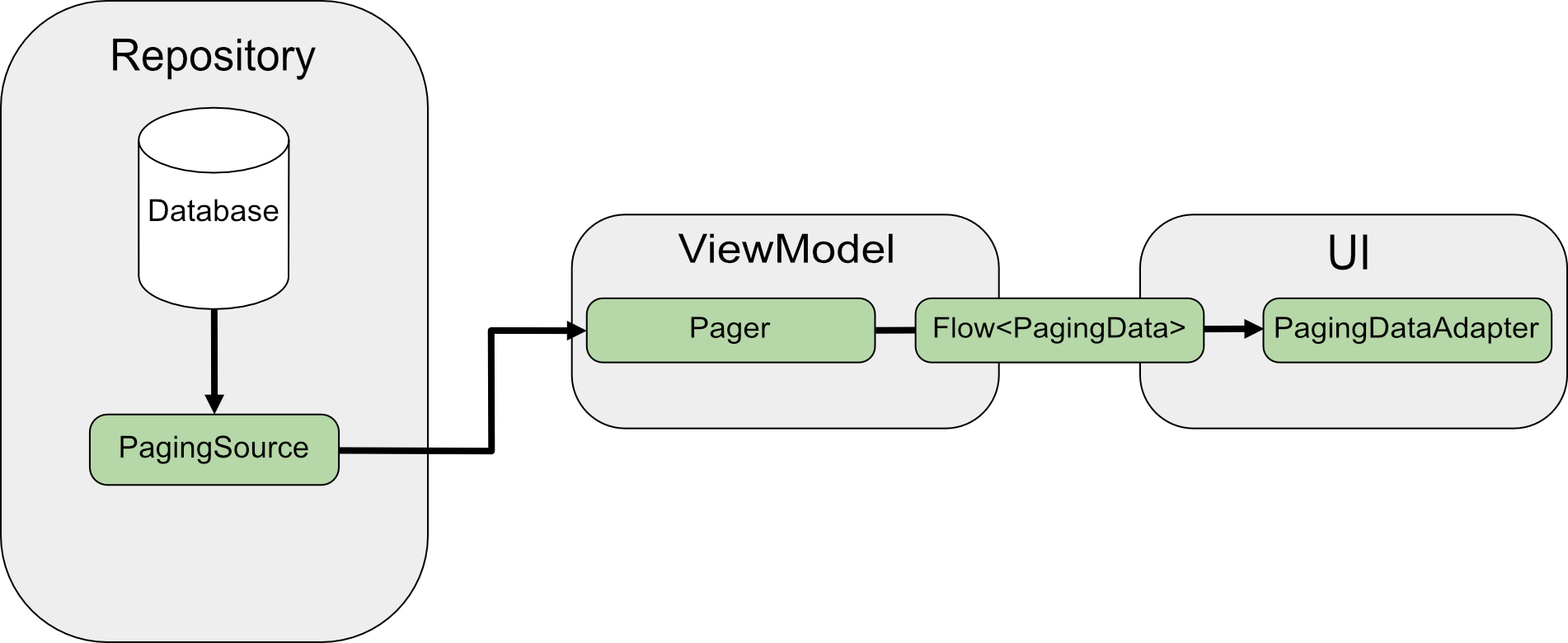
כשמבצעים החלפה בין דפים ישירות מהרשת, הנתונים נטענים ב-PagingSource ומוחזר אובייקט LoadResult. ההטמעה של PagingSource מועברת אל Pager באמצעות הפרמטר pagingSourceFactory.
כשנדרשים נתונים חדשים בממשק המשתמש, הפונקציה Pager קוראת לשיטה load() מתוך PagingSource ומחזירה זרם של אובייקטים PagingData שמכילים את הנתונים החדשים. כל אובייקט PagingData בדרך כלל נשמר במטמון ב-ViewModel לפני שהוא נשלח לממשק המשתמש לתצוגה.
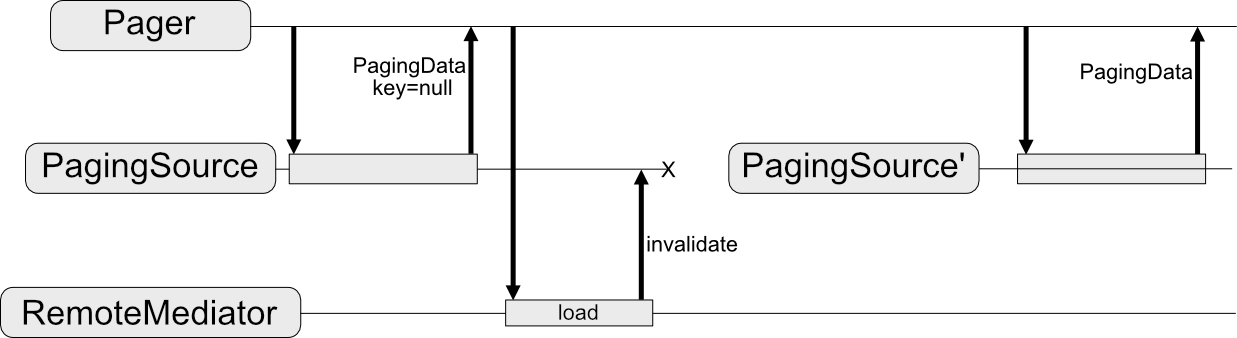
RemoteMediator משנה את זרימת הנתונים הזו. PagingSource עדיין טוען את הנתונים, אבל כשנגמרים הנתונים שמוצגים בדפים, ספריית Paging מפעילה את RemoteMediator כדי לטעון נתונים חדשים ממקור הרשת. הנתונים החדשים נשמרים במסד הנתונים המקומי ב-RemoteMediator, כך שאין צורך במטמון בזיכרון ב-ViewModel. לבסוף, PagingSource מבטל את עצמו ו-Pager יוצר מופע חדש כדי לטעון את הנתונים העדכניים ממסד הנתונים.
שימוש בסיסי
נניח שאתם רוצים שהאפליקציה שלכם תטען דפים של פריטים User ממקור נתוני רשת עם מפתח פריט למטמון מקומי שמאוחסן במסד נתונים של Room.
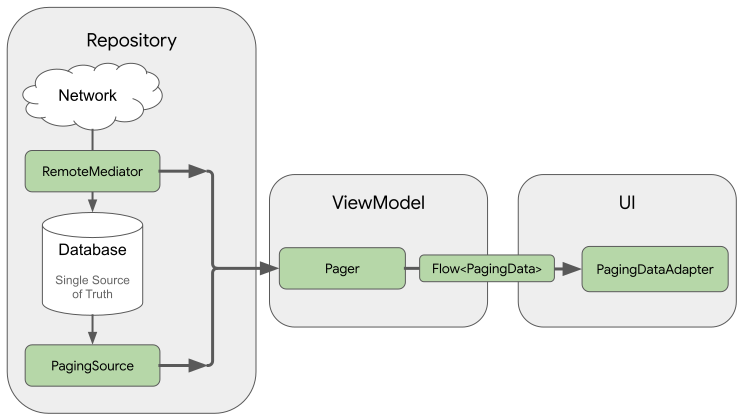
הטמעה של RemoteMediator עוזרת לטעון נתונים עם חלוקה לדפים מהרשת למסד הנתונים, אבל לא לטעון נתונים ישירות לממשק המשתמש. במקום זאת, האפליקציה משתמשת במסד הנתונים כמקור האמת. כלומר, האפליקציה מציגה רק נתונים שנשמרו במטמון במסד הנתונים. הטמעה של PagingSource (לדוגמה, כזו שנוצרה על ידי Room) מטפלת בטעינת נתונים שנשמרו במטמון ממסד הנתונים לממשק המשתמש.
יצירת ישויות של חדרים
השלב הראשון הוא להשתמש בספריית Room persistence כדי להגדיר מסד נתונים שמכיל מטמון מקומי של נתונים שמוצגים בדפים ממקור הנתונים ברשת. מתחילים בהטמעה של RoomDatabase כמו שמתואר במאמר שמירת נתונים במסד נתונים מקומי באמצעות Room.
לאחר מכן, מגדירים ישות Room כדי לייצג טבלה של פריטים ברשימה, כמו שמתואר במאמר הגדרת נתונים באמצעות ישויות Room.
נותנים לו שדה id כמפתח ראשי, וגם שדות לכל מידע אחר שפריטי הרשימה מכילים.
Java
@Entity(tableName = "users")
public class User {
  public String id;
  public String label;
}
Java
@Entity(tableName = "users")
public class User {
  public String id;
  public String label;
}
צריך גם להגדיר אובייקט לגישה לנתונים (DAO) עבור ישות Room הזו, כמו שמתואר במאמר גישה לנתונים באמצעות אובייקטים לגישה לנתונים (DAO) של Room. אובייקט ה-DAO של ישות פריט הרשימה חייב לכלול את ה-methods הבאות:
- Method
insertAll()שמוסיף רשימת פריטים לטבלה. - שיטה שמקבלת את מחרוזת השאילתה כפרמטר ומחזירה אובייקט
PagingSourceלרשימת התוצאות. כך, אובייקטPagerיכול להשתמש בטבלה הזו כמקור לנתונים עם מספור עמודים. - שיטה
clearAll()שמוחקת את כל הנתונים בטבלה.
Java
@Dao
interface UserDao {
  @Insert(onConflict = OnConflictStrategy.REPLACE)
  void insertAll(List<User> users);

  @Query("SELECT * FROM users WHERE mLabel LIKE :query")
  PagingSource<Integer, User> pagingSource(String query);

  @Query("DELETE FROM users")
  int clearAll();
}
Java
@Dao
interface UserDao {
  @Insert(onConflict = OnConflictStrategy.REPLACE)
  void insertAll(List<User> users);

  @Query("SELECT * FROM users WHERE mLabel LIKE :query")
  PagingSource<Integer, User> pagingSource(String query);

  @Query("DELETE FROM users")
  int clearAll();
}
הטמעה של RemoteMediator
התפקיד העיקרי של RemoteMediator הוא לטעון נתונים נוספים מהרשת כשPager נגמרים הנתונים או כשהנתונים הקיימים לא תקפים. הוא כולל שיטה load() שצריך לבטל כדי להגדיר את אופן הטעינה.
הטמעה טיפוסית של אירוע RemoteMediator כוללת את הפרמטרים הבאים:
-
query: מחרוזת שאילתה שמגדירה אילו נתונים לאחזר משירות ה-Backend. -
database: מסד הנתונים של Room שמשמש כמטמון מקומי. -
networkService: מופע API לשירות העורפי.
יוצרים הטמעה של RemoteMediator<Key, Value>. הסוגים Key ו-Value צריכים להיות זהים לסוגים שהיו מוגדרים אם הייתם מגדירים PagingSource מול אותו מקור נתונים ברשת. מידע נוסף על בחירת פרמטרים של סוג זמין במאמר בחירת סוגי מפתח וערך.
Java
@UseExperimental(markerClass = ExperimentalPagingApi.class)
class ExampleRemoteMediator extends RxRemoteMediator<Integer, User> {
  private String query;
  private ExampleBackendService networkService;
  private RoomDb database;
  private UserDao userDao;

  ExampleRemoteMediator(
    String query,
    ExampleBackendService networkService, RoomDb database
  ) {
    query = query;
    networkService = networkService;
    database = database;
    userDao = database.userDao();
  }

  @NotNull
  @Override
  public Single<MediatorResult> loadSingle(
    @NotNull LoadType loadType,
    @NotNull PagingState<Integer, User> state
  ) {
    ...
  }
}
Java
class ExampleRemoteMediator extends ListenableFutureRemoteMediator<Integer, User> {
  private String query;
  private ExampleBackendService networkService;
  private RoomDb database;
  private UserDao userDao;
  private Executor bgExecutor;

  ExampleRemoteMediator(
    String query,
    ExampleBackendService networkService,
    RoomDb database,
    Executor bgExecutor
  ) {
    this.query = query;
    this.networkService = networkService;
    this.database = database;
    this.userDao = database.userDao();
    this.bgExecutor = bgExecutor;
  }

  @NotNull
  @Override
  public ListenableFuture<MediatorResult> loadFuture(
    @NotNull LoadType loadType,
    @NotNull PagingState<Integer, User> state
  ) {
    ...
  }
}
שיטת load() אחראית לעדכון מערך הנתונים הבסיסי ולביטול התוקף של PagingSource. ספריות מסוימות שתומכות בהחלפה (כמו Room) יבטלו באופן אוטומטי את התוקף של אובייקטים מסוג PagingSource שהן מטמיעות.
השיטה load() מקבלת שני פרמטרים:
-
PagingState, שמכיל מידע על הדפים שנפרסו עד עכשיו, על האינדקס שאליו ניגשת לאחרונה ועל אובייקטPagingConfigשבו השתמשת כדי לאתחל את זרם העמודים. -
LoadType, שמציין את סוג הטעינה: REFRESH, APPENDאו PREPEND.
ערך ההחזרה של השיטה load() הוא אובייקט MediatorResult. MediatorResult יכול להיות
MediatorResult.Error
(שכולל את תיאור השגיאה) או
MediatorResult.Success
(שכולל אות שמציין אם יש עוד נתונים לטעינה).
השיטה load() צריכה לבצע את השלבים הבאים:
- קובעים איזה דף לטעון מהרשת בהתאם לסוג הטעינה ולנתונים שכבר נטענו.
- מפעילים את בקשת הרשת.
- מבצעים פעולות בהתאם לתוצאה של פעולת הטעינה:
- אם הטעינה הצליחה והרשימה שהתקבלה של הפריטים לא ריקה, הפריטים נשמרים במסד הנתונים ומוחזר הערך
MediatorResult.Success(endOfPaginationReached = false). אחרי שהנתונים מאוחסנים, צריך לבטל את התוקף של מקור הנתונים כדי להודיע לספריית Paging על הנתונים החדשים. - אם הטעינה הצליחה והרשימה שהתקבלה של הפריטים ריקה או שזהו אינדקס הדף האחרון, מחזירים
MediatorResult.Success(endOfPaginationReached = true). אחרי שהנתונים נשמרים, צריך לבטל את התוקף של מקור הנתונים כדי להודיע לספריית Paging על הנתונים החדשים. - אם הבקשה גורמת לשגיאה, הפונקציה מחזירה את הערך
MediatorResult.Error.
- אם הטעינה הצליחה והרשימה שהתקבלה של הפריטים לא ריקה, הפריטים נשמרים במסד הנתונים ומוחזר הערך
Java
@NotNull
@Override
public Single<MediatorResult> loadSingle(
  @NotNull LoadType loadType,
  @NotNull PagingState<Integer, User> state
) {
  // The network load method takes an optional after=<user.id> parameter. For
  // every page after the first, pass the last user ID to let it continue from
  // where it left off. For REFRESH, pass null to load the first page.
  String loadKey = null;
  switch (loadType) {
    case REFRESH:
      break;
    case PREPEND:
      // In this example, you never need to prepend, since REFRESH will always
      // load the first page in the list. Immediately return, reporting end of
      // pagination.
      return Single.just(new MediatorResult.Success(true));
    case APPEND:
      User lastItem = state.lastItemOrNull();

      // You must explicitly check if the last item is null when appending,
      // since passing null to networkService is only valid for initial load.
      // If lastItem is null it means no items were loaded after the initial
      // REFRESH and there are no more items to load.
      if (lastItem == null) {
        return Single.just(new MediatorResult.Success(true));
      }

      loadKey = lastItem.getId();
      break;
  }

  return networkService.searchUsers(query, loadKey)
    .subscribeOn(Schedulers.io())
    .map((Function<SearchUserResponse, MediatorResult>) response -> {
      database.runInTransaction(() -> {
        if (loadType == LoadType.REFRESH) {
          userDao.deleteByQuery(query);
        }

        // Insert new users into database, which invalidates the current
        // PagingData, allowing Paging to present the updates in the DB.
        userDao.insertAll(response.getUsers());
      });

      return new MediatorResult.Success(response.getNextKey() == null);
    })
    .onErrorResumeNext(e -> {
      if (e instanceof IOException || e instanceof HttpException) {
        return Single.just(new MediatorResult.Error(e));
      }

      return Single.error(e);
    });
}
Java
@NotNull
@Override
public ListenableFuture<MediatorResult> loadFuture(
  @NotNull LoadType loadType,
  @NotNull PagingState<Integer, User> state
) {
  // The network load method takes an optional after=<user.id> parameter. For
  // every page after the first, pass the last user ID to let it continue from
  // where it left off. For REFRESH, pass null to load the first page.
  String loadKey = null;
  switch (loadType) {
    case REFRESH:
      break;
    case PREPEND:
      // In this example, you never need to prepend, since REFRESH will always
      // load the first page in the list. Immediately return, reporting end of
      // pagination.
      return Futures.immediateFuture(new MediatorResult.Success(true));
    case APPEND:
      User lastItem = state.lastItemOrNull();

      // You must explicitly check if the last item is null when appending,
      // since passing null to networkService is only valid for initial load.
      // If lastItem is null it means no items were loaded after the initial
      // REFRESH and there are no more items to load.
      if (lastItem == null) {
        return Futures.immediateFuture(new MediatorResult.Success(true));
      }

      loadKey = lastItem.getId();
      break;
  }

  ListenableFuture<MediatorResult> networkResult = Futures.transform(
    networkService.searchUsers(query, loadKey),
    response -> {
      database.runInTransaction(() -> {
        if (loadType == LoadType.REFRESH) {
          userDao.deleteByQuery(query);
        }

        // Insert new users into database, which invalidates the current
        // PagingData, allowing Paging to present the updates in the DB.
        userDao.insertAll(response.getUsers());
      });

      return new MediatorResult.Success(response.getNextKey() == null);
    }, bgExecutor);

  ListenableFuture<MediatorResult> ioCatchingNetworkResult =
    Futures.catching(
      networkResult,
      IOException.class,
      MediatorResult.Error::new,
      bgExecutor
    );

  return Futures.catching(
    ioCatchingNetworkResult,
    HttpException.class,
    MediatorResult.Error::new,
    bgExecutor
  );
}
הגדרה של שיטת initialize
הטמעות של RemoteMediator יכולות גם לבטל את השיטה initialize() כדי לבדוק אם הנתונים שנשמרו במטמון לא מעודכנים, ולהחליט אם להפעיל רענון מרחוק. השיטה הזו מופעלת לפני ביצוע טעינה כלשהי, כך שאפשר לבצע מניפולציה במסד הנתונים (לדוגמה, כדי לנקות נתונים ישנים) לפני הפעלת טעינות מקומיות או מרוחקות.
מכיוון ש-initialize() היא פונקציה אסינכרונית, אפשר לטעון נתונים כדי לקבוע את הרלוונטיות של הנתונים הקיימים במסד הנתונים. ברוב המקרים, הנתונים שנשמרו במטמון תקפים רק למשך תקופה מסוימת. RemoteMediator יכול לבדוק אם חלף הזמן שצוין לתפוגה. אם כן, צריך לרענן את הנתונים בספריית Paging באופן מלא. הטמעות של initialize() צריכות להחזיר InitializeAction באופן הבא:
- במקרים שבהם צריך לרענן את הנתונים מחנויות מקומיות באופן מלא, הפונקציה
initialize()צריכה להחזיר את הערךInitializeAction.LAUNCH_INITIAL_REFRESH. בעקבות זאת, מתבצע רענון מרחוק שלRemoteMediatorכדי לטעון מחדש את הנתונים באופן מלא. כל טעינה מרחוק שלAPPENDאוPREPENDממתינה עד שטעינתREFRESHתסתיים בהצלחה לפני שממשיכים. - במקרים שבהם אין צורך לרענן את הנתונים מחנויות מקומיות, הפונקציה
initialize()צריכה להחזיר את הערךInitializeAction.SKIP_INITIAL_REFRESH. במקרה כזה,RemoteMediatorידלג על הרענון מרחוק ויטען את הנתונים במטמון.
Java
@NotNull
@Override
public Single<InitializeAction> initializeSingle() {
  long cacheTimeout = TimeUnit.MILLISECONDS.convert(1, TimeUnit.HOURS);
  return mUserDao.lastUpdatedSingle()
    .map(lastUpdatedMillis -> {
      if (System.currentTimeMillis() - lastUpdatedMillis <= cacheTimeout) {
        // Cached data is up-to-date, so there is no need to re-fetch
        // from the network.
        return InitializeAction.SKIP_INITIAL_REFRESH;
      } else {
        // Need to refresh cached data from network; returning
        // LAUNCH_INITIAL_REFRESH here will also block RemoteMediator's
        // APPEND and PREPEND from running until REFRESH succeeds.
        return InitializeAction.LAUNCH_INITIAL_REFRESH;
      }
    });
}
Java
@NotNull
@Override
public ListenableFuture<InitializeAction> initializeFuture() {
  long cacheTimeout = TimeUnit.MILLISECONDS.convert(1, TimeUnit.HOURS);
  return Futures.transform(
    mUserDao.lastUpdated(),
    lastUpdatedMillis -> {
      if (System.currentTimeMillis() - lastUpdatedMillis <= cacheTimeout) {
        // Cached data is up-to-date, so there is no need to re-fetch
        // from the network.
        return InitializeAction.SKIP_INITIAL_REFRESH;
      } else {
        // Need to refresh cached data from network; returning
        // LAUNCH_INITIAL_REFRESH here will also block RemoteMediator's
        // APPEND and PREPEND from running until REFRESH succeeds.
        return InitializeAction.LAUNCH_INITIAL_REFRESH;
      }
    },
    mBgExecutor);
}
יצירת מכשיר פייג'ר
לבסוף, צריך ליצור מופע של Pager כדי להגדיר את הזרם של נתונים עם חלוקה לדפים.
התהליך דומה ליצירת Pager ממקור נתונים פשוט של רשת, אבל יש שני הבדלים:
- במקום להעביר ישירות בנאי
PagingSource, צריך לספק את שיטת השאילתה שמחזירה אובייקטPagingSourceמ-DAO. - אתם צריכים לספק מופע של ההטמעה של
RemoteMediatorכפרמטרremoteMediator.
Java
UserDao userDao = database.userDao();
Pager<Integer, User> pager = Pager(
  new PagingConfig(/* pageSize = */ 20),
  null, // initialKey,
  new ExampleRemoteMediator(query, database, networkService)
  () -> userDao.pagingSource(query));
Java
UserDao userDao = database.userDao();
Pager<Integer, User> pager = Pager(
  new PagingConfig(/* pageSize = */ 20),
  null, // initialKey
  new ExampleRemoteMediator(query, database, networkService, bgExecutor),
  () -> userDao.pagingSource(query));
ניהול מפתחות לשליטה מרחוק
מפתחות מרוחקים הם מפתחות שיישום של RemoteMediator משתמש בהם כדי לציין לשירות לקצה העורפי אילו נתונים לטעון בהמשך. במקרה הפשוט ביותר, כל פריט של נתונים עם מספור דפים כולל מפתח מרוחק שאפשר להתייחס אליו בקלות. עם זאת, אם המפתחות המרוחקים לא תואמים לפריטים ספציפיים, צריך לאחסן אותם בנפרד ולנהל אותם בשיטה load().
בקטע הזה מוסבר איך לאסוף, לאחסן ולעדכן מפתחות מרוחקים שלא מאוחסנים בפריטים בודדים.
מפתחות פריטים
בקטע הזה מוסבר איך עובדים עם מפתחות מרוחקים שמתאימים לפריטים ספציפיים. בדרך כלל, כשמפתח API מופעל על פריטים ספציפיים, מזהה הפריט מועבר כפרמטר של שאילתה. שם הפרמטר מציין אם השרת צריך להגיב עם פריטים לפני המזהה שצוין או אחריו. בדוגמה של מחלקת המודל User, השדה id מהשרת משמש כמפתח מרוחק כשמבקשים נתונים נוספים.
כשצריך לנהל מפתחות מרחוק ספציפיים לפריט באמצעות השיטה load(), המפתחות האלה הם בדרך כלל מזהי הנתונים שנשלפים מהשרת. כדי לרענן את הפעולות לא צריך מפתח טעינה, כי הן רק מאחזרות את הנתונים העדכניים ביותר.
באופן דומה, פעולות של הוספה בתחילת המחרוזת לא צריכות לאחזר נתונים נוספים כי הרענון תמיד מושך את הנתונים הכי חדשים מהשרת.
עם זאת, פעולות הוספה דורשות מזהה. לשם כך צריך לטעון את הפריט האחרון ממסד הנתונים ולהשתמש במזהה שלו כדי לטעון את הדף הבא של הנתונים. אם אין פריטים במסד הנתונים, הערך של endOfPaginationReached הוא true, מה שמציין שצריך לרענן את הנתונים.
Java
@NotNull
@Override
public Single>MediatorResult< loadSingle(
  @NotNull LoadType loadType,
  @NotNull PagingState>Integer, User< state
) {
  // The network load method takes an optional String parameter. For every page
  // after the first, pass the String token returned from the previous page to
  // let it continue from where it left off. For REFRESH, pass null to load the
  // first page.
  Single>String< remoteKeySingle = null;
  switch (loadType) {
    case REFRESH:
      // Initial load should use null as the page key, so you can return null
      // directly.
      remoteKeySingle = Single.just(null);
      break;
    case PREPEND:
      // In this example, you never need to prepend, since REFRESH will always
      // load the first page in the list. Immediately return, reporting end of
      // pagination.
      return Single.just(new MediatorResult.Success(true));
    case APPEND:
      User lastItem = state.lastItemOrNull();

      // You must explicitly check if the last item is null when
      // appending, since passing null to networkService is only
      // valid for initial load. If lastItem is null it means no
      // items were loaded after the initial REFRESH and there are
      // no more items to load.
      if (lastItem == null) {
        return Single.just(new MediatorResult.Success(true));
      }
      remoteKeySingle = Single.just(lastItem.getId());
      break;
  }

  return remoteKeySingle
    .subscribeOn(Schedulers.io())
    .flatMap((Function<String, Single<MediatorResult>>) remoteKey -> {
      return networkService.searchUsers(query, remoteKey)
        .map(response -> {
          database.runInTransaction(() -> {
            if (loadType == LoadType.REFRESH) {
              userDao.deleteByQuery(query);
            }
            // Insert new users into database, which invalidates the current
            // PagingData, allowing Paging to present the updates in the DB.
            userDao.insertAll(response.getUsers());
          });

          return new MediatorResult.Success(response.getUsers().isEmpty());
        });
    })
    .onErrorResumeNext(e -> {
      if (e instanceof IOException || e instanceof HttpException) {
        return Single.just(new MediatorResult.Error(e));
      }

      return Single.error(e);
    });
}
Java
@NotNull
@Override
public ListenableFuture<MediatorResult> loadFuture(
  @NotNull LoadType loadType,
  @NotNull PagingState<Integer, User> state
) {
  // The network load method takes an optional after=<user.id> parameter.
  // For every page after the first, pass the last user ID to let it continue
  // from where it left off. For REFRESH, pass null to load the first page.
  ResolvableFuture<String> remoteKeyFuture = ResolvableFuture.create();
  switch (loadType) {
    case REFRESH:
      remoteKeyFuture.set(null);
      break;
    case PREPEND:
      // In this example, you never need to prepend, since REFRESH will always
      // load the first page in the list. Immediately return, reporting end of
      // pagination.
      return Futures.immediateFuture(new MediatorResult.Success(true));
    case APPEND:
      User lastItem = state.lastItemOrNull();

      // You must explicitly check if the last item is null when appending,
      // since passing null to networkService is only valid for initial load.
      // If lastItem is null it means no items were loaded after the initial
      // REFRESH and there are no more items to load.
      if (lastItem == null) {
        return Futures.immediateFuture(new MediatorResult.Success(true));
      }

      remoteKeyFuture.set(lastItem.getId());
      break;
  }

  return Futures.transformAsync(remoteKeyFuture, remoteKey -> {

    ListenableFuture<MediatorResult> networkResult = Futures.transform(
      networkService.searchUsers(query, remoteKey),
      response -> {
        database.runInTransaction(() -> {
        if (loadType == LoadType.REFRESH) {
          userDao.deleteByQuery(query);
        }

        // Insert new users into database, which invalidates the current
        // PagingData, allowing Paging to present the updates in the DB.
        userDao.insertAll(response.getUsers());
      });

      return new MediatorResult.Success(response.getUsers().isEmpty());
    }, bgExecutor);

    ListenableFuture<MediatorResult> ioCatchingNetworkResult =
      Futures.catching(
        networkResult,
        IOException.class,
        MediatorResult.Error::new,
        bgExecutor
      );

    return Futures.catching(
      ioCatchingNetworkResult,
      HttpException.class,
      MediatorResult.Error::new,
      bgExecutor
    );
  }, bgExecutor);
}
מפתחות של דפים
בקטע הזה מוסבר איך עובדים עם מפתחות מרוחקים שלא תואמים לפריטים ספציפיים.
הוספה של טבלת מפתחות מרוחקת
אם מפתחות מרוחקים לא משויכים ישירות לפריטים ברשימה, מומלץ לאחסן אותם בטבלה נפרדת במסד הנתונים המקומי. מגדירים ישות Room שמייצגת טבלה של מפתחות מרחוק:
Java
@Entity(tableName = "remote_keys")
public class RemoteKey {
  public String label;
  public String nextKey;
}
Java
@Entity(tableName = "remote_keys")
public class RemoteKey {
  public String label;
  public String nextKey;
}
צריך גם להגדיר DAO עבור הישות RemoteKey:
Java
@Dao
interface RemoteKeyDao {
  @Insert(onConflict = OnConflictStrategy.REPLACE)
  void insertOrReplace(RemoteKey remoteKey);

  @Query("SELECT * FROM remote_keys WHERE label = :query")
  Single<RemoteKey> remoteKeyByQuerySingle(String query);

  @Query("DELETE FROM remote_keys WHERE label = :query")
  void deleteByQuery(String query);
}
Java
@Dao
interface RemoteKeyDao {
  @Insert(onConflict = OnConflictStrategy.REPLACE)
  void insertOrReplace(RemoteKey remoteKey);

  @Query("SELECT * FROM remote_keys WHERE label = :query")
  ListenableFuture<RemoteKey> remoteKeyByQueryFuture(String query);

  @Query("DELETE FROM remote_keys WHERE label = :query")
  void deleteByQuery(String query);
}
טעינה באמצעות מקשי השלט הרחוק
אם צריך להשתמש בשיטה load() כדי לנהל מפתחות של דפים מרוחקים, צריך להגדיר אותה באופן שונה משימוש בסיסי ב-RemoteMediator, בדרכים הבאות:
- כוללים מאפיין נוסף שמכיל הפניה ל-DAO עבור טבלת המפתחות המרוחקת.
- כדי לקבוע איזה מקש לטעון בהמשך, המערכת שולחת שאילתה לטבלת המקשים המרוחקת במקום להשתמש ב-
PagingState. - יש להוסיף או לאחסן את המפתח המרוחק שמוחזר ממקור הנתונים של הרשת בנוסף לנתונים עצמם שמוצגים בדף.
Java
@NotNull
@Override
public Single<MediatorResult> loadSingle(
  @NotNull LoadType loadType,
  @NotNull PagingState<Integer, User> state
) {
  // The network load method takes an optional String parameter. For every page
  // after the first, pass the String token returned from the previous page to
  // let it continue from where it left off. For REFRESH, pass null to load the
  // first page.
  Single<RemoteKey> remoteKeySingle = null;
  switch (loadType) {
    case REFRESH:
      // Initial load should use null as the page key, so you can return null
      // directly.
      remoteKeySingle = Single.just(new RemoteKey(mQuery, null));
      break;
    case PREPEND:
      // In this example, you never need to prepend, since REFRESH will always
      // load the first page in the list. Immediately return, reporting end of
      // pagination.
      return Single.just(new MediatorResult.Success(true));
    case APPEND:
      // Query remoteKeyDao for the next RemoteKey.
      remoteKeySingle = mRemoteKeyDao.remoteKeyByQuerySingle(mQuery);
      break;
  }

  return remoteKeySingle
    .subscribeOn(Schedulers.io())
    .flatMap((Function<RemoteKey, Single<MediatorResult>>) remoteKey -> {
      // You must explicitly check if the page key is null when appending,
      // since null is only valid for initial load. If you receive null
      // for APPEND, that means you have reached the end of pagination and
      // there are no more items to load.
      if (loadType != REFRESH && remoteKey.getNextKey() == null) {
        return Single.just(new MediatorResult.Success(true));
      }

      return networkService.searchUsers(query, remoteKey.getNextKey())
        .map(response -> {
          database.runInTransaction(() -> {
            if (loadType == LoadType.REFRESH) {
              userDao.deleteByQuery(query);
              remoteKeyDao.deleteByQuery(query);
            }

            // Update RemoteKey for this query.
            remoteKeyDao.insertOrReplace(new RemoteKey(query, response.getNextKey()));

            // Insert new users into database, which invalidates the current
            // PagingData, allowing Paging to present the updates in the DB.
            userDao.insertAll(response.getUsers());
          });

          return new MediatorResult.Success(response.getNextKey() == null);
        });
    })
    .onErrorResumeNext(e -> {
      if (e instanceof IOException || e instanceof HttpException) {
        return Single.just(new MediatorResult.Error(e));
      }

      return Single.error(e);
    });
}
Java
@NotNull
@Override
public ListenableFuture<MediatorResult> loadFuture(
  @NotNull LoadType loadType,
  @NotNull PagingState<Integer, User> state
) {
  // The network load method takes an optional after=<user.id> parameter. For
  // every page after the first, pass the last user ID to let it continue from
  // where it left off. For REFRESH, pass null to load the first page.
  ResolvableFuture<RemoteKey> remoteKeyFuture = ResolvableFuture.create();
  switch (loadType) {
    case REFRESH:
      remoteKeyFuture.set(new RemoteKey(query, null));
      break;
    case PREPEND:
      // In this example, you never need to prepend, since REFRESH will always
      // load the first page in the list. Immediately return, reporting end of
      // pagination.
      return Futures.immediateFuture(new MediatorResult.Success(true));
    case APPEND:
      User lastItem = state.lastItemOrNull();

      // You must explicitly check if the last item is null when appending,
      // since passing null to networkService is only valid for initial load.
      // If lastItem is null it means no items were loaded after the initial
      // REFRESH and there are no more items to load.
      if (lastItem == null) {
        return Futures.immediateFuture(new MediatorResult.Success(true));
      }

      // Query remoteKeyDao for the next RemoteKey.
      remoteKeyFuture.setFuture(
        remoteKeyDao.remoteKeyByQueryFuture(query));
      break;
  }

  return Futures.transformAsync(remoteKeyFuture, remoteKey -> {
    // You must explicitly check if the page key is null when appending,
    // since null is only valid for initial load. If you receive null
    // for APPEND, that means you have reached the end of pagination and
    // there are no more items to load.
    if (loadType != LoadType.REFRESH && remoteKey.getNextKey() == null) {
      return Futures.immediateFuture(new MediatorResult.Success(true));
    }

    ListenableFuture<MediatorResult> networkResult = Futures.transform(
      networkService.searchUsers(query, remoteKey.getNextKey()),
      response -> {
        database.runInTransaction(() -> {
        if (loadType == LoadType.REFRESH) {
          userDao.deleteByQuery(query);
          remoteKeyDao.deleteByQuery(query);
        }

        // Update RemoteKey for this query.
        remoteKeyDao.insertOrReplace(new RemoteKey(query, response.getNextKey()));

        // Insert new users into database, which invalidates the current
        // PagingData, allowing Paging to present the updates in the DB.
        userDao.insertAll(response.getUsers());
      });

      return new MediatorResult.Success(response.getNextKey() == null);
    }, bgExecutor);

    ListenableFuture<MediatorResult> ioCatchingNetworkResult =
      Futures.catching(
        networkResult,
        IOException.class,
        MediatorResult.Error::new,
        bgExecutor
      );

    return Futures.catching(
      ioCatchingNetworkResult,
      HttpException.class,
      MediatorResult.Error::new,
      bgExecutor
    );
  }, bgExecutor);
}
מקורות מידע נוספים
איפה אפשר למצוא מידע נוסף על ספריית Paging?
Codelabs
דוגמיות
מומלץ בשבילכם
- הערה: טקסט הקישור מוצג כש-JavaScript מושבת
- טעינה והצגה של נתונים עם חלוקה לדפים
- בדיקת ההטמעה של חלוקה לדפים
- העברה ל-Paging 3