
OWASP category: MASVS-PLATFORM: Platform Interaction
Overview
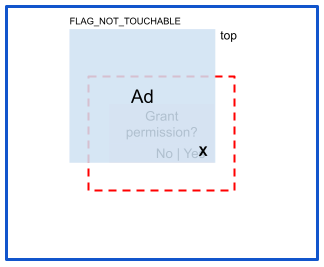
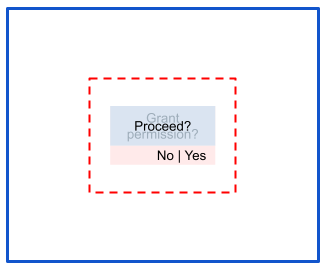
Tapjacking is the Android-app equivalent of the clickjacking web vulnerability: A malicious app tricks the user into clicking a security-relevant control (confirmation button etc.) by obscuring the UI with an overlay or by other means. On this page, we differentiate two attack variants: Full and partial occlusion. In full occlusion, the attacker overlays the touch area, while in partial occlusion, the touch area remains unobscured.
Impact
Tapjacking attacks are used to trick users into performing certain actions. The impact depends on the action targeted by the attacker.
Risk: Full occlusion
In full occlusion, the attacker overlays the touch area to hijack the touch event:
Mitigations
Full occlusion is prevented by setting View.setFilterTouchesWhenObscured(true) in the code. This blocks touches passed by an overlay. If you prefer a declarative approach, you can also add android:filterTouchesWhenObscured="true" in the layout file for the View object that you want to protect.
Risk: Partial occlusion
In partial occlusion attacks, the touch area remains unobscured:
Mitigations
You can mitigate partial occlusion by manually ignoring touch events that have
the FLAG_WINDOW_IS_PARTIALLY_OBSCURED flag. There are no default protections
against this scenario.
Android 14 and accessibilityDataSensitive: On Android 14 (API level 34)
and higher, you can use the
accessibilityDataSensitive flag to protect
sensitive data from malicious accessibility services. When you set this flag on
sensitive views, such as login or transaction confirmation screens, only
services that declare
android:isAccessibilityTool="true" can read the
view's data or perform accessibility actions on it. On Android 16 (API level 36)
and higher, accessibilityDataSensitive also blocks simulated touch gestures
injected with AccessibilityService.dispatchGesture by
services that don't declare android:isAccessibilityTool="true". This provides
system-level protection against the eavesdropping and click injection attacks
that are characteristic of partial occlusion scenarios. You can implicitly
enable accessibilityDataSensitive by specifying
android:filterTouchesWhenObscured="true" in your layout files.
Specific risks
This section gathers risks that require non-standard mitigation strategies or were mitigated at certain SDK level and are here for completeness.
Risk: android.Manifest.permission.SYSTEM_ALERT_WINDOW
The SYSTEM_ALERT_WINDOW permission allows an app to create a window shown on top of all apps.
Mitigations
Newer versions of Android have introduced several mitigations, including the following:
- On Android 6 (API level 23) and higher, users have to explicitly grant the permission for the app to create an overlay window.
- On Android 12 (API level 31) and higher, apps can pass
trueintoWindow.setHideOverlayWindows().
Risk: Custom toast
An attacker can use Toast.setView() to customize a toast message’s appearance. On Android 10 (API level 29) and lower, malicious apps could launch such toasts from the background.
Mitigations
If an app targets Android 11 (API level 30) or higher, the system blocks background custom toasts. However, this mitigation can be evaded in some circumstances using Toast burst, where the attacker queues multiple toasts while in the foreground and they keep getting launched even after an app goes to the background.
Background toasts and toast burst attacks are fully mitigated as of Android 12 (API level 31).
Risk: Activity sandwich
If a malicious app manages to convince a user to open it, it can still launch an activity from the victim app and subsequently overlay it with its own activity, forming an activity sandwich and creating a partial occlusion attack.
Mitigations
See general mitigations for partial occlusion. For defense in-depth, make sure that you don’t export activities that don’t need to be exported to prevent an attacker from sandwiching them.
Resources
Recommended for you
- Note: link text is displayed when JavaScript is off
- android:exported
- # Key management {:#key-management}
- Run embedded DEX code directly from APK