 Google 會運用 AI 技術將內容翻譯成你偏好的語言,但可能會出錯。
使用 Android SDK 升級工具
透過集合功能整理內容
你可以依據偏好儲存及分類內容。
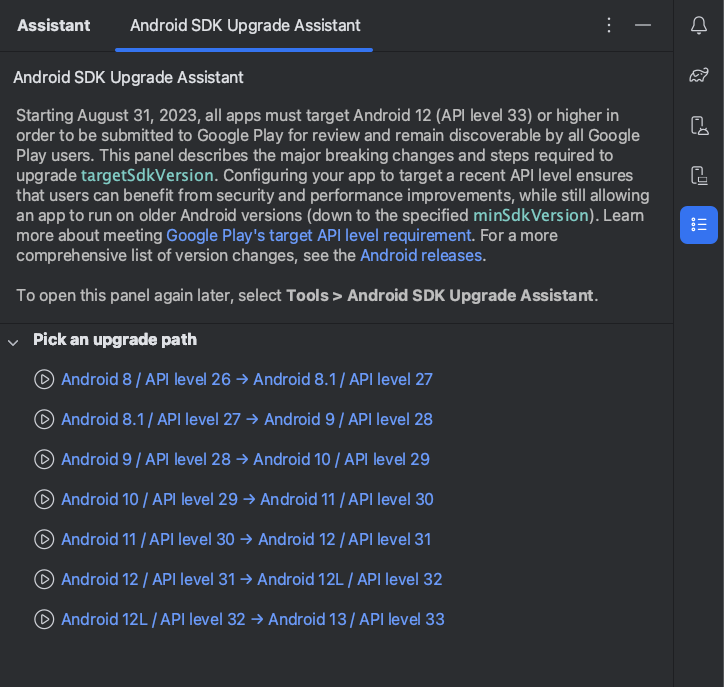
Android SDK 升級工具是 Android Studio 中的一項工具,可協助您升級 targetSdkVersion,或應用程式指定的 API 級別。請務必使用最新版本的 targetSdkVersion,以便使用平台的最新功能。Android Studio Giraffe 以上版本提供 Android SDK 升級工具,
透過 Android SDK 升級工具,您可在更新 targetSdkVersion 時節省時間和精力:
如要開啟 Android SDK 升級工具,請依序點選「Tools」>「Android SDK Upgrade Assistant」。接著在「Assistant」面板中選取要升級到哪個 API 級別,取得相關指引。為獲得最佳體驗,建議將 targetSdkVersion 值一次升級一級。
回報問題
為了協助我們打造最佳體驗,請使用 Issue Tracker 提交意見回饋和回報錯誤。
這個頁面中的內容和程式碼範例均受《內容授權》中的授權所規範。Java 與 OpenJDK 是 Oracle 和/或其關係企業的商標或註冊商標。
上次更新時間:2026-02-28 (世界標準時間)。
[[["容易理解","easyToUnderstand","thumb-up"],["確實解決了我的問題","solvedMyProblem","thumb-up"],["其他","otherUp","thumb-up"]],[["缺少我需要的資訊","missingTheInformationINeed","thumb-down"],["過於複雜/步驟過多","tooComplicatedTooManySteps","thumb-down"],["過時","outOfDate","thumb-down"],["翻譯問題","translationIssue","thumb-down"],["示例/程式碼問題","samplesCodeIssue","thumb-down"],["其他","otherDown","thumb-down"]],["上次更新時間:2026-02-28 (世界標準時間)。"],[],[]]
