

আপনার অ্যাপকে কীভাবে Play Billing Library API-এর সাথে ইন্টিগ্রেট করবেন তা এই নির্দেশিকায় বর্ণনা করা হয়েছে, যাতে আপনি ব্যবহারকারীদের বিলিং সংক্রান্ত বিকল্প অফার করতে পারেন।
PBL-এর সাথে ইন্টিগ্রেশন
আপনি চারটি পরিস্থিতিতে PBL-এর সাথে বিলিংয়ের বিকল্প ইন্টিগ্রেট করতে পারবেন। কে পছন্দের স্ক্রিন রেন্ডার করছে এবং কোথায় পেমেন্ট করা হবে তার উপর ভিত্তি করে বিভিন্ন পরিস্থিতি তৈরি হয়। নিচের টেবিলে ইন্টিগ্রেশন সংক্রান্ত বিভিন্ন পরিস্থিতি উল্লেখ করা হয়েছে:
| আপনি কোন বিলিং বিকল্প স্ক্রিন রেন্ডার করতে চান? | |||
| Google Play-এর | আপনার নিজের (UX নির্দেশিকা অনুযায়ী) | ||
| পেমেন্ট কোথায় করতে হবে? | অ্যাপ-মধ্যস্থ | পরিস্থিতি 1A
Google পছন্দ স্ক্রিন রেন্ডার করে এবং আপনার অ্যাপের মধ্যে বিকল্প বিলিং ম্যানেজ করা হয়। |
পরিস্থিতি 1B
অ্যাপ ডেভেলপার পছন্দ সংক্রান্ত স্ক্রিন রেন্ডার করেন এবং আপনার অ্যাপের মধ্যে বিকল্প বিলিং ম্যানেজ করা হয়। |
| এক্সটার্নাল ওয়েব লিঙ্ক | পরিস্থিতির উদাহরণ 2A
Google পছন্দ সংক্রান্ত স্ক্রিন রেন্ডার করে এবং কেনাকাটার জন্য ব্যবহারকারীকে আপনার অ্যাপের বাইরে আপনার নিজস্ব ওয়েবসাইটে লিঙ্ক করা হয়। |
পরিস্থিতি ২বি
অ্যাপ ডেভেলপার পছন্দ সংক্রান্ত স্ক্রিন রেন্ডার করেন এবং ব্যবহারকারীকে কেনাকাটার জন্য আপনার অ্যাপের বাইরে আপনার নিজস্ব ওয়েবসাইটে লিঙ্ক করা হয়। |
|
নিচের ছবিতে এই প্রতিটি পরিস্থিতির জন্য বিলিং বিকল্প বেছে নেওয়ার ফ্লো বিস্তারিতভাবে দেখানো হয়েছে:
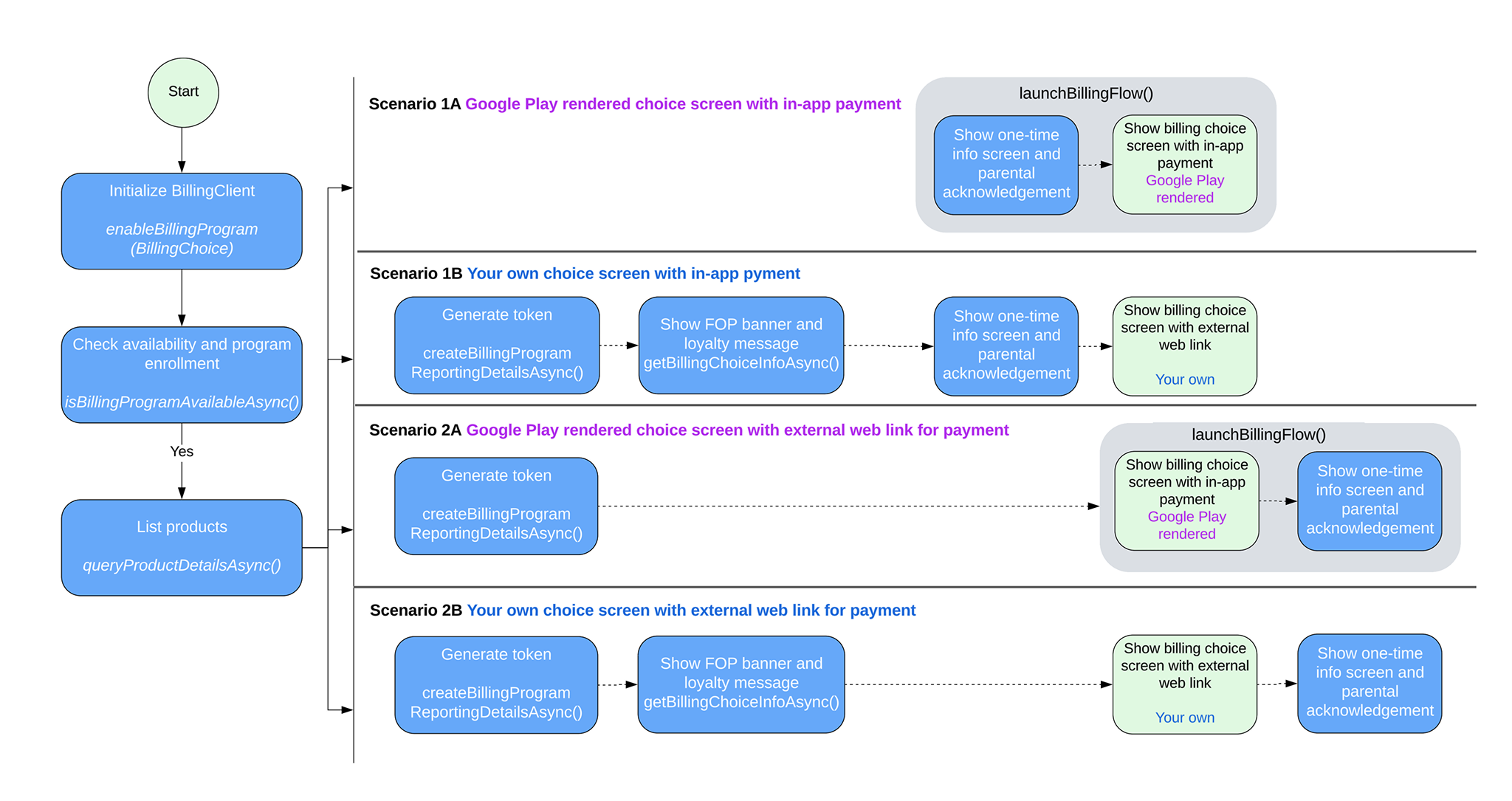
PBL ইন্টিগ্রেশন সংক্রান্ত পরিস্থিতি
আপনার ইন্টিগ্রেশন পরিস্থিতির উপর নির্ভর করে, আপনার অ্যাপে বিলিং সংক্রান্ত পছন্দ প্রয়োগ করতে, এই বিভাগে দেওয়া ধাপগুলি অনুসরণ করুন।
পরিস্থিতি 1A সামলানো
Google পছন্দ সংক্রান্ত স্ক্রিন রেন্ডার করে এবং বিকল্প বিলিং আপনার অ্যাপের মধ্যে ম্যানেজ করা হয় । এই পরিস্থিতিতে বিলিং সংক্রান্ত পছন্দ চালু করতে, নিম্নলিখিত ধাপগুলি অনুসরণ করুন:
আপনার BillingClient ইনস্ট্যান্স তৈরি করার সময়
EnableBillingProgramParams-এর সাথেenableBillingProgram-এ কল করুন এবং তারপরে কানেকশন শুরু করুন। যেমন:Kotlin
// Build the parameters to enable the Billing Choice program and assign the listener // to handle user selection of the developer-provided billing option. val enableBillingProgramParams = EnableBillingProgramParams.newBuilder() .setBillingProgram(BillingProgram.BILLING_CHOICE) .setDeveloperProvidedBillingListener(developerProvidedBillingListener) .build() // Build the parameters to enable support for pending purchases. val pendingPurchasesParams = PendingPurchasesParams.newBuilder() .enableOneTimeProducts() .build() // Construct the BillingClient instance with the purchases updated listener, // pending purchases support, and the billing choice params. val billingClient = BillingClient.newBuilder(context) .setListener(purchasesUpdatedListener) .enablePendingPurchases(pendingPurchasesParams) .enableBillingProgram(enableBillingProgramParams) .build() // Establish a connection to Google Play val billingResult = suspendCancellableCoroutine<BillingResult> { continuation -> billingClient.startConnection(object : BillingClientStateListener { // Called when the connection setup process completes. override fun onBillingSetupFinished(billingResult: BillingResult) { // Resume the coroutine and pass back the BillingResult to the caller. if (continuation.isActive) { continuation.resume(billingResult) } } // Called if the connection to the Play Store service is dropped. // This prevents the await or suspension point from hanging indefinitely. override fun onBillingServiceDisconnected() { if (continuation.isActive) { continuation.resume( BillingResult.newBuilder() .setResponseCode(BillingResponseCode.SERVICE_DISCONNECTED) .setDebugMessage("Billing service disconnected during connection setup") .build() ) } } }) }
জাভা
EnableBillingProgramParams params = EnableBillingProgramParams.newBuilder()
        .setBillingProgram(BillingProgram.BILLING_CHOICE)
        .setDeveloperProvidedBillingListener(developerProvidedBillingListener)
        .build();

BillingClient billingClient = BillingClient.newBuilder(context)
        .setListener(purchasesUpdatedListener)
        .enablePendingPurchases(
                PendingPurchasesParams.newBuilder()
                        .enableOneTimeProducts()
                        .build()
        )
        .enableBillingProgram(params)
        .build();
ব্যবহারকারীর জন্য Google-এর রেন্ডার করা বিলিং বিকল্প উপলভ্য আছে কিনা তা যাচাই করুন।
প্রোগ্রামের উপলভ্যতা চেক করতে
isBillingProgramAvailableAsyncনম্বরে কল করুন এবং উপলভ্য প্রোডাক্ট দেখতেqueryProductDetailsAsyncনম্বরে কল করুন। যেমন:Kotlin
val (billingResult, billingProgramAvailabilityDetails) = billingClient.isBillingProgramAvailable(BillingProgram.BILLING_CHOICE) if (billingResult.responseCode == BillingResponseCode.OK) { val billingChoiceAvailabilityDetails = billingProgramAvailabilityDetails.billingChoiceAvailabilityDetails if (billingChoiceAvailabilityDetails != null && billingChoiceAvailabilityDetails.choiceScreenType == ChoiceScreenType.GOOGLE_RENDERED ) { // Billing choice is available. Query products and proceed. } else { // Fallback to other available programs. } } else { // Fallback to other available programs. }
জাভা
// ...
billingClient.isBillingProgramAvailableAsync(
    BillingProgram.BILLING_CHOICE,
    (billingResult, billingProgramAvailabilityDetails) -> {
        if (billingResult.getResponseCode() == BillingResponseCode.OK) {
            BillingChoiceAvailabilityDetails billingChoiceAvailabilityDetails =
                billingProgramAvailabilityDetails.getBillingChoiceAvailabilityDetails();

            if (billingChoiceAvailabilityDetails != null &&
                billingChoiceAvailabilityDetails.getChoiceScreenType() == ChoiceScreenType.GOOGLE_RENDERED) {
                // Billing choice is available. Query products and proceed.
            } else {
                // Fallback to other available programs.
            }
        } else {
            // Fallback to other available programs.
        }
    }
);
মনে রাখবেন:
billingProgramAvailabilityDetailsথেকে আপনি জানতে পারবেন যে Google রেন্ডার করা বা ডেভেলপার রেন্ডার করা বিলিং পছন্দ স্ক্রিন উপলভ্য আছে কিনা।ব্যবহারকারী 'কিনুন' বোতামে ক্লিক করলে কেনাকাটা সম্পর্কিত ফ্লো ট্রিগার করতে
launchBillingFlowকল করুন। বিলিং বিকল্প উপলভ্য থাকলে,BillingFlowParams-এDeveloperBillingOptionParamsপাস করুন। যেমন:Kotlin
val developerBillingOptionParams = DeveloperBillingOptionParams.newBuilder() .setBillingProgram(BillingProgram.BILLING_CHOICE) .build() val billingFlowParams = BillingFlowParams.newBuilder() .setProductDetailsParamsList(productDetailsParamsList) .enableDeveloperBillingOption(developerBillingOptionParams) .build() val billingResult = billingClient.launchBillingFlow(activity, billingFlowParams)
জাভা
DeveloperBillingOptionParams developerBillingOptionParams =
    DeveloperBillingOptionParams.newBuilder()
        .setBillingProgram(BillingProgram.BILLING_CHOICE)
        .build();
BillingFlowParams billingFlowParams =
    BillingFlowParams.newBuilder()
        .setProductDetailsParamsList(productDetailsParamsList)
        .enableDeveloperBillingOption(developerBillingOptionParams)
        .build();

BillingResult billingResult = billingClient.launchBillingFlow(activity, billingFlowParams);
মনে রাখবেন: তত্ত্বাবধানে থাকা ব্যবহারকারীদের জন্য অভিভাবকীয় নিয়ন্ত্রণ দেখানো হয়।
বিলিংয়ের ধরন বেছে নেওয়ার ব্যাপারে ব্যবহারকারীকে নিম্নলিখিত উপায়ে সাহায্য করুন:
- ব্যবহারকারী Play বিলিং বেছে নিলে, বিলিং ফলাফলটি ধাপ ১-এ
PurchasesUpdatedListenerরেজিস্টার করা ইমেল আইডিতে পাঠানো হয়। - ব্যবহারকারী আপনার বিকল্প বিলিং বেছে নিলে, বিলিং ফলাফল
১ম ধাপে রেজিস্টার করা
DeveloperProvidedBillingListener-এ ফেরত পাঠানো হয়। ফেরত আসাDeveloperProvidedBillingDetails-এ এই ক্ষেত্রে একটিexternalTransactionTokenআছে। টোকেনটি ট্রানজ্যাকশন রিপোর্টিংয়ের জন্য ব্যবহার করা হবে।
- ব্যবহারকারী Play বিলিং বেছে নিলে, বিলিং ফলাফলটি ধাপ ১-এ
পরিস্থিতি 1B সামলানো
ডেভেলপার পছন্দ সংক্রান্ত স্ক্রিন রেন্ডার করে এবং আপনার অ্যাপের মধ্যে বিকল্প বিলিং ম্যানেজ করা হয়। এই পরিস্থিতিতে বিলিং সংক্রান্ত পছন্দ চালু করতে, নিম্নলিখিত ধাপগুলি অনুসরণ করুন:
BillingClientইনস্ট্যান্স তৈরি করার সময়EnableBillingProgramParams-এDeveloperProvidedBillingListenerছাড়াenableBillingProgram-এ কল করুন এবং তারপর কানেকশন শুরু করুন। যেমন:Kotlin
// Build the parameters to enable the Billing Choice program. val enableBillingProgramParams = EnableBillingProgramParams.newBuilder() .setBillingProgram(BillingProgram.BILLING_CHOICE) .build() // Build the parameters to enable support for pending purchases. val pendingPurchasesParams = PendingPurchasesParams.newBuilder() .enableOneTimeProducts() .build() // Construct the BillingClient instance with the purchases updated listener, // pending purchases support, and the billing choice params. val billingClient = BillingClient.newBuilder(context) .setListener(purchasesUpdatedListener) .enablePendingPurchases(pendingPurchasesParams) .enableBillingProgram(enableBillingProgramParams) .build() // Establish a connection to Google Play val billingResult = suspendCancellableCoroutine<BillingResult> { continuation -> billingClient.startConnection(object : BillingClientStateListener { // Called when the connection setup process completes. override fun onBillingSetupFinished(billingResult: BillingResult) { // Resume the coroutine and pass back the BillingResult to the caller. if (continuation.isActive) { continuation.resume(billingResult) } } // Called if the connection to the Play Store service is dropped. // This prevents the await or suspension point from hanging indefinitely. override fun onBillingServiceDisconnected() { if (continuation.isActive) { continuation.resume( BillingResult.newBuilder() .setResponseCode(BillingResponseCode.SERVICE_DISCONNECTED) .setDebugMessage("Billing service disconnected during connection setup") .build() ) } } }) }
জাভা
EnableBillingProgramParams params = EnableBillingProgramParams.newBuilder()
        .setBillingProgram(BillingProgram.BILLING_CHOICE)
        .build();

BillingClient billingClient = BillingClient.newBuilder(context)
        .setListener(purchasesUpdatedListener)
        .enablePendingPurchases()
        .enableBillingProgram(params)
        .build();
ডেভেলপার রেন্ডার করা বিলিং সংক্রান্ত পছন্দ ব্যবহারকারীর জন্য উপলভ্য কিনা তা যাচাই করুন।
প্রোগ্রামের উপলভ্যতা চেক করতে
isBillingProgramAvailableAsyncনম্বরে কল করুন এবং উপলভ্য প্রোডাক্ট দেখতেqueryProductDetailsAsyncনম্বরে কল করুন। যেমন:Kotlin
val (billingResult, billingProgramAvailabilityDetails) = billingClient.isBillingProgramAvailable(BillingProgram.BILLING_CHOICE) if (billingResult.responseCode == BillingResponseCode.OK) { val billingChoiceAvailabilityDetails = billingProgramAvailabilityDetails.billingChoiceAvailabilityDetails if (billingChoiceAvailabilityDetails != null && billingChoiceAvailabilityDetails.choiceScreenType == ChoiceScreenType.DEVELOPER_RENDERED ) { // Billing choice is available. Query products and proceed. // You can inspect details such as: // - billingChoiceAvailabilityDetails.choiceScreenType // - billingChoiceAvailabilityDetails.isExternalLinkAvailable } else { // Fallback to other available programs. } } else { // Fallback to other available programs. }
জাভা
// ...
billingClient.isBillingProgramAvailableAsync(
    BillingProgram.BILLING_CHOICE,
    (billingResult, billingProgramAvailabilityDetails) -> {
        if (billingResult.getResponseCode() == BillingResponseCode.OK) {
            BillingChoiceAvailabilityDetails billingChoiceAvailabilityDetails =
                billingProgramAvailabilityDetails.getBillingChoiceAvailabilityDetails();

            if (billingChoiceAvailabilityDetails != null
                    && billingChoiceAvailabilityDetails.getChoiceScreenType() == ChoiceScreenType.DEVELOPER_RENDERED) {
                // Billing choice is available. Query products and proceed.
                // You can inspect details such as:
                // - billingChoiceAvailabilityDetails.getChoiceScreenType()
                // - billingChoiceAvailabilityDetails.isExternalLinkAvailable()
            } else {
                // Fallback to other available programs.
            }
        } else {
            // Fallback to other available programs.
        }
    }
);
মনে রাখবেন:
billingProgramAvailabilityDetailsআপনাকে জানায় যে Google রেন্ডার করা অথবা ডেভেলপার রেন্ডার করা বিলিং পছন্দ স্ক্রিন উপলভ্য আছে কিনা।Play Billing ব্যানার ও লয়ালটি সংক্রান্ত তথ্য পেতে
getBillingChoiceInfoAsyncমেথড কল করুন। যেমন:Kotlin
// 1. Create the params required for the request val params = GetBillingChoiceInfoParams.newBuilder() .setBillingProgram(BillingProgram.BILLING_CHOICE) .setPlayBillingChoiceImageLayout(GetBillingChoiceInfoParams.ImageLayout.RECTANGULAR_FOUR_BY_ONE) .build() // 2. Call the suspend method on your billingClient instance val (billingResult, playBillingChoiceInfo) = billingClient.getBillingChoiceInfo(params) if (billingResult.responseCode == BillingResponseCode.OK && playBillingChoiceInfo != null) { // Access the URL of the image associated with the Play Billing Choice val imageUrl = playBillingChoiceInfo.playBillingChoiceImageUrl // Access the Play Loyalty string information, if available val loyaltyInfo = playBillingChoiceInfo.playBillingLoyaltyInfo // Populate your developer-rendered UI elements playBillingLoyaltyTextView.text = loyaltyInfo loadImage(imageUrl, playBillingImageView) } else { // Handle error scenarios }
জাভা
// 1. Create the params required for the request
GetBillingChoiceInfoParams params = GetBillingChoiceInfoParams.newBuilder()
    .setBillingProgram(BillingClient.BillingProgram.BILLING_CHOICE)
    .setPlayBillingChoiceImageLayout(GetBillingChoiceInfoParams.ImageLayout.RECTANGULAR_FOUR_BY_ONE)
    .build();
// 2. Call the method asynchronously on your billingClient instance
billingClient.getBillingChoiceInfoAsync(params, (billingResult, playBillingChoiceInfo) -> {
    if (billingResult.getResponseCode() == BillingResponseCode.OK && playBillingChoiceInfo != null) {
      // Access the URL of the image associated with the Play Billing Choice
        String imageUrl = playBillingChoiceInfo.getPlayBillingChoiceImageUrl();
        // Access the Play Loyalty string information, if available
        String loyaltyInfo = playBillingChoiceInfo.getPlayBillingLoyaltyInfo();

        // Populate your developer-rendered UI elements
        playBillingLoyaltyTextView.setText(loyaltyInfo);
          loadImage(imageUrl, playBillingImageView);
      } else {
          // Handle error scenarios
      }
});
DeveloperBillingType IN_APP হিসেবে সেট করে এক্সটার্নাল ট্রানজ্যাকশন টোকেন তৈরি করুন। যেমন:
Kotlin
// Build the parameters specifying the billing program and that the billing type is IN_APP. val params = BillingProgramReportingDetailsParams.newBuilder() .setBillingProgram(BillingProgram.BILLING_CHOICE) .setDeveloperBillingType(DeveloperBillingType.IN_APP) .build() // Call the suspending extension function to request the reporting details val (billingResult, billingProgramReportingDetails) = billingClient.createBillingProgramReportingDetails(params) if (billingResult.responseCode != BillingResponseCode.OK) { // Handle failures such as retrying due to network errors. return } // Extract the transaction token from the returned reporting details val transactionToken = billingProgramReportingDetails?.externalTransactionToken // Persist the external transaction token locally. Pass it to // DeveloperBillingOptionParams when launchBillingFlow is called. // It can also be used as part of your external website
জাভা
BillingProgramReportingDetailsParams params =
    BillingProgramReportingDetailsParams.newBuilder()
        .setBillingProgram(BillingProgram.BILLING_CHOICE)
        .setDeveloperBillingType(DeveloperBillingType.IN_APP)
        .build();

billingClient.createBillingProgramReportingDetailsAsync(
    params,
    new BillingProgramReportingDetailsListener() {
        @Override
        public void onCreateBillingProgramReportingDetailsResponse(
            BillingResult billingResult,
            @Nullable BillingProgramReportingDetails billingProgramReportingDetails
        ) {
            if (billingResult.getResponseCode() != BillingResponseCode.OK) {
                // Handle failures such as retrying due to network errors.
                return;
            }

            String transactionToken =
                billingProgramReportingDetails.getExternalTransactionToken();

            // Persist the external transaction token locally. Pass it to
            // DeveloperBillingOptionParams when launchBillingFlow is called.
            // It can also be used as part of your external website
        }
    }
);
ব্যবহারকারী 'কিনুন' বিকল্পে ক্লিক করলে,
showBillingProgramInformationDialogকল করে তথ্য ডায়ালগ দেখান। যেমন, ব্যবহারকারীদের জন্য তথ্য ডায়ালগ দেখুন। ৪ নম্বর ধাপে পাওয়া BillingProgram ও transactionToken অবশ্যই অনুরোধে সেট করতে হবে।মনে রাখবেন: তত্ত্বাবধানে থাকা ব্যবহারকারীদের জন্য অভিভাবকীয় নিয়ন্ত্রণ দেখানো হয়।
আগের ধাপের ফলাফল
OKহলে, আপনার বিলিংয়ের বিকল্প বেছে নেওয়ার স্ক্রিন চালু করুন।বিলিংয়ের ধরন বেছে নেওয়ার ব্যাপারে ব্যবহারকারীকে নিম্নলিখিত উপায়ে সাহায্য করুন:
- ব্যবহারকারী Play Billing বেছে নিলে,
launchBillingFlow-এ কল করুন Play Billing সংক্রান্ত সাধারণ নির্দেশাবলী অনুসরণ করে। বিলিং ফলাফল ধাপ ১-এ রেজিস্টার করাPurchasesUpdatedListener-এ ফেরত পাঠানো হয়। - ব্যবহারকারী আপনার বিকল্প বিলিং বেছে নিলে, আপনাকে অবশ্যই নিজেই ট্রানজ্যাকশন ম্যানেজ করতে হবে এবং ধাপ ৪-এ জেনারেট করা টোকেন ব্যবহার করে Play-কে রিপোর্ট করতে হবে।
- ব্যবহারকারী Play Billing বেছে নিলে,
পরিস্থিতি 2A সামলানো
Google, পছন্দ সংক্রান্ত স্ক্রিন রেন্ডার করে এবং আপনার অ্যাপের বাইরে বিকল্প বিলিং ম্যানেজ করা হয়। এই পরিস্থিতিতে বিলিং সংক্রান্ত পছন্দ চালু করতে, নিম্নলিখিত ধাপগুলি অনুসরণ করুন:
আপনার BillingClient ইনস্ট্যান্স তৈরি করার সময়
EnableBillingProgramParams-এর সাথেenableBillingProgram-এ কল করুন এবং তারপরে কানেকশন শুরু করুন। যেমন:Kotlin
// Build the parameters to enable the Billing Choice program and assign the listener // to handle user selection of the developer-provided billing option. val enableBillingProgramParams = EnableBillingProgramParams.newBuilder() .setBillingProgram(BillingProgram.BILLING_CHOICE) .setDeveloperProvidedBillingListener(developerProvidedBillingListener) .build() // Build the parameters to enable support for pending purchases. val pendingPurchasesParams = PendingPurchasesParams.newBuilder() .enableOneTimeProducts() .build() // Construct the BillingClient instance with the purchases updated listener, // pending purchases support, and the billing choice params. val billingClient = BillingClient.newBuilder(context) .setListener(purchasesUpdatedListener) .enablePendingPurchases(pendingPurchasesParams) .enableBillingProgram(enableBillingProgramParams) .build() // Establish a connection to Google Play val billingResult = suspendCancellableCoroutine<BillingResult> { continuation -> billingClient.startConnection(object : BillingClientStateListener { // Called when the connection setup process completes. override fun onBillingSetupFinished(billingResult: BillingResult) { // Resume the coroutine and pass back the BillingResult to the caller. if (continuation.isActive) { continuation.resume(billingResult) } } // Called if the connection to the Play Store service is dropped. // This prevents the await or suspension point from hanging indefinitely. override fun onBillingServiceDisconnected() { if (continuation.isActive) { continuation.resume( BillingResult.newBuilder() .setResponseCode(BillingResponseCode.SERVICE_DISCONNECTED) .setDebugMessage("Billing service disconnected during connection setup") .build() ) } } }) }
জাভা
EnableBillingProgramParams params = EnableBillingProgramParams.newBuilder()
        .setBillingProgram(BillingProgram.BILLING_CHOICE)
        .setDeveloperProvidedBillingListener(developerProvidedBillingListener)
        .build();

BillingClient billingClient = BillingClient.newBuilder(context)
        .setListener(purchasesUpdatedListener)
        .enablePendingPurchases(
                PendingPurchasesParams.newBuilder()
                        .enableOneTimeProducts()
                        .build()
        )
        .enableBillingProgram(params)
        .build();
নিম্নলিখিত বিষয়গুলি উপলভ্য আছে কিনা তা যাচাই করুন:
- Google-এর মাধ্যমে রেন্ডার করা বিলিংয়ের বিকল্প
- এক্সটার্নাল ওয়েব লিঙ্ক
প্রোগ্রামের উপলভ্যতা চেক করতে
isBillingProgramAvailableAsyncনম্বরে কল করুন এবং উপলভ্য প্রোডাক্ট দেখতেqueryProductDetailsAsyncনম্বরে কল করুন। যেমন:Kotlin
// Check the availability of the billing choice program asynchronously using coroutines val (billingResult, billingProgramAvailabilityDetails) = billingClient.isBillingProgramAvailable(BillingProgram.BILLING_CHOICE) // Ensure the billing program query succeeded if (billingResult.responseCode == BillingResponseCode.OK) { // Retrieve the availability details specific to the billing choice program val billingChoiceAvailabilityDetails = billingProgramAvailabilityDetails.billingChoiceAvailabilityDetails // Check if billing choice is available, renders via Google Play, and external link is supported if (billingChoiceAvailabilityDetails != null && billingChoiceAvailabilityDetails.choiceScreenType == ChoiceScreenType.GOOGLE_RENDERED && billingChoiceAvailabilityDetails.isExternalLinkAvailable ) { // Billing choice is available and external transaction links are supported. Query products and proceed. } else { // Fallback to other available programs. } } else { // Fallback to other available programs. }
জাভা
// ...
billingClient.isBillingProgramAvailableAsync(
    BillingProgram.BILLING_CHOICE,
    (billingResult, billingProgramAvailabilityDetails) -> {
        if (billingResult.getResponseCode() == BillingResponseCode.OK) {
            BillingChoiceAvailabilityDetails billingChoiceAvailabilityDetails =
                billingProgramAvailabilityDetails.getBillingChoiceAvailabilityDetails();

            if (billingChoiceAvailabilityDetails != null
                    && billingChoiceAvailabilityDetails.getChoiceScreenType() == ChoiceScreenType.GOOGLE_RENDERED
                    && billingChoiceAvailabilityDetails.isExternalLinkAvailable()) {
                // Billing choice is available and external transaction links are supported.
                // Query products and proceed.
            } else {
                // Fallback to other available programs.
            }
        } else {
            // Fallback to other available programs.
        }
    }
);
ব্যবহারকারী কেনার ইচ্ছা প্রকাশ করলে, এক্সটার্নাল ট্রানজ্যাকশন টোকেন তৈরি করতে
createBillingProgramReportingDetailsAsync-এ কল করুন। যেমন:Kotlin
// Build the parameters for creating reporting details val params = BillingProgramReportingDetailsParams.newBuilder() .setBillingProgram(BillingProgram.BILLING_CHOICE) .setDeveloperBillingType(DeveloperBillingType.EXTERNAL_LINK) .build() // Call the suspend function to create billing program reporting details val (billingResult, billingProgramReportingDetails) = billingClient.createBillingProgramReportingDetails(params) // Handle response failure cases if (billingResult.responseCode != BillingResponseCode.OK) { // Handle failures such as retrying due to network errors. return } // Retrieve the external transaction token val transactionToken = billingProgramReportingDetails?.externalTransactionToken // Persist the external transaction token locally. Pass it to // DeveloperBillingOptionParams when launchBillingFlow is called. // It can also be used as part of your external website
জাভা
BillingProgramReportingDetailsParams params =
    BillingProgramReportingDetailsParams.newBuilder()
        .setBillingProgram(BillingProgram.BILLING_CHOICE)
        .setDeveloperBillingType(DeveloperBillingType.EXTERNAL_LINK)
        .build();

billingClient.createBillingProgramReportingDetailsAsync(
    params,
    new BillingProgramReportingDetailsListener() {
        @Override
        public void onCreateBillingProgramReportingDetailsResponse(
            BillingResult billingResult,
            @Nullable BillingProgramReportingDetails billingProgramReportingDetails
        ) {
            if (billingResult.getResponseCode() != BillingResponseCode.OK) {
                // Handle failures such as retrying due to network errors.
                return;
            }

            String transactionToken =
                billingProgramReportingDetails.getExternalTransactionToken();

            // Persist the external transaction token locally. Pass it to
            // DeveloperBillingOptionParams when launchBillingFlow is called.
            // It can also be used as part of your external website.
        }
    }
);
ব্যবহারকারী 'কিনুন' বোতামে ক্লিক করলে কেনাকাটা সম্পর্কিত ফ্লো ট্রিগার করতে
launchBillingFlowকল করুন। ব্যবহারকারীর জন্য বিলিং সংক্রান্ত পছন্দ উপলভ্য থাকলে, নিম্নলিখিত কাজগুলি করুন:DeveloperBillingOptionParamsথেকেBillingFlowParamsপর্যন্ত।- ধাপ ৩ থেকে এক্সটার্নাল ট্রানজ্যাকশন টোকেনটি
DeveloperBillingOptionParams-এ পাস করুন।
যেমন:
Kotlin
// Build the developer billing option parameters with the external link URI, // the transaction token, and browser/app launch mode. val developerBillingOptionParams = DeveloperBillingOptionParams.newBuilder() .setBillingProgram(BillingProgram.BILLING_CHOICE) .setLinkUri(Uri.parse("https://www.example.com/external/purchase")) .setExternalTransactionToken(transactionToken) .setLaunchMode( DeveloperBillingOptionParams.LaunchMode.LAUNCH_IN_EXTERNAL_BROWSER_OR_APP ) .build() val billingFlowParams = BillingFlowParams.newBuilder() .setProductDetailsParamsList(productDetailsParamsList) .enableDeveloperBillingOption(developerBillingOptionParams) .build() val billingResult = billingClient.launchBillingFlow(activity, billingFlowParams)
জাভা
DeveloperBillingOptionParams developerBillingOptionParams =
    DeveloperBillingOptionParams.newBuilder()
        .setBillingProgram(BillingProgram.BILLING_CHOICE)
        .setLinkUri(Uri.parse("https://www.example.com/external/purchase"))
        .setExternalTransactionToken(transactionToken)
        .setLaunchMode(
          DeveloperBillingOptionParams.LaunchMode.LAUNCH_IN_EXTERNAL_BROWSER_OR_APP)
        .build();
মনে রাখবেন: অভিভাবকীয় নিয়ন্ত্রণ তত্ত্বাবধানে থাকা ব্যবহারকারীদের জন্য দেখানো হয়।
বিলিংয়ের ধরন বেছে নেওয়ার ব্যাপারে ব্যবহারকারীকে নিম্নলিখিত উপায়ে সাহায্য করুন:
- ব্যবহারকারী Play Billing বেছে নিলে,
launchBillingFlow-এ কল করুন Play Billing সংক্রান্ত সাধারণ নির্দেশাবলী অনুসরণ করে। বিলিং ফলাফল ধাপ ১-এ রেজিস্টার করাPurchasesUpdatedListener-এ ফেরত পাঠানো হয়। - ব্যবহারকারী আপনার বিকল্প বিলিং বেছে নিলে, বিলিং ফলাফল
DeveloperProvidedBillingListener-এ ফেরত পাঠানো হয় যা ধাপ- ফেরত আসা
DeveloperProvidedBillingDetails-এDeveloperBillingOptionParams-এ পাস করাexternalTransactionTokenথাকে। এটি বৈধ টোকেন হলে, এটি ধাপ ৪-এ থাকে।
- ফেরত আসা
- ব্যবহারকারী Play Billing বেছে নিলে,
পরিস্থিতি 2B সামলানো
ডেভেলপার পছন্দ সংক্রান্ত স্ক্রিন রেন্ডার করেন এবং বিকল্প বিলিং অ্যাপের বাইরে ম্যানেজ করা হয়। এই পরিস্থিতিতে বিলিং সংক্রান্ত পছন্দ চালু করতে, নিম্নলিখিত ধাপগুলি অনুসরণ করুন:
BillingClient ইনস্ট্যান্স তৈরি করার সময়
DeveloperProvidedBillingListener-এEnableBillingProgramParamsenableBillingProgram-কে কল করুন এবং তারপরে কানেকশন শুরু করুন। যেমন:Kotlin
// Build the parameters to enable the Billing Choice program. val enableBillingProgramParams = EnableBillingProgramParams.newBuilder() .setBillingProgram(BillingProgram.BILLING_CHOICE) .build() // Build the parameters to enable support for pending purchases. val pendingPurchasesParams = PendingPurchasesParams.newBuilder() .enableOneTimeProducts() .build() // Construct the BillingClient instance with the purchases updated listener, // pending purchases support, and the billing choice params. val billingClient = BillingClient.newBuilder(context) .setListener(purchasesUpdatedListener) .enablePendingPurchases(pendingPurchasesParams) .enableBillingProgram(enableBillingProgramParams) .build() // Establish a connection to Google Play val billingResult = suspendCancellableCoroutine<BillingResult> { continuation -> billingClient.startConnection(object : BillingClientStateListener { // Called when the connection setup process completes. override fun onBillingSetupFinished(billingResult: BillingResult) { // Resume the coroutine and pass back the BillingResult to the caller. if (continuation.isActive) { continuation.resume(billingResult) } } // Called if the connection to the Play Store service is dropped. // This prevents the await or suspension point from hanging indefinitely. override fun onBillingServiceDisconnected() { if (continuation.isActive) { continuation.resume( BillingResult.newBuilder() .setResponseCode(BillingResponseCode.SERVICE_DISCONNECTED) .setDebugMessage("Billing service disconnected during connection setup") .build() ) } } }) }
জাভা
EnableBillingProgramParams params = EnableBillingProgramParams.newBuilder()
        .setBillingProgram(BillingProgram.BILLING_CHOICE)
        .build();

BillingClient billingClient = BillingClient.newBuilder(context)
        .setListener(purchasesUpdatedListener)
        .enablePendingPurchases()
        .enableBillingProgram(params)
        .build();
নিম্নলিখিত বিষয়গুলি উপলভ্য আছে কিনা তা যাচাই করুন:
- Google-এর মাধ্যমে রেন্ডার করা বিলিংয়ের বিকল্প
- এক্সটার্নাল ওয়েব লিঙ্ক
প্রোগ্রামের উপলভ্যতা চেক করতে
isBillingProgramAvailableAsyncনম্বরে কল করুন এবং উপলভ্য প্রোডাক্ট দেখতেqueryProductDetailsAsyncনম্বরে কল করুন। যেমন:Kotlin
// Check the availability of the billing choice program asynchronously using a coroutine val (billingResult, billingProgramAvailabilityDetails) = billingClient.isBillingProgramAvailable(BillingProgram.BILLING_CHOICE) // Ensure the response code is OK if (billingResult.responseCode == BillingResponseCode.OK) { // Retrieve the billing choice availability details val billingChoiceAvailabilityDetails = billingProgramAvailabilityDetails.billingChoiceAvailabilityDetails // Check if billing choice details are available, choice screen is developer-rendered, // and external transaction links are supported. if (billingChoiceAvailabilityDetails != null && billingChoiceAvailabilityDetails.choiceScreenType == ChoiceScreenType.DEVELOPER_RENDERED && billingChoiceAvailabilityDetails.isExternalLinkAvailable ) { // Billing choice is available and external transaction links are supported. // Query products and proceed. } else { // Fallback to other available programs. } } else { // Fallback to other available programs. }
জাভা
// ...

billingClient.isBillingProgramAvailableAsync(
    BillingProgram.BILLING_CHOICE,
    (billingResult, billingProgramAvailabilityDetails) -> {
        if (billingResult.getResponseCode() == BillingResponseCode.OK) {
            BillingChoiceAvailabilityDetails billingChoiceAvailabilityDetails =
                billingProgramAvailabilityDetails.getBillingChoiceAvailabilityDetails();
            if (billingChoiceAvailabilityDetails != null &&
                billingChoiceAvailabilityDetails.getChoiceScreenType() == ChoiceScreenType.DEVELOPER_RENDERED &&
                billingChoiceAvailabilityDetails.isExternalLinkAvailable()) {
                // Billing choice is available and external transaction links are supported. Query products and proceed.
            } else {
                // Fallback to other available programs.
            }
        } else {
            // Fallback to other available programs.
        }
    }
);
Play Billing ব্যানার ও লয়ালটি সংক্রান্ত তথ্য পেতে
getBillingChoiceInfoAsyncমেথড কল করুন।Kotlin
// 1. Create the params required for the request val params = GetBillingChoiceInfoParams.newBuilder() .setBillingProgram(BillingProgram.BILLING_CHOICE) .setPlayBillingChoiceImageLayout(GetBillingChoiceInfoParams.ImageLayout.RECTANGULAR_FOUR_BY_ONE) .build() // 2. Call the suspend method on your billingClient instance val (billingResult, playBillingChoiceInfo) = billingClient.getBillingChoiceInfo(params) if (billingResult.responseCode == BillingResponseCode.OK && playBillingChoiceInfo != null) { // Access the URL of the image associated with the Play Billing Choice val imageUrl = playBillingChoiceInfo.playBillingChoiceImageUrl // Access the Play Loyalty string information, if available val loyaltyInfo = playBillingChoiceInfo.playBillingLoyaltyInfo // Populate your developer-rendered UI elements playBillingLoyaltyTextView.text = loyaltyInfo loadImage(imageUrl, playBillingImageView) } else { // Handle error scenarios }
জাভা
// 1. Create the params required for the request
GetBillingChoiceInfoParams params = GetBillingChoiceInfoParams.newBuilder()
    .setBillingProgram(BillingClient.BillingProgram.BILLING_CHOICE)
    .setPlayBillingChoiceImageLayout(GetBillingChoiceInfoParams.ImageLayout.RECTANGULAR_FOUR_BY_ONE)
    .build();
// 2. Call the method asynchronously on your billingClient instance
billingClient.getBillingChoiceInfoAsync(params, (billingResult, playBillingChoiceInfo) -> {
    if (billingResult.getResponseCode() == BillingResponseCode.OK && playBillingChoiceInfo != null) {
      // Access the URL of the image associated with the Play Billing Choice
        String imageUrl = playBillingChoiceInfo.getPlayBillingChoiceImageUrl();
        // Access the Play Loyalty string information, if available
        String loyaltyInfo = playBillingChoiceInfo.getPlayBillingLoyaltyInfo();

        // Populate your developer-rendered UI elements
        playBillingLoyaltyTextView.setText(loyaltyInfo);
          loadImage(imageUrl, playBillingImageView);
      } else {
          // Handle error scenarios
      }
});
ব্যবহারকারী কেনার ইচ্ছা প্রকাশ করলে, এক্সটার্নাল ট্রানজ্যাকশন টোকেন তৈরি করতে
createBillingProgramReportingDetailsAsync-এ কল করুন। যেমন:Kotlin
// Build the parameters for creating reporting details val params = BillingProgramReportingDetailsParams.newBuilder() .setBillingProgram(BillingProgram.BILLING_CHOICE) .setDeveloperBillingType(DeveloperBillingType.EXTERNAL_LINK) .build() // Call the suspend function to create billing program reporting details val (billingResult, billingProgramReportingDetails) = billingClient.createBillingProgramReportingDetails(params) // Handle response failure cases if (billingResult.responseCode != BillingResponseCode.OK) { // Handle failures such as retrying due to network errors. return } // Retrieve the external transaction token val transactionToken = billingProgramReportingDetails?.externalTransactionToken // Persist the external transaction token locally. Pass it to // DeveloperBillingOptionParams when launchBillingFlow is called. // It can also be used as part of your external website
জাভা
BillingProgramReportingDetailsParams params =
    BillingProgramReportingDetailsParams.newBuilder()
        .setBillingProgram(BillingProgram.BILLING_CHOICE)
        .setDeveloperBillingType(DeveloperBillingType.EXTERNAL_LINK)
        .build();

billingClient.createBillingProgramReportingDetailsAsync(
    params,
    new BillingProgramReportingDetailsListener() {
        @Override
        public void onCreateBillingProgramReportingDetailsResponse(
            BillingResult billingResult,
            @Nullable BillingProgramReportingDetails billingProgramReportingDetails
        ) {
            if (billingResult.getResponseCode() != BillingResponseCode.OK) {
                // Handle failures such as retrying due to network errors.
                return;
            }

            String transactionToken =
                billingProgramReportingDetails.getExternalTransactionToken();

            // Persist the external transaction token locally. Pass it to
            // DeveloperBillingOptionParams when launchBillingFlow is called.
            // It can also be used as part of your external website.
        }
    }
);
ব্যবহারকারী 'কিনুন' বোতামে ক্লিক করলে আপনার বিকল্প পছন্দ সংক্রান্ত স্ক্রিন লঞ্চ করুন।
বিলিংয়ের ধরন বেছে নেওয়ার ব্যাপারে ব্যবহারকারীকে নিম্নলিখিত উপায়ে সাহায্য করুন:
ব্যবহারকারী Play Billing বেছে নিলে,
launchBillingFlow-এ কল করুন Play Billing সংক্রান্ত সাধারণ নির্দেশাবলী অনুসরণ করে। বিলিং ফলাফল ধাপ ১-এ রেজিস্টার করাPurchasesUpdatedListener-এ ফেরত পাঠানো হয়।তত্ত্বাবধানে থাকা ব্যবহারকারীদের জন্য অভিভাবকীয় নিয়ন্ত্রণ দেখানো হয়।
ব্যবহারকারী আপনার বিকল্প বিলিং বেছে নিলে, launchExternalLink কল করুন। যেমন:
Kotlin
// An activity reference from which the purchase flow will be launched. val params = LaunchExternalLinkParams.newBuilder() .setBillingProgram(BillingProgram.BILLING_CHOICE) .setExternalTransactionToken(transactionToken) // You can pass along the external transaction token from // BillingProgramReportingDetails as a URL parameter in the URI .setLinkUri(yourLinkUri) .setLinkType(LaunchExternalLinkParams.LinkType.LINK_TO_DIGITAL_CONTENT_OFFER) .setLaunchMode( LaunchExternalLinkParams.LaunchMode.LAUNCH_IN_EXTERNAL_BROWSER_OR_APP ) .build() // Call launchExternalLink with a callback billingClient.launchExternalLink(activity, params) { billingResult -> if (billingResult.responseCode == BillingResponseCode.OK) { // Proceed with the rest of the purchase flow. If the user // purchases an item, be sure to report the transaction to Google // Play. } else { // Handle failures such as retrying due to network errors. } }
জাভা
// An activity reference from which the purchase flow will be launched.
Activity activity = ...;

LaunchExternalLinkParams params = LaunchExternalLinkParams.newBuilder()
    .setBillingProgram(BillingProgram.BILLING_CHOICE)
    // You can pass along the external transaction token from
    // BillingProgramReportingDetails as a URL parameter in the URI
    .setLinkUri(yourLinkUri)
    .setLinkType(LaunchExternalLinkParams.LinkType.LINK_TO_DIGITAL_CONTENT_OFFER)
    .setLaunchMode(
        LaunchExternalLinkParams.LaunchMode.LAUNCH_IN_EXTERNAL_BROWSER_OR_APP)
    .setExternalTransactionToken(transactionToken)
    .build();

LaunchExternalLinkResponseListener listener =
    new LaunchExternalLinkResponseListener() {
      @Override
      public void onLaunchExternalLinkResponse(BillingResult billingResult) {
        if (billingResult.getResponseCode() == BillingResponseCode.OK) {
          // Proceed with the rest of the purchase flow. If the user
          // purchases an item, be sure to report the transaction to Google
          // Play.
        } else {
          // Handle failures such as retrying due to network errors.
        }
      }
    };

billingClient.launchExternalLink(activity, params, listener);
ধাপ ৪ থেকে এক্সটার্নাল ট্রানজ্যাকশন টোকেন
LaunchExternalLinkParams-এ পাঠান। এটি OK দেখালে, ট্রানজ্যাকশন প্রসেস করুন এবং Google Play-তে ট্রানজ্যাকশনের বিষয়ে অভিযোগ জানান।অভিভাবকীয় নিয়ন্ত্রণ তত্ত্বাবধানে থাকা ব্যবহারকারীদের জন্য দেখানো হয়।
সাবস্ক্রিপশন পরিবর্তন করার সময় বিলিংয়ের বিকল্প
সাবস্ক্রিপশন পাল্টানোর ক্ষেত্রে, ব্যবহারকারীর পছন্দ সংক্রান্ত স্ক্রিন দেখানো উচিত নয়, কারণ আপগ্রেড ও ডাউনগ্রেডের জন্য আসল কেনাকাটার ক্ষেত্রে ব্যবহারকারীর পছন্দ সেভ করা থাকে।
মূল কেনাকাটা Google Play Billing-এর মাধ্যমে প্রসেস করা হলে, আপনাকে
স্ট্যান্ডার্ড Google Play Billing
সাবস্ক্রিপশন রিপ্লেসমেন্ট সংক্রান্ত তথ্য সহ launchBillingFlow নম্বরে কল করতে হবে।
তবে, আসল কেনাকাটা যদি বিকল্প বিলিংয়ের মাধ্যমে প্রসেস করা হয়ে থাকে, তাহলে সাবস্ক্রিপশন বদলানোর প্রসেস পরিস্থিতির উপর নির্ভর করে কিছুটা আলাদা হয়।
পরিস্থিতি ১ক-তে সাবস্ক্রিপশন পরিবর্তন করা
আপগ্রেড বা ডাউনগ্রেড করার অনুরোধকারী ব্যবহারকারীদের ব্যবহারকারীর পছন্দ সংক্রান্ত অভিজ্ঞতা আবার না নিয়ে ডেভেলপারের বিকল্প বিলিং সিস্টেমের মাধ্যমে প্রসেস করা উচিত।
এটি করতে, ব্যবহারকারী আপগ্রেড বা
ডাউনগ্রেডের অনুরোধ করলে launchBillingFlow-এ কল করুন। আসল কেনাকাটার জন্য এক্সটার্নাল
ট্রানজ্যাকশন আইডি দিতে, প্যারামিটারের মধ্যে
SubscriptionUpdateParams অবজেক্টের মধ্যে setOriginalExternalTransactionId ব্যবহার করুন। এর ফলে ব্যবহারকারীর পছন্দ
স্ক্রিন দেখানো হয় না, কারণ আপগ্রেড ও ডাউনগ্রেডের ক্ষেত্রে আসল কেনাকাটার জন্য ব্যবহারকারীর পছন্দ
সংরক্ষিত থাকে। এই ক্ষেত্রে launchBillingFlow-এ কল করলে,
ট্রানজ্যাকশনের জন্য একটি নতুন এক্সটার্নাল ট্রানজ্যাকশন টোকেন তৈরি হয় যা আপনি
কলব্যাক থেকে রিট্রিভ করতে পারবেন।
Kotlin
// The external transaction ID from the current // alternative billing subscription. val externalTransactionId = "external_transaction_id" val developerBillingOptionParams = DeveloperBillingOptionParams.newBuilder() .setBillingProgram(BillingProgram.BILLING_CHOICE) .build() val billingFlowParams = BillingFlowParams.newBuilder() .setProductDetailsParamsList( listOf( BillingFlowParams.ProductDetailsParams.newBuilder() // Fetched using queryProductDetailsAsync. .setProductDetails(productDetailsNewPlan) // offerIdToken can be found in // ProductDetails=>SubscriptionOfferDetails. .setOfferToken(offerTokenNewPlan) .build() ) ) .setSubscriptionUpdateParams( SubscriptionUpdateParams.newBuilder() .setOriginalExternalTransactionId(externalTransactionId) .build() ) .enableDeveloperBillingOption(developerBillingOptionParams) .build() val billingResult = billingClient.launchBillingFlow(activity, billingFlowParams) // When the user selects the alternative billing flow, // the DeveloperProvidedBillingListener is triggered.
জাভা
// The external transaction ID from the current
// alternative billing subscription.
String externalTransactionId = //... ;

DeveloperBillingOptionParams developerBillingOptionParams =
    DeveloperBillingOptionParams.newBuilder()
        .setBillingProgram(BillingProgram.BILLING_CHOICE)
        .build();

List<ProductDetailsParams> productDetailsParamsList = new ArrayList<>();
productDetailsParamsList.add(
    ProductDetailsParams.newBuilder()
        // Fetched using queryProductDetailsAsync.
        .setProductDetails(productDetailsNewPlan)
        // offerIdToken can be found in
        // ProductDetails=>SubscriptionOfferDetails
        .setOfferToken(offerTokenNewPlan)
        .build());

BillingFlowParams billingFlowParams =
    BillingFlowParams.newBuilder()
        .setProductDetailsParamsList(productDetailsParamsList)
        .setSubscriptionUpdateParams(
            SubscriptionUpdateParams.newBuilder()
                .setOriginalExternalTransactionId(externalTransactionId)
                .build())
        .enableDeveloperBillingOption(developerBillingOptionParams)
        .build();

BillingResult billingResult = billingClient.launchBillingFlow(activity, billingFlowParams);

// When the user selects the alternative billing flow,
// the DeveloperProvidedBillingListener is triggered.
আপগ্রেড বা ডাউনগ্রেড সম্পূর্ণ হয়ে গেলে, নতুন সাবস্ক্রিপশন কেনার জন্য আগের কলের মাধ্যমে পাওয়া এক্সটার্নাল ট্রানজ্যাকশন টোকেন ব্যবহার করে আপনাকে নতুন ট্রানজ্যাকশনের রিপোর্ট করতে হবে।
পরিস্থিতি ১বি-তে সাবস্ক্রিপশন পরিবর্তন করা
এই পরিস্থিতিতে, একটি নতুন এক্সটার্নাল ট্রানজ্যাকশন টোকেন তৈরি করতে হবে। সাধারণ কেনাকাটার সাথে এর একমাত্র পার্থক্য হল, এই পরিস্থিতিতে ব্যবহারকারীর পছন্দ সংরক্ষিত থাকে এবং আপনাকে আপগ্রেড বা ডাউনগ্রেডের জন্য পছন্দ সংক্রান্ত স্ক্রিন দেখাতে হবে না। তবে, আপনাকে একবারের তথ্য সংক্রান্ত ডায়ালগ এবং অভিভাবকের সম্মতি দেখাতে হবে।
নমুনা ইন্টিগ্রেশন কোডের জন্য, দৃশ্যকল্প ১বি-এর ধাপ ৪ দেখুন: ডেভেলপার পছন্দ স্ক্রিন রেন্ডার করে এবং আপনার অ্যাপের মধ্যে বিকল্প বিলিং ম্যানেজ করা হয়।
আপগ্রেড বা ডাউনগ্রেড সম্পূর্ণ হয়ে গেলে, নতুন সাবস্ক্রিপশন কেনার জন্য আগের কলের মাধ্যমে পাওয়া এক্সটার্নাল ট্রানজ্যাকশন টোকেন ব্যবহার করে আপনাকে নতুন ট্রানজ্যাকশনের রিপোর্ট করতে হবে।
পরিস্থিতি ২ক-তে সাবস্ক্রিপশন পরিবর্তন করা
যেসব সাবস্ক্রিপশন মূলত ডেভেলপারের ওয়েবসাইট বা ব্যবহারকারীর পছন্দ অনুযায়ী পেমেন্ট অ্যাপের মাধ্যমে কেনা হয়েছে, সেগুলির ক্ষেত্রে ব্যবহারকারী আপগ্রেড বা ডাউনগ্রেডের অনুরোধ করলে, তাকে ডেভেলপারের ওয়েবসাইট বা পেমেন্ট অ্যাপের মাধ্যমে প্রসেস করতে হবে এবং ব্যবহারকারীর পছন্দ সংক্রান্ত অভিজ্ঞতা আবার নিতে হবে না।
এটি করতে, ব্যবহারকারী আপগ্রেড বা
ডাউনগ্রেডের অনুরোধ করলে launchBillingFlow-এ কল করুন।
SubscriptionUpdateParams অবজেক্টের অধীনে অন্যান্য প্যারামিটার নির্দিষ্ট করার পরিবর্তে, setOriginalExternalTransactionId ব্যবহার করুন,
মূল কেনাকাটার জন্য এক্সটার্নাল ট্রানজ্যাকশন আইডি প্রদান করুন।
এই কলে DeveloperBillingOptionParams-এর উল্লেখও করতে হবে। এর ফলে ব্যবহারকারীর পছন্দ সংক্রান্ত স্ক্রিন
দেখানো হয় না, কারণ আপগ্রেড ও ডাউনগ্রেডের ক্ষেত্রে আসল
কেনাকাটার জন্য ব্যবহারকারীর পছন্দ সেভ করা থাকে। যেমন:
Kotlin
val externalTransactionId = "external_transaction_id" // 1. Construct DeveloperBillingOptionParams indicating the billing program val developerBillingOptionParams = DeveloperBillingOptionParams.newBuilder() .setBillingProgram(BillingProgram.BILLING_CHOICE) .build() // 2. Build BillingFlowParams combining DeveloperBillingOptionParams and SubscriptionUpdateParams val billingFlowParams = BillingFlowParams.newBuilder() .setProductDetailsParamsList( listOf( BillingFlowParams.ProductDetailsParams.newBuilder() // Fetched using queryProductDetailsAsync. .setProductDetails(productDetailsNewPlan) // offerIdToken can be found in ProductDetails=>SubscriptionOfferDetails. .setOfferToken(offerTokenNewPlan) .build() ) ) .setSubscriptionUpdateParams( SubscriptionUpdateParams.newBuilder() .setOriginalExternalTransactionId(externalTransactionId) .build() ) .enableDeveloperBillingOption(developerBillingOptionParams) .build()
জাভা
String externalTransactionId = //... ;

// 1. Construct DeveloperBillingOptionParams indicating the billing program
DeveloperBillingOptionParams developerBillingOptionParams =
    DeveloperBillingOptionParams.newBuilder()
        .setBillingProgram(BillingClient.BillingProgram.BILLING_CHOICE)
        .build();

// 2. Add ProductDetailsParams
List productDetailsParamsList = new ArrayList<>();
productDetailsParamsList.add(
    ProductDetailsParams.newBuilder()
        // Fetched using queryProductDetailsAsync.
        .setProductDetails(productDetailsNewPlan)
        // offerIdToken can be found in ProductDetails=>SubscriptionOfferDetails
        .setOfferToken(offerTokenNewPlan)
        .build());

// 3. Build BillingFlowParams combining DeveloperBillingOptionParams and SubscriptionUpdateParams
BillingFlowParams billingFlowParams =
    BillingFlowParams.newBuilder()
        .setProductDetailsParamsList(productDetailsParamsList)
        .setSubscriptionUpdateParams(
            SubscriptionUpdateParams.newBuilder()
                .setOriginalExternalTransactionId(externalTransactionId)
                .build())
        .enableDeveloperBillingOption(developerBillingOptionParams)
        .build();
এছাড়াও, আপনাকে অবশ্যই একটি নতুন এক্সটার্নাল ট্রানজ্যাকশন টোকেন তৈরি করতে হবে। যেমন:
Kotlin
val params = BillingProgramReportingDetailsParams.newBuilder() .setBillingProgram(BillingProgram.BILLING_CHOICE) .setDeveloperBillingType(DeveloperBillingType.EXTERNAL_LINK) .build() val (billingResult, billingProgramReportingDetails) = billingClient.createBillingProgramReportingDetails(params) if (billingResult.responseCode != BillingResponseCode.OK) { // Handle failures such as retrying due to network errors. return } val externalTransactionToken = billingProgramReportingDetails?.externalTransactionToken // Persist the external transaction token locally. Pass it to // the external website using DeveloperBillingOptionParams when // launchBillingFlow is called.
জাভা
BillingProgramReportingDetailsParams params =
    BillingProgramReportingDetailsParams.newBuilder()
        .setBillingProgram(BillingProgram.BILLING_CHOICE)
        .setDeveloperBillingType(DeveloperBillingType.EXTERNAL_LINK)
        .build();

billingClient.createBillingProgramReportingDetailsAsync(
    params,
    new BillingProgramReportingDetailsListener() {
      @Override
      public void onCreateBillingProgramReportingDetailsResponse(
          BillingResult billingResult,
          @Nullable BillingProgramReportingDetails billingProgramReportingDetails) {
        if (billingResult.getResponseCode() != BillingResponseCode.OK) {
          // Handle failures such as retrying due to network errors.
          return;
        }
        String transactionToken =
            billingProgramReportingDetails.getExternalTransactionToken();
        // Persist the external transaction token locally. Pass it to
        // the external website using DeveloperBillingOptionParams when
        // launchBillingFlow is called.
      }
    });
নতুন টোকেন তৈরি করার পরে, আপনাকে অবশ্যই launchBillingFlow
মেথড কল করে কেনাকাটার ফ্লো চালু করতে হবে।
আপগ্রেড বা ডাউনগ্রেড সম্পূর্ণ হয়ে গেলে, নতুন সাবস্ক্রিপশন কেনার জন্য আগের কলের মাধ্যমে পাওয়া এক্সটার্নাল ট্রানজ্যাকশন টোকেন ব্যবহার করে আপনাকে নতুন ট্রানজ্যাকশনের রিপোর্ট করতে হবে।
পরিস্থিতি ২(খ)-তে সাবস্ক্রিপশন পরিবর্তন করা
এই পরিস্থিতিতে সাবস্ক্রিপশন রিপ্লেসমেন্ট ম্যানেজ করার ধাপগুলি
পরিস্থিতি ২ক-তে সাবস্ক্রিপশন রিপ্লেসমেন্ট নিবন্ধে বর্ণিত ধাপগুলির মতো। একমাত্র
পার্থক্য হল, ট্রানজ্যাকশন টোকেন তৈরি করার পরে, launchBillingFlow পদ্ধতি কল করার
পরিবর্তে, আপনাকে অবশ্যই লিঙ্ক-আউট ডিসক্লেমার ডায়ালগ দেখানোর জন্য launchExternalLink
কল করতে হবে। এই পরিস্থিতিতে, ব্যবহারকারীর পছন্দ সংরক্ষিত থাকে
এবং আপনাকে আপগ্রেড বা ডাউনগ্রেড করার জন্য পছন্দ সংক্রান্ত স্ক্রিন দেখাতে হবে না।
নমুনা ইন্টিগ্রেশন কোডের জন্য, দৃশ্য ২বি-এর ৬ নম্বর ধাপ দেখুন: ডেভেলপার পছন্দ স্ক্রিন রেন্ডার করে এবং আপনার অ্যাপের মধ্যে বিকল্প বিলিং ম্যানেজ করা হয়।
আপগ্রেড বা ডাউনগ্রেড সম্পূর্ণ হয়ে গেলে, নতুন সাবস্ক্রিপশন কেনার জন্য আগের কলের মাধ্যমে পাওয়া এক্সটার্নাল ট্রানজ্যাকশন টোকেন ব্যবহার করে আপনাকে নতুন ট্রানজ্যাকশনের রিপোর্ট করতে হবে।