

O Android 15 introduz ótimos recursos e APIs para desenvolvedores. As seções a seguir resumem esses recursos para ajudar você a começar a usar as APIs relacionadas.
Para uma lista detalhada das APIs adicionadas, modificadas e removidas, leia o Relatório de diferenças da API. Para detalhes sobre as APIs adicionadas, acesse a Referência da API do Android. Para o Android 15, procure APIs que foram adicionadas no nível 35 da API. Para saber mais sobre as áreas em que as mudanças na plataforma podem afetar seus apps, confira as mudanças de comportamento do Android 15 para apps destinados ao Android 15 e para todos os apps.
Câmera e mídia
O Android 15 inclui vários recursos que melhoram a experiência de mídia e câmera e dão acesso a ferramentas e hardware para ajudar os criadores de conteúdo a dar vida à visão deles no Android.
Para saber mais sobre os recursos e soluções de desenvolvedores mais recentes para mídia e câmera do Android, assista à palestra Como criar experiências modernas de mídia e câmera no Android do Google I/O.
Aumento do modo pouca luz
O Android 15 apresenta o Modo pouca luz refinado, um modo de exposição automática disponível para a Câmera 2 e a extensão de câmera do modo noturno. O aumento do modo pouca luz ajusta a exposição do fluxo de visualização em condições de pouca luz. Isso é diferente de como a extensão da câmera do modo noturno cria imagens estáticas, porque o modo noturno combina uma série de fotos para criar uma única imagem aprimorada. Embora o modo noturno seja muito bom para criar uma imagem estática, ele não pode criar um fluxo contínuo de frames, mas o Modo pouca luz pode. Assim, o Modo de baixa luminosidade ativa os recursos da câmera, como:
- Fornecer uma visualização de imagem aprimorada para que os usuários possam enquadrar melhor as fotos com pouca luz
- Como ler QR codes em locais com pouca luz
Se você ativar o Modo pouca luz, ele será ativado automaticamente quando houver um nível baixo de iluminação e desativado quando houver mais luz.
Os apps podem gravar o fluxo de visualização em condições de pouca luz para salvar um vídeo mais claro.
Para mais informações, consulte Aprimoramento com pouca luz.
Controles da câmera no app
O Android 15 adiciona uma extensão para mais controle sobre o hardware da câmera e os algoritmos em dispositivos com suporte:
- Ajustes avançados de intensidade do flash, que permitem o controle preciso da intensidade
do flash nos modos
SINGLEeTORCHdurante a captura de imagens.
Controle de headroom de HDR
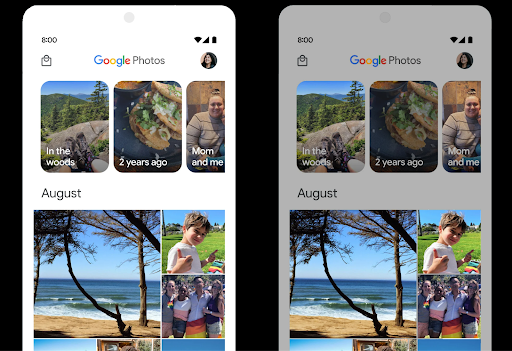
O Android 15 escolhe o headroom HDR apropriado para os recursos do dispositivo
e a profundidade de bits do painel. Para páginas com muito conteúdo
SDR, como um app de mensagens que mostra uma única miniatura HDR, esse
comportamento pode acabar influenciando negativamente o brilho percebido do conteúdo
SDR. O Android 15 permite controlar o headroom HDR com
setDesiredHdrHeadroom para encontrar um equilíbrio entre conteúdo SDR
e HDR.
Controle de intensidade

O Android 15 oferece suporte ao padrão de volume CTA-2075 para evitar inconsistências de volume de áudio e garantir que os usuários não precisem ajustar constantemente o volume ao alternar entre conteúdos. O sistema aproveita os dados características dos dispositivos de saída (fones de ouvido e alto-falantes), além de metadados de volume disponíveis no conteúdo de áudio AAC para ajustar de forma inteligente o volume do áudio e níveis de compactação do intervalo dinâmico.
Para ativar esse recurso, você precisa garantir que os metadados de intensidade de som estejam disponíveis no
conteúdo AAC e ativar o recurso da plataforma no app. Para isso,
instancie um objeto LoudnessCodecController chamando
o método de fábrica create com o ID da sessão de áudio do AudioTrack associado. Isso
começa a aplicar automaticamente as atualizações de áudio. É possível transmitir um
OnLoudnessCodecUpdateListener para modificar ou filtrar
loudness antes de serem aplicados ao
MediaCodec
// Media contains metadata of type MPEG_4 OR MPEG_D
val mediaCodec = …
val audioTrack = AudioTrack.Builder()
                                .setSessionId(sessionId)
                                .build()
...
// Create new loudness controller that applies the parameters to the MediaCodec
try {
   val lcController = LoudnessCodecController.create(mSessionId)
   // Starts applying audio updates for each added MediaCodec
}
O ExoPlayer da AndroidX media3 também será atualizado para usar a
LoudnessCodecController APIs para uma integração perfeita de apps.
Dispositivos MIDI 2.0 virtuais
O Android 13 adicionou suporte à conexão com dispositivos MIDI 2.0 usando USB, que se comunicam usando pacotes MIDI universais (UMPs). O Android 15 estende o suporte de UMP a apps MIDI virtuais, permitindo que apps de composição controlem apps de sintetizador como um dispositivo MIDI 2.0 virtual, assim como fariam com um dispositivo USB MIDI 2.0.
Decodificação de software AV1 mais eficiente

dav1d, o popular decodificador de software AV1 da VideoLAN, está disponível para dispositivos Android que não oferecem suporte à decodificação AV1 em hardware. O dav1d tem até três vezes mais desempenho do que o decodificador de software AV1 herdado, permitindo a reprodução de AV1 em alta definição para mais usuários, incluindo alguns dispositivos de nível baixo e médio.
O app precisa ativar o uso do dav1d invocando-o pelo nome
"c2.android.av1-dav1d.decoder". O dav1d vai se tornar o decodificador de software AV1
padrão em uma atualização subsequente. Esse suporte é padronizado e tem backport para
dispositivos Android 11 que recebem atualizações do sistema do Google Play.
Produtividade e ferramentas para desenvolvedores
Embora a maior parte do nosso trabalho para melhorar sua produtividade se concentre em ferramentas como o Android Studio, o Jetpack Compose e as bibliotecas do Android Jetpack, sempre buscamos maneiras na plataforma para ajudar você a realizar sua visão com mais facilidade.
Atualizações do OpenJDK 17
O Android 15 continua atualizando as principais bibliotecas para se alinhar aos recursos das versões mais recentes do LTS do OpenJDK.
Os seguintes recursos e melhorias principais estão incluídos:
- Melhorias na qualidade de vida em buffers NIO
- Streams
- Outros métodos
mathestrictmath - Atualizações de pacote
util, incluindocollection,mapesetsequenciais - Suporte a
ByteBuffernoDeflater - Atualizações de segurança, como
X500PrivateCredentiale chaves de segurança
Essas APIs são atualizadas em mais de um bilhão de dispositivos com o Android 12 (nível 31 da API) e versões mais recentes usando as atualizações do sistema do Google Play. Assim, você pode direcionar os recursos de programação mais recentes.
Melhorias no PDF
O Android 15 inclui melhorias substanciais no PdfRenderer.
APIs de terceiros. Os aplicativos podem incorporar recursos avançados, como renderização
arquivos protegidos por senha, anotações, edição de formulários,
pesquisa e seleção com cópia. PDF linearizado
são suportadas para acelerar a visualização do PDF local e reduzir o uso de recursos.
A biblioteca PDF do Jetpack usa essas APIs para simplificar a adição de recursos de
visualização de PDF ao app.
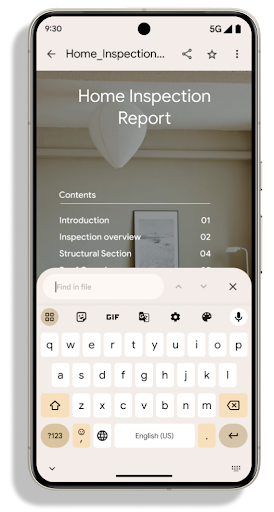
O PdfRenderer foi movido para um módulo que pode ser atualizado usando o Google
As atualizações do sistema do Google Play são independentes da versão da plataforma, e temos suporte para
essas mudanças de volta para o Android 11 (nível 30 da API), criando uma versão
anterior ao Android 15 da plataforma da API, chamada
PdfRendererPreV.
Refinamentos na troca automática de idioma
O Android 14 adicionou o reconhecimento de vários idiomas no dispositivo em áudio com a troca
automática entre idiomas, mas isso pode fazer com que as palavras sejam omitidas,
principalmente quando os idiomas são alternados com menos pausa entre as duas
pronúncias. O Android 15 adiciona mais controles para ajudar os apps a ajustar essa alternância
ao caso de uso.
EXTRA_LANGUAGE_SWITCH_INITIAL_ACTIVE_DURATION_TIME_MILLIS
limita a troca automática ao início da sessão de áudio, enquanto
EXTRA_LANGUAGE_SWITCH_MATCH_SWITCHES desativa a
troca de idioma após um número definido de trocas. Essas opções são
particularmente úteis se você espera que um único idioma seja falado
durante a sessão e seja detectado automaticamente.
API OpenType Variable Font aprimorada
O Android 15 melhora a usabilidade da fonte variável OpenType. É possível criar
uma instância FontFamily de uma fonte variável sem especificar os eixos de peso
com a API buildVariableFamily. O renderizador de texto substitui o valor
do eixo wght para corresponder ao texto exibido.
O uso da API simplifica o código para criar uma Typeface consideravelmente:
Kotlin
val newTypeface = Typeface.CustomFallbackBuilder(
            FontFamily.Builder(
                Font.Builder(assets, "RobotoFlex.ttf").build())
                    .buildVariableFamily())
    .build()
Java
Typeface newTypeface = Typeface.CustomFallbackBuilder(
            new FontFamily.Builder(
                new Font.Builder(assets, "RobotoFlex.ttf").build())
                    .buildVariableFamily())
    .build();
Antes, para criar o mesmo Typeface, era necessário muito mais código:
Kotlin
val oldTypeface = Typeface.CustomFallbackBuilder(
            FontFamily.Builder(
                Font.Builder(assets, "RobotoFlex.ttf")
                    .setFontVariationSettings("'wght' 400")
                    .setWeight(400)
                    .build())
                .addFont(
                    Font.Builder(assets, "RobotoFlex.ttf")
                        .setFontVariationSettings("'wght' 100")
                        .setWeight(100)
                        .build()
                )
                .addFont(
                    Font.Builder(assets, "RobotoFlex.ttf")
                        .setFontVariationSettings("'wght' 200")
                        .setWeight(200)
                        .build()
                )
                .addFont(
                    Font.Builder(assets, "RobotoFlex.ttf")
                        .setFontVariationSettings("'wght' 300")
                        .setWeight(300)
                        .build()
                )
                .addFont(
                    Font.Builder(assets, "RobotoFlex.ttf")
                        .setFontVariationSettings("'wght' 500")
                        .setWeight(500)
                        .build()
                )
                .addFont(
                    Font.Builder(assets, "RobotoFlex.ttf")
                        .setFontVariationSettings("'wght' 600")
                        .setWeight(600)
                        .build()
                )
                .addFont(
                    Font.Builder(assets, "RobotoFlex.ttf")
                        .setFontVariationSettings("'wght' 700")
                        .setWeight(700)
                        .build()
                )
                .addFont(
                    Font.Builder(assets, "RobotoFlex.ttf")
                        .setFontVariationSettings("'wght' 800")
                        .setWeight(800)
                        .build()
                )
                .addFont(
                    Font.Builder(assets, "RobotoFlex.ttf")
                        .setFontVariationSettings("'wght' 900")
                        .setWeight(900)
                        .build()
                ).build()
        ).build()
Java
Typeface oldTypeface = new Typeface.CustomFallbackBuilder(
    new FontFamily.Builder(
        new Font.Builder(assets, "RobotoFlex.ttf")
            .setFontVariationSettings("'wght' 400")
            .setWeight(400)
            .build()
    )
    .addFont(
        new Font.Builder(assets, "RobotoFlex.ttf")
            .setFontVariationSettings("'wght' 100")
            .setWeight(100)
            .build()
    )
    .addFont(
        new Font.Builder(assets, "RobotoFlex.ttf")
            .setFontVariationSettings("'wght' 200")
            .setWeight(200)
            .build()
    )
    .addFont(
        new Font.Builder(assets, "RobotoFlex.ttf")
            .setFontVariationSettings("'wght' 300")
            .setWeight(300)
            .build()
    )
    .addFont(
        new Font.Builder(assets, "RobotoFlex.ttf")
            .setFontVariationSettings("'wght' 500")
            .setWeight(500)
            .build()
    )
    .addFont(
        new Font.Builder(assets, "RobotoFlex.ttf")
            .setFontVariationSettings("'wght' 600")
            .setWeight(600)
            .build()
    )
    .addFont(
        new Font.Builder(assets, "RobotoFlex.ttf")
            .setFontVariationSettings("'wght' 700")
            .setWeight(700)
            .build()
    )
    .addFont(
        new Font.Builder(assets, "RobotoFlex.ttf")
            .setFontVariationSettings("'wght' 800")
            .setWeight(800)
            .build()
    )
    .addFont(
        new Font.Builder(assets, "RobotoFlex.ttf")
            .setFontVariationSettings("'wght' 900")
            .setWeight(900)
            .build()
    )
    .build()
).build();
Confira um exemplo de como uma Typeface foi criada com a API antiga e a nova.
renderiza:
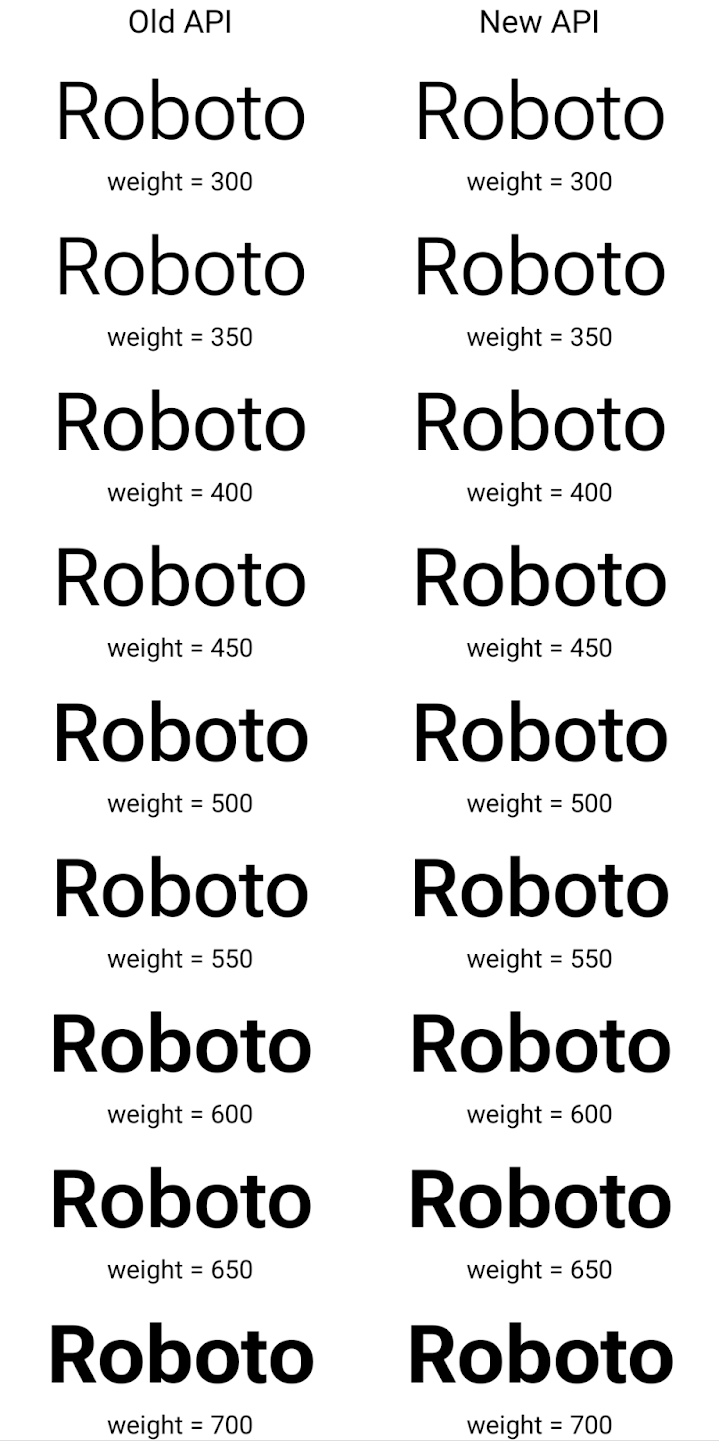
Neste exemplo, a Typeface criada com a API antiga não tem a
para criar pesos de fonte precisos para os tamanhos 350, 450, 550 e 650
instâncias de Font, então o renderizador retorna ao peso mais próximo. Portanto,
neste caso, 300 é renderizado em vez de 350, 400 é renderizado em vez de 450 e
assim por diante. Por outro lado, o Typeface criado com as novas APIs cria dinamicamente
uma instância Font para um determinado peso. Assim, pesos precisos são renderizados para 350,
450, 550 e 650.
Controles granulares de quebra de linha
No Android 15 e versões mais recentes, uma TextView e o quebrador
de linha podem preservar uma determinada parte do texto na mesma linha para melhorar
a legibilidade. Para aproveitar essa personalização de quebra de linha, use
a tag <nobreak> nos recursos de string ou
createNoBreakSpan. Da mesma forma, é possível preservar palavras de
separação usando a tag <nohyphen> ou
createNoHyphenationSpan.
Por exemplo, o recurso de string a seguir não inclui um ponto-e-vírgula e é renderizado com o texto "Pixel 8 Pro" quebrado em um lugar indesejado:
<resources>
    <string name="pixel8pro">The power and brains behind Pixel 8 Pro.</string>
</resources>
Por outro lado, esse recurso de string inclui a tag <nobreak>, que envolve a
frase "Pixel 8 Pro" e impede quebras de linha:
<resources>
    <string name="pixel8pro">The power and brains behind <nobreak>Pixel 8 Pro.</nobreak></string>
</resources>
A diferença na forma como essas strings são renderizadas é mostrada nas imagens abaixo:
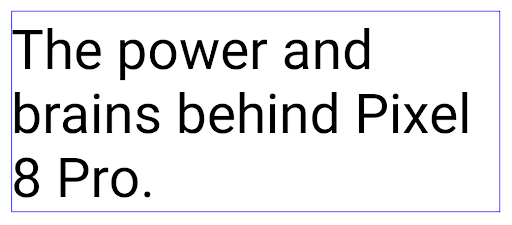
<nobreak>.
<nobreak>.Arquivamento de apps
O Android e o Google Play anunciaram o suporte ao arquivamento de apps por último ano, permitindo que os usuários liberem espaço removendo parcialmente apps usados com pouca frequência do dispositivo que foram publicados usando o app Android Pacote no Google Play. O Android 15 inclui suporte no nível do SO para arquivamento e desarquivamento de apps, facilitando a implementação em todas as app stores.
Apps com a permissão REQUEST_DELETE_PACKAGES podem chamar o
PackageInstaller requestArchive para solicitar o arquivamento de um
do pacote de apps instalado, que remove o APK e todos os arquivos em cache, mas persiste
dados do usuário. Os apps arquivados são retornados como apps que podem ser exibidos por meio do
APIs do LauncherApps os usuários verão um tratamento de interface para destacar
e os apps são arquivados. Se um usuário tocar em um app arquivado, o instalador responsável
receberá uma solicitação para desarquivá-la. Nesse caso, será possível
monitorado pela transmissão ACTION_PACKAGE_ADDED.
Ativar o modo 16 KB em um dispositivo usando as opções do desenvolvedor
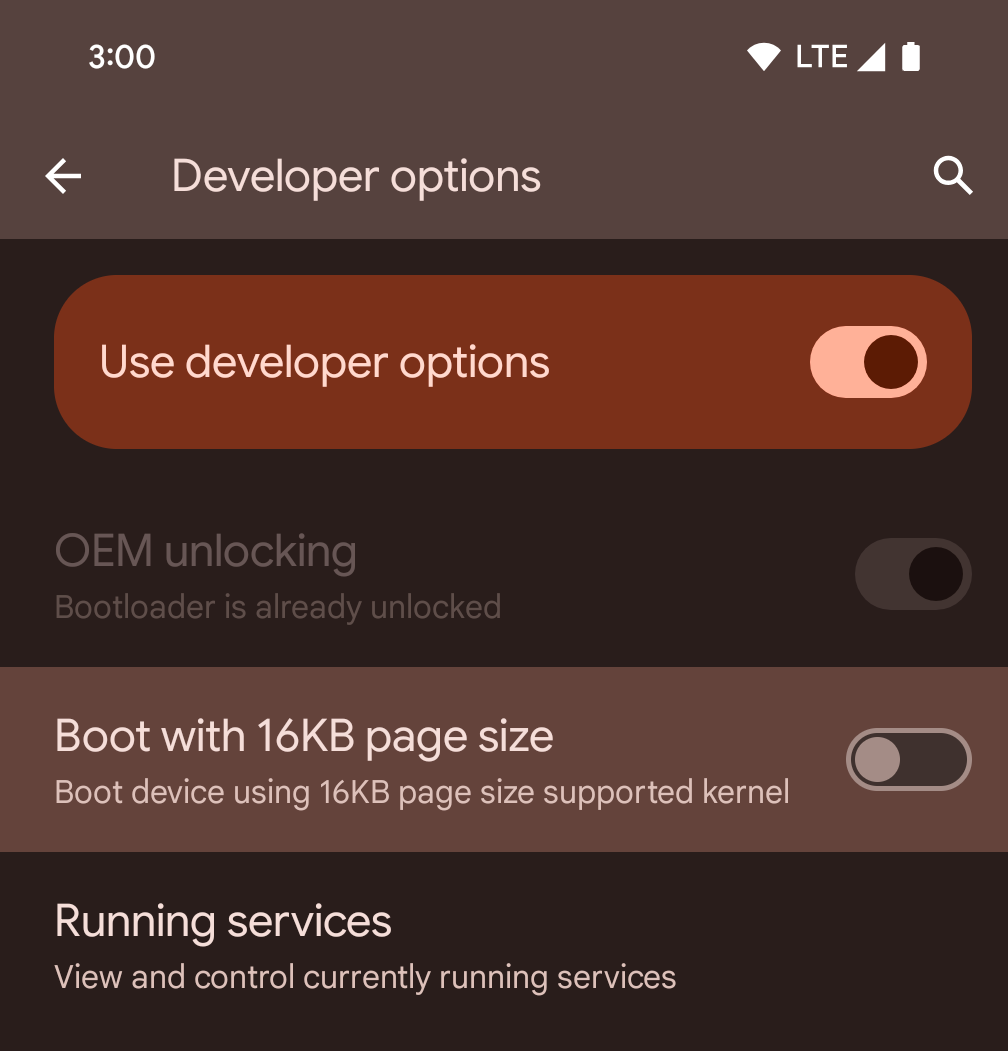
Ative a opção de desenvolvedor Inicializar com tamanho de página de 16 KB para inicializar um dispositivo no modo de 16 KB.
Nas versões QPR do Android 15, é possível usar a opção do desenvolvedor disponível em alguns dispositivos para inicializar o dispositivo no modo de 16 KB e realizar testes no dispositivo. Antes de usar a opção do desenvolvedor, acesse Configurações > Sistema > Atualizações de software e aplique as atualizações disponíveis.
Essa opção para desenvolvedores está disponível nos seguintes dispositivos:
Pixel 8 e 8 Pro (com Android 15 QPR1 ou versões mais recentes)
Pixel 8a (com Android 15 QPR1 ou versões mais recentes)
Pixel 9, 9 Pro e 9 Pro XL (com Android 15 QPR2 ou versões mais recentes)
Pixel 9a (com Android 16 ou versões mais recentes)
Gráficos
O Android 15 traz as melhorias gráficas mais recentes, incluindo ANGLE e adições ao sistema de gráficos Canvas.
Modernização do acesso à GPU do Android

O hardware do Android evoluiu bastante desde os primeiros dias, quando o SO principal era executado em uma única CPU e as GPUs eram acessadas usando APIs baseadas em pipelines de função fixa. A API gráfica Vulkan® está disponível no NDK desde o Android 7.0 (nível 24 da API) com uma abstração de nível mais baixo que reflete melhor o hardware de GPU moderno, dimensiona melhor para oferecer suporte a vários núcleos de CPU e oferece uma sobrecarga reduzida do driver de CPU, o que resulta em um melhor desempenho do app. O Vulkan é compatível com todos os mecanismos de jogo modernos.
O Vulkan é a interface preferida do Android para a GPU. Portanto, o Android 15 inclui o ANGLE como uma camada opcional para executar o OpenGL® ES em cima do Vulkan. A mudança para o ANGLE padroniza a implementação do OpenGL do Android para melhorar a compatibilidade e, em alguns casos, o desempenho. Para testar a estabilidade e o desempenho do app OpenGL ES com o ANGLE, ative a opção do desenvolvedor em Configurações -> Sistema -> Opções do desenvolvedor -> Experimental: Ativar ANGLE no Android 15.
Planejamento do ANGLE no Vulkan para Android
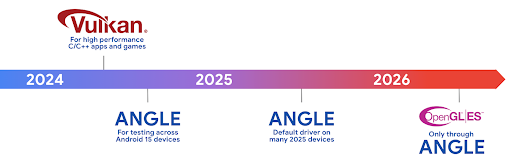
Como parte do aperfeiçoamento da pilha de GPU, vamos enviar o ANGLE como o driver do sistema GL em mais dispositivos novos, com a expectativa de que o OpenGL/ES só estará disponível pelo ANGLE. No entanto, planejamos continuar oferecendo suporte ao OpenGL ES em todos os dispositivos.
Próximas etapas recomendadas
Use as opções para desenvolvedores para selecionar o driver ANGLE para OpenGL ES e testar seu app. Para novos projetos, recomendamos o uso do Vulkan para C/C++.
Melhorias no Canvas
O Android 15 continua a modernizar o sistema de gráficos Canvas do Android com mais recursos:
Matrix44fornece uma matriz 4x4 para transformar coordenadas que precisam ser usadas quando você quer manipular a tela em 3D.clipShadercruza o clipe atual com o shader especificado, enquantoclipOutShaderdefine o clipe como a diferença entre o clipe atual e o shader, cada um tratando o shader como uma máscara alfa. Isso oferece suporte ao desenho de formas complexas de maneira eficiente.
Desempenho e bateria
O Android continua focado em ajudar você a melhorar a performance e a qualidade dos seus apps. O Android 15 apresenta APIs que ajudam a tornar as tarefas no seu app mais eficientes para executar, otimizar o desempenho do app e coletar insights sobre seus apps.
Para conferir práticas recomendadas de eficiência da bateria, depurar o uso de rede e energia e detalhes sobre como estamos melhorando a eficiência da bateria do trabalho em segundo plano no Android 15 e em versões recentes do Android, assista à palestra Como melhorar a eficiência da bateria do trabalho em segundo plano no Android do Google I/O.
API ApplicationStartInfo
Nas versões anteriores do Android, a inicialização de apps era um pouco misteriosa. Era
difícil determinar no app se ele foi iniciado a partir de um estado frio, quente
ou aquecido. Também era difícil saber quanto tempo o app levava durante as
várias fases de inicialização: bifurcar o processo, chamar onCreate, desenhar o
primeiro frame e muito mais. Quando a classe Application foi instanciada, você não tinha
como saber se o app foi iniciado por uma transmissão, um provedor de conteúdo, um
job, um backup, a inicialização completa, um alarme ou um Activity.
A API ApplicationStartInfo no Android 15 oferece
tudo isso e muito mais. Você pode até adicionar seus próprios carimbos de data/hora ao fluxo para ajudar a coletar dados de tempo em um só lugar. Além de coletar
métricas, você pode usar ApplicationStartInfo para ajudar a otimizar diretamente a inicialização
do app. Por exemplo, é possível eliminar a instanciação cara de bibliotecas relacionadas à
interface na classe Application quando o app está sendo inicializado devido a uma
transmissão.
Informações detalhadas sobre o tamanho do app
Desde o Android 8.0 (nível 26 da API), o Android inclui a
API StorageStats.getAppBytes, que resume o tamanho
instalado de um app como um único número de bytes, que é a soma do tamanho do APK, do
tamanho dos arquivos extraídos do APK e dos arquivos gerados no
dispositivo, como o código compilado antecipadamente (AOT). Esse número não é muito
útil para entender como o app está usando o armazenamento.
O Android 15 adiciona a
API StorageStats.getAppBytesByDataType([type]), que permite
que você saiba como o app está usando todo esse espaço, incluindo divisões de arquivo
APK, código relacionado ao AOT e à aceleração, metadados dex, bibliotecas e perfis
guiados.
Criação de perfil gerenciada pelo app
O Android 15 inclui a classe ProfilingManager,
que permite coletar informações de perfil do app, como despejos
de heap, perfis de heap, amostragem de pilha e muito mais. Ele fornece um callback para o
app com uma tag fornecida para identificar o arquivo de saída, que é enviado para o
diretório de arquivos do app. A API faz a limitação de taxa para minimizar o impacto no desempenho.
Para simplificar a criação de solicitações de criação de perfil no seu app, recomendamos usar a
API AndroidX Profiling correspondente, disponível
no Core 1.15.0-rc01 ou mais recente.
Melhorias no banco de dados SQLite
O Android 15 apresenta APIs SQLite que expõem recursos avançados do mecanismo SQLite que são destinados a problemas de desempenho específicos que podem se manifestar em apps. Essas APIs estão incluídas na atualização do SQLite para a versão 3.44.3.
Os desenvolvedores precisam consultar as práticas recomendadas para a performance do SQLite. para aproveitar ao máximo o banco de dados SQLite, especialmente ao trabalhar com grandes ou ao executar consultas sensíveis à latência.
- Transações adiadas somente leitura: ao emitir transações
somente leitura (sem instruções de gravação), use
beginTransactionReadOnly()ebeginTransactionWithListenerReadOnly(SQLiteTransactionListener)para emitir transaçõesDEFERREDsomente leitura. Essas transações podem ser executadas simultaneamente entre si e, se o banco de dados estiver no modo WAL, eles poderão são executados simultaneamente a transaçõesIMMEDIATEouEXCLUSIVE. - Contagem e IDs de linhas: foram adicionadas APIs para extrair a contagem de linhas
alteradas ou o ID da última linha inserida sem emitir uma consulta extra.
getLastChangedRowCount()retorna o número de linhas que foram inseridos, atualizados ou excluídos pela instrução SQL mais recente no a transação atual, enquantogetTotalChangedRowCount()retorna a contagem da conexão atual.getLastInsertRowId()retorna orowidda última linha. seja inserido na conexão atual. - Instruções brutas: emitem uma instrução SQL bruta, sem a conveniência. wrappers e qualquer sobrecarga de processamento adicional que eles possam incorrer.
Atualizações do Framework de Performance Dinâmica do Android
O Android 15 continua nosso investimento no Android Dynamic Performance Framework (ADPF), um conjunto de APIs que permite que jogos e apps de alta performance interajam mais diretamente com os sistemas térmicos e de energia de dispositivos Android. Em dispositivos com suporte, o Android 15 adiciona recursos ADPF:
- Um modo de economia de energia para sessões de dicas para indicar que as linhas de execução associadas devem preferir a economia de energia em vez de desempenho, ótimo para cargas de trabalho em segundo plano de longa duração.
- As durações de trabalho da GPU e da CPU podem ser relatadas em sessões de dicas, permitindo que o sistema ajuste as frequências da CPU e da GPU juntos para atender melhor às demandas de carga de trabalho.
- Limites de margem térmica para interpretar possíveis status de limitação térmica com base na previsão de margem.
Para saber mais sobre como usar o ADPF em apps e jogos, consulte a documentação.
Privacidade
O Android 15 inclui vários recursos que ajudam os desenvolvedores de apps a proteger a privacidade dos usuários.
Detecção de gravação de tela
O Android 15 adiciona suporte a apps para detectar isso. elas estão sendo gravadas. Um callback é invocado sempre que o app faz a transição. entre ficar visível ou invisível em uma gravação de tela. Um app é consideradas visíveis se as atividades pertencentes ao UID do processo de registro forem que está sendo gravado. Dessa forma, se o app estiver executando uma operação sensível, você informar ao usuário que a gravação está sendo feita.
val mCallback = Consumer<Int> { state ->
  if (state == SCREEN_RECORDING_STATE_VISIBLE) {
    // We're being recorded
  } else {
    // We're not being recorded
  }
}

override fun onStart() {
   super.onStart()
   val initialState =
      windowManager.addScreenRecordingCallback(mainExecutor, mCallback)
   mCallback.accept(initialState)
}

override fun onStop() {
    super.onStop()
    windowManager.removeScreenRecordingCallback(mCallback)
}
Recursos expandidos do IntentFilter
O Android 15 oferece suporte a uma resolução de Intent mais precisa usando
UriRelativeFilterGroup, que contém um conjunto de objetos
UriRelativeFilter que formam um conjunto de regras de correspondência de Intent
que precisam ser satisfeitas, incluindo parâmetros de consulta de URL, fragmentos de
URL e regras de bloqueio ou exclusão.
Essas regras podem ser definidas no arquivo XML AndroidManifest com a
tag <uri-relative-filter-group>, que pode incluir uma
tag android:allow. Essas tags podem conter tags <data> que usam atributos de tag de dados
existentes, além dos atributos android:query e android:fragment.
Confira um exemplo da sintaxe AndroidManifest:
<intent-filter android:autoVerify="true">
  <action android:name="android.intent.action.VIEW" />
  <category android:name="android.intent.category.BROWSABLE" />
  <category android:name="android.intent.category.DEFAULT" />
  <data android:scheme="http" />
  <data android:scheme="https" />
  <data android:host="astore.com" />
  <uri-relative-filter-group>
    <data android:pathPrefix="/auth" />
    <data android:query="region=na" />
  </uri-relative-filter-group>
  <uri-relative-filter-group android:allow="false">
    <data android:pathPrefix="/auth" />
    <data android:query="mobileoptout=true" />
  </uri-relative-filter-group>
  <uri-relative-filter-group android:allow="false">
    <data android:pathPrefix="/auth" />
    <data android:fragmentPrefix="faq" />
  </uri-relative-filter-group>
</intent-filter>
Espaço privado
O espaço privado permite que os usuários criem um local separado no dispositivo para manter os apps confidenciais longe de olhares curiosos e sob uma camada adicional de autenticação. O espaço privado usa um perfil de usuário separado. O usuário pode escolher usar o bloqueio do dispositivo ou um fator de bloqueio separado para o espaço privado.
Os apps no espaço particular aparecem em um contêiner separado no acesso rápido e ficam ocultos da visualização de recentes, notificações, configurações e outros apps quando o espaço particular está bloqueado. O conteúdo gerado e baixado pelo usuário (como mídia ou arquivos) e as contas ficam separados entre o espaço privado e o principal. A Sharesheet do sistema e o seletor de fotos podem ser usados para que os apps tenham acesso ao conteúdo entre espaços quando o espaço privado está desbloqueado.
Os usuários não podem mover os apps e os dados deles para o espaço privado. Em vez disso, os usuários selecionam uma opção de instalação no espaço privado para instalar um app usando a loja de apps de preferência. Os apps no espaço privado são instalados como cópias separadas de qualquer app no espaço principal (cópias novas do mesmo app).
Quando um usuário bloqueia o espaço particular, o perfil é interrompido. Enquanto o perfil está pausado, os apps no espaço particular não estão mais ativos e não podem realizar atividades em primeiro ou segundo plano, incluindo a exibição de notificações.
Recomendamos que você teste o app com espaço privado para garantir que ele funcione conforme o esperado, especialmente se ele se enquadrar em uma das seguintes categorias:
- Apps com lógica para perfis de trabalho que presumem que todas as cópias instaladas do app que não estão no perfil principal estão no perfil de trabalho.
- Apps de saúde
- Apps de acesso rápido
- Apps de app store
Consulta a seleção mais recente do usuário para o acesso a fotos selecionadas
Agora os apps podem destacar apenas as fotos e os vídeos selecionados mais recentemente quando
acesso parcial às permissões de mídia é concedido. Esse recurso pode melhorar
a experiência do usuário em apps que solicitam acesso frequente a fotos e
vídeos. Para usar esse recurso no app, ative o
Argumento QUERY_ARG_LATEST_SELECTION_ONLY ao consultar MediaStore
usando ContentResolver.
Kotlin
val externalContentUri = MediaStore.Files.getContentUri("external")

val mediaColumns = arrayOf(
   FileColumns._ID,
   FileColumns.DISPLAY_NAME,
   FileColumns.MIME_TYPE,
)

val queryArgs = bundleOf(
   // Return only items from the last selection (selected photos access)
   QUERY_ARG_LATEST_SELECTION_ONLY to true,
   // Sort returned items chronologically based on when they were added to the device's storage
   QUERY_ARG_SQL_SORT_ORDER to "${FileColumns.DATE_ADDED} DESC",
   QUERY_ARG_SQL_SELECTION to "${FileColumns.MEDIA_TYPE} = ? OR ${FileColumns.MEDIA_TYPE} = ?",
   QUERY_ARG_SQL_SELECTION_ARGS to arrayOf(
       FileColumns.MEDIA_TYPE_IMAGE.toString(),
       FileColumns.MEDIA_TYPE_VIDEO.toString()
   )
)
Java
Uri externalContentUri = MediaStore.Files.getContentUri("external");

String[] mediaColumns = {
    FileColumns._ID,
    FileColumns.DISPLAY_NAME,
    FileColumns.MIME_TYPE
};

Bundle queryArgs = new Bundle();
queryArgs.putBoolean(MediaStore.QUERY_ARG_LATEST_SELECTION_ONLY, true);
queryArgs.putString(MediaStore.QUERY_ARG_SQL_SORT_ORDER, FileColumns.DATE_ADDED + " DESC");
queryArgs.putString(MediaStore.QUERY_ARG_SQL_SELECTION, FileColumns.MEDIA_TYPE + " = ? OR " + FileColumns.MEDIA_TYPE + " = ?");
queryArgs.putStringArray(MediaStore.QUERY_ARG_SQL_SELECTION_ARGS, new String[] {
    String.valueOf(FileColumns.MEDIA_TYPE_IMAGE),
    String.valueOf(FileColumns.MEDIA_TYPE_VIDEO)
});
Sandbox de privacidade no Android
O Android 15 inclui as extensões mais recentes do AdServices, incorporando a versão mais recente do Sandbox de privacidade no Android. Essa adição faz parte do nosso trabalho para desenvolver tecnologias que melhorem a privacidade do usuário e viabilizem experiências de publicidade personalizadas e eficazes para apps para dispositivos móveis. Nossa página do Sandbox de privacidade tem mais informações sobre o Sandbox de privacidade na prévia para desenvolvedores do Android e nos programas Beta para ajudar você a começar.
Conexão Saúde
O Android 15 integra as extensões mais recentes A Conexão Saúde do Android, uma plataforma segura e centralizada para gerenciar e compartilhar dados de saúde e condicionamento físico coletados pelo app. Esta atualização adiciona suporte a outros tipos de dados em fitness; nutrição, temperatura da pele, planos de treino e muito mais.
O monitoramento de temperatura da pele permite que os usuários armazenem e compartilhem de forma mais precisa dados de temperatura de um wearable ou outro dispositivo de monitoramento.
Os planos de treinamento são planos de treino estruturados para ajudar o usuário a alcançar os objetivos de condicionamento físico. O suporte a planos de treinamento inclui vários objetivos de conclusão e performance:
- Metas de conclusão em torno de calorias queimadas, distância, duração, repetição e passos.
- Metas de desempenho de o máximo de repetições possível (AMRAP), cadência, frequência cardíaca, potência, taxa de esforço percebida e velocidade.
Saiba mais sobre as atualizações mais recentes do Conexão Saúde no Android na palestra Como criar experiências adaptáveis com o Android Health do Google I/O.
Compartilhamento de tela de app
O Android 15 oferece suporte ao compartilhamento de tela de apps para que os usuários possam compartilhar ou gravar apenas uma
janela de app, em vez de toda a tela do dispositivo. Esse recurso, ativado pela primeira vez no
Android 14 QPR2, inclui
callbacks MediaProjection que permitem que seu app
personalize a experiência de compartilhamento de tela. Para apps destinados ao
Android 14 (nível 34 da API) ou mais recente,
o consentimento do usuário é necessário para cada
sessão de captura de MediaProjection.
Experiência do usuário e interface do sistema
O Android 15 oferece aos desenvolvedores de apps e usuários mais controle e flexibilidade para configurar o dispositivo de acordo com as necessidades.
Para saber mais sobre como usar as melhorias mais recentes do Android 15 para melhorar a experiência do usuário do seu app, assista à palestra Melhorar a experiência do usuário do seu app Android no Google I/O.
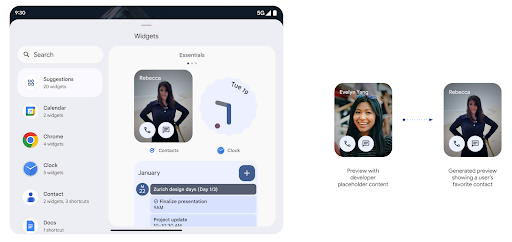
Prévia de widgets mais completa com a API Generated Previews
Antes do Android 15, a única maneira de fornecer visualizações do seletor de widgets era especificar um recurso de imagem ou layout estático. Essas visualizações geralmente são muito diferentes da aparência do widget real quando ele é colocado na tela inicial. Além disso, recursos estáticos não podem ser criados com o Jetpack Glance, então um Resumo o desenvolvedor teve que fazer uma captura de tela do widget ou criar um layout XML para ter um visualização do widget.
O Android 15 adiciona suporte a visualizações geradas. Isso significa que os provedores de widgets
de apps podem gerar RemoteViews para usar como a visualização do seletor, em vez
de um recurso estático.
API Push
Os apps podem fornecer visualizações geradas por uma API push. Os apps podem fornecer
visualizações em qualquer ponto do ciclo de vida e não recebem uma solicitação explícita
do host para fornecer visualizações. As prévias são mantidas em AppWidgetService,
e os hosts podem solicitá-las sob demanda. O exemplo a seguir carrega um recurso de layout
de widget XML e o define como a visualização:
AppWidgetManager.getInstance(appContext).setWidgetPreview(
   ComponentName(
       appContext,
       SociaLiteAppWidgetReceiver::class.java
   ),
   AppWidgetProviderInfo.WIDGET_CATEGORY_HOME_SCREEN,
   RemoteViews("com.example", R.layout.widget_preview)
)
O fluxo esperado é:
- A qualquer momento, o provedor de widgets chama
setWidgetPreview. O As visualizações são mantidas emAppWidgetServicecom outras informações do provedor. - O
setWidgetPreviewnotifica os hosts de uma visualização atualizada pelo callbackAppWidgetHost.onProvidersChanged. Em resposta, o widget host recarrega todas as informações do provedor. - Ao mostrar uma visualização de widget, o host verifica
AppWidgetProviderInfo.generatedPreviewCategoriese, se a categoria escolhida estiver disponível, chamaAppWidgetManager.getWidgetPreviewpara retornar a visualização salva para esse provedor.
Quando ligar para setWidgetPreview
Como não há callback para fornecer visualizações, os apps podem optar por enviar visualizações a qualquer momento durante a execução. A frequência de atualização da visualização depende do caso de uso do widget.
A lista a seguir descreve as duas principais categorias de casos de uso de visualização:
- Provedores que mostram dados reais nas visualizações de widget, como informações personalizadas ou recentes. Esses provedores podem definir a visualização depois que o usuário faz login ou faz a configuração inicial no app. Depois disso, eles podem definir uma tarefa periódica para atualizar as visualizações na cadência escolhida. Exemplos desse tipo de widget podem ser um widget de fotos, de agenda, de clima ou de notícias.
- Provedores que mostram informações estáticas em visualizações ou widgets de ação rápida que não exibem nenhum dado. Esses provedores podem definir as prévias uma vez, quando o app é iniciado pela primeira vez. Exemplos desse tipo de widget incluem um widget de ações rápidas do Drive ou um widget de atalhos do Chrome.
Alguns provedores podem mostrar visualizações estáticas no seletor de modo Hub, mas as informações no seletor da tela inicial. Esses provedores precisam seguir as orientações para definir as prévias nesses dois casos de uso.
Picture-in-picture
O Android 15 introduz mudanças no modo picture-in-picture (PiP), garantindo uma uma transição mais suave ao entrar no modo picture-in-picture. Isso será benéfico para apps que têm elementos de interface sobrepostos à interface principal, que entra no PiP.
Os desenvolvedores usam o callback onPictureInPictureModeChanged para definir a lógica.
que alterna a visibilidade dos elementos da interface sobrepostos. Esse callback é
acionada quando a animação de entrada ou saída do picture-in-picture é concluída. Começando em
No Android 15, a classe PictureInPictureUiState inclui outro estado.
Com esse estado da interface, os apps destinados ao Android 15 (nível 35 da API) vão observar a
Callback Activity#onPictureInPictureUiStateChanged sendo invocado com
isTransitioningToPip() assim que a animação do picture-in-picture começar. Existem
muitos elementos de IU que não são relevantes para o aplicativo quando ele está no modo picture-in-picture, por
exemplos de visualizações ou de layout que incluem informações como sugestões,
vídeos, classificações e títulos. Quando o aplicativo entrar no modo picture-in-picture, use o
onPictureInPictureUiStateChanged para ocultar esses elementos da interface. Quando o
for para o modo de tela cheia pela janela picture-in-picture, use
Callback onPictureInPictureModeChanged para reexibir esses elementos, conforme mostrado em
os seguintes exemplos:
override fun onPictureInPictureUiStateChanged(pipState: PictureInPictureUiState) {
        if (pipState.isTransitioningToPip()) {
          // Hide UI elements
        }
    }
override fun onPictureInPictureModeChanged(isInPictureInPictureMode: Boolean) {
        if (isInPictureInPictureMode) {
          // Unhide UI elements
        }
    }
Essa alternância rápida de visibilidade de elementos irrelevantes da interface (para uma janela picture-in-picture) ajuda garantir uma animação de entrada no modo picture-in-picture mais suave e sem oscilações.
Regras do modo Não perturbe aprimoradas
O AutomaticZenRule permite que os apps personalizem a atenção
de gerenciamento (Não perturbe) e decida quando ativar ou desativar
para resolvê-los com rapidez. O Android 15 aprimora essas regras de forma significativa, com o objetivo de melhorar a
experiência do usuário. As seguintes melhorias estão incluídas:
- Adição de tipos a
AutomaticZenRule, permitindo que o sistema aplique um tratamento especial a algumas regras. - Adição de um ícone à
AutomaticZenRule, ajudando a tornar os modos mais reconhecíveis. - Adicionar uma string
triggerDescriptionaAutomaticZenRuleque descreve as condições em que a regra deve ficar ativa para o usuário. - Adicionado
ZenDeviceEffectsparaAutomaticZenRule, permitindo que as regras acionem elementos como escala de cinza tela, modo noturno ou esmaecer o plano de fundo.
Definir VibrationEffect para canais de notificação
O Android 15 oferece suporte à configuração de vibrações avançadas para notificações recebidas
canal usando NotificationChannel.setVibrationEffect, então
os usuários podem distinguir entre diferentes tipos de notificação sem
sem olhar para o dispositivo.
Chip da barra de status de projeção de mídia e parada automática
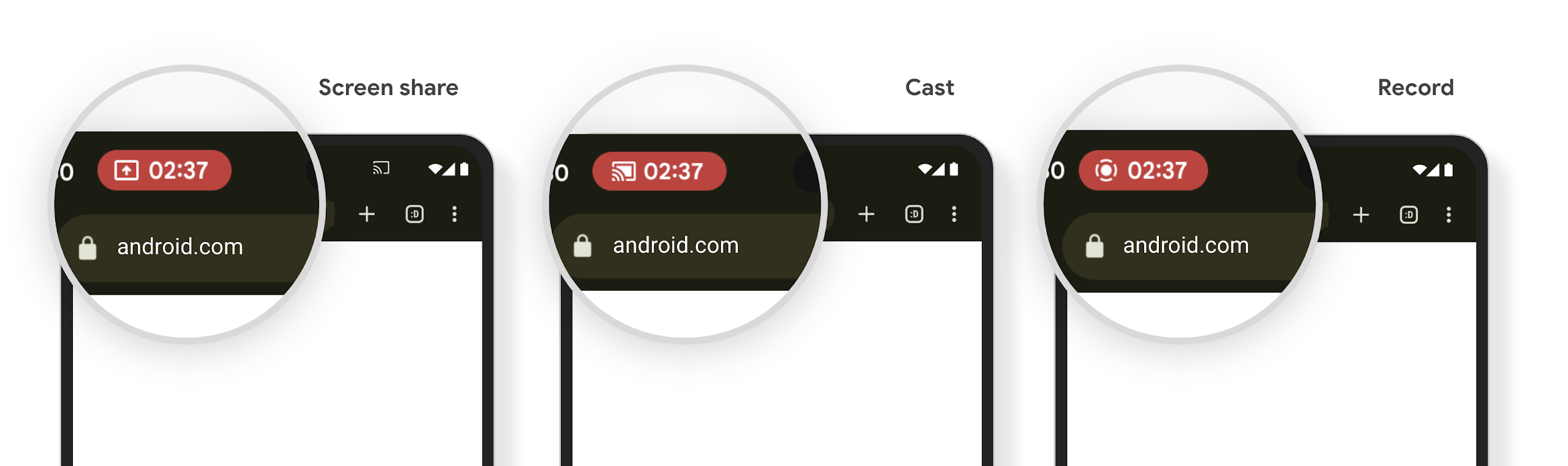
A projeção de mídia pode expor informações particulares do usuário. Um novo ícone de status de destaque na barra informa os usuários sobre qualquer projeção de tela em andamento. Os usuários podem tocar no chip para interromper a transmissão, o compartilhamento ou a gravação de tela. Além disso, para uma experiência do usuário mais intuitiva, qualquer projeção de tela em andamento agora é interrompida automaticamente quando a tela do dispositivo é bloqueada.
Telas grandes e formatos
O Android 15 oferece aos seus apps o suporte necessário para aproveitar ao máximo os formatos do Android, incluindo telas grandes, dispositivos dobráveis e flip.
Mais facilidade para várias tarefas em telas grandes
O Android 15 oferece aos usuários maneiras melhores de realizar várias tarefas em dispositivos de tela grande. Por exemplo, os usuários podem salvar as combinações de apps favoritos na tela dividida para acesso rápido e fixar a barra de tarefas na tela para alternar rapidamente entre os apps. Isso significa que garantir que seu app seja adaptável é mais importante do que nunca.
O Google I/O tem sessões sobre Como criar versões adaptáveis para Android apps e Como criar uma interface com o Material Design 3 biblioteca adaptável isso pode ajudar, e nossa documentação tem mais informações para ajudar você a criar para projetos de telas.
Suporte à tela de capa
O app pode declarar uma propriedade que o Android 15 usa para
permitir que o Application ou o Activity seja apresentado nas telas de
cobertura pequenas de dispositivos dobráveis compatíveis. Essas telas são muito pequenas para serem
consideradas como destinos compatíveis para execução de apps Android, mas seu app pode
ativar o suporte a elas, tornando-o disponível em mais lugares.
Conectividade
O Android 15 atualiza a plataforma para dar ao seu app acesso aos mais recentes avanços em tecnologias de comunicação e sem fio.
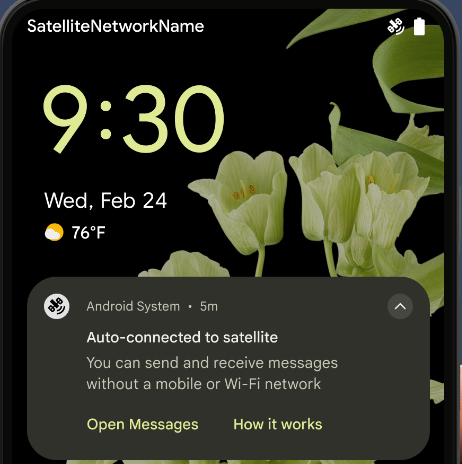
Suporte a satélite
O Android 15 continua a ampliar o suporte à plataforma para conectividade por satélite e inclui alguns elementos de IU para garantir uma experiência do usuário consistente em todo o de conectividade por satélite.
Os apps podem usar o ServiceState.isUsingNonTerrestrialNetwork() para
detectam quando um dispositivo está conectado a um satélite, o que aumenta o reconhecimento
por que serviços de rede completos podem estar indisponíveis. Além disso, o Android 15
oferece suporte a apps de SMS e MMS, bem como apps RCS pré-carregados para usar
a conectividade por satélite para enviar e receber mensagens.
Experiências de NFC mais fluidas
O Android 15 está trabalhando para tornar a experiência de pagamento por aproximação mais simples e
confiável, além de continuar oferecendo suporte ao ecossistema robusto de apps NFC do Android. Em
dispositivos com suporte, os apps podem solicitar que o NfcAdapter entre no
modo de observação, em que o dispositivo detecta, mas não responde aos leitores
NFC, enviando os PollingFrame
objetos do serviço NFC do app para processamento. Os objetos PollingFrame podem ser usados para autenticação
antes da primeira comunicação com o leitor NFC, permitindo uma transação
com um toque em muitos casos.
Além disso, os apps podem registrar um filtro em dispositivos com suporte para ser notificados sobre a atividade do loop de polling, o que permite uma operação suave com vários aplicativos compatíveis com NFC.
Função da carteira
O Android 15 apresenta uma função de carteira que permite uma integração mais estreita com o app de carteira preferido do usuário. Essa função substitui a configuração de pagamento por aproximação padrão do NFC. Os usuários podem gerenciar o detentor de função da Carteira acessando Configurações > Apps > Apps padrão.
A função da Carteira é usada ao rotear toques NFC para AIDs registrados na categoria de pagamento. Os toques sempre vão para o detentor de função da Carteira, a menos que outro app registrado para o mesmo AID esteja em execução em primeiro plano.
Esse papel também é usado para determinar para onde o bloco de acesso rápido da Carteira precisa ir quando ativado. Quando o papel é definido como "Nenhum", o bloco "Acesso rápido" não está disponível, e os toques NFC da categoria de pagamento são enviados apenas para o app em primeiro plano.
Segurança
O Android 15 ajuda você a melhorar a segurança do app, proteger os dados dele e oferecer mais transparência e controle aos usuários sobre os dados deles. Confira a palestra Proteção da segurança do usuário no Android (em inglês) do Google I/O para saber mais sobre o que estamos fazendo para melhorar as proteções do usuário e proteger seu app contra novas ameaças.
Integrar o Credential Manager ao preenchimento automático
A partir do Android 15, os desenvolvedores podem vincular visualizações específicas, como campos de nome de usuário ou senha, a solicitações do Gerenciador de credenciais, facilitando a criação de uma experiência personalizada do usuário durante o processo de login. Quando o usuário foca em uma dessas visualizações, uma solicitação correspondente é enviada ao Gerenciador de credenciais. As credenciais resultantes são agregadas entre os provedores e exibidas em interfaces padrão de preenchimento automático, como sugestões inline ou suspensas. A biblioteca androidx.credentials do Jetpack é o endpoint preferencial para desenvolvedores e em breve estará disponível para aprimorar ainda mais esse recurso no Android 15 e versões mais recentes.
Integrar o processo de login e inscrição com um único toque às solicitações biométricas
O Gerenciador de credenciais integra solicitações biométricas aos processos de criação e login de credenciais, eliminando a necessidade de os provedores gerenciarem solicitações biométricas. Como resultado, os provedores de credenciais só precisam se concentrar no dos fluxos "create" e "get", ampliados pelo resultado do fluxo biométrico. Esse processo simplificado cria uma credencial mais eficiente e simplificada o processo de criação e recuperação.
Gerenciamento de chaves para criptografia de ponta a ponta
Estamos lançando o E2eeContactKeysManager no Android 15, que
facilita a criptografia de ponta a ponta (E2EE, na sigla em inglês) nos seus apps Android, fornecendo uma
API no nível do SO para o armazenamento de chaves públicas criptográficas.
O E2eeContactKeysManager foi projetado para se integrar ao app de contatos
da plataforma e oferecer aos usuários uma maneira centralizada de gerenciar e verificar as
chaves públicas dos contatos.
Verificações de permissão em URIs de conteúdo
O Android 15 introduz um conjunto de APIs que executam verificações de permissão em URIs de conteúdo:
Context.checkContentUriPermissionFull: realiza uma verificação de permissão completa nos URIs de conteúdo.- Atributo de manifesto
ActivityrequireContentUriPermissionFromCaller: aplica as permissões especificadas aos URIs de conteúdo fornecidos no início da atividade. - Classe
ComponentCallerpara autores de chamadaActivity: representa o app que iniciou a atividade.
Acessibilidade
O Android 15 adiciona recursos que melhoram a acessibilidade para os usuários.
Braille melhorado
No Android 15, o TalkBack passou a oferecer suporte a telas em braille que usam o padrão HID por USB e Bluetooth seguro.
Esse padrão, semelhante ao usado por mouses e teclados, ajudará o Android a oferecer suporte a uma variedade maior de linhas braille ao longo do tempo.
Internacionalização
O Android 15 adiciona recursos e funcionalidades que complementam a experiência do usuário quando um dispositivo é usado em diferentes idiomas.
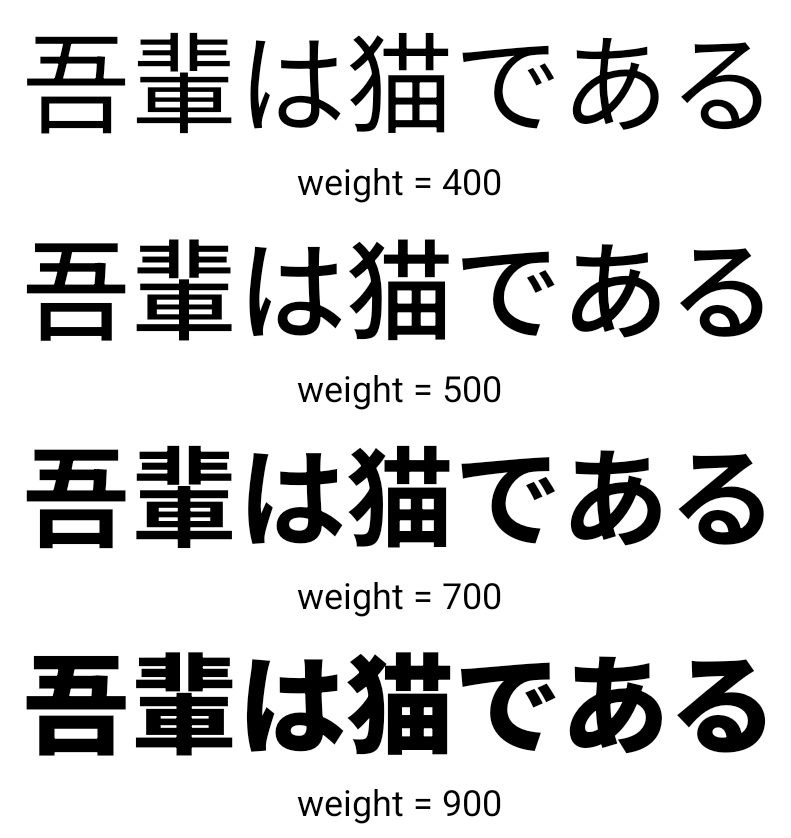
Fonte variável CJK
A partir do Android 15, o arquivo de fonte para idiomas chinês, japonês e coreano (CJK), NotoSansCJK, agora é uma fonte variável. As fontes variáveis oferecem possibilidades de tipografia criativa em idiomas CJK. Os designers podem explorar uma gama mais ampla de estilos e criar layouts visualmente atraentes que antes eram difíceis ou impossíveis de alcançar.
Justificação entre caracteres
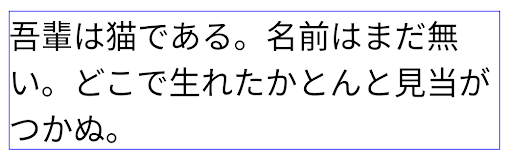
No Android 15 e versões mais recentes, o texto pode ser justificado usando o espaçamento entre letras
usando JUSTIFICATION_MODE_INTER_CHARACTER. A justificação entre palavras foi
introduzida pela primeira vez no Android 8.0 (nível 26 da API), e a justificação
entre caracteres oferece recursos semelhantes para idiomas que usam o
caractere de espaço em branco para segmentação, como chinês, japonês e outros.
JUSTIFICATION_MODE_NONE.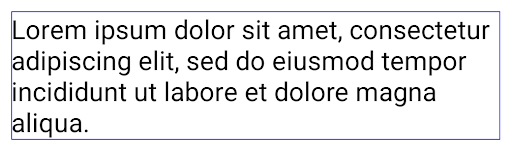
JUSTIFICATION_MODE_NONE.
JUSTIFICATION_MODE_INTER_WORD.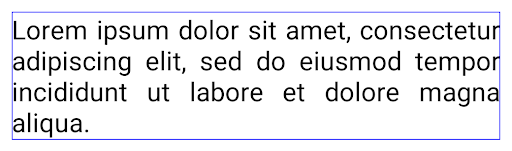
JUSTIFICATION_MODE_INTER_WORD.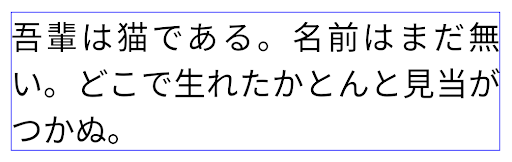
JUSTIFICATION_MODE_INTER_CHARACTER.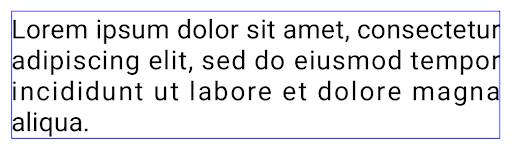
JUSTIFICATION_MODE_INTER_CHARACTER.Configuração automática de quebra de linha
O Android passou a oferecer suporte a quebras de linha baseadas em frases em japonês e coreano em
Android 13 (nível 33 da API). No entanto, embora as quebras de linha baseadas em frase melhorem
legibilidade de linhas de texto curtas, eles não funcionam bem para linhas de texto longas.
No Android 15, os apps só podem aplicar quebras de linha baseadas em frases para linhas curtas
de texto usando o método LINE_BREAK_WORD_STYLE_AUTO
é a melhor opção. Essa opção seleciona a melhor opção de estilo de palavra para o texto.
Para linhas de texto curtas, são usadas quebras de linha baseadas em frases, funcionando da mesma
como LINE_BREAK_WORD_STYLE_PHRASE, conforme mostrado no
imagem a seguir:
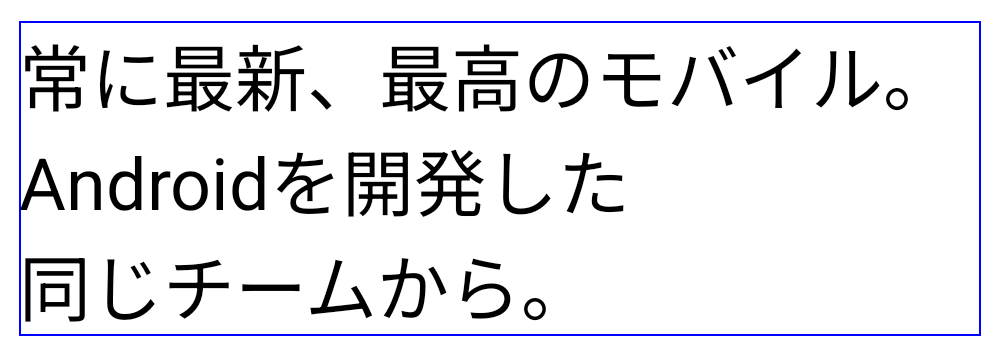
LINE_BREAK_WORD_STYLE_AUTO
aplica quebras de linha baseadas em frases para melhorar a legibilidade do texto.
Isso é o mesmo que aplicar
LINE_BREAK_WORD_STYLE_PHRASE.Para linhas de texto mais longas, LINE_BREAK_WORD_STYLE_AUTO usa um "no"
estilo de palavra com quebra de linha, funcionando da mesma forma
LINE_BREAK_WORD_STYLE_NONE, conforme mostrado no
imagem a seguir:
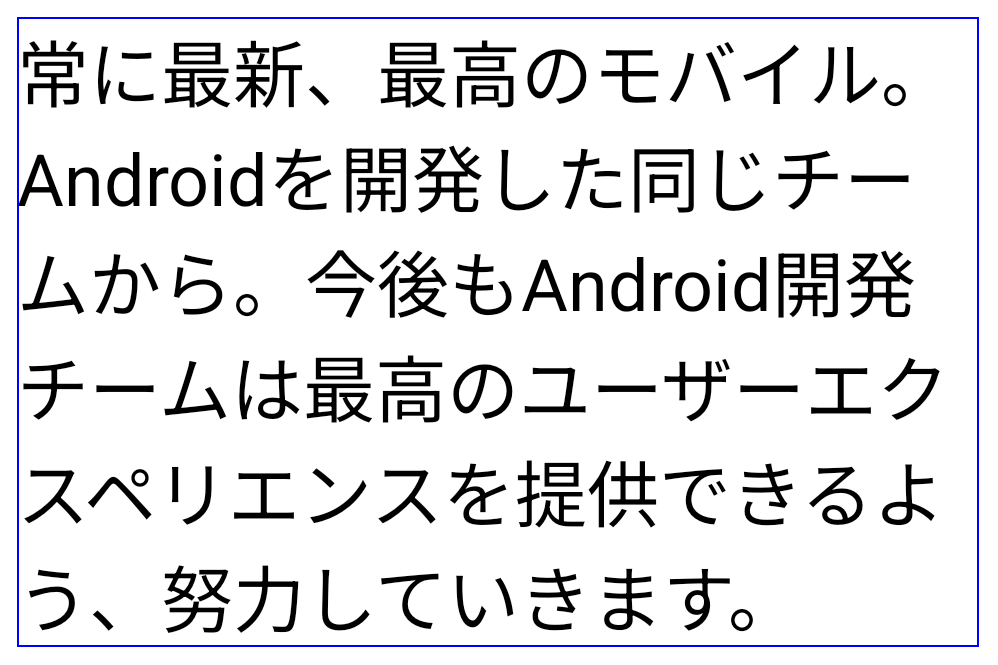
LINE_BREAK_WORD_STYLE_AUTO
não aplica estilo de palavra com quebra de linha para melhorar a legibilidade do texto.
Isso é o mesmo que aplicar
LINE_BREAK_WORD_STYLE_NONE.Fonte Hentaigana japonesa adicional
No Android 15, um arquivo de fonte do antigo hiragana japonês (conhecido como hentaigana) é empacotado por padrão. As formas únicas dos caracteres de Hentaigana podem adicionar um toque distinto a obras de arte ou designs, além de ajudar a preservar a transmissão e o entendimento precisos de documentos japoneses antigos.

Cone do VideoLAN Copyright (c) 1996-2010 VideoLAN. Esse logotipo ou uma versão modificada pode ser usado ou modificado por qualquer pessoa para se referir ao projeto VideoLAN ou a qualquer produto desenvolvido pela equipe do VideoLAN, mas não indica endosso do projeto.
Vulkan e o logotipo do Vulkan são marcas registradas do Khronos Group Inc.
O OpenGL é uma marca registrada, e o logotipo do OpenGL ES é uma marca registrada da Hewlett Packard Enterprise usada com permissão do Khronos.