

مانند نسخههای قبلی، اندروید ۱۶ شامل تغییرات رفتاری است که ممکن است بر برنامه شما تأثیر بگذارد. تغییرات رفتاری زیر منحصراً برای برنامههایی اعمال میشود که اندروید ۱۶ یا بالاتر را هدف قرار میدهند. اگر برنامه شما اندروید ۱۶ یا بالاتر را هدف قرار میدهد، باید برنامه خود را برای پشتیبانی از این رفتارها، در صورت لزوم، اصلاح کنید.
حتماً فهرست تغییرات رفتاری که صرف نظر از targetSdkVersion برنامه شما، بر همه برنامههای در حال اجرا در اندروید ۱۶ تأثیر میگذارند را نیز بررسی کنید.
تجربه کاربری و رابط کاربری سیستم
اندروید ۱۶ (سطح API ۳۶) شامل تغییرات زیر است که برای ایجاد یک تجربه کاربری سازگارتر و شهودیتر در نظر گرفته شدهاند.
کنار رفتن گزینه انصراف از لبه تا لبه
Android 15 enforced edge-to-edge for apps targeting Android 15 (API
level 35), but your app could opt-out by setting
R.attr#windowOptOutEdgeToEdgeEnforcement to true. For apps
targeting Android 16 (API level 36),
R.attr#windowOptOutEdgeToEdgeEnforcement is deprecated and disabled, and your
app can't opt-out of going edge-to-edge.
- If your app targets Android 16 (API level 36) and is running on an
Android 15 device,
R.attr#windowOptOutEdgeToEdgeEnforcementcontinues to work. - If your app targets Android 16 (API level 36) and is running on an
Android 16 device,
R.attr#windowOptOutEdgeToEdgeEnforcementis disabled.
For testing in Android 16, ensure your app supports edge-to-edge and
remove any use of R.attr#windowOptOutEdgeToEdgeEnforcement so that your app
also supports edge-to-edge on an Android 15 device. To support edge-to-edge,
see the Compose and Views guidance.
مهاجرت یا انصراف برای بازگشت پیشبینیکننده الزامی است
For apps targeting Android 16 (API level 36) or higher and running on an
Android 16 or higher device, the predictive back system animations
(back-to-home, cross-task, and cross-activity) are enabled by default.
Additionally, onBackPressed is not called and
KeyEvent.KEYCODE_BACK is not dispatched anymore.
If your app intercepts the back event and you haven't migrated to predictive
back yet, update your app to use supported back navigation APIs, or
temporarily opt out by setting the
android:enableOnBackInvokedCallback attribute to false in the
<application> or <activity> tag of your app's AndroidManifest.xml file.
APIهای فونت Elegant منسوخ و غیرفعال شدند
Apps targeting Android 15 (API level 35) have the
elegantTextHeight
TextView attribute set to true by
default, replacing the compact font with one that is much more readable. You
could override this by setting the elegantTextHeight attribute to false.
Android 16 deprecates the
elegantTextHeight attribute,
and the attribute will be ignored once your app targets Android 16. The "UI
fonts" controlled by these APIs are being discontinued, so you should adapt any
layouts to ensure consistent and future proof text rendering in Arabic, Lao,
Myanmar, Tamil, Gujarati, Kannada, Malayalam, Odia, Telugu or Thai.

elegantTextHeight behavior for apps targeting Android
14 (API level 34) and lower, or for apps targeting Android 15 (API level 35)
that overrode the default by setting the elegantTextHeight
attribute to false.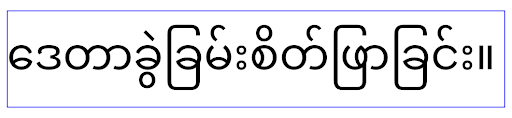
elegantTextHeight behavior for apps targeting Android
16 (API level 36), or for apps targeting Android 15 (API level 35) that didn't
override the default by setting the elegantTextHeight attribute
to false.عملکرد اصلی
اندروید ۱۶ (سطح API ۳۶) شامل تغییرات زیر است که قابلیتهای اصلی مختلف سیستم اندروید را اصلاح یا گسترش میدهد.
بهینهسازی زمانبندی کار با نرخ ثابت
قبل از هدف قرار دادن اندروید 16، زمانی که scheduleAtFixedRate اجرای یک کار را به دلیل خارج از چرخه حیات فرآیند معتبر از دست داد، همه اجراهای از دست رفته بلافاصله با بازگشت برنامه به چرخه حیات معتبر اجرا می شوند.
هنگام هدف قرار دادن Android 16، حداکثر یک اجرای از دست رفته scheduleAtFixedRate بلافاصله پس از بازگشت برنامه به چرخه حیات معتبر اجرا می شود. انتظار می رود این تغییر رفتار باعث بهبود عملکرد برنامه شود. این رفتار را در برنامه خود آزمایش کنید تا بررسی کنید آیا برنامه شما تحت تأثیر قرار گرفته است یا خیر. همچنین میتوانید با استفاده از چارچوب سازگاری برنامه و فعال کردن پرچم سازگار STPE_SKIP_MULTIPLE_MISSED_PERIODIC_TASKS آزمایش کنید.
فاکتورهای شکل دستگاه
اندروید ۱۶ (سطح API ۳۶) شامل تغییرات زیر برای برنامهها هنگام نمایش در دستگاههای صفحه نمایش بزرگ است.
طرحبندیهای تطبیقی
With Android apps now running on a variety of devices (such as phones, tablets, foldables, desktops, cars, and TVs) and windowing modes on large screens (such as split screen and desktop windowing), developers should build Android apps that adapt to any screen and window size, regardless of device orientation. Paradigms like restricting orientation and resizability are too restrictive in today's multidevice world.
Ignore orientation, resizability, and aspect ratio restrictions
For apps targeting Android 16 (API level 36), orientation, resizability, and aspect ratio restrictions no longer apply on displays with smallest width >= 600dp. Apps fill the entire display window, regardless of aspect ratio or a user's preferred orientation, and pillarboxing isn't used.
This change introduces a new standard platform behavior. Android is moving toward a model where apps are expected to adapt to various orientations, display sizes, and aspect ratios. Restrictions like fixed orientation or limited resizability hinder app adaptability. Make your app adaptive to deliver the best possible user experience.
You can also test this behavior by using the
app compatibility framework and enabling the
UNIVERSAL_RESIZABLE_BY_DEFAULT compat flag.
Common breaking changes
Ignoring orientation, resizability, and aspect ratio restrictions might impact your app's UI on some devices, especially elements that were designed for small layouts locked in portrait orientation: for example, issues like stretched layouts and off-screen animations and components. Any assumptions about aspect ratio or orientation can cause visual issues with your app. Learn more about how to avoid them and improve your app's adaptive behaviour.
Allowing device rotation results in more activity re-creation, which can result in losing user state if not properly preserved. Learn how to correctly save UI state in Save UI states.
Implementation details
The following manifest attributes and runtime APIs are ignored across large screen devices in full-screen and multi-window modes:
screenOrientationresizableActivityminAspectRatiomaxAspectRatiosetRequestedOrientation()getRequestedOrientation()
The following values for screenOrientation, setRequestedOrientation(), and
getRequestedOrientation() are ignored:
portraitreversePortraitsensorPortraituserPortraitlandscapereverseLandscapesensorLandscapeuserLandscape
Regarding display resizability, android:resizeableActivity="false",
android:minAspectRatio, and android:maxAspectRatio have no effect.
For apps targeting Android 16 (API level 36), app orientation, resizability, and aspect ratio constraints are ignored on large screens by default. Every app that isn't fully ready can temporarily override this behavior by opting out, which results in the previous behavior of being placed in compatibility mode.
Exceptions
The Android 16 orientation, resizability, and aspect ratio restrictions don't apply in the following situations:
- Games (based on the
android:appCategoryflag) - Users explicitly opting in to the app's default behavior in aspect ratio settings of the device
- Screens that are smaller than
sw600dp
Opt out temporarily
To opt out a specific activity, declare the
PROPERTY_COMPAT_ALLOW_RESTRICTED_RESIZABILITY manifest property:
<activity ...>
  <property android:name="android.window.PROPERTY_COMPAT_ALLOW_RESTRICTED_RESIZABILITY" android:value="true" />
  ...
</activity>
If too many parts of your app aren't ready for Android 16, you can opt out completely by applying the same property at the application level:
<application ...>
  <property android:name="android.window.PROPERTY_COMPAT_ALLOW_RESTRICTED_RESIZABILITY" android:value="true" />
</application>
سلامت و تناسب اندام
اندروید ۱۶ (سطح API ۳۶) شامل تغییرات زیر در رابطه با دادههای سلامت و تناسب اندام است.
مجوزهای سلامت و تناسب اندام
برای برنامههایی که اندروید ۱۶ (سطح API ۳۶) یا بالاتر را هدف قرار میدهند، مجوزهای BODY_SENSORS از مجوزهای جزئیتری تحت android.permissions.health استفاده میکنند که Health Connect نیز از آن استفاده میکند. از اندروید ۱۶، هر API که قبلاً به BODY_SENSORS یا BODY_SENSORS_BACKGROUND نیاز داشت، به جای آن به مجوز android.permissions.health مربوطه نیاز دارد. این امر بر انواع داده، APIها و انواع سرویسهای پیشزمینه زیر تأثیر میگذارد:
-
HEART_RATE_BPMاز سرویسهای سلامت در Wear OS -
Sensor.TYPE_HEART_RATEاز مدیریت حسگر اندروید -
heartRateAccuracyوheartRateBpmازProtoLayoutدر Wear OS -
FOREGROUND_SERVICE_TYPE_HEALTHکه در آن به جایBODY_SENSORSمجوزandroid.permission.healthمربوطه مورد نیاز است.
اگر برنامه شما از این APIها استفاده میکند، باید مجوزهای جزئی مربوطه را درخواست کند:
- برای نظارت بر ضربان قلب، SpO2 یا دمای پوست در حین استفاده: مجوز جزئی را در
android.permissions.healthدرخواست کنید، مانندREAD_HEART_RATEبه جایBODY_SENSORS. - برای دسترسی به حسگرهای پسزمینه: به جای
BODY_SENSORS_BACKGROUNDREAD_HEALTH_DATA_IN_BACKGROUNDدرخواست کنید.
این مجوزها همان مجوزهایی هستند که دسترسی به خواندن دادهها از Health Connect ، پایگاه داده اندروید برای دادههای سلامت، تناسب اندام و تندرستی، را محدود میکنند.
اپلیکیشنهای موبایل
برنامههای موبایلی که به استفاده از READ_HEART_RATE و سایر مجوزهای جزئی مهاجرت میکنند، باید فعالیتی را نیز برای نمایش سیاست حفظ حریم خصوصی برنامه اعلام کنند . این همان الزام Health Connect است.
اتصال
اندروید ۱۶ (سطح API ۳۶) شامل تغییرات زیر در پشته بلوتوث برای بهبود اتصال با دستگاههای جانبی است.
اهداف جدید برای مدیریت از دست دادن اوراق قرضه و تغییرات رمزگذاری
به عنوان بخشی از بهبود مدیریت از دست دادن اوراق قرضه ، اندروید 16 همچنین 2 هدف جدید را معرفی می کند تا برنامه ها را با آگاهی بیشتر از از دست دادن اوراق قرضه و تغییرات رمزگذاری ارائه کند.
برنامه هایی که اندروید 16 را هدف قرار می دهند اکنون می توانند:
- هنگامی که از دست دادن اوراق قرضه از راه دور شناسایی شد، یک هدف
ACTION_KEY_MISSINGدریافت کنید، که به آنها امکان می دهد بازخورد آموزنده تری از کاربر ارائه دهند و اقدامات مناسب را انجام دهند. - هر زمان که وضعیت رمزگذاری پیوند تغییر کرد، یک هدف
ACTION_ENCRYPTION_CHANGEدریافت کنید. این شامل تغییر وضعیت رمزگذاری، تغییر الگوریتم رمزگذاری و تغییر اندازه کلید رمزگذاری است. اگر بعداً پس از دریافت هدفACTION_ENCRYPTION_CHANGEپیوند با موفقیت رمزگذاری شد، برنامهها باید پیوند را بازیابی شده در نظر بگیرند.
انطباق با پیاده سازی های مختلف OEM
در حالی که اندروید 16 این اهداف جدید را معرفی میکند، پیادهسازی و پخش آنها میتواند در تولیدکنندگان مختلف دستگاه (OEM) متفاوت باشد. برای اطمینان از اینکه برنامه شما یک تجربه ثابت و قابل اعتماد را در همه دستگاهها ارائه میکند، توسعهدهندگان باید مدیریت تلفات اوراق قرضه خود را طوری طراحی کنند که بهخوبی با این تغییرات بالقوه سازگار شوند.
ما رفتارهای برنامه زیر را توصیه می کنیم:
اگر هدف
ACTION_KEY_MISSINGپخش شود:پیوند ACL (اتصال ناهمگام-کمتر) توسط سیستم قطع خواهد شد، اما اطلاعات پیوند دستگاه حفظ خواهد شد (همانطور که در اینجا توضیح داده شده است).
برنامه شما باید از این هدف بهعنوان سیگنال اصلی برای تشخیص از دست دادن اوراق قرضه استفاده کند و کاربر را راهنمایی کند تا قبل از شروع فراموشی یا جفتسازی مجدد دستگاه تأیید کند که دستگاه راه دور در محدوده است.
اگر دستگاهی پس از دریافت
ACTION_KEY_MISSINGقطع شود، برنامه شما باید در مورد اتصال مجدد محتاط باشد، زیرا ممکن است دستگاه دیگر به سیستم متصل نباشد.اگر هدف
ACTION_KEY_MISSINGپخش نشد:پیوند ACL متصل باقی میماند، و اطلاعات پیوند دستگاه توسط سیستم حذف میشود، مانند رفتار در Android 15.
در این سناریو، برنامه شما باید به مکانیسمهای مدیریت از دست دادن اوراق قرضه موجود خود مانند نسخههای قبلی اندروید ادامه دهد تا رویدادهای از دست دادن اوراق قرضه را شناسایی و مدیریت کند.
روش جدید برای حذف اتصال بلوتوث
All apps targeting Android 16 are now able to unpair bluetooth devices using a
public API in CompanionDeviceManager. If a companion device is
being managed as a CDM association, then the app can trigger
bluetooth bond removal by using the new removeBond(int) API
on the associated device. The app can monitor the bond state changes by
listening to the bluetooth device broadcast event
ACTION_BOND_STATE_CHANGED.
امنیت
اندروید ۱۶ (سطح API ۳۶) شامل تغییرات امنیتی زیر است.
قفل شدن نسخه MediaStore
For apps targeting Android 16 or higher, MediaStore#getVersion() will now
be unique to each app. This eliminates identifying properties from the version
string to prevent abuse and usage for fingerprinting techniques. Apps shouldn't
make any assumptions around the format of this version. Apps should already
handle version changes when using this API and in most cases shouldn't need to
change their current behavior, unless the developer has attempted to infer
additional information that is beyond the intended scope of this API.
مقاصد امنتر
The Safer Intents feature is a multi-phase security initiative designed to improve the security of Android's intent resolution mechanism. The goal is to protect apps from malicious actions by adding checks during intent processing and filtering intents that don't meet specific criteria.
In Android 15 the feature focused on the sending app. Now with Android 16, control shifts to the receiving app, allowing developers to opt-in to strict intent resolution using their app manifest.
Two key changes are being implemented:
Explicit Intents Must Match the Target Component's Intent Filter: If an intent explicitly targets a component, it should match that component's intent filter.
Intents Without an Action Cannot Match any Intent Filter: Intents that don't have an action specified shouldn't be resolved to any intent filter.
These changes only apply when multiple apps are involved and don't affect intent handling within a single app.
Impact
The opt-in nature means that developers must explicitly enable it in their app manifest for it to take effect. As a result, the feature's impact will be limited to apps whose developers:
- Are aware of the Safer Intents feature and its benefits.
- Actively choose to incorporate stricter intent handling practices into their apps.
This opt-in approach minimizes the risk of breaking existing apps that may rely on the current less-secure intent resolution behavior.
While the initial impact in Android 16 may be limited, the Safer Intents initiative has a roadmap for broader impact in future Android releases. The plan is to eventually make strict intent resolution the default behavior.
The Safer Intents feature has the potential to significantly enhance the security of the Android ecosystem by making it more difficult for malicious apps to exploit vulnerabilities in the intent resolution mechanism.
However, the transition to opt-out and mandatory enforcement must be carefully managed to address potential compatibility issues with existing apps.
Implementation
Developers need to explicitly enable stricter intent matching using the
intentMatchingFlags attribute in their app manifest.
Here is an example where the feature is opt-in for the entire app,
but disabled/opt-out on a receiver:
<application android:intentMatchingFlags="enforceIntentFilter">
    <receiver android:name=".MyBroadcastReceiver" android:exported="true" android:intentMatchingFlags="none">
        <intent-filter>
            <action android:name="com.example.MY_CUSTOM_ACTION" />
        </intent-filter>
        <intent-filter>
            <action android:name="com.example.MY_ANOTHER_CUSTOM_ACTION" />
        </intent-filter>
    </receiver>
</application>
More on the supported flags:
| Flag Name | Description |
|---|---|
| enforceIntentFilter | Enforces stricter matching for incoming intents |
| none | Disables all special matching rules for incoming intents. When specifying multiple flags, conflicting values are resolved by giving precedence to the "none" flag |
| allowNullAction | Relaxes the matching rules to allow intents without an action to match. This flag to be used in conjunction with "enforceIntentFilter" to achieve a specific behavior |
Testing and Debugging
When the enforcement is active, apps should function correctly if the intent
caller has properly populated the intent.
However, blocked intents will trigger warning log messages like
"Intent does not match component's intent filter:" and "Access blocked:"
with the tag "PackageManager."
This indicates a potential issue that could impact the app and requires
attention.
Logcat filter:
tag=:PackageManager & (message:"Intent does not match component's intent filter:" | message: "Access blocked:")
فیلتر کردن فراخوانیهای سیستمی GPU
برای مقاومسازی سطح پردازنده گرافیکی Mali، IOCTLهای پردازنده گرافیکی Mali که منسوخ شدهاند یا صرفاً برای توسعه پردازنده گرافیکی در نظر گرفته شدهاند، در نسخههای تولیدی مسدود شدهاند. علاوه بر این، IOCTLهای مورد استفاده برای پروفایلسازی پردازنده گرافیکی به فرآیند پوسته یا برنامههای اشکالزداییشده محدود شدهاند. برای جزئیات بیشتر در مورد سیاست سطح پلتفرم، به بهروزرسانی SAC مراجعه کنید.
این تغییر در دستگاههای پیکسل که از پردازنده گرافیکی Mali (پیکسل ۶-۹) استفاده میکنند، رخ میدهد. آرم دستهبندی رسمی IOCTL های خود را در Documentation/ioctl-categories.rst از نسخه r54p2 خود ارائه کرده است. این لیست در نسخههای درایور آینده همچنان حفظ خواهد شد.
این تغییر بر APIهای گرافیکی پشتیبانیشده (از جمله Vulkan و OpenGL) تأثیری ندارد و انتظار نمیرود که توسعهدهندگان یا برنامههای موجود را نیز تحت تأثیر قرار دهد. ابزارهای پروفایلینگ GPU مانند Streamline Performance Analyzer و Android GPU Inspector تحت تأثیر قرار نخواهند گرفت.
آزمایش
اگر با خطای عدم پذیرش SELinux مشابه تصویر زیر مواجه شدید، احتمالاً برنامه شما تحت تأثیر این تغییر قرار گرفته است:
06-30 10:47:18.617 20360 20360 W roidJUnitRunner: type=1400 audit(0.0:85): avc:  denied  { ioctl }
for  path="/dev/mali0" dev="tmpfs" ino=1188 ioctlcmd=0x8023
scontext=u:r:untrusted_app_25:s0:c512,c768 tcontext=u:object_r:gpu_device:s0 tclass=chr_file
permissive=0 app=com.google.android.selinux.pts
اگر برنامه شما نیاز به استفاده از IOCTL های مسدود شده دارد، لطفاً یک اشکال (bug) ثبت کنید و آن را به android-partner-security@google.com ارجاع دهید.
سوالات متداول
آیا این تغییر سیاست برای همه تولیدکنندگان اصلی تجهیزات (OEM) اعمال میشود؟ این تغییر اختیاری خواهد بود، اما برای هر تولیدکننده اصلی تجهیزاتی که مایل به استفاده از این روش مقاومسازی باشند، در دسترس خواهد بود. دستورالعملهای اجرای این تغییر را میتوانید در مستندات پیادهسازی بیابید.
آیا برای پیادهسازی این تغییر، ایجاد تغییرات در کدبیس تولیدکننده اصلی (OEM) اجباری است یا اینکه بهطور پیشفرض با یک نسخه جدید AOSP همراه خواهد بود؟ تغییر در سطح پلتفرم بهطور پیشفرض با یک نسخه جدید AOSP همراه خواهد بود. فروشندگان میتوانند در صورت تمایل به اعمال این تغییر در کدبیس خود، آن را بپذیرند.
آیا SoCها مسئول بهروز نگه داشتن لیست IOCTL هستند؟ به عنوان مثال، اگر دستگاه من از پردازنده گرافیکی ARM Mali استفاده میکند، آیا باید برای هرگونه تغییر با ARM تماس بگیرم؟ SoCهای جداگانه باید لیستهای IOCTL خود را برای هر دستگاه پس از انتشار درایور بهروزرسانی کنند. به عنوان مثال، ARM لیست IOCTL منتشر شده خود را پس از بهروزرسانی درایور بهروزرسانی میکند. با این حال، OEMها باید مطمئن شوند که بهروزرسانیها را در SEPolicy خود لحاظ میکنند و در صورت نیاز، IOCTLهای سفارشی انتخاب شده را به لیستها اضافه میکنند.
آیا این تغییر به طور خودکار برای همه دستگاههای پیکسل موجود در بازار اعمال میشود یا برای اعمال این تغییر، اقدام کاربر لازم است؟ این تغییر برای همه دستگاههای پیکسل موجود در بازار که از پردازنده گرافیکی Mali استفاده میکنند (پیکسل ۶-۹) اعمال میشود. برای اعمال این تغییر نیازی به اقدام کاربر نیست.
آیا استفاده از این سیاست بر عملکرد درایور هسته تأثیر میگذارد؟ این سیاست با استفاده از GFXBench روی پردازنده گرافیکی Mali آزمایش شد و هیچ تغییر قابل اندازهگیری در عملکرد پردازنده گرافیکی مشاهده نشد.
آیا لازم است لیست IOCTL با نسخههای فعلی درایور فضای کاربری و هسته هماهنگ شود؟ بله، لیست IOCTLهای مجاز باید با IOCTLهای پشتیبانی شده توسط درایورهای فضای کاربری و هسته هماهنگ شوند. اگر IOCTLهای موجود در فضای کاربری یا درایور هسته بهروزرسانی شوند، لیست IOCTL در SEPolicy نیز باید بهروزرسانی شود تا با آنها مطابقت داشته باشد.
ARM، IOCTLها را به عنوان «محدود» / «ابزار دقیق» طبقهبندی کرده است، اما ما میخواهیم از برخی از آنها در موارد استفاده در تولید استفاده کنیم و/یا برخی دیگر را رد کنیم. تولیدکنندگان اصلی تجهیزات/SoCها مسئول تصمیمگیری در مورد نحوه طبقهبندی IOCTLهایی هستند که بر اساس پیکربندی کتابخانههای Mali فضای کاربری خود، استفاده میکنند. فهرست ARM میتواند برای تصمیمگیری در مورد این موارد استفاده شود، اما موارد استفاده هر تولیدکننده اصلی تجهیزات/SoC ممکن است متفاوت باشد.
حریم خصوصی
اندروید ۱۶ (سطح API ۳۶) شامل تغییرات حریم خصوصی زیر است.
مجوز شبکه محلی
Devices on the LAN can be accessed by any app that has the INTERNET permission.
This makes it easy for apps to connect to local devices but it also has privacy
implications such as forming a fingerprint of the user, and being a proxy for
location.
The Local Network Protections project aims to protect the user's privacy by gating access to the local network behind a new runtime permission.
Release plan
This change will be deployed between two releases, 25Q2 and 26Q2 respectively. It is imperative that developers follow this guidance for 25Q2 and share feedback because these protections will be enforced at a later Android release. Moreover, they will need to update scenarios which depend on implicit local network access by using the following guidance and prepare for user rejection and revocation of the new permission.
Impact
At the current stage, LNP is an opt-in feature which means only the apps that opt in will be affected. The goal of the opt-in phase is for app developers to understand which parts of their app depend on implicit local network access such that they can prepare to permission guard them for the next release.
Apps will be affected if they access the user's local network using:
- Direct or library use of raw sockets on local network addresses (e.g. mDNS or SSDP service discovery protocol)
- Use of framework level classes that access the local network (e.g. NsdManager)
Traffic to and from a local network address requires local network access permission. The following table lists some common cases:
| App Low Level Network Operation | Local Network Permission Required |
|---|---|
| Making an outgoing TCP connection | yes |
| Accepting incoming TCP connections | yes |
| Sending a UDP unicast, multicast, broadcast | yes |
| Receiving an incoming UDP unicast, multicast, broadcast | yes |
These restrictions are implemented deep in the networking stack, and thus they apply to all networking APIs. This includes sockets created in native or managed code, networking libraries like Cronet and OkHttp, and any APIs implemented on top of those. Trying to resolve services on the local network (i.e. those with a .local suffix) will require local network permission.
Exceptions to the rules above:
- If a device's DNS server is on a local network, traffic to or from it (at port 53) doesn't require local network access permission.
- Applications using Output Switcher as their in-app picker won't need local network permissions (more guidance to come in 2025Q4).
Developer Guidance (Opt-in)
To opt into local network restrictions, do the following:
- Flash the device to a build with 25Q2 Beta 3 or later.
- Install the app to be tested.
Toggle the Appcompat flag in adb:
adb shell am compat enable RESTRICT_LOCAL_NETWORK <package_name>Reboot The device
Now your app's access to the local network is restricted and any attempt to access the local network will lead to socket errors. If you are using APIs that perform local network operations outside of your app process (ex: NsdManager), they won't be impacted during the opt-in phase.
To restore access, you must grant your app permission to NEARBY_WIFI_DEVICES.
- Ensure the app declares the
NEARBY_WIFI_DEVICESpermission in its manifest. - Go to Settings > Apps > [Application Name] > Permissions > Nearby devices > Allow.
Now your app's access to the local network should be restored and all your scenarios should work as they did prior to opting the app in.
Once enforcement for local network protection begins, here is how the app network traffic will be impacted.
| Permission | Outbound LAN Request | Outbound/Inbound Internet Request | Inbound LAN Request |
|---|---|---|---|
| Granted | Works | Works | Works |
| Not Granted | Fails | Works | Fails |
Use the following command to toggle-off the App-Compat flag
adb shell am compat disable RESTRICT_LOCAL_NETWORK <package_name>
Errors
Errors arising from these restrictions will be returned to the calling socket whenever it invokes send or a send variant to a local network address.
Example errors:
sendto failed: EPERM (Operation not permitted)

sendto failed: ECONNABORTED (Operation not permitted)
Local Network Definition
A local network in this project refers to an IP network that utilizes a broadcast-capable network interface, such as Wi-Fi or Ethernet, but excludes cellular (WWAN) or VPN connections.
The following are considered local networks:
IPv4:
- 169.254.0.0/16 // Link Local
- 100.64.0.0/10 // CGNAT
- 10.0.0.0/8 // RFC1918
- 172.16.0.0/12 // RFC1918
- 192.168.0.0/16 // RFC1918
IPv6:
- Link-local
- Directly-connected routes
- Stub networks like Thread
- Multiple-subnets (TBD)
Additionally, both multicast addresses (224.0.0.0/4, ff00::/8) and the IPv4 broadcast address (255.255.255.255) are classified as local network addresses.
عکسهای متعلق به برنامه
When prompted for photo and video permissions by an app targeting SDK 36 or higher on devices running Android 16 or higher, users who choose to limit access to selected media will see any photos owned by the app pre-selected in the photo picker. Users can deselect any of these pre-selected items, which will revoke the app's access to those photos and videos.