

Este guia descreve como integrar seu app às APIs da Biblioteca Play Faturamento para oferecer a opção de faturamento aos usuários.
Integração com a PBL
É possível integrar a opção de faturamento à PBL em quatro cenários. Os cenários variam de acordo com quem renderiza a tela de escolha e onde o pagamento será feito. A tabela a seguir descreve os cenários de integração:
| Qual tela de escolha de faturamento você quer renderizar? | |||
| Do Google Play | Sua própria (de acordo com as diretrizes de UX) | ||
| Onde o pagamento acontece? | No app | Cenário 1A
O Google renderiza a tela de escolha, e o faturamento alternativo é processado no seu app. |
Cenário 1B
O desenvolvedor do app renderiza a tela de escolha, e o faturamento alternativo é processado no seu app. |
| Link da Web externo | Cenário 2A
O Google renderiza a tela de escolha, e o usuário é vinculado a sites externos para fazer compras. |
Cenário 2B
O desenvolvedor do app renderiza a tela de escolha, e o usuário é vinculado a sites externos para fazer compras. |
|
A ilustração a seguir detalha o fluxo de escolha de faturamento para cada um desses cenários:
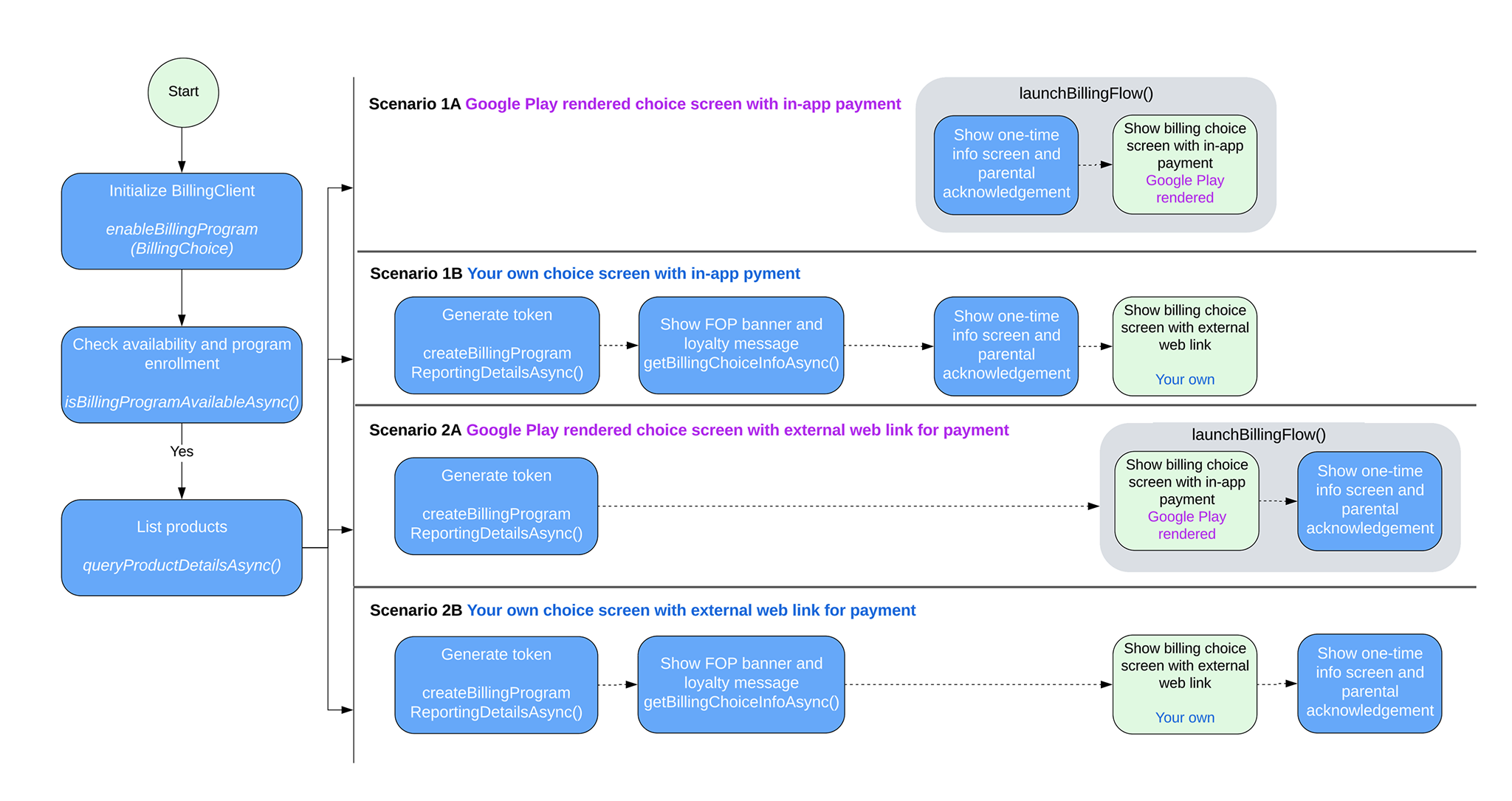
Cenários de integração da PBL
Dependendo do cenário de integração, siga as etapas desta seção para implementar a opção de faturamento no seu app.
Processar o cenário 1A
O Google renderiza a tela de escolha, e o faturamento alternativo é processado no seu app. Siga estas etapas para ativar a opção de faturamento nesse cenário:
Chame
enableBillingProgramcomEnableBillingProgramParamsao construir a instância do BillingClient e inicie a conexão. Exemplo:Kotlin
// Build the parameters to enable the Billing Choice program and assign the listener // to handle user selection of the developer-provided billing option. val params = EnableBillingProgramParams.newBuilder() .setBillingProgram(BillingProgram.BILLING_CHOICE) .setDeveloperProvidedBillingListener(developerProvidedBillingListener) .build() // Build the parameters to enable support for pending purchases. val pendingPurchasesParams = PendingPurchasesParams.newBuilder() .enableOneTimeProducts() .build() // Construct the BillingClient instance with the purchases updated listener, // pending purchases support, and the billing choice params. val billingClient = BillingClient.newBuilder(context) .setListener(purchasesUpdatedListener) .enablePendingPurchases(pendingPurchasesParams) .enableBillingProgram(params) .build() // Establish a connection to Google Play val billingResult = suspendCancellableCoroutine{ continuation -> billingClient.startConnection(object : BillingClientStateListener { // Called when the connection setup process completes. override fun onBillingSetupFinished(billingResult: BillingResult) { // Resume the coroutine and pass back the BillingResult to the caller. continuation.resume(billingResult) } // Called if the connection to the Play Store service is dropped. // This prevents the await or suspension point from hanging indefinitely. override fun onBillingServiceDisconnected() { continuation.resume( BillingResult.newBuilder() .setResponseCode(BillingClient.BillingResponseCode.SERVICE_DISCONNECTED) .setDebugMessage("Billing service disconnected during connection setup") .build() ) } }) } Java
EnableBillingProgramParams params = EnableBillingProgramParams.newBuilder()
        .setBillingProgram(BillingProgram.BILLING_CHOICE)
        .setDeveloperProvidedBillingListener(developerProvidedBillingListener)
        .build();

BillingClient billingClient = BillingClient.newBuilder(context)
        .setListener(purchasesUpdatedListener)
        .enablePendingPurchases(
                PendingPurchasesParams.newBuilder()
                        .enableOneTimeProducts()
                        .build()
        )
        .enableBillingProgram(params)
        .build();
Verifique se a opção de faturamento renderizada pelo Google está disponível para o usuário.
Chame
isBillingProgramAvailableAsyncpara verificar a disponibilidade do programa e, em seguida, chamequeryProductDetailsAsyncpara mostrar os produtos disponíveis. Exemplo:Kotlin
val (billingResult, billingProgramAvailabilityDetails) = billingClient.isBillingProgramAvailable(BillingProgram.BILLING_CHOICE)

if (billingResult.responseCode == BillingResponseCode.OK) {
    val billingChoiceAvailabilityDetails = billingProgramAvailabilityDetails.billingChoiceAvailabilityDetails
    if (billingChoiceAvailabilityDetails != null &&
        billingChoiceAvailabilityDetails.choiceScreenType == ChoiceScreenType.GOOGLE_RENDERED
    ) {
        // Billing choice is available. Query products and proceed.

    } else {
        // Fallback to other available programs.
    }
} else {
    // Fallback to other available programs.
}
Java
// ... billingClient.isBillingProgramAvailableAsync( BillingProgram.BILLING_CHOICE, (billingResult, billingProgramAvailabilityDetails) -> { if (billingResult.getResponseCode() == BillingResponseCode.OK) { BillingChoiceAvailabilityDetails billingChoiceAvailabilityDetails = billingProgramAvailabilityDetails.getBillingChoiceAvailabilityDetails(); if (billingChoiceAvailabilityDetails != null && billingChoiceAvailabilityDetails.getChoiceScreenType() == ChoiceScreenType.GOOGLE_RENDERED) { // Billing choice is available. Query products and proceed. } else { // Fallback to other available programs. } } else { // Fallback to other available programs. } } );Observação:
billingProgramAvailabilityDetailsinforma se a tela de escolha de faturamento renderizada pelo Google ou pelo desenvolvedor está disponível.Chame
launchBillingFlowpara acionar o fluxo de compra quando o usuário clicar em "Comprar". Se a opção de faturamento estiver disponível, transmitaDeveloperBillingOptionParamsparaBillingFlowParams. Exemplo:Kotlin
val developerBillingOptionParams = DeveloperBillingOptionParams.newBuilder()
    .setBillingProgram(BillingProgram.BILLING_CHOICE)
    .build()

val billingFlowParams = BillingFlowParams.newBuilder()
    .setProductDetailsParamsList(productDetailsParamsList)
    .enableDeveloperBillingOption(developerBillingOptionParams)
    .build()

val billingResult = billingClient.launchBillingFlow(activity, billingFlowParams)
Java
DeveloperBillingOptionParams developerBillingOptionParams = DeveloperBillingOptionParams.newBuilder() .setBillingProgram(BillingProgram.BILLING_CHOICE) .build(); BillingFlowParams billingFlowParams = BillingFlowParams.newBuilder() .setProductDetailsParamsList(productDetailsParamsList) .enableDeveloperBillingOption(developerBillingOptionParams) .build(); BillingResult billingResult = billingClient.launchBillingFlow(activity, billingFlowParams);Observação: o controle da família é mostrado para usuários supervisionados.
Processe a seleção do tipo de faturamento do usuário da seguinte maneira:
- Se o usuário selecionar o Google Play Faturamento, o resultado será retornado ao
PurchasesUpdatedListenerregistrado na etapa 1. - Se o usuário selecionar seu faturamento alternativo, o resultado será
retornado ao
DeveloperProvidedBillingListenerregistrado na etapa 1. Nesse caso, oDeveloperProvidedBillingDetailsretornado contém umexternalTransactionToken. O token será usado para relatórios de transações.
- Se o usuário selecionar o Google Play Faturamento, o resultado será retornado ao
Processar o cenário 1B
O desenvolvedor renderiza a tela de escolha, e o faturamento alternativo é processado no seu app. Siga estas etapas para ativar a opção de faturamento nesse cenário:
Chame
enableBillingProgramsem oDeveloperProvidedBillingListeneremEnableBillingProgramParamsao construir umaBillingClientinstância e inicie a conexão. Exemplo:Kotlin
// Build the parameters to enable the Billing Choice program.
val params = EnableBillingProgramParams.newBuilder()
    .setBillingProgram(BillingProgram.BILLING_CHOICE)
    .build()

// Construct the BillingClient instance with the purchases updated listener,
// pending purchases support, and the billing choice params.
val billingClient = BillingClient.newBuilder(context)
    .setListener(purchasesUpdatedListener)
    .enablePendingPurchases()
    .enableBillingProgram(params)
    .build()

// Establish a connection to Google Play
val billingResult = suspendCancellableCoroutine<BillingResult> { continuation ->
    billingClient.startConnection(object : BillingClientStateListener {
        // Called when the connection setup process completes.
        override fun onBillingSetupFinished(billingResult: BillingResult) {
            // Resume the coroutine and pass back the BillingResult to the caller.
            continuation.resume(billingResult)
        }

        // Called if the connection to the Play Store service is dropped.
        // This prevents the await or suspension point from hanging indefinitely.
        override fun onBillingServiceDisconnected() {
            continuation.resume(
                BillingResult.newBuilder()
                    .setResponseCode(BillingClient.BillingResponseCode.SERVICE_DISCONNECTED)
                    .setDebugMessage("Billing service disconnected during connection setup")
                    .build()
            )
        }
    })
}
Java
EnableBillingProgramParams params = EnableBillingProgramParams.newBuilder()
        .setBillingProgram(BillingProgram.BILLING_CHOICE)
        .build();

BillingClient billingClient = BillingClient.newBuilder(context)
        .setListener(purchasesUpdatedListener)
        .enablePendingPurchases()
        .enableBillingProgram(params)
        .build();
Verifique se a opção de faturamento renderizada pelo desenvolvedor está disponível para o usuário.
Chame
isBillingProgramAvailableAsyncpara verificar a disponibilidade do programa e, em seguida, chamequeryProductDetailsAsyncpara mostrar os produtos disponíveis. Exemplo:Kotlin
val (billingResult, billingProgramAvailabilityDetails) =
    billingClient.isBillingProgramAvailable(BillingProgram.BILLING_CHOICE)

if (billingResult.responseCode == BillingResponseCode.OK) {
    val billingChoiceAvailabilityDetails =
        billingProgramAvailabilityDetails.billingChoiceAvailabilityDetails

    if (billingChoiceAvailabilityDetails != null &&
        billingChoiceAvailabilityDetails.choiceScreenType == ChoiceScreenType.DEVELOPER_RENDERED
    ) {
        // Billing choice is available. Query products and proceed.
        // You can inspect details such as:
        // - billingChoiceAvailabilityDetails.choiceScreenType
        // - billingChoiceAvailabilityDetails.isExternalLinkAvailable
    } else {
        // Fallback to other available programs.
    }
} else {
    // Fallback to other available programs.
}
Java
// ... billingClient.isBillingProgramAvailableAsync( BillingProgram.BILLING_CHOICE, (billingResult, billingProgramAvailabilityDetails) -> { if (billingResult.getResponseCode() == BillingResponseCode.OK) { BillingChoiceAvailabilityDetails billingChoiceAvailabilityDetails = billingProgramAvailabilityDetails.getBillingChoiceAvailabilityDetails(); if (billingChoiceAvailabilityDetails != null && billingChoiceAvailabilityDetails.getChoiceScreenType() == ChoiceScreenType.DEVELOPER_RENDERED) { // Billing choice is available. Query products and proceed. // You can inspect details such as: // - billingChoiceAvailabilityDetails.getChoiceScreenType() // - billingChoiceAvailabilityDetails.isExternalLinkAvailable() } else { // Fallback to other available programs. } } else { // Fallback to other available programs. } } );Observação:
billingProgramAvailabilityDetailsinforma se a tela de escolha de faturamento renderizada pelo Google ou pelo desenvolvedor está disponível.Chame o método
getBillingChoiceInfoAsyncpara receber o banner do Google Play Faturamento e informações de fidelidade. Exemplo:Kotlin
// 1. Create the params required for the request
val params = GetBillingChoiceInfoParams.newBuilder()
    .setBillingProgram(BillingClient.BillingProgram.BILLING_CHOICE)
    .setPlayBillingChoiceImageLayout(GetBillingChoiceInfoParams.ImageLayout.RECTANGULAR_FOUR_BY_ONE)
    .build()

// 2. Call the suspend method on your billingClient instance
val (billingResult, playBillingChoiceInfo) = billingClient.getBillingChoiceInfo(params)

if (billingResult.responseCode == BillingResponseCode.OK && playBillingChoiceInfo != null) {
    // Access the URL of the image associated with the Play Billing Choice
    val imageUrl = playBillingChoiceInfo.playBillingChoiceImageUrl

    // Access the Play Loyalty string information, if available
    val loyaltyInfo = playBillingChoiceInfo.playBillingLoyaltyInfo

    // Populate your developer-rendered UI elements
    playBillingLoyaltyTextView.text = loyaltyInfo
    loadImage(imageUrl, playBillingImageView)
} else {
    // Handle error scenarios
}
Java
// 1. Create the params required for the request
GetBillingChoiceInfoParams params = GetBillingChoiceInfoParams.newBuilder()
    .setBillingProgram(BillingClient.BillingProgram.BILLING_CHOICE)
    .setPlayBillingChoiceImageLayout(GetBillingChoiceInfoParams.ImageLayout.RECTANGULAR_FOUR_BY_ONE)
    .build();
// 2. Call the method asynchronously on your billingClient instance
billingClient.getBillingChoiceInfoAsync(params, (billingResult, playBillingChoiceInfo) -> {
    if (billingResult.getResponseCode() == BillingResponseCode.OK && playBillingChoiceInfo != null) {
      // Access the URL of the image associated with the Play Billing Choice
        String imageUrl = playBillingChoiceInfo.getPlayBillingChoiceImageUrl();
        // Access the Play Loyalty string information, if available
        String loyaltyInfo = playBillingChoiceInfo.getPlayBillingLoyaltyInfo();

        // Populate your developer-rendered UI elements
        playBillingLoyaltyTextView.setText(loyaltyInfo);
          loadImage(imageUrl, playBillingImageView);
      } else {
          // Handle error scenarios
      }
});
Crie um token de transação externa com o DeveloperBillingType definido como IN_APP. Exemplo:
Kotlin
// Build the parameters specifying the billing program and that the billing type is IN_APP.
val params = BillingProgramReportingDetailsParams.newBuilder()
    .setBillingProgram(BillingProgram.BILLING_CHOICE)
    .setDeveloperBillingType(DeveloperBillingType.IN_APP)
    .build()

// Call the suspending extension function to request the reporting details
val (billingResult, billingProgramReportingDetails) =
    billingClient.createBillingProgramReportingDetails(params)

if (billingResult.responseCode != BillingResponseCode.OK) {
    // Handle failures such as retrying due to network errors.
    return
}

// Extract the transaction token from the returned reporting details
val transactionToken = billingProgramReportingDetails?.externalTransactionToken

// Persist the external transaction token locally. Pass it to
// DeveloperBillingOptionParams when launchBillingFlow is called.
// It can also be used as part of your external website
Java
BillingProgramReportingDetailsParams params =
    BillingProgramReportingDetailsParams.newBuilder()
        .setBillingProgram(BillingProgram.BILLING_CHOICE)
        .setDeveloperBillingType(DeveloperBillingType.IN_APP)
        .build();

billingClient.createBillingProgramReportingDetailsAsync(
    params,
    new BillingProgramReportingDetailsListener() {
        @Override
        public void onCreateBillingProgramReportingDetailsResponse(
            BillingResult billingResult,
            @Nullable BillingProgramReportingDetails billingProgramReportingDetails
        ) {
            if (billingResult.getResponseCode() != BillingResponseCode.OK) {
                // Handle failures such as retrying due to network errors.
                return;
            }

            String transactionToken =
                billingProgramReportingDetails.getExternalTransactionToken();

            // Persist the external transaction token locally. Pass it to
            // DeveloperBillingOptionParams when launchBillingFlow is called.
            // It can also be used as part of your external website
        }
    }
);
Quando o usuário clicar em "Comprar", chame
showBillingProgramInformationDialogpara mostrar uma caixa de diálogo de informações. Por exemplo, consulte Caixa de diálogo de informações para os usuários. BillingProgram e transactionToken da etapa 4 precisam ser definidos na solicitação.Observação: o controle da família é mostrado para usuários supervisionados.
Inicie a tela de escolha de faturamento alternativo se o resultado da etapa anterior for
OK.Processe a seleção do tipo de faturamento do usuário da seguinte maneira:
- Se o usuário selecionar o Google Play Faturamento, chame
launchBillingFlowseguindo as orientações padrão do Google Play Faturamento. O resultado do faturamento é retornado aoPurchasesUpdatedListenerregistrado na etapa 1. - Se o usuário selecionar seu faturamento alternativo, você precisará processar a transação e informá-la ao Google Play usando o token gerado na etapa 4.
- Se o usuário selecionar o Google Play Faturamento, chame
Processar o cenário 2A
O Google renderiza a tela de escolha, e o faturamento alternativo é processado fora do seu app. Siga estas etapas para ativar a opção de faturamento nesse cenário:
Chame
enableBillingProgramcomEnableBillingProgramParamsao construir a instância do BillingClient e inicie a conexão. Exemplo:Kotlin
// Build the parameters to enable the Billing Choice program and assign the listener // to handle user selection of the developer-provided billing option. val params = EnableBillingProgramParams.newBuilder() .setBillingProgram(BillingProgram.BILLING_CHOICE) .setDeveloperProvidedBillingListener(developerProvidedBillingListener) .build() // Build the parameters to enable support for pending purchases. val pendingPurchasesParams = PendingPurchasesParams.newBuilder() .enableOneTimeProducts() .build() // Construct the BillingClient instance with the purchases updated listener, // pending purchases support, and the billing choice params. val billingClient = BillingClient.newBuilder(context) .setListener(purchasesUpdatedListener) .enablePendingPurchases(pendingPurchasesParams) .enableBillingProgram(params) .build() // Establish a connection to Google Play val billingResult = suspendCancellableCoroutine{ continuation -> billingClient.startConnection(object : BillingClientStateListener { // Called when the connection setup process completes. override fun onBillingSetupFinished(billingResult: BillingResult) { // Resume the coroutine and pass back the BillingResult to the caller. continuation.resume(billingResult) } // Called if the connection to the Play Store service is dropped. // This prevents the await or suspension point from hanging indefinitely. override fun onBillingServiceDisconnected() { continuation.resume( BillingResult.newBuilder() .setResponseCode(BillingClient.BillingResponseCode.SERVICE_DISCONNECTED) .setDebugMessage("Billing service disconnected during connection setup") .build() ) } }) } Java
EnableBillingProgramParams params = EnableBillingProgramParams.newBuilder()
        .setBillingProgram(BillingProgram.BILLING_CHOICE)
        .setDeveloperProvidedBillingListener(developerProvidedBillingListener)
        .build();

BillingClient billingClient = BillingClient.newBuilder(context)
        .setListener(purchasesUpdatedListener)
        .enablePendingPurchases(
                PendingPurchasesParams.newBuilder()
                        .enableOneTimeProducts()
                        .build()
        )
        .enableBillingProgram(params)
        .build();
Verifique a disponibilidade do seguinte:
- Opção de faturamento renderizada pelo Google
- Link da Web externo
Chame
isBillingProgramAvailableAsyncpara verificar a disponibilidade do programa e, em seguida, chamequeryProductDetailsAsyncpara mostrar os produtos disponíveis. Exemplo:Kotlin
// Check the availability of the billing choice program asynchronously using coroutines
val (billingResult, billingProgramAvailabilityDetails) =
    billingClient.isBillingProgramAvailable(BillingProgram.BILLING_CHOICE)

// Ensure the billing program query succeeded
if (billingResult.responseCode == BillingResponseCode.OK) {
    // Retrieve the availability details specific to the billing choice program
    val billingChoiceAvailabilityDetails =
        billingProgramAvailabilityDetails.billingChoiceAvailabilityDetails

    // Check if billing choice is available, renders via Google Play, and external link is supported
    if (billingChoiceAvailabilityDetails != null &&
        billingChoiceAvailabilityDetails.choiceScreenType == ChoiceScreenType.GOOGLE_RENDERED &&
        billingChoiceAvailabilityDetails.isExternalLinkAvailable
    ) {
        // Billing choice is available and external transaction links are supported. Query products and proceed.
    } else {
        // Fallback to other available programs.
    }
} else {
    // Fallback to other available programs.
}
Java
// ...
billingClient.isBillingProgramAvailableAsync(
    BillingProgram.BILLING_CHOICE,
    (billingResult, billingProgramAvailabilityDetails) -> {
        if (billingResult.getResponseCode() == BillingResponseCode.OK) {
            BillingChoiceAvailabilityDetails billingChoiceAvailabilityDetails =
                billingProgramAvailabilityDetails.getBillingChoiceAvailabilityDetails();

            if (billingChoiceAvailabilityDetails != null
                    && billingChoiceAvailabilityDetails.getChoiceScreenType() == ChoiceScreenType.GOOGLE_RENDERED
                    && billingChoiceAvailabilityDetails.isExternalLinkAvailable()) {
                // Billing choice is available and external transaction links are supported.
                // Query products and proceed.
            } else {
                // Fallback to other available programs.
            }
        } else {
            // Fallback to other available programs.
        }
    }
);
Chame
createBillingProgramReportingDetailsAsyncpara criar um token de transação externa quando o usuário mostrar a intenção de comprar. Exemplo:Kotlin
// Build the parameters for creating reporting details
val params =
    BillingProgramReportingDetailsParams.newBuilder()
        .setBillingProgram(BillingProgram.BILLING_CHOICE)
        .setDeveloperBillingType(DeveloperBillingType.EXTERNAL_LINK)
        .build()

// Call the suspend function to create billing program reporting details
val (billingResult, billingProgramReportingDetails) =
    billingClient.createBillingProgramReportingDetails(params)

// Handle response failure cases
if (billingResult.responseCode != BillingResponseCode.OK) {
    // Handle failures such as retrying due to network errors.
    return
}

// Retrieve the external transaction token
val transactionToken =
    billingProgramReportingDetails?.externalTransactionToken

// Persist the external transaction token locally. Pass it to
// DeveloperBillingOptionParams when launchBillingFlow is called.
// It can also be used as part of your external website
Java
BillingProgramReportingDetailsParams params =
    BillingProgramReportingDetailsParams.newBuilder()
        .setBillingProgram(BillingProgram.BILLING_CHOICE)
        .setDeveloperBillingType(DeveloperBillingType.EXTERNAL_LINK)
        .build();

billingClient.createBillingProgramReportingDetailsAsync(
    params,
    new BillingProgramReportingDetailsListener() {
        @Override
        public void onCreateBillingProgramReportingDetailsResponse(
            BillingResult billingResult,
            @Nullable BillingProgramReportingDetails billingProgramReportingDetails
        ) {
            if (billingResult.getResponseCode() != BillingResponseCode.OK) {
                // Handle failures such as retrying due to network errors.
                return;
            }

            String transactionToken =
                billingProgramReportingDetails.getExternalTransactionToken();

            // Persist the external transaction token locally. Pass it to
            // DeveloperBillingOptionParams when launchBillingFlow is called.
            // It can also be used as part of your external website.
        }
    }
);
Chame
launchBillingFlowpara acionar o fluxo de compra quando o usuário clicar em "Comprar". Se a opção de faturamento estiver disponível para o usuário, faça o seguinte:- Transmita DeveloperBillingOptionParams para
BillingFlowParams. - Transmita o token de transação externa da etapa 3 para
DeveloperBillingOptionParams.
Exemplo:
Kotlin
// Build the developer billing option parameters with the external link URI,
// the transaction token, and browser/app launch mode.
val developerBillingOptionParams =
    DeveloperBillingOptionParams.newBuilder()
        .setBillingProgram(BillingProgram.BILLING_CHOICE)
        .setLinkUri(Uri.parse("https://www.example.com/external/purchase"))
        .setExternalTransactionToken(transactionToken)
        .setLaunchMode(
            DeveloperBillingOptionParams.LaunchMode.LAUNCH_IN_EXTERNAL_BROWSER_OR_APP
        )
        .build()
Java
DeveloperBillingOptionParams developerBillingOptionParams = DeveloperBillingOptionParams.newBuilder() .setBillingProgram(BillingProgram.BILLING_CHOICE) .setLinkUri(Uri.parse("https://www.example.com/external/purchase")) .setExternalTransactionToken(transactionToken) .setLaunchMode( DeveloperBillingOptionParams.LaunchMode.LAUNCH_IN_EXTERNAL_BROWSER_OR_APP) .build();Observação: o controle da família é mostrado para usuários supervisionados.
- Transmita DeveloperBillingOptionParams para
Processe a seleção do tipo de faturamento do usuário da seguinte maneira:
- Se o usuário selecionar o Google Play Faturamento, chame
launchBillingFlowseguindo as orientações padrão do Google Play Faturamento. O resultado do faturamento é retornado aoPurchasesUpdatedListenerregistrado na etapa 1. - Se o usuário selecionar seu faturamento alternativo, o resultado será
retornado ao
DeveloperProvidedBillingListenerregistrado na etapa- O
DeveloperProvidedBillingDetailsretornado contém oexternalTransactionTokenque foi transmitido paraDeveloperBillingOptionParamsna etapa 4, se for um token válido.
- O
- Se o usuário selecionar o Google Play Faturamento, chame
Processar o cenário 2B
O desenvolvedor renderiza a tela de escolha, e o faturamento alternativo é processado fora do app. Siga estas etapas para ativar a opção de faturamento nesse cenário:
Chame
enableBillingProgramsem oDeveloperProvidedBillingListeneremEnableBillingProgramParamsao construir uma instância do BillingClient e inicie a conexão. Exemplo:Kotlin
// Build the parameters to enable the Billing Choice program.
val params = EnableBillingProgramParams.newBuilder()
    .setBillingProgram(BillingProgram.BILLING_CHOICE)
    .build()

// Construct the BillingClient instance with the purchases updated listener,
// pending purchases support, and the billing choice params.
val billingClient = BillingClient.newBuilder(context)
    .setListener(purchasesUpdatedListener)
    .enablePendingPurchases()
    .enableBillingProgram(params)
    .build()

// Establish a connection to Google Play
val billingResult = suspendCancellableCoroutine<BillingResult> { continuation ->
    billingClient.startConnection(object : BillingClientStateListener {
        // Called when the connection setup process completes.
        override fun onBillingSetupFinished(billingResult: BillingResult) {
            // Resume the coroutine and pass back the BillingResult to the caller.
            continuation.resume(billingResult)
        }

        // Called if the connection to the Play Store service is dropped.
        // This prevents the await or suspension point from hanging indefinitely.
        override fun onBillingServiceDisconnected() {
            continuation.resume(
                BillingResult.newBuilder()
                    .setResponseCode(BillingClient.BillingResponseCode.SERVICE_DISCONNECTED)
                    .setDebugMessage("Billing service disconnected during connection setup")
                    .build()
            )
        }
    })
}
Java
EnableBillingProgramParams params = EnableBillingProgramParams.newBuilder()
        .setBillingProgram(BillingProgram.BILLING_CHOICE)
        .build();

BillingClient billingClient = BillingClient.newBuilder(context)
        .setListener(purchasesUpdatedListener)
        .enablePendingPurchases()
        .enableBillingProgram(params)
        .build();
Verifique a disponibilidade do seguinte:
- Opção de faturamento renderizada pelo Google
- Link da Web externo
Chame
isBillingProgramAvailableAsyncpara verificar a disponibilidade do programa e, em seguida, chamequeryProductDetailsAsyncpara mostrar os produtos disponíveis. Exemplo:Kotlin
// Check the availability of the billing choice program asynchronously using a coroutine
val (billingResult, billingProgramAvailabilityDetails) =
    billingClient.isBillingProgramAvailable(BillingProgram.BILLING_CHOICE)

// Ensure the response code is OK
if (billingResult.responseCode == BillingResponseCode.OK) {
    // Retrieve the billing choice availability details
    val billingChoiceAvailabilityDetails =
        billingProgramAvailabilityDetails.billingChoiceAvailabilityDetails

    // Check if billing choice details are available, choice screen is developer-rendered,
    // and external transaction links are supported.
    if (billingChoiceAvailabilityDetails != null &&
        billingChoiceAvailabilityDetails.choiceScreenType == ChoiceScreenType.DEVELOPER_RENDERED &&
        billingChoiceAvailabilityDetails.isExternalLinkAvailable
    ) {
        // Billing choice is available and external transaction links are supported.
        // Query products and proceed.
    } else {
        // Fallback to other available programs.
    }
} else {
    // Fallback to other available programs.
}
Java
// ...

billingClient.isBillingProgramAvailableAsync(
    BillingProgram.BILLING_CHOICE,
    (billingResult, billingProgramAvailabilityDetails) -> {
        if (billingResult.getResponseCode() == BillingResponseCode.OK) {
            BillingChoiceAvailabilityDetails billingChoiceAvailabilityDetails =
                billingProgramAvailabilityDetails.getBillingChoiceAvailabilityDetails();
            if (billingChoiceAvailabilityDetails != null &&
                billingChoiceAvailabilityDetails.getChoiceScreenType() == ChoiceScreenType.DEVELOPER_RENDERED &&
                billingChoiceAvailabilityDetails.isExternalLinkAvailable()) {
                // Billing choice is available and external transaction links are supported. Query products and proceed.
            } else {
                // Fallback to other available programs.
            }
        } else {
            // Fallback to other available programs.
        }
    }
);
Chame o método
getBillingChoiceInfoAsyncpara receber o banner do Google Play Faturamento e informações de fidelidade.Kotlin
// 1. Create the params required for the request
val params = GetBillingChoiceInfoParams.newBuilder()
    .setBillingProgram(BillingClient.BillingProgram.BILLING_CHOICE)
    .setPlayBillingChoiceImageLayout(GetBillingChoiceInfoParams.ImageLayout.RECTANGULAR_FOUR_BY_ONE)
    .build()

// 2. Call the suspend method on your billingClient instance
val (billingResult, playBillingChoiceInfo) = billingClient.getBillingChoiceInfo(params)

if (billingResult.responseCode == BillingResponseCode.OK && playBillingChoiceInfo != null) {
    // Access the URL of the image associated with the Play Billing Choice
    val imageUrl = playBillingChoiceInfo.playBillingChoiceImageUrl

    // Access the Play Loyalty string information, if available
    val loyaltyInfo = playBillingChoiceInfo.playBillingLoyaltyInfo

    // Populate your developer-rendered UI elements
    playBillingLoyaltyTextView.text = loyaltyInfo
    loadImage(imageUrl, playBillingImageView)
} else {
    // Handle error scenarios
}
Java
// 1. Create the params required for the request
GetBillingChoiceInfoParams params = GetBillingChoiceInfoParams.newBuilder()
    .setBillingProgram(BillingClient.BillingProgram.BILLING_CHOICE)
    .setPlayBillingChoiceImageLayout(GetBillingChoiceInfoParams.ImageLayout.RECTANGULAR_FOUR_BY_ONE)
    .build();
// 2. Call the method asynchronously on your billingClient instance
billingClient.getBillingChoiceInfoAsync(params, (billingResult, playBillingChoiceInfo) -> {
    if (billingResult.getResponseCode() == BillingResponseCode.OK && playBillingChoiceInfo != null) {
      // Access the URL of the image associated with the Play Billing Choice
        String imageUrl = playBillingChoiceInfo.getPlayBillingChoiceImageUrl();
        // Access the Play Loyalty string information, if available
        String loyaltyInfo = playBillingChoiceInfo.getPlayBillingLoyaltyInfo();

        // Populate your developer-rendered UI elements
        playBillingLoyaltyTextView.setText(loyaltyInfo);
          loadImage(imageUrl, playBillingImageView);
      } else {
          // Handle error scenarios
      }
});
Chame
createBillingProgramReportingDetailsAsyncpara criar um token de transação externa quando o usuário mostrar a intenção de comprar. Exemplo:Kotlin
// Build the parameters for creating reporting details
val params =
    BillingProgramReportingDetailsParams.newBuilder()
        .setBillingProgram(BillingProgram.BILLING_CHOICE)
        .setDeveloperBillingType(DeveloperBillingType.EXTERNAL_LINK)
        .build()

// Call the suspend function to create billing program reporting details
val (billingResult, billingProgramReportingDetails) =
    billingClient.createBillingProgramReportingDetails(params)

// Handle response failure cases
if (billingResult.responseCode != BillingResponseCode.OK) {
    // Handle failures such as retrying due to network errors.
    return
}

// Retrieve the external transaction token
val transactionToken =
    billingProgramReportingDetails?.externalTransactionToken

// Persist the external transaction token locally. Pass it to
// DeveloperBillingOptionParams when launchBillingFlow is called.
// It can also be used as part of your external website
Java
BillingProgramReportingDetailsParams params =
    BillingProgramReportingDetailsParams.newBuilder()
        .setBillingProgram(BillingProgram.BILLING_CHOICE)
        .setDeveloperBillingType(DeveloperBillingType.EXTERNAL_LINK)
        .build();

billingClient.createBillingProgramReportingDetailsAsync(
    params,
    new BillingProgramReportingDetailsListener() {
        @Override
        public void onCreateBillingProgramReportingDetailsResponse(
            BillingResult billingResult,
            @Nullable BillingProgramReportingDetails billingProgramReportingDetails
        ) {
            if (billingResult.getResponseCode() != BillingResponseCode.OK) {
                // Handle failures such as retrying due to network errors.
                return;
            }

            String transactionToken =
                billingProgramReportingDetails.getExternalTransactionToken();

            // Persist the external transaction token locally. Pass it to
            // DeveloperBillingOptionParams when launchBillingFlow is called.
            // It can also be used as part of your external website.
        }
    }
);
Inicie a tela de escolha alternativa quando o usuário clicar em "Comprar".
Processe a seleção do tipo de faturamento do usuário da seguinte maneira:
Se o usuário selecionar o Google Play Faturamento, chame
launchBillingFlowseguindo as orientações padrão do Google Play Faturamento. O resultado do faturamento é retornado aoPurchasesUpdatedListenerregistrado na etapa 1.O controle da família é mostrado para usuários supervisionados.
Se o usuário selecionar seu faturamento alternativo, chame launchExternalLink. Exemplo:
Kotlin
// An activity reference from which the purchase flow will be launched.
val activity: Activity = ...

val params = LaunchExternalLinkParams.newBuilder()
    .setBillingProgram(BillingProgram.BILLING_CHOICE)
    // You can pass along the external transaction token from
    // BillingProgramReportingDetails as a URL parameter in the URI
    .setLinkUri(yourLinkUri)
    .setLinkType(LaunchExternalLinkParams.LinkType.LINK_TO_DIGITAL_CONTENT_OFFER)
    .setLaunchMode(
        LaunchExternalLinkParams.LaunchMode.LAUNCH_IN_EXTERNAL_BROWSER_OR_APP
    )
    .build()

// Call launchExternalLink with a callback
billingClient.launchExternalLink(activity, params) { billingResult ->
    if (billingResult.responseCode == BillingResponseCode.OK) {
        // Proceed with the rest of the purchase flow. If the user
        // purchases an item, be sure to report the transaction to Google
        // Play.
    } else {
        // Handle failures such as retrying due to network errors.
    }
}
Java
// An activity reference from which the purchase flow will be launched.
Activity activity = ...;

LaunchExternalLinkParams params = LaunchExternalLinkParams.newBuilder()
    .setBillingProgram(BillingProgram.BILLING_CHOICE)
    // You can pass along the external transaction token from
    // BillingProgramReportingDetails as a URL parameter in the URI
    .setLinkUri(yourLinkUri)
    .setLinkType(LaunchExternalLinkParams.LinkType.LINK_TO_DIGITAL_CONTENT_OFFER)
    .setLaunchMode(
        LaunchExternalLinkParams.LaunchMode.LAUNCH_IN_EXTERNAL_BROWSER_OR_APP)
    .setExternalTransactionToken(transactionToken)
    .build();

LaunchExternalLinkResponseListener listener =
    new LaunchExternalLinkResponseListener() {
      @Override
      public void onLaunchExternalLinkResponse(BillingResult billingResult) {
        if (billingResult.getResponseCode() == BillingResponseCode.OK) {
          // Proceed with the rest of the purchase flow. If the user
          // purchases an item, be sure to report the transaction to Google
          // Play.
        } else {
          // Handle failures such as retrying due to network errors.
        }
      }
    };

billingClient.launchExternalLink(activity, params, listener);
Transmita o token de transação externa da etapa 4 para
LaunchExternalLinkParams. Se ele retornar "OK", continue com a transação e informe-a ao Google Play.O controle da família é mostrado para usuários supervisionados.
Opção de faturamento durante a substituição de assinatura
Para a substituição de assinatura, a tela de escolha do usuário não deve ser mostrada, já que a escolha original é preservada para upgrades e downgrades.
Se a compra original foi processada pelo Google Play Faturamento, você
deve chamar launchBillingFlow com as informações padrão de substituição de assinatura do Google Play Faturamento
.
No entanto, se a compra original foi processada por um faturamento alternativo, o tratamento das substituições de assinatura varia um pouco de acordo com os cenários.
Substituição de assinatura no cenário 1A
Os usuários que solicitarem um upgrade ou downgrade vão passar pelo sistema alternativo de faturamento do desenvolvedor sem precisar passar pela experiência de escolha do usuário de novo.
Para fazer isso, chame launchBillingFlow quando o usuário solicitar um upgrade ou um
downgrade. Use setOriginalExternalTransactionId no objeto SubscriptionUpdateParams nos parâmetros para fornecer o ID da transação externa da compra original. Isso não mostra a tela de escolha do usuário, já que a escolha original é preservada para upgrades e downgrades. Nesse caso, a chamada para launchBillingFlow
gera um novo token de transação externa , que pode ser
extraído do callback.
Kotlin
// The external transaction ID from the current
// alternative billing subscription.
val externalTransactionId = //... ;

val developerBillingOptionParams = DeveloperBillingOptionParams.newBuilder()
    .setBillingProgram(BillingProgram.BILLING_CHOICE)
    .build()

val billingFlowParams = BillingFlowParams.newBuilder()
    .setProductDetailsParamsList(
        listOf(
            BillingFlowParams.ProductDetailsParams.newBuilder()
                // Fetched using queryProductDetailsAsync.
                .setProductDetails(productDetailsNewPlan)
                // offerIdToken can be found in
                // ProductDetails=>SubscriptionOfferDetails.
                .setOfferToken(offerTokenNewPlan)
                .build()
        )
    )
    .setSubscriptionUpdateParams(
        BillingFlowParams.SubscriptionUpdateParams.newBuilder()
            .setOriginalExternalTransactionId(externalTransactionId)
            .build()
    )
    .enableDeveloperBillingOption(developerBillingOptionParams)
    .build()

val billingResult = billingClient.launchBillingFlow(activity, billingFlowParams)

// When the user selects the alternative billing flow,
// the DeveloperProvidedBillingListener is triggered.
Java
// The external transaction ID from the current
// alternative billing subscription.
String externalTransactionId = //... ;

DeveloperBillingOptionParams developerBillingOptionParams =
    DeveloperBillingOptionParams.newBuilder()
        .setBillingProgram(BillingProgram.BILLING_CHOICE)
        .build();

List<ProductDetailsParams> productDetailsParamsList = new ArrayList<>();
productDetailsParamsList.add(
    ProductDetailsParams.newBuilder()
        // Fetched using queryProductDetailsAsync.
        .setProductDetails(productDetailsNewPlan)
        // offerIdToken can be found in
        // ProductDetails=>SubscriptionOfferDetails
        .setOfferToken(offerTokenNewPlan)
        .build());

BillingFlowParams billingFlowParams =
    BillingFlowParams.newBuilder()
        .setProductDetailsParamsList(productDetailsParamsList)
        .setSubscriptionUpdateParams(
            SubscriptionUpdateParams.newBuilder()
                .setOriginalExternalTransactionId(externalTransactionId)
                .build())
        .enableDeveloperBillingOption(developerBillingOptionParams)
        .build();

BillingResult billingResult = billingClient.launchBillingFlow(activity, billingFlowParams);

// When the user selects the alternative billing flow,
// the DeveloperProvidedBillingListener is triggered.
Quando o upgrade ou downgrade for concluído, você precisará informar uma nova transação usando o token de transação externa recebido na chamada anterior para a nova compra da assinatura.
Substituição de assinatura no cenário 1B
Nesse cenário, um novo token de transação externa precisa ser gerado. A única diferença de uma compra normal é que, nesse cenário, a escolha do usuário é preservada, e você não precisa mostrar a tela de escolha para upgrade ou downgrade. No entanto, é necessário mostrar a caixa de diálogo de informações únicas e o reconhecimento dos pais.
Para conferir um exemplo de código de integração, consulte a etapa 4 do cenário 1B: o desenvolvedor renderiza a tela de escolha, e o faturamento alternativo é processado no seu app.
Quando o upgrade ou downgrade for concluído, você precisará informar uma nova transação usando o token de transação externa recebido na chamada anterior para a nova compra da assinatura.
Substituição de assinatura no cenário 2A
Para assinaturas que foram compradas originalmente no site do desenvolvedor ou em um app de pagamento após a escolha do usuário, aqueles que solicitarem um upgrade ou downgrade vão passar pelo mesmo site ou app sem precisar passar pela experiência de escolha do usuário de novo.
Para fazer isso, chame launchBillingFlow quando o usuário solicitar um upgrade ou um
downgrade. Em vez de especificar outros parâmetros no objeto
SubscriptionUpdateParams, use setOriginalExternalTransactionId,
fornecendo o ID da transação externa para a compra original.
DeveloperBillingOptionParams também precisa ser fornecido nessa chamada. Isso não mostra a tela de escolha do usuário, já que a escolha original é preservada para upgrades e downgrades. Exemplo:
Kotlin
val externalTransactionId = //... ;

// 1. Construct DeveloperBillingOptionParams indicating the billing program
val developerBillingOptionParams = DeveloperBillingOptionParams.newBuilder()
    .setBillingProgram(BillingClient.BillingProgram.BILLING_CHOICE)
    .build()

// 2. Build BillingFlowParams combining DeveloperBillingOptionParams and SubscriptionUpdateParams
val billingFlowParams = BillingFlowParams.newBuilder()
    .setProductDetailsParamsList(
        listOf(
            BillingFlowParams.ProductDetailsParams.newBuilder()
                // Fetched using queryProductDetailsAsync.
                .setProductDetails(productDetailsNewPlan)
                // offerIdToken can be found in ProductDetails=>SubscriptionOfferDetails.
                .setOfferToken(offerTokenNewPlan)
                .build()
        )
    )
    .setSubscriptionUpdateParams(
        SubscriptionUpdateParams.newBuilder()
            .setOriginalExternalTransactionId(externalTransactionId)
            .build()
    )
    .enableDeveloperBillingOption(developerBillingOptionParams)
    .build()
Java
String externalTransactionId = //... ;

// 1. Construct DeveloperBillingOptionParams indicating the billing program
DeveloperBillingOptionParams developerBillingOptionParams =
    DeveloperBillingOptionParams.newBuilder()
        .setBillingProgram(BillingClient.BillingProgram.BILLING_CHOICE)
        .build();

// 2. Add ProductDetailsParams
List productDetailsParamsList = new ArrayList<>();
productDetailsParamsList.add(
    ProductDetailsParams.newBuilder()
        // Fetched using queryProductDetailsAsync.
        .setProductDetails(productDetailsNewPlan)
        // offerIdToken can be found in ProductDetails=>SubscriptionOfferDetails
        .setOfferToken(offerTokenNewPlan)
        .build());

// 3. Build BillingFlowParams combining DeveloperBillingOptionParams and SubscriptionUpdateParams
BillingFlowParams billingFlowParams =
    BillingFlowParams.newBuilder()
        .setProductDetailsParamsList(productDetailsParamsList)
        .setSubscriptionUpdateParams(
            SubscriptionUpdateParams.newBuilder()
                .setOriginalExternalTransactionId(externalTransactionId)
                .build())
        .enableDeveloperBillingOption(developerBillingOptionParams)
        .build();
Você também precisa gerar um novo token de transação externa. Exemplo:
Kotlin
val params =
    BillingProgramReportingDetailsParams.newBuilder()
        .setBillingProgram(BillingProgram.BILLING_CHOICE)
        .setDeveloperBillingType(DeveloperBillingType.EXTERNAL_LINK)
        .build()

billingClient.createBillingProgramReportingDetailsAsync(
    params,
    object : BillingProgramReportingDetailsListener {
        override fun onCreateBillingProgramReportingDetailsResponse(
            billingResult: BillingResult,
            billingProgramReportingDetails: BillingProgramReportingDetails?
        ) {
            if (billingResult.responseCode != BillingResponseCode.OK) {
                // Handle failures such as retrying due to network errors.
                return
            }
            val externalTransactionToken =
                billingProgramReportingDetails?.externalTransactionToken
            // Persist the external transaction token locally. Pass it to
            // the external website using DeveloperBillingOptionParams when
            // launchBillingFlow is called.
        }
    }
)
Java
BillingProgramReportingDetailsParams params =
    BillingProgramReportingDetailsParams.newBuilder()
        .setBillingProgram(BillingProgram.BILLING_CHOICE)
        .setDeveloperBillingType(DeveloperBillingType.EXTERNAL_LINK)
        .build();

billingClient.createBillingProgramReportingDetailsAsync(
    params,
    new BillingProgramReportingDetailsListener() {
      @Override
      public void onCreateBillingProgramReportingDetailsResponse(
          BillingResult billingResult,
          @Nullable BillingProgramReportingDetails billingProgramReportingDetails) {
        if (billingResult.getResponseCode() != BillingResponseCode.OK) {
          // Handle failures such as retrying due to network errors.
          return;
        }
        String transactionToken =
            billingProgramReportingDetails.getExternalTransactionToken();
        // Persist the external transaction token locally. Pass it to
        // the external website using DeveloperBillingOptionParams when
        // launchBillingFlow is called.
      }
    });
Depois de gerar o novo token, chame o launchBillingFlow
método para iniciar o fluxo de compra.
Quando o upgrade ou downgrade for concluído, você precisará informar uma nova transação usando o token de transação externa recebido na chamada anterior para a nova compra da assinatura.
Substituição de assinatura no cenário 2B
As etapas para processar a substituição de assinatura nesse cenário são semelhantes às etapas descritas em Substituição de assinatura no cenário 2A. A única
diferença é que, depois de gerar o token de transação, em vez de chamar
o launchBillingFlow método, você precisa chamar o launchExternalLink para
mostrar a caixa de diálogo de isenção de responsabilidade do link. Nesse cenário, a escolha do usuário é preservada, e você não precisa mostrar a tela de escolha para upgrade ou downgrade.
Para conferir um exemplo de código de integração, consulte a etapa 6 do cenário 2B: o desenvolvedor renderiza a tela de escolha, e o faturamento alternativo é processado no seu app.
Quando o upgrade ou downgrade for concluído, você precisará informar uma nova transação usando o token de transação externa recebido na chamada anterior para a nova compra da assinatura.