

本指南說明如何將應用程式與 Play 結帳服務程式庫 API 整合,以便為使用者提供結帳選項。
與 PBL 整合
您可以在四種情境中將帳單選項與 PBL 整合。情境會因顯示選擇畫面的人員和付款地點而有所不同。下表列出整合情境:
| 您想顯示哪個結帳選項畫面? | |||
| Google Play 的 | 您自己的 (符合使用者體驗指南) | ||
| 付款地點? | 應用程式內 | 情境 1A
Google 會顯示選擇畫面,其他結帳系統則在應用程式內處理。 |
情境 1B
應用程式開發人員會顯示自選結帳系統畫面,並在應用程式中處理其他結帳系統。 |
| 外部網頁連結 | 情境 2A
Google 會顯示選項畫面,並將使用者帶往應用程式外的網站購物。 |
情境 2B
應用程式開發人員會顯示選項畫面,並引導使用者前往您的網站購物。 |
|
下圖詳細說明上述各情境的帳單選項流程:
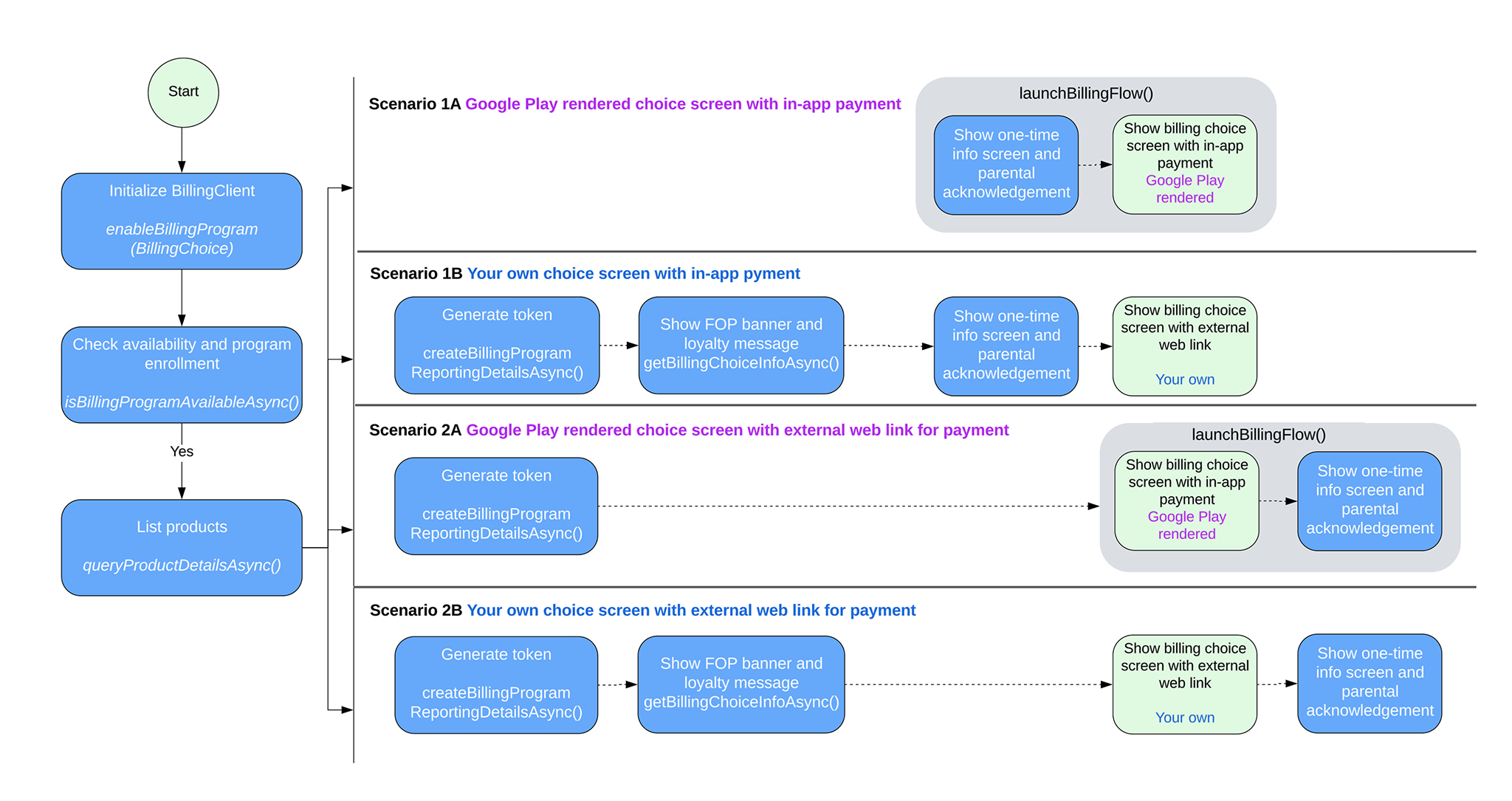
PBL 整合情境
根據整合情境,按照本節的步驟在應用程式中導入結帳選項。
處理情境 1A
Google 會產生自選結帳系統畫面,替代結帳系統則會在您的應用程式中處理。如要在這種情況下啟用自選結帳系統功能,請按照下列步驟操作:
建構 BillingClient 執行個體時,請使用
EnableBillingProgramParams呼叫enableBillingProgram,然後啟動連線。例如:Kotlin
// Build the parameters to enable the Billing Choice program and assign the listener // to handle user selection of the developer-provided billing option. val enableBillingProgramParams = EnableBillingProgramParams.newBuilder() .setBillingProgram(BillingProgram.BILLING_CHOICE) .setDeveloperProvidedBillingListener(developerProvidedBillingListener) .build() // Build the parameters to enable support for pending purchases. val pendingPurchasesParams = PendingPurchasesParams.newBuilder() .enableOneTimeProducts() .build() // Construct the BillingClient instance with the purchases updated listener, // pending purchases support, and the billing choice params. val billingClient = BillingClient.newBuilder(context) .setListener(purchasesUpdatedListener) .enablePendingPurchases(pendingPurchasesParams) .enableBillingProgram(enableBillingProgramParams) .build() // Establish a connection to Google Play val billingResult = suspendCancellableCoroutine<BillingResult> { continuation -> billingClient.startConnection(object : BillingClientStateListener { // Called when the connection setup process completes. override fun onBillingSetupFinished(billingResult: BillingResult) { // Resume the coroutine and pass back the BillingResult to the caller. if (continuation.isActive) { continuation.resume(billingResult) } } // Called if the connection to the Play Store service is dropped. // This prevents the await or suspension point from hanging indefinitely. override fun onBillingServiceDisconnected() { if (continuation.isActive) { continuation.resume( BillingResult.newBuilder() .setResponseCode(BillingResponseCode.SERVICE_DISCONNECTED) .setDebugMessage("Billing service disconnected during connection setup") .build() ) } } }) }
Java
EnableBillingProgramParams params = EnableBillingProgramParams.newBuilder()
        .setBillingProgram(BillingProgram.BILLING_CHOICE)
        .setDeveloperProvidedBillingListener(developerProvidedBillingListener)
        .build();

BillingClient billingClient = BillingClient.newBuilder(context)
        .setListener(purchasesUpdatedListener)
        .enablePendingPurchases(
                PendingPurchasesParams.newBuilder()
                        .enableOneTimeProducts()
                        .build()
        )
        .enableBillingProgram(params)
        .build();
確認使用者可使用 Google 提供的自選結帳系統。
呼叫
isBillingProgramAvailableAsync檢查方案是否適用,然後呼叫queryProductDetailsAsync顯示可用的產品。例如:Kotlin
val (billingResult, billingProgramAvailabilityDetails) = billingClient.isBillingProgramAvailable(BillingProgram.BILLING_CHOICE) if (billingResult.responseCode == BillingResponseCode.OK) { val billingChoiceAvailabilityDetails = billingProgramAvailabilityDetails.billingChoiceAvailabilityDetails if (billingChoiceAvailabilityDetails != null && billingChoiceAvailabilityDetails.choiceScreenType == ChoiceScreenType.GOOGLE_RENDERED ) { // Billing choice is available. Query products and proceed. } else { // Fallback to other available programs. } } else { // Fallback to other available programs. }
Java
// ... billingClient.isBillingProgramAvailableAsync( BillingProgram.BILLING_CHOICE, (billingResult, billingProgramAvailabilityDetails) -> { if (billingResult.getResponseCode() == BillingResponseCode.OK) { BillingChoiceAvailabilityDetails billingChoiceAvailabilityDetails = billingProgramAvailabilityDetails.getBillingChoiceAvailabilityDetails(); if (billingChoiceAvailabilityDetails != null && billingChoiceAvailabilityDetails.getChoiceScreenType() == ChoiceScreenType.GOOGLE_RENDERED) { // Billing choice is available. Query products and proceed. } else { // Fallback to other available programs. } } else { // Fallback to other available programs. } } );注意:
billingProgramAvailabilityDetails會顯示 Google 提供的自選結帳系統畫面或開發人員自行產生的自選結帳系統畫面是否可用。使用者點選「購買」時,請呼叫
launchBillingFlow觸發購買流程。如果可選擇結帳系統,請將DeveloperBillingOptionParams傳遞至BillingFlowParams。例如:Kotlin
val developerBillingOptionParams = DeveloperBillingOptionParams.newBuilder() .setBillingProgram(BillingProgram.BILLING_CHOICE) .build() val billingFlowParams = BillingFlowParams.newBuilder() .setProductDetailsParamsList(productDetailsParamsList) .enableDeveloperBillingOption(developerBillingOptionParams) .build() val billingResult = billingClient.launchBillingFlow(activity, billingFlowParams)
Java
DeveloperBillingOptionParams developerBillingOptionParams = DeveloperBillingOptionParams.newBuilder() .setBillingProgram(BillingProgram.BILLING_CHOICE) .build(); BillingFlowParams billingFlowParams = BillingFlowParams.newBuilder() .setProductDetailsParamsList(productDetailsParamsList) .enableDeveloperBillingOption(developerBillingOptionParams) .build(); BillingResult billingResult = billingClient.launchBillingFlow(activity, billingFlowParams);注意:家長監護功能僅適用於受監護使用者。
請按照下列方式處理使用者選擇的結帳類型:
- 如果使用者選取 Play 帳款服務,系統會將結帳結果傳回步驟 1 中註冊的
PurchasesUpdatedListener。 - 如果使用者選取其他結帳系統,結帳結果會傳回至步驟 1 中註冊的
DeveloperProvidedBillingListener。傳回的DeveloperProvidedBillingDetails在這種情況下會包含externalTransactionToken。這個權杖會用於交易報表。
- 如果使用者選取 Play 帳款服務,系統會將結帳結果傳回步驟 1 中註冊的
處理情境 1B
開發人員會產生選擇畫面,並在應用程式中處理其他結帳方式。如要在這種情況下啟用結帳選項,請按照下列步驟操作:
建構
BillingClient例項時,請呼叫enableBillingProgram,但不要使用DeveloperProvidedBillingListener(位於EnableBillingProgramParams中),然後啟動連線。例如:Kotlin
// Build the parameters to enable the Billing Choice program. val enableBillingProgramParams = EnableBillingProgramParams.newBuilder() .setBillingProgram(BillingProgram.BILLING_CHOICE) .build() // Build the parameters to enable support for pending purchases. val pendingPurchasesParams = PendingPurchasesParams.newBuilder() .enableOneTimeProducts() .build() // Construct the BillingClient instance with the purchases updated listener, // pending purchases support, and the billing choice params. val billingClient = BillingClient.newBuilder(context) .setListener(purchasesUpdatedListener) .enablePendingPurchases(pendingPurchasesParams) .enableBillingProgram(enableBillingProgramParams) .build() // Establish a connection to Google Play val billingResult = suspendCancellableCoroutine<BillingResult> { continuation -> billingClient.startConnection(object : BillingClientStateListener { // Called when the connection setup process completes. override fun onBillingSetupFinished(billingResult: BillingResult) { // Resume the coroutine and pass back the BillingResult to the caller. if (continuation.isActive) { continuation.resume(billingResult) } } // Called if the connection to the Play Store service is dropped. // This prevents the await or suspension point from hanging indefinitely. override fun onBillingServiceDisconnected() { if (continuation.isActive) { continuation.resume( BillingResult.newBuilder() .setResponseCode(BillingResponseCode.SERVICE_DISCONNECTED) .setDebugMessage("Billing service disconnected during connection setup") .build() ) } } }) }
Java
EnableBillingProgramParams params = EnableBillingProgramParams.newBuilder()
        .setBillingProgram(BillingProgram.BILLING_CHOICE)
        .build();

BillingClient billingClient = BillingClient.newBuilder(context)
        .setListener(purchasesUpdatedListener)
        .enablePendingPurchases()
        .enableBillingProgram(params)
        .build();
確認開發人員提供的自選結帳系統可供使用者選擇。
呼叫
isBillingProgramAvailableAsync檢查方案是否適用,然後呼叫queryProductDetailsAsync顯示可用的產品。例如:Kotlin
val (billingResult, billingProgramAvailabilityDetails) = billingClient.isBillingProgramAvailable(BillingProgram.BILLING_CHOICE) if (billingResult.responseCode == BillingResponseCode.OK) { val billingChoiceAvailabilityDetails = billingProgramAvailabilityDetails.billingChoiceAvailabilityDetails if (billingChoiceAvailabilityDetails != null && billingChoiceAvailabilityDetails.choiceScreenType == ChoiceScreenType.DEVELOPER_RENDERED ) { // Billing choice is available. Query products and proceed. // You can inspect details such as: // - billingChoiceAvailabilityDetails.choiceScreenType // - billingChoiceAvailabilityDetails.isExternalLinkAvailable } else { // Fallback to other available programs. } } else { // Fallback to other available programs. }
Java
// ... billingClient.isBillingProgramAvailableAsync( BillingProgram.BILLING_CHOICE, (billingResult, billingProgramAvailabilityDetails) -> { if (billingResult.getResponseCode() == BillingResponseCode.OK) { BillingChoiceAvailabilityDetails billingChoiceAvailabilityDetails = billingProgramAvailabilityDetails.getBillingChoiceAvailabilityDetails(); if (billingChoiceAvailabilityDetails != null && billingChoiceAvailabilityDetails.getChoiceScreenType() == ChoiceScreenType.DEVELOPER_RENDERED) { // Billing choice is available. Query products and proceed. // You can inspect details such as: // - billingChoiceAvailabilityDetails.getChoiceScreenType() // - billingChoiceAvailabilityDetails.isExternalLinkAvailable() } else { // Fallback to other available programs. } } else { // Fallback to other available programs. } } );注意:
billingProgramAvailabilityDetails會顯示 Google 提供的自選結帳系統畫面或開發人員自行產生的自選結帳系統畫面是否可用。呼叫
getBillingChoiceInfoAsync方法,即可取得 Play 帳單橫幅和會員資訊。例如:Kotlin
// 1. Create the params required for the request val params = GetBillingChoiceInfoParams.newBuilder() .setBillingProgram(BillingProgram.BILLING_CHOICE) .setPlayBillingChoiceImageLayout(GetBillingChoiceInfoParams.ImageLayout.RECTANGULAR_FOUR_BY_ONE) .build() // 2. Call the suspend method on your billingClient instance val (billingResult, playBillingChoiceInfo) = billingClient.getBillingChoiceInfo(params) if (billingResult.responseCode == BillingResponseCode.OK && playBillingChoiceInfo != null) { // Access the URL of the image associated with the Play Billing Choice val imageUrl = playBillingChoiceInfo.playBillingChoiceImageUrl // Access the Play Loyalty string information, if available val loyaltyInfo = playBillingChoiceInfo.playBillingLoyaltyInfo // Populate your developer-rendered UI elements playBillingLoyaltyTextView.text = loyaltyInfo loadImage(imageUrl, playBillingImageView) } else { // Handle error scenarios }
Java
// 1. Create the params required for the request
GetBillingChoiceInfoParams params = GetBillingChoiceInfoParams.newBuilder()
    .setBillingProgram(BillingClient.BillingProgram.BILLING_CHOICE)
    .setPlayBillingChoiceImageLayout(GetBillingChoiceInfoParams.ImageLayout.RECTANGULAR_FOUR_BY_ONE)
    .build();
// 2. Call the method asynchronously on your billingClient instance
billingClient.getBillingChoiceInfoAsync(params, (billingResult, playBillingChoiceInfo) -> {
    if (billingResult.getResponseCode() == BillingResponseCode.OK && playBillingChoiceInfo != null) {
      // Access the URL of the image associated with the Play Billing Choice
        String imageUrl = playBillingChoiceInfo.getPlayBillingChoiceImageUrl();
        // Access the Play Loyalty string information, if available
        String loyaltyInfo = playBillingChoiceInfo.getPlayBillingLoyaltyInfo();

        // Populate your developer-rendered UI elements
        playBillingLoyaltyTextView.setText(loyaltyInfo);
          loadImage(imageUrl, playBillingImageView);
      } else {
          // Handle error scenarios
      }
});
建立外部交易憑證,並將 DeveloperBillingType 設為 IN_APP。例如:
Kotlin
// Build the parameters specifying the billing program and that the billing type is IN_APP. val params = BillingProgramReportingDetailsParams.newBuilder() .setBillingProgram(BillingProgram.BILLING_CHOICE) .setDeveloperBillingType(DeveloperBillingType.IN_APP) .build() // Call the suspending extension function to request the reporting details val (billingResult, billingProgramReportingDetails) = billingClient.createBillingProgramReportingDetails(params) if (billingResult.responseCode != BillingResponseCode.OK) { // Handle failures such as retrying due to network errors. return } // Extract the transaction token from the returned reporting details val transactionToken = billingProgramReportingDetails?.externalTransactionToken // Persist the external transaction token locally. Pass it to // DeveloperBillingOptionParams when launchBillingFlow is called. // It can also be used as part of your external website
Java
BillingProgramReportingDetailsParams params =
    BillingProgramReportingDetailsParams.newBuilder()
        .setBillingProgram(BillingProgram.BILLING_CHOICE)
        .setDeveloperBillingType(DeveloperBillingType.IN_APP)
        .build();

billingClient.createBillingProgramReportingDetailsAsync(
    params,
    new BillingProgramReportingDetailsListener() {
        @Override
        public void onCreateBillingProgramReportingDetailsResponse(
            BillingResult billingResult,
            @Nullable BillingProgramReportingDetails billingProgramReportingDetails
        ) {
            if (billingResult.getResponseCode() != BillingResponseCode.OK) {
                // Handle failures such as retrying due to network errors.
                return;
            }

            String transactionToken =
                billingProgramReportingDetails.getExternalTransactionToken();

            // Persist the external transaction token locally. Pass it to
            // DeveloperBillingOptionParams when launchBillingFlow is called.
            // It can also be used as part of your external website
        }
    }
);
使用者點選「購買」時,請呼叫
showBillingProgramInformationDialog來顯示資訊對話方塊。例如,請參閱「向使用者顯示的資訊對話方塊」。 要求中必須設定步驟 4 的 BillingProgram 和 transactionToken。注意:家長監護功能僅適用於受監護使用者。
如果上一個步驟的結果為
OK,請啟動替代結帳系統選項畫面。請按照下列方式處理使用者選擇的結帳類型:
- 如果使用者選取 Play 帳款服務,請按照標準 Play 帳款服務指南呼叫
launchBillingFlow。系統會將帳單結算結果傳回步驟 1 中註冊的PurchasesUpdatedListener。 - 如果使用者選擇其他結帳系統,您必須自行處理交易,並使用步驟 4 中產生的權杖向 Play 回報。
- 如果使用者選取 Play 帳款服務,請按照標準 Play 帳款服務指南呼叫
處理情境 2A
Google 會產生自選結帳系統畫面,替代結帳系統則會在應用程式「外部」處理。如要在這種情況下啟用自選結帳系統,請按照下列步驟操作:
建構 BillingClient 執行個體時,請使用
EnableBillingProgramParams呼叫enableBillingProgram,然後啟動連線。例如:Kotlin
// Build the parameters to enable the Billing Choice program and assign the listener // to handle user selection of the developer-provided billing option. val enableBillingProgramParams = EnableBillingProgramParams.newBuilder() .setBillingProgram(BillingProgram.BILLING_CHOICE) .setDeveloperProvidedBillingListener(developerProvidedBillingListener) .build() // Build the parameters to enable support for pending purchases. val pendingPurchasesParams = PendingPurchasesParams.newBuilder() .enableOneTimeProducts() .build() // Construct the BillingClient instance with the purchases updated listener, // pending purchases support, and the billing choice params. val billingClient = BillingClient.newBuilder(context) .setListener(purchasesUpdatedListener) .enablePendingPurchases(pendingPurchasesParams) .enableBillingProgram(enableBillingProgramParams) .build() // Establish a connection to Google Play val billingResult = suspendCancellableCoroutine<BillingResult> { continuation -> billingClient.startConnection(object : BillingClientStateListener { // Called when the connection setup process completes. override fun onBillingSetupFinished(billingResult: BillingResult) { // Resume the coroutine and pass back the BillingResult to the caller. if (continuation.isActive) { continuation.resume(billingResult) } } // Called if the connection to the Play Store service is dropped. // This prevents the await or suspension point from hanging indefinitely. override fun onBillingServiceDisconnected() { if (continuation.isActive) { continuation.resume( BillingResult.newBuilder() .setResponseCode(BillingResponseCode.SERVICE_DISCONNECTED) .setDebugMessage("Billing service disconnected during connection setup") .build() ) } } }) }
Java
EnableBillingProgramParams params = EnableBillingProgramParams.newBuilder()
        .setBillingProgram(BillingProgram.BILLING_CHOICE)
        .setDeveloperProvidedBillingListener(developerProvidedBillingListener)
        .build();

BillingClient billingClient = BillingClient.newBuilder(context)
        .setListener(purchasesUpdatedListener)
        .enablePendingPurchases(
                PendingPurchasesParams.newBuilder()
                        .enableOneTimeProducts()
                        .build()
        )
        .enableBillingProgram(params)
        .build();
確認下列項目是否可用:
- Google 提供的結帳選項
- 外部網頁連結
呼叫
isBillingProgramAvailableAsync檢查計畫適用情形,然後呼叫queryProductDetailsAsync顯示可用的產品。例如:Kotlin
// Check the availability of the billing choice program asynchronously using coroutines val (billingResult, billingProgramAvailabilityDetails) = billingClient.isBillingProgramAvailable(BillingProgram.BILLING_CHOICE) // Ensure the billing program query succeeded if (billingResult.responseCode == BillingResponseCode.OK) { // Retrieve the availability details specific to the billing choice program val billingChoiceAvailabilityDetails = billingProgramAvailabilityDetails.billingChoiceAvailabilityDetails // Check if billing choice is available, renders via Google Play, and external link is supported if (billingChoiceAvailabilityDetails != null && billingChoiceAvailabilityDetails.choiceScreenType == ChoiceScreenType.GOOGLE_RENDERED && billingChoiceAvailabilityDetails.isExternalLinkAvailable ) { // Billing choice is available and external transaction links are supported. Query products and proceed. } else { // Fallback to other available programs. } } else { // Fallback to other available programs. }
Java
// ...
billingClient.isBillingProgramAvailableAsync(
    BillingProgram.BILLING_CHOICE,
    (billingResult, billingProgramAvailabilityDetails) -> {
        if (billingResult.getResponseCode() == BillingResponseCode.OK) {
            BillingChoiceAvailabilityDetails billingChoiceAvailabilityDetails =
                billingProgramAvailabilityDetails.getBillingChoiceAvailabilityDetails();

            if (billingChoiceAvailabilityDetails != null
                    && billingChoiceAvailabilityDetails.getChoiceScreenType() == ChoiceScreenType.GOOGLE_RENDERED
                    && billingChoiceAvailabilityDetails.isExternalLinkAvailable()) {
                // Billing choice is available and external transaction links are supported.
                // Query products and proceed.
            } else {
                // Fallback to other available programs.
            }
        } else {
            // Fallback to other available programs.
        }
    }
);
使用者表示有意購買時,請呼叫
createBillingProgramReportingDetailsAsync建立外部交易權杖。例如:Kotlin
// Build the parameters for creating reporting details val params = BillingProgramReportingDetailsParams.newBuilder() .setBillingProgram(BillingProgram.BILLING_CHOICE) .setDeveloperBillingType(DeveloperBillingType.EXTERNAL_LINK) .build() // Call the suspend function to create billing program reporting details val (billingResult, billingProgramReportingDetails) = billingClient.createBillingProgramReportingDetails(params) // Handle response failure cases if (billingResult.responseCode != BillingResponseCode.OK) { // Handle failures such as retrying due to network errors. return } // Retrieve the external transaction token val transactionToken = billingProgramReportingDetails?.externalTransactionToken // Persist the external transaction token locally. Pass it to // DeveloperBillingOptionParams when launchBillingFlow is called. // It can also be used as part of your external website
Java
BillingProgramReportingDetailsParams params =
    BillingProgramReportingDetailsParams.newBuilder()
        .setBillingProgram(BillingProgram.BILLING_CHOICE)
        .setDeveloperBillingType(DeveloperBillingType.EXTERNAL_LINK)
        .build();

billingClient.createBillingProgramReportingDetailsAsync(
    params,
    new BillingProgramReportingDetailsListener() {
        @Override
        public void onCreateBillingProgramReportingDetailsResponse(
            BillingResult billingResult,
            @Nullable BillingProgramReportingDetails billingProgramReportingDetails
        ) {
            if (billingResult.getResponseCode() != BillingResponseCode.OK) {
                // Handle failures such as retrying due to network errors.
                return;
            }

            String transactionToken =
                billingProgramReportingDetails.getExternalTransactionToken();

            // Persist the external transaction token locally. Pass it to
            // DeveloperBillingOptionParams when launchBillingFlow is called.
            // It can also be used as part of your external website.
        }
    }
);
使用者點選「購買」時,請呼叫
launchBillingFlow觸發購買流程。如果使用者可選擇結帳系統,請執行下列操作:- 將
DeveloperBillingOptionParams傳遞至BillingFlowParams。 - 將步驟 3 中的外部交易憑證傳遞至
DeveloperBillingOptionParams。
例如:
Kotlin
// Build the developer billing option parameters with the external link URI, // the transaction token, and browser/app launch mode. val developerBillingOptionParams = DeveloperBillingOptionParams.newBuilder() .setBillingProgram(BillingProgram.BILLING_CHOICE) .setLinkUri(Uri.parse("https://www.example.com/external/purchase")) .setExternalTransactionToken(transactionToken) .setLaunchMode( DeveloperBillingOptionParams.LaunchMode.LAUNCH_IN_EXTERNAL_BROWSER_OR_APP ) .build() val billingFlowParams = BillingFlowParams.newBuilder() .setProductDetailsParamsList(productDetailsParamsList) .enableDeveloperBillingOption(developerBillingOptionParams) .build() val billingResult = billingClient.launchBillingFlow(activity, billingFlowParams)
Java
DeveloperBillingOptionParams developerBillingOptionParams = DeveloperBillingOptionParams.newBuilder() .setBillingProgram(BillingProgram.BILLING_CHOICE) .setLinkUri(Uri.parse("https://www.example.com/external/purchase")) .setExternalTransactionToken(transactionToken) .setLaunchMode( DeveloperBillingOptionParams.LaunchMode.LAUNCH_IN_EXTERNAL_BROWSER_OR_APP) .build();注意:家長監護功能只會顯示給受監護使用者。
- 將
請按照下列方式處理使用者選擇的結帳類型:
- 如果使用者選取 Play 帳款服務,請按照標準 Play 帳款服務指南呼叫
launchBillingFlow。系統會將帳單結算結果傳回步驟 1 中註冊的PurchasesUpdatedListener。 - 如果使用者選取其他結帳系統,結帳結果會傳回步驟
-
中註冊的
- 如果權杖有效,傳回的
DeveloperProvidedBillingDetails會包含在步驟 4 中傳遞至DeveloperBillingOptionParams的externalTransactionToken。
DeveloperProvidedBillingListener。 - 如果權杖有效,傳回的
- 如果使用者選取 Play 帳款服務,請按照標準 Play 帳款服務指南呼叫
處理情境 2B
開發人員會產生選擇畫面,且其他結帳程序會在應用程式「外部」處理。如要在這種情況下啟用結帳選項,請按照下列步驟操作:
建構 BillingClient 執行個體時,請呼叫
enableBillingProgram,但不要使用DeveloperProvidedBillingListener(位於EnableBillingProgramParams中),然後啟動連線。例如:Kotlin
// Build the parameters to enable the Billing Choice program. val enableBillingProgramParams = EnableBillingProgramParams.newBuilder() .setBillingProgram(BillingProgram.BILLING_CHOICE) .build() // Build the parameters to enable support for pending purchases. val pendingPurchasesParams = PendingPurchasesParams.newBuilder() .enableOneTimeProducts() .build() // Construct the BillingClient instance with the purchases updated listener, // pending purchases support, and the billing choice params. val billingClient = BillingClient.newBuilder(context) .setListener(purchasesUpdatedListener) .enablePendingPurchases(pendingPurchasesParams) .enableBillingProgram(enableBillingProgramParams) .build() // Establish a connection to Google Play val billingResult = suspendCancellableCoroutine<BillingResult> { continuation -> billingClient.startConnection(object : BillingClientStateListener { // Called when the connection setup process completes. override fun onBillingSetupFinished(billingResult: BillingResult) { // Resume the coroutine and pass back the BillingResult to the caller. if (continuation.isActive) { continuation.resume(billingResult) } } // Called if the connection to the Play Store service is dropped. // This prevents the await or suspension point from hanging indefinitely. override fun onBillingServiceDisconnected() { if (continuation.isActive) { continuation.resume( BillingResult.newBuilder() .setResponseCode(BillingResponseCode.SERVICE_DISCONNECTED) .setDebugMessage("Billing service disconnected during connection setup") .build() ) } } }) }
Java
EnableBillingProgramParams params = EnableBillingProgramParams.newBuilder()
        .setBillingProgram(BillingProgram.BILLING_CHOICE)
        .build();

BillingClient billingClient = BillingClient.newBuilder(context)
        .setListener(purchasesUpdatedListener)
        .enablePendingPurchases()
        .enableBillingProgram(params)
        .build();
確認下列項目是否可用:
- Google 提供的結帳選項
- 外部網頁連結
呼叫
isBillingProgramAvailableAsync檢查計畫適用情形,然後呼叫queryProductDetailsAsync顯示可用的產品。例如:Kotlin
// Check the availability of the billing choice program asynchronously using a coroutine val (billingResult, billingProgramAvailabilityDetails) = billingClient.isBillingProgramAvailable(BillingProgram.BILLING_CHOICE) // Ensure the response code is OK if (billingResult.responseCode == BillingResponseCode.OK) { // Retrieve the billing choice availability details val billingChoiceAvailabilityDetails = billingProgramAvailabilityDetails.billingChoiceAvailabilityDetails // Check if billing choice details are available, choice screen is developer-rendered, // and external transaction links are supported. if (billingChoiceAvailabilityDetails != null && billingChoiceAvailabilityDetails.choiceScreenType == ChoiceScreenType.DEVELOPER_RENDERED && billingChoiceAvailabilityDetails.isExternalLinkAvailable ) { // Billing choice is available and external transaction links are supported. // Query products and proceed. } else { // Fallback to other available programs. } } else { // Fallback to other available programs. }
Java
// ...

billingClient.isBillingProgramAvailableAsync(
    BillingProgram.BILLING_CHOICE,
    (billingResult, billingProgramAvailabilityDetails) -> {
        if (billingResult.getResponseCode() == BillingResponseCode.OK) {
            BillingChoiceAvailabilityDetails billingChoiceAvailabilityDetails =
                billingProgramAvailabilityDetails.getBillingChoiceAvailabilityDetails();
            if (billingChoiceAvailabilityDetails != null &&
                billingChoiceAvailabilityDetails.getChoiceScreenType() == ChoiceScreenType.DEVELOPER_RENDERED &&
                billingChoiceAvailabilityDetails.isExternalLinkAvailable()) {
                // Billing choice is available and external transaction links are supported. Query products and proceed.
            } else {
                // Fallback to other available programs.
            }
        } else {
            // Fallback to other available programs.
        }
    }
);
呼叫
getBillingChoiceInfoAsync方法,即可取得 Play 帳單橫幅和會員方案資訊。Kotlin
// 1. Create the params required for the request val params = GetBillingChoiceInfoParams.newBuilder() .setBillingProgram(BillingProgram.BILLING_CHOICE) .setPlayBillingChoiceImageLayout(GetBillingChoiceInfoParams.ImageLayout.RECTANGULAR_FOUR_BY_ONE) .build() // 2. Call the suspend method on your billingClient instance val (billingResult, playBillingChoiceInfo) = billingClient.getBillingChoiceInfo(params) if (billingResult.responseCode == BillingResponseCode.OK && playBillingChoiceInfo != null) { // Access the URL of the image associated with the Play Billing Choice val imageUrl = playBillingChoiceInfo.playBillingChoiceImageUrl // Access the Play Loyalty string information, if available val loyaltyInfo = playBillingChoiceInfo.playBillingLoyaltyInfo // Populate your developer-rendered UI elements playBillingLoyaltyTextView.text = loyaltyInfo loadImage(imageUrl, playBillingImageView) } else { // Handle error scenarios }
Java
// 1. Create the params required for the request
GetBillingChoiceInfoParams params = GetBillingChoiceInfoParams.newBuilder()
    .setBillingProgram(BillingClient.BillingProgram.BILLING_CHOICE)
    .setPlayBillingChoiceImageLayout(GetBillingChoiceInfoParams.ImageLayout.RECTANGULAR_FOUR_BY_ONE)
    .build();
// 2. Call the method asynchronously on your billingClient instance
billingClient.getBillingChoiceInfoAsync(params, (billingResult, playBillingChoiceInfo) -> {
    if (billingResult.getResponseCode() == BillingResponseCode.OK && playBillingChoiceInfo != null) {
      // Access the URL of the image associated with the Play Billing Choice
        String imageUrl = playBillingChoiceInfo.getPlayBillingChoiceImageUrl();
        // Access the Play Loyalty string information, if available
        String loyaltyInfo = playBillingChoiceInfo.getPlayBillingLoyaltyInfo();

        // Populate your developer-rendered UI elements
        playBillingLoyaltyTextView.setText(loyaltyInfo);
          loadImage(imageUrl, playBillingImageView);
      } else {
          // Handle error scenarios
      }
});
使用者表示有意購買時,請呼叫
createBillingProgramReportingDetailsAsync建立外部交易權杖。例如:Kotlin
// Build the parameters for creating reporting details val params = BillingProgramReportingDetailsParams.newBuilder() .setBillingProgram(BillingProgram.BILLING_CHOICE) .setDeveloperBillingType(DeveloperBillingType.EXTERNAL_LINK) .build() // Call the suspend function to create billing program reporting details val (billingResult, billingProgramReportingDetails) = billingClient.createBillingProgramReportingDetails(params) // Handle response failure cases if (billingResult.responseCode != BillingResponseCode.OK) { // Handle failures such as retrying due to network errors. return } // Retrieve the external transaction token val transactionToken = billingProgramReportingDetails?.externalTransactionToken // Persist the external transaction token locally. Pass it to // DeveloperBillingOptionParams when launchBillingFlow is called. // It can also be used as part of your external website
Java
BillingProgramReportingDetailsParams params =
    BillingProgramReportingDetailsParams.newBuilder()
        .setBillingProgram(BillingProgram.BILLING_CHOICE)
        .setDeveloperBillingType(DeveloperBillingType.EXTERNAL_LINK)
        .build();

billingClient.createBillingProgramReportingDetailsAsync(
    params,
    new BillingProgramReportingDetailsListener() {
        @Override
        public void onCreateBillingProgramReportingDetailsResponse(
            BillingResult billingResult,
            @Nullable BillingProgramReportingDetails billingProgramReportingDetails
        ) {
            if (billingResult.getResponseCode() != BillingResponseCode.OK) {
                // Handle failures such as retrying due to network errors.
                return;
            }

            String transactionToken =
                billingProgramReportingDetails.getExternalTransactionToken();

            // Persist the external transaction token locally. Pass it to
            // DeveloperBillingOptionParams when launchBillingFlow is called.
            // It can also be used as part of your external website.
        }
    }
);
使用者點選「購買」時,啟動替代選項畫面。
請按照下列方式處理使用者選擇的結帳類型:
如果使用者選取 Play 帳款服務,請按照標準 Play 帳款服務指南呼叫
launchBillingFlow。系統會將帳單結算結果傳回步驟 1 中註冊的PurchasesUpdatedListener。系統會為受監護使用者顯示家長監護功能。
如果使用者選擇其他結帳系統,請呼叫 launchExternalLink。例如:
Kotlin
// An activity reference from which the purchase flow will be launched. val params = LaunchExternalLinkParams.newBuilder() .setBillingProgram(BillingProgram.BILLING_CHOICE) .setExternalTransactionToken(transactionToken) // You can pass along the external transaction token from // BillingProgramReportingDetails as a URL parameter in the URI .setLinkUri(yourLinkUri) .setLinkType(LaunchExternalLinkParams.LinkType.LINK_TO_DIGITAL_CONTENT_OFFER) .setLaunchMode( LaunchExternalLinkParams.LaunchMode.LAUNCH_IN_EXTERNAL_BROWSER_OR_APP ) .build() // Call launchExternalLink with a callback billingClient.launchExternalLink(activity, params) { billingResult -> if (billingResult.responseCode == BillingResponseCode.OK) { // Proceed with the rest of the purchase flow. If the user // purchases an item, be sure to report the transaction to Google // Play. } else { // Handle failures such as retrying due to network errors. } }
Java
// An activity reference from which the purchase flow will be launched.
Activity activity = ...;

LaunchExternalLinkParams params = LaunchExternalLinkParams.newBuilder()
    .setBillingProgram(BillingProgram.BILLING_CHOICE)
    // You can pass along the external transaction token from
    // BillingProgramReportingDetails as a URL parameter in the URI
    .setLinkUri(yourLinkUri)
    .setLinkType(LaunchExternalLinkParams.LinkType.LINK_TO_DIGITAL_CONTENT_OFFER)
    .setLaunchMode(
        LaunchExternalLinkParams.LaunchMode.LAUNCH_IN_EXTERNAL_BROWSER_OR_APP)
    .setExternalTransactionToken(transactionToken)
    .build();

LaunchExternalLinkResponseListener listener =
    new LaunchExternalLinkResponseListener() {
      @Override
      public void onLaunchExternalLinkResponse(BillingResult billingResult) {
        if (billingResult.getResponseCode() == BillingResponseCode.OK) {
          // Proceed with the rest of the purchase flow. If the user
          // purchases an item, be sure to report the transaction to Google
          // Play.
        } else {
          // Handle failures such as retrying due to network errors.
        }
      }
    };

billingClient.launchExternalLink(activity, params, listener);
將步驟 4 中的外部交易憑證傳遞至
LaunchExternalLinkParams。如果傳回 OK,請繼續交易,並向 Google Play 回報交易。家長監護功能會顯示給受監護使用者。
更換訂閱方案時的結帳選項
如果使用者要更換訂閱方案,系統不應顯示使用者選擇畫面,因為升級與降級流程將沿用使用者為原始交易選擇的結帳系統。
如果原始購買是透過 Google Play 帳款服務處理,您應使用標準 Google Play 帳款服務訂閱項目更換資訊呼叫 launchBillingFlow。
不過,如果原始交易是透過其他結帳系統處理,訂閱項目更換作業的處理方式會因情況而略有不同。
情境 1A 的訂閱項目更換
使用者要求升級或降級時,不必重新選擇,而是應該透過開發人員的其他結帳系統操作。
如要採取上述做法,請在使用者要求升級或降級時呼叫 launchBillingFlow。請在參數的 SubscriptionUpdateParams 物件中使用 setOriginalExternalTransactionId,提供原始購買交易的外部交易 ID。這種做法不會顯示使用者選擇畫面,因為升級與降級流程將沿用使用者為原始交易選擇的結帳系統。在此情況下,向 launchBillingFlow 發出的呼叫會針對交易產生新的外部交易憑證,您可以從回呼中擷取這個憑證。
Kotlin
// The external transaction ID from the current // alternative billing subscription. val externalTransactionId = "external_transaction_id" val developerBillingOptionParams = DeveloperBillingOptionParams.newBuilder() .setBillingProgram(BillingProgram.BILLING_CHOICE) .build() val billingFlowParams = BillingFlowParams.newBuilder() .setProductDetailsParamsList( listOf( BillingFlowParams.ProductDetailsParams.newBuilder() // Fetched using queryProductDetailsAsync. .setProductDetails(productDetailsNewPlan) // offerIdToken can be found in // ProductDetails=>SubscriptionOfferDetails. .setOfferToken(offerTokenNewPlan) .build() ) ) .setSubscriptionUpdateParams( SubscriptionUpdateParams.newBuilder() .setOriginalExternalTransactionId(externalTransactionId) .build() ) .enableDeveloperBillingOption(developerBillingOptionParams) .build() val billingResult = billingClient.launchBillingFlow(activity, billingFlowParams) // When the user selects the alternative billing flow, // the DeveloperProvidedBillingListener is triggered.
Java
// The external transaction ID from the current
// alternative billing subscription.
String externalTransactionId = //... ;

DeveloperBillingOptionParams developerBillingOptionParams =
    DeveloperBillingOptionParams.newBuilder()
        .setBillingProgram(BillingProgram.BILLING_CHOICE)
        .build();

List<ProductDetailsParams> productDetailsParamsList = new ArrayList<>();
productDetailsParamsList.add(
    ProductDetailsParams.newBuilder()
        // Fetched using queryProductDetailsAsync.
        .setProductDetails(productDetailsNewPlan)
        // offerIdToken can be found in
        // ProductDetails=>SubscriptionOfferDetails
        .setOfferToken(offerTokenNewPlan)
        .build());

BillingFlowParams billingFlowParams =
    BillingFlowParams.newBuilder()
        .setProductDetailsParamsList(productDetailsParamsList)
        .setSubscriptionUpdateParams(
            SubscriptionUpdateParams.newBuilder()
                .setOriginalExternalTransactionId(externalTransactionId)
                .build())
        .enableDeveloperBillingOption(developerBillingOptionParams)
        .build();

BillingResult billingResult = billingClient.launchBillingFlow(activity, billingFlowParams);

// When the user selects the alternative billing flow,
// the DeveloperProvidedBillingListener is triggered.
升級或降級完成後,您需要回報新交易,做法是使用先前呼叫新訂閱項目購買交易時所取得的外部交易憑證。
情境 1B 中的訂閱項目更換
在此情況下,必須產生新的外部交易憑證。與一般購買交易的唯一差別在於,在這種情況下,系統會保留使用者的選擇,因此您不必顯示升級或降級的選擇畫面。不過,您必須顯示一次性資訊對話方塊和家長確認訊息。
如需整合程式碼範例,請參閱情境 1B 的步驟 4:開發人員會顯示選項畫面,並在應用程式中處理替代結帳方式。
升級或降級完成後,您需要回報新交易,做法是使用先前呼叫新訂閱項目購買交易時所取得的外部交易憑證。
情境 2A 的訂閱項目更換
如果使用者做出選擇後原本是以開發人員的網站或付款應用程式購買訂閱項目,要求升級或降級時就不必重新選擇,而是應該透過開發人員的網站或付款應用程式操作。
如要採取上述做法,請在使用者要求升級或降級時呼叫 launchBillingFlow。請勿在 SubscriptionUpdateParams 物件下指定其他參數,而是要改用 setOriginalExternalTransactionId,提供原始購買交易的外部交易 ID。此外,您也必須在這通電話中提供 DeveloperBillingOptionParams。這種做法不會顯示使用者選擇畫面,因為升級與降級流程將沿用使用者為原始交易選擇的結帳系統。例如:
Kotlin
val externalTransactionId = "external_transaction_id" // 1. Construct DeveloperBillingOptionParams indicating the billing program val developerBillingOptionParams = DeveloperBillingOptionParams.newBuilder() .setBillingProgram(BillingProgram.BILLING_CHOICE) .build() // 2. Build BillingFlowParams combining DeveloperBillingOptionParams and SubscriptionUpdateParams val billingFlowParams = BillingFlowParams.newBuilder() .setProductDetailsParamsList( listOf( BillingFlowParams.ProductDetailsParams.newBuilder() // Fetched using queryProductDetailsAsync. .setProductDetails(productDetailsNewPlan) // offerIdToken can be found in ProductDetails=>SubscriptionOfferDetails. .setOfferToken(offerTokenNewPlan) .build() ) ) .setSubscriptionUpdateParams( SubscriptionUpdateParams.newBuilder() .setOriginalExternalTransactionId(externalTransactionId) .build() ) .enableDeveloperBillingOption(developerBillingOptionParams) .build()
Java
String externalTransactionId = //... ;

// 1. Construct DeveloperBillingOptionParams indicating the billing program
DeveloperBillingOptionParams developerBillingOptionParams =
    DeveloperBillingOptionParams.newBuilder()
        .setBillingProgram(BillingClient.BillingProgram.BILLING_CHOICE)
        .build();

// 2. Add ProductDetailsParams
List productDetailsParamsList = new ArrayList<>();
productDetailsParamsList.add(
    ProductDetailsParams.newBuilder()
        // Fetched using queryProductDetailsAsync.
        .setProductDetails(productDetailsNewPlan)
        // offerIdToken can be found in ProductDetails=>SubscriptionOfferDetails
        .setOfferToken(offerTokenNewPlan)
        .build());

// 3. Build BillingFlowParams combining DeveloperBillingOptionParams and SubscriptionUpdateParams
BillingFlowParams billingFlowParams =
    BillingFlowParams.newBuilder()
        .setProductDetailsParamsList(productDetailsParamsList)
        .setSubscriptionUpdateParams(
            SubscriptionUpdateParams.newBuilder()
                .setOriginalExternalTransactionId(externalTransactionId)
                .build())
        .enableDeveloperBillingOption(developerBillingOptionParams)
        .build();
您也必須產生新的外部交易憑證。例如:
Kotlin
val params = BillingProgramReportingDetailsParams.newBuilder() .setBillingProgram(BillingProgram.BILLING_CHOICE) .setDeveloperBillingType(DeveloperBillingType.EXTERNAL_LINK) .build() val (billingResult, billingProgramReportingDetails) = billingClient.createBillingProgramReportingDetails(params) if (billingResult.responseCode != BillingResponseCode.OK) { // Handle failures such as retrying due to network errors. return } val externalTransactionToken = billingProgramReportingDetails?.externalTransactionToken // Persist the external transaction token locally. Pass it to // the external website using DeveloperBillingOptionParams when // launchBillingFlow is called.
Java
BillingProgramReportingDetailsParams params =
    BillingProgramReportingDetailsParams.newBuilder()
        .setBillingProgram(BillingProgram.BILLING_CHOICE)
        .setDeveloperBillingType(DeveloperBillingType.EXTERNAL_LINK)
        .build();

billingClient.createBillingProgramReportingDetailsAsync(
    params,
    new BillingProgramReportingDetailsListener() {
      @Override
      public void onCreateBillingProgramReportingDetailsResponse(
          BillingResult billingResult,
          @Nullable BillingProgramReportingDetails billingProgramReportingDetails) {
        if (billingResult.getResponseCode() != BillingResponseCode.OK) {
          // Handle failures such as retrying due to network errors.
          return;
        }
        String transactionToken =
            billingProgramReportingDetails.getExternalTransactionToken();
        // Persist the external transaction token locally. Pass it to
        // the external website using DeveloperBillingOptionParams when
        // launchBillingFlow is called.
      }
    });
產生新權杖後,您必須呼叫 launchBillingFlow 方法來啟動購買流程。
升級或降級完成後,您需要回報新交易,做法是使用先前呼叫新訂閱項目購買交易時所取得的外部交易憑證。
情境 2B 中的訂閱方案更換
在這個情境中處理訂閱項目更換的步驟,與情境 2A 中的訂閱項目更換步驟類似。唯一的差別在於產生交易權杖後,您必須呼叫 launchExternalLink 來顯示外部連結免責事項對話方塊,而不是呼叫 launchBillingFlow 方法。在這種情況下,系統會保留使用者選擇,因此您不必顯示升級或降級的選擇畫面。
如需整合程式碼範例,請參閱「情境 2B:開發人員會顯示選擇畫面,並在應用程式中處理替代結帳方式」的步驟 6。
升級或降級完成後,您需要回報新交易,做法是使用先前呼叫新訂閱項目購買交易時所取得的外部交易憑證。