

Android 15 มาพร้อมฟีเจอร์และ API ที่ยอดเยี่ยมสำหรับนักพัฒนาแอป ส่วนต่อไปนี้จะสรุปฟีเจอร์เหล่านี้เพื่อช่วยให้คุณเริ่มต้นใช้งาน API ที่เกี่ยวข้องได้
ดูรายการ API ที่เพิ่ม แก้ไข และนำออกโดยละเอียดได้ที่รายงานความแตกต่างของ API ดูรายละเอียดเกี่ยวกับ API ที่เพิ่มเข้ามาได้ที่เอกสารอ้างอิง API ของ Android โดยสำหรับ Android 15 ให้มองหา API ที่เพิ่มเข้ามาใน API ระดับ 35 หากต้องการดูข้อมูลเกี่ยวกับส่วนที่การเปลี่ยนแปลงแพลตฟอร์มอาจส่งผลต่อแอปของคุณ โปรดดูการเปลี่ยนแปลงลักษณะการทำงานของ Android 15 สำหรับแอปที่กำหนดเป้าหมายเป็น Android 15 และสำหรับแอปทั้งหมด
กล้องและสื่อ
Android 15 มีฟีเจอร์ที่หลากหลายซึ่งช่วยปรับปรุงประสบการณ์การใช้งานกล้องและสื่อ รวมถึงให้คุณเข้าถึงเครื่องมือและฮาร์ดแวร์เพื่อสนับสนุนครีเอเตอร์ในการสร้างสรรค์ผลงานตามที่ต้องการใน Android
ดูข้อมูลเพิ่มเติมเกี่ยวกับฟีเจอร์ล่าสุดและโซลูชันสำหรับนักพัฒนาแอปสำหรับสื่อและกล้อง Android ได้ที่การบรรยายเรื่องการสร้างประสบการณ์การใช้งานสื่อและกล้อง Android ที่ทันสมัยจาก Google I/O
การเพิ่มแสงในสภาวะแสงน้อย
Android 15 introduces Low Light Boost, an auto-exposure mode available to both Camera 2 and the night mode camera extension. Low Light Boost adjusts the exposure of the Preview stream in low-light conditions. This is different from how the night mode camera extension creates still images, because night mode combines a burst of photos to create a single, enhanced image. While night mode works very well for creating a still image, it can't create a continuous stream of frames, but Low Light Boost can. Thus, Low Light Boost enables camera capabilities, such as:
- Providing an enhanced image preview, so users are better able to frame their low-light pictures
- Scanning QR codes in low light
If you enable Low Light Boost, it automatically turns on when there's a low light level, and turns off when there's more light.
Apps can record off the Preview stream in low-light conditions to save a brightened video.
For more information, see Low Light Boost.
การควบคุมกล้องในแอป
Android 15 adds an extension for more control over the camera hardware and its algorithms on supported devices:
- Advanced flash strength adjustments enabling precise control of flash
intensity in both
SINGLEandTORCHmodes while capturing images.
การควบคุมเฮดรูม HDR
Android 15 chooses HDR headroom that is appropriate for the underlying device
capabilities and bit-depth of the panel. For pages that have lots of SDR
content, such as a messaging app displaying a single HDR thumbnail, this
behavior can end up adversely influencing the perceived brightness of the SDR
content. Android 15 lets you control the HDR headroom with
setDesiredHdrHeadroom to strike a balance between SDR
and HDR content.

การควบคุมความดัง

Android 15 เพิ่มการรองรับ มาตรฐานความดัง CTA-2075 เพื่อช่วยคุณ หลีกเลี่ยงความดังของเสียงที่ไม่สอดคล้องกัน และทำให้ผู้ใช้ไม่ต้องคอยฟัง ปรับระดับเสียงเมื่อสลับระหว่างเนื้อหา ระบบใช้ประโยชน์จากลักษณะที่ทราบของอุปกรณ์เอาต์พุต (หูฟังและลำโพง) พร้อมกับข้อมูลเมตาระดับเสียงที่มีอยู่ในเนื้อหาเสียง AAC เพื่อปรับระดับความดังของเสียงและการบีบอัดช่วงไดนามิกอย่างชาญฉลาด
หากต้องการเปิดใช้ฟีเจอร์นี้ คุณต้องตรวจสอบว่าข้อมูลเมตาระดับเสียงพร้อมใช้งานในเนื้อหา AAC และเปิดใช้ฟีเจอร์แพลตฟอร์มในแอป โดยคุณจะต้องสร้างอินสแตนซ์ออบเจ็กต์ LoudnessCodecController ด้วยการเรียกใช้เมธอด create ของฟีเจอร์ดังกล่าวพร้อมด้วยรหัสเซสชันเสียงจาก AudioTrack ที่เชื่อมโยง ซึ่งจะเริ่มใช้การอัปเดตเสียงโดยอัตโนมัติ คุณสามารถส่ง OnLoudnessCodecUpdateListener เพื่อแก้ไขหรือกรองพารามิเตอร์ระดับเสียงก่อนที่จะนำไปใช้กับ MediaCodec
// Media contains metadata of type MPEG_4 OR MPEG_D
val mediaCodec = …
val audioTrack = AudioTrack.Builder()
                                .setSessionId(sessionId)
                                .build()
...
// Create new loudness controller that applies the parameters to the MediaCodec
try {
   val lcController = LoudnessCodecController.create(mSessionId)
   // Starts applying audio updates for each added MediaCodec
}
นอกจากนี้ AndroidX media3 ExoPlayer จะได้รับการอัปเดตให้ใช้ LoudnessCodecControllerAPI เพื่อการผสานรวมแอปอย่างราบรื่น
อุปกรณ์ MIDI 2.0 เสมือน
Android 13 added support for connecting to MIDI 2.0 devices using USB, which communicate using Universal MIDI Packets (UMP). Android 15 extends UMP support to virtual MIDI apps, enabling composition apps to control synthesizer apps as a virtual MIDI 2.0 device just like they would with an USB MIDI 2.0 device.
การถอดรหัสซอฟต์แวร์ AV1 ที่มีประสิทธิภาพมากขึ้น

dav1d ซึ่งเป็นโปรแกรมถอดรหัส AV1 ยอดนิยมจาก VideoLAN พร้อมให้ใช้งานในอุปกรณ์ Android ที่ไม่รองรับการถอดรหัส AV1 ในฮาร์ดแวร์แล้ว โดยมีประสิทธิภาพมากกว่าโปรแกรมถอดรหัสซอฟต์แวร์ AV1 รุ่นเดิมถึง 3 เท่า ซึ่งช่วยให้ผู้ใช้จำนวนมากขึ้นสามารถเล่น AV1 แบบ HD ได้ รวมถึงอุปกรณ์ระดับกลางและระดับล่างบางรุ่น
แอปของคุณต้องเลือกใช้ dav1d โดยเรียกใช้ตามชื่อ
"c2.android.av1-dav1d.decoder" เราจะกำหนดให้ dav1d เป็นโปรแกรมถอดรหัสซอฟต์แวร์ AV1 เริ่มต้นในการอัปเดตครั้งถัดไป การรองรับนี้ได้รับการกำหนดมาตรฐานและพอร์ตไปยังเวอร์ชันเก่าสำหรับอุปกรณ์ Android 11 ที่ได้รับการอัปเดตระบบ Google Play
ประสิทธิภาพการทำงานและเครื่องมือของนักพัฒนาซอฟต์แวร์
แม้ว่างานส่วนใหญ่ของเราในการปรับปรุงประสิทธิภาพการทำงานจะมุ่งเน้นไปที่เครื่องมือต่างๆ เช่น Android Studio, Jetpack Compose และไลบรารี Android Jetpack แต่เราก็มองหาวิธีต่างๆ ในแพลตฟอร์มเพื่อช่วยให้คุณบรรลุวิสัยทัศน์ได้ง่ายขึ้นเสมอ
การอัปเดต OpenJDK 17
Android 15 ยังคงดำเนินการรีเฟรชไลบรารีหลักของ Android เพื่อปรับให้สอดคล้องกับฟีเจอร์ใน OpenJDK LTS เวอร์ชันล่าสุด
ฟีเจอร์หลักและการปรับปรุงที่สำคัญมีดังนี้
- การปรับปรุงคุณภาพชีวิตเกี่ยวกับบัฟเฟอร์ NIO
- สตรีม
- วิธีเพิ่มเติมสำหรับ
mathและstrictmath - การอัปเดตแพ็กเกจ
utilซึ่งรวมถึงแพ็กเกจcollection,mapและset - การสนับสนุน
ByteBufferในDeflater - การอัปเดตความปลอดภัย เช่น
X500PrivateCredentialและการอัปเดตคีย์ความปลอดภัย
API เหล่านี้ได้รับการอัปเดตในอุปกรณ์กว่า 1 พันล้านเครื่องที่ใช้ Android 12 (API ระดับ 31) ขึ้นไปผ่านการอัปเดตระบบ Google Play เพื่อให้คุณกำหนดเป้าหมายฟีเจอร์การเขียนโปรแกรมล่าสุดได้
การปรับปรุง PDF
Android 15 includes substantial improvements to the PdfRenderer
APIs. Apps can incorporate advanced features such as rendering
password-protected files, annotations, form editing,
searching, and selection with copy. Linearized PDF
optimizations are supported to speed local PDF viewing and reduce resource use.
The Jetpack PDF library uses these APIs to simplify adding PDF
viewing capabilities to your app.

The PdfRenderer has been moved to a module that can be updated using Google
Play system updates independent of the platform release, and we're supporting
these changes back to Android 11 (API level 30) by creating a compatible
pre-Android 15 version of the API surface, called
PdfRendererPreV.
การปรับแต่งการเปลี่ยนภาษาอัตโนมัติ
Android 14 added on-device, multi-language recognition in audio with automatic
switching between languages, but this can cause words to get dropped,
especially when languages switch with less of a pause between the two
utterances. Android 15 adds additional controls to help apps tune this switching
to their use case.
EXTRA_LANGUAGE_SWITCH_INITIAL_ACTIVE_DURATION_TIME_MILLIS
confines the automatic switching to the beginning of the audio session, while
EXTRA_LANGUAGE_SWITCH_MATCH_SWITCHES deactivates the
language switching after a defined number of switches. These options are
particularly useful if you expect that there will be a single language spoken
during the session that should be autodetected.
ปรับปรุง OpenType Variable Font API
Android 15 ปรับปรุงความสามารถในการใช้งานแบบอักษร OpenType แบบแปรผัน คุณสามารถสร้างอินสแตนซ์ FontFamily จากแบบอักษรแบบผันแปรได้โดยไม่ต้องระบุแกนน้ำหนักด้วย buildVariableFamily API ตัวแสดงผลข้อความจะลบล้างค่า
ของแกน wght เพื่อให้ตรงกับข้อความที่แสดง
การใช้ API ช่วยลดความซับซ้อนของโค้ดในการสร้าง Typeface อย่างมาก
Kotlin
val newTypeface = Typeface.CustomFallbackBuilder(
            FontFamily.Builder(
                Font.Builder(assets, "RobotoFlex.ttf").build())
                    .buildVariableFamily())
    .build()
Java
Typeface newTypeface = Typeface.CustomFallbackBuilder(
            new FontFamily.Builder(
                new Font.Builder(assets, "RobotoFlex.ttf").build())
                    .buildVariableFamily())
    .build();
ก่อนหน้านี้ หากต้องการสร้าง Typeface เดียวกัน คุณต้องใช้โค้ดมากกว่านี้มาก
Kotlin
val oldTypeface = Typeface.CustomFallbackBuilder(
            FontFamily.Builder(
                Font.Builder(assets, "RobotoFlex.ttf")
                    .setFontVariationSettings("'wght' 400")
                    .setWeight(400)
                    .build())
                .addFont(
                    Font.Builder(assets, "RobotoFlex.ttf")
                        .setFontVariationSettings("'wght' 100")
                        .setWeight(100)
                        .build()
                )
                .addFont(
                    Font.Builder(assets, "RobotoFlex.ttf")
                        .setFontVariationSettings("'wght' 200")
                        .setWeight(200)
                        .build()
                )
                .addFont(
                    Font.Builder(assets, "RobotoFlex.ttf")
                        .setFontVariationSettings("'wght' 300")
                        .setWeight(300)
                        .build()
                )
                .addFont(
                    Font.Builder(assets, "RobotoFlex.ttf")
                        .setFontVariationSettings("'wght' 500")
                        .setWeight(500)
                        .build()
                )
                .addFont(
                    Font.Builder(assets, "RobotoFlex.ttf")
                        .setFontVariationSettings("'wght' 600")
                        .setWeight(600)
                        .build()
                )
                .addFont(
                    Font.Builder(assets, "RobotoFlex.ttf")
                        .setFontVariationSettings("'wght' 700")
                        .setWeight(700)
                        .build()
                )
                .addFont(
                    Font.Builder(assets, "RobotoFlex.ttf")
                        .setFontVariationSettings("'wght' 800")
                        .setWeight(800)
                        .build()
                )
                .addFont(
                    Font.Builder(assets, "RobotoFlex.ttf")
                        .setFontVariationSettings("'wght' 900")
                        .setWeight(900)
                        .build()
                ).build()
        ).build()
Java
Typeface oldTypeface = new Typeface.CustomFallbackBuilder(
    new FontFamily.Builder(
        new Font.Builder(assets, "RobotoFlex.ttf")
            .setFontVariationSettings("'wght' 400")
            .setWeight(400)
            .build()
    )
    .addFont(
        new Font.Builder(assets, "RobotoFlex.ttf")
            .setFontVariationSettings("'wght' 100")
            .setWeight(100)
            .build()
    )
    .addFont(
        new Font.Builder(assets, "RobotoFlex.ttf")
            .setFontVariationSettings("'wght' 200")
            .setWeight(200)
            .build()
    )
    .addFont(
        new Font.Builder(assets, "RobotoFlex.ttf")
            .setFontVariationSettings("'wght' 300")
            .setWeight(300)
            .build()
    )
    .addFont(
        new Font.Builder(assets, "RobotoFlex.ttf")
            .setFontVariationSettings("'wght' 500")
            .setWeight(500)
            .build()
    )
    .addFont(
        new Font.Builder(assets, "RobotoFlex.ttf")
            .setFontVariationSettings("'wght' 600")
            .setWeight(600)
            .build()
    )
    .addFont(
        new Font.Builder(assets, "RobotoFlex.ttf")
            .setFontVariationSettings("'wght' 700")
            .setWeight(700)
            .build()
    )
    .addFont(
        new Font.Builder(assets, "RobotoFlex.ttf")
            .setFontVariationSettings("'wght' 800")
            .setWeight(800)
            .build()
    )
    .addFont(
        new Font.Builder(assets, "RobotoFlex.ttf")
            .setFontVariationSettings("'wght' 900")
            .setWeight(900)
            .build()
    )
    .build()
).build();
ต่อไปนี้เป็นตัวอย่างการแสดงผลของ Typeface ที่สร้างขึ้นด้วยทั้ง API เก่าและใหม่

ในตัวอย่างนี้ Typeface ที่สร้างขึ้นด้วย API เก่าไม่มีความสามารถในการสร้างน้ำหนักแบบอักษรที่ถูกต้องสำหรับอินสแตนซ์ 350, 450, 550 และ 650 Font ดังนั้นโปรแกรมแสดงผลจึงใช้น้ำหนักแบบอักษรที่ใกล้เคียงที่สุด ดังนั้นใน
ในกรณีนี้ แสดงผล 300 แทน 350, แสดงผล 400 แทน 450 และ
เป็นต้น ในทางตรงกันข้าม Typeface ที่สร้างด้วย API ใหม่จะสร้าง
อินสแตนซ์ Font สำหรับน้ำหนักที่ระบุ ดังนั้นระบบจะแสดงผลน้ำหนักที่ถูกต้องเป็น 350
450, 550 และ 650 ด้วย
การควบคุมการขึ้นบรรทัดใหม่แบบละเอียด
Starting in Android 15, a TextView and the underlying
line breaker can preserve the given portion of text in the same line to improve
readability. You can take advantage of this line break customization by using
the <nobreak> tag in string resources or
createNoBreakSpan. Similarly, you can preserve words from
hyphenation by using the <nohyphen> tag or
createNoHyphenationSpan.
For example, the following string resource doesn't include a line break, and renders with the text "Pixel 8 Pro." breaking in an undesirable place:
<resources>
    <string name="pixel8pro">The power and brains behind Pixel 8 Pro.</string>
</resources>
In contrast, this string resource includes the <nobreak> tag, which wraps the
phrase "Pixel 8 Pro." and prevents line breaks:
<resources>
    <string name="pixel8pro">The power and brains behind <nobreak>Pixel 8 Pro.</nobreak></string>
</resources>
The difference in how these strings are rendered is shown in the following images:

<nobreak> tag.
<nobreak> tag.การเก็บแอปถาวร
Android and Google Play announced support for app archiving last year, allowing users to free up space by partially removing infrequently used apps from the device that were published using Android App Bundle on Google Play. Android 15 includes OS level support for app archiving and unarchiving, making it easier for all app stores to implement it.
Apps with the REQUEST_DELETE_PACKAGES permission can call the
PackageInstaller requestArchive method to request archiving an
installed app package, which removes the APK and any cached files, but persists
user data. Archived apps are returned as displayable apps through the
LauncherApps APIs; users will see a UI treatment to highlight that those
apps are archived. If a user taps on an archived app, the responsible installer
will get a request to unarchive it, and the restoration process can be
monitored by the ACTION_PACKAGE_ADDED broadcast.
เปิดใช้โหมด 16 KB ในอุปกรณ์โดยใช้ตัวเลือกสำหรับนักพัฒนาแอป

สลับตัวเลือกสำหรับนักพัฒนาแอปบูตโดยใช้หน้าหน่วยความจำขนาด 16 KB เพื่อบูตอุปกรณ์ในโหมด 16 KB
ใน Android 15 เวอร์ชัน QPR คุณสามารถใช้ตัวเลือกสำหรับนักพัฒนาแอปที่มีในอุปกรณ์บางรุ่นเพื่อบูตอุปกรณ์ในโหมด 16 KB และทำการทดสอบในอุปกรณ์ได้ ก่อนใช้ตัวเลือกสำหรับนักพัฒนาซอฟต์แวร์ ให้ไปที่การตั้งค่า > ระบบ > การอัปเดตซอฟต์แวร์ แล้วใช้การอัปเดตที่มี
ตัวเลือกสำหรับนักพัฒนาแอปนี้พร้อมใช้งานในอุปกรณ์ต่อไปนี้
Pixel 8 และ 8 Pro (ที่ใช้ Android 15 QPR1 ขึ้นไป)
Pixel 8a (ใช้ Android 15 QPR1 ขึ้นไป)
Pixel 9, 9 Pro และ 9 Pro XL (ใช้ Android 15 QPR2 ขึ้นไป)
Pixel 9a (ใช้ Android 16 ขึ้นไป)
กราฟิก
Android 15 มาพร้อมการปรับปรุงกราฟิกล่าสุด ซึ่งรวมถึง ANGLE และการเพิ่มประสิทธิภาพให้กับระบบกราฟิก Canvas
การปรับปรุงการเข้าถึง GPU ของ Android ให้ทันสมัย

ฮาร์ดแวร์ Android พัฒนาไปมากจากยุคแรกๆ ที่ระบบปฏิบัติการหลักจะทำงานบน CPU เพียงตัวเดียวและเข้าถึง GPU โดยใช้ API ตามไปป์ไลน์ฟังก์ชันคงที่ Vulkan® graphics API พร้อมใช้งานใน NDK ตั้งแต่ Android 7.0 (API ระดับ 24) โดยใช้การแยกระดับที่ต่ำลงซึ่งแสดงถึงฮาร์ดแวร์ GPU สมัยใหม่ได้ดียิ่งขึ้น ปรับขนาดได้ดียิ่งขึ้นเพื่อรองรับแกน CPU หลายแกน และลดค่าใช้จ่ายเพิ่มเติมของไดรเวอร์ CPU ซึ่งส่งผลให้แอปมีประสิทธิภาพดีขึ้น เครื่องมือเกมสมัยใหม่ทั้งหมดรองรับ Vulkan
Vulkan เป็นอินเทอร์เฟซที่ Android แนะนำสำหรับ GPU ดังนั้น Android 15 จึงรวม ANGLE ไว้เป็นเลเยอร์ที่ไม่บังคับสําหรับการเรียกใช้ OpenGL® ES บน Vulkan การเปลี่ยนไปใช้ ANGLE จะทำให้การใช้งาน OpenGL ของ Android เป็นมาตรฐานเดียวกันเพื่อการทำงานร่วมกันได้ดียิ่งขึ้น และปรับปรุงประสิทธิภาพในบางกรณี คุณสามารถทดสอบความเสถียรและประสิทธิภาพของแอป OpenGL ES โดยใช้ ANGLE ได้โดยเปิดใช้ตัวเลือกสำหรับนักพัฒนาแอปในการตั้งค่า -> ระบบ -> ตัวเลือกสำหรับนักพัฒนาแอป -> ทดลอง: เปิดใช้ ANGLE ใน Android 15
แผนพัฒนา ANGLE บน Vulkan ของ Android

ในอนาคตเราจะจัดส่ง ANGLE เป็นไดรเวอร์ระบบ GL ในอุปกรณ์ใหม่จำนวนมากขึ้นเพื่อปรับปรุงประสิทธิภาพของ GPU โดยคาดว่า OpenGL/ES จะใช้งานได้ผ่าน ANGLE เท่านั้น อย่างไรก็ตาม เราวางแผนที่จะรองรับ OpenGL ES บนอุปกรณ์ทุกเครื่องต่อไป
ขั้นตอนถัดไปที่แนะนำ
ใช้ตัวเลือกสำหรับนักพัฒนาแอปเพื่อเลือกไดรเวอร์ ANGLE สำหรับ OpenGL ES และทดสอบแอป สำหรับโปรเจ็กต์ใหม่ เราขอแนะนำให้ใช้ Vulkan สำหรับ C/C++
การปรับปรุงสำหรับ Canvas
Android 15 continues our modernization of Android's Canvas graphics system with additional capabilities:
Matrix44provides a 4x4 matrix for transforming coordinates that should be used when you want to manipulate the canvas in 3D.clipShaderintersects the current clip with the specified shader, whileclipOutShadersets the clip to the difference of the current clip and the shader, each treating the shader as an alpha mask. This supports the drawing of complex shapes efficiently.
ประสิทธิภาพและแบตเตอรี่
Android ยังคงมุ่งเน้นที่การช่วยคุณปรับปรุงประสิทธิภาพและคุณภาพของแอป Android 15 เปิดตัว API ที่ช่วยให้งานในแอปของคุณมีประสิทธิภาพมากขึ้นในการดำเนินการ เพิ่มประสิทธิภาพของแอป และรวบรวมข้อมูลเชิงลึกเกี่ยวกับแอปของคุณ
ดูแนวทางปฏิบัติแนะนำเพื่อประหยัดแบตเตอรี่ การแก้ไขข้อบกพร่องเกี่ยวกับการใช้งานเครือข่ายและพลังงาน รวมถึงรายละเอียดเกี่ยวกับวิธีที่เราปรับปรุงประสิทธิภาพแบตเตอรี่ของการทำงานในเบื้องหลังใน Android 15 และ Android เวอร์ชันล่าสุดได้ที่การบรรยายเรื่องการปรับปรุงประสิทธิภาพแบตเตอรี่ของการทำงานในเบื้องหลังบน Android จาก Google I/O
ApplicationStartInfo API
In previous versions of Android, app startup has been a bit of a mystery. It was
challenging to determine within your app whether it started from a cold, warm,
or hot state. It was also difficult to know how long your app spent during the
various launch phases: forking the process, calling onCreate, drawing the
first frame, and more. When your Application class was instantiated, you had no
way of knowing whether the app started from a broadcast, a content provider, a
job, a backup, boot complete, an alarm, or an Activity.
The ApplicationStartInfo API on Android 15 provides
all of this and more. You can even choose to add your own timestamps into the
flow to help collect timing data in one place. In addition to collecting
metrics, you can use ApplicationStartInfo to help directly optimize app
startup; for example, you can eliminate the costly instantiation of UI-related
libraries within your Application class when your app is starting up due to a
broadcast.
ข้อมูลขนาดแอปโดยละเอียด
Since Android 8.0 (API level 26), Android has included the
StorageStats.getAppBytes API that summarizes the installed
size of an app as a single number of bytes, which is a sum of the APK size, the
size of files extracted from the APK, and files that were generated on the
device such as ahead-of-time (AOT) compiled code. This number is not very
insightful in terms of how your app is using storage.
Android 15 adds the
StorageStats.getAppBytesByDataType([type]) API, which lets
you get insight into how your app is using up all that space, including APK file
splits, AOT and speedup related code, dex metadata, libraries, and guided
profiles.
การทำโปรไฟล์ที่จัดการโดยแอป
Android 15 includes the ProfilingManager class,
which lets you collect profiling information from within your app such as heap
dumps, heap profiles, stack sampling, and more. It provides a callback to your
app with a supplied tag to identify the output file, which is delivered to your
app's files directory. The API does rate limiting to minimize the performance
impact.
To simplify constructing profiling requests in your app, we recommend using the
corresponding Profiling AndroidX API, available
in Core 1.15.0-rc01 or higher.
การปรับปรุงฐานข้อมูล SQLite
Android 15 introduces SQLite APIs that expose advanced features from the underlying SQLite engine that target specific performance issues that can manifest in apps. These APIs are included with the update of SQLite to version 3.44.3.
Developers should consult best practices for SQLite performance to get the most out of their SQLite database, especially when working with large databases or when running latency-sensitive queries.
- Read-only deferred transactions: when issuing transactions that are
read-only (don't include write statements), use
beginTransactionReadOnly()andbeginTransactionWithListenerReadOnly(SQLiteTransactionListener)to issue read-onlyDEFERREDtransactions. Such transactions can run concurrently with each other, and if the database is in WAL mode, they can run concurrently withIMMEDIATEorEXCLUSIVEtransactions. - Row counts and IDs: APIs were added to retrieve the count of changed
rows or the last inserted row ID without issuing an additional query.
getLastChangedRowCount()returns the number of rows that were inserted, updated, or deleted by the most recent SQL statement within the current transaction, whilegetTotalChangedRowCount()returns the count on the current connection.getLastInsertRowId()returns therowidof the last row to be inserted on the current connection. - Raw statements: issue a raw SQlite statement, bypassing convenience wrappers and any additional processing overhead that they may incur.
การอัปเดตเฟรมเวิร์กประสิทธิภาพไดนามิก Android
Android 15 continues our investment in the Android Dynamic Performance Framework (ADPF), a set of APIs that allow games and performance intensive apps to interact more directly with power and thermal systems of Android devices. On supported devices, Android 15 adds ADPF capabilities:
- A power-efficiency mode for hint sessions to indicate that their associated threads should prefer power saving over performance, great for long-running background workloads.
- GPU and CPU work durations can both be reported in hint sessions, allowing the system to adjust CPU and GPU frequencies together to best meet workload demands.
- Thermal headroom thresholds to interpret possible thermal throttling status based on headroom prediction.
To learn more about how to use ADPF in your apps and games, head over to the documentation.
ความเป็นส่วนตัว
Android 15 มีฟีเจอร์หลากหลายที่ช่วยให้นักพัฒนาแอปปกป้องความเป็นส่วนตัวของผู้ใช้
การตรวจจับโปรแกรมบันทึกหน้าจอ
Android 15 adds support for apps to detect that they are being recorded. A callback is invoked whenever the app transitions between being visible or invisible within a screen recording. An app is considered visible if activities owned by the registering process's UID are being recorded. This way, if your app is performing a sensitive operation, you can inform the user that they're being recorded.
val mCallback = Consumer<Int> { state ->
  if (state == SCREEN_RECORDING_STATE_VISIBLE) {
    // We're being recorded
  } else {
    // We're not being recorded
  }
}

override fun onStart() {
   super.onStart()
   val initialState =
      windowManager.addScreenRecordingCallback(mainExecutor, mCallback)
   mCallback.accept(initialState)
}

override fun onStop() {
    super.onStop()
    windowManager.removeScreenRecordingCallback(mCallback)
}
ความสามารถของ IntentFilter ที่เพิ่มขึ้น
Android 15 รองรับความละเอียดของ Intent ที่แม่นยำยิ่งขึ้นผ่าน UriRelativeFilterGroup ซึ่งมีชุดออบเจ็กต์ UriRelativeFilter ที่ประกอบขึ้นเป็นชุดกฎการจับคู่ Intent ที่ต้องปฏิบัติตามแต่ละส่วน เช่น พารามิเตอร์การค้นหา URL, ส่วนย่อยของ URL และกฎการบล็อกหรือการยกเว้น
คุณกำหนดกฎเหล่านี้ในไฟล์ XML AndroidManifest ได้ด้วยแท็ก <uri-relative-filter-group> ซึ่งอาจรวมแท็ก android:allow หรือไม่ก็ได้ แท็กเหล่านี้อาจมีแท็ก <data> ที่ใช้แอตทริบิวต์แท็กที่มีอยู่ รวมถึงแอตทริบิวต์ android:query และ android:fragment
ตัวอย่างไวยากรณ์ AndroidManifest
<intent-filter android:autoVerify="true">
  <action android:name="android.intent.action.VIEW" />
  <category android:name="android.intent.category.BROWSABLE" />
  <category android:name="android.intent.category.DEFAULT" />
  <data android:scheme="http" />
  <data android:scheme="https" />
  <data android:host="astore.com" />
  <uri-relative-filter-group>
    <data android:pathPrefix="/auth" />
    <data android:query="region=na" />
  </uri-relative-filter-group>
  <uri-relative-filter-group android:allow="false">
    <data android:pathPrefix="/auth" />
    <data android:query="mobileoptout=true" />
  </uri-relative-filter-group>
  <uri-relative-filter-group android:allow="false">
    <data android:pathPrefix="/auth" />
    <data android:fragmentPrefix="faq" />
  </uri-relative-filter-group>
</intent-filter>
พื้นที่ส่วนตัว
Private space lets users create a separate space on their device where they can keep sensitive apps away from prying eyes, under an additional layer of authentication. The private space uses a separate user profile. The user can choose to use the device lock or a separate lock factor for the private space.
Apps in the private space show up in a separate container in the launcher, and are hidden from the recents view, notifications, settings, and from other apps when the private space is locked. User-generated and downloaded content (such as media or files) and accounts are separated between the private space and the main space. The system sharesheet and the photo picker can be used to give apps access to content across spaces when the private space is unlocked.
Users can't move existing apps and their data into the private space. Instead, users select an install option in the private space to install an app using whichever app store they prefer. Apps in the private space are installed as separate copies from any apps in the main space (new copies of the same app).
When a user locks the private space, the profile is stopped. While the profile is stopped, apps in the private space are no longer active and can't perform foreground or background activities, including showing notifications.
We recommend that you test your app with private space to make sure your app works as expected, especially if your app falls into one of the following categories:
- Apps with logic for work profiles that assumes that any installed copies of their app that aren't in the main profile are in the work profile.
- Medical apps
- Launcher apps
- App store apps
ค้นหาการเลือกของผู้ใช้ล่าสุดสำหรับสิทธิ์เข้าถึงรูปภาพที่เลือก
Apps can now highlight only the most-recently-selected photos and videos when
partial access to media permissions is granted. This feature can improve
the user experience for apps that frequently request access to photos and
videos. To use this feature in your app, enable the
QUERY_ARG_LATEST_SELECTION_ONLY argument when querying MediaStore
through ContentResolver.
Kotlin
val externalContentUri = MediaStore.Files.getContentUri("external")

val mediaColumns = arrayOf(
   FileColumns._ID,
   FileColumns.DISPLAY_NAME,
   FileColumns.MIME_TYPE,
)

val queryArgs = bundleOf(
   // Return only items from the last selection (selected photos access)
   QUERY_ARG_LATEST_SELECTION_ONLY to true,
   // Sort returned items chronologically based on when they were added to the device's storage
   QUERY_ARG_SQL_SORT_ORDER to "${FileColumns.DATE_ADDED} DESC",
   QUERY_ARG_SQL_SELECTION to "${FileColumns.MEDIA_TYPE} = ? OR ${FileColumns.MEDIA_TYPE} = ?",
   QUERY_ARG_SQL_SELECTION_ARGS to arrayOf(
       FileColumns.MEDIA_TYPE_IMAGE.toString(),
       FileColumns.MEDIA_TYPE_VIDEO.toString()
   )
)
Java
Uri externalContentUri = MediaStore.Files.getContentUri("external");

String[] mediaColumns = {
    FileColumns._ID,
    FileColumns.DISPLAY_NAME,
    FileColumns.MIME_TYPE
};

Bundle queryArgs = new Bundle();
queryArgs.putBoolean(MediaStore.QUERY_ARG_LATEST_SELECTION_ONLY, true);
queryArgs.putString(MediaStore.QUERY_ARG_SQL_SORT_ORDER, FileColumns.DATE_ADDED + " DESC");
queryArgs.putString(MediaStore.QUERY_ARG_SQL_SELECTION, FileColumns.MEDIA_TYPE + " = ? OR " + FileColumns.MEDIA_TYPE + " = ?");
queryArgs.putStringArray(MediaStore.QUERY_ARG_SQL_SELECTION_ARGS, new String[] {
    String.valueOf(FileColumns.MEDIA_TYPE_IMAGE),
    String.valueOf(FileColumns.MEDIA_TYPE_VIDEO)
});
Privacy Sandbox ใน Android
Android 15 includes the latest Android Ad Services extensions, incorporating the latest version of the Privacy Sandbox on Android. This addition is part of our work to develop technologies that improve user privacy and enable effective, personalized advertising experiences for mobile apps. Our privacy sandbox page has more information about the Privacy Sandbox on Android developer preview and beta programs to help you get started.
Health Connect
Android 15 integrates the latest extensions around Health Connect by Android, a secure and centralized platform to manage and share app-collected health and fitness data. This update adds support for additional data types across fitness, nutrition, skin temperature, training plans, and more.
Skin temperature tracking allows users to store and share more accurate temperature data from a wearable or other tracking device.
Training plans are structured workout plans to help a user achieve their fitness goals. Training plans support includes a variety of completion and performance goals:
- Completion goals around calories burned, distance, duration, repetition, and steps.
- Performance goals around as many repetitions as possible (AMRAP), cadence, heart rate, power, perceived rate of exertion, and speed.
Learn more about the latest updates to Health Connect in Android in the Building adaptable experiences with Android Health talk from Google I/O.
การแชร์หน้าจอเฉพาะแอป
Android 15 supports app screen sharing so users can share or record just an
app window rather than the entire device screen. This feature, first enabled in
Android 14 QPR2, includes
MediaProjection callbacks that allow your app
to customize the app screen sharing experience. Note that for apps targeting
Android 14 (API level 34) or higher,
user consent is required for each
MediaProjection capture session.
ประสบการณ์ของผู้ใช้และ UI ของระบบ
Android 15 ช่วยให้นักพัฒนาแอปและผู้ใช้ควบคุมและกำหนดค่าอุปกรณ์ให้เหมาะกับความต้องการได้มากขึ้นและยืดหยุ่นยิ่งขึ้น
ดูข้อมูลเพิ่มเติมเกี่ยวกับวิธีใช้การปรับปรุงล่าสุดใน Android 15 เพื่อปรับปรุงประสบการณ์ของผู้ใช้แอปได้ที่การบรรยายเรื่องปรับปรุงประสบการณ์ของผู้ใช้แอป Android จาก Google I/O
ตัวอย่างวิดเจ็ตที่สมบูรณ์ยิ่งขึ้นด้วย Generated Previews API
Before Android 15, the only way to provide widget picker previews was to specify a static image or layout resource. These previews often differ significantly from the look of the actual widget when it is placed on the home screen. Also, static resources can't be created with Jetpack Glance, so a Glance developer had to screenshot their widget or create an XML layout to have a widget preview.
Android 15 adds support for generated previews. This means that app widget
providers can generate RemoteViews to use as the picker preview, instead
of a static resource.

Push API
Apps can provide generated previews through a push API. Apps can provide
previews at any point in their lifecycle, and don't receive an explicit request
from the host to provide previews. Previews are persisted in AppWidgetService,
and hosts can request them on-demand. The following example loads an XML widget
layout resource and sets it as the preview:
AppWidgetManager.getInstance(appContext).setWidgetPreview(
   ComponentName(
       appContext,
       SociaLiteAppWidgetReceiver::class.java
   ),
   AppWidgetProviderInfo.WIDGET_CATEGORY_HOME_SCREEN,
   RemoteViews("com.example", R.layout.widget_preview)
)
The expected flow is:
- At any time, the widget provider calls
setWidgetPreview. The provided previews are persisted inAppWidgetServicewith other provider info. setWidgetPreviewnotifies hosts of an updated preview through theAppWidgetHost.onProvidersChangedcallback. In response, the widget host reloads all of its provider information.- When displaying a widget preview, the host checks
AppWidgetProviderInfo.generatedPreviewCategories, and if the chosen category is available, callsAppWidgetManager.getWidgetPreviewto return the saved preview for this provider.
When to call setWidgetPreview
Because there is no callback to provide previews, apps can choose to send previews at any point when they are running. How often to update the preview depends on the widget's use case.
The following list describes the two main categories of preview use cases:
- Providers that show real data in their widget previews, such as personalized or recent information. These providers can set the preview once the user has signed in or has done initial configuration in their app. After this, they can set up a periodic task to update the previews at their chosen cadence. Examples of this type of widget could be a photo, calendar, weather or news widget.
- Providers that show static information in previews or quick-action widgets that don't display any data. These providers can set previews once, when the app first launches. Examples of this type of widget include a drive quick actions widget or chrome shortcuts widget.
Some providers might show static previews on the hub mode picker, but real information on the homescreen picker. These providers should follow the guidance for both of these use cases to set previews.
การแสดงภาพซ้อนภาพ
Android 15 introduces changes in Picture-in-Picture (PiP) ensuring an even smoother transition when entering into PiP mode. This will be beneficial for apps having UI elements overlaid on top of their main UI, which goes into PiP.
Developers use the onPictureInPictureModeChanged callback to define logic
that toggles the visibility of the overlaid UI elements. This callback is
triggered when the PiP enter or exit animation is completed. Beginning in
Android 15, the PictureInPictureUiState class includes another state.
With this UI state, apps targeting Android 15 (API level 35) will observe the
Activity#onPictureInPictureUiStateChanged callback being invoked with
isTransitioningToPip() as soon as the PiP animation starts. There are
many UI elements that are not relevant for the app when it is in PiP mode, for
example views or layout that include information such as suggestions, upcoming
video, ratings, and titles. When the app goes to PiP mode, use the
onPictureInPictureUiStateChanged callback to hide these UI elements. When the
app goes to full screen mode from the PiP window, use
onPictureInPictureModeChanged callback to unhide these elements, as shown in
the following examples:
override fun onPictureInPictureUiStateChanged(pipState: PictureInPictureUiState) {
        if (pipState.isTransitioningToPip()) {
          // Hide UI elements
        }
    }
override fun onPictureInPictureModeChanged(isInPictureInPictureMode: Boolean) {
        if (isInPictureInPictureMode) {
          // Unhide UI elements
        }
    }
This quick visibility toggle of irrelevant UI elements (for a PiP window) helps ensure a smoother and flicker-free PiP enter animation.
กฎโหมดห้ามรบกวนที่ปรับปรุงแล้ว
AutomaticZenRule lets apps customize Attention
Management (Do Not Disturb) rules and decide when to activate or deactivate
them. Android 15 greatly enhances these rules with the goal of improving the
user experience. The following enhancements are included:
- Adding types to
AutomaticZenRule, allowing the system to apply special treatment to some rules. - Adding an icon to
AutomaticZenRule, helping to make the modes be more recognizable. - Adding a
triggerDescriptionstring toAutomaticZenRulethat describes the conditions on which the rule should become active for the user. - Added
ZenDeviceEffectstoAutomaticZenRule, allowing rules to trigger things like grayscale display, night mode, or dimming the wallpaper.
ตั้งค่า VibrationEffect สำหรับช่องทางการแจ้งเตือน
Android 15 supports setting rich vibrations for incoming notifications by
channel using NotificationChannel.setVibrationEffect, so
your users can distinguish between different types of notifications without
having to look at their device.
ชิปแถบสถานะการฉายภาพสื่อและการหยุดอัตโนมัติ
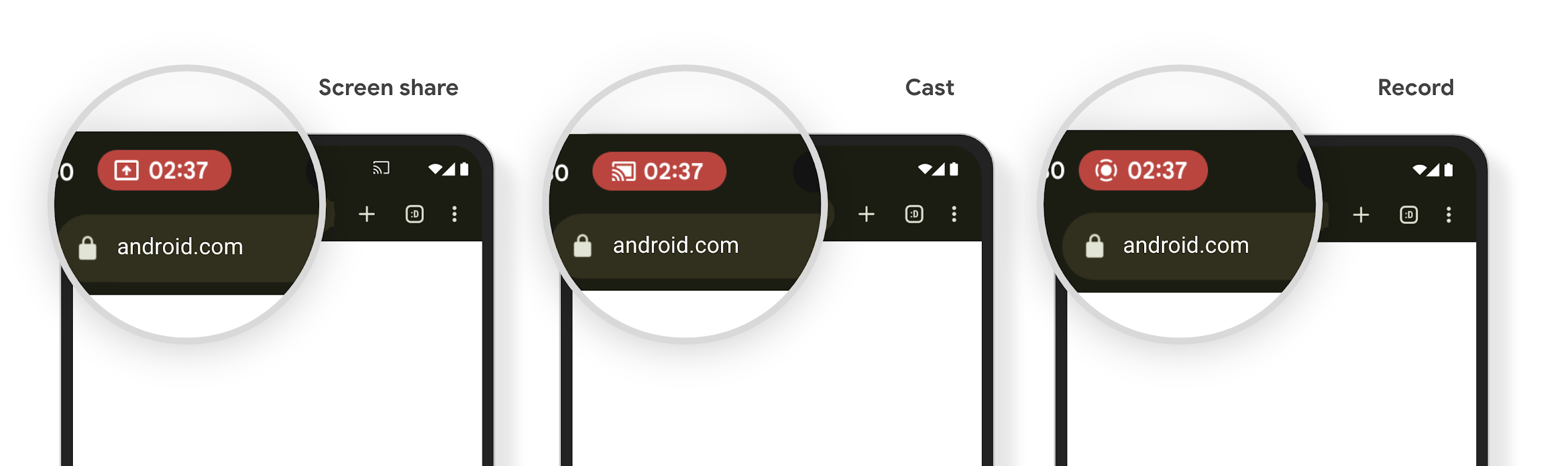
Media projection can expose private user information. A new, prominent status bar chip makes users aware of any ongoing screen projection. Users can tap the chip to stop screen casting, sharing, or recording. Also, for a more intuitive user experience, any in‑progress screen projection now automatically stops when the device screen is locked.
หน้าจอขนาดใหญ่และรูปแบบของอุปกรณ์
Android 15 ช่วยให้แอปของคุณใช้ประโยชน์จากรูปแบบของ Android ได้อย่างเต็มที่ ซึ่งรวมถึงหน้าจอขนาดใหญ่ อุปกรณ์แบบพับได้ และอุปกรณ์แบบพับได้
การทำงานหลายอย่างพร้อมกันบนหน้าจอขนาดใหญ่ที่ปรับปรุงใหม่
Android 15 ช่วยให้ผู้ใช้ทำงานหลายอย่างพร้อมกันในอุปกรณ์หน้าจอขนาดใหญ่ได้ดียิ่งขึ้น สำหรับ เช่น ผู้ใช้สามารถบันทึกชุดแอปที่ใช้ร่วมกันที่ชอบเพื่อใช้โหมดแยกหน้าจอได้อย่างรวดเร็ว เข้าถึงและปักหมุดแถบงานบนหน้าจอเพื่อสลับไปมาระหว่างแอปต่างๆ ได้อย่างรวดเร็ว ซึ่งหมายความว่า การทำให้แอปของคุณปรับเปลี่ยนได้นั้นสำคัญกว่าที่เคย
Google I/O มีเซสชันเกี่ยวกับการสร้าง Android แบบปรับอัตโนมัติ แอปและการสร้าง UI ด้วย Material 3 ไลบรารีแบบปรับอัตโนมัติ ที่ช่วยได้ และเอกสารของเรายังมีสิ่งอื่นๆ ที่ช่วยคุณออกแบบ
การรองรับหน้าจอด้านนอก
Your app can declare a property that Android 15 uses to
allow your Application or Activity to be presented on the small cover
screens of supported flippable devices. These screens are too small to be
considered as compatible targets for Android apps to run on, but your app can
opt in to supporting them, making your app available in more places.
การเชื่อมต่อ
Android 15 อัปเดตแพลตฟอร์มเพื่อให้แอปของคุณเข้าถึงความก้าวหน้าล่าสุดในด้านเทคโนโลยีการสื่อสารและเทคโนโลยีไร้สาย
การสนับสนุนผ่านดาวเทียม
Android 15 ยังคงขยายการรองรับแพลตฟอร์มสำหรับการเชื่อมต่อผ่านดาวเทียมต่อไป และ มีองค์ประกอบ UI บางอย่างเพื่อให้มั่นใจว่าผู้ใช้จะได้รับประสบการณ์ที่สอดคล้องกันทั่วทั้ง การเชื่อมต่อผ่านดาวเทียม
แอปสามารถใช้ ServiceState.isUsingNonTerrestrialNetwork() เพื่อ
ตรวจจับเมื่ออุปกรณ์เชื่อมต่อกับดาวเทียม ทำให้อุปกรณ์รับรู้ถึง
สาเหตุที่บริการเครือข่ายเต็มรูปแบบอาจใช้ไม่ได้ นอกจากนี้ Android 15 ยังรองรับแอป SMS และ MMS รวมถึงแอป RCS ที่โหลดไว้ล่วงหน้าเพื่อใช้การเชื่อมต่อผ่านดาวเทียมสำหรับส่งและรับข้อความ

ประสบการณ์การใช้งาน NFC ที่ราบรื่นยิ่งขึ้น
Android 15 กำลังพัฒนาประสบการณ์การแตะเพื่อจ่ายให้ราบรื่นและเชื่อถือได้มากขึ้น ในขณะเดียวกันก็ยังคงรองรับระบบนิเวศแอป NFC ที่มีประสิทธิภาพของ Android ในอุปกรณ์ที่รองรับ แอปจะขอให้ NfcAdapter เข้าสู่โหมดสังเกตการณ์ ซึ่งอุปกรณ์จะฟังแต่ไม่ตอบสนองต่อเครื่องอ่าน NFC โดยส่งออบเจ็กต์บริการ NFC ของแอป PollingFrame ไปประมวลผล คุณสามารถใช้ออบเจ็กต์ PollingFrame เพื่อตรวจสอบสิทธิ์ก่อนการสื่อสารกับเครื่องอ่าน NFC ครั้งแรก ซึ่งจะช่วยให้ทำธุรกรรมแบบแตะครั้งเดียวได้ในกรณีหลายกรณี
นอกจากนี้ แอปยังลงทะเบียนตัวกรองในอุปกรณ์ที่รองรับเพื่อให้ได้รับการแจ้งเตือนเกี่ยวกับกิจกรรมของลูปการสำรวจ ซึ่งช่วยให้แอปพลิเคชันที่รองรับ NFC หลายรายการทำงานได้อย่างราบรื่น
บทบาทของ Wallet
Android 15 เปิดตัวบทบาท Wallet ที่ช่วยให้ผสานรวมกับแอป Wallet ที่ต้องการของผู้ใช้ได้ดียิ่งขึ้น บทบาทนี้จะแทนที่การตั้งค่าการชำระเงินแบบไม่ต้องสัมผัสเริ่มต้นของ NFC ผู้ใช้สามารถจัดการผู้ถือบทบาท Wallet ได้โดยไปที่การตั้งค่า > แอป > แอปเริ่มต้น
ระบบจะใช้บทบาท Wallet เมื่อกำหนดเส้นทางการแตะ NFC สำหรับ AID ที่ลงทะเบียนไว้ในหมวดหมู่การชำระเงิน การแตะจะไปยังผู้ถือบทบาท Wallet เสมอ เว้นแต่ว่าแอปอื่นที่ลงทะเบียนสำหรับ AID เดียวกันจะทำงานอยู่เบื้องหน้า
บทบาทนี้ยังใช้เพื่อกำหนดตําแหน่งการ์ดการเข้าถึงด่วนของ Wallet เมื่อเปิดใช้งาน เมื่อตั้งค่าบทบาทเป็น "ไม่มี" การ์ดการเข้าถึงด่วนจะใช้งานไม่ได้และการแตะ NFC หมวดหมู่การชำระเงินจะแสดงในแอปที่ทำงานอยู่เบื้องหน้าเท่านั้น
ความปลอดภัย
Android 15 ช่วยคุณปรับปรุงความปลอดภัยของแอป ปกป้องข้อมูลของแอป และให้ผู้ใช้มีความโปร่งใสและควบคุมข้อมูลของตนได้มากขึ้น ดูการบรรยายเรื่องการปกป้องความปลอดภัยของผู้ใช้ใน Android จาก Google I/O เพื่อดูข้อมูลเพิ่มเติมเกี่ยวกับสิ่งที่เรากำลังทำเพื่อปรับปรุงการป้องกันผู้ใช้และปกป้องแอปของคุณจากภัยคุกคามใหม่ๆ
ผสานรวม Credential Manager กับการป้อนข้อความอัตโนมัติ
Starting with Android 15, developers can link specific views like username or password fields with Credential Manager requests, making it easier to provide a tailored user experience during the sign-in process. When the user focuses on one of these views, a corresponding request is sent to Credential Manager. The resulting credentials are aggregated across providers and displayed in autofill fallback UIs, such as inline suggestions or drop-down suggestions. The Jetpack androidx.credentials library is the preferred endpoint for developers to use and will soon be available to further enhance this feature in Android 15 and higher.
ผสานรวมการลงชื่อสมัครใช้และการลงชื่อเข้าใช้ด้วยการแตะครั้งเดียวกับข้อความแจ้งข้อมูลไบโอเมตริก
Credential Manager integrates biometric prompts into the credential creation and sign-in processes, eliminating the need for providers to manage biometric prompts. As a result, credential providers only need to focus on the results of the create and get flows, augmented with the biometric flow result. This simplified process creates a more efficient and streamlined credential creation and retrieval process.
การจัดการคีย์สำหรับการเข้ารหัสจากต้นทางถึงปลายทาง
We are introducing the E2eeContactKeysManager in Android 15, which
facilitates end-to-end encryption (E2EE) in your Android apps by providing an
OS-level API for the storage of cryptographic public keys.
The E2eeContactKeysManager is designed to integrate with the platform
contacts app to give users a centralized way to manage and verify their
contacts' public keys.
การตรวจสอบสิทธิ์ใน URI เนื้อหา
Android 15 introduces a set of APIs that perform permission checks on content URIs:
Context.checkContentUriPermissionFull: This performs a full permission check on content URIs.Activitymanifest attributerequireContentUriPermissionFromCaller: This enforces specified permissions on the provided content URIs at activity launch.ComponentCallerclass forActivitycallers: This represents the app that launched the activity.
การช่วยเหลือพิเศษ
Android 15 เพิ่มฟีเจอร์ที่ปรับปรุงการช่วยเหลือพิเศษสำหรับผู้ใช้
อักษรเบรลล์ที่ดีขึ้น
In Android 15, we've made it possible for TalkBack to support Braille displays that are using the HID standard over both USB and secure Bluetooth.
This standard, much like the one used by mice and keyboards, will help Android support a wider range of Braille displays over time.
การทำให้เป็นสากล
Android 15 เพิ่มฟีเจอร์และความสามารถที่ช่วยเสริมประสบการณ์ของผู้ใช้เมื่อใช้อุปกรณ์ในภาษาต่างๆ
แบบอักษรที่ปรับแต่งได้ CJK
Starting with Android 15, the font file for Chinese, Japanese, and Korean (CJK) languages, NotoSansCJK, is now a variable font. Variable fonts open up possibilities for creative typography in CJK languages. Designers can explore a broader range of styles and create visually striking layouts that were previously difficult or impossible to achieve.

การจัดชิดขอบระหว่างอักขระ
ใน Android 15 เป็นต้นไป คุณสามารถปรับข้อความให้ชิดขอบโดยใช้ระยะห่างของตัวอักษรได้โดย
ด้วย JUSTIFICATION_MODE_INTER_CHARACTER การให้เหตุผลระหว่างคำเดิมคือ
เปิดตัวครั้งแรกใน Android 8.0 (API ระดับ 26) และระหว่างอักขระ
เหตุผลรองรับมีความสามารถที่คล้ายกันสำหรับภาษาที่ใช้
อักขระช่องว่างในการแบ่งกลุ่ม เช่น ภาษาจีน ภาษาญี่ปุ่น และอื่นๆ

JUSTIFICATION_MODE_NONE
JUSTIFICATION_MODE_NONE
JUSTIFICATION_MODE_INTER_WORD
JUSTIFICATION_MODE_INTER_WORD
JUSTIFICATION_MODE_INTER_CHARACTER
JUSTIFICATION_MODE_INTER_CHARACTERการกำหนดค่าการขึ้นบรรทัดใหม่อัตโนมัติ
Android เริ่มรองรับการขึ้นบรรทัดใหม่ด้วยวลีสำหรับภาษาญี่ปุ่นและเกาหลีใน
Android 13 (API ระดับ 33) อย่างไรก็ตาม ขณะที่ตัวแบ่งบรรทัดแบบวลีจะปรับปรุง
ความสะดวกในการอ่านข้อความบรรทัดสั้นๆ จะทำงานได้ไม่ดีกับข้อความยาวๆ
ใน Android 15 แอปจะใช้ตัวแบ่งบรรทัดแบบวลีได้เฉพาะกับบรรทัดสั้นๆ เท่านั้น
โดยใช้ฟังก์ชัน LINE_BREAK_WORD_STYLE_AUTO
ตัวเลือก ตัวเลือกนี้จะเลือกตัวเลือกรูปแบบคำที่ดีที่สุดสำหรับข้อความ
สำหรับบรรทัดข้อความสั้นๆ จะมีการใช้ตัวแบ่งบรรทัดโดยใช้วลี โดยทำงานเหมือนเดิม
เป็น LINE_BREAK_WORD_STYLE_PHRASE ดังที่แสดงใน
รูปภาพต่อไปนี้:

LINE_BREAK_WORD_STYLE_AUTOจะใช้การแบ่งบรรทัดตามวลีเพื่อปรับปรุงความอ่านง่ายของข้อความ
เช่นเดียวกับการสมัคร
LINE_BREAK_WORD_STYLE_PHRASEสำหรับบรรทัดข้อความที่ยาวขึ้น LINE_BREAK_WORD_STYLE_AUTO จะใช้โอเปอเรเตอร์
รูปแบบการขึ้นบรรทัดใหม่ ทำงานเหมือนกับ
LINE_BREAK_WORD_STYLE_NONE ดังที่แสดงใน
รูปภาพต่อไปนี้:

LINE_BREAK_WORD_STYLE_AUTO
ไม่ใช้รูปแบบการขึ้นบรรทัดใหม่ เพื่อทำให้ข้อความอ่านง่ายขึ้น
เช่นเดียวกับการสมัคร
LINE_BREAK_WORD_STYLE_NONEแบบอักษรเฮนไทกานะภาษาญี่ปุ่นเพิ่มเติม
In Android 15, a font file for old Japanese Hiragana (known as Hentaigana) is bundled by default. The unique shapes of Hentaigana characters can add a distinctive flair to artwork or design while also helping to preserve accurate transmission and understanding of ancient Japanese documents.

VideoLAN cone Copyright (c) 1996-2010 VideoLAN. This logo or a modified version may be used or modified by anyone to refer to the VideoLAN project or any product developed by the VideoLAN team, but does not indicate endorsement by the project.
Vulkan and the Vulkan logo are registered trademarks of the Khronos Group Inc.
OpenGL is a registered trademark and the OpenGL ES logo is a trademark of Hewlett Packard Enterprise used by permission by Khronos.