

ב-Android 14 נוספו תכונות וממשקי API מעולים למפתחים. המאמרים הבאים יעזרו לכם להבין את התכונות של האפליקציות ולהתחיל להשתמש בממשקי ה-API שקשורים אליהן.
רשימה מפורטת של ממשקי API שנוספו, שונו או הוסרו מופיעה בדוח ההבדלים בין גרסאות ה-API. פרטים על ממשקי API שנוספו זמינים במאמרי העזרה של ה-Android API. ב-Android 14, אפשר לחפש ממשקי API שנוספו ברמת API 34. כדי לקבל מידע על תחומים שבהם שינויים בפלטפורמה עשויים להשפיע על האפליקציות שלכם, כדאי לעיין בשינויים בהתנהגות ב-Android 14 באפליקציות שמטרגטות ל-Android 14 ובכל האפליקציות.
אינטרנציונליזציה
העדפות שפה לכל אפליקציה
ב-Android 14 נוספו לתכונות של שפה לכל אפליקציה, שהוצגו ב-Android 13 (רמת API 33), היכולות הבאות:
יצירה אוטומטית של
localeConfigשל אפליקציה: החל מ-Android Studio Giraffe Canary 7 ו-AGP 8.1.0-alpha07, אפשר להגדיר את האפליקציה כך שתתמוך באופן אוטומטי בהעדפות שפה לכל אפליקציה. על סמך המשאבים של הפרויקט, הפלאגין של Android Gradle יוצר את הקובץLocaleConfigומוסיף לו הפניה בקובץ המניפסט הסופי, כך שאין יותר צורך ליצור או לעדכן את הקובץ באופן ידני. מערכת AGP משתמשת במשאבים בתיקיותresשל מודולי האפליקציה ובכל יחסי התלות של מודולי הספריות כדי לקבוע את האזורים הגיאוגרפיים שצריך לכלול בקובץLocaleConfig.עדכונים דינמיים של
localeConfigבאפליקציה: משתמשים בשיטותsetOverrideLocaleConfig()ו-getOverrideLocaleConfig()שמפורטות ב-LocaleManagerכדי לעדכן באופן דינמי את רשימת השפות הנתמכות באפליקציה בהגדרות המערכת של המכשיר. הגמישות הזו מאפשרת לכם להתאים אישית את רשימת השפות הנתמכות לפי אזור, להריץ ניסויים מסוג A/B או לספק רשימה מעודכנת של אזורי זמן אם האפליקציה שלכם משתמשת בהעברות (push) בצד השרת לצורך לוקליזציה.הצגת שפת האפליקציה לעורכי שיטות קלט (IME): עורכי שיטות קלט יכולים להשתמש ב-method
getApplicationLocales()כדי לבדוק את שפת האפליקציה הנוכחית ולהתאים את שפת ה-IME לשפה הזו.
Grammatical Inflection API
3 billion people speak gendered languages: languages where grammatical categories—such as nouns, verbs, adjectives, and prepositions—inflect according to the gender of people and objects you talk to or about. Traditionally, many gendered languages use masculine grammatical gender as the default or generic gender.
Addressing users in the wrong grammatical gender, such as addressing women in masculine grammatical gender, can negatively impact their performance and attitude. In contrast, a UI with language that correctly reflects the user's grammatical gender can improve user engagement and provide a more personalized and natural-sounding user experience.
כדי לעזור לכם ליצור ממשק משתמש שמתמקד במשתמשים בשפות עם הבחנה בין מינים, ב-Android 14 מופיע Grammatical Inflection API, שמאפשר לכם להוסיף תמיכה בלשון מגדרית בלי לבצע רפאקציה לאפליקציה.
העדפות הפורמט והמידות
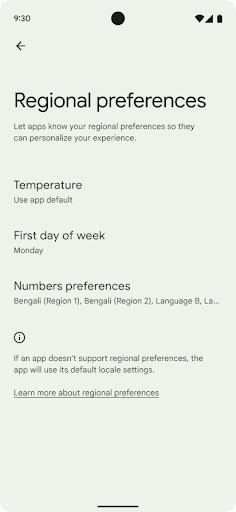
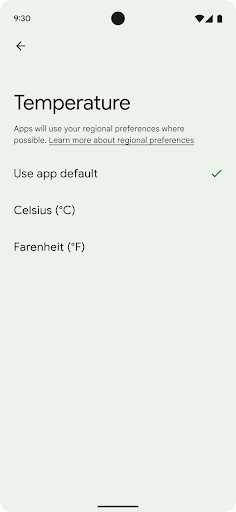
Regional preferences enable users to personalize temperature units, the first day of the week, and numbering systems. A European living in the United States might prefer temperature units to be in Celsius rather than Fahrenheit and for apps to treat Monday as the beginning of the week instead of the US default of Sunday.
New Android Settings menus for these preferences provide users with a
discoverable and centralized location to change app preferences. These
preferences also persist through backup and restore. Several APIs and
intents—such as
getTemperatureUnit
and
getFirstDayOfWeek—
grant your app read access to user preferences, so your app can adjust how it
displays information. You can also register a
BroadcastReceiver on
ACTION_LOCALE_CHANGED
to handle locale configuration changes when regional preferences change.
To find these settings, open the Settings app and navigate to System > Languages & input > Regional preferences.
נגישות
הגדלה לא לינארית של הגופן עד 200%
Starting in Android 14, the system supports font scaling up to 200%, providing users with additional accessibility options.
To prevent large text elements on screen from scaling too large, the system applies a nonlinear scaling curve. This scaling strategy means that large text doesn't scale at the same rate as smaller text. Nonlinear font scaling helps preserve the proportional hierarchy between elements of different sizes while mitigating issues with linear text scaling at high degrees (such as text being cut off or text that becomes harder to read due to an extremely large display sizes).
Test your app with nonlinear font scaling
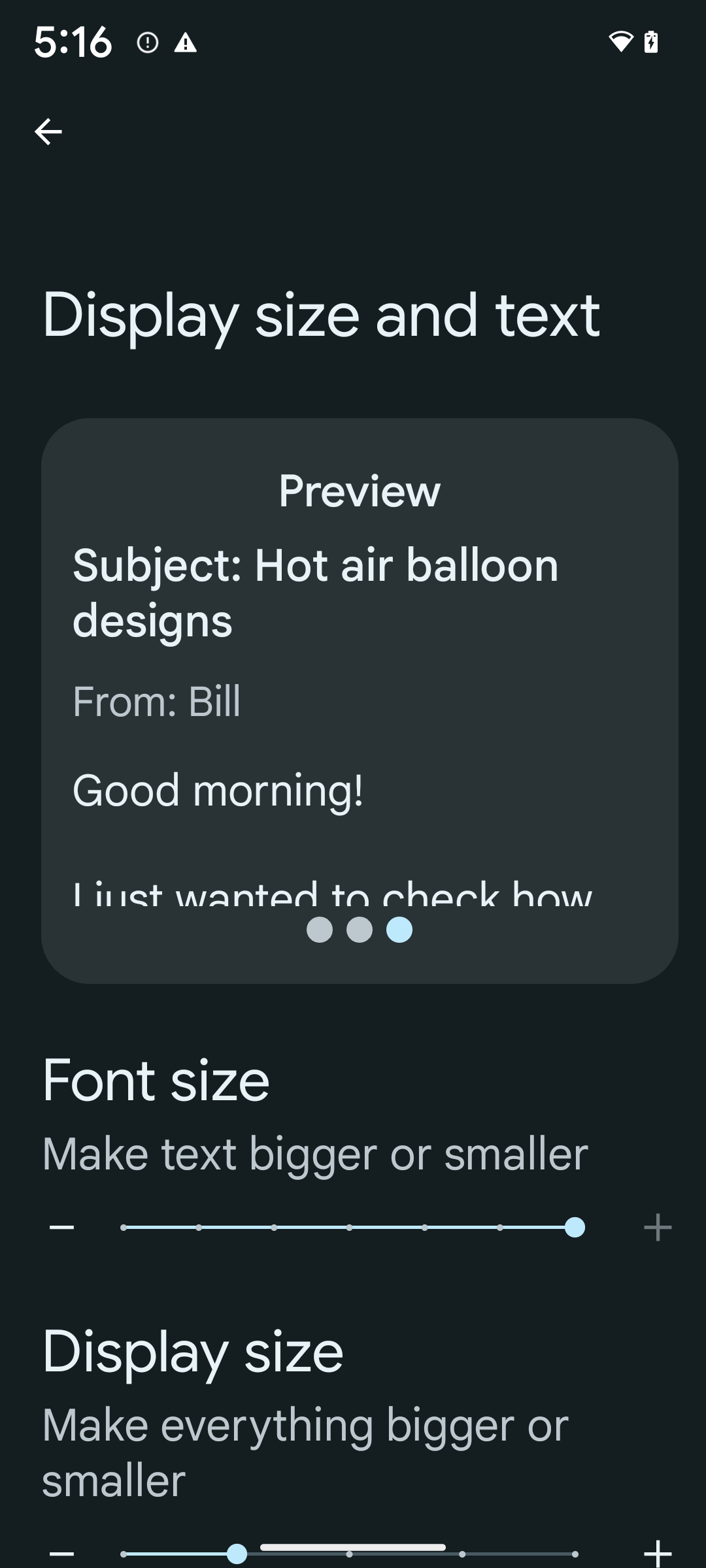
If you already use scaled pixels (sp) units to define text sizing, then these additional options and scaling improvements are applied automatically to the text in your app. However, you should still perform UI testing with the maximum font size enabled (200%) to ensure that your app applies the font sizes correctly and can accommodate larger font sizes without impacting usability.
To enable 200% font size, follow these steps:
- Open the Settings app and navigate to Accessibility > Display size and text.
- For the Font size option, tap the plus (+) icon until the maximum font size setting is enabled, as shown in the image that accompanies this section.
Use scaled pixel (sp) units for text-sizes
Remember to always specify text sizes in sp units. When your app uses sp units, Android can apply the user's preferred text size and scale it appropriately.
Don't use sp units for padding or define view heights assuming implicit padding: with nonlinear font scaling sp dimensions might not be proportional, so 4sp + 20sp might not equal 24sp.
Convert scaled pixel (sp) units
Use TypedValue.applyDimension() to convert from sp units
to pixels, and use TypedValue.deriveDimension() to
convert pixels to sp. These methods apply the appropriate nonlinear scaling
curve automatically.
Avoid hardcoding equations using
Configuration.fontScale or
DisplayMetrics.scaledDensity. Because font scaling is
nonlinear, the scaledDensity field is no longer accurate. The fontScale
field should be used for informational purposes only because fonts are no longer
scaled with a single scalar value.
Use sp units for lineHeight
Always define android:lineHeight using sp units instead
of dp, so the line height scales along with your text. Otherwise, if your text
is sp but your lineHeight is in dp or px, it doesn't scale and looks cramped.
TextView automatically corrects the lineHeight so that your intended
proportions are preserved, but only if both textSize and lineHeight are
defined in sp units.
מצלמה ומדיה
תמונות ב-Ultra HDR

ב-Android 14 נוספה תמיכה בתמונות באיכות HDR (טווח דינמי גבוה), שמאפשרות לשמור יותר מידע מהחיישן בזמן הצילום, וכך לייצר צבעים עזים וניגודיות גבוהה יותר. ב-Android נעשה שימוש בפורמט Ultra HDR, שהוא תואם לאחור לתמונות JPEG. כך האפליקציות יכולות לפעול בצורה חלקה עם תמונות HDR ולהציג אותן בטווח דינמי סטנדרטי (SDR) לפי הצורך.
המערכת מבצעת את העיבוד של התמונות האלה בממשק המשתמש ב-HDR באופן אוטומטי כשהאפליקציה בוחרת להשתמש בממשק משתמש ב-HDR בחלון הפעילות שלה, דרך רשומה במניפסט או במהלך זמן הריצה על ידי קריאה ל-Window.setColorMode(). אפשר גם לצלם תמונות סטילס דחוסות ב-Ultra HDR במכשירים נתמכים. כשהחיישן משחזר יותר צבעים, אפשר לערוך את התמונות בצורה גמישה יותר. אפשר להשתמש ב-Gainmap שמשויך לתמונות Ultra HDR כדי ליצור רינדור שלהן באמצעות OpenGL או Vulkan.
זום, מיקוד, תצוגה מקדימה ועוד בתוספים למצלמה
Android 14 upgrades and improves camera extensions, allowing apps to handle longer processing times, which enables improved images using compute-intensive algorithms like low-light photography on supported devices. These features give users an even more robust experience when using camera extension capabilities. Examples of these improvements include:
- Dynamic still capture processing latency estimation provides much more
accurate still capture latency estimates based on the current scene and
environment conditions. Call
CameraExtensionSession.getRealtimeStillCaptureLatency()to get aStillCaptureLatencyobject that has two latency estimation methods. ThegetCaptureLatency()method returns the estimated latency betweenonCaptureStartedandonCaptureProcessStarted(), and thegetProcessingLatency()method returns the estimated latency betweenonCaptureProcessStarted()and the final processed frame being available. - Support for capture progress callbacks so that apps can display the current
progress of long-running, still-capture processing operations. You can check
if this feature is available with
CameraExtensionCharacteristics.isCaptureProcessProgressAvailable, and if it is, you implement theonCaptureProcessProgressed()callback, which has the progress (from 0 to 100) passed in as a parameter. Extension specific metadata, such as
CaptureRequest.EXTENSION_STRENGTHfor dialing in the amount of an extension effect, such as the amount of background blur withEXTENSION_BOKEH.Postview Feature for Still Capture in camera extensions, which provides a less-processed image more quickly than the final image. If an extension has increased processing latency, a postview image could be provided as a placeholder to improve UX and switched out later for the final image. You can check if this feature is available with
CameraExtensionCharacteristics.isPostviewAvailable. Then you can pass anOutputConfigurationtoExtensionSessionConfiguration.setPostviewOutputConfiguration.Support for
SurfaceViewallowing for a more optimized and power-efficient preview render path.Support for tap to focus and zoom during extension usage.
זום בחיישן
When REQUEST_AVAILABLE_CAPABILITIES_STREAM_USE_CASE in
CameraCharacteristics contains
SCALER_AVAILABLE_STREAM_USE_CASES_CROPPED_RAW, your app
can use advanced sensor capabilities to give a cropped RAW stream the same
pixels as the full field of view by using a CaptureRequest
with a RAW target that has stream use case set to
CameraMetadata.SCALER_AVAILABLE_STREAM_USE_CASES_CROPPED_RAW.
By implementing the request override controls, the updated camera gives users
zoom control even before other camera controls are ready.
אודיו ב-USB ללא אובדן מידע
ב-Android 14 יש תמיכה בפורמטים של אודיו ללא אובדן נתונים, כדי שתוכלו ליהנות מחוויית אודיו ברמה גבוהה באמצעות אוזניות קוויות עם חיבור USB. אפשר לשלוח שאילתה למכשיר USB כדי לקבל את מאפייני המיקסר המועדפים שלו, לרשום מאזין לשינויים במאפייני המיקסר המועדפים ולהגדיר את מאפייני המיקסר באמצעות הכיתה AudioMixerAttributes. המחלקה הזו מייצגת את הפורמט, כמו מסכת הערוץ, קצב הדגימה וההתנהגות של מיקסר האודיו. הסוג הזה מאפשר לשלוח אודיו ישירות, בלי ערבוב, שינוי עוצמת קול או עיבוד אפקטים.
פרודוקטיביות וכלים למפתחים
מנהל פרטי הכניסה
Android 14 adds Credential Manager as a platform API, with additional support back to Android 4.4 (API level 19) devices through a Jetpack Library using Google Play services. Credential Manager aims to make sign-in easier for users with APIs that retrieve and store credentials with user-configured credential providers. Credential Manager supports multiple sign-in methods, including username and password, passkeys, and federated sign-in solutions (such as Sign-in with Google) in a single API.
Passkeys provide many advantages. For example, passkeys are built on industry standards, can work across different operating systems and browser ecosystems, and can be used with both websites and apps.
For more information, see the Credential Manager and passkeys documentation and the blogpost about Credential Manager and passkeys.
Health Connect
Health Connect is an on-device repository for user health and fitness data. It allows users to share data between their favorite apps, with a single place to control what data they want to share with these apps.
On devices running Android versions prior to Android 14, Health Connect is available to download as an app on the Google Play store. Starting with Android 14, Health Connect is part of the platform and receives updates through Google Play system updates without requiring a separate download. With this, Health Connect can be updated frequently, and your apps can rely on Health Connect being available on devices running Android 14 or higher. Users can access Health Connect from the Settings in their device, with privacy controls integrated into the system settings.
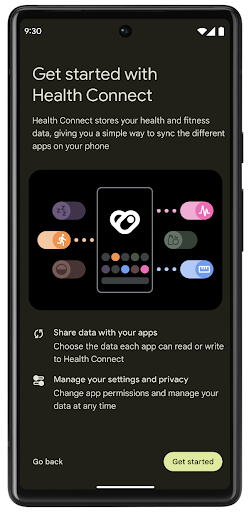
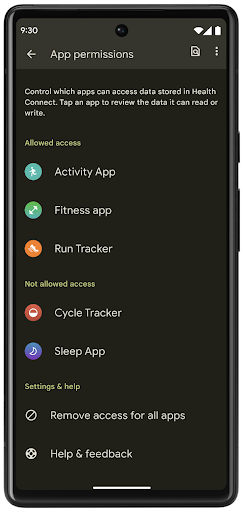
Health Connect includes several new features in Android 14, such as exercise routes, allowing users to share a route of their workout which can be visualized on a map. A route is defined as a list of locations saved within a window of time, and your app can insert routes into exercise sessions, tying them together. To ensure that users have complete control over this sensitive data, users must allow sharing individual routes with other apps.
For more information, see the Health Connection documentation and the blogpost on What's new in Android Health.
עדכונים ל-OpenJDK 17
Android 14 continues the work of refreshing Android's core libraries to align with the features in the latest OpenJDK LTS releases, including both library updates and Java 17 language support for app and platform developers.
The following features and improvements are included:
- Updated approximately 300
java.baseclasses to Java 17 support. - Text Blocks, which introduce multi-line string literals to the Java programming language.
- Pattern Matching for instanceof, which allows an object to
be treated as having a specific type in an
instanceofwithout any additional variables. - Sealed classes, which allow you restrict which classes and interfaces can extend or implement them.
Thanks to Google Play system updates (Project Mainline), over 600 million devices are enabled to receive the latest Android Runtime (ART) updates that include these changes. This is part of our commitment to give apps a more consistent, secure environment across devices, and to deliver new features and capabilities to users independent of platform releases.
Java and OpenJDK are trademarks or registered trademarks of Oracle and/or its affiliates.
שיפורים בחנויות אפליקציות
ב-Android 14 נוספו כמה ממשקי API של PackageInstaller שמאפשרים לחנויות האפליקציות לשפר את חוויית המשתמש שלהן.
בקשה לאישור התקנה לפני ההורדה
יכול להיות שתצטרכו אישור משתמש כדי להתקין או לעדכן אפליקציה.
לדוגמה, כשתוכנית התקנה שמשתמשת בהרשאה REQUEST_INSTALL_PACKAGES מנסה להתקין אפליקציה חדשה. בגרסאות קודמות של Android, חנויות אפליקציות יכולות לבקש אישור מהמשתמש רק אחרי שקבצי ה-APK נכתבים בסשן ההתקנה והסשן מוגדר.
החל מ-Android 14, השיטה requestUserPreapproval() מאפשרת למתקינים לבקש אישור מהמשתמשים לפני ביצוע סשן ההתקנה. השיפור הזה מאפשר לחנות אפליקציות לדחות את הורדת חבילות ה-APK עד שהמשתמש יאשר את ההתקנה. בנוסף, אחרי שהמשתמש מאשר את ההתקנה, חנות האפליקציות יכולה להוריד ולהתקין את האפליקציה ברקע בלי להפריע למשתמש.
לטעון לבעלות על עדכונים עתידיים
השיטה setRequestUpdateOwnership() מאפשרת למתקין להציין למערכת שהוא מתכוון להיות אחראי על עדכונים עתידיים לאפליקציה שהוא מתקין. היכולת הזו מאפשרת לאכוף את הבעלות על העדכון, כלומר רק בעל העדכון רשאי להתקין עדכונים אוטומטיים לאפליקציה. אכיפת הבעלות על העדכון עוזרת לוודא שהמשתמשים מקבלים עדכונים רק מחנות האפליקציות הצפויה.
כל מתקין אחר, כולל אלה שמשתמשים בהרשאה INSTALL_PACKAGES, צריך לקבל אישור מפורש מהמשתמש כדי להתקין עדכון. אם משתמש מחליט להמשיך עם עדכון ממקור אחר, הבעלות על העדכון אבודה.
עדכון אפליקציות בזמנים פחות מפריעים
בדרך כלל, בחנויות האפליקציות לא רוצים לעדכן אפליקציה שבשימוש פעיל, כי זה מוביל לסגירת התהליכים שפועלים באפליקציה, ויכול להפריע למה שהמשתמש עושה.
החל מ-Android 14, ממשק ה-API של InstallConstraints מאפשר למתקינים לוודא שהעדכונים של האפליקציות שלהם מתבצעים בזמן המתאים. לדוגמה, חנות אפליקציות יכולה להפעיל את השיטה commitSessionAfterInstallConstraintsAreMet() כדי לוודא שהעדכון יאושר רק כשהמשתמש כבר לא יוצר אינטראקציה עם האפליקציה הרלוונטית.
התקנה חלקה של חלוקות אופציונליות
כשמשתמשים ב-APKs מפוצלים, אפשר לספק את התכונות של האפליקציה בקובצי APK נפרדים, במקום כ-APK מונוליתי. קובצי APK מפוצלים מאפשרים לחנויות אפליקציות לבצע אופטימיזציה של העברת הרכיבים השונים של האפליקציה. לדוגמה, חנויות אפליקציות עשויות לבצע אופטימיזציה על סמך המאפיינים של מכשיר היעד. ה-API של PackageInstaller תומך בחלוקות מאז ההשקה שלו ברמת API 22.
ב-Android 14, השיטה setDontKillApp() מאפשרת למנהל ההתקנה לציין שלא צריך להרוג את התהליכים שפועלים באפליקציה כשמתקינים פלחים חדשים. חנויות האפליקציות יכולות להשתמש בתכונה הזו כדי להתקין בצורה חלקה תכונות חדשות של אפליקציה בזמן שהמשתמש משתמש באפליקציה.
חבילות מטא-נתונים של אפליקציות
Starting in Android 14, the Android package installer lets you specify app metadata, such as data safety practices, to include on app store pages such as Google Play.
זיהוי מתי משתמשים מצלמים צילומי מסך במכשיר
To create a more standardized experience for detecting screenshots, Android 14 introduces a privacy-preserving screenshot detection API. This API lets apps register callbacks on a per-activity basis. These callbacks are invoked, and the user is notified, when the user takes a screenshot while that activity is visible.
חוויית משתמש
פעולות מותאמות אישית בקובץ לשיתוף ודירוג משופר
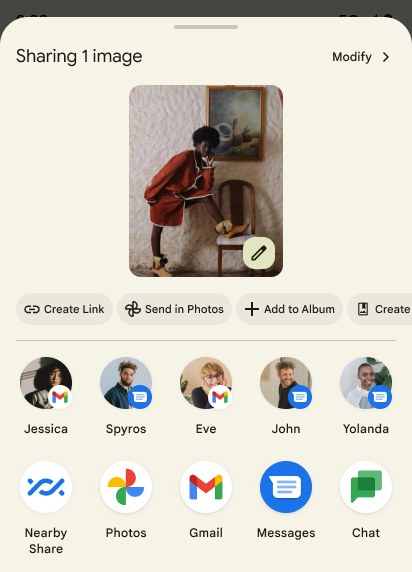
Android 14 updates the system sharesheet to support custom app actions and more informative preview results for users.
Add custom actions
With Android 14, your app can add custom actions to the system sharesheet it invokes.
Improve ranking of Direct Share targets
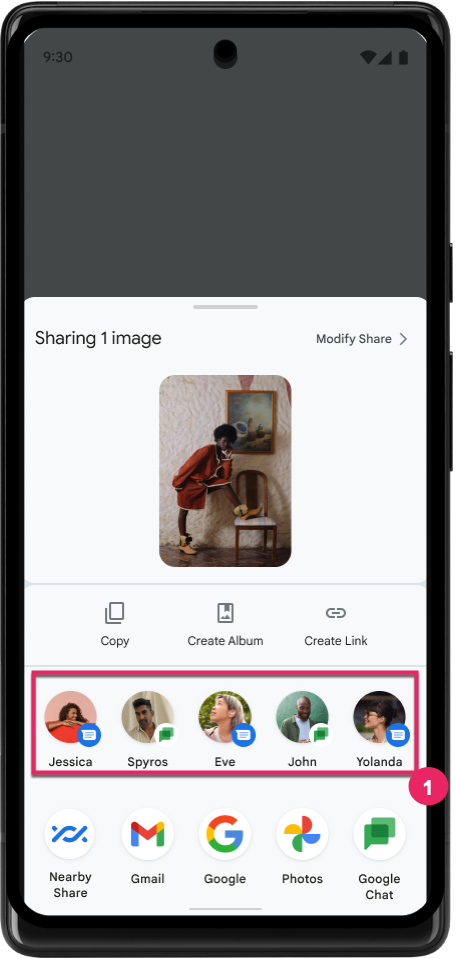
Android 14 uses more signals from apps to determine the ranking of the direct share targets to provide more helpful results for the user. To provide the most useful signal for ranking, follow the guidance for improving rankings of your Direct Share targets. Communication apps can also report shortcut usage for outgoing and incoming messages.
תמיכה באנימציות מובנות ומותאמות אישית לחיזוי של תנועת החזרה
Android 13 introduced the predictive back-to-home animation behind a developer option. When used in a supported app with the developer option enabled, swiping back shows an animation indicating that the back gesture exits the app back to the home screen.
Android 14 includes multiple improvements and new guidance for Predictive Back:
- You can set
android:enableOnBackInvokedCallback=trueto opt in to predictive back system animations per-Activity instead of for the entire app. - We've added new system animations to accompany the back-to-home animation from Android 13. The new system animations are cross-activity and cross-task, which you get automatically after migrating to Predictive Back.
- We've added new Material Component animations for Bottom sheets, Side sheets, and Search.
- We've created design guidance for creating custom in-app animations and transitions.
- We've added new APIs to support custom in-app transition animations:
handleOnBackStarted,handleOnBackProgressed,handleOnBackCancelledinOnBackPressedCallbackonBackStarted,onBackProgressed,onBackCancelledinOnBackAnimationCallback- Use
overrideActivityTransitioninstead ofoverridePendingTransitionfor transitions that respond as the user swipes back.
With this Android 14 preview release, all features of Predictive Back remain behind a developer option. See the developer guide to migrate your app to predictive back, as well as the developer guide to creating custom in-app transitions.
שינויים בהגדרות של אפליקציות ספציפיות במכשירים עם מסך גדול
שינוי הגדרות ברמת האפליקציה מאפשר ליצרני המכשירים לשנות את ההתנהגות של האפליקציות במכשירים עם מסך גדול. לדוגמה, ההחרגה FORCE_RESIZE_APP מורה למערכת לשנות את גודל האפליקציה כך שיתאים למימדי המסך (מבלי להשתמש במצב תאימות לגודל) גם אם הערך resizeableActivity="false" מוגדר בקובץ המניפסט של האפליקציה.
השינויים מברירת המחדל נועדו לשפר את חוויית המשתמש במסכים גדולים.
מאפייני מניפסט חדשים מאפשרים להשבית חלק מהשינויים של יצרן המכשירים באפליקציה שלכם.
שינויים בהגדרות של כל אפליקציה בנפרד למשתמשים במסכים גדולים
שינוי ההגדרות של כל אפליקציה בנפרד משנה את התנהגות האפליקציות במכשירים עם מסך גדול. לדוגמה, שינוי ברירת המחדל של יצרן המכשיר OVERRIDE_MIN_ASPECT_RATIO_LARGE מגדיר את יחס הגובה-רוחב של האפליקציה ל-16:9, ללא קשר להגדרות האפליקציה.
ב-Android 14 QPR1, משתמשים יכולים להחיל שינויים ספציפיים לאפליקציות באמצעות תפריט הגדרות חדש במכשירים עם מסך גדול.
שיתוף מסך של אפליקציה
שיתוף מסך של אפליקציה מאפשר למשתמשים לשתף חלון של אפליקציה במקום את כל מסך המכשיר במהלך הקלטת תוכן המסך.
כשמשתפים את המסך של אפליקציה, סרגל הסטטוס, סרגל הניווט, ההתראות ואלמנטים אחרים בממשק המשתמש של המערכת לא נכללים במסך המשותף. רק התוכן של האפליקציה שנבחרה ישותף.
שיתוף המסך של אפליקציות משפר את הפרודוקטיביות והפרטיות, כי הוא מאפשר למשתמשים להפעיל כמה אפליקציות אבל להגביל את שיתוף התוכן לאפליקציה אחת.
תשובה מהירה מבוססת-LLM ב-Gboard ב-Pixel 8 Pro
במכשירי Pixel 8 Pro עם גרסת Feature Drop מדצמבר, מפתחים יכולים לנסות תשובות חכמות באיכות גבוהה יותר ב-Gboard שמבוססות על מודלים גדולים של שפה (LLM) במכשיר שפועלים על Google Tensor.
התכונה הזו זמינה בתור תצוגה מקדימה מוגבלת באנגלית (ארה"ב) ב-WhatsApp, ב-Line וב-KakaoTalk. כדי להשתמש בתכונה הזו, צריך מכשיר Pixel 8 Pro עם Gboard כמקלדת.
כדי לנסות את התכונה, קודם צריך להפעיל אותה בקטע הגדרות > אפשרויות למפתחים > הגדרות AICore > הפעלת AICore Persistent.
לאחר מכן, פותחים שיחה באפליקציה נתמכת כדי לראות את התשובות המהירות שמבוססות על LLM בשורת ההצעות של Gboard בתגובה להודעות נכנסות.
גרפיקה
אפשר להריץ שאילתות על נתיבים ולבצע בהם אינטרפולציה
Android's Path API is a powerful and flexible mechanism for
creating and rendering vector graphics, with the ability to stroke or fill a
path, construct a path from line segments or quadratic or cubic curves, perform
boolean operations to get even more complex shapes, or all of these
simultaneously. One limitation is the ability to find out what is actually in a
Path object; the internals of the object are opaque to callers after creation.
To create a Path, you call methods such as
moveTo(), lineTo(), and
cubicTo() to add path segments. But there has been no way to
ask that path what the segments are, so you must retain that information at
creation time.
Starting in Android 14, you can query paths to find out what's inside of them.
First, you need to get a PathIterator object using the
Path.getPathIterator API:
Kotlin
val path = Path().apply {
    moveTo(1.0f, 1.0f)
    lineTo(2.0f, 2.0f)
    close()
}
val pathIterator = path.pathIterator
Java
Path path = new Path();
path.moveTo(1.0F, 1.0F);
path.lineTo(2.0F, 2.0F);
path.close();
PathIterator pathIterator = path.getPathIterator();
Next, you can call PathIterator to iterate through the segments
one by one, retrieving all of the necessary data for each segment. This example
uses PathIterator.Segment objects, which packages up the data
for you:
Kotlin
for (segment in pathIterator) {
    println("segment: ${segment.verb}, ${segment.points}")
}
Java
while (pathIterator.hasNext()) {
    PathIterator.Segment segment = pathIterator.next();
    Log.i(LOG_TAG, "segment: " + segment.getVerb() + ", " + segment.getPoints());
}
PathIterator also has a non-allocating version of next() where you can pass
in a buffer to hold the point data.
One of the important use cases of querying Path data is interpolation. For
example, you might want to animate (or morph) between two different paths. To
further simplify that use case, Android 14 also includes the
interpolate() method on Path. Assuming the two paths have
the same internal structure, the interpolate() method creates a new Path
with that interpolated result. This example returns a path whose shape is
halfway (a linear interpolation of .5) between path and otherPath:
Kotlin
val interpolatedResult = Path()
if (path.isInterpolatable(otherPath)) {
    path.interpolate(otherPath, .5f, interpolatedResult)
}
Java
Path interpolatedResult = new Path();
if (path.isInterpolatable(otherPath)) {
    path.interpolate(otherPath, 0.5F, interpolatedResult);
}
The Jetpack graphics-path library enables similar APIs for earlier versions of Android as well.
רשתות מותאמות אישית עם הצללות של קודקודים ושל שברים
Android has long supported drawing triangle meshes with custom shading, but the input mesh format has been limited to a few predefined attribute combinations. Android 14 adds support for custom meshes, which can be defined as triangles or triangle strips, and can, optionally, be indexed. These meshes are specified with custom attributes, vertex strides, varying, and vertex and fragment shaders written in AGSL.
The vertex shader defines the varyings, such as position and color, while the
fragment shader can optionally define the color for the pixel, typically by
using the varyings created by the vertex shader. If color is provided by the
fragment shader, it is then blended with the current Paint
color using the blend mode selected when
drawing the mesh. Uniforms can be passed
into the fragment and vertex shaders for additional flexibility.
מעבד מאגר חומרה ל-Canvas
To assist in using Android's Canvas API to draw with
hardware acceleration into a HardwareBuffer, Android 14
introduces HardwareBufferRenderer. This API is
particularly useful when your use case involves communication with the system
compositor through SurfaceControl for low-latency
drawing.