

Android 14 では、デベロッパー向けに優れた機能と API が導入されました。以下では、アプリの機能を確認し、関連する API を試すことができます。
追加、変更、削除された API の詳細な一覧については、API 差分レポートをご覧ください。追加された API について詳しくは、Android API リファレンスをご覧ください。Android 14 の場合は、API レベル 34 で追加された API をご確認ください。プラットフォームの変更がアプリに影響する可能性がある領域については、Android 14 の動作変更(Android 14 をターゲットとするアプリの場合とすべてのアプリの場合)をご確認ください。
国際化
アプリ別の言語設定
Android 14 expands on the per-app language features that were introduced in Android 13 (API level 33) with these additional capabilities:
Automatically generate an app's
localeConfig: Starting with Android Studio Giraffe Canary 7 and AGP 8.1.0-alpha07, you can configure your app to support per-app language preferences automatically. Based on your project resources, the Android Gradle plugin generates theLocaleConfigfile and adds a reference to it in the final manifest file, so you no longer have to create or update the file manually. AGP uses the resources in theresfolders of your app modules and any library module dependencies to determine the locales to include in theLocaleConfigfile.Dynamic updates for an app's
localeConfig: Use thesetOverrideLocaleConfig()andgetOverrideLocaleConfig()methods inLocaleManagerto dynamically update your app's list of supported languages in the device's system settings. Use this flexibility to customize the list of supported languages per region, run A/B experiments, or provide an updated list of locales if your app utilizes server-side pushes for localization.App language visibility for input method editors (IMEs): IMEs can utilize the
getApplicationLocales()method to check the language of the current app and match the IME language to that language.
Grammatical Inflection API
30 億人もの人々が、性別で文法が変わる言語を話します。こうした言語では、話す相手、または言及する人や物の性別に応じて、各文法範疇(名詞、動詞、形容詞、前置詞など)の語形が変化します。伝統的に、性別で文法が変わる多くの言語では、男性形をデフォルトまたは汎用の性別として使用しています。
女性を男性形で呼ぶなど、ユーザーに対して不適切な文法的性を使用すると、そのユーザーのパフォーマンスと態度に悪影響を及ぼす可能性があります。一方、ユーザーの文法的性を適切に反映した言語を使用して UI を作成すると、ユーザー エンゲージメントが向上し、より自然でパーソナライズされたユーザー エクスペリエンスを提供できます。
Android 14 では、性別で文法が変わる言語に合わせてユーザー中心の UI を構築するため、アプリをリファクタリングせずに文法上の性別への対応を追加できる Grammatical Inflection API が導入されています。
地域の設定
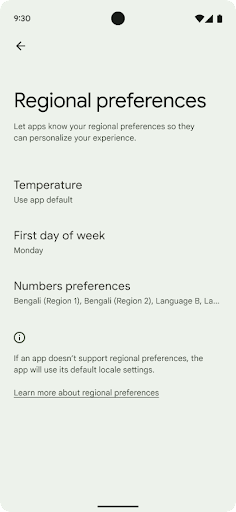
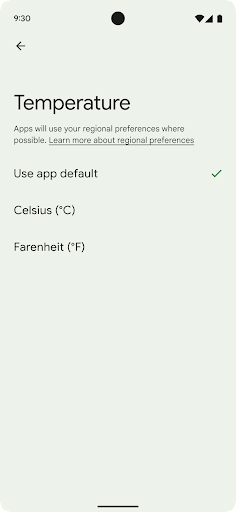
地域の設定を使用すると、ユーザーは温度単位、週の最初の曜日、番号体系をカスタマイズできます。米国に住んでいる欧州のユーザーの場合、温度の単位は華氏ではなく摂氏で表示し、アプリで週の始まりを米国のデフォルトの日曜日ではなく月曜日に指定することを好む可能性があります。
Android の新しい設定メニューは見つけやすく、ユーザーはここでアプリのそうした設定を一元的に変更できます。これらの設定は、バックアップや復元を行った場合も保持されます。複数の API とインテント(getTemperatureUnit や getFirstDayOfWeek など)により、アプリにそうしたユーザー設定への読み取りアクセス権を付与することで、アプリでの情報の表示方法を調整できます。また、ACTION_LOCALE_CHANGED に BroadcastReceiver を登録して、地域の設定が変更されたときに言語 / 地域の構成の変更を処理することも可能です。
これらの設定を確認するには、設定アプリを開いて [システム] > [言語と入力] > [地域の設定] に移動します。
ユーザー補助
非線形フォント スケーリングを 200% にする
Starting in Android 14, the system supports font scaling up to 200%, providing users with additional accessibility options.
To prevent large text elements on screen from scaling too large, the system applies a nonlinear scaling curve. This scaling strategy means that large text doesn't scale at the same rate as smaller text. Nonlinear font scaling helps preserve the proportional hierarchy between elements of different sizes while mitigating issues with linear text scaling at high degrees (such as text being cut off or text that becomes harder to read due to an extremely large display sizes).
Test your app with nonlinear font scaling
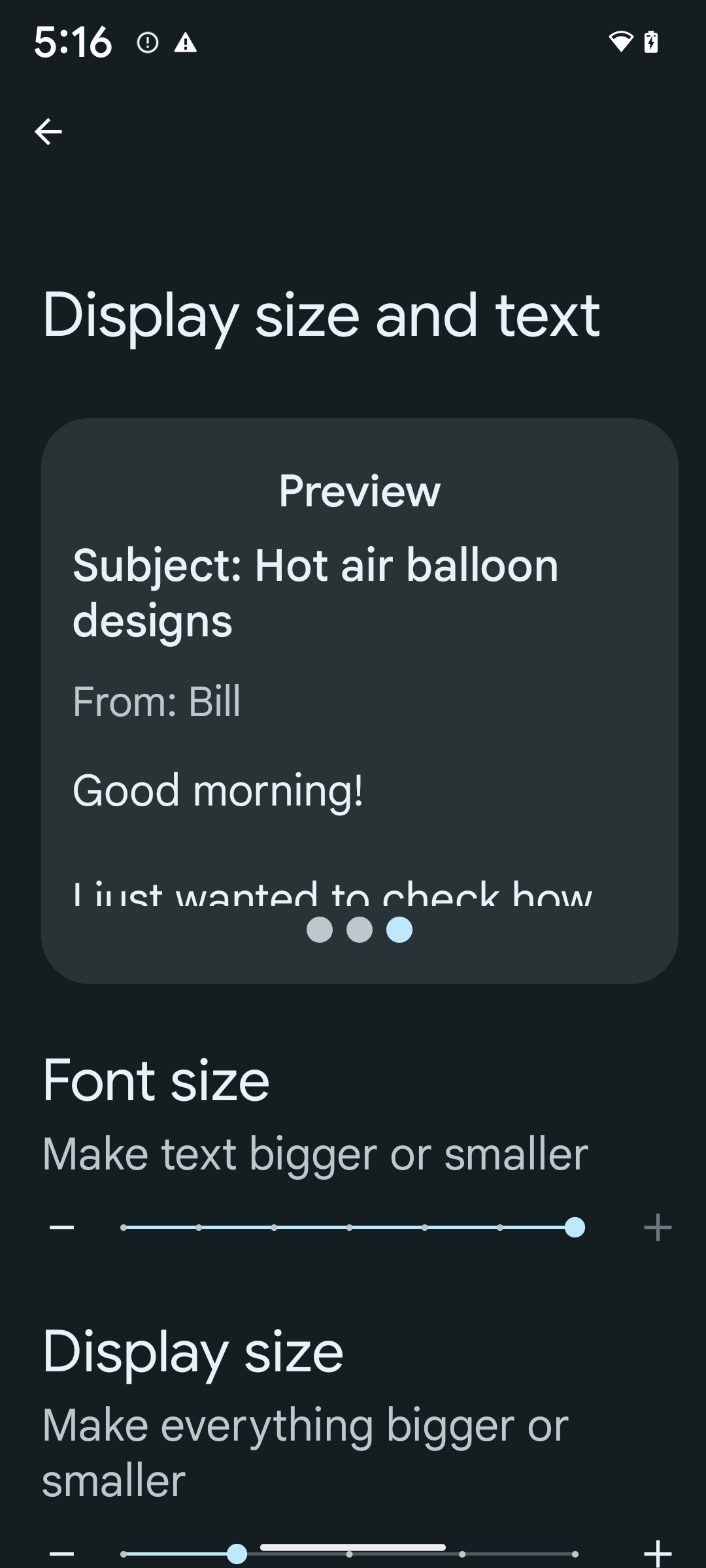
If you already use scaled pixels (sp) units to define text sizing, then these additional options and scaling improvements are applied automatically to the text in your app. However, you should still perform UI testing with the maximum font size enabled (200%) to ensure that your app applies the font sizes correctly and can accommodate larger font sizes without impacting usability.
To enable 200% font size, follow these steps:
- Open the Settings app and navigate to Accessibility > Display size and text.
- For the Font size option, tap the plus (+) icon until the maximum font size setting is enabled, as shown in the image that accompanies this section.
Use scaled pixel (sp) units for text-sizes
Remember to always specify text sizes in sp units. When your app uses sp units, Android can apply the user's preferred text size and scale it appropriately.
Don't use sp units for padding or define view heights assuming implicit padding: with nonlinear font scaling sp dimensions might not be proportional, so 4sp + 20sp might not equal 24sp.
Convert scaled pixel (sp) units
Use TypedValue.applyDimension() to convert from sp units
to pixels, and use TypedValue.deriveDimension() to
convert pixels to sp. These methods apply the appropriate nonlinear scaling
curve automatically.
Avoid hardcoding equations using
Configuration.fontScale or
DisplayMetrics.scaledDensity. Because font scaling is
nonlinear, the scaledDensity field is no longer accurate. The fontScale
field should be used for informational purposes only because fonts are no longer
scaled with a single scalar value.
Use sp units for lineHeight
Always define android:lineHeight using sp units instead
of dp, so the line height scales along with your text. Otherwise, if your text
is sp but your lineHeight is in dp or px, it doesn't scale and looks cramped.
TextView automatically corrects the lineHeight so that your intended
proportions are preserved, but only if both textSize and lineHeight are
defined in sp units.
カメラとメディア
画像のウルトラ HDR
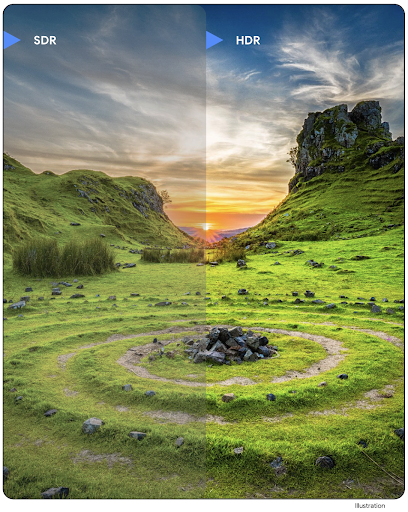
Android 14 adds support for High Dynamic Range (HDR) images that retain more of the information from the sensor when taking a photo, which enables vibrant colors and greater contrast. Android uses the Ultra HDR format, which is fully backward compatible with JPEG images, allowing apps to seamlessly interoperate with HDR images, displaying them in Standard Dynamic Range (SDR) as needed.
Rendering these images in the UI in HDR is done automatically by the framework
when your app opts in to using HDR UI for its Activity Window, either through a
manifest entry or at runtime by calling
Window.setColorMode(). You can also capture compressed Ultra
HDR still images on supported devices. With more colors recovered
from the sensor, editing in post can be more flexible. The
Gainmap associated with Ultra HDR images can be used to render
them using OpenGL or Vulkan.
カメラ拡張機能のズーム、フォーカス、ポストビューなど
Android 14 upgrades and improves camera extensions, allowing apps to handle longer processing times, which enables improved images using compute-intensive algorithms like low-light photography on supported devices. These features give users an even more robust experience when using camera extension capabilities. Examples of these improvements include:
- Dynamic still capture processing latency estimation provides much more
accurate still capture latency estimates based on the current scene and
environment conditions. Call
CameraExtensionSession.getRealtimeStillCaptureLatency()to get aStillCaptureLatencyobject that has two latency estimation methods. ThegetCaptureLatency()method returns the estimated latency betweenonCaptureStartedandonCaptureProcessStarted(), and thegetProcessingLatency()method returns the estimated latency betweenonCaptureProcessStarted()and the final processed frame being available. - Support for capture progress callbacks so that apps can display the current
progress of long-running, still-capture processing operations. You can check
if this feature is available with
CameraExtensionCharacteristics.isCaptureProcessProgressAvailable, and if it is, you implement theonCaptureProcessProgressed()callback, which has the progress (from 0 to 100) passed in as a parameter. Extension specific metadata, such as
CaptureRequest.EXTENSION_STRENGTHfor dialing in the amount of an extension effect, such as the amount of background blur withEXTENSION_BOKEH.Postview Feature for Still Capture in camera extensions, which provides a less-processed image more quickly than the final image. If an extension has increased processing latency, a postview image could be provided as a placeholder to improve UX and switched out later for the final image. You can check if this feature is available with
CameraExtensionCharacteristics.isPostviewAvailable. Then you can pass anOutputConfigurationtoExtensionSessionConfiguration.setPostviewOutputConfiguration.Support for
SurfaceViewallowing for a more optimized and power-efficient preview render path.Support for tap to focus and zoom during extension usage.
センサー内ズーム
CameraCharacteristics の REQUEST_AVAILABLE_CAPABILITIES_STREAM_USE_CASE に SCALER_AVAILABLE_STREAM_USE_CASES_CROPPED_RAW が含まれている場合、アプリは高度なセンサー機能を使用して、ストリームのユースケースが CameraMetadata.SCALER_AVAILABLE_STREAM_USE_CASES_CROPPED_RAW に設定されている RAW ターゲットで CaptureRequest を使用して、切り抜き RAW ストリームに全画角と同じピクセルを設定できます。リクエスト オーバーライド コントロールを実装することで、更新されたカメラでは、他のカメラ コントロールの準備が整う前にユーザーがズームを操作できるようになります。
ロスレス USB オーディオ
Android 14 では、USB 有線ヘッドセットを介してオーディオファイル レベルのエクスペリエンスを実現するロスレス音声フォーマットがサポートされています。USB デバイスの優先ミキサー属性をクエリしたり、優先ミキサー属性の変更をリッスンするリスナーを登録したり、AudioMixerAttributes クラスを使用してミキサー属性を設定したりできます。このクラスは、チャンネル マスク、サンプルレート、オーディオ ミキサーの動作などの形式を表します。このクラスを使用すると、ミキシング、音量調整、エフェクト処理を行わずに音声を直接送信できます。
デベロッパーの生産性とツール
認証情報マネージャー
Android 14 adds Credential Manager as a platform API, with additional support back to Android 4.4 (API level 19) devices through a Jetpack Library using Google Play services. Credential Manager aims to make sign-in easier for users with APIs that retrieve and store credentials with user-configured credential providers. Credential Manager supports multiple sign-in methods, including username and password, passkeys, and federated sign-in solutions (such as Sign-in with Google) in a single API.
Passkeys provide many advantages. For example, passkeys are built on industry standards, can work across different operating systems and browser ecosystems, and can be used with both websites and apps.
For more information, see the Credential Manager and passkeys documentation and the blogpost about Credential Manager and passkeys.
ヘルスコネクト
ヘルスコネクトは、ユーザーの健康とフィットネスに関するデータのデバイス上のリポジトリです。ユーザーは、お気に入りのアプリ間でデータを共有し、これらのアプリと共有するデータを 1 か所で管理できます。
Android 14 より前の Android バージョンを搭載したデバイスでは、ヘルスコネクトを Google Play ストアからアプリとしてダウンロードできます。Android 14 以降では、ヘルスコネクトはプラットフォームの一部となり、個別のダウンロードを必要とせずに Google Play システム アップデートを通じてアップデートを受け取ります。これにより、ヘルスコネクトを頻繁に更新でき、アプリは Android 14 以降を搭載したデバイスでヘルスコネクトを利用できます。ユーザーはデバイスの設定からヘルスコネクトにアクセスできます。プライバシー管理はシステム設定に統合されています。
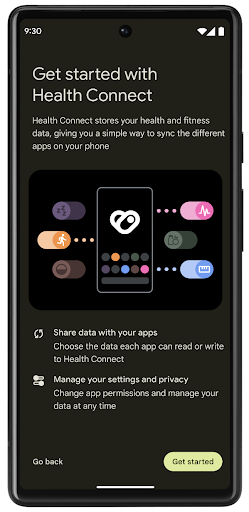
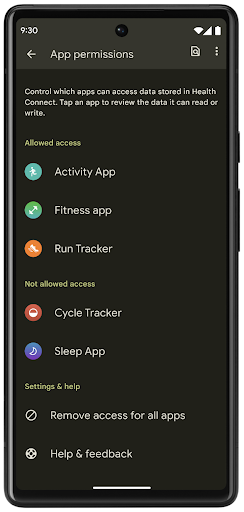
ヘルスコネクトには、Android 14 の新機能がいくつか含まれています。たとえば、エクササイズ ルートを使用すると、ユーザーはワークアウトのルートを共有し、地図上に可視化できます。ルートは、一定の期間内に保存された位置情報のリストとして定義されます。アプリは、エクササイズ セッションにルートを挿入して、それらを関連付けることができます。ユーザーがこの機密データを完全に管理できるようにするには、ユーザーが個々のルートを他のアプリと共有することを許可する必要があります。
詳しくは、ヘルスコネクトのドキュメントと、Android ヘルスの新機能に関するブログ投稿をご覧ください。
OpenJDK 17 の更新
Android 14 continues the work of refreshing Android's core libraries to align with the features in the latest OpenJDK LTS releases, including both library updates and Java 17 language support for app and platform developers.
The following features and improvements are included:
- Updated approximately 300
java.baseclasses to Java 17 support. - Text Blocks, which introduce multi-line string literals to the Java programming language.
- Pattern Matching for instanceof, which allows an object to
be treated as having a specific type in an
instanceofwithout any additional variables. - Sealed classes, which allow you restrict which classes and interfaces can extend or implement them.
Thanks to Google Play system updates (Project Mainline), over 600 million devices are enabled to receive the latest Android Runtime (ART) updates that include these changes. This is part of our commitment to give apps a more consistent, secure environment across devices, and to deliver new features and capabilities to users independent of platform releases.
Java and OpenJDK are trademarks or registered trademarks of Oracle and/or its affiliates.
アプリストアの改善
Android 14 introduces several PackageInstaller APIs that
allow app stores to improve their user experience.
Request install approval before downloading
Installing or updating an app might require user approval.
For example, when an installer making use of the
REQUEST_INSTALL_PACKAGES permission attempts to install a
new app. In prior Android versions, app stores can only request user approval
after APKs are written to the install session and the
session is committed.
Starting with Android 14, the requestUserPreapproval()
method lets installers request user approval before committing the install
session. This improvement lets an app store defer downloading any APKs until
after the installation has been approved by the user. Furthermore, once a user
has approved installation, the app store can download and install the app in the
background without interrupting the user.
Claim responsibility for future updates
The setRequestUpdateOwnership() method allows an installer
to indicate to the system that it intends to be responsible for future updates
to an app it is installing. This capability enables update ownership
enforcement, meaning that only the update owner is permitted
to install automatic updates to the app. Update ownership enforcement helps to
ensure that users receive updates only from the expected app store.
Any other installer, including those making use of the
INSTALL_PACKAGES permission, must receive explicit user
approval in order to install an update. If a user decides to proceed with an
update from another source, update ownership is lost.
Update apps at less-disruptive times
App stores typically want to avoid updating an app that is actively in use because this leads to the app's running processes being killed, which potentially interrupts what the user was doing.
Starting with Android 14, the InstallConstraints API
gives installers a way to ensure that their app updates happen at an opportune
moment. For example, an app store can call the
commitSessionAfterInstallConstraintsAreMet() method to
make sure that an update is only committed when the user is no longer
interacting with the app in question.
Seamlessly install optional splits
With split APKs, features of an app can be delivered in separate APK files,
rather than as a monolithic APK. Split APKs allow app stores to optimize the
delivery of different app components. For example, app stores might optimize
based on the properties of the target device. The
PackageInstaller API has supported splits since its
introduction in API level 22.
In Android 14, the setDontKillApp() method allows an
installer to indicate that the app's running processes shouldn't be killed when
new splits are installed. App stores can use this feature to seamlessly install
new features of an app while the user is using the app.
アプリのメタデータ バンドル
Starting in Android 14, the Android package installer lets you specify app metadata, such as data safety practices, to include on app store pages such as Google Play.
ユーザーがデバイスのスクリーンショットを撮影したときに検出する
To create a more standardized experience for detecting screenshots, Android 14 introduces a privacy-preserving screenshot detection API. This API lets apps register callbacks on a per-activity basis. These callbacks are invoked, and the user is notified, when the user takes a screenshot while that activity is visible.
ユーザー エクスペリエンス
共有シートのカスタム アクションとランキングの改善
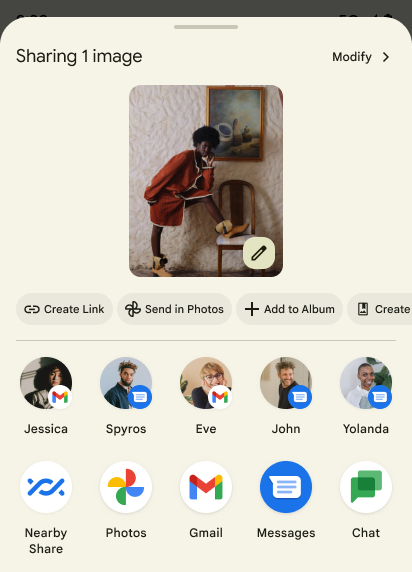
Android 14 updates the system sharesheet to support custom app actions and more informative preview results for users.
Add custom actions
With Android 14, your app can add custom actions to the system sharesheet it invokes.
Improve ranking of Direct Share targets
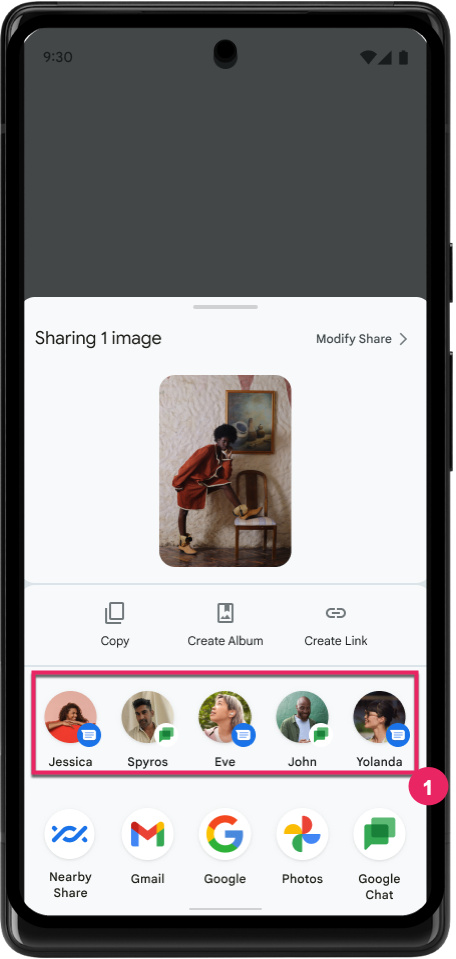
Android 14 uses more signals from apps to determine the ranking of the direct share targets to provide more helpful results for the user. To provide the most useful signal for ranking, follow the guidance for improving rankings of your Direct Share targets. Communication apps can also report shortcut usage for outgoing and incoming messages.
予測型「戻る」の組み込みアニメーションとカスタム アニメーションのサポート
Android 13 では、開発者向けオプションの背後に予測型「戻る」アニメーションが導入されました。開発者向けオプションが有効になっているサポート対象アプリで使用すると、後方にスワイプすると、戻るジェスチャーでアプリが終了してホーム画面に戻ることを示すアニメーションが表示されます。
Android 14 では、予測型「戻る」機能の改善が複数行われ、新しいガイダンスが追加されています。
android:enableOnBackInvokedCallback=trueを設定すると、アプリ全体ではなくアクティビティごとに、予測型「戻る」システム アニメーションを有効にできます。- Android 13 の「ホームに戻る」アニメーションに伴い、新しいシステム アニメーションが追加されました。新しいシステム アニメーションはアクティビティ間およびタスク間で動作し、予測型「戻る」に移行すると自動的に適用されます。
- ボトムシート、サイドシート、検索に新しいマテリアル コンポーネント アニメーションを追加しました。
- カスタムのアプリ内アニメーションと遷移を作成する際の設計ガイダンスを作成しました。
- カスタムのアプリ内遷移アニメーションをサポートする新しい API が追加されました。
handleOnBackStarted、handleOnBackProgressed、handleOnBackCancelledinOnBackPressedCallbackonBackStarted、onBackProgressed、onBackCancelledinOnBackAnimationCallback- ユーザーが後方にスワイプしたときに遷移を再生するには、
overridePendingTransitionではなくoverrideActivityTransitionを使用します。
この Android 14 プレビュー リリースでは、予測型「戻る」のすべての機能は開発者向けオプションに引き続き隠されています。アプリを予測型「戻る」に移行するデベロッパー ガイドと、カスタム アプリ内遷移を作成するデベロッパー ガイドをご覧ください。
大画面デバイスのメーカーによるアプリごとのオーバーライド
Per-app overrides enable device manufacturers to change the behavior of apps on large screen devices. For example, the FORCE_RESIZE_APP override instructs the system to resize the app to fit display dimensions (avoiding size compatibility mode) even if resizeableActivity="false" is set in the app manifest.
Overrides are intended to improve the user experience on large screens.
New manifest properties enable you to disable some device manufacturer overrides for your app.
大画面ユーザーのアプリごとのオーバーライド
Per-app overrides change the behavior of apps on large screen devices. For example, the OVERRIDE_MIN_ASPECT_RATIO_LARGE device manufacturer override sets the app aspect ratio to 16:9 regardless of the app's configuration.
Android 14 QPR1 enables users to apply per‑app overrides by means of a new settings menu on large screen devices.
アプリの画面共有
App screen sharing enables users to share an app window instead of the entire device screen during screen content recording.
With app screen sharing, the status bar, navigation bar, notifications, and other system UI elements are excluded from the shared display. Only the content of the selected app is shared.
App screen sharing improves productivity and privacy by enabling users to run multiple apps but limit content sharing to a single app.
Google Pixel 8 Pro の Gboard で LLM を活用したスマート リプライを使用する
On Pixel 8 Pro devices with the December Feature Drop, developers can try out higher-quality smart replies in Gboard powered by on-device Large Language Models (LLMs) running on Google Tensor.
This feature is available as a limited preview for US English in WhatsApp, Line, and KakaoTalk. It requires using a Pixel 8 Pro device with Gboard as your keyboard.
To try it out, first enable the feature in Settings > Developer Options > AiCore Settings > Enable Aicore Persistent.
Next, open a conversation in a supported app to see LLM-powered Smart Reply in Gboard's suggestion strip in response to incoming messages.
グラフィック
パスのクエリと補間に対応
Android の Path API は、ベクター グラフィックを作成およびレンダリングするための強力で柔軟なメカニズムです。パスのストロークや塗りつぶし、線分、二次曲線、三次曲線からのパスの作成、ブール演算による複雑な図形の取得、これらすべてを同時に実行することもできます。1 つの制限は、Path オブジェクトに実際に何が含まれているかを確認できることです。オブジェクト内部は、作成後、呼び出し元には不透明です。
Path を作成するには、moveTo()、lineTo()、cubicTo() などのメソッドを呼び出して、パスセグメントを追加します。これまでは、そのパスに対してセグメントの内容を確認する手段がなかったため、この情報を作成時に保持しておく必要がありました。
Android 14 以降では、パスをクエリしてパスの内部を調べることができます。まず、Path.getPathIterator API を使用して PathIterator オブジェクトを取得する必要があります。
Kotlin
val path = Path().apply {
    moveTo(1.0f, 1.0f)
    lineTo(2.0f, 2.0f)
    close()
}
val pathIterator = path.pathIterator
Java
Path path = new Path();
path.moveTo(1.0F, 1.0F);
path.lineTo(2.0F, 2.0F);
path.close();
PathIterator pathIterator = path.getPathIterator();
次に、PathIterator を呼び出してセグメントを 1 つずつ反復し、各セグメントに必要なすべてのデータを取得できます。この例では、データをパッケージ化する PathIterator.Segment オブジェクトを使用します。
Kotlin
for (segment in pathIterator) {
    println("segment: ${segment.verb}, ${segment.points}")
}
Java
while (pathIterator.hasNext()) {
    PathIterator.Segment segment = pathIterator.next();
    Log.i(LOG_TAG, "segment: " + segment.getVerb() + ", " + segment.getPoints());
}
PathIterator には next() の非割り当てバージョンもあり、このバージョンでバッファを渡してポイントデータを保持できます。
Path データのクエリを行う重要なユースケースの一つに、補間があります。たとえば、2 つの異なるパスの間でアニメーション(モーフィング)できます。このユースケースをさらに簡素化するために、Android 14 では Path に interpolate() メソッドも追加されています。2 つのパスの内部構造が同じであると仮定したうえで、interpolate() メソッドはその補間された結果を使用して新しい Path を作成します。この例では、形状が path と otherPath の中間(0 .5 の線形補間)であるパスを返します。
Kotlin
val interpolatedResult = Path()
if (path.isInterpolatable(otherPath)) {
    path.interpolate(otherPath, .5f, interpolatedResult)
}
Java
Path interpolatedResult = new Path();
if (path.isInterpolatable(otherPath)) {
    path.interpolate(otherPath, 0.5F, interpolatedResult);
}
Jetpack の graphics-path ライブラリを使用すると、以前のバージョンの Android でも同様の API を使用できます。
頂点シェーダーとフラグメント シェーダーを使用したカスタム メッシュ
Android では長い間、カスタム シェーディングによる三角形メッシュの描画をサポートしてきましたが、入力メッシュ形式は、事前定義された属性の組み合わせに限定されていました。Android 14 では、カスタムメッシュのサポートが追加されました。これは、三角形または三角形ストリップとして定義でき、必要に応じてインデックスを付けることができます。これらのメッシュは、カスタム属性、頂点ストライド、変化、AGSL で記述された頂点シェーダーとフラグメント シェーダーで指定されます。
頂点シェーダーは位置や色などの変化を定義しますが、フラグメント シェーダーは、通常は頂点シェーダーによって作成された変化を使用して、ピクセルの色を定義することもできます。フラグメント シェーダーによって色が指定されている場合は、メッシュの描画時に選択されたブレンドモードを使用して、現在の Paint 色とブレンドされます。ユニフォームをフラグメント シェーダーと頂点シェーダーに渡して柔軟性を高めることができます。
Canvas のハードウェア バッファ レンダラ
To assist in using Android's Canvas API to draw with
hardware acceleration into a HardwareBuffer, Android 14
introduces HardwareBufferRenderer. This API is
particularly useful when your use case involves communication with the system
compositor through SurfaceControl for low-latency
drawing.