

Android 15 為開發人員推出了強大的新功能和 API。以下各節將摘要說明這些功能,協助您開始使用相關 API。
如需新增、修改及移除 API 的詳細清單,請參閱 API 差異比較表。如要進一步瞭解新增的 API,請參閱 Android API 參考資料 - 針對 Android 15,請尋找 API 級別 35 中新增的 API。如要瞭解平台變更可能對應用程式造成的影響,請務必查看指定 Android 15 的應用程式和所有應用程式的 Android 15 行為變更。
相機和媒體
Android 15 包含多種功能,可提升相機和媒體體驗,並提供工具和硬體,協助創作者在 Android 上實現創意。
如要進一步瞭解 Android 媒體和相機的最新功能和開發人員解決方案,請觀看 Google I/O 的「打造現代 Android 媒體和相機體驗」演講。
低光源增強
Android 15 推出了 低光源增強功能,這是可用於 Camera 2 和 夜間模式相機擴充功能的自動曝光模式。低光源增強功能會在低光源環境中調整預覽串流的曝光量。這與夜間模式相機擴充功能建立靜態圖片的方式不同,因為夜間模式會結合一系列相片,建立單一經過強化的圖片。夜間模式雖然非常適合用於拍攝靜態相片,但無法建立連續的畫面串流,而低光增強功能則可以。因此,低光增強功能可啟用相機功能,例如:
- 提供強化圖片預覽功能,方便使用者在低光源環境下拍攝相片
- 在光線不足的環境下掃描 QR code
啟用低光源增強功能後,系統會在光線較暗時自動開啟,並在光線較強時關閉。
應用程式可以在低光源環境下錄製預覽串流,以便儲存經過調亮的影片。
詳情請參閱「低光增強」。
應用程式內相機控制項
Android 15 新增了擴充功能,可進一步控管相機硬體及其在支援裝置上的演算法:
HDR 動態範圍控制
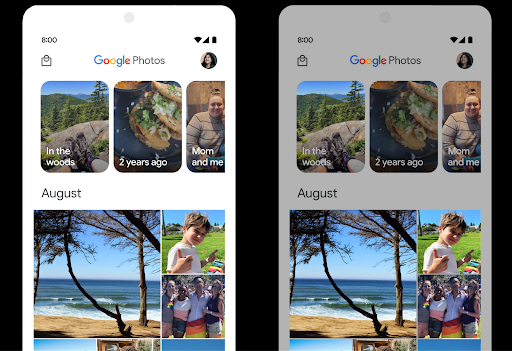
Android 15 會選擇適合底層裝置功能和面板位元深度的 HDR 空間。對於含有大量 SDR 內容的網頁 (例如顯示單一 HDR 縮圖的訊息應用程式),這種行為可能會對 SDR 內容的觀看亮度造成負面影響。在 Android 15 中,您可以使用 setDesiredHdrHeadroom 控制 HDR 空間,以便在 SDR 和 HDR 內容之間取得平衡。
音量控制

Android 15 開始支援 CTA-2075 音量標準,協助您 可避免音訊音量不一致的情況,同時確保使用者不必一直 調整音量。系統會利用輸出裝置 (耳機和喇叭) 的已知特性,以及 AAC 音訊內容提供的音量中繼資料,智慧調整音訊音量和動態範圍壓縮等級。
如要啟用這項功能,請務必確保檔案含有音量中繼資料
您的 AAC 內容,並在應用程式中啟用平台功能。為此,您
透過以下方式將 LoudnessCodecController 物件執行個體化:
呼叫其 create 工廠方法,並與音訊
來自相關聯 AudioTrack 的工作階段 ID;本
系統就會開始自動套用音訊更新您可以傳遞 OnLoudnessCodecUpdateListener,藉此修改或篩選音量參數,再套用至 MediaCodec。
// Media contains metadata of type MPEG_4 OR MPEG_D
val mediaCodec = …
val audioTrack = AudioTrack.Builder()
                                .setSessionId(sessionId)
                                .build()
...
// Create new loudness controller that applies the parameters to the MediaCodec
try {
   val lcController = LoudnessCodecController.create(mSessionId)
   // Starts applying audio updates for each added MediaCodec
}
AndroidX media3 ExoPlayer 也會更新,使用
透過 LoudnessCodecController API 完美整合應用程式。
虛擬 MIDI 2.0 裝置
Android 13 新增了支援功能,可透過 USB 連線至MIDI 2.0 裝置,並透過通用 MIDI 封包 (UMP) 進行通訊。Android 15 將 UMP 支援擴展至虛擬 MIDI 應用程式,讓合成應用程式可透過虛擬 MIDI 2.0 裝置控制合成器應用程式,就像使用 USB MIDI 2.0 裝置一樣。
更有效率的 AV1 軟體解碼

dav1d 是 VideoLAN 推出的熱門 AV1 軟體解碼器,適用於不支援硬體 AV1 解碼功能的 Android 裝置。dav1d 的效能比舊版 AV1 軟體解碼器高出 3 倍,可讓更多使用者 (包括部分低階和中階裝置) 播放 HD AV1 影片。
您的應用程式必須透過名稱 "c2.android.av1-dav1d.decoder" 呼叫 dav1d,才能選擇使用 dav1d。在後續更新中,dav1d 將成為預設的 AV1 軟體解碼器。這項支援功能已標準化,並向後移植至接收 Google Play 系統更新的 Android 11 裝置。
開發人員工作效率和工具
我們致力於提升開發人員的工作效率,因此大部分工作都圍繞著 Android Studio、Jetpack Compose 和 Android Jetpack 程式庫等工具進行,但我們也不斷尋找平台上的各種方法,協助您更輕鬆地實現願景。
OpenJDK 17 更新
Android 15 continues the work of refreshing Android's core libraries to align with the features in the latest OpenJDK LTS releases.
The following key features and improvements are included:
- Quality-of-life improvements around NIO buffers
- Streams
- Additional
mathandstrictmathmethods utilpackage updates including sequencedcollection,map, andsetByteBuffersupport inDeflater- Security updates such as
X500PrivateCredentialand security key updates
These APIs are updated on over a billion devices running Android 12 (API level 31) and higher through Google Play System updates, so you can target the latest programming features.
PDF 改善
Android 15 對 PdfRenderer 進行了大幅改善。
相互整合應用程式可導入轉譯等進階功能
受密碼保護的檔案、註解、表單編輯、
搜尋及選取副本。支援線性化 PDF 最佳化功能,可加快本機 PDF 檢視速度並減少資源使用量。Jetpack PDF 程式庫會使用這些 API,簡化在應用程式中新增 PDF 檢視功能的程序。
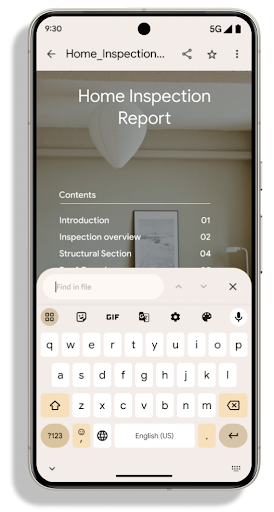
PdfRenderer 已移至可透過 Google Play 系統更新進行更新的模組,不受平台版本影響。我們會透過建立與 Android 15 以下版本相容的 API 途徑 (稱為 PdfRendererPreV),將這些變更回溯至 Android 11 (API 級別 30)。
自動切換語言的改良功能
Android 14 在音訊中新增了裝置端多語言辨識功能,可自動切換語言,但這可能會導致字詞遺漏,尤其是在兩次發音之間的暫停時間較短時。Android 15 新增了額外控制項,協助應用程式根據用途調整此切換功能。EXTRA_LANGUAGE_SWITCH_INITIAL_ACTIVE_DURATION_TIME_MILLIS 會將自動切換限制在音訊工作階段的開頭,而 EXTRA_LANGUAGE_SWITCH_MATCH_SWITCHES 會在指定次數的切換後停用語言切換功能。如果您預期在工作階段中會使用單一語言,且該語言應自動偵測,這些選項就特別實用。
改良 OpenType 變數字型 API
Android 15 improves the usability of the OpenType variable font. You can create
a FontFamily instance from a variable font without specifying weight axes
with the buildVariableFamily API. The text renderer overrides the value
of wght axis to match the displaying text.
Using the API simplifies the code for creating a Typeface considerably:
Kotlin
val newTypeface = Typeface.CustomFallbackBuilder(
            FontFamily.Builder(
                Font.Builder(assets, "RobotoFlex.ttf").build())
                    .buildVariableFamily())
    .build()
Java
Typeface newTypeface = Typeface.CustomFallbackBuilder(
            new FontFamily.Builder(
                new Font.Builder(assets, "RobotoFlex.ttf").build())
                    .buildVariableFamily())
    .build();
Previously, to create the same Typeface, you would need much more code:
Kotlin
val oldTypeface = Typeface.CustomFallbackBuilder(
            FontFamily.Builder(
                Font.Builder(assets, "RobotoFlex.ttf")
                    .setFontVariationSettings("'wght' 400")
                    .setWeight(400)
                    .build())
                .addFont(
                    Font.Builder(assets, "RobotoFlex.ttf")
                        .setFontVariationSettings("'wght' 100")
                        .setWeight(100)
                        .build()
                )
                .addFont(
                    Font.Builder(assets, "RobotoFlex.ttf")
                        .setFontVariationSettings("'wght' 200")
                        .setWeight(200)
                        .build()
                )
                .addFont(
                    Font.Builder(assets, "RobotoFlex.ttf")
                        .setFontVariationSettings("'wght' 300")
                        .setWeight(300)
                        .build()
                )
                .addFont(
                    Font.Builder(assets, "RobotoFlex.ttf")
                        .setFontVariationSettings("'wght' 500")
                        .setWeight(500)
                        .build()
                )
                .addFont(
                    Font.Builder(assets, "RobotoFlex.ttf")
                        .setFontVariationSettings("'wght' 600")
                        .setWeight(600)
                        .build()
                )
                .addFont(
                    Font.Builder(assets, "RobotoFlex.ttf")
                        .setFontVariationSettings("'wght' 700")
                        .setWeight(700)
                        .build()
                )
                .addFont(
                    Font.Builder(assets, "RobotoFlex.ttf")
                        .setFontVariationSettings("'wght' 800")
                        .setWeight(800)
                        .build()
                )
                .addFont(
                    Font.Builder(assets, "RobotoFlex.ttf")
                        .setFontVariationSettings("'wght' 900")
                        .setWeight(900)
                        .build()
                ).build()
        ).build()
Java
Typeface oldTypeface = new Typeface.CustomFallbackBuilder(
    new FontFamily.Builder(
        new Font.Builder(assets, "RobotoFlex.ttf")
            .setFontVariationSettings("'wght' 400")
            .setWeight(400)
            .build()
    )
    .addFont(
        new Font.Builder(assets, "RobotoFlex.ttf")
            .setFontVariationSettings("'wght' 100")
            .setWeight(100)
            .build()
    )
    .addFont(
        new Font.Builder(assets, "RobotoFlex.ttf")
            .setFontVariationSettings("'wght' 200")
            .setWeight(200)
            .build()
    )
    .addFont(
        new Font.Builder(assets, "RobotoFlex.ttf")
            .setFontVariationSettings("'wght' 300")
            .setWeight(300)
            .build()
    )
    .addFont(
        new Font.Builder(assets, "RobotoFlex.ttf")
            .setFontVariationSettings("'wght' 500")
            .setWeight(500)
            .build()
    )
    .addFont(
        new Font.Builder(assets, "RobotoFlex.ttf")
            .setFontVariationSettings("'wght' 600")
            .setWeight(600)
            .build()
    )
    .addFont(
        new Font.Builder(assets, "RobotoFlex.ttf")
            .setFontVariationSettings("'wght' 700")
            .setWeight(700)
            .build()
    )
    .addFont(
        new Font.Builder(assets, "RobotoFlex.ttf")
            .setFontVariationSettings("'wght' 800")
            .setWeight(800)
            .build()
    )
    .addFont(
        new Font.Builder(assets, "RobotoFlex.ttf")
            .setFontVariationSettings("'wght' 900")
            .setWeight(900)
            .build()
    )
    .build()
).build();
Here's an example of how a Typeface created with both the old and new APIs
renders:
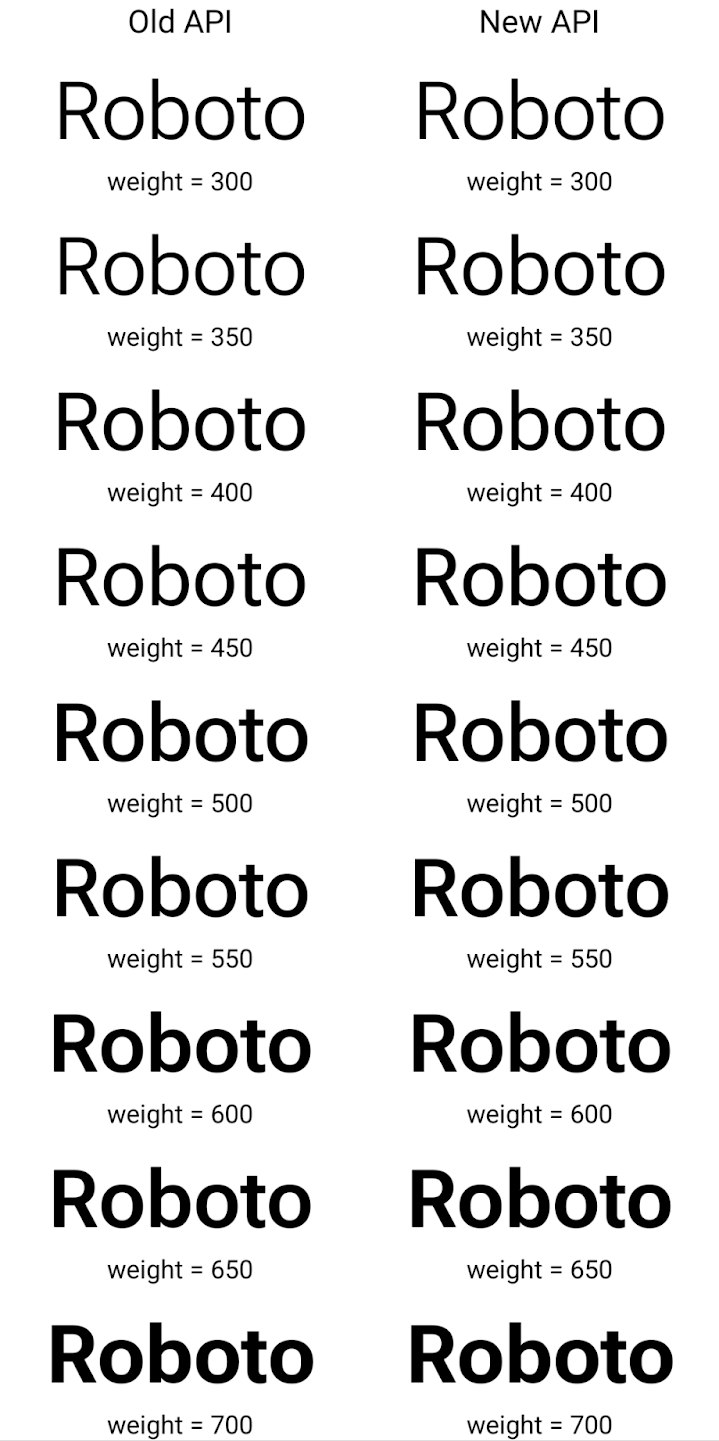
In this example, the Typeface created with the old API doesn't have the
capability to create accurate font weights for the 350, 450, 550 and 650
Font instances, so the renderer falls back to the closest weight. So in
this case, 300 is rendered instead of 350, 400 is rendered instead of 450, and
so on. By contrast, the Typeface created with the new APIs dynamically creates
a Font instance for a given weight, so accurate weights are rendered for 350,
450, 550, and 650 as well.
精細的換行符號控制
Starting in Android 15, a TextView and the underlying
line breaker can preserve the given portion of text in the same line to improve
readability. You can take advantage of this line break customization by using
the <nobreak> tag in string resources or
createNoBreakSpan. Similarly, you can preserve words from
hyphenation by using the <nohyphen> tag or
createNoHyphenationSpan.
For example, the following string resource doesn't include a line break, and renders with the text "Pixel 8 Pro." breaking in an undesirable place:
<resources>
    <string name="pixel8pro">The power and brains behind Pixel 8 Pro.</string>
</resources>
In contrast, this string resource includes the <nobreak> tag, which wraps the
phrase "Pixel 8 Pro." and prevents line breaks:
<resources>
    <string name="pixel8pro">The power and brains behind <nobreak>Pixel 8 Pro.</nobreak></string>
</resources>
The difference in how these strings are rendered is shown in the following images:
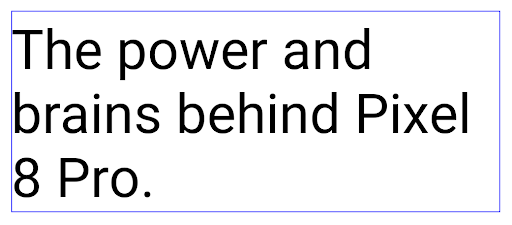
<nobreak> tag.
<nobreak> tag.封存應用程式
Android 和 Google Play 去年宣布支援應用程式封存功能,使用者可以在 Google Play 上使用 Android App Bundle 發布的應用程式,從裝置上部分移除不常使用的應用程式,藉此釋出空間。Android 15 提供應用程式封存和解封存的作業系統層級支援功能,讓所有應用程式商店更輕鬆地實作這項功能。
具有 REQUEST_DELETE_PACKAGES 權限的應用程式可以呼叫
PackageInstaller requestArchive 方法,要求封存
已安裝的應用程式套件,會移除 APK 和任何快取檔案,但會保留
使用者資料。系統會透過
LauncherApps API;使用者會看到 UI 樣式,藉此突顯這些
個應用程式已封存。使用者輕觸封存的應用程式時,負責的安裝程式
會收到取消封存的要求,而且還原程序可以
由 ACTION_PACKAGE_ADDED 廣播監控。
使用開發人員選項在裝置上啟用 16 KB 模式
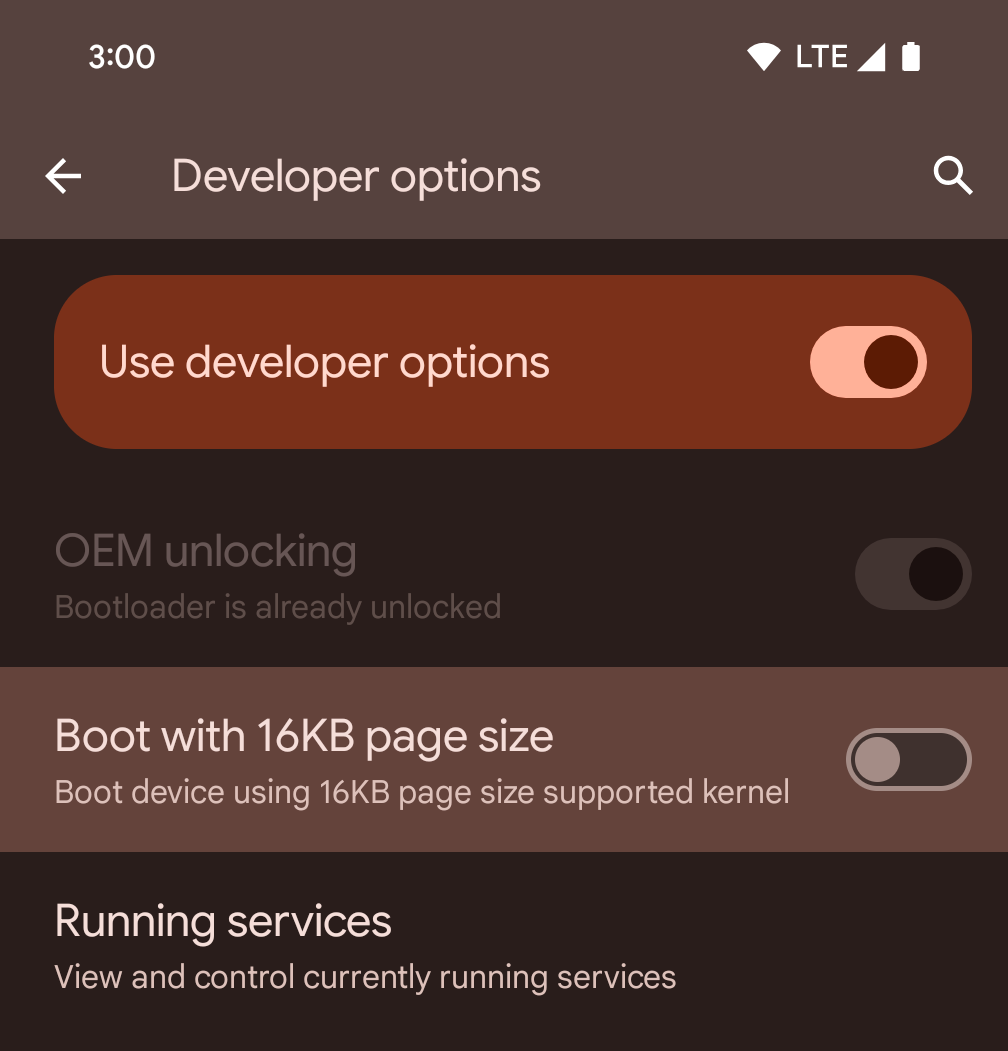
切換「以 16KB 頁面大小啟動」開發人員選項,即可在 16 KB 模式下啟動裝置。
在 Android 15 的 QPR 版本中,您可以使用特定裝置上的開發人員選項,以 16 KB 模式啟動裝置,並執行裝置端測試。使用開發人員選項前,請依序前往「設定」>「系統」>「軟體更新」,並套用所有可用的更新。
下列裝置提供這項開發人員選項:
Pixel 8 和 8 Pro (搭載 Android 15 QPR1 以上版本)
Pixel 8a (搭載 Android 15 QPR1 以上版本)
Pixel 9、Pixel 9 Pro 和 Pixel 9 Pro XL (搭載 Android 15 QPR2 以上版本)
Pixel 9a (搭載 Android 16 以上版本)
圖形
Android 15 帶來最新的圖像改善項目,包括 ANGLE 和 Canvas 圖像系統的增強功能。
更新 Android 的 GPU 存取權

與早期核心作業系統會在單一 CPU 上執行,並使用以固定函式管道為基礎的 API 存取 GPU 不同,Android 硬體已大幅進化。自 Android 7.0 (API 級別 24) 起,NDK 就提供 Vulkan® 圖形 API,其中包含低階抽象化功能,可更貼近現代 GPU 硬體、更有效地支援多個 CPU 核心,並減少 CPU 驅動程式額外負擔,進而提升應用程式效能。所有新型遊戲引擎都支援 Vulkan。
Vulkan 是 Android 對 GPU 的偏好介面。因此,Android 15 包含 ANGLE 做為可選的圖層,可在 Vulkan 上執行 OpenGL® ES。改用 ANGLE 可將 Android OpenGL 實作標準化,進而改善相容性,在某些情況下還能提升效能。您可以在 Android 15 上依序前往「設定」->「系統」->「開發人員選項」->「實驗功能:啟用 ANGLE」,啟用開發人員選項,藉此使用 ANGLE 測試 OpenGL ES 應用程式的穩定性和效能。
Android ANGLE 的 Vulkan 時程表
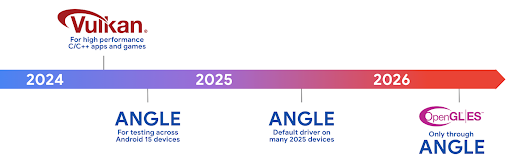
為了簡化 GPU 堆疊,我們日後會在更多新裝置上提供 ANGLE 做為 GL 系統驅動程式,並預期 OpenGL/ES 日後只會透過 ANGLE 提供。不過,我們計劃繼續在所有裝置上支援 OpenGL ES。
建議採取的後續步驟
使用開發人員選項選取 OpenGL ES 的 ANGLE 驅動程式,並測試應用程式。對於新專案,我們強烈建議使用 Vulkan 開發 C/C++。
Canvas 改善項目
Android 15 continues our modernization of Android's Canvas graphics system with additional capabilities:
Matrix44provides a 4x4 matrix for transforming coordinates that should be used when you want to manipulate the canvas in 3D.clipShaderintersects the current clip with the specified shader, whileclipOutShadersets the clip to the difference of the current clip and the shader, each treating the shader as an alpha mask. This supports the drawing of complex shapes efficiently.
效能和電池
Android 持續致力於協助您提升應用程式的效能和品質。Android 15 導入的 API 可協助您更有效率地執行應用程式中的工作、提升應用程式效能,以及收集應用程式的洞察資訊。
如要瞭解省電最佳做法、如何偵錯網路和耗電量,以及我們如何在 Android 15 和近期 Android 版本中提升背景作業的省電效率,請參閱 Google I/O 的「提升 Android 背景作業的省電效率」演講。
ApplicationStartInfo API
在先前的 Android 版本中,應用程式啟動過程一直是個謎。在應用程式中判斷應用程式是否從冷、暖或熱狀態啟動,是一項挑戰。您也難以瞭解應用程式在各個啟動階段 (分支程序、呼叫 onCreate、繪製第一個影格等) 花費的時間。在 Application 類別例項化時,您無法得知應用程式是從廣播、內容供應器、工作、備份、啟動完成、鬧鐘或 Activity 啟動。
Android 15 的 ApplicationStartInfo API 提供上述所有功能,甚至更多。您甚至可以選擇在流程中加入自己的時間戳記,方便集中收集時間資料。除了收集指標,您也可以使用 ApplicationStartInfo 直接改善應用程式啟動效能。舉例來說,如果應用程式因廣播而啟動,您可以避免在 Application 類別中執行與 UI 相關的程式庫例項,以免造成不必要的負擔。
應用程式大小詳細資訊
Since Android 8.0 (API level 26), Android has included the
StorageStats.getAppBytes API that summarizes the installed
size of an app as a single number of bytes, which is a sum of the APK size, the
size of files extracted from the APK, and files that were generated on the
device such as ahead-of-time (AOT) compiled code. This number is not very
insightful in terms of how your app is using storage.
Android 15 adds the
StorageStats.getAppBytesByDataType([type]) API, which lets
you get insight into how your app is using up all that space, including APK file
splits, AOT and speedup related code, dex metadata, libraries, and guided
profiles.
應用程式管理的剖析
Android 15 包含 ProfilingManager 類別,可讓您從應用程式內收集剖析資訊,例如記憶體快照資料、記憶體快照資料、堆疊取樣等。它會為您的應用程式提供回呼,並提供標記來識別輸出檔案,該檔案會傳送至應用程式的檔案目錄。API 會實施頻率限制,盡可能降低對效能的影響。
如要簡化應用程式中的剖析要求建構程序,建議您使用對應的 Profiling AndroidX API (適用於 Core 1.15.0-rc01 以上版本)。
SQLite 資料庫改善項目
Android 15 推出 SQLite API,可公開基礎 SQLite 引擎的進階功能,針對應用程式可能出現的特定效能問題進行調整。這些 API 已隨 SQLite 更新至 3.44.3 版一併提供。
開發人員應參考提升 SQLite 效能的最佳做法 充分運用 SQLite 資料庫,尤其是處理大型資料集時 或執行容易受到延遲時間影響的查詢時
- 唯讀延遲交易:在發出唯讀交易 (不包含寫入陳述式) 時,請使用
beginTransactionReadOnly()和beginTransactionWithListenerReadOnly(SQLiteTransactionListener)發出唯讀DEFERRED交易。這類交易可以同時執行,如果資料庫處於 WAL 模式,則可以與IMMEDIATE或EXCLUSIVE交易同時執行。 - 資料列計數與 ID:新增了 API 以擷取已變更的計數
資料列或上次插入的資料列 ID,且無須發出額外查詢。
getLastChangedRowCount()會傳回資料列數量 最新的 SQL 陳述式已插入、更新或刪除 目前交易,而getTotalChangedRowCount()會傳回目前連線的計數。getLastInsertRowId()會傳回要在目前連線中插入的最後一列的rowid。 - 原始陳述式:發布原始 SQlite 陳述式,略過便利性 以及可能會產生的任何額外處理負擔。
Android 動態效能架構更新
Android 15 continues our investment in the Android Dynamic Performance Framework (ADPF), a set of APIs that allow games and performance intensive apps to interact more directly with power and thermal systems of Android devices. On supported devices, Android 15 adds ADPF capabilities:
- A power-efficiency mode for hint sessions to indicate that their associated threads should prefer power saving over performance, great for long-running background workloads.
- GPU and CPU work durations can both be reported in hint sessions, allowing the system to adjust CPU and GPU frequencies together to best meet workload demands.
- Thermal headroom thresholds to interpret possible thermal throttling status based on headroom prediction.
To learn more about how to use ADPF in your apps and games, head over to the documentation.
隱私權
Android 15 包含多項功能,可協助應用程式開發人員保護使用者隱私權。
螢幕錄影偵測功能
Android 15 adds support for apps to detect that they are being recorded. A callback is invoked whenever the app transitions between being visible or invisible within a screen recording. An app is considered visible if activities owned by the registering process's UID are being recorded. This way, if your app is performing a sensitive operation, you can inform the user that they're being recorded.
val mCallback = Consumer<Int> { state ->
  if (state == SCREEN_RECORDING_STATE_VISIBLE) {
    // We're being recorded
  } else {
    // We're not being recorded
  }
}

override fun onStart() {
   super.onStart()
   val initialState =
      windowManager.addScreenRecordingCallback(mainExecutor, mCallback)
   mCallback.accept(initialState)
}

override fun onStop() {
    super.onStop()
    windowManager.removeScreenRecordingCallback(mCallback)
}
擴充 IntentFilter 功能
Android 15 builds in support for more precise Intent resolution through
UriRelativeFilterGroup, which contains a set of
UriRelativeFilter objects that form a set of Intent
matching rules that must each be satisfied, including URL query parameters, URL
fragments, and blocking or exclusion rules.
These rules can be defined in the AndroidManifest XML file with the
<uri-relative-filter-group> tag, which can optionally include an
android:allow tag. These tags can contain <data> tags that use existing data
tag attributes as well as the android:query and android:fragment
attributes.
Here's an example of the AndroidManifest syntax:
<intent-filter android:autoVerify="true">
  <action android:name="android.intent.action.VIEW" />
  <category android:name="android.intent.category.BROWSABLE" />
  <category android:name="android.intent.category.DEFAULT" />
  <data android:scheme="http" />
  <data android:scheme="https" />
  <data android:host="astore.com" />
  <uri-relative-filter-group>
    <data android:pathPrefix="/auth" />
    <data android:query="region=na" />
  </uri-relative-filter-group>
  <uri-relative-filter-group android:allow="false">
    <data android:pathPrefix="/auth" />
    <data android:query="mobileoptout=true" />
  </uri-relative-filter-group>
  <uri-relative-filter-group android:allow="false">
    <data android:pathPrefix="/auth" />
    <data android:fragmentPrefix="faq" />
  </uri-relative-filter-group>
</intent-filter>
私人空間
Private space lets users create a separate space on their device where they can keep sensitive apps away from prying eyes, under an additional layer of authentication. The private space uses a separate user profile. The user can choose to use the device lock or a separate lock factor for the private space.
Apps in the private space show up in a separate container in the launcher, and are hidden from the recents view, notifications, settings, and from other apps when the private space is locked. User-generated and downloaded content (such as media or files) and accounts are separated between the private space and the main space. The system sharesheet and the photo picker can be used to give apps access to content across spaces when the private space is unlocked.
Users can't move existing apps and their data into the private space. Instead, users select an install option in the private space to install an app using whichever app store they prefer. Apps in the private space are installed as separate copies from any apps in the main space (new copies of the same app).
When a user locks the private space, the profile is stopped. While the profile is stopped, apps in the private space are no longer active and can't perform foreground or background activities, including showing notifications.
We recommend that you test your app with private space to make sure your app works as expected, especially if your app falls into one of the following categories:
- Apps with logic for work profiles that assumes that any installed copies of their app that aren't in the main profile are in the work profile.
- Medical apps
- Launcher apps
- App store apps
查詢「選取的相片存取權」的最新使用者選取項目
現在應用程式只能醒目顯示最近選取的相片和影片
授予媒體的部分存取權。這項功能可改善經常要求存取相片和影片存取權的應用程式使用者體驗。如要在應用程式中使用這項功能,請啟用
查詢 MediaStore 時有 QUERY_ARG_LATEST_SELECTION_ONLY 引數
透過 ContentResolver 關閉通知。
Kotlin
val externalContentUri = MediaStore.Files.getContentUri("external")

val mediaColumns = arrayOf(
   FileColumns._ID,
   FileColumns.DISPLAY_NAME,
   FileColumns.MIME_TYPE,
)

val queryArgs = bundleOf(
   // Return only items from the last selection (selected photos access)
   QUERY_ARG_LATEST_SELECTION_ONLY to true,
   // Sort returned items chronologically based on when they were added to the device's storage
   QUERY_ARG_SQL_SORT_ORDER to "${FileColumns.DATE_ADDED} DESC",
   QUERY_ARG_SQL_SELECTION to "${FileColumns.MEDIA_TYPE} = ? OR ${FileColumns.MEDIA_TYPE} = ?",
   QUERY_ARG_SQL_SELECTION_ARGS to arrayOf(
       FileColumns.MEDIA_TYPE_IMAGE.toString(),
       FileColumns.MEDIA_TYPE_VIDEO.toString()
   )
)
Java
Uri externalContentUri = MediaStore.Files.getContentUri("external");

String[] mediaColumns = {
    FileColumns._ID,
    FileColumns.DISPLAY_NAME,
    FileColumns.MIME_TYPE
};

Bundle queryArgs = new Bundle();
queryArgs.putBoolean(MediaStore.QUERY_ARG_LATEST_SELECTION_ONLY, true);
queryArgs.putString(MediaStore.QUERY_ARG_SQL_SORT_ORDER, FileColumns.DATE_ADDED + " DESC");
queryArgs.putString(MediaStore.QUERY_ARG_SQL_SELECTION, FileColumns.MEDIA_TYPE + " = ? OR " + FileColumns.MEDIA_TYPE + " = ?");
queryArgs.putStringArray(MediaStore.QUERY_ARG_SQL_SELECTION_ARGS, new String[] {
    String.valueOf(FileColumns.MEDIA_TYPE_IMAGE),
    String.valueOf(FileColumns.MEDIA_TYPE_VIDEO)
});
Android 版 Privacy Sandbox
Android 15 includes the latest Android Ad Services extensions, incorporating the latest version of the Privacy Sandbox on Android. This addition is part of our work to develop technologies that improve user privacy and enable effective, personalized advertising experiences for mobile apps. Our privacy sandbox page has more information about the Privacy Sandbox on Android developer preview and beta programs to help you get started.
健康資料同步
Android 15 整合了 Health Connect by Android 的最新擴充功能,這是一個安全且集中式的平台,可用於管理及分享應用程式收集的健康與健身資料。這次更新新增了健身、營養、皮膚溫度、訓練計畫等其他資料類型的支援。
皮膚溫度追蹤功能可讓使用者透過穿戴式裝置或其他追蹤裝置,儲存及分享更準確的溫度資料。
訓練計畫是結構化的運動計畫,可協助使用者達成健身目標。訓練計畫支援各種完成和表現目標:
如要進一步瞭解 Android 中的 Health Connect 最新更新,請觀看 Google I/O 大會的 透過 Android 健康資料建構可調整的體驗演講。
應用程式分享螢幕畫面
Android 15 支援應用程式畫面分享功能,因此使用者可以只分享或錄製應用程式視窗,而非整個裝置畫面。這項功能最初是在 Android 14 QPR2 中啟用,其中包含 MediaProjection 回呼,可讓應用程式自訂應用程式螢幕分享體驗。請注意,如果應用程式指定 Android 14 (API 級別 34) 以上版本,則每個 MediaProjection 擷取工作階段都需要使用者同意。
使用者體驗和系統 UI
Android 15 可讓應用程式開發人員和使用者進一步控管及彈性設定裝置,以符合自身需求。
如要進一步瞭解如何運用 Android 15 的最新改良功能,提升應用程式的使用者體驗,請參閱 Google I/O 的「改善 Android 應用程式的使用者體驗」演講。
使用 Generated Previews API 取得更豐富的小工具預覽畫面
Before Android 15, the only way to provide widget picker previews was to specify a static image or layout resource. These previews often differ significantly from the look of the actual widget when it is placed on the home screen. Also, static resources can't be created with Jetpack Glance, so a Glance developer had to screenshot their widget or create an XML layout to have a widget preview.
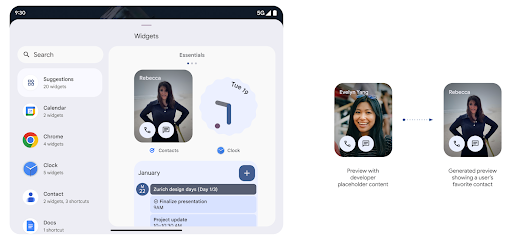
Android 15 adds support for generated previews. This means that app widget
providers can generate RemoteViews to use as the picker preview, instead
of a static resource.
Push API
Apps can provide generated previews through a push API. Apps can provide
previews at any point in their lifecycle, and don't receive an explicit request
from the host to provide previews. Previews are persisted in AppWidgetService,
and hosts can request them on-demand. The following example loads an XML widget
layout resource and sets it as the preview:
AppWidgetManager.getInstance(appContext).setWidgetPreview(
   ComponentName(
       appContext,
       SociaLiteAppWidgetReceiver::class.java
   ),
   AppWidgetProviderInfo.WIDGET_CATEGORY_HOME_SCREEN,
   RemoteViews("com.example", R.layout.widget_preview)
)
The expected flow is:
- At any time, the widget provider calls
setWidgetPreview. The provided previews are persisted inAppWidgetServicewith other provider info. setWidgetPreviewnotifies hosts of an updated preview through theAppWidgetHost.onProvidersChangedcallback. In response, the widget host reloads all of its provider information.- When displaying a widget preview, the host checks
AppWidgetProviderInfo.generatedPreviewCategories, and if the chosen category is available, callsAppWidgetManager.getWidgetPreviewto return the saved preview for this provider.
When to call setWidgetPreview
Because there is no callback to provide previews, apps can choose to send previews at any point when they are running. How often to update the preview depends on the widget's use case.
The following list describes the two main categories of preview use cases:
- Providers that show real data in their widget previews, such as personalized or recent information. These providers can set the preview once the user has signed in or has done initial configuration in their app. After this, they can set up a periodic task to update the previews at their chosen cadence. Examples of this type of widget could be a photo, calendar, weather or news widget.
- Providers that show static information in previews or quick-action widgets that don't display any data. These providers can set previews once, when the app first launches. Examples of this type of widget include a drive quick actions widget or chrome shortcuts widget.
Some providers might show static previews on the hub mode picker, but real information on the homescreen picker. These providers should follow the guidance for both of these use cases to set previews.
子母畫面
Android 15 introduces changes in Picture-in-Picture (PiP) ensuring an even smoother transition when entering into PiP mode. This will be beneficial for apps having UI elements overlaid on top of their main UI, which goes into PiP.
Developers use the onPictureInPictureModeChanged callback to define logic
that toggles the visibility of the overlaid UI elements. This callback is
triggered when the PiP enter or exit animation is completed. Beginning in
Android 15, the PictureInPictureUiState class includes another state.
With this UI state, apps targeting Android 15 (API level 35) will observe the
Activity#onPictureInPictureUiStateChanged callback being invoked with
isTransitioningToPip() as soon as the PiP animation starts. There are
many UI elements that are not relevant for the app when it is in PiP mode, for
example views or layout that include information such as suggestions, upcoming
video, ratings, and titles. When the app goes to PiP mode, use the
onPictureInPictureUiStateChanged callback to hide these UI elements. When the
app goes to full screen mode from the PiP window, use
onPictureInPictureModeChanged callback to unhide these elements, as shown in
the following examples:
override fun onPictureInPictureUiStateChanged(pipState: PictureInPictureUiState) {
        if (pipState.isTransitioningToPip()) {
          // Hide UI elements
        }
    }
override fun onPictureInPictureModeChanged(isInPictureInPictureMode: Boolean) {
        if (isInPictureInPictureMode) {
          // Unhide UI elements
        }
    }
This quick visibility toggle of irrelevant UI elements (for a PiP window) helps ensure a smoother and flicker-free PiP enter animation.
更完善的「零打擾」規則
AutomaticZenRule lets apps customize Attention
Management (Do Not Disturb) rules and decide when to activate or deactivate
them. Android 15 greatly enhances these rules with the goal of improving the
user experience. The following enhancements are included:
- Adding types to
AutomaticZenRule, allowing the system to apply special treatment to some rules. - Adding an icon to
AutomaticZenRule, helping to make the modes be more recognizable. - Adding a
triggerDescriptionstring toAutomaticZenRulethat describes the conditions on which the rule should become active for the user. - Added
ZenDeviceEffectstoAutomaticZenRule, allowing rules to trigger things like grayscale display, night mode, or dimming the wallpaper.
為通知管道設定 VibrationEffect
Android 15 支援使用 NotificationChannel.setVibrationEffect 為特定管道設定豐富的震動效果,讓使用者不必查看裝置,就能區分不同類型的通知。
媒體投影狀態列圖示和自動停止
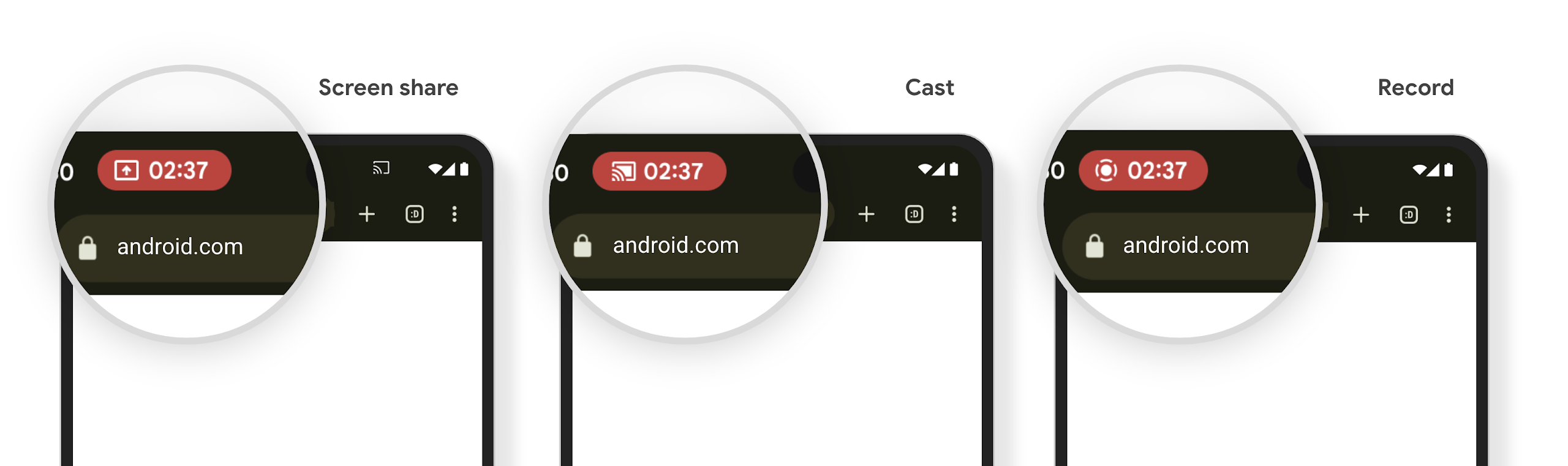
Media projection can expose private user information. A new, prominent status bar chip makes users aware of any ongoing screen projection. Users can tap the chip to stop screen casting, sharing, or recording. Also, for a more intuitive user experience, any in‑progress screen projection now automatically stops when the device screen is locked.
大螢幕和板型規格
Android 15 可讓應用程式充分運用 Android 的板型規格,包括大螢幕、翻蓋式和折疊式裝置。
改善大螢幕多工處理功能
Android 15 可讓使用者在大螢幕裝置上更妥善地進行多工處理。適用對象 舉例來說,使用者可以儲存喜愛的分割畫面應用程式組合,以便快速 ,並將工作列固定在畫面上,即可快速切換應用程式。也就是說 確保應用程式會自動調適,比以往更重要。
Google I/O 大會建構可自動調整的 Android 環境 應用程式以及使用 Material 3 建構使用者介面 自動調整程式庫 這能幫助您,而我們的說明文件也更勝以往,能進一步協助您運用大型語言設計 螢幕。
支援封面螢幕
Your app can declare a property that Android 15 uses to
allow your Application or Activity to be presented on the small cover
screens of supported flippable devices. These screens are too small to be
considered as compatible targets for Android apps to run on, but your app can
opt in to supporting them, making your app available in more places.
連線能力
Android 15 更新了平台,讓您的應用程式能使用通訊和無線技術的最新進展。
衛星支援
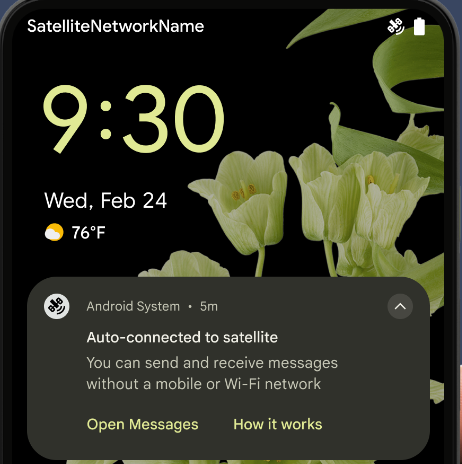
Android 15 持續擴大平台支援範圍,包括衛星連線,以及 包含一些 UI 元素,確保 衛星連線環境。
應用程式可以使用 ServiceState.isUsingNonTerrestrialNetwork() 執行下列操作:
會偵測裝置是否與衛星連線
可能無法使用完整網路服務的原因此外,Android 15
支援簡訊和多媒體訊息應用程式,以及預先載入的 RCS 應用程式
可以收發訊息的衛星連線。
更流暢的 NFC 體驗
Android 15 正在努力讓輕觸付款體驗更流暢可靠,同時繼續支援 Android 強大的 NFC 應用程式生態系統。在支援的裝置上,應用程式可以要求 NfcAdapter 進入觀察模式,在該模式下,裝置會聆聽但不會回應 NFC 讀卡器,並傳送應用程式的 NFC 服務 PollingFrame
物件進行處理。PollingFrame 物件可用於在首次與 NFC 讀取器通訊前進行驗證,在許多情況下可支援單按鈕交易。
此外,應用程式可以在支援的裝置上註冊篩選器,以便在檢查迴圈活動發生時收到通知,進而與多個支援 NFC 的應用程式順利運作。
錢包角色
Android 15 推出了錢包角色,可與使用者偏好的錢包應用程式進行更緊密的整合。這個角色會取代 NFC 預設感應式付款設定。使用者可以依序前往「設定」>「應用程式」>「預設應用程式」,管理錢包角色持有人。
當您為付款類別註冊的 AID 轉送 NFC 輕觸動作時,就會使用錢包角色。除非另一個已註冊相同 AID 的應用程式在前景執行,否則點選動作一律會傳送至錢包角色持有者。
這個角色也用於決定 Wallet 快速存取設定方塊在啟用時應顯示的位置。將角色設為「None」時,系統就不會提供快速存取圖塊,且付款類別的 NFC 輕觸動作只會傳送至前景應用程式。
安全性
Android 15 可協助您提升應用程式安全性、保護應用程式資料,並讓使用者進一步瞭解及掌控自己的資料。如要進一步瞭解我們如何加強使用者防護措施,以及保護應用程式免於新威脅侵擾,請觀看 Google I/O 的這場演講。
整合 Credential Manager 與自動填入功能
Starting with Android 15, developers can link specific views like username or password fields with Credential Manager requests, making it easier to provide a tailored user experience during the sign-in process. When the user focuses on one of these views, a corresponding request is sent to Credential Manager. The resulting credentials are aggregated across providers and displayed in autofill fallback UIs, such as inline suggestions or drop-down suggestions. The Jetpack androidx.credentials library is the preferred endpoint for developers to use and will soon be available to further enhance this feature in Android 15 and higher.
整合單鍵註冊和登入功能與生物特徵辨識提示功能
Credential Manager integrates biometric prompts into the credential creation and sign-in processes, eliminating the need for providers to manage biometric prompts. As a result, credential providers only need to focus on the results of the create and get flows, augmented with the biometric flow result. This simplified process creates a more efficient and streamlined credential creation and retrieval process.
端對端加密的金鑰管理
我們在 Android 15 中推出 E2eeContactKeysManager,這項功能可提供 OS 層級 API 來儲存加密編譯公用金鑰,方便在 Android 應用程式中進行端對端加密 (E2EE)。
E2eeContactKeysManager 旨在整合平台聯絡人應用程式,為使用者提供集中式方式,管理及驗證聯絡人的公開金鑰。
內容 URI 的權限檢查
Android 15 推出一組 API,可針對內容 URI 執行權限檢查:
Context.checkContentUriPermissionFull:會對內容 URI 執行完整權限檢查。Activity資訊清單屬性requireContentUriPermissionFromCaller:這會在活動啟動時,對提供的內容 URI 強制執行指定權限。Activity呼叫端的ComponentCaller類別:代表啟動活動的應用程式。
無障礙設定
Android 15 新增了多項功能,可提升使用者無障礙體驗。
Better Braille
In Android 15, we've made it possible for TalkBack to support Braille displays that are using the HID standard over both USB and secure Bluetooth.
This standard, much like the one used by mice and keyboards, will help Android support a wider range of Braille displays over time.
國際化
Android 15 新增了多項功能,可提升使用者在不同語言環境下的裝置使用體驗。
中日韓變數字型
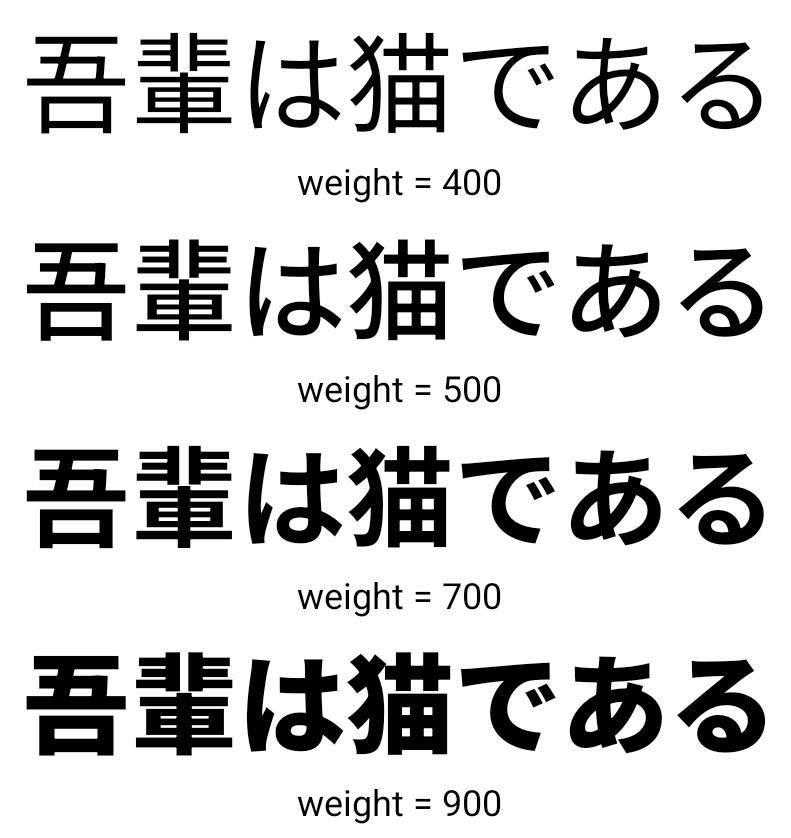
從 Android 15 開始,適用於中文、日文和韓文 (CJK) 的字型檔案 NotoSansCJK,現在已變成可變字型。變數字型為中日韓語言開啟了創意排版的可能性。設計人員可以探索更多樣式,並製作出以往難以或無法達成的視覺效果強烈版面配置。
字元間距對齊
從 Android 15 開始,系統可根據字母間距,使用字母間距
使用 JUSTIFICATION_MODE_INTER_CHARACTER。有多字的理由
Android 8.0 (API 級別 26) 首次推出的功能,以及跨字元
對於使用
空白字元做為區隔,例如中文、日文等。
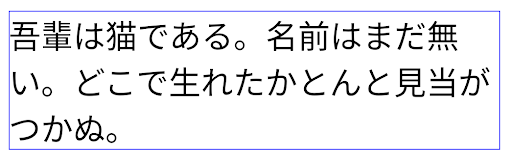
JUSTIFICATION_MODE_NONE 設定日文內容的版面配置。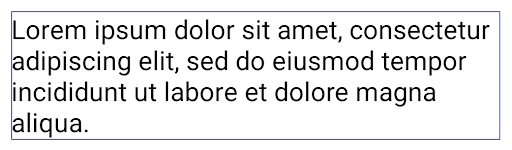
JUSTIFICATION_MODE_NONE 設定英文內容的版面配置。
JUSTIFICATION_MODE_INTER_WORD 設定日文內容的版面配置。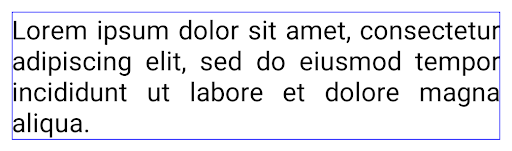
JUSTIFICATION_MODE_INTER_WORD 的英文文字版面配置。
JUSTIFICATION_MODE_INTER_CHARACTER 的日文文字版面配置。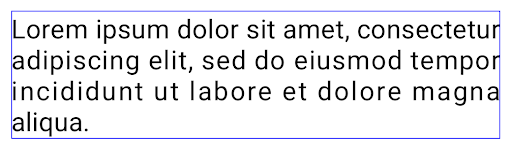
JUSTIFICATION_MODE_INTER_CHARACTER 為英文內容的版面配置。自動換行設定
Android started supporting phrase-based line breaks for Japanese and Korean in
Android 13 (API level 33). However, while phrase-based line breaks improve the
readability of short lines of text, they don't work well for long lines of text.
In Android 15, apps can apply phrase-based line breaks only for short lines
of text, using the LINE_BREAK_WORD_STYLE_AUTO
option. This option selects the best word style option for the text.
For short lines of text, phrase-based line breaks are used, functioning the same
as LINE_BREAK_WORD_STYLE_PHRASE, as shown in the
following image:
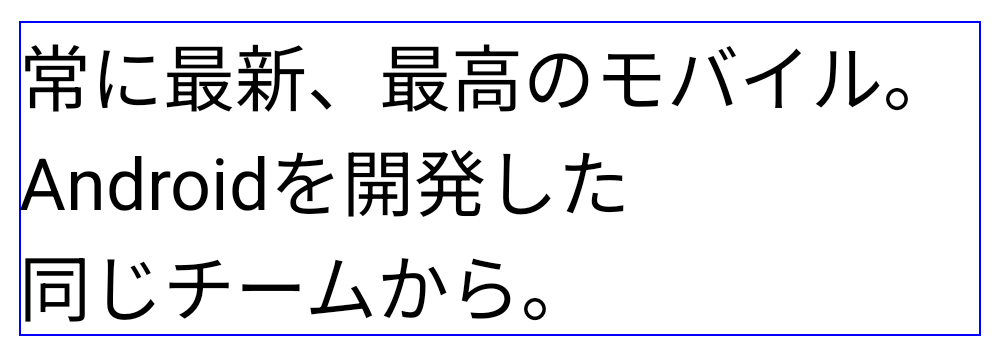
LINE_BREAK_WORD_STYLE_AUTO
applies phrase-based line breaks to improve the readability of the text.
This is the same as applying
LINE_BREAK_WORD_STYLE_PHRASE.For longer lines of text, LINE_BREAK_WORD_STYLE_AUTO uses a no
line-break word style, functioning the same as
LINE_BREAK_WORD_STYLE_NONE, as shown in the
following image:
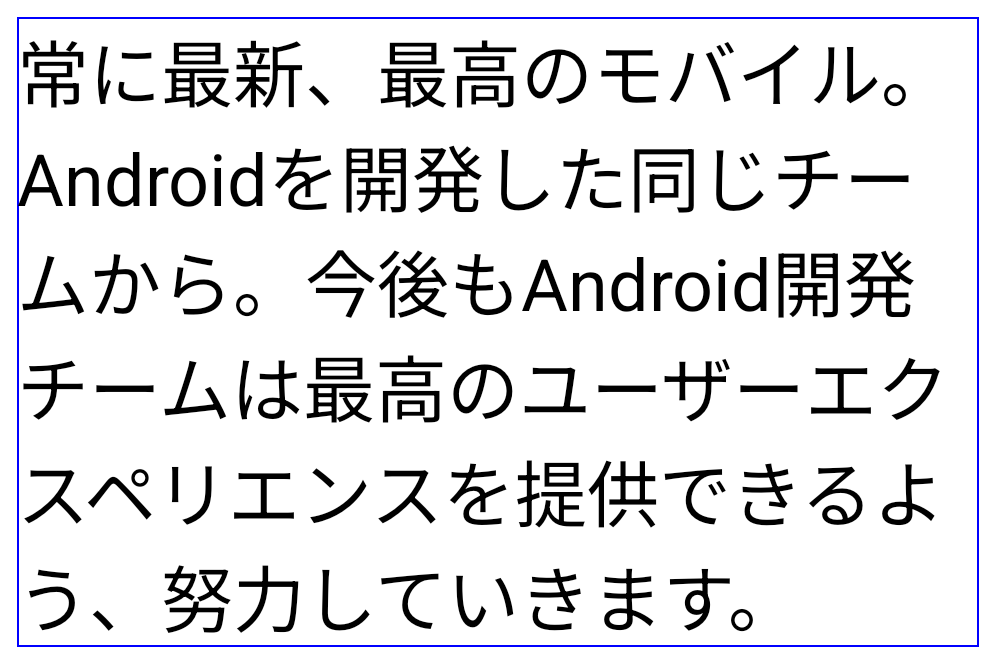
LINE_BREAK_WORD_STYLE_AUTO
applies no line-break word style to improve the readability of the text.
This is the same as applying
LINE_BREAK_WORD_STYLE_NONE.額外的日文變體假名字型
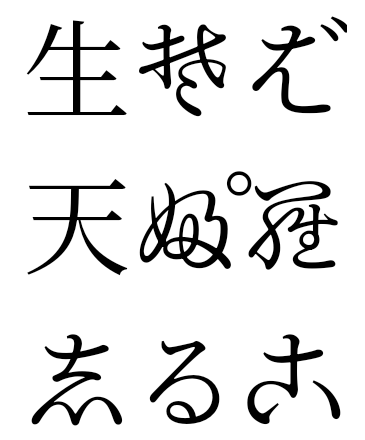
在 Android 15 中,這是日文平假名 (也稱為 Hentaigana) 的字型檔案 系統預設會整合在一起由於平假名字元的形狀獨特,因此可為圖像或設計增添獨特風格,同時也能確保古代日本文件的正確傳遞和理解。
VideoLAN cone Copyright (c) 1996-2010 VideoLAN. 任何人都可以使用或修改這個標誌或修改版本,以便提及 VideoLAN 專案或 VideoLAN 團隊開發的任何產品,但這並不表示專案認可該標誌或修改版本。
Vulkan 和 Vulkan 標誌是 Khronos Group Inc.的註冊商標。
OpenGL 是註冊商標,OpenGL ES 標誌則是 Hewlett Packard Enterprise 的商標,已獲 Khronos 使用許可。