
The Gemini Pro and Gemini Flash model families offer Android developers multimodal AI capabilities, running inference in the cloud and processing image, audio, video, and text inputs in Android apps.
- Gemini Pro: Gemini Pro is Google's state-of-the-art thinking model, capable of reasoning over complex problems in code, math, and STEM, as well as analyzing large datasets, codebases, and documents using long context.
- Gemini Flash: The Gemini Flash models deliver next-gen features and improved capabilities, including superior speed, built-in tool use, and a 1M token context window.
Firebase AI Logic
Firebase AI Logic enables developers to securely and directly add Google's generative AI into their apps simplifying development, and offers tools and product integrations for successful production readiness. It provides client Android SDKs to directly integrate and call the Gemini API from client code, simplifying development by eliminating the need for a backend.
API providers
Firebase AI Logic lets you use the following Google Gemini API providers: Gemini Developer API and Agent Platform Gemini API (formerly Vertex AI).
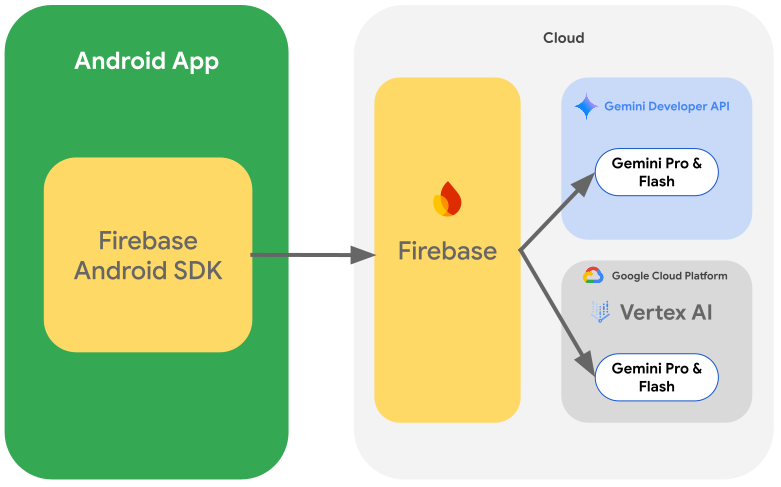
Here are the primary differences for each API provider:
- Get started at no-cost with a generous free tier without payment information required.
- Optionally upgrade to the paid tier of the Gemini Developer API to scale as your user base grows.
- Iterate and experiment with prompts and even get code snippets using Google AI Studio.
Agent Platform Gemini API (formerly Vertex AI):
- Granular control over where you access the model.
- Ideal for developers already embedded in the Google Cloud ecosystem.
- Iterate and experiment with prompts and even get code snippets using Agent Studio.
Selecting the appropriate Gemini API provider for your app is based on your business and technical constraints. Most Android developers just getting started with Gemini Pro and Flash models should begin with the Gemini Developer API. Switching between providers is done by changing the parameter in the model constructor:
Kotlin
// For the Agent Platform Gemini API, use `backend = GenerativeBackend.agentPlatform()` val model = Firebase.ai(backend = GenerativeBackend.googleAI()) .generativeModel("gemini-3.5-flash") val response = model.generateContent("Write a story about a magic backpack") val output = response.text
Java
// For the Agent Platform Gemini API, use `backend = GenerativeBackend.agentPlatform()` GenerativeModel firebaseAI = FirebaseAI.getInstance(GenerativeBackend.googleAI()) .generativeModel("gemini-3.5-flash"); // Use the GenerativeModelFutures Java compatibility layer which offers // support for ListenableFuture and Publisher APIs GenerativeModelFutures model = GenerativeModelFutures.from(firebaseAI); Content prompt = new Content.Builder() .addText("Write a story about a magic backpack.") .build(); ListenableFuture<GenerateContentResponse> response = model.generateContent(prompt); Futures.addCallback(response, new FutureCallback<GenerateContentResponse>() { @Override public void onSuccess(GenerateContentResponse result) { String resultText = result.getText(); // ... } @Override public void onFailure(Throwable t) { t.printStackTrace(); } }, executor);
See the full list of available generative AI models supported by Firebase AI Logic client SDKs.
Firebase services
In addition to access to the Gemini API, Firebase AI Logic offers a set of services to simplify the deployment of AI-enabled features to your app and get ready for production:
App Check
Firebase App Check safeguards app backends from abuse by ensuring only authorized clients access resources. It integrates with Google services (including Firebase and Google Cloud) and custom backends. App Check uses Play Integrity to verify that requests originate from the authentic app and an untampered device.
Starting early July 2026, Firebase automatically enforces App Check for Firebase AI Logic during the guided setup workflow in the Firebase console.
Remote Config
Instead of hardcoding the model name in your app, we recommend using a server-controlled variable using Firebase Remote Config. This lets you dynamically update the model your app uses without having to deploy a new version of your app or require your users to pick up a new version. You can also use Remote Config to A/B test models and prompts.
AI monitoring
To understand how your AI-enabled features are performing you can use the AI monitoring dashboard within the Firebase console. You'll get valuable insights into usage patterns, performance metrics, and debugging information for your Gemini API calls.