Ready to review some changes but not others? Try using Play Console’s new Save for later feature
2 min read

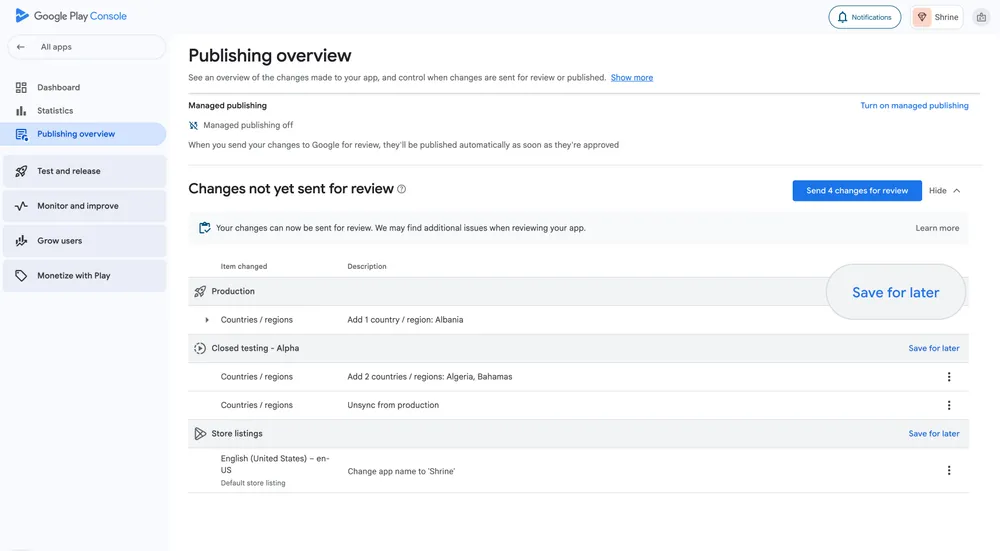
We’ve launched a new Save for later feature on Google Play Console’s Publishing overview to give you more control over when you send changes for review.
In the past, changes to your app were bundled together before being sent for review. This presented challenges if you needed to reprioritize changes, or if the changes were no longer relevant. For example, updates to your test tracks grouped with marketing changes that need to be rescheduled. This lack of flexibility meant that if some changes were ready for review but not others, you could end up delaying urgent fixes, or publishing changes that you weren’t quite ready to make.
Now, you have the ability to hold back the changes you’re not ready to have reviewed.
How it works
In the 'Changes not yet sent for review' section of the Publishing overview page, select ‘Save for later’ on the groups of changes that you don’t want to include in your next review. You can view and edit the list of saved changes, and return them to the Publishing overview if you change your mind. Once the review has started, your saved changes will be added back to ‘Changes not yet sent for review’.
Integration with our pre-review checks
Save for later also works with our pre-review checks. Pre-review checks look for issues in your changes that may prevent your app from being published, so that you can fix them before you send changes for review. If checks find issues with your app, there are two ways you can proceed:
- If issues are isolated to an individual track, we’ll show you an error beside that change, so you know what to save for later in order to proceed to review with your other changes.
- If you have issues that affect your whole app, for example, App content issues, Save for later will be unavailable and you will need to fix them before you can send any changes for review.
Greater flexibility in your workflows
Our goal for Save for later is to give you greater flexibility over your release schedule. With this feature you can manage what changes you send for review, and address issues affecting individual tracks without holding up ready-to-release changes, so you can iterate faster and minimize the impact of rejections on your release timeline.
So, what's next?
We're committed to continuously improving your publishing experience. Save for later is a significant step towards providing you with more granular control over this all-important stage in the journey to publishing your app. We'll continue to gather your feedback and look at ways we can provide greater flexibility to the review and publishing process.
We're excited to see how Save for later helps you to streamline your release process and bring your app innovations to users even faster.
-
 Product News
Today, we're thrilled to announce the stable release of the AndroidX Security State version 1.1.0 and Security State Provider version 1.0.0 libraries.
Maunik Shah, Alec Garcia, Joseph Yong • 4 min read -

 Product News
Today we’re releasing the first set of long-horizon tasks (LHT), which are tasks of great complexity that take an engineer multiple days or even a week to complete. We are also introducing agentic evaluation, starting with agents from corresponding model providers.
Matthew McCullough • 3 min read -
 Product News
Wireless debugging on Android is now faster, more reliable, and easier to set up than ever. With ADB Wi-Fi 2.0, we’ve introduced a new server stack and smarter network handling to directly address developer feedback around usability gaps.
Get the latest Android development insights delivered to your inbox weekly.