
If you are an original equipment manufacturer (OEM) or maintain a privileged over-the-air (OTA) update client, you can give security-sensitive apps on the device visibility into pending security updates so they can accurately evaluate the device's security posture. To enforce robust zero-trust policies, apps must be able to verify not only the patch level installed on the device (Device Security Patch Level, or DSPL), but also what security updates are available and ready to install (Available Security Patch Level, or ASPL).
Because unprivileged client apps can't directly read firmware
properties, inspect private updater databases, or query internal OEM backend
endpoints, the AndroidX Security State Provider library provides a
standardized, secure interprocess communication (IPC) architecture that update
clients use to share information about available updates. By implementing an
UpdateInfoService in your OTA update client, you can publish ASPL
metadata for the system without exposing proprietary backend integrations. While
Google provides implementation for modular system component (Mainline)
updaters for GMS devices, non-GMS devices can also publish ASPL metadata for
these modular system components.
Architectural overview
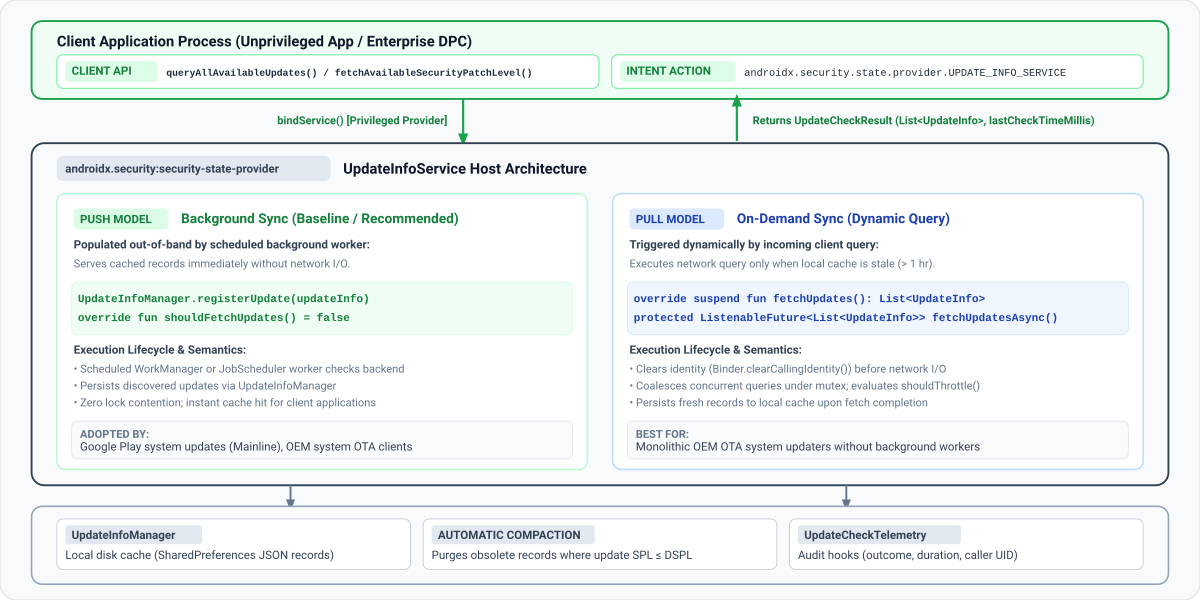
The following diagram illustrates how the AndroidX Security State Provider library establishes a standardized, secure IPC framework between unprivileged client apps and on-device update services:
Data delivery models
Client apps query update availability by calling
queryAllAvailableUpdates or
fetchAvailableSecurityPatchLevel. Under the hood, the client
library automatically discovers and binds to all registered services that
extend the UpdateInfoService class on the device from system apps that
hold the READ_PRIVILEGED_PHONE_STATE permission.
As illustrated in the preceding diagram, the security-state-provider library
supports two data delivery models:
| Delivery model | Synchronization trigger | Client response | Recommended use cases |
|---|---|---|---|
| Push model (Background sync) | Scheduled background workers (WorkManager or JobScheduler) sync with your backend and write records to UpdateInfoManager. Your service always serves from local disk cache (shouldFetchUpdates() = false). |
Served immediately from local cache. | OEM system OTA updaters and background-synced modular component updaters. |
| Pull model (On-demand sync) | Incoming client IPC queries trigger a network fetch when cached records are stale (shouldFetchUpdates() = true). Mutex coalescing and rate limiting (shouldThrottle()) protect your backend from spikes. |
Waits for the backend fetch when the cache is stale. | Monolithic OEM OTA updaters without scheduled background sync workers. |
Multiple update providers
On production Android devices, multiple independent update providers coexist
concurrently. For example, Mainline publishes availability for modular
components (COMPONENT_SYSTEM_MODULES), while your OEM OTA client
publishes updates for the primary OS image (COMPONENT_SYSTEM).
Your service only needs to register updates for the specific components it
manages. If multiple providers on a device publish updates for the same
component, client apps evaluate the highest available patch level (using
fetchAvailableSecurityPatchLevel()) or inspect individual
UpdateInfo records (using queryAllAvailableUpdates()) for
enterprise auditing. Ensure that your service always publishes the canonical
format for your component (DateBasedSecurityPatchLevel for
COMPONENT_SYSTEM).
Step-by-step guide to onboard your update client
Follow these steps to integrate the AndroidX Security State Provider library into your update client and begin publishing your device's security update availability.
Step 1: Add dependencies
To implement an update provider, make sure your project includes the Google
Maven repository, then add the security-state-provider library to your
module's build.gradle.kts (Kotlin DSL) or build.gradle (Groovy DSL) file:
Kotlin
// Kotlin DSL (build.gradle.kts)
dependencies {
    // Core provider library for OTA and system update clients
    implementation("androidx.security:security-state-provider:1.0.0")
    // Required to construct UpdateInfo and DateBasedSecurityPatchLevel records
    implementation("androidx.security:security-state:1.1.0")
    // Optional: Guava ListenableFuture support for Java implementations
    implementation("androidx.concurrent:concurrent-futures:1.2.0")
    implementation("com.google.guava:guava:33.0.0-android")
}
Groovy
// Groovy DSL (build.gradle)
dependencies {
    // Core provider library for OTA and system update clients
    implementation 'androidx.security:security-state-provider:1.0.0'
    // Required to construct UpdateInfo and DateBasedSecurityPatchLevel records
    implementation 'androidx.security:security-state:1.1.0'
    // Optional: Guava ListenableFuture support for Java implementations
    implementation 'androidx.concurrent:concurrent-futures:1.2.0'
    implementation 'com.google.guava:guava:33.0.0-android'
}
Step 2: Declare the update service in your manifest
Declare your service in your app's AndroidManifest.xml with an
<intent-filter> matching
androidx.security.state.provider.UPDATE_INFO_SERVICE. The service must be
exported (android:exported="true") and configured as a single-user service
(android:singleUser="true") so the client library can bind to it across
process and user boundaries, especially for work profiles:
<!-- AndroidManifest.xml -->
<manifest xmlns:android="http://schemas.android.com/apk/res/android"
    xmlns:tools="http://schemas.android.com/tools"
    package="com.example.android.updater">
    <application>
        <service
            android:name=".MyUpdateInfoService"
            android:exported="true"
            android:singleUser="true"
            tools:ignore="ExportedService">
            <intent-filter>
                <action android:name="androidx.security.state.provider.UPDATE_INFO_SERVICE" />
            </intent-filter>
        </service>
    </application>
</manifest>
If your updater doesn't run as android.uid.system, also declare the following
permissions in your manifest and make sure to add them to your privileged
permission allowlist:
READ_PRIVILEGED_PHONE_STATE: required for clients to trust your provider.INTERACT_ACROSS_USERS: required forandroid:singleUser="true".
Step 3: Implement UpdateInfoService
To publish your update status, you must implement the UpdateInfoService
class and construct update records that match the expected data model.
UpdateInfo data model specification
Whether you choose the Push model or Pull model, construct UpdateInfo
records using UpdateInfo.Builder according to the following
specification:
| Field Name | Getter Method | Data Type | Validation and Format Requirements | Purpose and System Semantics |
|---|---|---|---|---|
component |
getComponent() |
String (@Component) |
Canonical constants in SecurityPatchState: COMPONENT_SYSTEM, COMPONENT_SYSTEM_MODULES, or COMPONENT_KERNEL. |
Identifies the software or firmware subsystem this update targets. |
securityPatchLevel |
getSecurityPatchLevel() |
SecurityPatchLevel |
Must be an instance of DateBasedSecurityPatchLevel (YYYY-MM-DD) or VersionedSecurityPatchLevel (major.minor.patch), or parsed using SecurityPatchState.getComponentSecurityPatchLevel(). |
The target security patch level that will be achieved once this update is installed. |
publishedDateMillis |
getPublishedDateMillis() |
long |
Milliseconds since Unix epoch (System.currentTimeMillis()). Must be > 0. |
When the update was made available to users, such as the OTA release time. Don't use the payload download or install time. |
lastCheckTimeMillis |
getLastCheckTimeMillis() |
long |
Milliseconds since Unix epoch. Must be > 0. |
Timestamp when your provider verified or discovered this update record during synchronization. |
Choose the delivery model that fits your updater's architecture from the following options:
Option A: Push model (recommended)
When your background sync worker checks your OTA server, validate that any
discovered update advances the device's current patch level and persist it using
UpdateInfoManager.registerUpdate(), or call
UpdateInfoManager.unregisterUpdate() if no advancing security update is
pending. Always call UpdateInfoManager.setLastCheckTimeMillis() at the
end of every sync (even after calling registerUpdate(), which persists the
per-component UpdateInfo record but doesn't update the global last-check
timestamp returned to clients). You can implement this with a
WorkManager CoroutineWorker in Kotlin or Worker in Java:
Kotlin
import android.content.Context
import androidx.security.state.SecurityPatchState
import androidx.security.state.SecurityPatchState.DateBasedSecurityPatchLevel
import androidx.security.state.UpdateInfo
import androidx.security.state.provider.UpdateInfoManager
import androidx.work.CoroutineWorker
import androidx.work.WorkerParameters
import kotlin.math.max

class OtaSyncWorker(context: Context, params: WorkerParameters) : CoroutineWorker(context, params) {
    override suspend fun doWork(): Result {
        val updateInfoManager = UpdateInfoManager(applicationContext)
        val securityPatchState = SecurityPatchState(applicationContext)
        val currentSpl = securityPatchState.getDeviceSecurityPatchLevel(SecurityPatchState.COMPONENT_SYSTEM)

        // 1. Fetch available update metadata from OEM backend
        val latestUpdate = MyOtaClient.fetchLatestSystemUpdate()
        val targetSplString = latestUpdate?.spl?.trim()
        val targetSpl = if (!targetSplString.isNullOrEmpty()) {
            DateBasedSecurityPatchLevel.fromString(targetSplString)
        } else {
            null
        }

        // 2. Defensively verify that target SPL is non-blank AND strictly newer than installed DSPL.
        // If an update is a maintenance patch with no SPL increment (or if no update is available),
        // unregister any stale cached record for this component.
        if (latestUpdate != null && targetSpl != null && targetSpl > currentSpl) {
            val updateInfo = UpdateInfo.Builder()
                .setComponent(SecurityPatchState.COMPONENT_SYSTEM)
                .setSecurityPatchLevel(targetSpl)
                .setPublishedDateMillis(latestUpdate.releaseTimeMillis)
                .setLastCheckTimeMillis(System.currentTimeMillis())
                .build()
            updateInfoManager.registerUpdate(updateInfo)
        } else {
            val clearTarget = UpdateInfo.Builder()
                .setComponent(SecurityPatchState.COMPONENT_SYSTEM)
                .build()
            updateInfoManager.unregisterUpdate(clearTarget)
        }

        // 3. Update global freshness timestamp (monotonic synchronization)
        val currentCheckTime = System.currentTimeMillis()
        val previousCheckTime = updateInfoManager.getLastCheckTimeMillis()
        updateInfoManager.setLastCheckTimeMillis(max(previousCheckTime, currentCheckTime))
        return Result.success()
    }
}
Java
import android.content.Context;
import android.text.TextUtils;
import androidx.annotation.NonNull;
import androidx.security.state.SecurityPatchState;
import androidx.security.state.SecurityPatchState.DateBasedSecurityPatchLevel;
import androidx.security.state.SecurityPatchState.SecurityPatchLevel;
import androidx.security.state.UpdateInfo;
import androidx.security.state.provider.UpdateInfoManager;
import androidx.work.Worker;
import androidx.work.WorkerParameters;

public class OtaSyncWorker extends Worker {
    public OtaSyncWorker(@NonNull Context context, @NonNull WorkerParameters params) {
        super(context, params);
    }

    @NonNull
    @Override
    public Result doWork() {
        // In Java, pass null for customSecurityState because UpdateInfoManager does not declare @JvmOverloads
        UpdateInfoManager updateInfoManager =
                new UpdateInfoManager(getApplicationContext(), /* customSecurityState= */ null);
        SecurityPatchState securityPatchState = new SecurityPatchState(getApplicationContext());
        SecurityPatchLevel currentSpl =
                securityPatchState.getDeviceSecurityPatchLevel(SecurityPatchState.COMPONENT_SYSTEM);

        // 1. Fetch available update metadata from OEM backend
        MyOtaUpdate latestUpdate = MyOtaClient.fetchLatestSystemUpdate();
        String targetSplString = (latestUpdate != null && latestUpdate.getSpl() != null)
                ? latestUpdate.getSpl().trim()
                : null;
        DateBasedSecurityPatchLevel targetSpl =
                !TextUtils.isEmpty(targetSplString)
                        ? DateBasedSecurityPatchLevel.fromString(targetSplString)
                        : null;

        // 2. Defensively verify that target SPL is non-blank AND strictly newer than installed DSPL.
        // If an update is a maintenance patch with no SPL increment (or if no update is available),
        // unregister any stale cached record for this component.
        if (latestUpdate != null && targetSpl != null && targetSpl.compareTo(currentSpl) > 0) {
            UpdateInfo updateInfo = new UpdateInfo.Builder()
                    .setComponent(SecurityPatchState.COMPONENT_SYSTEM)
                    .setSecurityPatchLevel(targetSpl)
                    .setPublishedDateMillis(latestUpdate.getReleaseTimeMillis())
                    .setLastCheckTimeMillis(System.currentTimeMillis())
                    .build();
            updateInfoManager.registerUpdate(updateInfo);
        } else {
            UpdateInfo clearTarget = new UpdateInfo.Builder()
                    .setComponent(SecurityPatchState.COMPONENT_SYSTEM)
                    .build();
            updateInfoManager.unregisterUpdate(clearTarget);
        }

        // 3. Update global freshness timestamp (monotonic synchronization)
        long currentCheckTime = System.currentTimeMillis();
        long previousCheckTime = updateInfoManager.getLastCheckTimeMillis();
        updateInfoManager.setLastCheckTimeMillis(Math.max(previousCheckTime, currentCheckTime));
        return Result.success();
    }
}
In a push-based model, background tasks persist update records directly to
UpdateInfoManager. To instruct the framework to always serve records from
local disk storage, override shouldFetchUpdates() to return false by
extending UpdateInfoService in Kotlin or
ListenableFutureUpdateInfoService in Java:
Kotlin
import androidx.security.state.UpdateInfo
import androidx.security.state.provider.UpdateInfoService

class PushUpdateInfoService : UpdateInfoService() {
    // Cache is populated out-of-band by background sync tasks
    override fun shouldFetchUpdates(): Boolean = false

    // Never invoked under normal flow because shouldFetchUpdates() returns false
    override suspend fun fetchUpdates(): List<UpdateInfo> = emptyList()
}
Java
import androidx.annotation.NonNull;
import androidx.security.state.UpdateInfo;
import androidx.security.state.provider.ListenableFutureUpdateInfoService;
import com.google.common.util.concurrent.Futures;
import com.google.common.util.concurrent.ListenableFuture;
import java.util.Collections;
import java.util.List;

public class PushUpdateInfoService extends ListenableFutureUpdateInfoService {
    @Override
    protected boolean shouldFetchUpdates() {
        return false;
    }

    @NonNull
    @Override
    protected ListenableFuture<List<UpdateInfo>> fetchUpdatesAsync() {
        return Futures.immediateFuture(Collections.emptyList());
    }
}
Option B: Pull model (on-demand)
In a pull-based architecture, your service handles on-demand refresh requests triggered by client apps when the local cache is stale.
To handle on-demand update queries, extend UpdateInfoService in Kotlin
(implementing the suspending fetchUpdates() function) or
ListenableFutureUpdateInfoService in Java (implementing
fetchUpdatesAsync() returning a Guava ListenableFuture):
Kotlin
package com.example.android.updater

import androidx.security.state.SecurityPatchState
import androidx.security.state.SecurityPatchState.DateBasedSecurityPatchLevel
import androidx.security.state.UpdateInfo
import androidx.security.state.provider.UpdateInfoManager
import androidx.security.state.provider.UpdateInfoService
import java.util.concurrent.TimeUnit

class MyUpdateInfoService : UpdateInfoService() {
    // Manage local update records and check timestamps
    private val updateInfoManager by lazy { UpdateInfoManager(this) }

    override suspend fun fetchUpdates(): List<UpdateInfo> {
        val currentSpl = SecurityPatchState(this)
            .getDeviceSecurityPatchLevel(SecurityPatchState.COMPONENT_SYSTEM)

        // 1. Execute network request to OTA backend
        val response = MyOtaBackendClient.checkAvailableUpdates()

        // 2. Defensively filter out blank or non-advancing SPLs and map to UpdateInfo objects
        val validUpdates = response.updates
            .mapNotNull { updateItem ->
                val splString = updateItem.targetSpl?.trim()
                if (splString.isNullOrEmpty()) return@mapNotNull null
                val parsedSpl = DateBasedSecurityPatchLevel.fromString(splString)
                if (parsedSpl > currentSpl) {
                    UpdateInfo.Builder()
                        .setComponent(SecurityPatchState.COMPONENT_SYSTEM)
                        .setSecurityPatchLevel(parsedSpl)
                        .setPublishedDateMillis(updateItem.releaseTimestampMillis)
                        .setLastCheckTimeMillis(System.currentTimeMillis())
                        .build()
                } else {
                    null
                }
            }

        // 3. If no advancing SYSTEM update is available (or if a previously offered update was revoked),
        // proactively unregister any cached record for this component.
        if (validUpdates.isEmpty()) {
            val clearTarget = UpdateInfo.Builder()
                .setComponent(SecurityPatchState.COMPONENT_SYSTEM)
                .build()
            updateInfoManager.unregisterUpdate(clearTarget)
        }
        return validUpdates
    }

    override fun shouldFetchUpdates(): Boolean {
        // Enforce custom freshness threshold (for example, 4 hours instead of default 1 hour)
        val lastCheckMillis = updateInfoManager.getLastCheckTimeMillis()
        val dataAge = System.currentTimeMillis() - lastCheckMillis
        return dataAge > TimeUnit.HOURS.toMillis(4)
    }
}
Java
package com.example.android.updater;

import android.text.TextUtils;
import androidx.annotation.NonNull;
import androidx.security.state.SecurityPatchState;
import androidx.security.state.SecurityPatchState.DateBasedSecurityPatchLevel;
import androidx.security.state.SecurityPatchState.SecurityPatchLevel;
import androidx.security.state.UpdateInfo;
import androidx.security.state.provider.ListenableFutureUpdateInfoService;
import androidx.security.state.provider.UpdateInfoManager;
import com.google.common.util.concurrent.Futures;
import com.google.common.util.concurrent.ListenableFuture;
import java.util.ArrayList;
import java.util.List;
import java.util.concurrent.TimeUnit;

public class MyUpdateInfoService extends ListenableFutureUpdateInfoService {
    private UpdateInfoManager updateInfoManager;

    @Override
    public void onCreate() {
        super.onCreate();
        // Pass null for customSecurityState because UpdateInfoManager does not declare @JvmOverloads
        updateInfoManager = new UpdateInfoManager(this, /* customSecurityState= */ null);
    }

    @NonNull
    @Override
    protected ListenableFuture<List<UpdateInfo>> fetchUpdatesAsync() {
        try {
            SecurityPatchLevel currentSpl = new SecurityPatchState(this)
                    .getDeviceSecurityPatchLevel(SecurityPatchState.COMPONENT_SYSTEM);
            MyOtaBackendResponse response = MyOtaBackendClient.checkAvailableUpdates();
            List<UpdateInfo> updates = new ArrayList<>();
            for (MyOtaUpdateItem item : response.getUpdates()) {
                String trimmedSpl = (item.getTargetSpl() != null) ? item.getTargetSpl().trim() : null;
                if (!TextUtils.isEmpty(trimmedSpl)) {
                    DateBasedSecurityPatchLevel parsedSpl =
                            DateBasedSecurityPatchLevel.fromString(trimmedSpl);
                    if (parsedSpl.compareTo(currentSpl) > 0) {
                        updates.add(new UpdateInfo.Builder()
                                .setComponent(SecurityPatchState.COMPONENT_SYSTEM)
                                .setSecurityPatchLevel(parsedSpl)
                                .setPublishedDateMillis(item.getReleaseTimestampMillis())
                                .setLastCheckTimeMillis(System.currentTimeMillis())
                                .build());
                    }
                }
            }

            // If no advancing SYSTEM update is available (or if a previously offered update was revoked),
            // proactively unregister any cached record for this component.
            if (updates.isEmpty()) {
                UpdateInfo clearTarget = new UpdateInfo.Builder()
                        .setComponent(SecurityPatchState.COMPONENT_SYSTEM)
                        .build();
                updateInfoManager.unregisterUpdate(clearTarget);
            }
            return Futures.immediateFuture(updates);
        } catch (Exception e) {
            return Futures.immediateFailedFuture(e);
        }
    }

    @Override
    protected boolean shouldFetchUpdates() {
        long lastCheckMillis = updateInfoManager.getLastCheckTimeMillis();
        long dataAge = System.currentTimeMillis() - lastCheckMillis;
        return dataAge > TimeUnit.HOURS.toMillis(4);
    }
}
Step 4: Clear applied updates after device reboot
While UpdateInfoManager automatically prunes obsolete updates whenever
registerUpdate() is invoked, your updater won't call
registerUpdate() again after an OTA update finishes installing until the next
scheduled server sync cycle. To prevent client apps from seeing an
already-installed update as still pending immediately after reboot, listen for
ACTION_BOOT_COMPLETED and call
UpdateInfoManager.unregisterUpdate() when an OTA update has finished
installing to clear the record from the local cache. Doing this only when an
update has finished installing avoids unconditionally wiping pending
(uninstalled) updates on every normal device reboot. Because
UpdateInfoManager keys update records by
component, you only need to specify the target component when constructing the
UpdateInfo object for unregistration:
Kotlin
// Build target identifying the component to unregister
val target = UpdateInfo.Builder()
    .setComponent(SecurityPatchState.COMPONENT_SYSTEM)
    .build()
// Unregister the update to remove it from disk cache
updateInfoManager.unregisterUpdate(target)
// Refresh last check timestamp to indicate up-to-date state
updateInfoManager.setLastCheckTimeMillis(System.currentTimeMillis())
Java
// Build target identifying the component to unregister
UpdateInfo target = new UpdateInfo.Builder()
    .setComponent(SecurityPatchState.COMPONENT_SYSTEM)
    .build();
// Unregister the update to remove it from disk cache
updateInfoManager.unregisterUpdate(target);
// Refresh last check timestamp to indicate up-to-date state
updateInfoManager.setLastCheckTimeMillis(System.currentTimeMillis());
Step 5: Verify your integration
Run the following checks on an Android device or emulator using Android Debug Bridge (ADB) to validate end-to-end integration and prevent common OEM deployment pitfalls:
Verify that clients trust your provider: Client apps ignore any provider that doesn't hold
READ_PRIVILEGED_PHONE_STATE, even if it's preinstalled. Confirm that the permission is granted:adb shell dumpsys package <your_package_name> | grep "READ_PRIVILEGED_PHONE_STATE: granted=true"Then confirm that your service is discoverable and has no service permission. In the output for your service, check for
exported=trueandpermission=null:adb shell pm query-services --user 0 -a androidx.security.state.provider.UPDATE_INFO_SERVICEIf a client still doesn't see your provider, check logcat for
Ignoring untrusted update providerfrom theSecurityPatchStatetag.Verify intent resolution in both User 0 and Work Profiles: Assert that the Android OS
PackageManagerresolves your exportedUPDATE_INFO_SERVICEintent filter in both the primary user (User 0) and any active Android Enterprise Work Profile (such asUser 10):adb shell pm query-services --user 0 -a androidx.security.state.provider.UPDATE_INFO_SERVICE adb shell pm query-services --user 10 -a androidx.security.state.provider.UPDATE_INFO_SERVICEVerify service state and cached records using
dumpsys:UpdateInfoServiceoverridesdump()to reportGlobal Last Check,Should Throttle(the state of the rate limiter), andCached Updates. BecauseUpdateInfoServiceis a bound service and clients unbind immediately after querying,dumpsys activity serviceoutputs(nothing)when no client is bound. Start the service explicitly before runningdumpsys:adb shell am start-service -a androidx.security.state.provider.UPDATE_INFO_SERVICE <your_package_name>/.<service_class_name> adb shell dumpsys activity service <your_package_name>/.<service_class_name>Example diagnostic output:
UpdateInfoService State:
  Active Requests: 0
  Global Last Check: Thu Jan 01 12:00:00 UTC 2026
  Should Throttle: false
  Cached Updates (1):
    - Component: SYSTEM
      SPL: 2026-01-01
      Published: Thu Jan 01 00:00:00 UTC 2026
      Last Checked: Thu Jan 01 12:00:00 UTC 2026
Trigger client binding and verify telemetry outcomes: From an unprivileged test app (not holding system signature permissions), invoke
SecurityPatchState.queryAllAvailableUpdates(). If you implemented the telemetry callbacks, check the following:- Verify that the unprivileged client binds without a
SecurityExceptionand triggersonClientConnected(packageName, callerUid). - For Push-model providers (
shouldFetchUpdates() == false): Verify thatonRequestCompleted(telemetry)logsUpdateFetchOutcome.CACHE_HIT(1) withfetchDurationMillis == 0on every query. - For Pull-model providers (
shouldFetchUpdates() == true): Verify thatonRequestCompleted(telemetry)logsUpdateFetchOutcome.FETCHED(3) on the initial stale-cache query, followed byCACHE_HIT(1) on immediate subsequent queries. (To reset the 1-hour persistent rate limiter between Pull-model test runs, runadb shell pm clear <your_package_name>.)
- Verify that the unprivileged client binds without a
Optional and advanced configurations
Caching policy and rate limiting
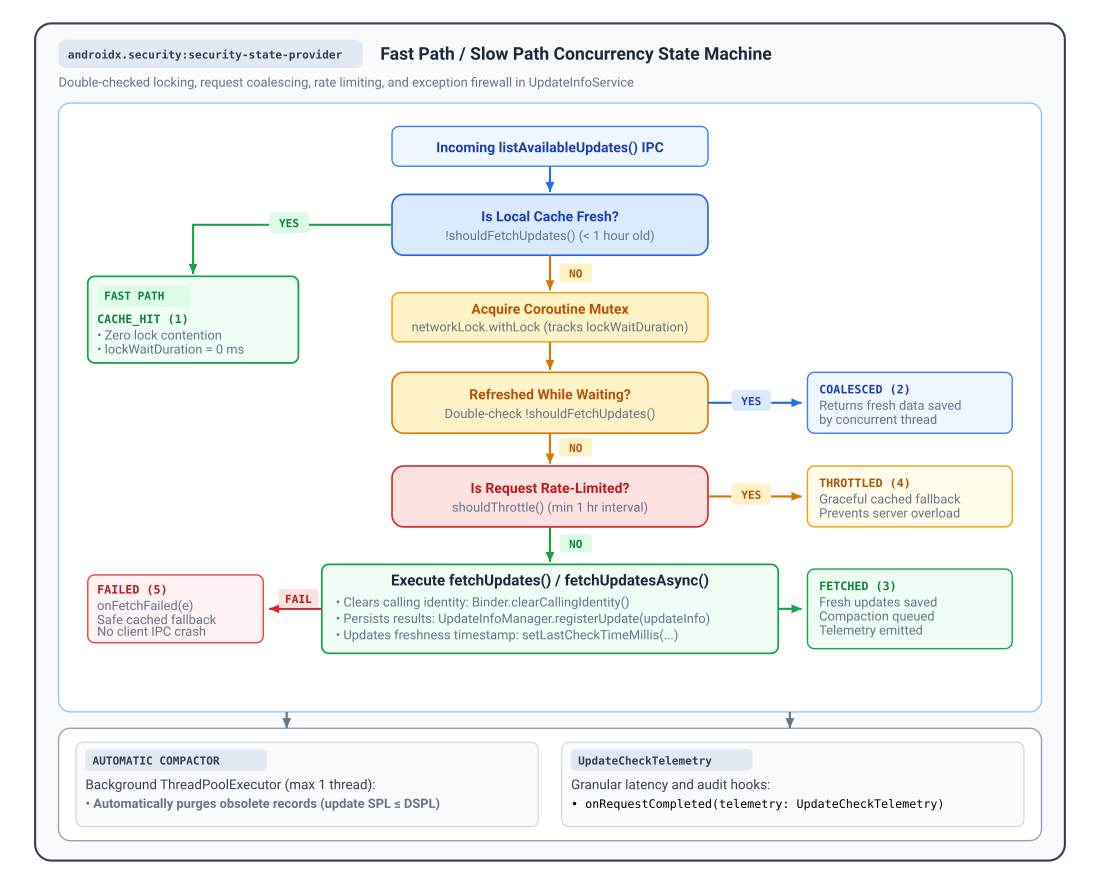
When a client queries updates, UpdateInfoService executes a
double-checked locking workflow to balance data freshness against backend server
load:
- Fast Path (
shouldFetchUpdates()): By default,shouldFetchUpdates()returnstrue(indicating a stale cache) only when the globallastCheckTimeMillisis older than 1 hour (TimeUnit.HOURS.toMillis(1)). WhenshouldFetchUpdates()returnsfalse, the service immediately returns cached records with outcomeUpdateFetchOutcome.CACHE_HITwithout acquiring locks or performing network I/O. You can overrideshouldFetchUpdates()to customize this caching policy. - Slow Path & Request Coalescing: When
shouldFetchUpdates()returnstrue, the service acquires an internal coroutine mutex and re-evaluatesshouldFetchUpdates()(returningUpdateFetchOutcome.COALESCEDif a concurrent request already refreshed the cache while waiting for the lock). - Persistent Rate Limiter (
shouldThrottle()): To protect backend infrastructure from query bursts or repeated failures,shouldThrottle()enforces a persistent minimum 1-hour interval across app and device restarts.UpdateInfoServicerecords each attempt before invokingfetchUpdates(), so iffetchUpdates()throws an exception (returningUpdateFetchOutcome.FAILEDafter invokingonFetchFailed(e)), subsequent queries during the next 60 minutes gracefully return cached fallback data with outcomeUpdateFetchOutcome.THROTTLED.
Observability, telemetry, and diagnostics
UpdateInfoService provides built-in observability hooks to track client
adoption, monitor IPC latency, and log backend errors without instrumenting
low-level AIDL stubs:
onRequestCompleted(telemetry): Invoked upon completion of each update check with anUpdateCheckTelemetrysummary.onClientConnected(packageName, callerUid): Invoked when a verified client opens a session.onClientDisconnected(packageName, callerUid): Invoked when a client unbinds or its process terminates.onFetchFailed(e): Invoked if an exception occurs duringfetchUpdates(), before the service returns cached fallback data.
Override these callbacks in UpdateInfoService (Kotlin) or
ListenableFutureUpdateInfoService (Java):
Kotlin
import androidx.security.state.provider.UpdateCheckTelemetry
import androidx.security.state.provider.UpdateFetchOutcome
import androidx.security.state.provider.UpdateInfoService

abstract class MonitoredUpdateInfoService : UpdateInfoService() {
    override fun onRequestCompleted(telemetry: UpdateCheckTelemetry) {
        val outcomeName = when (telemetry.outcome) {
            UpdateFetchOutcome.CACHE_HIT -> "CACHE_HIT"
            UpdateFetchOutcome.COALESCED -> "COALESCED"
            UpdateFetchOutcome.FETCHED -> "FETCHED"
            UpdateFetchOutcome.THROTTLED -> "THROTTLED"
            UpdateFetchOutcome.FAILED -> "FAILED"
            else -> "UNKNOWN"
        }
        MyAnalytics.logEvent("SECURITY_UPDATE_CHECK")
            .addParam("outcome", outcomeName)
            .addParam("total_duration_ms", telemetry.totalDurationMillis)
            .addParam("lock_wait_ms", telemetry.lockWaitDurationMillis)
            .addParam("processing_ms", telemetry.processingDurationMillis)
            .addParam("fetch_duration_ms", telemetry.fetchDurationMillis)
            .addParam("caller_uid", telemetry.callerUid)
            .send()
    }

    override fun onClientConnected(packageName: String, callerUid: Int) {
        // Track authenticated client sessions and adoption
        MyMetrics.incrementCounter("client_connected", "package", packageName)
    }

    override fun onClientDisconnected(packageName: String, callerUid: Int) {
        // Track session termination and cleanup resources
        MyMetrics.incrementCounter("client_disconnected", "package", packageName)
    }

    override fun onFetchFailed(e: Exception) {
        // Report exceptions caught during the update check workflow
        MyCrashReporter.recordException(e)
    }
}
Java
import androidx.annotation.NonNull;
import androidx.security.state.provider.ListenableFutureUpdateInfoService;
import androidx.security.state.provider.UpdateCheckTelemetry;
import androidx.security.state.provider.UpdateFetchOutcome;

public abstract class MonitoredUpdateInfoService extends ListenableFutureUpdateInfoService {
    @Override
    protected void onRequestCompleted(@NonNull UpdateCheckTelemetry telemetry) {
        String outcomeName;
        switch (telemetry.getOutcome()) {
            case UpdateFetchOutcome.CACHE_HIT: outcomeName = "CACHE_HIT"; break;
            case UpdateFetchOutcome.COALESCED: outcomeName = "COALESCED"; break;
            case UpdateFetchOutcome.FETCHED: outcomeName = "FETCHED"; break;
            case UpdateFetchOutcome.THROTTLED: outcomeName = "THROTTLED"; break;
            case UpdateFetchOutcome.FAILED: outcomeName = "FAILED"; break;
            default: outcomeName = "UNKNOWN"; break;
        }
        MyAnalytics.logEvent("SECURITY_UPDATE_CHECK")
            .addParam("outcome", outcomeName)
            .addParam("total_duration_ms", telemetry.getTotalDurationMillis())
            .addParam("lock_wait_ms", telemetry.getLockWaitDurationMillis())
            .addParam("processing_ms", telemetry.getProcessingDurationMillis())
            .addParam("fetch_duration_ms", telemetry.getFetchDurationMillis())
            .addParam("caller_uid", telemetry.getCallerUid())
            .send();
    }

    @Override
    protected void onClientConnected(@NonNull String packageName, int callerUid) {
        MyMetrics.incrementCounter("client_connected", "package", packageName);
    }

    @Override
    protected void onClientDisconnected(@NonNull String packageName, int callerUid) {
        MyMetrics.incrementCounter("client_disconnected", "package", packageName);
    }

    @Override
    protected void onFetchFailed(@NonNull Exception e) {
        MyCrashReporter.recordException(e);
    }
}
Telemetry outcomes and latency metrics
UpdateCheckTelemetry measures monotonic elapsed durations
(SystemClock.elapsedRealtime()) and reports one of five outcomes defined
in UpdateFetchOutcome:
| Outcome Constant | @IntDef Code |
Metric Properties Logged | Description & System State |
|---|---|---|---|
UpdateFetchOutcome.CACHE_HIT |
1 |
totalDurationMillis, processingDurationMillis, callerUid |
Served immediately from local disk/memory cache on Fast Path (shouldFetchUpdates() returned false). lockWaitDurationMillis and fetchDurationMillis are 0. |
UpdateFetchOutcome.COALESCED |
2 |
totalDurationMillis, lockWaitDurationMillis, processingDurationMillis, callerUid |
Query queued behind another active refresh; upon acquiring lock, data was fresh. Avoided duplicate network fetch (fetchDurationMillis is 0). |
UpdateFetchOutcome.FETCHED |
3 |
totalDurationMillis, lockWaitDurationMillis, processingDurationMillis, fetchDurationMillis, callerUid |
Backend network sync executed successfully (fetchUpdates() completed). New records persisted to disk. |
UpdateFetchOutcome.THROTTLED |
4 |
totalDurationMillis, lockWaitDurationMillis, processingDurationMillis, callerUid |
Request blocked by rate limiter (shouldThrottle() returned true). Cached data returned safely to client (fetchDurationMillis is 0). |
UpdateFetchOutcome.FAILED |
5 |
totalDurationMillis, lockWaitDurationMillis, processingDurationMillis, fetchDurationMillis, callerUid |
Update check or network request threw an exception. Caught by exception firewall, fired onFetchFailed(e), returned cached fallback. |
Advanced service broker hook: getCallerUid()
When a client connects, UpdateInfoService automatically evaluates
getCallerUid() on the initial Binder thread (before calling
Binder.clearCallingIdentity() prior to fetchUpdates()), verifies
package ownership, and passes the verified caller UID directly to
onClientConnected(), onClientDisconnected(), and telemetry.callerUid in
onRequestCompleted(telemetry).
For standard Android <service> components, you don't need to call or override
getCallerUid(). The protected open getCallerUid() method (which delegates to
Binder.getCallingUid() by default) is provided as an override hook for
host apps that route Binder IPC through an internal service broker or
proxy architecture, letting the subclass return the logical client UID
rather than the broker's UID.
Additional resources
For more information about publishing security state, see the following resources:
Documentation
- Understand device security state
- Android Security Bulletins
- Modular system components
- Supplemental security patches
- Security State Provider 1.0.0 release notes
API reference
UpdateInfoServiceListenableFutureUpdateInfoServiceUpdateInfoManagerUpdateInfoUpdateInfo.BuilderUpdateCheckTelemetryUpdateFetchOutcomeSecurityPatchState