

Android 聯絡人選擇工具是標準化的可瀏覽介面,使用者可透過這個介面與應用程式分享聯絡人。這項工具適用於搭載 Android 17 (API 級別 37) 以上版本的裝置,可做為廣泛 READ_CONTACTS 權限的替代方案,保護使用者隱私。應用程式不必要求存取使用者的完整地址簿,而是指定需要的資料欄位 (例如電話號碼或電子郵件地址),然後由使用者選取要分享的特定聯絡人。這項功能只會授予應用程式所選資料的讀取權限,確保您能精細控管資料,同時提供一致的使用者體驗,包括內建搜尋、切換設定檔和多選功能,不必自行建構或維護使用者介面。
整合聯絡人選擇工具
如要整合聯絡人選擇工具,請使用 ContactsPickerSessionContract.ACTION_PICK_CONTACTS 意圖。這項意圖會啟動選擇工具,並將所選聯絡人傳回應用程式。
有別於先前的 ACTION_PICK,您現在可以使用聯絡人選擇工具,同時指定應用程式所需的多個資料欄位。您可以使用 ContactsPickerSessionContract.EXTRA_REQUESTED_DATA_FIELDS 執行這項操作,並傳遞 ContactsContract.CommonDataKinds 中定義的 MIME 類型 ArrayList<String>。
常見的 MIME 類型包括:
ContactsContract.CommonDataKinds.Phone.CONTENT_ITEM_TYPEContactsContract.CommonDataKinds.Email.CONTENT_ITEM_TYPEContactsContract.CommonDataKinds.StructuredPostal.CONTENT_ITEM_TYPE
啟動挑選器
使用 registerForActivityResult 和 StartActivityForResult 合約啟動挑選工具。您可以將意圖設為允許單選或多選。
// Launcher for the Contact Picker intent
val pickContact = rememberLauncherForActivityResult(StartActivityForResult()) {
if (it.resultCode == Activity.RESULT_OK) {
val resultUri = it.data?.data ?: return@rememberLauncherForActivityResult
// Process the result URI in a background thread to fetch all selected contacts
coroutine.launch {
contacts = processContactPickerResultUri(resultUri, context)
}
}
}
選取模式
聯絡人挑選器的使用者介面會根據要求提供的資料欄位進行調整。視這些需求而定,使用者可以選擇整個聯絡人記錄 (如果需要多個欄位),或從聯絡人資訊中選取特定資料項目。
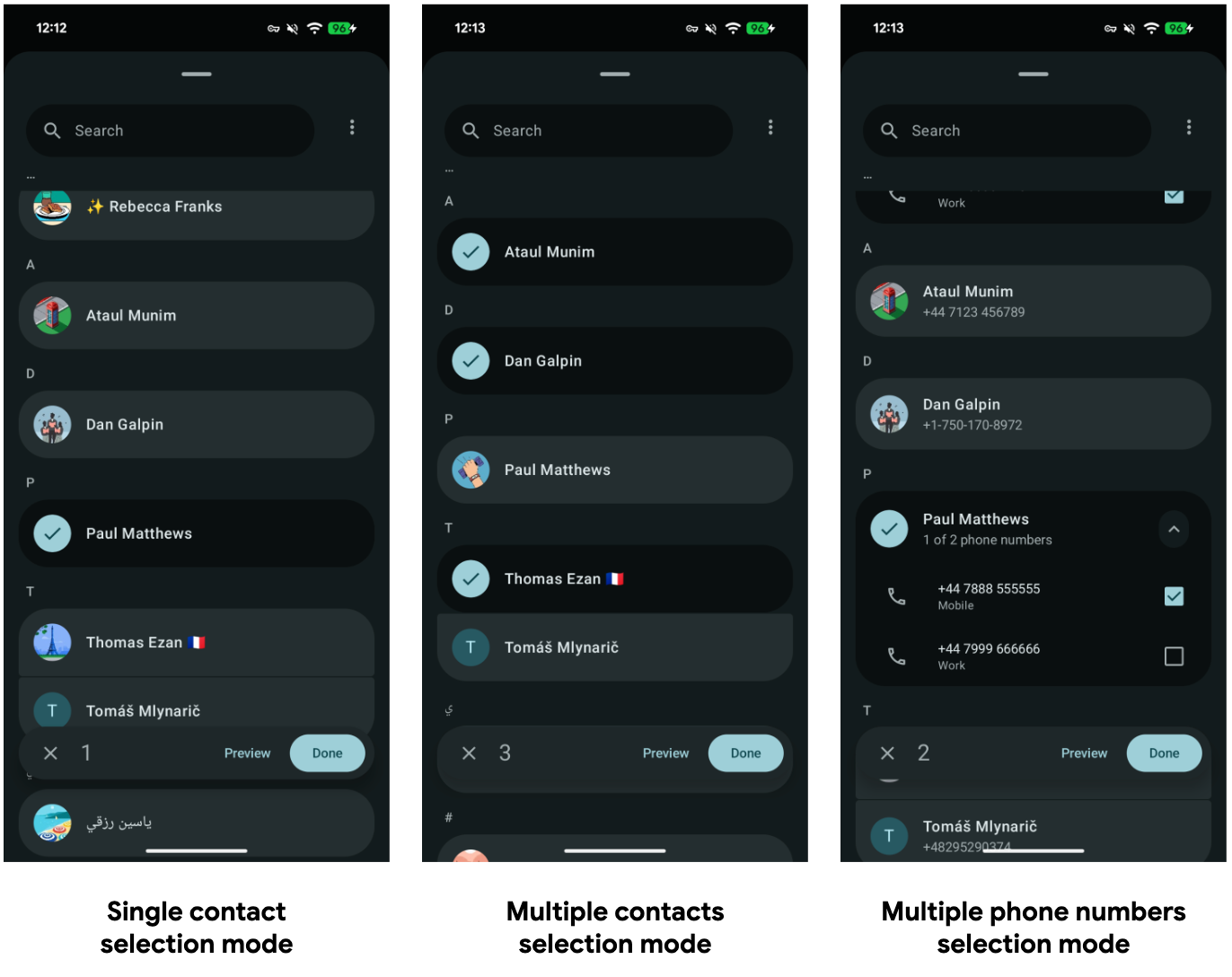
選取單一聯絡人
在本範例中,應用程式只會要求電話號碼。挑選器會篩選清單,只顯示有電話號碼的聯絡人,並讓使用者選取特定號碼。
// Define the specific contact data fields you need
val requestedFields = arrayListOf(
Email.CONTENT_ITEM_TYPE,
Phone.CONTENT_ITEM_TYPE,
)
// Set up the intent for the Contact Picker
val pickContactIntent = Intent(ACTION_PICK_CONTACTS).apply {
putExtra(EXTRA_USE_SYSTEM_CONTACTS_PICKER, true)
putStringArrayListExtra(
EXTRA_PICK_CONTACTS_REQUESTED_DATA_FIELDS,
requestedFields
)
}
// Launch the picker
pickContact.launch(pickContactIntent)
選取多位聯絡人
如要啟用多重選取功能,請新增 Intent.EXTRA_ALLOW_MULTIPLE extra。您可以選擇限制使用者可選取的項目數量。
val requestedFields = arrayListOf(
Email.CONTENT_ITEM_TYPE,
Phone.CONTENT_ITEM_TYPE,
)
// Set up the intent for the Contact Picker
val pickContactIntent = Intent(ACTION_PICK_CONTACTS).apply {
putExtra(EXTRA_USE_SYSTEM_CONTACTS_PICKER, true)
// Enable multi-select
putExtra(Intent.EXTRA_ALLOW_MULTIPLE, true)
// Set limit of selectable contacts
putExtra(EXTRA_PICK_CONTACTS_SELECTION_LIMIT, 5)
// Define the specific contact data fields you need
putStringArrayListExtra(
EXTRA_PICK_CONTACTS_REQUESTED_DATA_FIELDS,
requestedFields
)
// Enable this option to only filter contacts that have all the requested data fields
putExtra(EXTRA_PICK_CONTACTS_MATCH_ALL_DATA_FIELDS, false)
}
// Launch the picker
pickContact.launch(pickContactIntent)
處理結果
使用者完成選取後,系統會傳回 RESULT_OK 和工作階段 URI。這個 URI 可授予所選資料的臨時讀取權。
您可以使用標準 ContentResolver 查詢這個 URI。產生的 Cursor 包含所要求的資料欄位,並遵循 ContactsContract.Data 的結構定義。
// Data class representing a parsed Contact with selected details.
data class Contact(
val lookupKey: String,
val name: String,
val emails: List<String>,
val phones: List<String>
)
// Helper function to query the content resolver with the URI returned by the Contact Picker.
// Parses the cursor to extract contact details such as name, email, and phone number.
private suspend fun processContactPickerResultUri(
sessionUri: Uri,
context: Context
): List<Contact> = withContext(Dispatchers.IO) {
// Define the columns we want to retrieve from the ContactPicker ContentProvider
val projection = arrayOf(
ContactsContract.Contacts.LOOKUP_KEY,
ContactsContract.Contacts.DISPLAY_NAME_PRIMARY,
ContactsContract.Data.MIMETYPE, // Type of data (e.g., email or phone)
ContactsContract.Data.DATA1, // The actual data (Phone number / Email string)
)
// We use `LOOKUP_KEY` as a unique ID to aggregate all contact info related to a same person
val contactsMap = mutableMapOf<String, Contact>()
// Note: The Contact Picker Session Uri doesn't support custom selection & selectionArgs.
// We query the URI directly to get the results chosen by the user.
context.contentResolver.query(sessionUri, projection, null, null, null)?.use { cursor ->
// Get the column indices for our requested projection
val lookupKeyIdx = cursor.getColumnIndex(ContactsContract.Contacts.LOOKUP_KEY)
val mimeTypeIdx = cursor.getColumnIndex(ContactsContract.Data.MIMETYPE)
val nameIdx = cursor.getColumnIndex(ContactsContract.Contacts.DISPLAY_NAME_PRIMARY)
val data1Idx = cursor.getColumnIndex(ContactsContract.Data.DATA1)
while (cursor.moveToNext()) {
val lookupKey = cursor.getString(lookupKeyIdx)
val mimeType = cursor.getString(mimeTypeIdx)
val name = cursor.getString(nameIdx) ?: ""
val data1 = cursor.getString(data1Idx) ?: ""
val email = if (mimeType == Email.CONTENT_ITEM_TYPE) data1 else null
val phone = if (mimeType == Phone.CONTENT_ITEM_TYPE) data1 else null
val existingContact = contactsMap[lookupKey]
if (existingContact != null) {
contactsMap[lookupKey] = existingContact.copy(
emails = if (email != null) existingContact.emails + email else existingContact.emails,
phones = if (phone != null) existingContact.phones + phone else existingContact.phones
)
} else {
contactsMap[lookupKey] = Contact(
lookupKey = lookupKey,
name = name,
emails = if (email != null) listOf(email) else emptyList(),
phones = if (phone != null) listOf(phone) else emptyList()
)
}
}
}
return@withContext contactsMap.values.toList()
}
回溯相容性
如果應用程式指定 Android 17 (API 級別 37) 以上版本,系統會自動升級現有的 Intent.ACTION_PICK 意圖,改用新的聯絡人選擇工具介面。
如果應用程式已使用 ACTION_PICK,則不需要變更程式碼,即可接收新的 UI。不過,如要使用新功能,例如接收單一 Uri 來查詢聯絡人資料、在個人和工作資料夾之間切換,或提出多個資料欄位要求,您必須更新實作項目,改用 ContactsPickerSessionContract.ACTION_PICK_CONTACTS 或新的 Intent 額外資訊。
在舊版目標 SDK 上進行測試
即使應用程式指定較低的 SDK 版本,您也可以在搭載 Android 17 以上版本的裝置上測試新的挑選器行為,方法是在 ACTION_PICK Intent 中加入 EXTRA_USE_SYSTEM_CONTACTS_PICKER 布林值額外項目。
最佳做法
- 只要求必要的權限:如果應用程式只需要傳送簡訊,請要求
Phone.CONTENT_ITEM_TYPE。系統會自動篩除沒有電話號碼的聯絡人,讓使用者介面更簡潔。 - 管理每個聯絡人的多筆資料:個別聯絡人通常包含各種電子郵件地址或電話號碼。為確保使用者能清楚直覺地查看這些資訊,建議使用
ContactsContract.Contacts.LOOKUP_KEY將資訊分組。此外,您也可以為每個項目擷取特定標籤 (例如工作或個人),在應用程式介面中提供更精細的選取選項。 - 立即保存資料:工作階段 URI 會授予暫時的讀取權限。如果稍後需要存取這項聯絡資訊 (應用程式程序終止後),應用程式必須保留聯絡人資料。
- 請勿依賴帳戶資料:為保護使用者隱私並防止指紋辨識,系統會從結果中移除帳戶專屬的中繼資料。