

Đối với những ứng dụng yêu cầu hỗ trợ giọng nói theo thời gian thực và có độ trễ thấp, chẳng hạn như chatbot hoặc các hoạt động tương tác dựa trên tác nhân, Gemini Live API cung cấp một cách thức tối ưu để truyền trực tuyến cả dữ liệu đầu vào và đầu ra cho một mô hình Gemini. Bằng cách sử dụng Firebase AI Logic, bạn có thể gọi trực tiếp Gemini Live API từ ứng dụng Android mà không cần tích hợp phụ trợ. Tài liệu này hướng dẫn bạn cách sử dụng Gemini Live API trong ứng dụng Android bằng Firebase AI Logic.
Bắt đầu
Trước khi bắt đầu, hãy đảm bảo ứng dụng của bạn nhắm đến API cấp 23 trở lên.
Nếu chưa có, hãy thiết lập một dự án Firebase và kết nối ứng dụng của bạn với Firebase. Để biết thông tin chi tiết, hãy xem tài liệu về Firebase AI Logic.
Thiết lập dự án Android
Thêm thư viện Firebase AI Logic và các phần phụ thuộc của Kiểm tra ứng dụng vào tệp build.gradle.kts hoặc build.gradle ở cấp ứng dụng. Sử dụng Firebase Android BoM để quản lý các phiên bản thư viện.
dependencies {
  // Import the Firebase BoM
  implementation(platform("com.google.firebase:firebase-bom:34.19.0"))

  // Add the dependencies for the Firebase AI Logic and App Check libraries
  // When using the BoM, you don't specify versions in Firebase library dependencies
  implementation("com.google.firebase:firebase-ai")
  implementation("com.google.firebase:firebase-appcheck-debug")
}
Sau khi thêm các phần phụ thuộc, hãy đồng bộ hoá dự án Android của bạn với Gradle.
Định cấu hình trình cung cấp gỡ lỗi App Check cho quá trình phát triển cục bộ
Kể từ đầu tháng 7 năm 2026, trong quy trình thiết lập có hướng dẫn cho AI Logic trong bảng điều khiển của Firebase, tính năng Kiểm tra ứng dụng Firebase sẽ tự động được thực thi để bảo vệ Gemini API. Đối với quá trình phát triển cục bộ, bạn cần định cấu hình nhà cung cấp dịch vụ gỡ lỗi Kiểm tra ứng dụng để bỏ qua chứng thực trong khi vẫn duy trì việc thực thi Kiểm tra ứng dụng.
Trong bản gỡ lỗi, hãy định cấu hình tính năng Kiểm tra ứng dụng để sử dụng nhà cung cấp gỡ lỗi:
Kotlin
Firebase.initialize(context = this)
Firebase.appCheck.installAppCheckProviderFactory(
    DebugAppCheckProviderFactory.getInstance(),
)
Java
FirebaseApp.initializeApp(/*context=*/ this);
FirebaseAppCheck firebaseAppCheck = FirebaseAppCheck.getInstance();
firebaseAppCheck.installAppCheckProviderFactory(
        DebugAppCheckProviderFactory.getInstance());
Lấy mã thông báo gỡ lỗi:
Chạy ứng dụng trong trình mô phỏng hoặc trên thiết bị thử nghiệm.
Tìm mã gỡ lỗi Kiểm tra ứng dụng trong nhật ký của bạn. Ví dụ:
D DebugAppCheckProvider: Enter this debug secret into the allow list
in the Firebase Console for your project: 123a4567-b89c-12d3-e456-789012345678
Sao chép mã thông báo (ví dụ:
123a4567-b89c-12d3-e456-789012345678).
Đăng ký mã thông báo gỡ lỗi với Kiểm tra ứng dụng:
Trong bảng điều khiển của Firebase, hãy chuyển đến thẻ Bảo mật > Kiểm tra ứng dụng > Ứng dụng.
Tìm ứng dụng của bạn, nhấp vào trình đơn mục bổ sung (), rồi chọn Quản lý mã gỡ lỗi.
Làm theo hướng dẫn trên màn hình để đăng ký mã gỡ lỗi.
Để biết thông tin chi tiết về nhà cung cấp dịch vụ gỡ lỗi (bao gồm cả cách lấy mã thông báo gỡ lỗi mới), hãy xem tài liệu chính thức về Kiểm tra ứng dụng.
Tích hợp Firebase AI Logic và khởi chạy một mô hình tạo sinh
Thêm quyền RECORD_AUDIO vào tệp AndroidManifest.xml của ứng dụng:
<uses-permission android:name="android.permission.RECORD_AUDIO" />
Khởi chạy dịch vụ phụ trợ Gemini Developer API và truy cập vào LiveModel.
Sử dụng một mô hình hỗ trợ Live API, chẳng hạn như gemini-2.5-flash-native-audio-preview-12-2025.
Hãy xem tài liệu của Firebase để biết các mô hình Live API hiện có.
Để chỉ định một giọng nói, hãy đặt tên giọng nói trong đối tượng speechConfig trong cấu hình mô hình. Nếu bạn không chỉ định giọng nói, thì giọng nói mặc định sẽ là Puck.
Kotlin
// Initialize the `LiveModel` val model = Firebase.ai(backend = GenerativeBackend.googleAI()).liveModel( modelName = "gemini-2.5-flash-native-audio-preview-12-2025", generationConfig = liveGenerationConfig { responseModality = ResponseModality.AUDIO speechConfig = SpeechConfig(voice = Voice("FENRIR")) } )
Java
// Initialize the `LiveModel`
LiveGenerativeModel model = FirebaseAI
       .getInstance(GenerativeBackend.googleAI())
       .liveModel(
              "gemini-2.5-flash-native-audio-preview-12-2025",
              new LiveGenerationConfig.Builder()
                     .setResponseModality(ResponseModality.AUDIO)
                     .setSpeechConfig(new SpeechConfig(new Voice("FENRIR"))
              ).build(),
        null,
        null
);
Bạn có thể tuỳ ý xác định một nhân vật hoặc vai trò mà mô hình đóng bằng cách đặt một chỉ dẫn hệ thống:
Kotlin
val systemInstruction = content { text("You are a helpful assistant, you main role is [...]") } val model = Firebase.ai(backend = GenerativeBackend.googleAI()).liveModel( modelName = "gemini-2.5-flash-native-audio-preview-12-2025", generationConfig = liveGenerationConfig { responseModality = ResponseModality.AUDIO speechConfig = SpeechConfig(voice = Voice("FENRIR")) }, systemInstruction = systemInstruction, )
Java
Content systemInstruction = new Content.Builder()
       .addText("You are a helpful assistant, you main role is [...]")
       .build();

LiveGenerativeModel model = FirebaseAI
       .getInstance(GenerativeBackend.googleAI())
       .liveModel(
              "gemini-2.5-flash-native-audio-preview-12-2025",
              new LiveGenerationConfig.Builder()
                     .setResponseModality(ResponseModality.AUDIO)
                     .setSpeechConfig(new SpeechConfig(new Voice("FENRIR"))
              ).build(),
        tools, // null if you don't want to use function calling
        systemInstruction
);
Bạn có thể chuyên biệt hoá thêm cuộc trò chuyện với mô hình bằng cách sử dụng các chỉ dẫn hệ thống để cung cấp bối cảnh dành riêng cho ứng dụng của bạn (ví dụ: nhật ký hoạt động của người dùng trong ứng dụng).
Khởi chạy một phiên Live API
Sau khi bạn tạo thực thể LiveModel, hãy gọi model.connect() để tạo một đối tượng LiveSession và thiết lập kết nối liên tục với mô hình bằng tính năng truyền phát trực tiếp có độ trễ thấp. LiveSession cho phép bạn tương tác với mô hình bằng cách bắt đầu và dừng phiên thoại, cũng như gửi và nhận văn bản.
Sau đó, bạn có thể gọi startAudioConversation() để bắt đầu cuộc trò chuyện với mô hình:
Kotlin
val session = model.connect() session.startAudioConversation()
Java
LiveModelFutures model = LiveModelFutures.from(liveModel);
ListenableFuture<LiveSession> sessionFuture = model.connect();

Futures.addCallback(sessionFuture, new FutureCallback<LiveSession>() {
    @Override
    public void onSuccess(LiveSession ses) {
        LiveSessionFutures session = LiveSessionFutures.from(ses);
        session.startAudioConversation();
    }
    @Override
    public void onFailure(Throwable t) {
        // Handle exceptions
    }
}, executor);
Trong các cuộc trò chuyện với mô hình, xin lưu ý rằng mô hình không xử lý các yêu cầu bị gián đoạn. Ngoài ra, Live API là hai chiều nên bạn có thể dùng cùng một kết nối để gửi và nhận nội dung.
Bạn cũng có thể dùng Gemini Live API để tạo âm thanh từ nhiều phương thức nhập:
- Gửi văn bản và dữ liệu đầu vào âm thanh.
- Gửi dữ liệu đầu vào video (hãy xem ứng dụng khởi động nhanh Firebase).
Gọi hàm: kết nối Gemini Live API với ứng dụng của bạn
Để tiến thêm một bước, bạn cũng có thể cho phép mô hình tương tác trực tiếp với logic của ứng dụng bằng cách sử dụng tính năng gọi hàm.
Gọi hàm (hoặc gọi công cụ) là một tính năng của các hoạt động triển khai AI tạo sinh, cho phép mô hình tự chủ động gọi các hàm để thực hiện hành động. Nếu hàm có đầu ra, mô hình sẽ thêm đầu ra đó vào ngữ cảnh của hàm và dùng đầu ra đó cho các thế hệ tiếp theo.
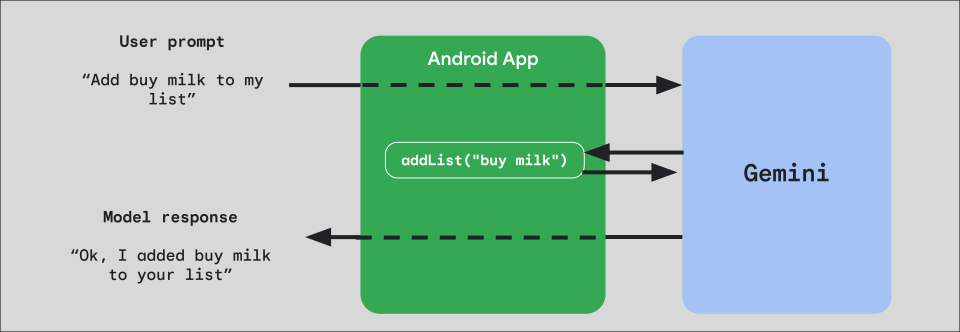
Để triển khai tính năng gọi hàm trong ứng dụng, hãy bắt đầu bằng cách tạo một đối tượng FunctionDeclaration cho mỗi hàm mà bạn muốn hiển thị cho mô hình.
Ví dụ: để hiển thị một hàm addList nối một chuỗi vào danh sách các chuỗi cho Gemini, hãy bắt đầu bằng cách tạo một biến FunctionDeclaration có tên và nội dung mô tả ngắn bằng tiếng Anh đơn giản về hàm và tham số của hàm đó:
Kotlin
val itemList = mutableListOf<String>() fun addList(item: String) { itemList.add(item) } val addListFunctionDeclaration = FunctionDeclaration( name = "addList", description = "Function adding an item the list", parameters = mapOf( "item" to Schema.string("A short string describing the item to add to the list") ) )
Java
HashMap<String, Schema> addListParams = new HashMap<String, Schema>(1);

addListParams.put("item", Schema.str("A short string describing the item to add to the list"));

FunctionDeclaration addListFunctionDeclaration = new FunctionDeclaration(
    "addList",
    "Function adding an item the list",
    addListParams,
    Collections.emptyList()
);
Sau đó, hãy truyền FunctionDeclaration này dưới dạng Tool đến mô hình khi bạn tạo thực thể:
Kotlin
val addListTool = Tool.functionDeclarations(listOf(addListFunctionDeclaration)) val model = Firebase.ai(backend = GenerativeBackend.googleAI()).liveModel( modelName = "gemini-2.5-flash-native-audio-preview-12-2025", generationConfig = liveGenerationConfig { responseModality = ResponseModality.AUDIO speechConfig = SpeechConfig(voice = Voice("FENRIR")) }, systemInstruction = systemInstruction, tools = listOf(addListTool) )
Java
LiveGenerativeModel model = FirebaseAI.getInstance(
    GenerativeBackend.googleAI()).liveModel(
        "gemini-2.5-flash-native-audio-preview-12-2025",
  new LiveGenerationConfig.Builder()
        .setResponseModalities(ResponseModality.AUDIO)
        .setSpeechConfig(new SpeechConfig(new Voice("FENRIR")))
        .build(),
  List.of(Tool.functionDeclarations(List.of(addListFunctionDeclaration))),
               null,
               systemInstruction
        );
Cuối cùng, hãy triển khai một hàm trình xử lý để xử lý lệnh gọi công cụ mà mô hình thực hiện và truyền phản hồi trở lại. Hàm trình xử lý này được cung cấp cho LiveSession khi bạn gọi startAudioConversation, nhận một tham số FunctionCallPart và trả về FunctionResponsePart:
Kotlin
session.startAudioConversation(::functionCallHandler) // ... fun functionCallHandler(functionCall: FunctionCallPart): FunctionResponsePart { return when (functionCall.name) { "addList" -> { // Extract function parameter from functionCallPart val itemName = functionCall.args["item"]!!.jsonPrimitive.content // Call function with parameter addList(itemName) // Confirm the function call to the model val response = JsonObject( mapOf( "success" to JsonPrimitive(true), "message" to JsonPrimitive("Item $itemName added to the todo list") ) ) FunctionResponsePart(functionCall.name, response) } else -> { val response = JsonObject( mapOf( "error" to JsonPrimitive("Unknown function: ${functionCall.name}") ) ) FunctionResponsePart(functionCall.name, response) } } }
Java
Futures.addCallback(sessionFuture, new FutureCallback<LiveSessionFutures>() {

    @RequiresPermission(Manifest.permission.RECORD_AUDIO)
    @Override
    @OptIn(markerClass = PublicPreviewAPI.class)
    public void onSuccess(LiveSessionFutures ses) {
        ses.startAudioConversation(::handleFunctionCallFuture);
    }

    @Override
    public void onFailure(Throwable t) {
        // Handle exceptions
    }
}, executor);

// ...

ListenableFuture<JsonObject> handleFunctionCallFuture = Futures.transform(response, result -> {
    for (FunctionCallPart functionCall : result.getFunctionCalls()) {
        if (functionCall.getName().equals("addList")) {
            Map<String, JsonElement> args = functionCall.getArgs();
            String item =
                    JsonElementKt.getContentOrNull(
                            JsonElementKt.getJsonPrimitive(
                                    locationJsonObject.get("item")));
            return addList(item);
        }
    }
    return null;
}, Executors.newSingleThreadExecutor());
Các bước tiếp theo
- Dùng thử Gemini Live API trong ứng dụng mẫu danh mục AI trên Android.
- Hãy đọc thêm về Gemini Live API trong tài liệu về Firebase AI Logic.
- Tìm hiểu thêm về các mô hình Gemini hiện có.
- Tìm hiểu thêm về lệnh gọi hàm.
- Khám phá các chiến lược thiết kế câu lệnh.