
Security is foundational to Android. We partner with you to keep the platform safe and protect user data by offering powerful security tools and features, like Credential Manager and FLAG_SECURE. Every Android release brings performance and security enhancements, and with Android 16, you can take simple, significant steps to strengthen your app’s defenses. Check out our video or continue reading to learn more about our enhanced protections for accessibility APIs.
Protect your app from snooping with a single line of code
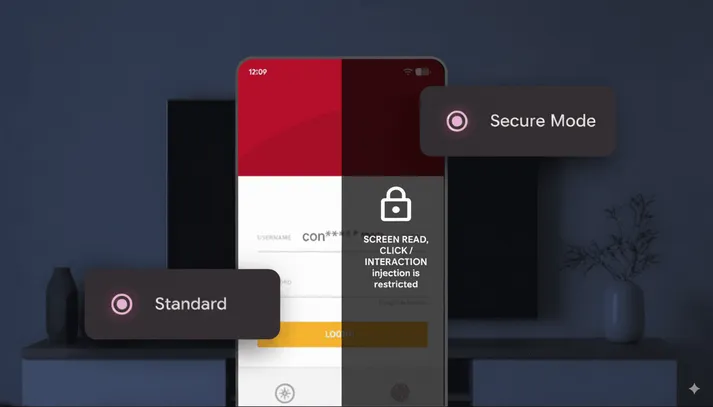
We’ve seen that bad actors sometimes try to exploit accessibility API features to read sensitive information, like passwords and financial details, directly from the screen and manipulate a user's device by injecting touches. To combat this, Android 16 provides a new, powerful defense in a single line of code: accessibilityDataSensitive.
The accessibilityDataSensitive flag allows you to explicitly mark a view or composable as containing sensitive data. When you set this flag to true on your app, you are essentially blocking potentially malicious apps from accessing your sensitive view data or performing interactions on it. Here is how it works: any app requesting accessibility permission that hasn't explicitly declared itself as a legitimate accessibility tool (isAccessibilityTool=true) is denied access to that view.
This simple but effective change helps to prevent malware from stealing information and performing unauthorized actions, all without impacting users’ experience of legitimate accessibility tools. Note: If an app is not an accessibility tool but requests accessibility permissions and sets isAccessibilityTool=true, Play will reject it and Google Play Protect will block it on user devices.
Automatic, enhanced security for setFilterTouchesWhenObscured protection
We’ve already integrated this new accessibilityDataSensitive security functionality with the existing setFilterTouchesWhenObscured method.
If you already use setFilterTouchesWhenObscured(true) to protect your app from tapjacking, your views are automatically treated as sensitive data for accessibility. By enhancing the setFilterTouchesWhenObscured method with accessibilityDataSensitive protections, we’re instantly giving everyone an additional layer of defense with no extra work.
Getting started
We recommend that you use setFilterTouchesWhenObscured, or alternatively the accessibilityDataSensitive flag, on any screen that contains sensitive information, including login pages, payment flows, and any view displaying personal or financial data.
For Jetpack Compose
setFilterTouchesWhenObscured | accessibilityDataSensitive |
val composeView = LocalView.current DisposableEffect(Unit) { composeView.filterTouchesWhenObscured = true onDispose { composeView.filterTouchesWhenObscured = false } }
| Use the BasicText { text = “Your password”,
modifier = Modifier.semantics {
sensitiveData = true }}
|
For View-based apps
In your XML layout, add the relevant attribute to the sensitive view.
setFilterTouchesWhenObscured | accessibilityDataSensitive |
|
|
Alternatively, you can set the property programmatically in Java or Kotlin:
setFilterTouchesWhenObscured | accessibilityDataSensitive |
|
|
|
|
Read more about the accessibilityDataSensitive and setFilterTouchesWhenObscured flags in the Tapjacking guide.
Partnering with developers to keep users safe
We worked with developers early to ensure this feature meets real-world needs and integrates smoothly into your workflow.

"We've always prioritized protecting our customers' sensitive financial data, which required us to build our own protection layer against accessibility-based malware. Revolut strongly supports the introduction of this new, official Android API, as it allows us to gradually move away from our custom code in favor of a robust, single-line platform defense."
- Vladimir Kozhevnikov, Android Engineer at Revolut
You can play a crucial role in protecting your users from malicious accessibility-based attacks by adopting these features. We encourage all developers to integrate these features into their apps to help keep users safe.
Together, we can build a more secure and trustworthy experience for everyone.
-

 Product News
Making Google Play the safest and most trusted experience possible. Today, we’re announcing a new set of policy updates and an account transfer feature to boost user privacy and protect your business from fraud.
Bennet Manuel • 3 min read -

 Product News
A pillar of the Android ecosystem is our shared commitment to user trust. As the mobile landscape has evolved, so does our approach to protecting sensitive information.
Robert Clifford • 3 min read -
 Product News
Today, we're thrilled to announce the stable release of the AndroidX Security State version 1.1.0 and Security State Provider version 1.0.0 libraries.
Maunik Shah, Alec Garcia, Joseph Yong • 4 min read
Get the latest Android development insights delivered to your inbox weekly.