
Android developer verification links real-world entities (individuals and organizations) with their Android applications. Android requires all apps to be registered by verified developers for users to install them on certified Android devices. This guide explains what you need to do.
Why these changes are happening
Android's developer verification protects users by deterring bad actors and making it harder for them to repeatedly spread harm.
How this helps you
A safer, more trusted ecosystem benefits the entire developer community.
- Deters bad actors who prefer to operate anonymously.
- Makes it harder to spread harm by linking bad apps to their developers. This helps us hold developers accountable, enforce safety policies, and remove malicious networks.
- Boosts user confidence, helping you build relationships with new users and establish trust.
Where changes are in effect
Starting September 30, 2026, these new developer verification protections go live for users in Brazil, Indonesia, Singapore, and Thailand. This rollout is a collective effort across the mobile industry to make the ecosystem a safe place where users can confidently download apps and developers' business can thrive.
To support the introduction of the developer verification in these four countries, the system verifies app installations from the following app stores:
- Google (Google Play)
- Honor (HONOR App Market)
- OPlus (OPPO App Market)
- Samsung (Galaxy Store)
- Transsion (Palm Store)
- vivo (V-Appstore)
- Xiaomi (GetApps)
Following this initial phase with our partners, we will expand these protections globally for all apps on certified Android devices in 2027. The verification capability will soon be expanded to all third-party Android app stores.
What you need to do
Complete these steps:
Sign up for an Android Developer Console account if you distribute apps outside of Google Play. You will automatically be registered if you distribute your app through Google Play.
Verify your identity: Provide information and documentation to confirm your identity as an individual or an organization.
Register your package names: Prove ownership of your apps by providing the APK signed with your private key to connect the APK with your developer account.
| Choose how to distribute your apps | |||
|---|---|---|---|
| Full distribution | Limited distribution | Sideloading unregistered apps | |
| Best for | Organizations and professional developers with wide distribution. | Students, hobbyists, and other personal use. | Developers who are not verified. |
| Identity verification required? | Yes | No | No |
| Distribution | Distribute from any app store or channels you choose (your company website, etc.) | Distribute to up to 20 devices | Distribute from any channels you choose (outside of app stores that require verification). |
| Your users' experience | Nothing changes from today's experience | Accept invitation to install from a developer you know | Use advanced flow to sideload unregistered apps with extra safeguards that gives critical time and space needed to break the cycle of potential coercion. |
|
|||
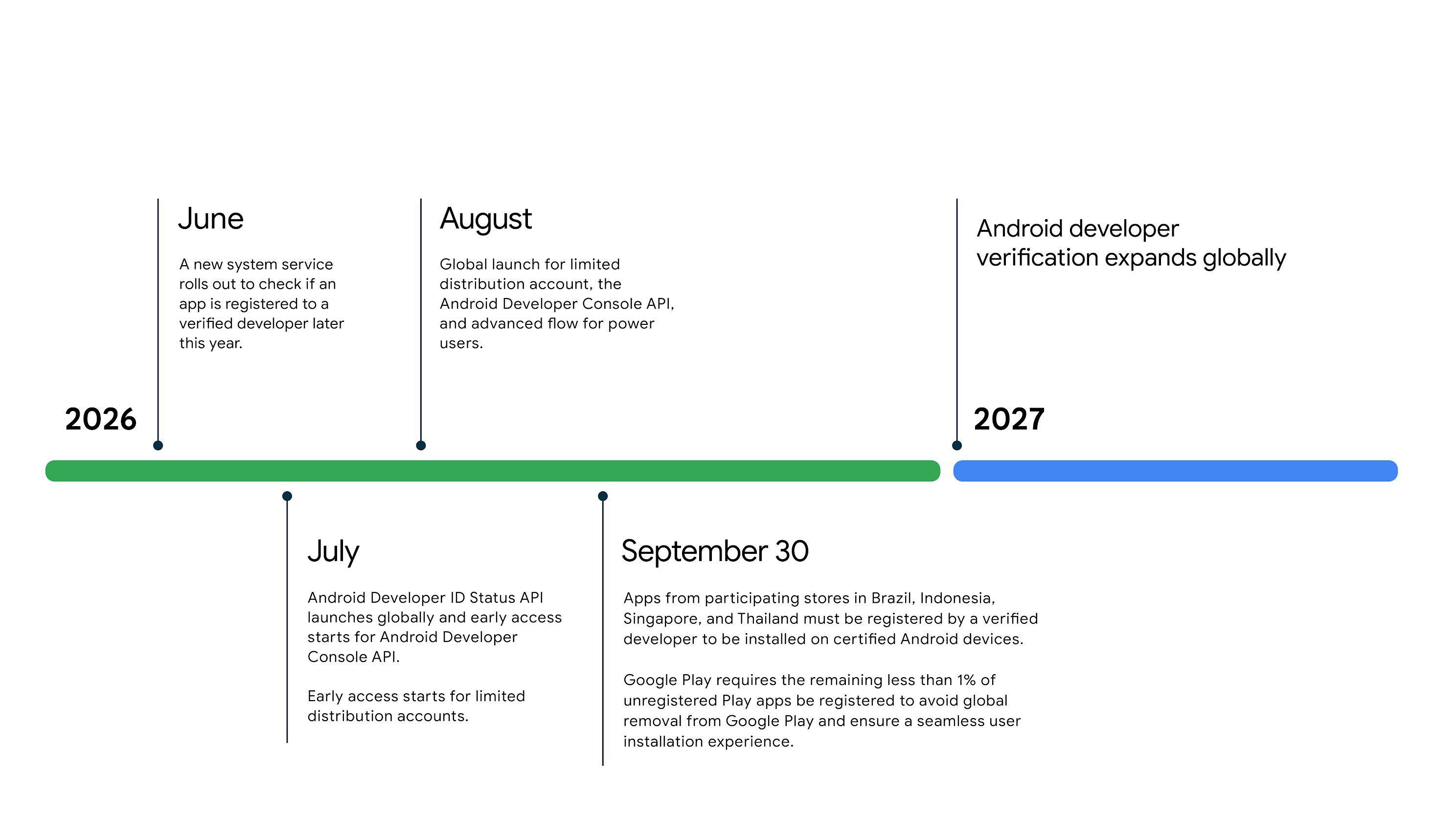
Key milestones
We're taking time to incorporate your feedback and give you time to prepare. Here's what to focus on at each stage:
Key concepts
Before you start, review these key terms:
- Android Developer Console: A console for developers who distribute apps only outside of Google Play.
- App signing key: The certificate used to sign your APK.
- Certified Android devices: Google enforces Android developer verification requirements on these devices. If your app runs on a certified device, these requirements apply to you, regardless of your app's download source.
- Google Play Console: The console for developers who distribute apps on Google Play. If you have a Play Console account, use it to complete the verification requirements.
- Identity verification: The process of providing information and official documentation to verify your identity as an individual or organization.
- Package name registration: The process of creating a formal, verifiable link between your app's unique package name and signing keys.
- Search Console: Organizations need to provide their organization's website. This will need to be verified using Google Search Console.
Find your path
Use the following table to find the correct console and instructions for your situation.
If you distribute apps... |
Next Steps |
Only on Google Play |
Use your existing Play Console account. |
Both on and off Google Play |
Use your existing Play Console account, where there will be new functionality to register your apps outside of Google Play and keys. |
Only outside of Google Play |
Create an account in the Android Developer Console. |