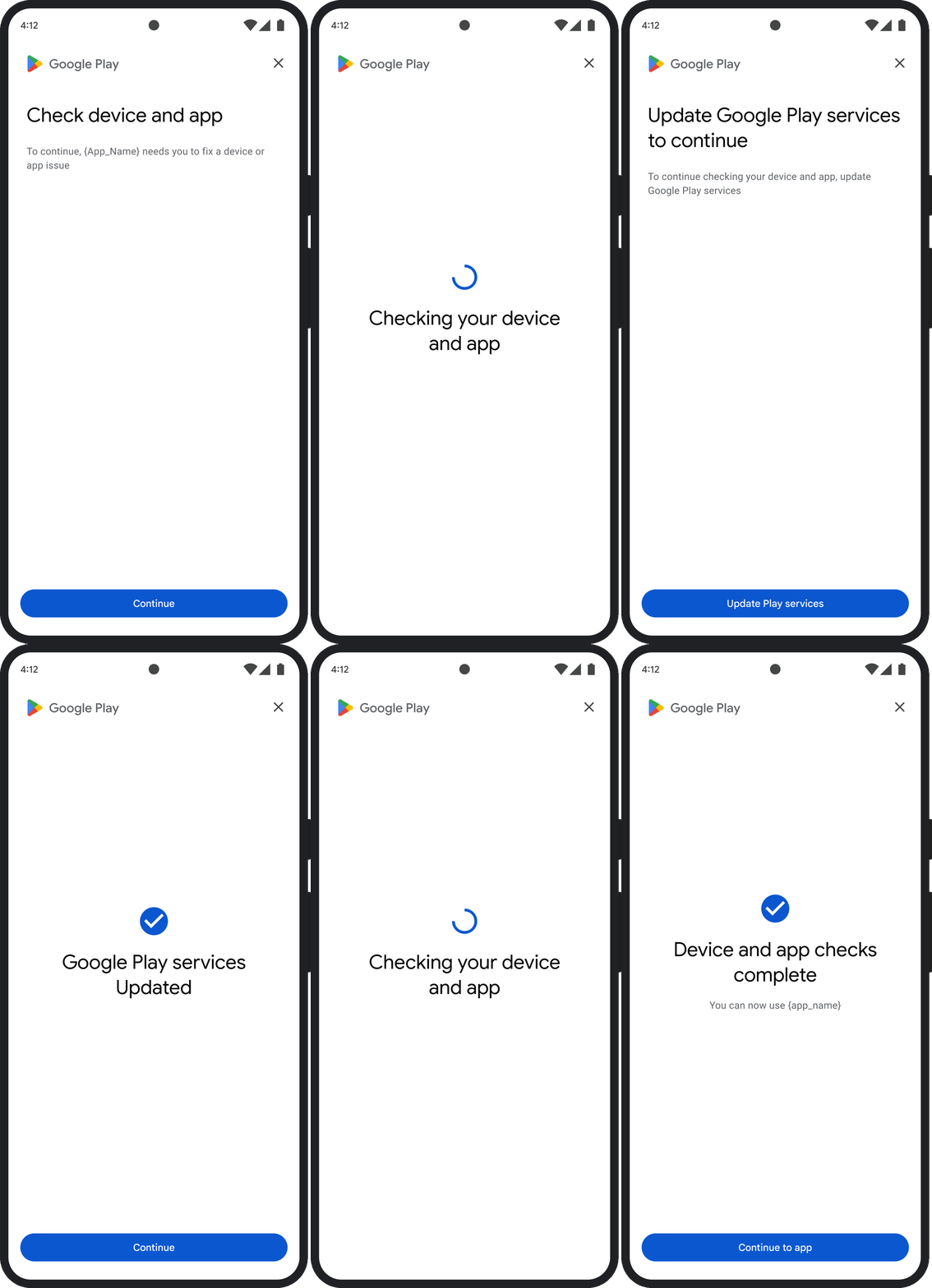
این صفحه نحوه رسیدگی به مشکلات مربوط به احکام مربوط به صداقت را شرح میدهد.
پس از درخواست توکن یکپارچگی، میتوانید یک کادر محاورهای گوگل پلی را به کاربر نمایش دهید. میتوانید این کادر محاورهای را زمانی که یک یا چند مشکل در مورد حکم یکپارچگی وجود دارد یا اگر در طول درخواست API یکپارچگی، استثنایی رخ داده است، نمایش دهید. پس از بسته شدن کادر محاورهای، میتوانید با درخواست توکن یکپارچگی دیگری، تأیید کنید که مشکل برطرف شده است. اگر درخواستهای استاندارد ارسال میکنید، باید دوباره ارائهدهنده توکن را گرم کنید تا حکم جدیدی دریافت کنید.
درخواست گفتگوی یکپارچگی برای رفع مشکل حکم
وقتی کلاینت درخواست یک توکن یکپارچگی (integrity token) میکند، میتوانید از متد ارائه شده در StandardIntegrityToken (API استاندارد) و IntegrityTokenResponse (API کلاسیک) استفاده کنید: showDialog(Activity activity, int integrityDialogTypeCode) .
مراحل زیر نحوه استفاده از Play Integrity API برای نمایش یک دیالوگ اصلاح با استفاده از کد دیالوگ GET_LICENSED را شرح میدهد. سایر کدهای دیالوگی که برنامه شما میتواند درخواست کند، پس از این بخش فهرست شدهاند.
از برنامه خود یک توکن یکپارچگی درخواست کنید و توکن را به سرور خود ارسال کنید. میتوانید از درخواست استاندارد یا کلاسیک استفاده کنید.
کاتلین
// Request an integrity token
val tokenResponse: StandardIntegrityToken = requestIntegrityToken()
// Send token to app server and get response on what to do next
val yourServerResponse: YourServerResponse = sendToServer(tokenResponse.token())
جاوا
// Request an integrity token
StandardIntegrityToken tokenResponse = requestIntegrityToken();
// Send token to app server and get response on what to do next
YourServerResponse yourServerResponse = sendToServer(tokenResponse.token());
وحدت
// Request an integrity token
StandardIntegrityToken tokenResponse = RequestIntegrityToken();
// Send token to app server and get response on what to do next
YourServerResponse yourServerResponse = sendToServer(tokenResponse.Token);
موتور غیرواقعی
// Request an integrity token
StandardIntegrityToken* Response = RequestIntegrityToken();
// Send token to app server and get response on what to do next
YourServerResponse YourServerResponse = SendToServer(Response->Token);
بومی
/// Request an integrity token
StandardIntegrityToken* response = requestIntegrityToken();
/// Send token to app server and get response on what to do next
YourServerResponse yourServerResponse = sendToServer(StandardIntegrityToken_getToken(response));
روی سرور خود، توکن یکپارچگی را رمزگشایی کنید و فیلد
appLicensingVerdictرا بررسی کنید. میتواند چیزی شبیه به این باشد:// Licensing issue { ... "accountDetails": { "appLicensingVerdict": "UNLICENSED" } }
اگر توکن شامل
appLicensingVerdict: "UNLICENSED"باشد، به کلاینت برنامه خود پاسخ دهید و از آن درخواست کنید که کادر محاورهای صدور مجوز را نشان دهد:کاتلین
private fun getDialogTypeCode(integrityToken: String): Int{
  // Get licensing verdict from decrypted and verified integritytoken
  val licensingVerdict: String = getLicensingVerdictFromDecryptedToken(integrityToken)

  return if (licensingVerdict == "UNLICENSED") {
          1 // GET_LICENSED
      } else 0
}
جاوا
private int getDialogTypeCode(String integrityToken) {
  // Get licensing verdict from decrypted and verified integrityToken
  String licensingVerdict = getLicensingVerdictFromDecryptedToken(integrityToken);

  if (licensingVerdict.equals("UNLICENSED")) {
    return 1; // GET_LICENSED
  }
  return 0;
}
وحدت
private int GetDialogTypeCode(string IntegrityToken) {
  // Get licensing verdict from decrypted and verified integrityToken
  string licensingVerdict = GetLicensingVerdictFromDecryptedToken(IntegrityToken);

  if (licensingVerdict == "UNLICENSED") {
    return 1; // GET_LICENSED
  }
  return 0;
}
موتور غیرواقعی
private int GetDialogTypeCode(FString IntegrityToken) {
  // Get licensing verdict from decrypted and verified integrityToken
  FString LicensingVerdict = GetLicensingVerdictFromDecryptedToken(IntegrityToken);

  if (LicensingVerdict == "UNLICENSED") {
    return 1; // GET_LICENSED
  }
  return 0;
}
بومی
private int getDialogTypeCode(string integrity_token) {
  /// Get licensing verdict from decrypted and verified integrityToken
  string licensing_verdict = getLicensingVerdictFromDecryptedToken(integrity_token);

  if (licensing_verdict == "UNLICENSED") {
    return 1; // GET_LICENSED
  }
  return 0;
}
در برنامه خود، تابع
showDialogبا کد درخواستی که از سرور شما بازیابی شده است، فراخوانی کنید:کاتلین
// Show dialog as indicated by the server
val showDialogType: Int? = yourServerResponse.integrityDialogTypeCode()
if (showDialogType == null) {
   return
}

// Create dialog request
val dialogRequest = StandardIntegrityDialogRequest.builder()
        .setActivity(activity)
        .setTypeCode(showDialogType)
        .setStandardIntegrityResponse(StandardIntegrityResponse.TokenResponse(token))
        .build()

// Call showDialog, the dialog will be shown on top of the provided activity
// and the task will complete when the dialog is closed.
val result: Task<Int> = standardIntegrityManager.showDialog(dialogRequest)

// Handle response code, call the Integrity API again to confirm that the
// verdict issue has been resolved.
جاوا
// Show dialog as indicated by the server
@Nullable Integer showDialogType = yourServerResponse.integrityDialogTypeCode();
if (showDialogType == null) {
   return;
}

// Create dialog request
StandardIntegrityDialogRequest dialogRequest =
    StandardIntegrityDialogRequest.builder()
        .setActivity(getActivity())
        .setTypeCode(showDialogTypeCode)
        .setStandardIntegrityResponse(new StandardIntegrityResponse.TokenResponse(token))
        .build();

// Call showDialog, the dialog will be shown on top of the provided activity
// and the task will complete when the dialog is closed.
Task<Integer> result = standardIntegrityManager.showDialog(dialogRequest);

// Handle response code, call the Integrity API again to confirm that the
// verdict issue has been resolved.
وحدت
// Initialize the V2 manager. Requires Play Integrity Unity Plugin v2.0.0 or
// higher.
var standardIntegrityManager = new StandardIntegrityManagerV2();
IEnumerator ShowDialogCoroutine() {
  int showDialogType = yourServerResponse.IntegrityDialogTypeCode();

  PlayAsyncOperation<IntegrityDialogResponseCode, StandardIntegrityError> showDialogTask;

  using (var activity = UnityPlayerHelper.GetCurrentActivity())
  {
      // Create a dialog request
      var dialogRequest = new StandardIntegrityDialogRequest(tokenResponse, activity, showDialogType);

      // Call showDialog with the request, the dialog will be shown on top of the
      // provided activity and complete when the dialog is closed.
      showDialogTask = standardIntegrityManager.ShowDialog(dialogRequest);
  }

  // Wait for PlayAsyncOperation to complete.
  yield return showDialogTask;

  // Handle response code, call the Integrity API again to confirm that the
  // verdict issue been resolved.
}
موتور غیرواقعی
// .h
void MyClass::OnShowDialogCompleted(
  EStandardIntegrityErrorCode Error,
  EIntegrityDialogResponseCode Response)
{
  // Handle response code, call the Integrity API again to confirm that the
  // verdict issue has been resolved.
}

// .cpp
void MyClass::RequestIntegrityToken()
{
  UStandardIntegrityToken* Response = ...
  int TypeCode = YourServerResponse.integrityDialogTypeCode();

  // Create a delegate to bind the callback function.
  FShowDialogStandardOperationCompletedDelegate Delegate;

  // Bind the completion handler (OnShowDialogCompleted) to the delegate.
  Delegate.BindDynamic(this, &MyClass::OnShowDialogCompleted);

  // Call ShowDialog with TypeCode which completes when the dialog is closed.
  Response->ShowDialog(TypeCode, Delegate);
}
بومی
// Show dialog as indicated by the server
int show_dialog_type = yourServerResponse.integrityDialogTypeCode();
if(show_dialog_type == 0){
return;
}

/// Create dialog request
StandardIntegrityDialogRequest* dialog_request;
StandardIntegrityDialogRequest_create(&dialog_request);
StandardIntegrityDialogRequest_setTypeCode(dialog_request, show_dialog_type);
StandardIntegrityDialogRequest_setActivity(dialog_request, activity);
StandardIntegrityDialogRequest_setStandardIntegrityToken(dialog_request,
                                              token_response);

/// Call showDialog with the dialog request. The dialog will be shown on top
/// of the provided activity and complete when the dialog is closed by the
/// user.
StandardIntegrityDialogResponse* dialog_response;
StandardIntegrityErrorCode error_code =
  StandardIntegrityManager_showDialog(dialog_request, &dialog_response);

/// Use polling to wait for the async operation to complete. Note, the polling
/// shouldn't block the thread where the StandardIntegrityManager is running.
IntegrityDialogResponseCode response_code = INTEGRITY_DIALOG_RESPONSE_UNKNOWN;
while (error_code == STANDARD_INTEGRITY_NO_ERROR) {
  error_code = StandardIntegrityDialogResponse_getResponseCode(dialog_response, &response_code);
  if(response_code != INTEGRITY_DIALOG_RESPONSE_UNKNOWN){
    break;
  }
}

/// Free memory
StandardIntegrityDialogRequest_destroy(dialog_request);
StandardIntegrityDialogResponse_destroy(dialog_response);

/// Handle response code, call the Integrity API again to confirm that the
/// verdict issues have been resolved.
این کادر محاورهای در بالای فعالیت ارائه شده نمایش داده میشود. هنگامی که کاربر کادر محاورهای را ببندد، وظیفه با یک کد پاسخ تکمیل میشود.
(اختیاری) برای نمایش هرگونه کادر محاورهای بیشتر، درخواست توکن دیگری کنید. اگر درخواستهای استاندارد ارسال میکنید، برای دریافت حکم جدید، باید دوباره ارائهدهنده توکن را فعال کنید.
درخواست یک گفتگوی یکپارچگی برای رفع یک استثنا در سمت کلاینت
اگر یک درخواست Integrity API با خطای StandardIntegrityException (استاندارد API) یا IntegrityServiceException (کلاسیک API) با شکست مواجه شود و این خطا قابل رفع باشد، میتوانید از کادرهای GET_INTEGRITY یا GET_STRONG_INTEGRITY برای رفع خطا استفاده کنید.
مراحل زیر نحوه استفاده از کادر محاورهای GET_INTEGRITY برای رفع خطای سمت کلاینت قابل اصلاح گزارش شده توسط Integrity API را شرح میدهد.
بررسی کنید که خطای برگشتی از درخواست Integrity API قابل رفع باشد.
کاتلین
private fun isExceptionRemediable(exception: ExecutionException): Boolean {
  val cause = exception.cause
  if (cause is StandardIntegrityException && cause.isRemediable) {
      return true
  }
  return false
}
جاوا
private boolean isExceptionRemediable(ExecutionException exception) {
  Throwable cause = exception.getCause();
  if (cause instanceof StandardIntegrityException integrityException
&& integrityException.isRemediable()) {
      return true;
  }
  return false;
}
وحدت
private bool IsExceptionRemediable(StandardIntegrityError error) {
  // Check if the operation resulted in a remediable error
  if (error != null && error.ErrorCode != StandardIntegrityErrorCode.NoError && error.IsRemediable) {
      return true;
  }
  return false;
}
بومی
bool IsErrorRemediable(StandardIntegrityToken* token) {
  /// Check if the error associated with the token is remediable
  bool isRemediable = false;
  if(StandardIntegrityToken_getIsRemediable(response, &isRemediable) == STANDARD_INTEGRITY_NO_ERROR){
    return isRemediable;
  }
  return false;
}
اگر استثنا قابل رفع باشد، با استفاده از استثنای برگردانده شده، دیالوگ
GET_INTEGRITYرا درخواست کنید. این دیالوگ روی فعالیت ارائه شده نمایش داده میشود و وظیفه برگردانده شده پس از بستن دیالوگ توسط کاربر، با یک کد پاسخ تکمیل میشود.کاتلین
private fun showDialog(exception: StandardIntegrityException) {
  // Create a dialog request
  val standardIntegrityDialogRequest =
      StandardIntegrityDialogRequest.builder()
          .setActivity(activity)
          .setType(IntegrityDialogTypeCode.GET_INTEGRITY)
          .setStandardIntegrityResponse(ExceptionDetails(exception))
          .build()

  // Request dialog
  val responseCode: Task<Int> =
        standardIntegrityManager.showDialog(standardIntegrityDialogRequest)
}
جاوا
private void showDialog(StandardIntegrityException exception) {
  // Create a dialog request
  StandardIntegrityDialogRequest standardIntegrityDialogRequest =
      StandardIntegrityDialogRequest.builder()
          .setActivity(this.activity)
          .setType(IntegrityDialogTypeCode.GET_INTEGRITY)
          .setStandardIntegrityResponse(new ExceptionDetails(exception))
          .build();

  // Request dialog
  Task<Integer> responseCode =
        standardIntegrityManager.showDialog(standardIntegrityDialogRequest);
}
وحدت
// Initialize the V2 manager. Requires Play Integrity Unity Plugin v2.0.0 or
// higher.
var standardIntegrityManager = new StandardIntegrityManagerV2();
IEnumerator ShowDialogToFixError(StandardIntegrityError error) {
  PlayAsyncOperation<IntegrityDialogResponseCode, StandardIntegrityError> showDialogTask;

  using (var activity = UnityPlayerHelper.GetCurrentActivity())
  {
      // Create a dialog request using the error
      var dialogRequest = new StandardIntegrityDialogRequest(error, activity, GET_INTEGRITY_DIALOG);

      // Request dialog
      showDialogTask = standardIntegrityManager.ShowDialog(dialogRequest);
  }

  // Wait for PlayAsyncOperation to complete.
  yield return showDialogTask;
}
بومی
private void showDialogToFixError(StandardIntegrityToken* token) {
  /// If the token request failed, and the underlying error is not fixable
  /// then return early
  if(isErrorRemediable(token)) {
    return;
  }

  /// Create dialog request
  StandardIntegrityDialogRequest* dialog_request;
  StandardIntegrityDialogRequest_create(&dialog_request);
  StandardIntegrityDialogRequest_setTypeCode(dialog_request,
                                     kGetIntegrityDialogTypeCode);
  StandardIntegrityDialogRequest_setActivity(dialog_request, activity);
  StandardIntegrityDialogRequest_setStandardIntegrityToken(dialog_request,
                                                  token_response);

  /// Call showDialog with the dialog request. The dialog will be shown on
  /// top of the provided activity and complete when the dialog is closed by
  /// the user.
  StandardIntegrityDialogResponse* dialog_response;
  StandardIntegrityErrorCode error_code =
      StandardIntegrityManager_showDialog(dialog_request, &dialog_response);

  /// Use polling to wait for the async operation to complete.
  /// Note, the polling shouldn't block the thread where the
  /// StandardIntegrityManager is running.
  IntegrityDialogResponseCode response_code = INTEGRITY_DIALOG_RESPONSE_UNKNOWN;
  while (error_code == STANDARD_INTEGRITY_NO_ERROR) {
      error_code = StandardIntegrityDialogResponse_getResponseCode(response, &response_code);
      if(response_code != INTEGRITY_DIALOG_RESPONSE_UNKNOWN){
        break;
      }
  }

  /// Free memory
  StandardIntegrityDialogRequest_destroy(dialog_request);
  StandardIntegrityDialogResponse_destroy(dialog_response);

}
اگر کد پاسخ برگشتی نشاندهنده موفقیت باشد، درخواست بعدی برای توکن یکپارچگی باید بدون هیچ استثنایی موفقیتآمیز باشد. اگر درخواستهای استاندارد ارسال میکنید، برای دریافت حکم جدید، باید دوباره ارائهدهنده توکن را گرم کنید.
کدهای محاورهای یکپارچگی
GET_LICENSED (کد ۱ را وارد کنید)
مسئله حکم
این گفتگو برای دو موضوع مناسب است:
- دسترسی غیرمجاز :
appLicensingVerdict: "UNLICENSED". این بدان معناست که حساب کاربری مجوزی برای برنامه شما ندارد، که میتواند در صورتی اتفاق بیفتد که کاربر آن را از فروشگاه برنامه دیگری غیر از Google Play دانلود کرده باشد یا آن را تهیه کرده باشد. - برنامه دستکاری شده :
appRecognitionVerdict: "UNRECOGNIZED_VERSION". این بدان معناست که فایل باینری برنامه شما تغییر یافته است یا نسخهای نیست که توسط گوگل پلی شناخته شده باشد.
اصلاح
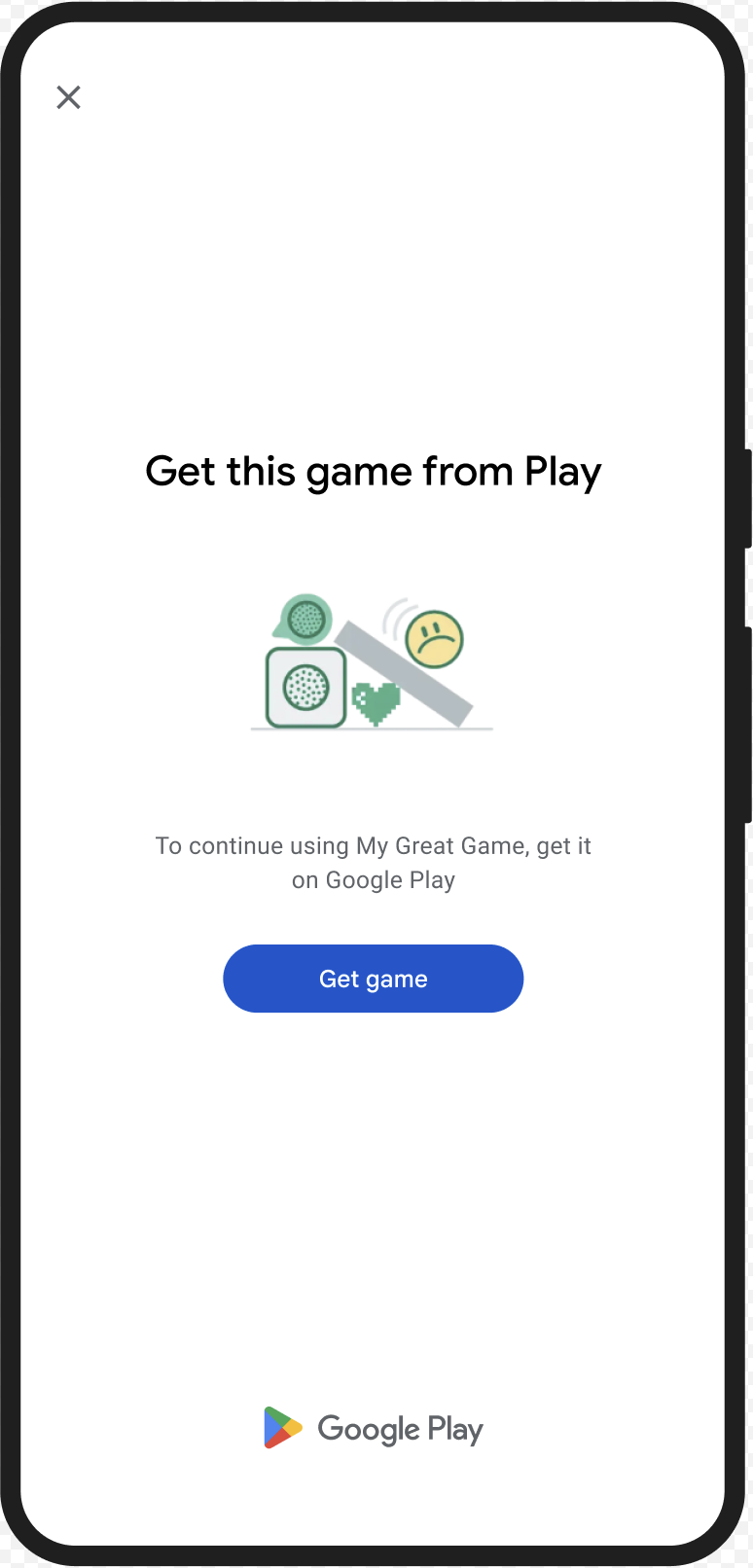
شما میتوانید کادر محاورهای GET_LICENSED را نمایش دهید تا کاربر را به دریافت برنامه اصلی از گوگل پلی ترغیب کنید. این کادر محاورهای به هر دو سناریو میپردازد:
- برای یک کاربر بدون مجوز ، یک مجوز Play به او اعطا میشود. این به کاربر امکان میدهد بهروزرسانیهای برنامه را از Google Play دریافت کند.
- برای کاربری که نسخه برنامهاش دستکاری شده است ، این کد او را به سمت نصب برنامه اصلاح نشده از گوگل پلی راهنمایی میکند.
وقتی کاربر این کادر محاورهای را کامل میکند، بررسیهای یکپارچگی بعدی، appLicensingVerdict: "LICENSED" و appRecognitionVerdict: "PLAY_RECOGNIZED" را برمیگردانند.
مثال UX
CLOSE_UNKNOWN_ACCESS_RISK (کد نوع ۲)
مسئله حکم
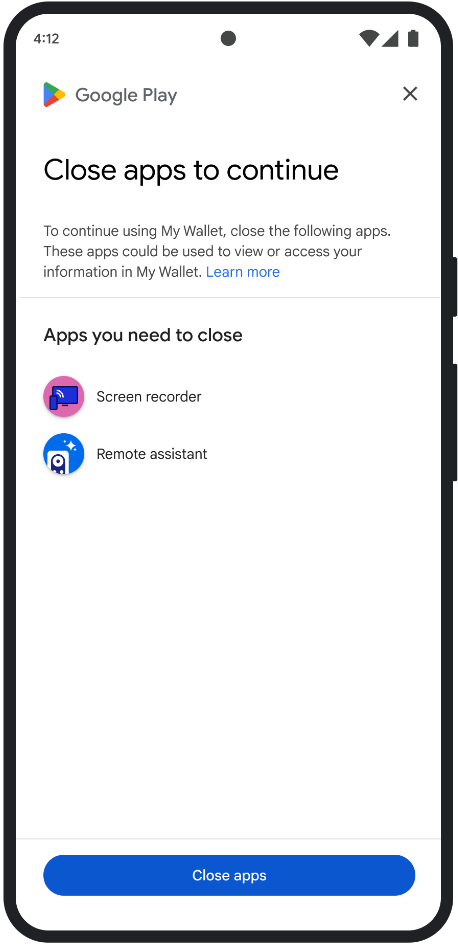
وقتی environmentDetails.appAccessRiskVerdict.appsDetected حاوی "UNKNOWN_CAPTURING" یا "UNKNOWN_CONTROLLING" باشد، به این معنی است که برنامههای دیگری (که توسط گوگل پلی نصب نشدهاند یا توسط سازنده دستگاه روی پارتیشن سیستم از قبل بارگذاری نشدهاند) روی دستگاه در حال اجرا هستند که میتوانند صفحه نمایش را ضبط کنند یا دستگاه را کنترل کنند.
اصلاح
میتوانید کادر محاورهای CLOSE_UNKNOWN_ACCESS_RISK را نمایش دهید تا کاربر را وادار به بستن تمام برنامههای ناشناختهای کند که میتوانند صفحه نمایش را ضبط کنند یا دستگاه را کنترل کنند. اگر کاربر دکمه Close all لمس کند، تمام این برنامهها بسته میشوند.
مثال UX
CLOSE_ALL_ACCESS_RISK (کد نوع ۳)
مسئله حکم
وقتی environmentDetails.appAccessRiskVerdict.appsDetected شامل هر یک از موارد "KNOWN_CAPTURING" ، "KNOWN_CONTROLLING" ، "UNKNOWN_CAPTURING" یا "UNKNOWN_CONTROLLING" باشد، به این معنی است که برنامههایی در دستگاه در حال اجرا هستند که میتوانند از صفحه نمایش عکس بگیرند یا دستگاه را کنترل کنند.
اصلاح
میتوانید کادر محاورهای CLOSE_ALL_ACCESS_RISK را نمایش دهید تا کاربر را وادار به بستن تمام برنامههایی کند که میتوانند صفحه را ضبط کنند یا دستگاه را کنترل کنند. اگر کاربر دکمه Close all لمس کند، تمام این برنامهها روی دستگاه بسته میشوند.
مثال UX
GET_INTEGRITY (کد نوع ۴)
مسئله حکم
این گفتگو برای هر یک از مشکلات زیر مناسب است:
ضعف یکپارچگی دستگاه : وقتی
deviceRecognitionVerdictشاملMEETS_DEVICE_INTEGRITYنباشد، ممکن است دستگاه یک دستگاه اندرویدی واقعی و دارای گواهی نباشد. این اتفاق میتواند رخ دهد، برای مثال، اگر بوت لودر دستگاه آنلاک شده باشد یا سیستم عامل اندروید نصب شده روی آن، یک ایمیج سازندهی معتبر نباشد.دسترسی غیرمجاز :
appLicensingVerdict: "UNLICENSED". این بدان معناست که حساب کاربری مجوزی برای برنامه شما ندارد، که میتواند در صورتی اتفاق بیفتد که کاربر آن را از فروشگاه برنامه دیگری غیر از Google Play دانلود کرده باشد یا آن را تهیه کرده باشد.برنامه دستکاری شده :
appRecognitionVerdict: "UNRECOGNIZED_VERSION". این بدان معناست که فایل باینری برنامه شما تغییر یافته است یا نسخهای نیست که توسط گوگل پلی شناخته شده باشد.استثنائات سمت کلاینت : زمانی که یک استثنای قابل رفع در طول یک درخواست Integrity API رخ میدهد. استثنائات قابل رفع، استثنائات Integrity API با کدهای خطایی مانند
PLAY_SERVICES_VERSION_OUTDATED،NETWORK_ERROR،PLAY_SERVICES_NOT_FOUNDو غیره هستند. میتوانید از متدexception.isRemediable()برای بررسی اینکه آیا یک استثنا توسط کادر محاورهای قابل رفع است یا خیر، استفاده کنید.
اصلاح
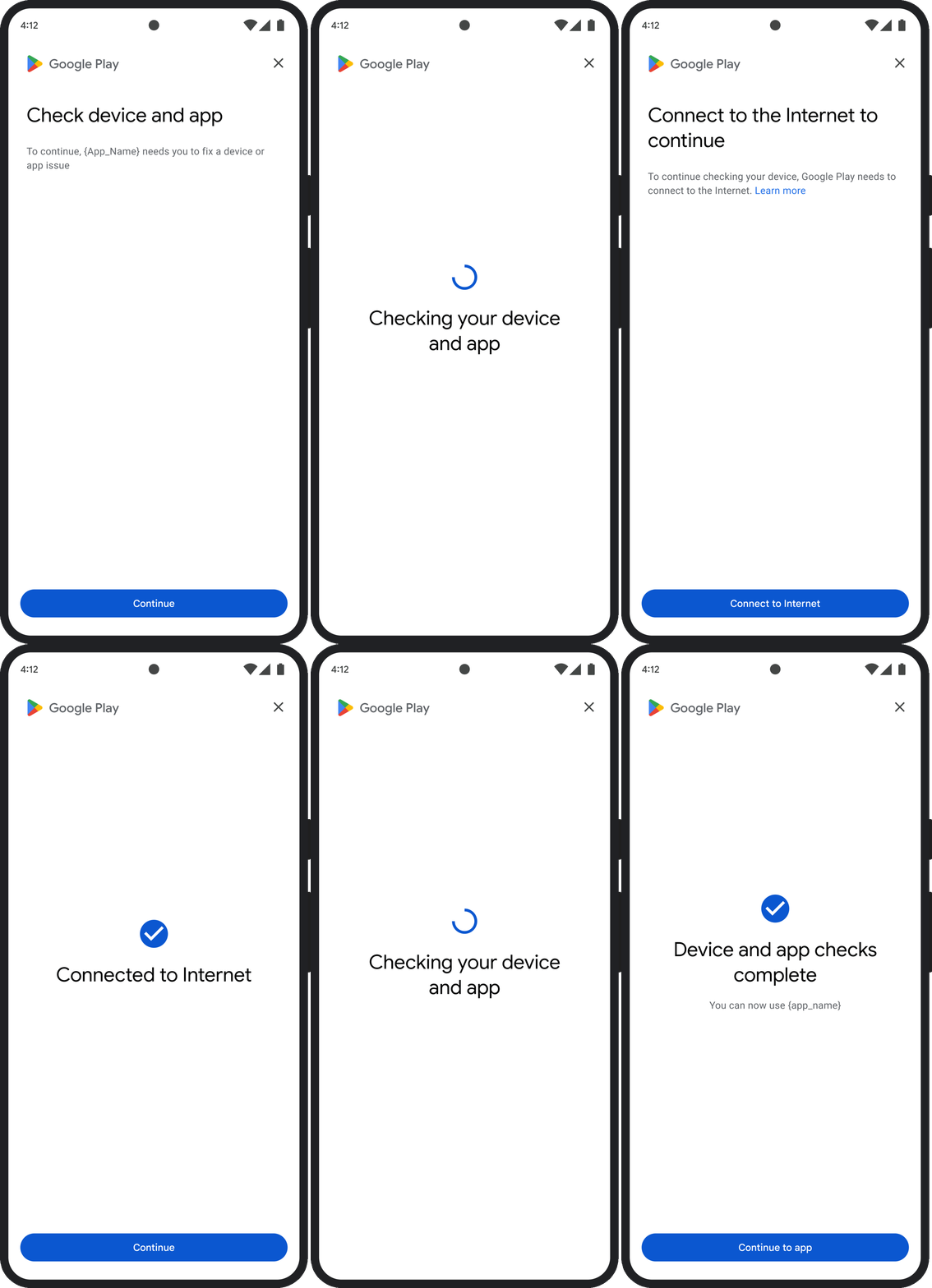
کادر محاورهای GET_INTEGRITY به گونهای طراحی شده است که با مدیریت چندین مرحله اصلاح در یک جریان واحد و پیوسته، تجربه کاربر را سادهتر کند. این امر مانع از آن میشود که کاربر برای رفع مشکلات مختلف، مجبور به تعامل با چندین کادر محاورهای جداگانه باشد.
وقتی درخواست دیالوگ را میدهید، به طور خودکار تشخیص میدهد که کدام یک از مشکلات مربوط به حکم مورد نظر وجود دارد و مراحل اصلاح مناسب را ارائه میدهد. این بدان معناست که یک درخواست دیالوگ میتواند چندین مشکل را به طور همزمان برطرف کند، از جمله:
- یکپارچگی دستگاه : اگر مشکلی در یکپارچگی دستگاه تشخیص داده شود، پنجرهی محاورهای کاربر را راهنمایی میکند تا وضعیت امنیتی دستگاه را بهبود بخشد تا الزامات مربوط به حکم
MEETS_DEVICE_INTEGRITYرا برآورده کند. - یکپارچگی برنامه : اگر مشکلاتی مانند دسترسی غیرمجاز یا دستکاری برنامه شناسایی شود، پنجره گفتگو کاربران را به دریافت برنامه از فروشگاه Play برای رفع آنها هدایت میکند.
- استثنائات سمت کلاینت : این پنجره، هرگونه مشکل اساسی که باعث ایجاد یک استثنای API مربوط به یکپارچگی (Integrity API) شده است را بررسی و تلاش میکند تا آن را برطرف کند. برای مثال، ممکن است از کاربر بخواهد نسخه قدیمی سرویسهای گوگل پلی را بهروزرسانی کند.
مثال UX
GET_STRONG_INTEGRITY (کد ۵ را وارد کنید)
مسئله حکم
این کادر محاورهای برای رفع تمام مشکلاتی که GET_INTEGRITY به آنها میپردازد طراحی شده است، به علاوه قابلیت رفع مشکلاتی که مانع از دریافت حکم MEETS_STRONG_INTEGRITY توسط دستگاه میشوند و رفع مشکلات حکم Play Protect نیز به آن اضافه شده است.
اصلاح
GET_STRONG_INTEGRITY به گونهای طراحی شده است که با مدیریت چندین مرحله اصلاح در یک جریان واحد و پیوسته، تجربه کاربر را سادهتر کند. این کادر محاورهای به طور خودکار مشکلات مربوط به یکپارچگی، از جمله موارد زیر را بررسی میکند:
- یکپارچگی دستگاه : اگر مشکلی در یکپارچگی دستگاه شناسایی شود، پنجرهی محاورهای کاربر را راهنمایی میکند تا وضعیت امنیتی دستگاه را بهبود بخشد تا الزامات مربوط به حکم
MEETS_STRONG_INTEGRITYرا برآورده کند. وضعیت محافظت در حال پخش : اگر
playProtectVerdictمشکلی را نشان دهد، کادر محاورهای کاربر را برای رفع آن راهنمایی میکند:- اگر Play Protect غیرفعال باشد (
playProtectVerdict == POSSIBLE_RISK)، پنجره از کاربر میخواهد که آن را فعال کند و اسکن تمام برنامههای روی دستگاه را انجام دهد. - اگر برنامههای مضر شناسایی شوند (
playProtectVerdict == MEDIUM_RISKیاHIGH_RISK)، پنجرهی محاورهای کاربر را به حذف نصب آنها با استفاده از Google Play Protect هدایت میکند.
- اگر Play Protect غیرفعال باشد (
یکپارچگی برنامه : اگر مشکلاتی مانند دسترسی غیرمجاز یا دستکاری برنامه شناسایی شود، پنجره از کاربر میخواهد که برای رفع مشکل، برنامه را از فروشگاه Play دریافت کند.
استثنائات سمت کلاینت : این کادر محاورهای همچنین تلاش میکند تا هرگونه مشکل اساسی که باعث ایجاد استثنائات Integrity API شده است را برطرف کند. برای مثال، اگر مشخص شود که سرویسهای Google Play غیرفعال شدهاند، ممکن است از کاربر بخواهد که آنها را فعال کند. استثنائات قابل رفع، استثنائات Integrity API با کدهای خطایی مانند
PLAY_SERVICES_VERSION_OUTDATED،NETWORK_ERRORیاPLAY_SERVICES_NOT_FOUNDهستند. میتوانید از متدexception.isRemediable()برای بررسی اینکه آیا یک خطا توسط کادر محاورهای قابل رفع است یا خیر، استفاده کنید.
مثال UX