
Digital credential verification within Android apps can be used to authenticate and authorize a user's identity (such as a government ID), properties about that user (such as a driver's license, academic degree, or attributes such as age or address), or other scenarios where a credential needs to be issued and verified to assert the authenticity of an entity.
The Verifier API is supported on Android 9 (API level 28) and higher.
Implementation
To verify digital credentials in your Android project, do the following:
- Add dependencies to your app's build script and initialize a
CredentialManagerclass. - Construct a digital credential request and use it to initialize a
DigitalCredentialOption, followed by building theGetCredentialRequest. - Launch the
getCredentialflow with the constructed request to receive a successfulGetCredentialResponseor handle any exceptions that might occur. Upon successful retrieval, validate the response.
Add dependencies and initialize
Add the following dependencies to your Gradle build script:
dependencies {
    implementation("androidx.credentials:credentials:1.6.0-beta01")
    implementation("androidx.credentials:credentials-play-services-auth:1.6.0-beta01")
}
Next, initialize an instance of the CredentialManager class.
val credentialManager = CredentialManager.create(context)
Construct a digital credential request
Construct a digital credential request and use it to initialize a
DigitalCredentialOption.
// The request in the JSON format to conform with
// the JSON-ified Credential Manager - Verifier API request definition.
val requestJson = generateRequestFromServer()
val digitalCredentialOption =
    GetDigitalCredentialOption(requestJson = requestJson)

// Use the option from the previous step to build the `GetCredentialRequest`.
val getCredRequest = GetCredentialRequest(
    listOf(digitalCredentialOption)
)
The following example demonstrates an OpenId4Vp1 request. For details about the fields in this request, see the OpenID documentation.
{
  "requests": [
    {
      "protocol": "openid4vp-v1-unsigned",
      "data": {
        "response_type": "vp_token",
        "response_mode": "dc_api",
        "nonce": "OD8eP8BYfr0zyhgq4QCVEGN3m7C1Ht_No9H5fG5KJFk",
        "dcql_query": {
          "credentials": [
            {
              "id": "cred1",
              "format": "mso_mdoc",
              "meta": {
                "doctype_value": "org.iso.18013.5.1.mDL"
              },
              "claims": [
                {
                  "path": [
                    "org.iso.18013.5.1",
                    "family_name"
                  ]
                },
                {
                  "path": [
                    "org.iso.18013.5.1",
                    "given_name"
                  ]
                },
                {
                  "path": [
                    "org.iso.18013.5.1",
                    "age_over_21"
                  ]
                }
              ]
            }
          ]
        }
      }
    }
  ]
}
Get the credential
Launch the getCredential flow with the constructed request. You'll receive
either a successful GetCredentialResponse, or a GetCredentialException if
the request fails.
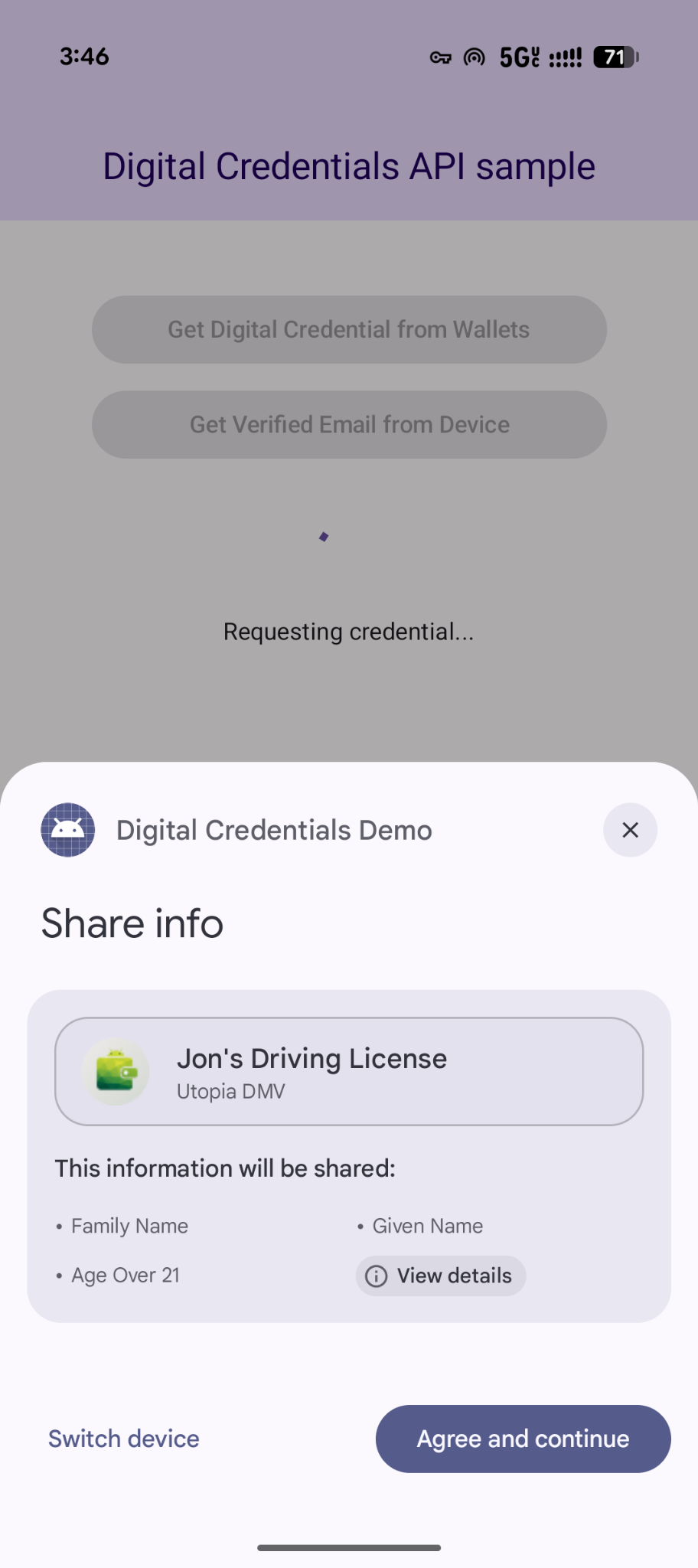
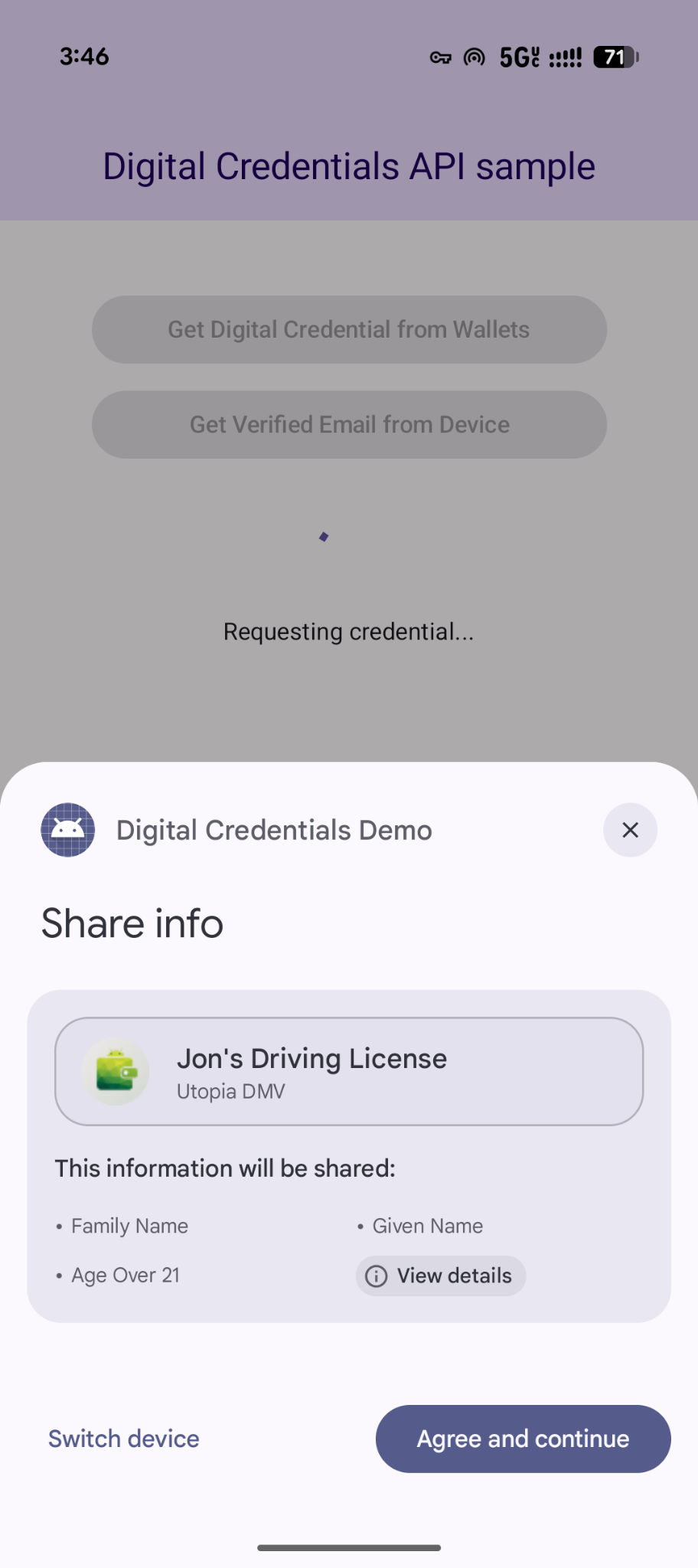
The getCredential flow triggers Android system dialogs to present the user's
available credential options and collect their selection. Next, the wallet app
that contains the chosen credential option will display UIs to collect consent
and perform actions needed to generate a digital credential response.
coroutineScope.launch {
    try {
        val result = credentialManager.getCredential(
            context = activityContext,
            request = getCredRequest
        )
        verifyResult(result)
    } catch (e : GetCredentialException) {
        handleFailure(e)
    }
}

// Handle the successfully returned credential.
fun verifyResult(result: GetCredentialResponse) {
    val credential = result.credential
    when (credential) {
        is DigitalCredential -> {
            val responseJson = credential.credentialJson
            validateResponseOnServer(responseJson)
        }
        else -> {
            // Catch any unrecognized credential type here.
            Log.e(TAG, "Unexpected type of credential ${credential.type}")
        }
    }
}

// Handle failure.
fun handleFailure(e: GetCredentialException) {
  when (e) {
        is GetCredentialCancellationException -> {
            // The user intentionally canceled the operation and chose not
            // to share the credential.
        }
        is GetCredentialInterruptedException -> {
            // Retry-able error. Consider retrying the call.
        }
        is NoCredentialException -> {
            // No credential was available.
        }
        else -> Log.w(TAG, "Unexpected exception type ${e::class.java}")
    }
}
Flexible multi-credential requests
The Digital Credentials API also supports requesting multiple types of credentials at a time using OpenID4VP:
- Simultaneous requests: Request multiple credentials in a single user transaction. For example, a travel app can request a boarding pass and a government ID simultaneously, allowing the user to review and consent to both in a single tap.
- Flexible fulfillment: Accept any one of several credential types or issuers. For example, an age verification flow can accept either a driver's license or a passport, enabling users to fulfill the request using whichever credential they have stored in their holder.
Here's an example of requesting multiple credentials in a single request:
{
  "credentials": [
    {
      "id": "gov_id1",
      "format": "mso_mdoc",
      "meta": {
        "doctype_value": "org.iso.18013.5.1.mDL"
      },
      "claims": [
        {
          "path": [
            "org.iso.18013.5.1",
            "age_over_21"
          ]
        }
      ]
    },
    {
      "id": "boarding_pass1",
      "format": "dc+sd-jwt",
      "meta": {
        "vct_values": [
          "https://credentials.example.airline/boarding-pass"
        ]
      },
      "claims": [
        {
          "path": [
            "flight_number"
          ]
        },
        {
          "path": [
            "seat"
          ]
        }
      ]
    }
  ]
}
Handle the response
After making the credential request, handle the GetCredentialResponse
returned from CredentialManager.
// Handle the successfully returned credential.
fun verifyResult(result: GetCredentialResponse) {
    val credential = result.credential
    when (credential) {
        is DigitalCredential -> {
            val responseJson = credential.credentialJson
            validateResponseOnServer(responseJson)
        }
        else -> {
            // Catch any unrecognized credential type here.
            Log.e(TAG, "Unexpected type of credential ${credential.type}")
        }
    }
}
Handle exceptions
Your app should handle errors that can be thrown, including if there are no credentials on the device or if the user cancels the operation:
// Handle failure.
fun handleFailure(e: GetCredentialException) {
    when (e) {
        is GetCredentialCancellationException -> {
            // The user intentionally canceled the operation and chose not
            // to share the credential.
        }
        is GetCredentialInterruptedException -> {
            // Retry-able error. Consider retrying the call.
        }
        is NoCredentialException -> {
            // No credential was available.
        }
        is CreateCredentialUnknownException -> {
            // An unknown, usually unexpected, error has occurred. Check the
            // message error for any additional debugging information.
        }
        is CreateCredentialCustomException -> {
            // You have encountered a custom error thrown by the wallet.
            // If you made the API call with a request object that's a
            // subclass of CreateCustomCredentialRequest using a 3rd-party SDK,
            // then you should check for any custom exception type constants
            // within that SDK to match with e.type. Otherwise, drop or log the
            // exception.
        }
        else -> Log.w(TAG, "Unexpected exception type ${e::class.java}")
    }
}