

이 가이드에서는 DigitalCredential API를 사용하여 사용자의 인증된 전화번호를 가져오는 방법을 자세히 설명합니다. 이 프로세스는 다음 두 단계로 구성됩니다.
- 사전 확인: Android Telephony API를 쿼리하여 사용자의 이동통신사가 이 API를 지원하는지 확인합니다. 이동통신사가 지원되지 않는 경우 일반 SMS 흐름으로 대체합니다.
TS.43 token요청: 클라이언트 앱('확인자')이 사용자 기기에서 임시 TS.43 토큰을 요청합니다.TS.43 token는 사용자의 ID를 나타내는 이동통신사 발급 사용자 인증 정보입니다.- 토큰을 전화번호로 교환: 앱의 백엔드에서 애그리게이터 또는 이동통신사와
TS.43 token를 교환하여 사용자의 인증된 전화번호를 가져옵니다.
Android 버전 호환성
전화번호 인증 API는 Android 10 (API 수준 29) 이상에서 지원됩니다.
기본 요건
DigitalCredential API를 사용하여 전화번호 인증을 구현하려면 애그리게이터 또는 이동통신사 계정이 필요합니다. 애그리게이터는 이동통신사와 상호작용하고 앱에 필요한 API 노출 영역을 제공합니다. 일반적으로 청구 가능한 Cloud API 엔드포인트로 제공됩니다. 이 가이드에서는 애그리게이터와 이동통신사를 모두 애그리게이터라고 합니다.
또한 Gradle 빌드 스크립트에 다음 종속 항목을 추가해야 합니다.
Kotlin
dependencies {
    implementation("androidx.credentials:credentials:1.7.0-alpha02")
    implementation("androidx.credentials:credentials-play-services-auth:1.7.0-alpha02")
}
Groovy
dependencies {
    implementation "androidx.credentials:credentials:1.7.0-alpha02"
    implementation "androidx.credentials:credentials-play-services-auth:1.7.0-alpha02"
}
구현
Digital Credentials API를 호출하기 전에 Android Telephony API를 사용하여 사용자의 이동통신사가 이 기능을 지원하는지 확인합니다.
AndroidManifest.xml 파일에 READ_PHONE_STATE 권한을 추가합니다.
val telephonyManager = context.getSystemService(Context.TELEPHONY_SERVICE) as TelephonyManager
val carrierId = telephonyManager.getSimCarrierId()
이 ID를 사용하여 애그리게이터 백엔드에서 TS.43 지원을 확인합니다. 이 사용자의 이동통신사가 지원되지 않는 경우 Digital Credentials API를 호출하면 빈 결과가 반환되므로 SMS와 같은 대체 방법으로 대체할 수 있습니다. 그렇지 않으면 디지털 인증서 흐름을 계속 진행합니다.
엔드 투 엔드 프로세스는 일반적으로 다음 단계를 따릅니다.
- 애그리게이터에서 DCQL (디지털 사용자 인증 정보 쿼리 언어) 매개변수 요청: 하나 이상의 애그리게이터를 호출하고 DCQL 매개변수 집합을 요청합니다. DCQL을 사용하면 각 애그리게이터에서 필요한 정확한 디지털 사용자 인증 정보를 지정할 수 있습니다.
OpenID4VP 요청 만들기: 앱 백엔드에서 애그리게이터의 DCQL 매개변수를 포함하여 OpenID4VP 요청을 만듭니다. 그런 다음 OpenID4VP 요청을 클라이언트 앱으로 전송합니다.
Credential Manager API 호출: 클라이언트 앱에서 Credential Manager API를 사용하여 OpenID4VP 요청을 운영체제에 전송합니다. 이에 대한 응답으로
TS.43 Digital Credential가 포함된 OpenID4VP 응답 객체를 받습니다. 이 사용자 인증 정보는 암호화되며 연결된 애그리게이터만 복호화할 수 있습니다. 이동통신사 토큰을 받은 후 클라이언트 앱의 응답을 앱의 백엔드로 전송합니다.응답 검증: 앱의 백엔드에서 OpenID4VP 응답을 검증합니다.
전화번호로 교환: 앱 백엔드에서 애그리게이터로
TS.43 Digital Credential를 전송합니다. 애그리게이터는 사용자 인증 정보를 검증하고 인증된 전화번호를 반환합니다.
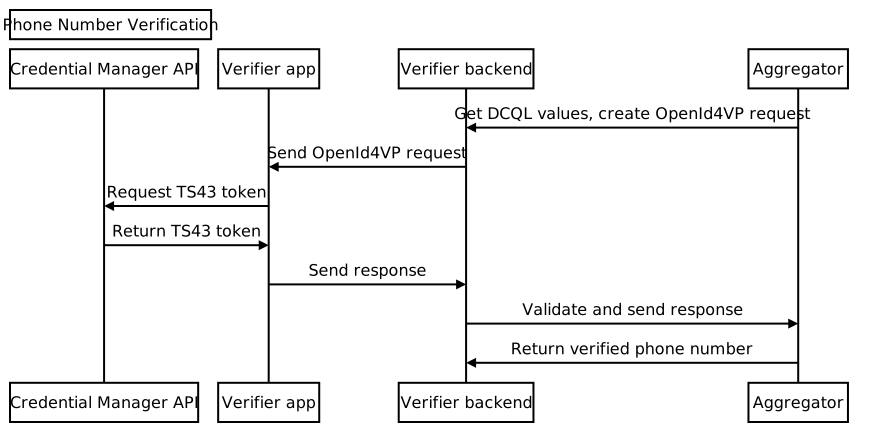
애그리게이터에서 DCQL 매개변수 요청
앱의 백엔드에서 애그리게이터에 디지털 사용자 인증 정보 쿼리 언어 (DCQL) 사용자 인증 정보 객체를 요청합니다. 요청에 nonce와 요청 ID를 제공해야 합니다. 애그리게이터는 다음과 유사한 구조의 DCQL 사용자 인증 정보 객체를 반환합니다.
{
  // The credential ID is mapped to the request ID that is sent in your request to the aggregator.
  "id": "aggregator1",
  "format": "dc-authorization+sd-jwt",
  "meta": {
    "vct_values": [
      "number-verification/device-phone-number/ts43"
    ],
    "credential_authorization_jwt": "..."
  },
  "claims": [
    {
      "path": ["subscription_hint"],
      "values": [1]
    },
    {
      "path": ["phone_number_hint"],
      "values": ["+14155552671"]
    }
  ]
}
OpenID4VP 요청 만들기
먼저 앱의 백엔드에서 다음 예와 같이 dcql_query 객체 내에 중첩된 credentials 배열에 DCQL 사용자 인증 정보 객체를 배치하여 dcql_query 객체를 만듭니다.
"dcql_query": {
  "credentials": [
      "id": "aggregator1",
      "format": "dc-authorization+sd-jwt",
      "meta": {
        "vct_values": [
          "number-verification/device-phone-number/ts43"
        ],
        "credential_authorization_jwt": "..."
      },
      "claims": [
        {
          "path": ["subscription_hint"],
          "values": [1]
        },
        {
          "path": ["phone_number_hint"],
          "values": ["+14155552671"]
        }
      ]
  ]
}
그런 다음, 다음 구조로 OpenID4VP 요청을 만듭니다.
{
  "protocol": "openid4vp-v1-unsigned",
  "data": {
    "response_type": "vp_token",
    "response_mode": "dc_api",
    "nonce": "...",
    "dcql_query": { ... }
  }
}
protocol: 전화번호 인증 요청의 경우openid4vp-v1-unsigned로 설정해야 합니다.response_type및response_mode: 각각 고정 값vp_token및dc_api을 사용하여 요청 형식을 나타내는 상수입니다.nonce: 각 요청에 대해 백엔드에서 생성하는 고유한 값입니다. 애그리게이터 DCQL 사용자 인증 정보 객체의 nonce가 이 nonce와 일치해야 합니다.dcql_query: 이 경우dcql_query를 사용하여TS.43 Digital Credential가 요청되고 있음을 지정합니다. 여기에서 다른 디지털 사용자 인증 정보를 요청할 수도 있습니다.
그런 다음 OpenID4VP 요청을 DigitalCredential API 요청 객체로 래핑하고 클라이언트 앱으로 전송합니다.
{
  "requests":
    [
      {
        "protocol": "openid4vp-v1-unsigned",
        "data": {
          "response_type": "vp_token",
          "response_mode": "dc_api",
          "nonce": "...",
          "dcql_query": { ... }
        }
      }
    ]
}
다음 스니펫은 DigitalCredential API 요청을 생성하는 방법을 보여줍니다.
def GenerateDCRequest():
    credentials = []
    aggregator1_dcql = call_aggregator_endpoint(nonce, "aggregator1", additional_params)
    credentials.append(aggregator1_dcql) # You can optionally work with multiple
    # aggregators, or request other types of credentials

    val dc_request =
    {
      "requests":
        [
          {
            "protocol": "openid4vp-v1-unsigned",
            "data": {
              "response_type": "vp_token",
              "response_mode": "dc_api",
              "nonce": "...",
              "dcql_query": {"credentials": credentials}
            }
          }
        ]
    }
    return dc_request
Credential Manager API 호출
클라이언트 앱에서 앱 백엔드에서 제공하는 DigitalCredential API 요청을 사용하여 Credential Manager API를 호출합니다.
val requestJson = generateTs43DigitalCredentialRequestFromServer()
val digiCredOption = GetDigitalCredentialOption(requestJson = requestJson)
val getCredRequest = GetCredentialRequest(
    listOf(digiCredOption)
)

coroutineScope.launch {
  try {
    val response = credentialManager.getCredential(
      context = activityContext,
      request = getCredRequest
    )
    val credential = response.credential
    when (credential) {
      is DigitalCredential -> {
        val responseJson = credential.credentialJson
        validateResponseOnServer(responseJson)
      }
      else -> {
        // Catch any unrecognized credential type here.
        Log.e(TAG, "Unexpected type of credential ${credential.type}")
      }
    }
  } catch (e : GetCredentialException) {
      // If user cancels the operation, the feature isn't available, or the
      // SIM doesn't support the feature, a GetCredentialCancellationException
      // will be returned. Otherwise, a GetCredentialUnsupportedException will
      // be returned with details in the exception message.
      handleFailure(e)
  }
}
DigitalCredential API 응답에는 OpenID4VP 응답이 포함됩니다. DigitalCredential 결과의 일반적인 사용자 인증 정보 JSON은 다음과 같습니다.
{
  "protocol": "openid4vp-v1-unsigned",

  "data": {
    "vp_token": {
      "aggregator1": ["eyJhbGciOiAiRVMy..."] # The encrypted TS.43 Digital
                                             # Credential in an array structure.
    }
  }
}
클라이언트 앱에서 DigitalCredential API 응답을 백엔드 서버로 다시 전송합니다. 백엔드 서버에서 이 응답을 검증하고 애그리게이터와 인증된 전화번호를 교환하는 데 사용할 수 있습니다.
경우에 따라 응답에 TS.43 오류가 포함될 수 있습니다. 오류 응답은 OpenID4VP 오류 응답 형식을 따르는 JSON 객체입니다.
{
  "protocol": "openid4vp-v1-unsigned",

  "data": {
    "error": "<error_code>",
    "error_description": "<Human-readable description of the error>",
  }
}
가능한 error_code 값은 두 가지입니다.
invalid_request: 요청 형식이 잘못되었음을 나타냅니다.server_error: 요청을 처리할 때 오류가 발생했음을 나타냅니다. 이는 로컬 오류 또는 TS.43 문제일 수 있습니다.
error_description 필드에는 문제에 관한 추가 세부정보가 표시됩니다.
디지털 사용자 인증 정보 응답 검증
다음은 앱 백엔드에서 응답을 파싱하고 유효성 검사 단계를 수행하는 방법의 예입니다.
def processDigitalCredentialsResponse(response):
  # Step 1: Parse out the TS.43 Digital Credential from the response
  openId4VpResponse = response['data']

  ts43_digital_credential = response['vp_token']["aggregator1"][0]

  # Step 2: Perform response validation
  verifyResponse(ts43_digital_credential)

def verifyResponse(ts43_digital_credential):
  # The returned ts43_digital_credential is an SD-JWT-based Verifiable Credentials
  # (SD-JWT VC) as defined in this IETF spec. The section 3.4 of the specification
  # outlines how to validate the credential. At a high level, the steps involves
  # validating (1) the nonce in the response credential matches the one in the
  # request, (2) the integrity of the credential by checking the credential is
  # signed by the trusted issuer Android Telephony, and (3) other validity
  # properties associated with this credential, such as issue time and expiration
  # time

  # In most cases, you can use an SD-JWT VC library to perform these validations.

  # Some aggregators may also perform the validation logic for you. Check with your
  # aggregator to decide the exact scope of the validation required.
전화번호 교환
앱의 백엔드에서 검증된 TS.43 Digital Credential를 애그리게이터의 엔드포인트로 전송하여 사용자 인증 정보를 검증하고 인증된 전화번호를 수신합니다.
def processDigitalCredentialsResponse(response):
  # ... prior steps

  # Step 3: Call aggregator endpoint to exchange the verified phone number
  callAggregatorPnvEndpoint(ts43_digital_credential)