

ExoPlayer 的主要範例應用程式有兩個主要用途:
- 提供 ExoPlayer 用法的完整範例。您可以將這個試用版應用程式做為起點,輕鬆開發自己的應用程式。
- 讓您試用 ExoPlayer。除了內建的範例,您也可以使用這個試用版應用程式測試自己的內容播放情形。
本頁面說明如何取得、編譯及執行試用版應用程式,以及如何使用該應用程式播放自己的媒體。
取得程式碼
主要試用版應用程式的原始碼位於 GitHub 專案的 demos/main 資料夾中。如果尚未完成,請將專案複製到本機目錄:
git clone https://github.com/androidx/media.git
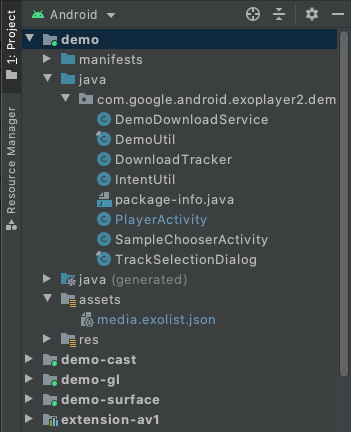
接著,在 Android Studio 中開啟專案。在 Android 專案檢視畫面中,您應該會看到下列內容 (試用版應用程式的相關資料夾已展開):
編譯及執行
如要編譯及執行試用版應用程式,請在 Android Studio 中選取並執行 demo 設定。試用版應用程式會安裝在已連線的 Android 裝置上並執行。建議盡可能使用實體裝置。如要改用模擬器,請參閱「支援的裝置」一節中的模擬器部分,並確認虛擬裝置使用的系統映像檔 API 級別至少為 23。
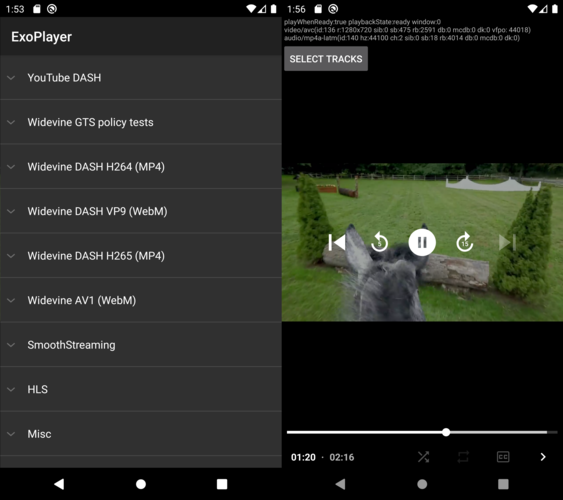
試用版應用程式會顯示範例清單 (SampleChooserActivity)。選取範例後,系統會開啟第二個 Activity (PlayerActivity) 以供播放。這個範例展示了播放控制項和曲目選取功能。此外,它還會使用 ExoPlayer 的 EventLogger 公用程式類別,將實用的偵錯資訊輸出至系統記錄。您可以使用下列指令查看這項記錄 (以及其他標記的錯誤層級記錄):
adb logcat EventLogger:V *:E
啟用隨附解碼器
ExoPlayer 有多項擴充功能,可使用隨附的軟體解碼器,包括 AV1、VP9、Opus、FLAC 和 FFmpeg (僅限音訊)。您可以建構試用版應用程式,納入並使用這些擴充功能,方法如下:
- 建立要加入的每個擴充功能。請注意,這是手動程序。如需操作說明,請參閱各擴充功能的
README.md檔案。 在 Android Studio 的「Build Variants」檢視畫面中,將示範模組的建構變化版本設為
withDecoderExtensionsDebug或withDecoderExtensionsRelease,如下圖所示。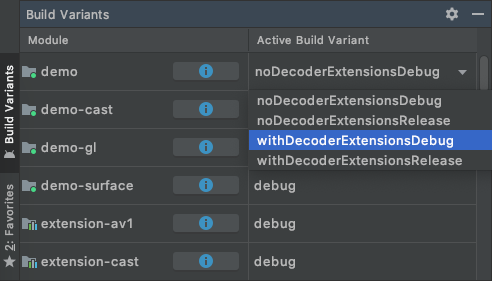
照常編譯、安裝及執行
demo設定。
根據預設,只有在沒有合適的平台解碼器時,系統才會使用擴充功能解碼器。您可以指定偏好的擴充功能解碼器,詳情請參閱下列章節。
播放自己的內容
您可以在試用版應用程式中透過多種方式播放自己的內容。
1. 編輯 assets/media.exolist.json
試用版應用程式中列出的樣本會從 assets/media.exolist.json 載入。
編輯這個 JSON 檔案,即可在範例應用程式中新增及移除樣本。結構定義如下,其中 [O] 表示選用屬性。
[
  {
    "name": "Name of heading",
    "samples": [
      {
        "name": "Name of sample",
        "uri": "The URI of the sample",
        "extension": "[O] Sample type hint. Cannot be combined with mime_type. Values: mpd, ism, m3u8",
        "clip_start_position_ms": "[O] A start point to which the sample should be clipped, in milliseconds"
        "clip_end_position_ms": "[O] An end point from which the sample should be clipped, in milliseconds"
        "drm_scheme": "[O] Drm scheme if protected. Values: widevine, playready, clearkey",
        "drm_license_uri": "[O] URI of the license server if protected",
        "drm_force_default_license_uri": "[O] Whether to force use of "drm_license_uri" for key requests that include their own license URI",
        "drm_key_request_properties": "[O] Key request headers if protected",
        "drm_session_for_clear_content": "[O] Whether to attach a DRM session to clear video and audio tracks"
        "drm_multi_session": "[O] Enables key rotation if protected",
        "mime_type": "[O] The MIME type of the sample. Cannot be combined with extension.",
        "subtitle_uri": "[O] The URI of a subtitle sidecar file",
        "subtitle_mime_type": "[O] The MIME type of subtitle_uri (required if subtitle_uri is set)",
        "subtitle_language": "[O] The BCP47 language code of the subtitle file (ignored if subtitle_uri is not set)",
        "ad_tag_uri": "[O] The URI of an ad tag to load via the IMA extension"
      },
      ...etc
    ]
  },
  ...etc
]
您可以使用下列結構定義範例播放清單:
[
  {
    "name": "Name of heading",
    "samples": [
      {
        "name": "Name of playlist sample",
        "playlist": [
          {
            "uri": "The URI of the first sample in the playlist",
            "extension": "[O] Sample type hint. Cannot be combined with mime_type. Values: mpd, ism, m3u8"
            "clip_start_position_ms": "[O] A start point to which the sample should be clipped, in milliseconds"
            "clip_end_position_ms": "[O] An end point from which the sample should be clipped, in milliseconds"
            "drm_scheme": "[O] Drm scheme if protected. Values: widevine, playready, clearkey",
            "drm_license_uri": "[O] URI of the license server if protected",
            "drm_force_default_license_uri": "[O] Whether to force use of "drm_license_uri" for key requests that include their own license URI",
            "drm_key_request_properties": "[O] Key request headers if protected",
            "drm_session_for_clear_content": "[O] Whether to attach a DRM session to clear video and audio tracks",
            "drm_multi_session": "[O] Enables key rotation if protected",
            "mime_type": "[O] The MIME type of the sample. Cannot be combined with extension.",
            "subtitle_uri": "[O] The URI of a subtitle sidecar file",
            "subtitle_mime_type": "[O] The MIME type of subtitle_uri (required if subtitle_uri is set)",
            "subtitle_language": "[O] The BCP47 language code of the subtitle file (ignored if subtitle_uri is not set)"
          },
          {
            "uri": "The URI of the second sample in the playlist",
            ...etc
          },
          ...etc
        ]
      },
      ...etc
    ]
  },
  ...etc
]
如有需要,請將重要要求標頭指定為物件,其中包含每個標頭的字串屬性:
"drm_key_request_properties": {
  "name1": "value1",
  "name2": "value2",
  ...etc
}
在範例選擇器活動中,溢位選單包含指定是否偏好擴充功能解碼器的選項。
本機檔案 URI 和限定範圍儲存空間限制
指定本機檔案 URI 時,範例應用程式會要求必要的儲存空間存取權,以便讀取這些檔案。不過,從 Android 13 開始,您無法載入結尾不是一般媒體檔案副檔名 (例如 .mp4) 的任意檔案。如要載入這類檔案,可以將檔案放在沒有存取限制的示範應用程式特定儲存空間目錄中。這通常位於 /sdcard/Android/data/androidx.media3.demo.main/files。
2. 載入外部 exolist.json 檔案
試用版應用程式可載入外部 JSON 檔案,這些檔案使用上述結構定義,並根據 *.exolist.json 慣例命名。舉例來說,如果您在 https://yourdomain.com/samples.exolist.json 託管這類檔案,可以使用下列程式碼在試用版應用程式中開啟檔案:
adb shell am start -a android.intent.action.VIEW \
    -d https://yourdomain.com/samples.exolist.json
在已安裝試用版應用程式的裝置上,點選 *.exolist.json 連結 (例如在瀏覽器或電子郵件用戶端中),也會在試用版應用程式中開啟該連結。只要代管 *.exolist.json JSON 檔案,就能發布內容,供其他人在試用版應用程式中試用。
3. 觸發意圖
意圖可用於略過樣本清單,直接啟動播放。如要播放單一樣本,請將意圖的動作設為 androidx.media3.demo.main.action.VIEW,並將資料 URI 設為要播放的樣本。您可以使用下列指令,從終端機觸發這類意圖:
adb shell am start -a androidx.media3.demo.main.action.VIEW \
    -d https://yourdomain.com/sample.mp4
單一範例意圖支援的選用額外資料包括:
- 設定範例額外項目:
mime_type[String] Sample MIME type hint. 例如 DASH 內容的application/dash+xml。clip_start_position_ms[Long] 樣本應剪輯的起始點,以毫秒為單位。clip_end_position_ms[Long] 應剪輯樣本的端點,以毫秒為單位。drm_scheme[String] DRM scheme if protected. 有效值為widevine、playready和clearkey。系統也接受數位版權管理機制 UUID。drm_license_uri[String] URI of the license server if protected.drm_force_default_license_uri[Boolean] 是否強制對包含自有授權 URI 的金鑰要求使用drm_license_uri。drm_key_request_properties[字串陣列] 如果受到保護,則會將金鑰要求標頭封裝為 name1、value1、name2、value2 等。drm_session_for_clear_content[Boolean] 是否要將 DRM 工作階段附加至清除的視訊和音軌。drm_multi_session[Boolean] Enables key rotation if protected.subtitle_uri[String] 字幕補充資訊檔案的 URI。subtitle_mime_type[字串] subtitle_uri 的 MIME 類型 (如果設定 subtitle_uri,則為必填)。subtitle_language[String] 字幕檔案的 BCP47 語言代碼 (如果未設定 subtitle_uri,系統會忽略這個值)。ad_tag_uri[String] 要使用 IMA 擴充功能載入的廣告代碼 URI。prefer_extension_decoders[布林值] 擴充功能解碼器是否優先於平台解碼器。
使用 adb shell am start 觸發意圖時,可以使用 --es 設定選用的字串額外資訊 (例如 --es extension mpd)。可以使用 --ez 設定選用的布林值額外資訊 (例如 --ez prefer_extension_decoders TRUE)。可以使用 --el 設定選用的 long 額外資訊 (例如 --el clip_start_position_ms 5000)。可以使用 --esa 設定選用的字串陣列額外資訊 (例如 --esa drm_key_request_properties name1,value1)。
如要播放試聽內容播放清單,請將意圖的動作設為 androidx.media3.demo.main.action.VIEW_LIST。範例設定的額外項目與 androidx.media3.demo.main.action.VIEW 相同,但有兩項差異:
- 額外內容的鍵應以底線和樣本的 0 索引為後置字串。舉例來說,
extension_0會提示第一個樣本的樣本類型。drm_scheme_1會為第二個樣本設定 DRM 方案。 - 範例的 URI 會以額外資訊的形式傳遞,並以
uri_<sample-index>做為鍵。
其他不依附於樣本的額外內容則不會變更。舉例來說,您可以在終端機中執行下列指令,播放含有兩項內容的播放清單,並覆寫第二項內容的副檔名:
adb shell am start -a androidx.media3.demo.main.action.VIEW_LIST \
    --es uri_0 https://a.com/sample1.mp4 \
    --es uri_1 https://b.com/sample2.fake_mpd \
    --es extension_1 mpd