
The Media Enhancement API provides a low-latency, privacy-preserving, on-device AI solution that leverages hardware acceleration to deliver high-quality media improvements with zero APK bloat. For more information, see Understand the media enhancement capabilities.
The following architecture diagram shows the asynchronous surface mode execution lifecycle of the Media Enhancement API. This mode directly links hardware buffers to eliminate the performance bottleneck of copying uncompressed frames back and forth between CPU and GPU memory buffers.
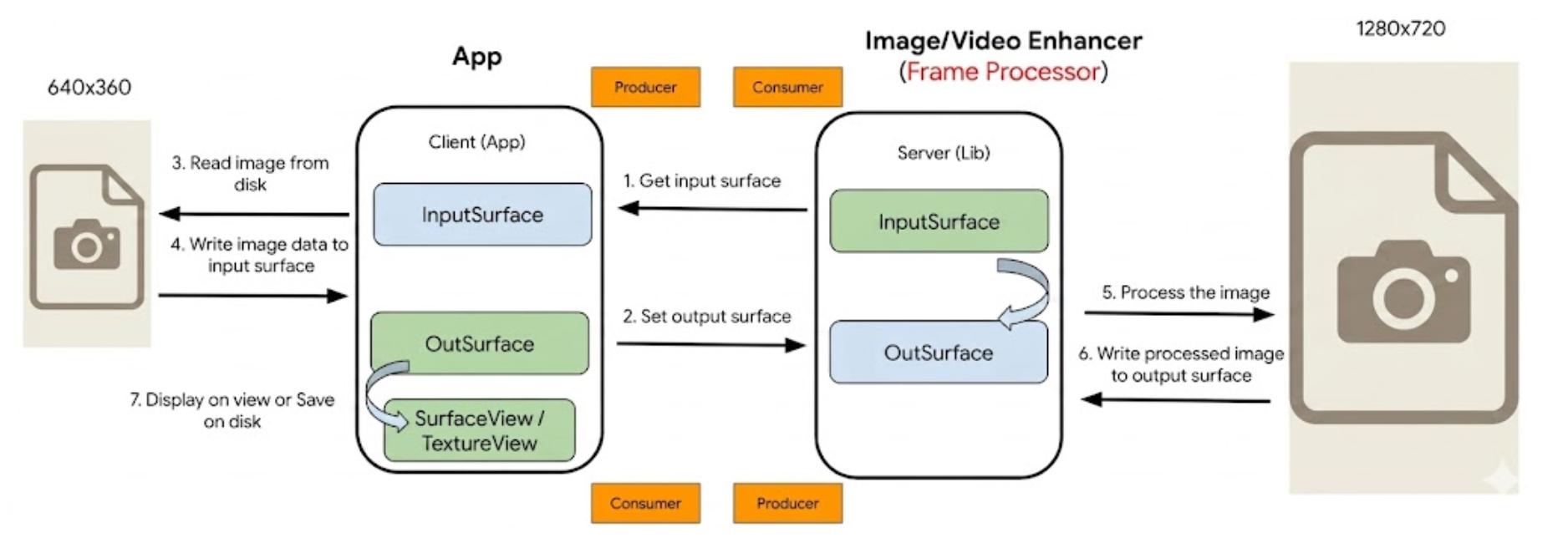
The enhancement pipeline is implemented through the following steps:
Phase 1. Set up the enhancement session
1. Provide input surface: Your app provides the enhancement framework with an input surface handle to access frames for processing.
2. Set output surface: Your app provisions and binds rendering targets
(such as a SurfaceView or TextureView) directly to the framework.
Phase 2. Produce an input frame
3. Prepare base media: Your app retrieves the base uncompressed media. For example, by reading a file from a local disk.
4. Inject frame data: Your app writes the raw image payload directly into the bound input surface pipeline.
Phase 3. Process and enhance
5. Execute AI processing: The framework processes the frame on the device's GPU or NPU, applying machine learning enhancements like tonemapping, deblurring, or upscaling.
6. Deliver enhanced frame: The engine outputs the enhanced, full-resolution frame directly to the bound output surface.
Phase 4. Display or save the result
7. Finalize output: Your app receives the processed hardware stream buffer to render it in the UI or save it back to storage.
The EnhancementSession is a heavyweight context object that maintains a
persistent GPU or NPU memory pipeline. It allocates dedicated video RAM (VRAM)
and native system handles. To prevent severe memory leaks and potential
OutOfMemoryError crashes, adhere to the following lifecycle principles:
- Lazy instantiation: Don't create a session until the user initiates an enhancement action.
- Strategic reuse: Maintain and reuse a single session instance when processing streams or frames with identical configurations (dimensions and toggled options).
- Prompt teardown: Invoke
session.release()immediately when visual tasks terminate to free shared hardware resources.
Initialize the enhancement engine
This method orchestrates a two-step check. It verifies if the device's hardware supports acceleration, and then ensures the required machine learning modules are present.
Running this as a prerequisite step prevents runtime initialization failures by validating capabilities before your app attempts to process media.
class MediaSetupViewModel(application: Application) : AndroidViewModel(application) {
    private val enhancementClient = Enhancement.getClient(application)
    fun initializeEnhancementEngine() {
        viewModelScope.launch {
            try {
                // 1. Verify hardware capability
                val isSupported = enhancementClient.isDeviceSupportedAsync()
                if (!isSupported) {
                    notifyUiDeviceIncompatible()
                    return@launch
                }
                // 2. Verify and download the Google Play services ML modules
                val isInstalled = enhancementClient.isModuleInstalledAsync()
                if (!isInstalled) {
                    notifyUiDownloadingModels()
                    enhancementClient.installModule().await()
                }
                notifyUiEngineReady()
            } catch (e: Exception) {
                // Handle potential errors during session creation or image
                // processing.
                handleInitializationError(e)
            }
        }
    }
}
Implementation: Surface mode (surface in, surface out)
The Surface execution mode (EnhancementMode.SURFACE) avoids the performance
overhead of moving frames between CPU and GPU memory buffers. Instead, the
enhancement library maps raw hardware buffers directly, reading frames from an
input Surface, processing them natively, and piping them straight to an output
Surface.
Single-frame surface snapshots
This method is used to efficiently apply effects to a single hardware-decoded image frame.
// Provisions input Surface (for example, ImageReader) and output Surface (for
// example, SurfaceView)
val inputSurface: Surface = imageReader.surface
val outputSurface: Surface = surfaceView.holder.surface
// 1. Configure parameters for SURFACE mode
val surfaceOptions = EnhancementOptions(
    imageReader.width,
    imageReader.height,
    EnhancementMode.SURFACE,
    enableTonemap = true,
    enableDeblurDenoise = true,
    enableFaceDetection = false
).also {
    // 2. Bind hardware surfaces
    it.setInputSurface(inputSurface)
    it.setOutputSurface(outputSurface)
}

// 3. Create the session to process the hardware frame
val singleFrameSession = enhancementClient.createSessionAsync(surfaceOptions, executor)
// The API processes the single frame. Upon completion, release the session.
singleFrameSession.release()