
Android skills are AI-optimized instructions, to help AI tools and agents better understand and execute specific patterns that follow best practices and guidance on Android development. They are housed in the Android skills GitHub repository.
You can use an Android skill to do tasks such as the following:
- Migrate from XML to Compose
- Upgrade to AGP 9
- Set up newer frameworks like Navigation 3
- Modernize your app UI by making it edge-to-edge
- Improve performance by auditing your R8 configuration
By using Android skills, you can help ground LLMs with more recent knowledge and context on specialized Android workflows.
Android skills follow the agent skills open standard, so they are compatible with any AI tool that supports skills. This page explains how to use skills in Android Studio and how to use the Android CLI to install skills for use with any agent and tooling of your choice.
Key benefits of Android skills
Android skills provide a number of key benefits that aim to accelerate your agentic workflow towards more efficiently producing high-quality Android code:
- Ground with expert knowledge: Provide more Android-specific context to agents, grounding them on demand and extending their default knowledge and expertise beyond the regular model training cycle.
- Repeatable workflows: Provide standard instructions to help ensure that multi-step tasks in Android development are performed consistently.
- Resource bundling: Include scripts, templates, or additional documentation alongside your main SKILL.md instructions so the agent has everything it needs in one place, avoiding the need to manually attach files for a prompt.
- Shared expertise: Package your team's Android development patterns into shared folders for unified access and collaboration.
Use Android skills
Android skills are integrated in the Android CLI, to be used with any agent of your choice.
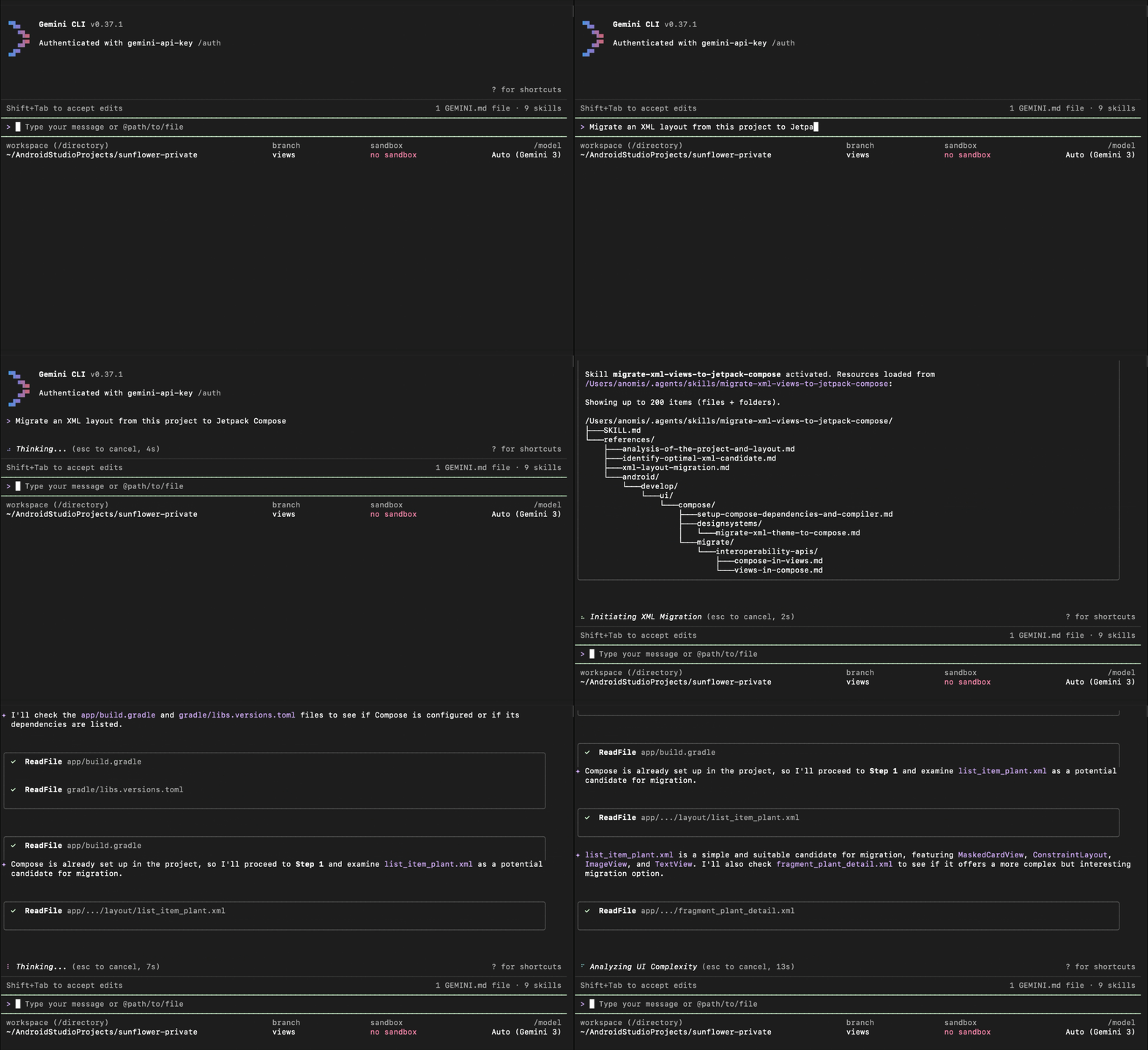
Android CLI
We recommend installing an Android skill using the Android CLI, which makes it easier to discover, download, and manage skills for any agent of your choice.
- To see the list of available skills, run
android skills list. - To install a skill, run
android skills add skill-name. If you already have the skill installed,skills addwill update it to the latest version.
Android Studio
You can download a skill from the Android skills GitHub repo and import it into your project in Android Studio.
Activate a skill
The agent automatically activates skills that are relevant to your task. To use a skill, prompt the agent to complete a task that is related to the skill, for example "Make my app UI edge-to-edge." The agent should automatically find and use the skill if it's available.
In Android Studio, you can also invoke a skill
manually directly by typing @skill-name in the chat window.
Create your own skills
You can create your own skills to package and share your team's workflows. To learn more about skill requirements, see the agent skills specification.
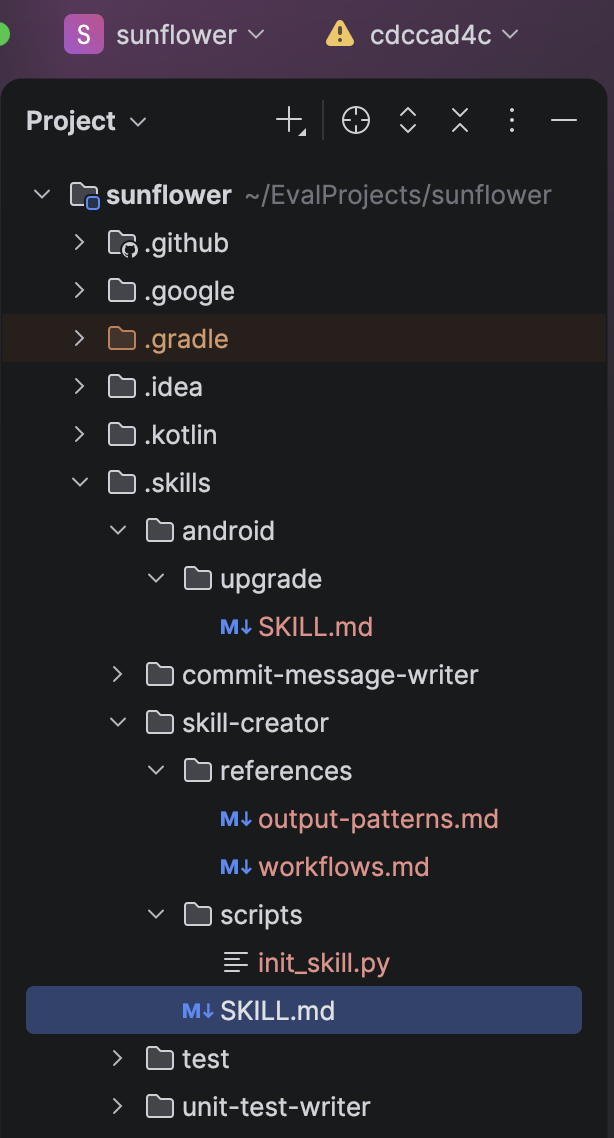
The agent looks for skills starting from the .skills/ or .agent/skills/
directories located at your project root. To build a custom skill, follow these
steps:
- Create a directory for your skill (for example,
my-new-skill/). - Create a
SKILL.mdfile (case-sensitive) inside the new directory.
Skills must follow these rules:
- One directory per skill: Each skill must have its own unique directory
that includes a
SKILL.mdfile and any additional resources. - Nesting: All skills must be in the
.skills/or.agent/skills/directory at the project root. However, you can use subdirectories for better organization (for example,skills/ui-flows/<skill name>/SKILL.mdorskills/testing/<skill name>/SKILL.md). - Scope: Only skills located within the project's codebase are supported.
The SKILL.md file uses a YAML block for metadata and standard Markdown for the
instructions.
name: A unique identifier for the skill. This should match the directory name.description: A clear explanation of what the skill does and when the agent should use it.- Body: The Markdown body below the YAML block contains the instructions that guide the agent's behavior when the skill is active.
---
name: skill-name
description: A description of what this skill does and when to use it.
metadata:
  author: example-org
  version: "1.0"
---

Skill content
Format guidelines
- Name: Maximum of 64 characters (lowercase letters, numbers, and hyphens only).
- Description: Maximum of 1024 characters.
- Body content: Aim for 10k–20k characters (~2,500–5,000 tokens). If your instructions exceed this, consider moving detailed documentation to a resource file as described in Optional skill directories.
Optional skill directories
To keep your SKILL.md file concise and modular, you can include additional
resources in the following optional directories within your skill's folder:
scripts/: Contains executable code (for example, Python or Bash) that the agent can run.references/: Contains detailed technical documentation, API references, or domain-specific guides.assets/: Contains static resources such as document templates, UI diagrams, or JSON schemas.
When referring to these files within your SKILL.md instructions, use relative
paths from the skill root. For example: Run the script at scripts/cleanup.py.
How skills work
Skills represent on-demand expertise. This structure lets the agent maintain a large number of specialized capabilities without cluttering the model's immediate context window.
The model autonomously decides when to employ a skill based on your request and the skill's description. When a relevant skill is identified, the model dynamically pulls in the full instructions and resources required to complete the task.