

Как и в предыдущих версиях, Android 15 включает изменения в поведении, которые могут повлиять на ваше приложение. Следующие изменения в поведении применяются исключительно к приложениям, ориентированным на Android 15 или выше. Если ваше приложение ориентировано на Android 15 или выше, вам следует внести в него изменения для корректной поддержки этих изменений, где это применимо.
Обязательно ознакомьтесь также со списком изменений в поведении, которые затрагивают все приложения, работающие на Android 15, независимо от targetSdkVersion вашего приложения.
Основная функциональность
Android 15 изменяет или расширяет различные основные возможности системы Android.
Изменения в работе служб переднего плана
We are making the following changes to foreground services with Android 15.
- Data sync foreground service timeout behavior
- New media processing foreground service type
- Restrictions on
BOOT_COMPLETEDbroadcast receivers launching foreground services - Restrictions on starting foreground services while an app holds the
SYSTEM_ALERT_WINDOWpermission
Data sync foreground service timeout behavior
Android 15 introduces a new timeout behavior to dataSync for apps targeting
Android 15 (API level 35) or higher. This behavior also applies to the new
mediaProcessing foreground service type.
The system permits an app's dataSync services to run for a total of 6 hours
in a 24-hour period, after which the system calls the running service's
Service.onTimeout(int, int) method (introduced in Android
15). At this time, the service has a few seconds to call
Service.stopSelf(). When Service.onTimeout() is called, the
service is no longer considered a foreground service. If the service does not
call Service.stopSelf(), the system throws an internal exception. The
exception is logged in Logcat with the following message:
Fatal Exception: android.app.RemoteServiceException: "A foreground service of
type dataSync did not stop within its timeout: [component name]"
To avoid problems with this behavior change, you can do one or more of the following:
- Have your service implement the new
Service.onTimeout(int, int)method. When your app receives the callback, make sure to callstopSelf()within a few seconds. (If you don't stop the app right away, the system generates a failure.) - Make sure your app's
dataSyncservices don't run for more than a total of 6 hours in any 24-hour period (unless the user interacts with the app, resetting the timer). - Only start
dataSyncforeground services as a result of direct user interaction; since your app is in the foreground when the service starts, your service has the full six hours after the app goes to the background. - Instead of using a
dataSyncforeground service, use an alternative API.
If your app's dataSync foreground services have run for 6 hours in the last
24, you cannot start another dataSync foreground service unless the user
has brought your app to the foreground (which resets the timer). If you try to
start another dataSync foreground service, the system throws
ForegroundServiceStartNotAllowedException
with an error message like "Time limit already exhausted for foreground service
type dataSync".
Testing
To test your app's behavior, you can enable data sync timeouts even if your app
is not targeting Android 15 (as long as the app is running on an Android 15
device). To enable timeouts, run the following adb command:
adb shell am compat enable FGS_INTRODUCE_TIME_LIMITS your-package-name
You can also adjust the timeout period, to make it easier to test how your
app behaves when the limit is reached. To set a new timeout period, run the
following adb command:
adb shell device_config put activity_manager data_sync_fgs_timeout_duration duration-in-milliseconds
New media processing foreground service type
В Android 15 представлен новый тип службы переднего плана — mediaProcessing . Этот тип службы подходит для таких операций, как перекодирование медиафайлов. Например, мультимедийное приложение может загрузить аудиофайл, и ему необходимо преобразовать его в другой формат перед воспроизведением. Вы можете использовать службу переднего плана mediaProcessing чтобы гарантировать, что преобразование продолжается, даже когда приложение находится в фоновом режиме.
Система разрешает службам mediaProcessing приложения работать в общей сложности 6 часов в течение 24-часового периода, после чего система вызывает метод Service.onTimeout(int, int) работающей службы (представленный в Android 15). В это время у службы есть несколько секунд для вызова Service.stopSelf() . Если служба не вызывает Service.stopSelf() , система выдает внутреннее исключение. Исключение регистрируется в Logcat со следующим сообщением:
Fatal Exception: android.app.RemoteServiceException: "A foreground service of
type mediaProcessing did not stop within its timeout: [component name]"
Чтобы избежать исключения, вы можете сделать одно из следующих действий:
- Пусть ваш сервис реализует новый метод
Service.onTimeout(int, int). Когда ваше приложение получит обратный вызов, обязательно вызовитеstopSelf()в течение нескольких секунд. (Если вы не остановите приложение сразу, система выдаст ошибку.) - Убедитесь, что службы
mediaProcessingвашего приложения не работают более 6 часов в течение любого 24-часового периода (если только пользователь не взаимодействует с приложением, сбрасывая таймер). - Запускайте службы переднего плана
mediaProcessingтолько в результате прямого взаимодействия с пользователем; поскольку ваше приложение находится на переднем плане при запуске службы, у вашей службы есть полные шесть часов после того, как приложение перейдет в фоновый режим. - Вместо использования службы переднего плана
mediaProcessingиспользуйте альтернативный API , например WorkManager.
Если службы переднего плана mediaProcessing вашего приложения работали в течение 6 часов за последние 24, вы не сможете запустить другую службу переднего плана mediaProcessing , пока пользователь не переведет ваше приложение на передний план (что сбрасывает таймер). Если вы попытаетесь запустить другую службу переднего плана mediaProcessing , система выдаст ForegroundServiceStartNotAllowedException с сообщением об ошибке, например «Ограничение времени уже исчерпано для типа службы переднего плана mediaProcessing».
Дополнительные сведения о типе службы mediaProcessing см. в разделе Изменения в типах служб переднего плана для Android 15: обработка мультимедиа .
Тестирование
Чтобы проверить поведение вашего приложения, вы можете включить тайм-ауты обработки мультимедиа, даже если ваше приложение не предназначено для Android 15 (при условии, что приложение работает на устройстве Android 15). Чтобы включить таймауты, выполните следующую команду adb :
adb shell am compat enable FGS_INTRODUCE_TIME_LIMITS your-package-name
Вы также можете настроить период ожидания, чтобы было проще протестировать поведение вашего приложения при достижении предела. Чтобы установить новый период ожидания, выполните следующую команду adb :
adb shell device_config put activity_manager media_processing_fgs_timeout_duration duration-in-milliseconds
Restrictions on BOOT_COMPLETED broadcast receivers launching foreground services
Существуют новые ограничения на широковещательные приемники BOOT_COMPLETED , запускающие службы приоритета. Получателям BOOT_COMPLETED не разрешено запускать следующие типы служб приоритета:
-
dataSync -
camera -
mediaPlayback -
phoneCall -
mediaProjection -
microphone(это ограничение действует дляmicrophoneначиная с Android 14)
Если получатель BOOT_COMPLETED пытается запустить любой из этих типов служб переднего плана, система выдает исключение ForegroundServiceStartNotAllowedException .
Тестирование
Чтобы проверить поведение вашего приложения, вы можете включить эти новые ограничения, даже если ваше приложение не предназначено для Android 15 (при условии, что приложение работает на устройстве Android 15). Запустите следующую команду adb :
adb shell am compat enable FGS_BOOT_COMPLETED_RESTRICTIONS your-package-name
Чтобы отправить широковещательную рассылку BOOT_COMPLETED без перезагрузки устройства, выполните следующую команду adb :
adb shell am broadcast -a android.intent.action.BOOT_COMPLETED your-package-name
Restrictions on starting foreground services while an app holds the SYSTEM_ALERT_WINDOW permission
Раньше, если приложение имело разрешение SYSTEM_ALERT_WINDOW , оно могло запустить службу переднего плана, даже если приложение в данный момент находилось в фоновом режиме (как обсуждалось в разделе об исключениях из ограничений фонового запуска ).
Если приложение предназначено для Android 15, это исключение теперь уже. Теперь приложению необходимо иметь разрешение SYSTEM_ALERT_WINDOW , а также иметь видимое окно наложения. То есть приложению необходимо сначала запустить окно TYPE_APPLICATION_OVERLAY , и это окно должно быть видимым перед запуском службы переднего плана.
Если ваше приложение пытается запустить службу переднего плана в фоновом режиме, не отвечая этим новым требованиям (и у него нет других исключений), система выдает ForegroundServiceStartNotAllowedException .
Если ваше приложение объявляет разрешение SYSTEM_ALERT_WINDOW и запускает службы переднего плана в фоновом режиме, это изменение может повлиять на него. Если ваше приложение получает исключение ForegroundServiceStartNotAllowedException , проверьте порядок операций вашего приложения и убедитесь, что в нем уже есть активное окно наложения, прежде чем оно попытается запустить службу переднего плана из фона. Вы можете проверить, видимо ли ваше окно наложения в данный момент, вызвав View.getWindowVisibility() , или вы можете переопределить View.onWindowVisibilityChanged() чтобы получать уведомления при каждом изменении видимости.
Тестирование
Чтобы проверить поведение вашего приложения, вы можете включить эти новые ограничения, даже если ваше приложение не предназначено для Android 15 (при условии, что приложение работает на устройстве Android 15). Чтобы включить эти новые ограничения на запуск служб переднего плана в фоновом режиме, выполните следующую команду adb :
adb shell am compat enable FGS_SAW_RESTRICTIONS your-package-name
Изменения в условиях, когда приложения могут изменять глобальное состояние режима «Не беспокоить».
Приложения, предназначенные для Android 15 (уровень API 35) и выше, больше не могут изменять глобальное состояние или политику режима «Не беспокоить» (DND) на устройстве (путем изменения пользовательских настроек или отключения режима «Не беспокоить»). Вместо этого приложения должны внести AutomaticZenRule , которое система объединяет в глобальную политику с существующей схемой наиболее ограничительной политики. Вызовы к существующим API, которые ранее влияли на глобальное состояние ( setInterruptionFilter , setNotificationPolicy ), приводят к созданию или обновлению неявного AutomaticZenRule , который включается и выключается в зависимости от цикла вызовов этих вызовов API.
Обратите внимание, что это изменение влияет на наблюдаемое поведение только в том случае, если приложение вызывает setInterruptionFilter(INTERRUPTION_FILTER_ALL) и ожидает, что этот вызов деактивирует AutomaticZenRule , который ранее был активирован его владельцами.
Изменения в API OpenJDK
Android 15 continues the work of refreshing Android's core libraries to align with the features in the latest OpenJDK LTS releases.
Some of these changes can affect app compatibility for apps targeting Android 15 (API level 35):
Changes to string formatting APIs: Validation of argument index, flags, width, and precision are now more strict when using the following
String.format()andFormatter.format()APIs:String.format(String, Object[])String.format(Locale, String, Object[])Formatter.format(String, Object[])Formatter.format(Locale, String, Object[])
For example, the following exception is thrown when an argument index of 0 is used (
%0in the format string):IllegalFormatArgumentIndexException: Illegal format argument index = 0In this case, the issue can be fixed by using an argument index of 1 (
%1in the format string).Changes to component type of
Arrays.asList(...).toArray(): When usingArrays.asList(...).toArray(), the component type of the resulting array is now anObject—not the type of the underlying array's elements. So the following code throws aClassCastException:String[] elements = (String[]) Arrays.asList("one", "two").toArray();For this case, to preserve
Stringas the component type in the resulting array, you could useCollection.toArray(Object[])instead:String[] elements = Arrays.asList("two", "one").toArray(new String[0]);Changes to language code handling: When using the
LocaleAPI, language codes for Hebrew, Yiddish, and Indonesian are no longer converted to their obsolete forms (Hebrew:iw, Yiddish:ji, and Indonesian:in). When specifying the language code for one of these locales, use the codes from ISO 639-1 instead (Hebrew:he, Yiddish:yi, and Indonesian:id).Changes to random int sequences: Following the changes made in https://bugs.openjdk.org/browse/JDK-8301574, the following
Random.ints()methods now return a different sequence of numbers than theRandom.nextInt()methods do:Generally, this change shouldn't result in app-breaking behavior, but your code shouldn't expect the sequence generated from
Random.ints()methods to matchRandom.nextInt().
The new SequencedCollection API can affect your app's compatibility
after you update compileSdk in your app's build configuration to use
Android 15 (API level 35):
Collision with
MutableList.removeFirst()andMutableList.removeLast()extension functions inkotlin-stdlibThe
Listtype in Java is mapped to theMutableListtype in Kotlin. Because theList.removeFirst()andList.removeLast()APIs have been introduced in Android 15 (API level 35), the Kotlin compiler resolves function calls, for examplelist.removeFirst(), statically to the newListAPIs instead of to the extension functions inkotlin-stdlib.If an app is re-compiled with
compileSdkset to35andminSdkset to34or lower, and then the app is run on Android 14 and lower, a runtime error is thrown:java.lang.NoSuchMethodError: No virtual method removeFirst()Ljava/lang/Object; in class Ljava/util/ArrayList;The existing
NewApilint option in Android Gradle Plugin can catch these new API usages../gradlew lintMainActivity.kt:41: Error: Call requires API level 35 (current min is 34): java.util.List#removeFirst [NewApi] list.removeFirst()To fix the runtime exception and lint errors, the
removeFirst()andremoveLast()function calls can be replaced withremoveAt(0)andremoveAt(list.lastIndex)respectively in Kotlin. If you're using Android Studio Ladybug | 2024.1.3 or higher, it also provides a quick fix option for these errors.Consider removing
@SuppressLint("NewApi")andlintOptions { disable 'NewApi' }if the lint option has been disabled.Collision with other methods in Java
New methods have been added into the existing types, for example,
ListandDeque. These new methods might not be compatible with the methods with the same name and argument types in other interfaces and classes. In the case of a method signature collision with incompatibility, thejavaccompiler outputs a build-time error. For example:Example error 1:
javac MyList.javaMyList.java:135: error: removeLast() in MyList cannot implement removeLast() in List public void removeLast() { ^ return type void is not compatible with Object where E is a type-variable: E extends Object declared in interface ListExample error 2:
javac MyList.javaMyList.java:7: error: types Deque<Object> and List<Object> are incompatible; public class MyList implements List<Object>, Deque<Object> { both define reversed(), but with unrelated return types 1 errorExample error 3:
javac MyList.javaMyList.java:43: error: types List<E#1> and MyInterface<E#2> are incompatible; public static class MyList implements List<Object>, MyInterface<Object> { class MyList inherits unrelated defaults for getFirst() from types List and MyInterface where E#1,E#2 are type-variables: E#1 extends Object declared in interface List E#2 extends Object declared in interface MyInterface 1 errorTo fix these build errors, the class implementing these interfaces should override the method with a compatible return type. For example:
@Override
public Object getFirst() {
    return List.super.getFirst();
}
Безопасность
В Android 15 внесены изменения, повышающие безопасность системы и помогающие защитить приложения и пользователей от вредоносных программ.
Ограниченные версии TLS
Android 15 ограничивает использование TLS версий 1.0 и 1.1. Эти версии ранее были признаны устаревшими в Android, но теперь запрещены для приложений, ориентированных на Android 15.
Запуск защищенной фоновой активности
Android 15 protects users from malicious apps and gives them more control over their devices by adding changes that prevent malicious background apps from bringing other apps to the foreground, elevating their privileges, and abusing user interaction. Background activity launches have been restricted since Android 10 (API level 29).
Other changes
- Change
PendingIntentcreators to block background activity launches by default. This helps prevent apps from accidentally creating aPendingIntentthat could be abused by malicious actors. - Don't bring an app to the foreground unless the
PendingIntentsender allows it. This change aims to prevent malicious apps from abusing the ability to start activities in the background. By default, apps are not allowed to bring the task stack to the foreground unless the creator allows background activity launch privileges or the sender has background activity launch privileges. - Control how the top activity of a task stack can finish its task. If the top activity finishes a task, Android will go back to whichever task was last active. Moreover, if a non-top activity finishes its task, Android will go back to the home screen; it won't block the finish of this non-top activity.
- Prevent launching arbitrary activities from other apps into your own task. This change prevents malicious apps from phishing users by creating activities that appear to be from other apps.
- Block non-visible windows from being considered for background activity launches. This helps prevent malicious apps from abusing background activity launches to display unwanted or malicious content to users.
Более безопасные намерения
В Android 15 представлен StrictMode для намерений.
Чтобы просмотреть подробные журналы нарушений использования Intent , используйте следующий метод:
Котлин
fun onCreate() {
    StrictMode.setVmPolicy(VmPolicy.Builder()
        .detectUnsafeIntentLaunch()
        .build()
    )
}
Ява
public void onCreate() {
    StrictMode.setVmPolicy(new VmPolicy.Builder()
            .detectUnsafeIntentLaunch()
            .build());
}
Пользовательский опыт и пользовательский интерфейс системы
В Android 15 внесены некоторые изменения, призванные обеспечить более согласованный и интуитивно понятный пользовательский интерфейс.
Изменения отступа окна
Есть два изменения, связанных с вставками окон в Android 15: по умолчанию применяется сквозное изображение, а также есть изменения конфигурации, такие как конфигурация системных панелей по умолчанию.
Комплексное обеспечение соблюдения требований
Apps are edge-to-edge by default on devices running Android 15 if the app is targeting Android 15 (API level 35).
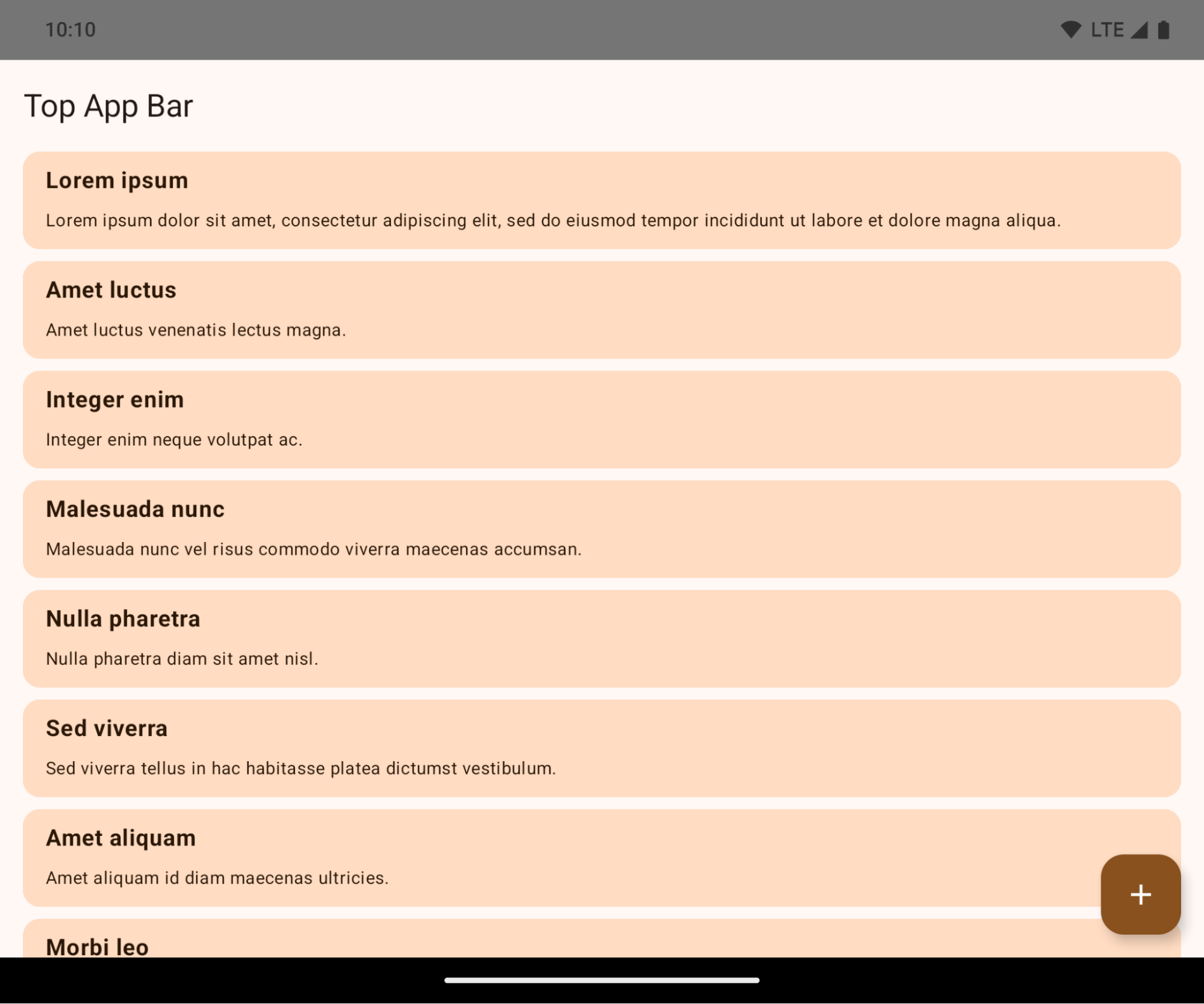
This is a breaking change that might negatively impact your app's UI. The changes affect the following UI areas:
- Gesture handle navigation bar
- Transparent by default.
- Bottom offset is disabled so content draws behind the system navigation bar unless insets are applied.
setNavigationBarColorandR.attr#navigationBarColorare deprecated and don't affect gesture navigation.setNavigationBarContrastEnforcedandR.attr#navigationBarContrastEnforcedcontinue to have no effect on gesture navigation.
- 3-button navigation
- Opacity set to 80% by default, with color possibly matching the window background.
- Bottom offset disabled so content draws behind the system navigation bar unless insets are applied.
setNavigationBarColorandR.attr#navigationBarColorare set to match the window background by default. The window background must be a color drawable for this default to apply. This API is deprecated but continues to affect 3-button navigation.setNavigationBarContrastEnforcedandR.attr#navigationBarContrastEnforcedis true by default, which adds an 80% opaque background across 3-button navigation.
- Status bar
- Transparent by default.
- The top offset is disabled so content draws behind the status bar unless insets are applied.
setStatusBarColorandR.attr#statusBarColorare deprecated and have no effect on Android 15.setStatusBarContrastEnforcedandR.attr#statusBarContrastEnforcedare deprecated but still have an effect on Android 15.
- Display cutout
layoutInDisplayCutoutModeof non-floating windows must beLAYOUT_IN_DISPLAY_CUTOUT_MODE_ALWAYS.SHORT_EDGES,NEVER, andDEFAULTare interpreted asALWAYSso that users don't see a black bar caused by the display cutout and appear edge-to-edge.
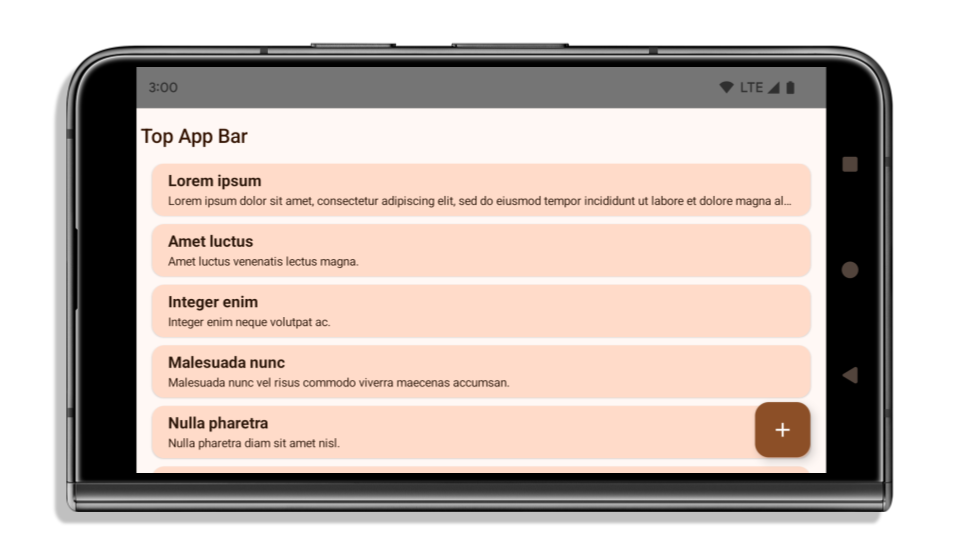
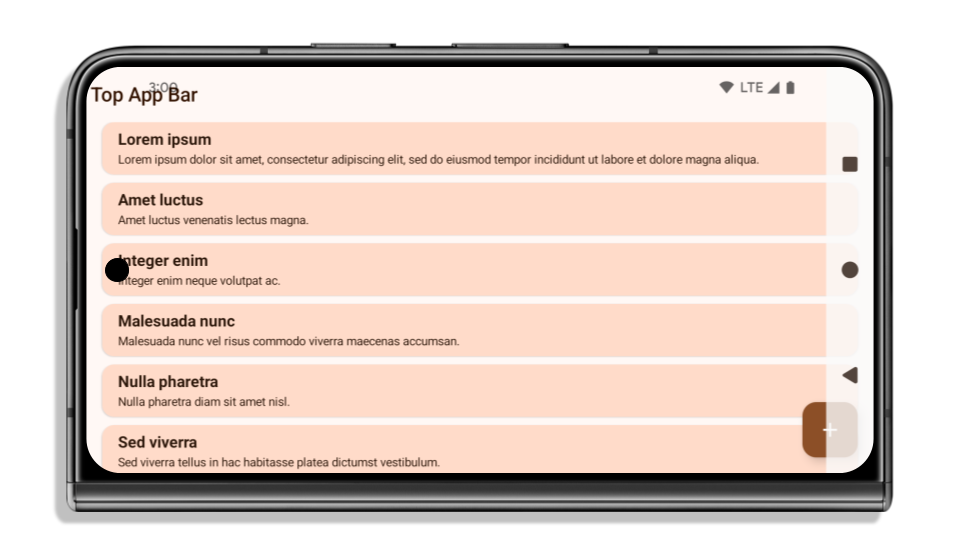
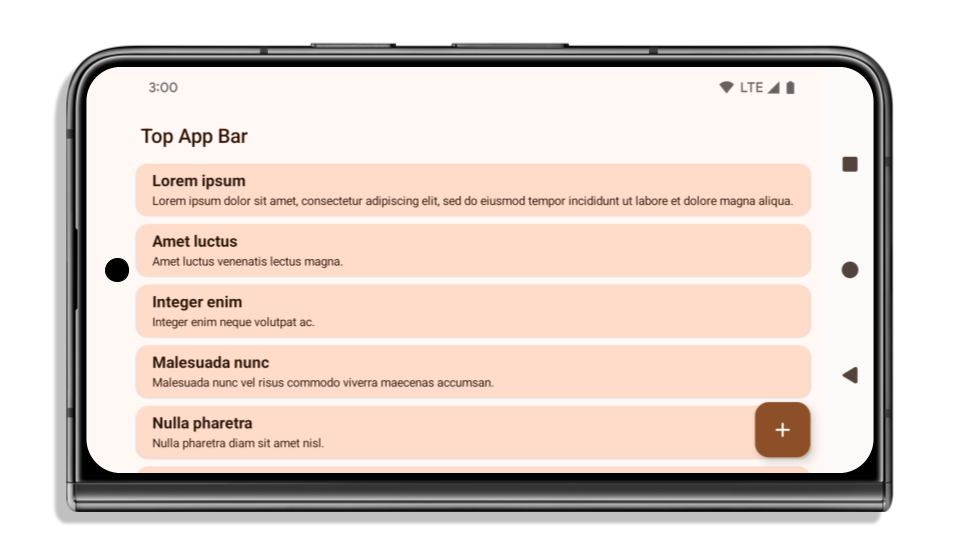
The following example shows an app before and after targeting Android 15 (API level 35), and before and after applying insets. This example is not comprehensive, this might appear differently on Android Auto.
What to check if your app is already edge-to-edge
If your app is already edge-to-edge and applies insets, you are mostly unimpacted, except in the following scenarios. However, even if you think you aren't impacted, we recommend you test your app.
- You have a non-floating window, such as an
Activitythat usesSHORT_EDGES,NEVERorDEFAULTinstead ofLAYOUT_IN_DISPLAY_CUTOUT_MODE_ALWAYS. If your app crashes on launch, this might be due to your splashscreen. You can either upgrade the core splashscreen dependency to 1.2.0-alpha01 or later or setwindow.attributes.layoutInDisplayCutoutMode = WindowManager.LayoutInDisplayCutoutMode.always. - There might be lower-traffic screens with occluded UI. Verify these
less-visited screens don't have occluded UI. Lower-traffic screens include:
- Onboarding or sign-in screens
- Settings pages
What to check if your app is not already edge-to-edge
If your app is not already edge-to-edge, you are most likely impacted. In addition to the scenarios for apps that are already edge-to-edge, you should consider the following:
- If your app uses Material 3 Components (
androidx.compose.material3) in compose, such asTopAppBar,BottomAppBar, andNavigationBar, these components are likely not impacted because they automatically handle insets. - If your app is using Material 2 Components (
androidx.compose.material) in Compose, these components don't automatically handle insets. However, you can get access to the insets and apply them manually. In androidx.compose.material 1.6.0 and later, use thewindowInsetsparameter to apply the insets manually forBottomAppBar,TopAppBar,BottomNavigation, andNavigationRail. Likewise, use thecontentWindowInsetsparameter forScaffold. - If your app uses views and Material Components
(
com.google.android.material), most views-based Material Components such asBottomNavigationView,BottomAppBar,NavigationRailView, orNavigationView, handle insets and require no additional work. However, you need to addandroid:fitsSystemWindows="true"if usingAppBarLayout. - For custom composables, apply the insets manually as padding. If your
content is within a
Scaffold, you can consume insets using theScaffoldpadding values. Otherwise, apply padding using one of theWindowInsets. - If your app is using views and
BottomSheet,SideSheetor custom containers, apply padding usingViewCompat.setOnApplyWindowInsetsListener. ForRecyclerView, apply padding using this listener and also addclipToPadding="false".
What to check if your app must offer custom background protection
If your app must offer custom background protection to 3-button navigation or
the status bar, your app should place a composable or view behind the system bar
using WindowInsets.Type#tappableElement() to get the 3-button
navigation bar height or WindowInsets.Type#statusBars.
Additional edge-to-edge resources
See the Edge to Edge Views and Edge to Edge Compose guides for additional considerations on applying insets.
Deprecated APIs
The following APIs are deprecated but not disabled:
R.attr#enforceStatusBarContrastR.attr#navigationBarColor(for 3 button navigation, with 80% alpha)Window#isStatusBarContrastEnforcedWindow#setNavigationBarColor(for 3 button navigation, with 80% alpha)Window#setStatusBarContrastEnforced
The following APIs are deprecated and disabled:
R.attr#navigationBarColor(for gesture navigation)R.attr#navigationBarDividerColorR.attr#statusBarColorWindow#setDecorFitsSystemWindowsWindow#getNavigationBarColorWindow#getNavigationBarDividerColorWindow#getStatusBarColorWindow#setNavigationBarColor(for gesture navigation)Window#setNavigationBarDividerColorWindow#setStatusBarColor
Стабильная конфигурация
Если ваше приложение ориентировано на Android 15 (уровень API 35) или выше, Configuration больше не исключает системные панели. Если вы используете размер экрана в классе Configuration для расчета компоновки, вам следует заменить его на более подходящие альтернативы, такие как соответствующий ViewGroup , WindowInsets или WindowMetricsCalculator в зависимости от ваших потребностей.
Configuration доступны с API 1. Обычно их получают из Activity.onConfigurationChanged . Они предоставляют информацию, такую как плотность окон, ориентация и размеры. Важной особенностью размеров окон, возвращаемых Configuration является то, что ранее они не включали системные панели.
Размер конфигурации обычно используется для выбора ресурсов, например, /res/layout-h500dp , и это по-прежнему допустимый вариант использования. Однако использование его для расчета компоновки всегда не рекомендовалось. Если вы все же используете его, вам следует отказаться от него. Вам следует заменить использование Configuration чем-то более подходящим в зависимости от ваших задач.
Если вы используете его для расчета компоновки, используйте соответствующий ViewGroup , например CoordinatorLayout или ConstraintLayout . Если вы используете его для определения высоты системной панели навигации, используйте WindowInsets . Если вы хотите узнать текущий размер окна вашего приложения, используйте computeCurrentWindowMetrics .
Ниже приведён список полей, затронутых этим изменением:
- Размеры
Configuration.screenWidthDpиscreenHeightDpбольше не исключают системные полосы. - Изменения параметров
screenWidthDpиscreenHeightDpкосвенно влияют наConfiguration.smallestScreenWidthDp. - На устройствах с почти квадратным экраном изменения параметров
screenWidthDpиscreenHeightDpкосвенно влияют наConfiguration.orientation. -
Display.getSize(Point)косвенно зависит от изменений вConfiguration. Он был объявлен устаревшим начиная с уровня API 30. -
Display.getMetrics()работает подобным образом уже с 33-го уровня API.
Атрибут elegantTextHeight по умолчанию имеет значение true.
Для приложений, ориентированных на Android 15 (уровень API 35), атрибут elegantTextHeight TextView становится true по умолчанию, заменяя компактный шрифт, используемый по умолчанию, некоторыми скриптами с большими вертикальными метриками на гораздо более читаемый. Компактный шрифт был введен, чтобы предотвратить нарушение макета; Android 13 (уровень API 33) предотвращает многие из этих проблем, позволяя текстовому макету растягивать вертикальную высоту с помощью атрибута fallbackLineSpacing .
В Android 15 компактный шрифт по-прежнему остается в системе, поэтому ваше приложение может установить для elegantTextHeight значение false чтобы получить то же поведение, что и раньше, но вряд ли он будет поддерживаться в следующих выпусках. Итак, если ваше приложение поддерживает следующие сценарии: арабский, лаосский, мьянманский, тамильский, гуджаратский, каннада, малаялам, одиа, телугу или тайский, протестируйте свое приложение, установив для elegantTextHeight значение true .

elegantTextHeight для приложений, ориентированных на Android 14 (уровень API 34) и ниже. 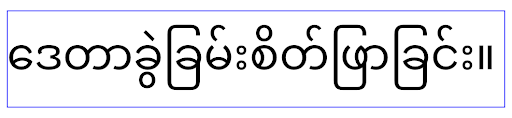
elegantTextHeight для приложений, ориентированных на Android 15.Изменение ширины TextView для сложных форм букв
В предыдущих версиях Android некоторые рукописные шрифты или языки сложной формы могли отображать буквы в области предыдущего или следующего символа. В некоторых случаях такие буквы обрезались в начальной или конечной позиции. Начиная с Android 15, TextView выделяет ширину для рисования достаточного места для таких букв и позволяет приложениям запрашивать дополнительные поля слева, чтобы предотвратить обрезку.
Поскольку это изменение влияет на то, как TextView определяет ширину, TextView по умолчанию выделяет большую ширину, если приложение предназначено для Android 15 (уровень API 35) или выше. Вы можете включить или отключить это поведение, вызвав API setUseBoundsForWidth в TextView .
Поскольку добавление левого отступа может привести к смещению существующих макетов, отступы не добавляются по умолчанию даже для приложений, ориентированных на Android 15 или более позднюю версию. Однако вы можете добавить дополнительные отступы для предотвращения обрезки, вызвав setShiftDrawingOffsetForStartOverhang .
В следующих примерах показано, как эти изменения могут улучшить макет текста для некоторых шрифтов и языков.
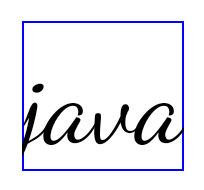
<TextView
    android:fontFamily="cursive"
    android:text="java" />
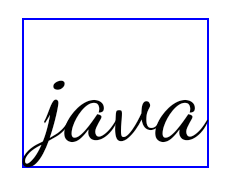
<TextView
    android:fontFamily="cursive"
    android:text="java"
    android:useBoundsForWidth="true"
    android:shiftDrawingOffsetForStartOverhang="true" />
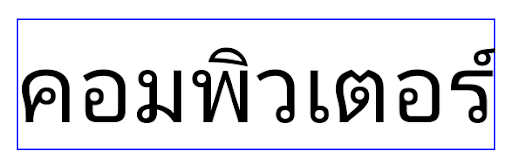
<TextView
    android:text="คอมพิวเตอร์" />
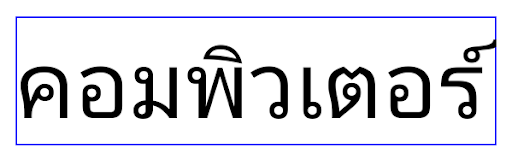
<TextView
    android:text="คอมพิวเตอร์"
    android:useBoundsForWidth="true"
    android:shiftDrawingOffsetForStartOverhang="true" />
Высота строки по умолчанию для EditText с учетом локали
In previous versions of Android, the text layout stretched the height of the
text to meet the line height of the font that matched the current locale. For
example, if the content was in Japanese, because the line height of the Japanese
font is slightly larger than the one of a Latin font, the height of the text
became slightly larger. However, despite these differences in line heights, the
EditText element was sized uniformly, regardless
of the locale being used, as illustrated in the following image:

EditText elements that
can contain text from English (en), Japanese (ja), and Burmese (my). The
height of the EditText is the same, even though these languages
have different line heights from each other.For apps targeting Android 15 (API level 35), a minimum line height is now
reserved for EditText to match the reference font for the specified Locale, as
shown in the following image:

EditText elements that
can contain text from English (en), Japanese (ja), and Burmese (my). The
height of the EditText now includes space to accommodate the
default line height for these languages' fonts.If needed, your app can restore the previous behavior by specifying the
useLocalePreferredLineHeightForMinimum attribute
to false, and your app can set custom minimum vertical metrics using the
setMinimumFontMetrics API in Kotlin and Java.
Камера и медиа
В Android 15 внесены следующие изменения в работу камеры и мультимедиа для приложений, ориентированных на Android 15 и выше.
Ограничения на запрос фокусировки звука
Приложения, предназначенные для Android 15 (уровень API 35), должны быть главным приложением или запускать службу переднего плана, чтобы запросить фокус звука . Если приложение пытается запросить фокус, хотя оно не соответствует одному из этих требований, вызов возвращает AUDIOFOCUS_REQUEST_FAILED .
Дополнительную информацию о фокусе звука можно узнать в разделе «Управление фокусом звука» .
Обновлены ограничения, не относящиеся к SDK.
Android 15 includes updated lists of restricted non-SDK interfaces based on collaboration with Android developers and the latest internal testing. Whenever possible, we make sure that public alternatives are available before we restrict non-SDK interfaces.
If your app does not target Android 15, some of these changes might not immediately affect you. However, while it's possible for your app to access some non-SDK interfaces depending on your app's target API level, using any non-SDK method or field always carries a high risk of breaking your app.
If you are unsure if your app uses non-SDK interfaces, you can test your app to find out. If your app relies on non-SDK interfaces, you should begin planning a migration to SDK alternatives. Nevertheless, we understand that some apps have valid use cases for using non-SDK interfaces. If you can't find an alternative to using a non-SDK interface for a feature in your app, you should request a new public API.
Дополнительные сведения об изменениях в этой версии Android см. в разделе Обновления ограничений интерфейса, не связанных с SDK, в Android 15 . Дополнительные сведения об интерфейсах, отличных от SDK, см. в разделе Ограничения на интерфейсы, не относящиеся к SDK .