

يقدّم Android 16 ميزات وواجهات برمجة تطبيقات جديدة رائعة للمطوّرين. وتلخّص الأقسام التالية هذه الميزات لمساعدتك في بدء استخدام واجهات برمجة التطبيقات ذات الصلة.
للحصول على قائمة تفصيلية بواجهات برمجة التطبيقات الجديدة والمعدَّلة والمُزالة، يُرجى الاطّلاع على تقرير مقارنة واجهات برمجة التطبيقات. للحصول على تفاصيل حول واجهات برمجة التطبيقات الجديدة، يُرجى الانتقال إلى مرجع واجهة برمجة تطبيقات Android، حيث يتم تمييز واجهات برمجة التطبيقات الجديدة لتسهيل رؤيتها.يجب أيضًا مراجعة الجوانب التي قد تؤثر فيها تغييرات المنصة على تطبيقاتك. لمزيد من المعلومات، يُرجى الاطّلاع على الصفحات التالية:
- التغييرات في السلوك التي تؤثر في التطبيقات التي تستهدف Android 16
- تغييرات في السلوك تؤثر في جميع التطبيقات بغض النظر عن
targetSdkVersion:
الوظيفة الأساسية
يتضمّن Android واجهات برمجة تطبيقات جديدة توسّع الإمكانات الأساسية لنظام Android.
إصداران من واجهة برمجة تطبيقات Android في عام 2025
- This preview is for the next major release of Android with a planned launch in Q2 of 2025. This release is similar to all of our API releases in the past, where we can have planned behavior changes that are often tied to a targetSdkVersion.
- We're planning the major release a quarter earlier (Q2 rather than Q3 in prior years) to better align with the schedule of device launches across our ecosystem, so more devices can get the major release of Android sooner. With the major release coming in Q2, you'll need to do your annual compatibility testing a few months earlier than in previous years to make sure your apps are ready.
- We plan to have another release in Q4 of 2025 which also will include new developer APIs. The Q2 major release will be the only release in 2025 to include planned behavior changes that could affect apps.
In addition to new developer APIs, the Q4 minor release will pick up feature updates, optimizations, and bug fixes; it will not include any app-impacting behavior changes.
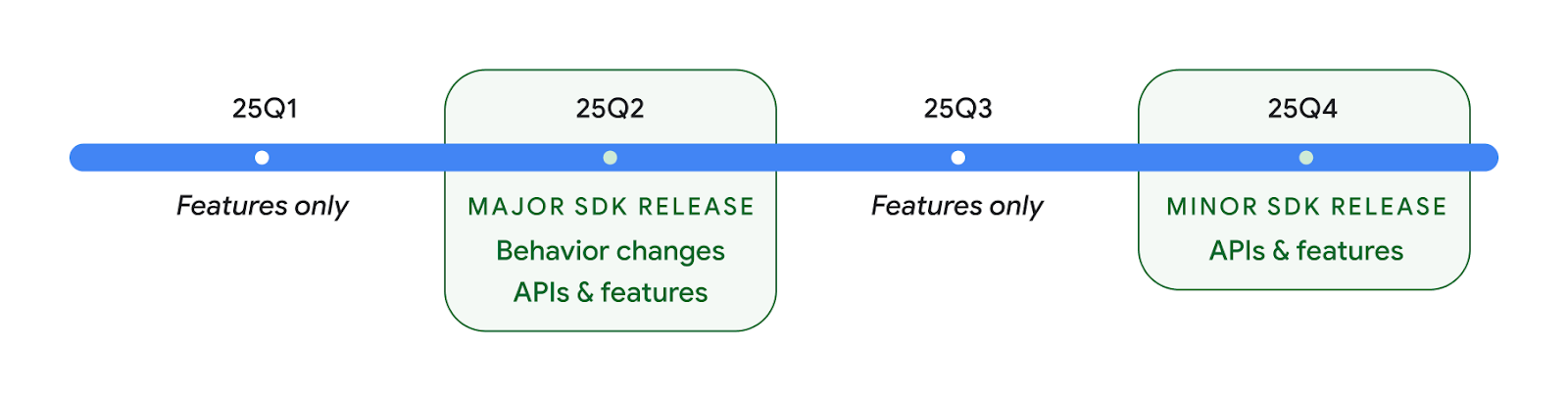
We'll continue to have quarterly Android releases. The Q1 and Q3 updates in-between the API releases will provide incremental updates to help ensure continuous quality. We're actively working with our device partners to bring the Q2 release to as many devices as possible.
Using new APIs with major and minor releases
Guarding a code block with a check for API level is done today using
the SDK_INT constant with
VERSION_CODES. This will continue
to be supported for major Android releases.
if (SDK_INT >= VERSION_CODES.BAKLAVA) {
  // Use APIs introduced in Android 16
}
The new SDK_INT_FULL
constant can be used for API checks against both major and minor versions with
the new VERSION_CODES_FULL
enumeration.
if (SDK_INT_FULL >= VERSION_CODES_FULL.[MAJOR or MINOR RELEASE]) {
  // Use APIs introduced in a major or minor release
}
You can also use the
Build.getMinorSdkVersion()
method to get just the minor SDK version.
val minorSdkVersion = Build.getMinorSdkVersion(VERSION_CODES_FULL.BAKLAVA)
These APIs have not yet been finalized and are subject to change, so please send us feedback if you have any concerns.
تجربة المستخدم وواجهة مستخدم النظام
يمنح Android 16 مطوّري التطبيقات والمستخدمين مزيدًا من التحكّم والمرونة في ضبط أجهزتهم لتناسب احتياجاتهم.
إشعارات تركّز على مستوى التقدّم
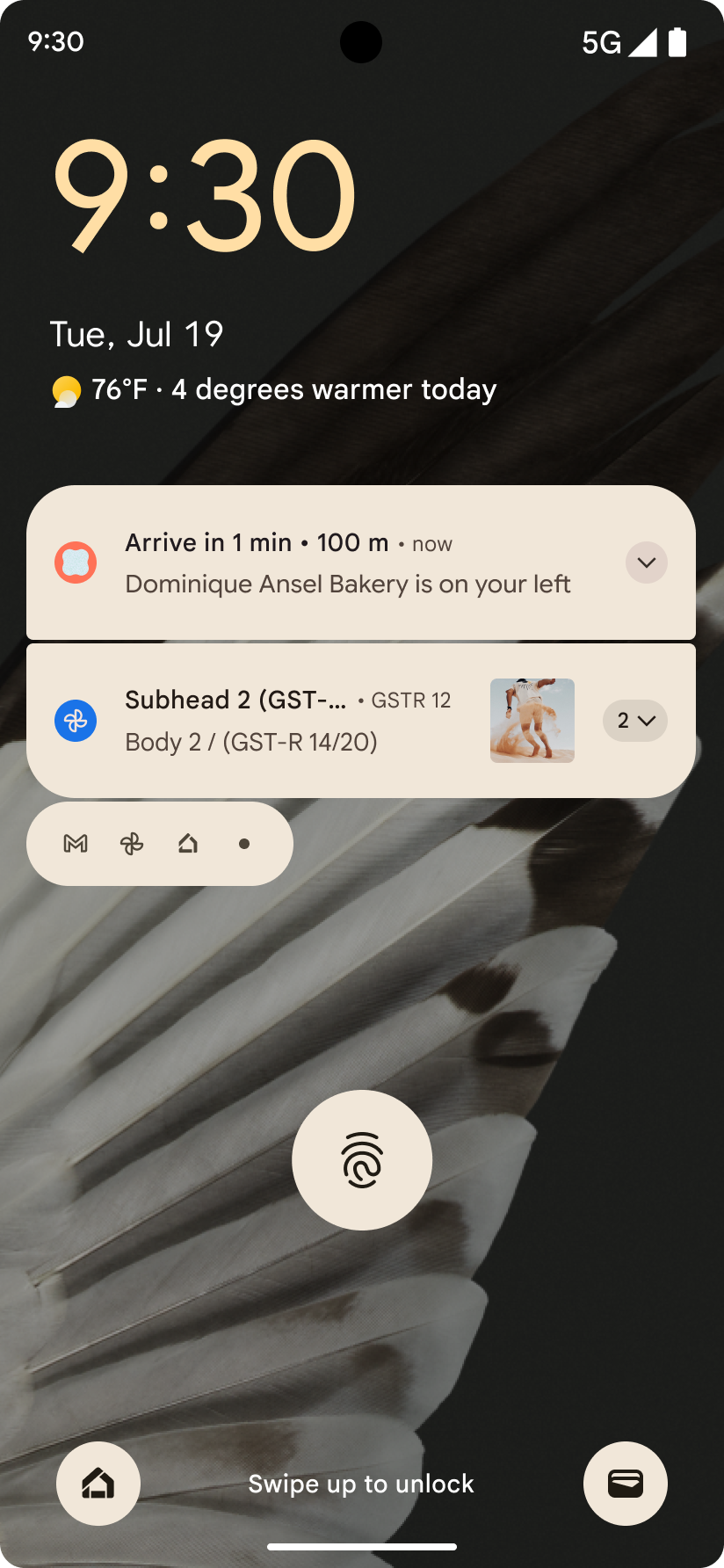
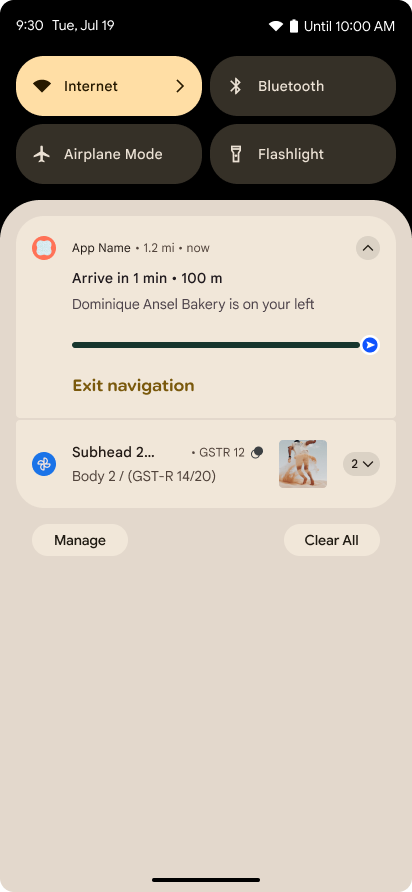
يقدّم الإصدار 16 من نظام التشغيل Android إشعارات تركّز على مستوى التقدّم لمساعدة المستخدمين في تتبُّع الرحلات التي يبدأها المستخدمون من البداية إلى النهاية بسلاسة.
Notification.ProgressStyle هو أسلوب إشعار
جديد يتيح لك إنشاء إشعارات تركّز على مستوى التقدّم. تشمل حالات الاستخدام الرئيسية
خدمات النقل المشترك والتوصيل والملاحة. ضمن Notification.ProgressStyle
الفئة، يمكنك الإشارة إلى الحالات والمحطّات الرئيسية في رحلة المستخدِم باستخدام
النقاط والشريح.
To learn more, see the Progress-centric notifications documentation page.
تعديلات على ميزة "إيماءة إظهار شاشة الرجوع"
Android 16 adds new APIs to help you enable predictive back system animations in
gesture navigation such as the back-to-home animation. Registering the
onBackInvokedCallback with the new
PRIORITY_SYSTEM_NAVIGATION_OBSERVER allows your app to
receive the regular onBackInvoked call whenever the
system handles a back navigation without impacting the normal back navigation
flow.
Android 16 additionally adds the
finishAndRemoveTaskCallback() and
moveTaskToBackCallback. By registering these callbacks
with the OnBackInvokedDispatcher, the system can trigger
specific behaviors and play corresponding ahead-of-time animations when the back
gesture is invoked.
تجاوب لمسي أكثر ثراءً
Android has exposed control over the haptic actuator ever since its inception.
Android 11 added support for more complex haptic effects that more advanced
actuators could support through
VibrationEffect.Compositions of device-defined semantic
primitives.
Android 16 adds haptic APIs that let apps define the amplitude and frequency curves of a haptic effect while abstracting away differences between device capabilities.
إنتاجية المطوّرين وأدواتهم
على الرغم من أنّ معظم جهودنا لتحسين إنتاجيتك تتمحور حول أدوات مثل استوديو Android وJetpack Compose ومكتبات Android Jetpack، فإنّنا نبحث دائمًا عن طرق في النظام الأساسي لمساعدتك في تحقيق رؤيتك.
التعامل مع محتوى الخلفيات المتحركة
In Android 16, the live wallpaper framework is gaining a new content API to
address the challenges of dynamic, user-driven wallpapers. Currently, live
wallpapers incorporating user-provided content require complex, service-specific
implementations. Android 16 introduces
WallpaperDescription and
WallpaperInstance. WallpaperDescription lets you
identify distinct instances of a live wallpaper from the same service. For
example, a wallpaper that has instances on both the home screen and on the lock
screen may have unique content in both places. The wallpaper picker and
WallpaperManager use this metadata to better present
wallpapers to users, streamlining the process for you to create diverse and
personalized live wallpaper experiences.
الأداء والبطارية
يقدّم Android 16 واجهات برمجة تطبيقات تساعد في جمع إحصاءات حول تطبيقاتك.
تحديد المواصفات الشخصية لصاحب البيانات من خلال النظام
تم إضافةProfilingManager في Android 15، ما يتيح للتطبيقات طلب جمع بيانات الأداء باستخدام Perfetto على الأجهزة العامة في الميدان.
ومع ذلك، بما أنّه يجب بدء عملية وضع هذه الملفات الشخصية من التطبيق، سيكون من الصعب أو من المستحيل على التطبيقات تسجيل مسارات الأداء الحرجة، مثل عمليات بدء التشغيل أو أخطاء ANR.
للمساعدة في ذلك، يقدّم نظام التشغيل Android 16 ميزة "الملف الشخصي الذي يبدأه النظام" لتطبيق
ProfilingManager. يمكن للتطبيقات تسجيل اهتمامها بتلقّي عمليات تتبُّع لعوامل بدء محدّدة
مثل بدء التشغيل البارد reportFullyDrawn
أو أخطاء ANR، ثم يبدأ النظام عملية تتبُّع ويوقفها نيابةً عن التطبيق. بعد اكتمال التتبُّع، يتم إرسال النتائج إلى دليل بيانات التطبيق.
بدء المكوّن في ApplicationStartInfo
تم إضافةApplicationStartInfo في الإصدار
15 من Android، ما يتيح للتطبيق الاطّلاع على أسباب
بدء العملية ونوع البدء وأوقات البدء والحدّ من السرعة وغيرها من بيانات التشخيص مفيدة. يضيف الإصدار 16 من Android رمزًا برمجيًا هو
getStartComponent()
لتمييز نوع المكوّن الذي بدأ عملية التشغيل، ما قد يكون مفيدًا في
تحسين عملية بدء تشغيل تطبيقك.
تحسين فحص المهام
The JobScheduler#getPendingJobReason() API returns a reason why a job
might be pending. However, a job might be pending for multiple reasons.
In Android 16, we are introducing a new API
JobScheduler#getPendingJobReasons(int jobId), which returns multiple
reasons why a job is pending, due to both explicit constraints set by the
developer and implicit constraints set by the system.
We're also introducing
JobScheduler#getPendingJobReasonsHistory(int jobId), which returns a list
of the most recent constraint changes.
We recommend using the API to help you debug why your jobs may not be executing, especially if you're seeing reduced success rates of certain tasks or have bugs around latency of certain job completion. For example, updating widgets in the background failed to occur or prefetch job failed to be called prior to app start.
This can also better help you understand if certain jobs are not completing due to system defined constraints versus explicitly set constraints.
معدّل التحديث التكيّفي
Adaptive refresh rate (ARR), introduced in Android 15, enables the display refresh rate on supported hardware to adapt to the content frame rate using discrete VSync steps. This reduces power consumption while eliminating the need for potentially jank-inducing mode-switching.
Android 16 introduces hasArrSupport() and
getSuggestedFrameRate(int) while restoring
getSupportedRefreshRates() to make it easier for your apps to take
advantage of ARR. RecyclerView
1.4 internally supports ARR when it is settling from a fling or
smooth scroll, and we're continuing our work to add ARR
support into more Jetpack libraries. This frame rate article covers
many of the APIs you can use to set the frame rate so that your app can directly
use ARR.
واجهات برمجة التطبيقات الخاصة بالقدرة الاحتياطية في إطار عمل ADPF
The SystemHealthManager introduces the
getCpuHeadroom and
getGpuHeadroom APIs, designed to provide games and
resource-intensive apps with estimates of available CPU and GPU resources. These
methods offer a way for you to gauge how your app or game can best improve
system health, particularly when used in conjunction with other Android Dynamic
Performance Framework (ADPF) APIs that detect thermal
throttling.
By using CpuHeadroomParams and
GpuHeadroomParams on supported devices, you can
customize the time window used to compute the headroom and select between
average or minimum resource availability. This can help you reduce your CPU or
GPU resource usage accordingly, leading to better user experiences and improved
battery life.
تسهيل الاستخدام
يضيف Android 16 واجهات برمجة تطبيقات وميزات جديدة لتسهيل الاستخدام يمكن أن تساعدك في إتاحة تطبيقك لكل مستخدم.
واجهات برمجة تطبيقات محسَّنة لتسهيل الاستخدام
Android 16 adds additional APIs to enhance UI semantics that help improve consistency for users that rely on accessibility services, such as TalkBack.
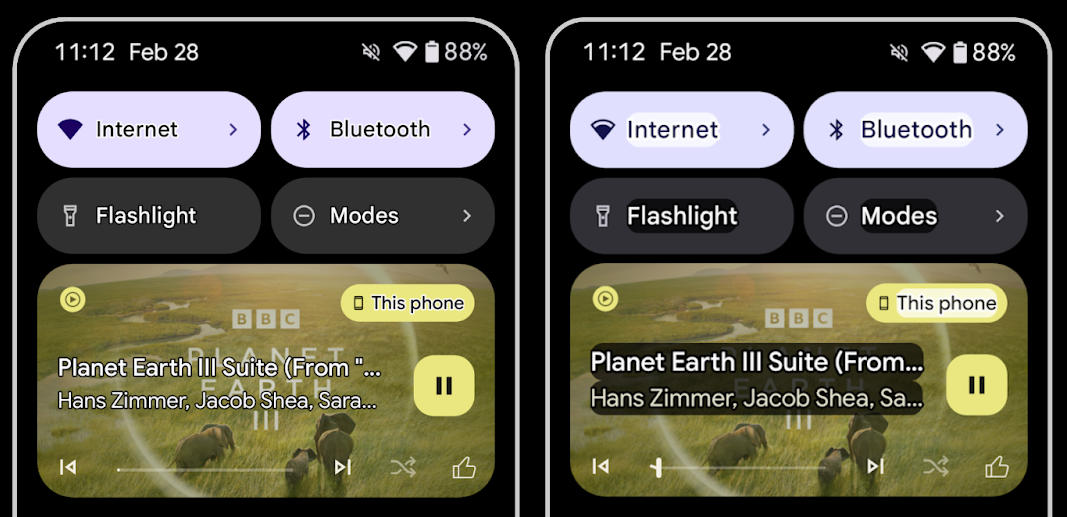
Outline text for maximum text contrast
Users with low vision often have reduced contrast sensitivity, making it challenging to distinguish objects from their backgrounds. To help these users, Android 16 introduces outline text, replacing high contrast text, which draws a larger contrasting area around text to greatly improve legibility.
Android 16 contains new AccessibilityManager APIs to let
your apps check or register a listener to
see if this mode is enabled. This is primarily for UI Toolkits like Compose to
offer a similar visual experience. If you maintain a UI Toolkit library or your
app performs custom text rendering that bypasses the
android.text.Layout class then you can use this to know
when outline text is enabled.
Duration added to TtsSpan
Android 16 extends TtsSpan with a TYPE_DURATION,
consisting of ARG_HOURS, ARG_MINUTES,
and ARG_SECONDS. This lets you directly annotate time
duration, ensuring accurate and consistent text-to-speech output with services
like TalkBack.
Support elements with multiple labels
Android currently allows UI elements to derive their accessibility label from
another, and now offers the ability for multiple labels to be associated, a
common scenario in web content. By introducing a list-based API within
AccessibilityNodeInfo, Android can directly support these
multi-label relationships. As part of this change, we've deprecated
AccessibilityNodeInfo#setLabeledBy and
#getLabeledBy in favor of
#addLabeledBy, #removeLabeledBy, and
#getLabeledByList.
Improved support for expandable elements
Android 16 adds accessibility APIs that allow you to convey the expanded or
collapsed state of interactive elements, such as menus and expandable lists. By
setting the expanded state using setExpandedState and
dispatching TYPE_WINDOW_CONTENT_CHANGED AccessibilityEvents
with a CONTENT_CHANGE_TYPE_EXPANDED content change type,
you can ensure that screen readers like TalkBack announce
state changes, providing a more intuitive and inclusive user experience.
Indeterminate ProgressBars
Android 16 adds RANGE_TYPE_INDETERMINATE, giving a way for
you to expose RangeInfo for both determinate and
indeterminate ProgressBar widgets, allowing services like
TalkBack to more consistently provide feedback for progress
indicators.
Tri-state CheckBox
The new AccessibilityNodeInfo
getChecked and setChecked(int)
methods in Android 16 now support a "partially checked" state in addition to
"checked" and "unchecked." This replaces the deprecated boolean
isChecked and setChecked(boolean).
Supplemental descriptions
When an accessibility service describes a ViewGroup, it
combines content labels from its child views. If you provide a
contentDescription for the ViewGroup, accessibility services assume you are
also overriding the description of non-focusable child views. This can be
problematic if you want to label things like a drop-down (for example, "Font
Family") while preserving the current selection for accessibility (for example,
"Roboto"). Android 16 adds setSupplementalDescription so
you can provide text that provides information about a ViewGroup without
overriding information from its children.
Required form fields
Android 16 adds setFieldRequired to
AccessibilityNodeInfo so apps can tell an accessibility
service that input to a form field is required. This is an important scenario
for users filling out many types of forms, even things as simple as a required
terms and conditions checkbox, helping users to consistently identify and
quickly navigate between required fields.
استخدام الهاتف كميكروفون لإدخال الصوت أثناء المكالمات الصوتية باستخدام سماعات الأذن الطبية المزودة بتقنية LE Audio
Android 16 adds the capability for users of LE Audio hearing aids to switch between the built-in microphones on the hearing aids and the microphone on their phone for voice calls. This can be helpful in noisy environments or other situations where the hearing aid's microphones might not perform well.
عناصر التحكّم في مستوى الصوت المحيط لسماعات الأذن الطبية المتوافقة مع LE Audio
Android 16 adds the capability for users of LE Audio hearing aids to adjust the volume of ambient sound that is picked up by the hearing aid's microphones. This can be helpful in situations where background noise is too loud or too quiet.
الكاميرا
يوفّر Android 16 دعمًا محسّنًا لمستخدمي الكاميرات الاحترافية، ما يتيح التعريض التلقائي المختلط مع تعديلات دقيقة لدرجة حرارة الألوان ودرجة اللون. يساعد مؤشر "الوضع الليلي" الجديد تطبيقك في معرفة وقت التبديل إلى جلسة كاميرا في "الوضع الليلي" والتبديل منها. تسهّل إجراءات Intent الجديدة التقاط الصور المتحركة،
ونواصل تحسين صور UltraHDR من خلال إتاحة ترميز HEIC
والمَعلمات الجديدة من مسودة معيار ISO 21496-1.
التعرّض التلقائي المختلط للضوء
يضيف نظام التشغيل Android 16 أوضاعًا جديدة مختلطة للتعريض التلقائي إلى Camera2، ما يتيح لك التحكّم يدويًا في جوانب معيّنة من التعريض مع السماح لخوارزمية التعريض التلقائي (AE) بالتعامل مع الباقي. يمكنك التحكّم في درجة ISO + التعريض التلقائي ووقت التعريض + التعريض التلقائي، ما يوفّر مزيدًا من المرونة مقارنةً بالنهج الحالي الذي يتيح لك التحكّم يدوياً بالكامل أو الاعتماد بالكامل على التعريض التلقائي.
fun setISOPriority() {
    // ... (Your existing code before the snippet) ...

    val availablePriorityModes = mStaticInfo.characteristics.get(
        CameraCharacteristics.CONTROL_AE_AVAILABLE_PRIORITY_MODES
    )

    // ... (Your existing code between the snippets) ...

    // Turn on AE mode to set priority mode
    reqBuilder.set(
        CaptureRequest.CONTROL_AE_MODE,
        CameraMetadata.CONTROL_AE_MODE_ON
    )
    reqBuilder.set(
        CaptureRequest.CONTROL_AE_PRIORITY_MODE,
        CameraMetadata.CONTROL_AE_PRIORITY_MODE_SENSOR_SENSITIVITY_PRIORITY
    )
    reqBuilder.set(
        CaptureRequest.SENSOR_SENSITIVITY,
        TEST_SENSITIVITY_VALUE
    )
    val request: CaptureRequest = reqBuilder.build()

    // ... (Your existing code after the snippet) ...
}
تعديلات دقيقة على درجة حرارة الألوان وتدرّجها
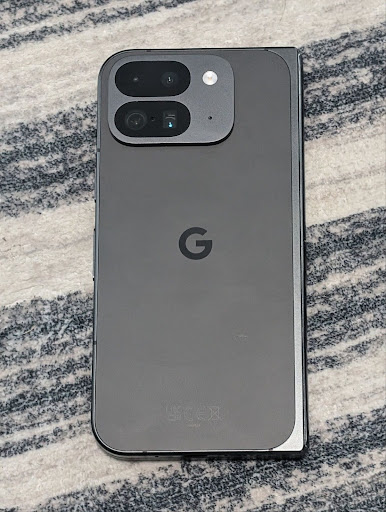
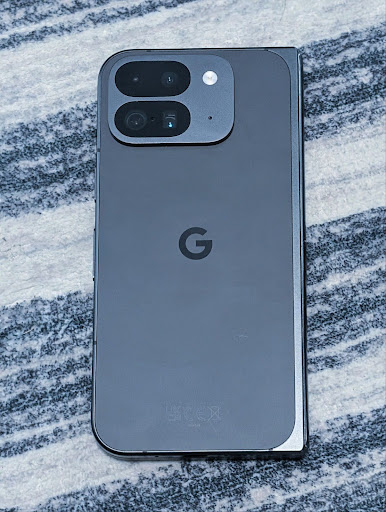
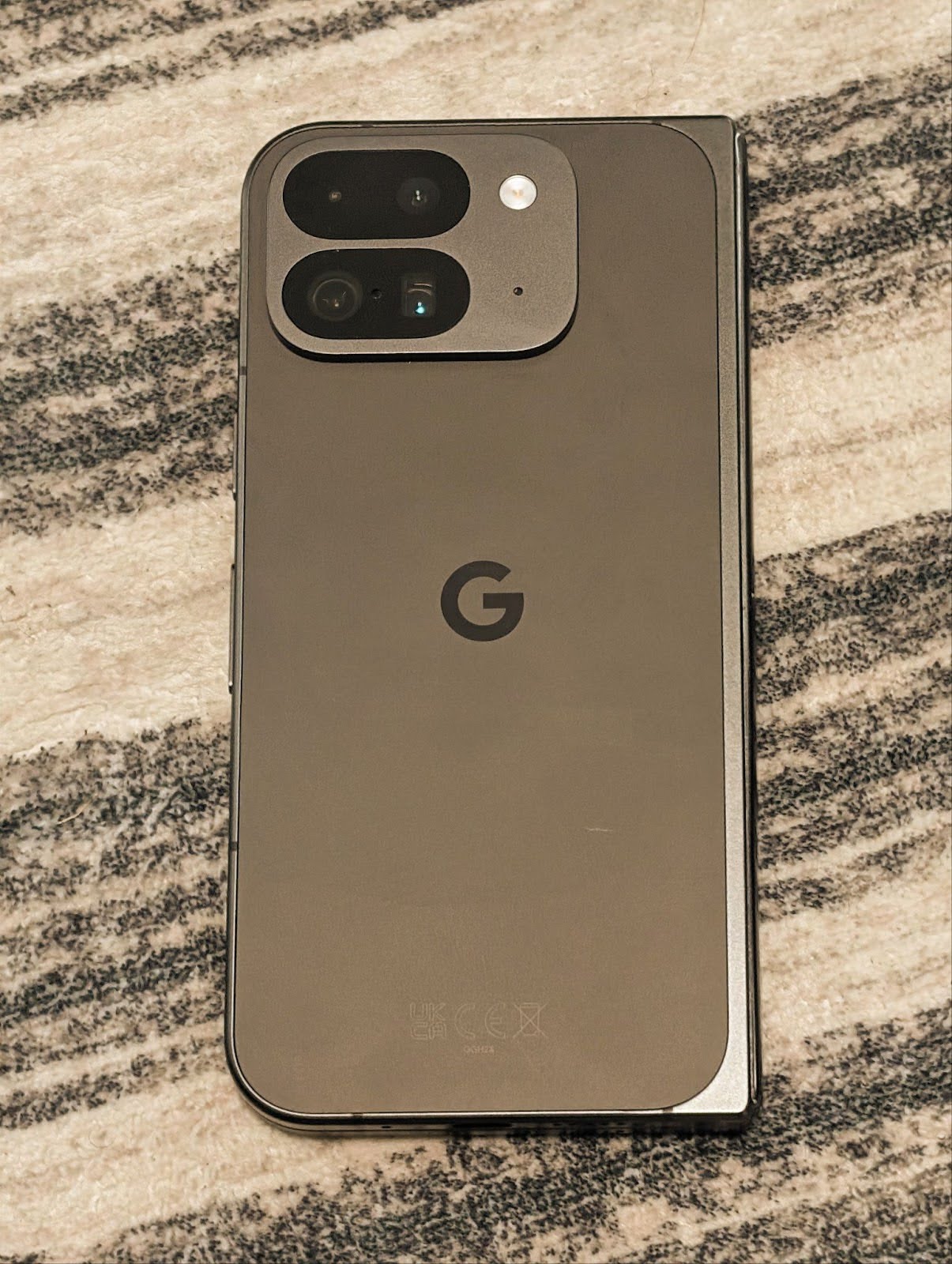
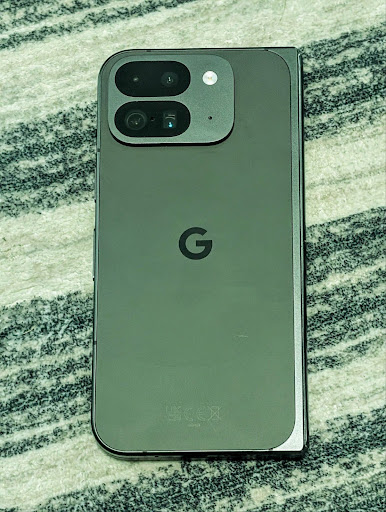
Android 16 adds camera support for fine color temperature and tint adjustments
to better support professional video recording applications. In previous Android
versions, you could control white balance settings through
CONTROL_AWB_MODE, which contains options limited to a
preset list, such as Incandescent,
Cloudy, and Twilight. The
COLOR_CORRECTION_MODE_CCT enables the use of
COLOR_CORRECTION_COLOR_TEMPERATURE and
COLOR_CORRECTION_COLOR_TINT for precise adjustments of
white balance based on the correlated color temperature.
fun setCCT() {
    // ... (Your existing code before this point) ...

    val colorTemperatureRange: Range<Int> =
        mStaticInfo.characteristics[CameraCharacteristics.COLOR_CORRECTION_COLOR_TEMPERATURE_RANGE]

    // Set to manual mode to enable CCT mode
    reqBuilder[CaptureRequest.CONTROL_AWB_MODE] = CameraMetadata.CONTROL_AWB_MODE_OFF
    reqBuilder[CaptureRequest.COLOR_CORRECTION_MODE] = CameraMetadata.COLOR_CORRECTION_MODE_CCT
    reqBuilder[CaptureRequest.COLOR_CORRECTION_COLOR_TEMPERATURE] = 5000
    reqBuilder[CaptureRequest.COLOR_CORRECTION_COLOR_TINT] = 30

    val request: CaptureRequest = reqBuilder.build()

    // ... (Your existing code after this point) ...
}
The following examples show how a photo would look after applying different color temperature and tint adjustments:
رصد المشاهد في "الوضع الليلي" للكاميرا
To help your app know when to switch to and from a night mode camera session,
Android 16 adds EXTENSION_NIGHT_MODE_INDICATOR. If
supported, it's available in the CaptureResult within
Camera2.
This is the API we briefly mentioned as coming soon in the How Instagram enabled users to take stunning low light photos blog post. That post is a practical guide on how to implement night mode together with a case study that links higher-quality in-app night mode photos with an increase in the number of photos shared from the in-app camera.
إجراءات intent لالتقاط الصور الحيّة
يضيف نظام التشغيل Android 16 إجراءات Intent عادية، وهي
ACTION_MOTION_PHOTO_CAPTURE و
ACTION_MOTION_PHOTO_CAPTURE_SECURE، تطلب من
تطبيق الكاميرا التقاط صورة متحركة وإعادتها.
يجب إدخال EXTRA_OUTPUT إضافي للتحكّم في
مكان كتابة الصورة، أو Uri من خلال
Intent.setClipData(ClipData). إذا لم تضبط
ClipData، سيتم نسخها إليك عند الاتصال بالرقم
Context.startActivity(Intent).
تحسينات الصور بدقة HDR فائقة
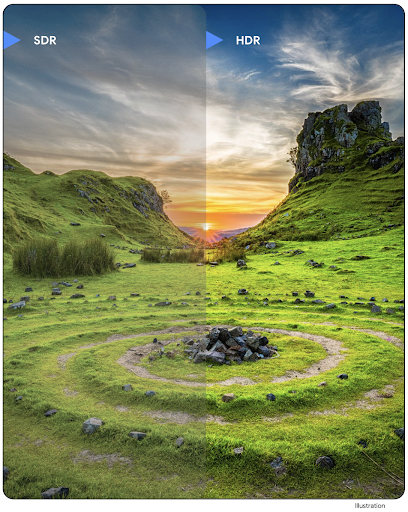
يواصل نظام Android 16 جهودنا لتوفير جودة صور مذهلة باستخدام صور UltraHDR. تمت إضافة إمكانية استخدام صور UltraHDR بتنسيق ملف HEIC. ستحصل هذه الصور على نوع ImageFormat
HEIC_ULTRAHDR وستحتوي على خريطة مكاسب مضمّنة مشابهة
لتنسيق UltraHDR JPEG الحالي. نحن نعمل أيضًا على إتاحة تنسيق AVIF لميزة UltraHDR، لذا يُرجى متابعتنا باستمرار.
بالإضافة إلى ذلك، ينفِّذ الإصدار 16 من نظام التشغيل Android مَعلمات إضافية في ميزة "دقة HDR الفائقة" من مسودة معيار ISO 21496-1، بما في ذلك إمكانية الحصول على مساحة الألوان التي يجب تطبيق العمليات الحسابية لخريطة الكسب فيها وضبطها، بالإضافة إلى إتاحة الصور الأساسية المُشفَّرة بتقنية النطاق العالي الديناميكية (HDR) مع خرائط الكسب بتقنية النطاق العادي الديناميكية (SDR).
الرسومات
يتضمّن Android 16 أحدث التحسينات في الرسومات، مثل التأثيرات الرسومية المخصّصة باستخدام AGSL.
تأثيرات رسومية مخصّصة باستخدام AGSL
Android 16 adds RuntimeColorFilter and
RuntimeXfermode, allowing you to author complex effects like
Threshold, Sepia, and Hue Saturation and apply them to draw calls. Since Android
13, you've been able to use AGSL to create custom
RuntimeShaders that extend Shader. The new API
mirrors this, adding an AGSL-powered RuntimeColorFilter that
extends ColorFilter, and a Xfermode effect that
lets you implement AGSL-based custom compositing and blending between source and
destination pixels.
private val thresholdEffectString = """
    uniform half threshold;

    half4 main(half4 c) {
        half luminosity = dot(c.rgb, half3(0.2126, 0.7152, 0.0722));
        half bw = step(threshold, luminosity);
        return bw.xxx1 * c.a;
    }"""

fun setCustomColorFilter(paint: Paint) {
   val filter = RuntimeColorFilter(thresholdEffectString)
   filter.setFloatUniform(0.5);
   paint.colorFilter = filter
}
إمكانية الاتصال
يحدّث Android 16 النظام الأساسي لمنح تطبيقك إمكانية الوصول إلى أحدث التطوّرات في تكنولوجيات الاتصال والتكنولوجيات اللاسلكية.
تحديد النطاق باستخدام ميزات الأمان المحسّنة
Android 16 adds support for robust security features in Wi-Fi location on supported devices with Wi-Fi 6's 802.11az, allowing apps to combine the higher accuracy, greater scalability, and dynamic scheduling of the protocol with security enhancements including AES-256-based encryption and protection against MITM attacks. This allows it to be used more safely in proximity use cases, such as unlocking a laptop or a vehicle door. 802.11az is integrated with the Wi-Fi 6 standard, leveraging its infrastructure and capabilities for wider adoption and easier deployment.
واجهات برمجة التطبيقات العامة لتحديد النطاق
Android 16 includes the new RangingManager, which provides
ways to determine the distance and angle on supported hardware between the local
device and a remote device. RangingManager supports the usage of a variety of
ranging technologies such as BLE channel sounding, BLE RSSI-based ranging, Ultra
Wideband, and Wi-Fi round trip time.
توفّر الأجهزة في "أداة إدارة الأجهزة المصاحبة"
In Android 16, new APIs are being introduced for binding your companion app
service. Service will be bound when BLE is in range and Bluetooth is connected
and service will be unbound when BLE is out of range or Bluetooth is
disconnected. App will receives a new
'onDevicePresenceEvent()' callback based on various
of DevicePresenceEvent.
More details can be found in
'startObservingDevicePresence(ObservingDevicePresenceRequest)'.
الوسائط
يتضمّن Android 16 مجموعة متنوعة من الميزات التي تحسّن تجربة الوسائط.
تحسينات على "أداة اختيار الصور"
The photo picker provides a safe, built-in way for users to grant your app access to selected images and videos from both local and cloud storage, instead of their entire media library. Using a combination of Modular System Components through Google System Updates and Google Play services, it's supported back to Android 4.4 (API level 19). Integration requires just a few lines of code with the associated Android Jetpack library.
Android 16 includes the following improvements to the photo picker:
- Embedded photo picker: New APIs that enable apps to embed the photo picker into their view hierarchy. This allows it to feel like a more integrated part of the app while still leveraging the process isolation that allows users to select media without the app needing overly broad permissions. To maximize compatibility across platform versions and simplify your integration, you'll want to use the forthcoming Android Jetpack library if you want to integrate the embedded photo picker.
- Cloud search in photo picker: New APIs that enable searching from the cloud media provider for the Android photo picker. Search functionality in the photo picker is coming soon.
Advanced Professional Video
يتيح نظام التشغيل Android 16 استخدام ترميز Advanced Professional Video (APV) المصمّم لاستخدامه في تسجيل الفيديوهات بجودة عالية على المستوى الاحترافي وعمليات ما بعد الإنتاج.
يتضمن معيار ترميز APV الميزات التالية:
- جودة فيديو بدون فقدان ملحوظ للبيانات (قريبة من جودة الفيديو الأصلي)
- ترميز داخل اللقطة فقط بدرجة منخفضة من التعقيد ومع معدل نقل بيانات مرتفع (بدون توقّع ملف هبوط حبيبات البكسل) لدعم سير عمل التعديل بشكل أفضل
- إتاحة نطاق معدل نقل بيانات مرتفع يصل إلى بضعة غيغابايت في الثانية للمحتوى بدقة 2K و4K و8K ، وذلك من خلال مخطّط ترميز معلومات منخفض الوزن
- تقسيم الإطارات للمحتوى الغامر وتفعيل الترميز والترميز الثنائي
- إتاحة تنسيقات مختلفة لتحليل الألوان ودرجات البت
- إتاحة عمليات فك ترميز وإعادة ترميز متعددة بدون تعريض الجودة المرئية للتدهّور الشديد
- إتاحة الفيديوهات المتعدّدة وأنواع الفيديوهات المساعِدة، مثل الفيديوهات التي تُظهر العمق والصور المموّهة والمعاينة
- التوافق مع تقنية HDR10/10+ والبيانات الوصفية التي يحدّدها المستخدم
يتم توفير تنفيذ مرجعي لـ APV من خلال مشروع OpenAPV. سيتيح نظام Android 16 استخدام الملف الشخصي APV 422-10 الذي يقدّم تحليل ألوان YUV 422 بالإضافة إلى ترميز 10 بت ومعدّلات نقل البيانات المستهدَفة التي تصل إلى 2 غيغابايت في الثانية.
الخصوصية
يتضمّن Android 16 مجموعة متنوعة من الميزات التي تساعد مطوّري التطبيقات في حماية خصوصية المستخدمين.
تحديثات Health Connect
Health Connect adds ACTIVITY_INTENSITY, a data type defined according to World
Health Organization guidelines around moderate and vigorous activity. Each
record requires the start time, the end time, and whether the activity intensity
is moderate or vigorous.
Health Connect also contains updated APIs supporting medical records. This allows apps to read and write medical records in FHIR format with explicit user consent.
"مبادرة حماية الخصوصية" على Android
Android 16 incorporates the latest version of the Privacy Sandbox on Android, part of our ongoing work to develop technologies where users know their privacy is protected. Our website has more about the Privacy Sandbox on Android developer beta program to help you get started. Check out the SDK Runtime which allows SDKs to run in a dedicated runtime environment separate from the app they are serving, providing stronger safeguards around user data collection and sharing.
الأمان
يتضمّن Android 16 ميزات تساعدك في تعزيز أمان تطبيقك وحماية بياناته.
واجهة برمجة التطبيقات لمشاركة المفاتيح
Android 16 adds APIs that support sharing access to
Android Keystore keys with other apps. The new
KeyStoreManager class supports
granting and revoking access to keys
by app uid, and includes an API for apps to access shared
keys.
أشكال الأجهزة
يوفّر Android 16 لتطبيقاتك الدعم اللازم للاستفادة إلى أقصى حد من أشكال أجهزة Android.
إطار عمل موحّد لجودة الصورة والصوت على أجهزة التلفزيون
The new MediaQuality
package in Android 16 exposes
a set of standardized APIs for access to audio and picture profiles and
hardware-related settings. This allows streaming apps to query profiles and
apply them to media dynamically:
- Movies mastered with a wider dynamic range require greater color accuracy to see subtle details in shadows and adjust to ambient light, so a profile that prefers color accuracy over brightness may be appropriate.
- Live sporting events are often mastered with a narrow dynamic range, but are often watched in daylight, so a profile that preferences brightness over color accuracy can give better results.
- Fully interactive content wants minimal processing to reduce latency, and wants higher frame rates, which is why many TV's ship with a game profile.
The API allows apps to switch between profiles and users to enjoy tuning supported TVs to best suit their content.
التوافق مع أسواق عالمية
يضيف Android 16 ميزات وإمكانات تكمّل تجربة المستخدم عند استخدام جهاز بلغات مختلفة.
نص عمودي
يضيف نظام Android 16 دعمًا من المستوى الأدنى لعرض النص وقياسه عموديًا بهدف
توفير دعم أساسي للكتابة العمودية لمطوّري المكتبات. ويفيد ذلك
بشكل خاص في اللغات التي تستخدم عادةً أنظمة كتابة عمودية، مثل اليابانية. تمت إضافة علامة جديدة،
VERTICAL_TEXT_FLAG،
إلى فئة Paint. عند ضبط
هذا الإعداد باستخدام
Paint.setFlags، ستحدّد واجهات برمجة التطبيقات
لقياس النصوص في Paint التقدّم في الرسم بالاتجاه العمودي بدلاً من التقدّم في الرسم بالاتجاه الأفقي، وسيرسم Canvas النص
بالاتجاه العمودي.
val text = "「春は、曙。」"
Box(
    Modifier.padding(innerPadding).background(Color.White).fillMaxSize().drawWithContent {
        drawIntoCanvas { canvas ->
            val paint = Paint().apply { textSize = 64.sp.toPx() }
            // Draw text vertically
            paint.flags = paint.flags or VERTICAL_TEXT_FLAG
            val height = paint.measureText(text)
            canvas.nativeCanvas.drawText(
                text,
                0,
                text.length,
                size.width / 2,
                (size.height - height) / 2,
                paint
            )
        }
    }
) {}
تخصيص نظام القياس
Users can now customize their measurement system in regional preferences within
Settings. The user preference is included as part of the locale code, so you can
register a BroadcastReceiver on
ACTION_LOCALE_CHANGED to handle locale configuration changes when
regional preferences change.
Using formatters can help match the local experience. For example, "0.5 in" in English (United States), is "12,7 mm" for a user who has set their phone to English (Denmark) or who uses their phone in English (United States) with the metric system as the measurement system preference.
To find these settings, open the Settings app and navigate to System > Languages & region.