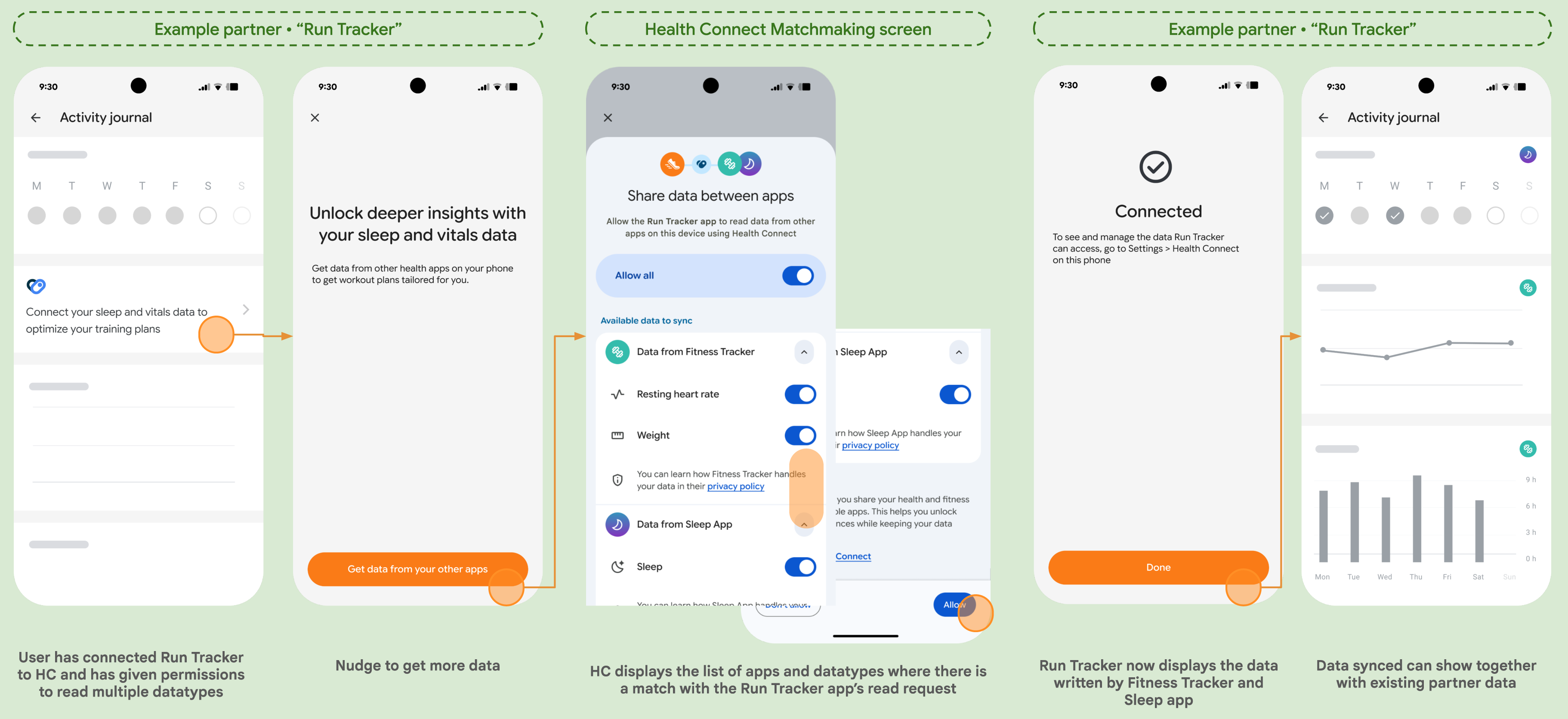
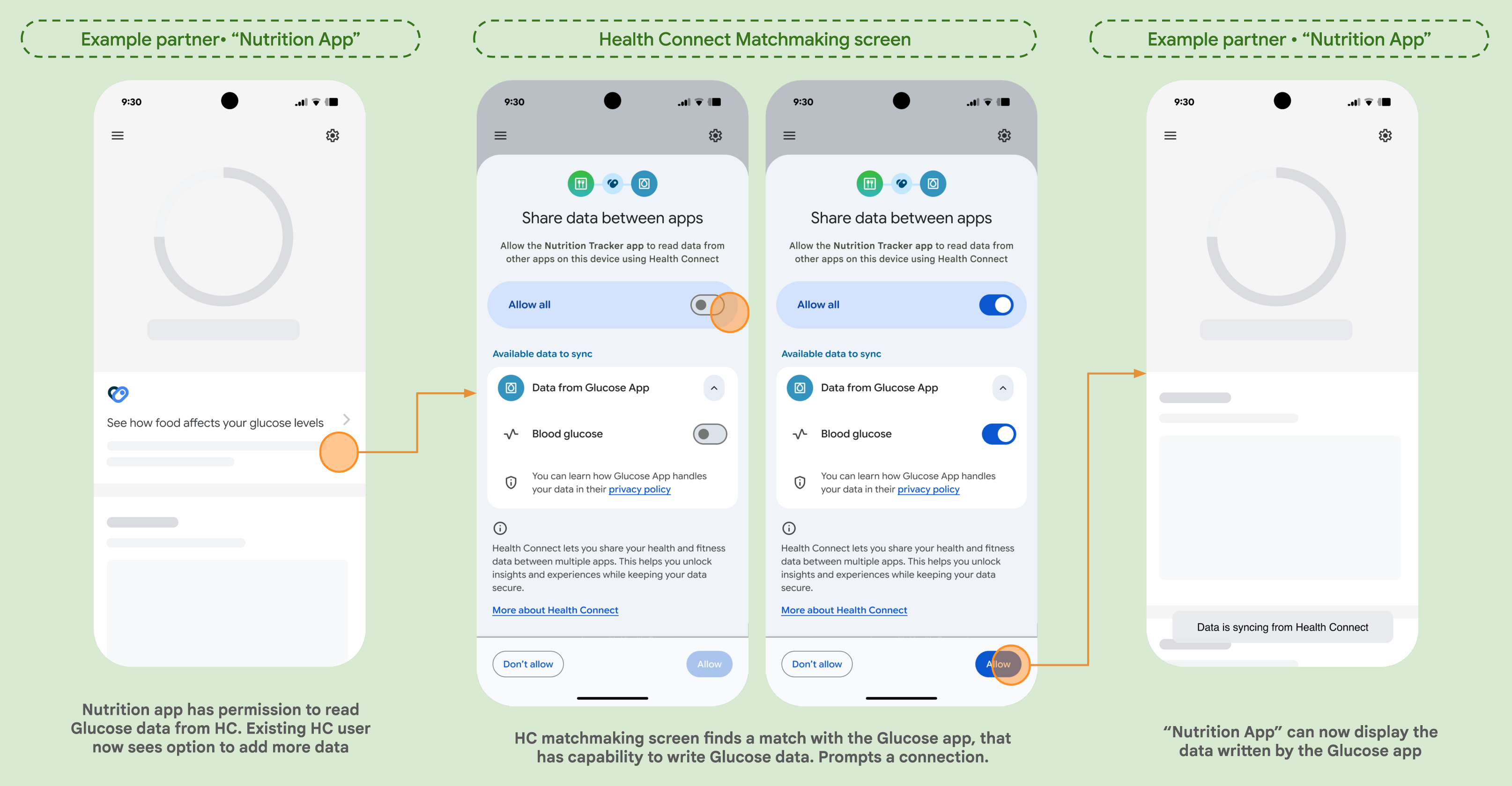
A guide to the Health Connect Matchmaking API.
Overview
The Matchmaking API allows your app to discover other apps and devices that can write health data that your app has permission to read. This helps users connect their favorite data sources to your app with less friction.
The Matchmaking screen discovers Health Connect-compatible apps and devices. It then cross-references your app's required read permissions with the write capabilities of those apps and devices. The screen displays apps and devices that have declared, but not yet granted, write permissions for at least one of the specified record types that your app is permitted to read.
Before you begin
This guide assumes you have already
configured Health Connect in your app
and have an instance of HealthConnectClient available.
Check Health Connect availability
Before attempting to use Health Connect, your app should verify that Health Connect is available on the user's device. Health Connect may not be installed on the user's device, or it could be disabled.
Use HealthConnectClient.getSdkStatus() to check for
availability. If Health Connect is not available, prompt the user to
install or update Health Connect from the Google Play Store.
Check feature availability
To determine whether a user's device supports matchmaking on Health Connect,
check for the availability of FEATURE_MATCHMAKING:
if (healthConnectClient
    .features
    .getFeatureStatus(
    HealthConnectFeatures.FEATURE_MATCHMAKING
    ) == HealthConnectFeatures.FEATURE_STATUS_AVAILABLE) {

// Feature is available
} else {
// Feature isn't available
}
Implementation
The matchmaking flow is launched using a MatchmakingRequest. This request
defines which record types you want your app to collect, and lets you include or
exclude specific data sources such as apps or devices:
recordTypes: A set ofRecordclasses such asStepsRecord::class. If empty, the flow considers all record types your app has read permissions for.includedDataSources: A set ofDataOriginobjects to exclusively include.excludedDataSources: A set ofDataOriginobjects to exclude.
Follow these steps to integrate the Matchmaking API into your application.
Check if matchmaking is possible
Before showing a matchmaking entry point, use
checkIfMatchmakingIsPossible() to determine if there are any relevant
matching apps or devices for the requested record types:
suspend fun checkMatchmakingPossible(healthConnectClient: HealthConnectClient) {
    val request = MatchmakingRequest(recordTypes = setOf(StepsRecord::class))
    val response = healthConnectClient.checkIfMatchmakingIsPossible(request)

    if (response.isMatchmakingPossible) {
        // Relevant apps or devices found. Show entry point to launch flow.
    } else {
        // Handle case where no new data sources are available
    }
}
We recommend checking if matchmaking is possible on an ongoing basis.
Users might later install additional apps or connect devices with mutually
compatible data types. A common approach is to check each time your app
starts. If it returns true, show an entry point to launch the matchmaking
flow.
Launch the Matchmaking flow
If matchmaking is possible, use createMatchmakingIntent() to get an Intent
to launch the Health Connect flow, then launch it using the Activity Result
API:
// Create the matchmaking launcher
val matchmakingLauncher = registerForActivityResult(
    ActivityResultContracts.StartActivityForResult()
) { result ->
    if (result.resultCode == Activity.RESULT_OK) {
        // Matchmaking finished successfully.
        // User successfully granted at least one permission.
    } else {
        // User canceled flow or didn't grant permissions.
    }
}

fun launchMatchmaking(healthConnectClient: HealthConnectClient) {
    val request = MatchmakingRequest(recordTypes = setOf(StepsRecord::class))
    val intent = healthConnectClient.createMatchmakingIntent(request)
    matchmakingLauncher.launch(intent)
}
By launching this intent, Health Connect displays a screen where users can see compatible apps and devices, and choose to connect them to share data with your app.