
This guide is designed to help you integrate Google's generative artificial intelligence and machine learning (AI/ML) solutions into your applications. It provides guidance to help you navigate the various artificial intelligence and machine learning solutions available and choose the one that best fits your needs. The goal of this document is to help you determine which tool to use and why, by focusing on your needs and use cases.
To assist you in selecting the most suitable AI/ML solution for your specific requirements, this document includes a solutions guide. By answering a series of questions about your project's goals and constraints, the guide directs you towards the most appropriate tools and technologies.
This guide helps you choose the best AI solution for your app. Consider these factors: the type of data (text, images, audio, video), the task's complexity (simple summarization to complex tasks needing specialized knowledge), and the data size (short inputs versus large documents). This will help you decide between using Gemini Nano on your device or Firebase's cloud-based AI (Gemini Flash or Gemini Pro).
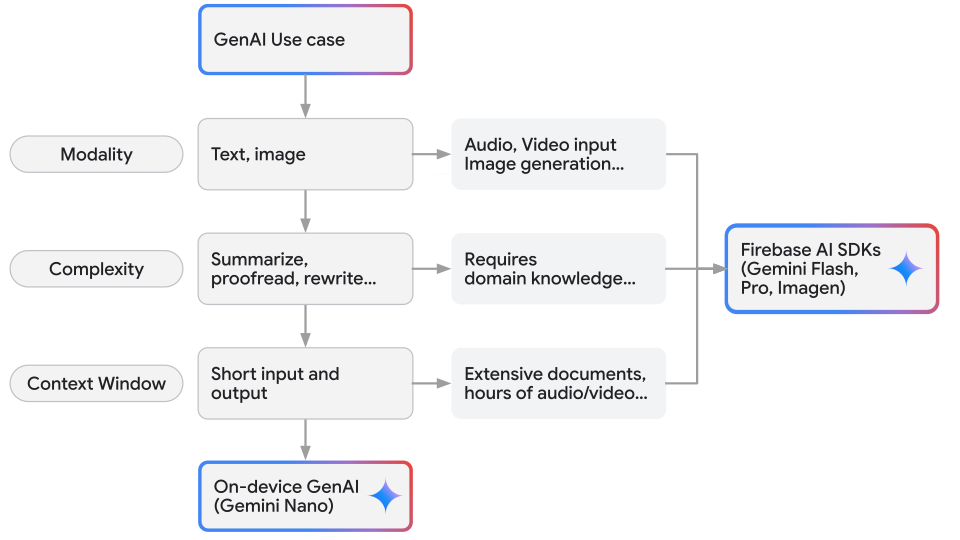
Harness the power of on-device inference
When you're adding AI and ML features to your Android app, you can choose different ways to deliver them – either on the device or using the cloud.
On-device solutions like Gemini Nano deliver results with no additional cost, provide enhanced user privacy, and provide reliable offline functionality because input data is processed locally. These benefits can be critical for certain use cases, like message summarization, making on-device a priority when choosing the right solutions.
Gemini Nano lets you run inference directly on an Android-powered device. If you're working with text, images, or audio, start with ML Kit's GenAI APIs for out-of-the-box solutions. The ML Kit GenAI APIs are powered by Gemini Nano, leveraging AICore as the underlying system service, and are fine-tuned for specific on-device tasks. The ML Kit GenAI APIs are an ideal path to production for your apps due to their higher-level interface and scalability. These APIs allow you to send natural language requests with both text and image inputs, enabling a variety of use cases such as image understanding, short translations, guided summarizations, and more.
For traditional machine learning tasks, you have the flexibility to implement your own custom models. We provide robust tools like ML Kit, MediaPipe, LiteRT, and Google Play delivery features to streamline your development process.
For applications that require highly specialized solutions, you can use your own custom model, such as Gemma or another model that is tailored to your specific use case. Run your model directly on the user's device with LiteRT, which provides pre-designed model architectures for optimized performance.
You can also consider building a hybrid solution by leveraging both on-device and cloud models.
Mobile apps commonly utilize local models for small text data, such as chat conversations or blog articles. However, for larger data sources (like PDFs) or when additional knowledge is required, a cloud-based solution with more powerful Gemini models may be necessary.
Integrate advanced Gemini models
Android developers can integrate Google's advanced generative AI capabilities, including the powerful Gemini Pro and Gemini Flash models, into their applications using the Firebase AI Logic SDK. This SDK is designed for larger data needs and provides expanded capabilities and adaptability by enabling access to these high-performing, multimodal AI models.
With the Firebase AI Logic SDK, developers can make client-side calls to Google's AI models with minimal effort. These models, such as Gemini Pro and Gemini Flash, run inference in the cloud and empower Android apps to process a variety of inputs including image, audio, video, and text. Gemini Pro excels at reasoning over complex problems and analyzing extensive data, while the Gemini Flash series offers superior speed and a context window large enough for most tasks.
When to use traditional machine learning
While generative AI is useful for creating and editing content like text, images, and code, many real-world problems are better solved using traditional Machine Learning (ML) techniques. These established methods excel at tasks involving prediction, classification, detection, and understanding patterns within existing data, often with greater efficiency, lower computational cost, and simpler implementation than generative models.
Traditional ML frameworks offer robust, optimized, and often more practical solutions for applications focused on analyzing input, identifying features, or making predictions based on learned patterns—rather than generating entirely new output. Tools like Google's ML Kit, LiteRT, and MediaPipe provide powerful capabilities tailored for these non-generative use cases, particularly in mobile and edge computing environments.
Kickstart your machine learning integration with ML Kit
ML Kit offers production-ready, mobile-optimized solutions for common machine learning tasks, requiring no prior ML expertise. This easy-to-use mobile SDK brings Google's ML expertise directly to your Android and iOS apps, allowing you to focus on feature development instead of model training and optimization. ML Kit provides prebuilt APIs and ready-to-use models for features like barcode scanning, text recognition (OCR), face detection, image labeling, object detection and tracking, language identification, and smart reply.
These models are typically optimized for on-device execution, ensuring low latency, offline functionality, and enhanced user privacy as data often remains on the device. Choose ML Kit to quickly add established ML features to your mobile app without needing to train models or require generative output. It's ideal for efficiently enhancing apps with "smart" capabilities using Google's optimized models or by deploying custom TensorFlow Lite models.
Get started with our comprehensive guides and documentation at the ML Kit developer site.
Custom ML deployment with LiteRT
For greater control or to deploy your own ML models, use a custom ML stack built on LiteRT and Google Play services. This stack provides the essentials for deploying high-performance ML features. LiteRT is a toolkit optimized for running TensorFlow models efficiently on resource-constrained mobile, embedded, and edge devices, giving you the ability to run significantly smaller and faster models that consume less memory, power, and storage. The LiteRT runtime is highly optimized for various hardware accelerators (GPUs, DSPs, NPUs) on edge devices, enabling low-latency inference.
Choose LiteRT when you need to efficiently deploy trained ML models (commonly for classification, regression, or detection) on devices with limited computational power or battery life, such as smartphones, IoT devices, or microcontrollers. It's the preferred solution for deploying custom or standard predictive models at the edge where speed and resource conservation are paramount.
Learn more about ML deployment with LiteRT.
Build real-time perception into your apps with MediaPipe
MediaPipe provides open-source, cross-platform, and customizable machine learning solutions designed for live and streaming media. Benefit from optimized, prebuilt tools for complex tasks like hand tracking, pose estimation, face mesh detection, and object detection, all enabling high-performance, real-time interaction even on mobile devices.
MediaPipe's graph-based pipelines are highly customizable, allowing you to tailor solutions for Android, iOS, web, desktop, and backend applications. Choose MediaPipe when your application needs to understand and react instantly to live sensor data, especially video streams, for use cases such as gesture recognition, AR effects, fitness tracking, or avatar control—all focused on analyzing and interpreting input.
Explore the solutions and start building with MediaPipe.
Integrate your app with the device assistant
While traditional AI integration focuses on "getting AI into your app," you can also "get your app into AI." By contributing your app's functionality to system AI features, you allow system-level assistants (such as Gemini) to discover and invoke your app's capabilities agentically. AppFunctions is the primary way to achieve this integration, enabling your app to become a participant in the broader Android AI ecosystem. In contrast, when your app hosts in-app agents that need to return interactive UI to users, use the Jetpack Compose A2UI Renderer to display agent-driven interfaces natively.
Choose an approach
When incorporating AI to improve your Android app, you should consider three primary approaches: performing processing on-device, leveraging cloud-based models, or adding your app's functionality to system-level AI. Tools like ML Kit, Gemini Nano, and LiteRT enable on-device capabilities, while the Gemini cloud APIs with Firebase AI Logic provide powerful cloud-based processing. AppFunctions represents a third path, allowing you to "get your app into AI" by making its features agentically available to the system.
Consider these factors when choosing your approach:
| Factor | On-device solutions | Cloud solutions |
|---|---|---|
| Connectivity and offline functionality | Ideal for offline use; functions without a network connection. | Requires a network connection to communicate with remote servers. |
| Data privacy | Processes and stores sensitive data locally on the device. | Data is transmitted to the cloud, requiring trust in provider security. |
| Discoverability and reach | Direct OS integration (AppFunctions) allows assistants to discover features. | Discovery is typically limited to the app's internal UI or specific API integrations. |
| Model capabilities | Optimized for low latency and specific, less intensive tasks. | Powerful models capable of handling high complexity and large inputs. |
| Cost considerations | No direct per-use charges; utilizes existing device hardware. | Typically involves usage-based pricing or ongoing subscription costs. |
| Device resources | Utilizes local storage, RAM, and battery life. | Minimal local impact; heavy lifting is offloaded to the server. |
| Fine-tuning | Limited flexibility; constrained by local hardware capabilities. | Greater flexibility for extensive customization and large-scale tuning. |
| Cross-platform consistency | Availability may vary depending on OS and hardware support. | Consistent experience across any platform with internet access. |
By carefully considering your use case requirements and the available options, you can find the perfect AI/ML solution to enhance your Android app and deliver intelligent and personalized experiences to your users.
Guide to AI/ML solutions
This solutions guide can help you identify the appropriate developer tools for integrating AI/ML technologies into your Android projects.
What is the primary goal of the AI feature?
- A) Generating new content (text, image descriptions), or performing simple text processing (summarizing, proofreading, or rewriting text)? → Go to Generative AI
- B) Analyzing existing data/input for prediction, classification, detection, understanding patterns, or processing real-time streams (like video/audio)? → Go to Traditional ML & Perception
- C) Enhancing your app's functionality to integrate with system AI features (getting your app into AI)? → Go to Getting your app into AI
- D) Rendering dynamic, interactive UI generated by AI agents? → Learn how to Use agents to generate UI
Traditional ML and perception
You need to analyze input, identify features, or make predictions based on learned patterns, rather than generating entirely new output.
What specific task are you performing?
- A) Need quick integration of pre-built, common mobile ML features?
(e.g., barcode scanning, text recognition (OCR), face detection, image
labeling, object detection and tracking, language ID, basic smart reply)
- → Use: ML Kit (Traditional APIs)
- Why: Easiest integration for established mobile ML tasks, often optimized for on-device use (low latency, offline, privacy).
- B) Need to process real-time streaming data (like video or audio) for
perception tasks? (e.g., hand tracking, pose estimation, face mesh,
Real-time object detection and segmentation in video)
- → Use: MediaPipe
- Why: Framework specialized for high-performance, real-time perception pipelines on various platforms.
- C) Need to efficiently run your own custom-trained ML model (e.g., for
classification, regression, detection) on the device, prioritizing
performance and low resource usage?
- → Use: LiteRT (TensorFlow Lite Runtime)
- Why: Optimized runtime for deploying custom models efficiently on mobile and edge devices (small size, fast inference, hardware acceleration).
- D) Need to train your own custom ML model for a specific task?
- → Use: LiteRT (TensorFlow Lite Runtime) + custom model training
- Why: Provides the tools to train and deploy custom models, optimized for mobile and edge devices.
- E) Need advanced content classification, sentiment analysis, or
translation of many languages with high nuance?
- Consider if traditional ML models (potentially deployed using LiteRT or cloud) fit, or if advanced NLU requires generative models (return to Start, choose A). For cloud-based classification, sentiment, or translation:
- → Use: Cloud-based solutions (e.g., Google Cloud Natural Language API, Google Cloud Translation API, potentially accessed using a custom backend or Gemini Enterprise Agent Platform). (Lower priority than on-device options if offline or privacy is key).
- Why: Cloud solutions offer powerful models and extensive language support, but require connectivity and may incur costs.
Generative AI
You need to create new content, summarize, rewrite, or perform complex understanding or interaction tasks.
Do you require the AI to function offline, need maximum data privacy (keeping user data on-device), or want to avoid cloud inference costs?
- A) Yes, offline, maximum privacy, or no cloud cost is critical.
- → Go to On-device generative AI
- B) No, connectivity is available and acceptable, cloud capabilities and
scalability are more important, or specific features require cloud.
- → Go to Cloud generative AI
On-device generative AI (Using Gemini Nano)
Caveats: Requires compatible Android devices, limited iOS support, models are less powerful than cloud counterparts.
With ML Kit's Prompt API you can send natural language requests with text-only or text-and-image inputs for a variety of use cases, such as image understanding, short translations, and guided summarizations. If your use cases can be satisfied by these token limits, ML Kit GenAI APIs are your best option for on-device generative AI. ML Kit also offers streamlined APIs for common tasks like summarization and smart reply.
- → Use: ML Kit GenAI APIs (powered by Gemini Nano)
- Why: Easiest way to integrate generative AI tasks on-device using natural language prompts, highest priority on-device solution.
Cloud generative AI
Uses more powerful models, requires connectivity, usually involves inference costs, offers wider device reach and easier cross-platform (Android and iOS) consistency.
What is your priority: Ease of integration within Firebase OR maximum flexibility/control?
- A) Prefer easier integration, a managed API experience, and are likely
using Firebase already?
- → Use: Firebase AI Logic SDK → Go to Firebase AI Logic
- B) Need maximum flexibility, access to the widest range of models
(including third-party/custom), advanced fine-tuning, and are willing to
manage your own backend integration (more complex)?
- → Use: Gemini API with a Custom Cloud Backend (using Google Cloud Platform)
- Why: Offers the most control, broadest model access, and custom training options but requires significant backend development effort. Suitable for complex, large-scale, or highly customized needs.
(You chose Firebase AI Logic SDK) What kind of generative task and performance profile do you need?
- A) Need a balance of performance and cost, suitable for general text
generation, summarization, or chat applications where speed is important?
- → Use: Firebase AI Logic SDK with Gemini Flash
- Why: Optimized for speed and efficiency within Google Cloud's managed environment.
- B) Need higher quality and capability for complex text generation,
reasoning, advanced NLU, or instruction following?
- → Use: Firebase AI Logic SDK with Gemini Pro
- Why: More powerful text model for demanding tasks, accessed through Firebase.
AppFunctions
You need to enhance your app's functionality to integrate with system AI features (getting your app into AI).
- → Use: AppFunctions
- Why: Enables system AI features, such as Assistant, to discover and invoke your app's capabilities.
Use agents to generate UI that uses Jetpack Compose and Material 3
You need to render interactive UI generated or requested by AI agents in your app.
- → Use: Jetpack Compose A2UI Renderer
- Why: Enables agents to "speak UI" using the agent-to-UI (A2UI) protocol, rendering dynamic agent responses as native Jetpack Compose and Material 3 components with full state and event handling.