


At Google, we’re committed to bringing the most capable AI models directly to the Android devices in your pocket. Today, we’re thrilled to announce the release of our latest state-of-the-art open model: Gemma 4.
These models are the foundation for the next generation of Gemini Nano, so code you write today for Gemma 4 will automatically work on Gemini Nano 4-enabled devices that will be available later this year. With Gemini Nano 4, you’ll benefit from our additional performance optimizations so you can ship to production across the Android ecosystem with the most efficient on-device inference.
You can get early access to this model today through the AICore Developer Preview.
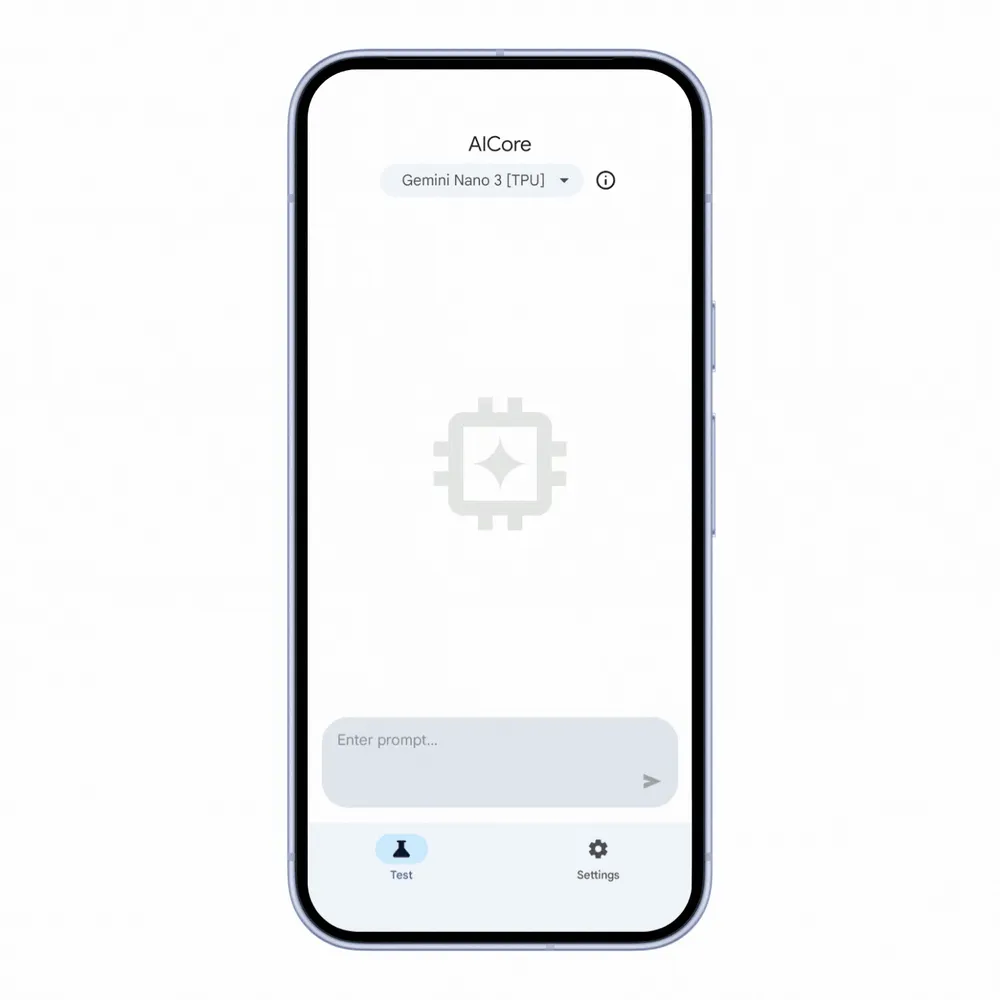
Select the Gemini Nano 4 Fast model in the Developer Preview UI to see its blazing fast inference speed in action before you write any code
Because Gemma 4 natively supports over 140 languages, you can expect improved localized, multilingual experiences for your global audience. Furthermore, Gemma 4 offers industry-leading performance with multimodal understanding, allowing your apps to understand and process text, images, and audio. To give you the best balance of performance and efficiency, Gemma 4 on Android comes in two sizes:
- E4B: Designed for higher reasoning power and complex tasks.
- E2B: Optimized for maximum speed (3x faster than the E4B model!) and lower latency.
The new model is up to 4x faster than previous versions and uses up to 60% less battery. Starting today, you can experiment with improved capabilities including:
- Reasoning: Chain-of-thought commands and conditional statements can now be expected to return higher quality results. For example: “Determine if the following comment for a discussion thread passes the community guidelines. The comment does not pass the community guideline if it contains one or more of these reason_for_flag: profanity, derogatory language, hate speech”. If the review passes the community guidelines, return {true}. Otherwise, return {false, reason_for_flag}.”
- Math: With better math skills, the model can now more accurately answer questions. For example: “If I get 26 paychecks per year, how much should I contribute each paycheck to reach my savings goal of $10,000 over the course of a year?”
- Time understanding: The model is now more capable when reasoning about time, making it more accurate for use cases that involve calendars, reminders, and alarms. For example: “The event is at 6PM on August 18th, and a reminder should be sent out 10 hours before the event. Return the time and date the reminder should be sent.”
- Image understanding: Use cases that involve OCR (Optical Character Recognition) - such as chart understanding, visual data extraction, and handwriting recognition - will now return more accurate results.
Join the Developer Preview today to download these models in preview models and start building next-generation features right away.
Start testing the model
You can try out the model without code by following the Developer Preview guide. If you want to jump straight into integrating these models with your existing workflow, we’ve made that seamless. Head over to Android Studio to refine your prompt and build with the familiar ML Kit Prompt API. We’ve introduced a new ability to specify a model, allowing you to target the E2B (fast) or E4B (full) variants for testing.
// Define the configuration with a specific track and preference
val previewFullConfig = generationConfig {
    modelConfig = ModelConfig {
        releaseTrack = ModelReleaseTrack.PREVIEW
        preference = ModelPreference.FULL
    }
}

// Initialize the GenerativeModel with the configuration
val previewModel = GenerativeModel.getClient(previewFullConfig)

// Verify that the specific preview model is available
val previewModelStatus = previewModel.checkStatus()
if (previewModelStatus == FeatureStatus.AVAILABLE) {
    // Proceed with inference
    val response = previewModel.generateContent("If I get 26 paychecks per year, how much I should contribute each paycheck to reach my savings goal of $10k over the course of a year? Return only the amount.")

} else {
    // Handle the case where the preview model is not available
    // (e.g., print out log statements)
}
What to expect during the Developer Preview
The goal of this Developer Preview is to give you a head start on refining prompt accuracy and exploring new use cases for your specific apps.
We will be making several updates throughout the preview period including support for tool calling, structured output, system prompts, and thinking mode in Prompt API, making it easier to take full advantage of the new capabilities in Gemma 4 as well as significant performance optimisations.
The preview models are available for testing on AICore-enabled devices. These models will run on the latest generation of specialist AI accelerators from Google, MediaTek, and Qualcomm Technologies. On other devices, the models will initially run on a CPU implementation that is not representative of final production performance. If your device is not AICore-enabled, you can also test these models via the AI Edge Gallery app. We’ll provide support for more devices in the future.
How to get started
Ready to see what Gemma 4 can do for your users?
- Opt-in: Sign up for the AICore Developer Preview.
- Download: Once opted in, you can trigger the download of the latest Gemma 4 models directly to your supported test device.
- Build: Update your ML Kit implementation to target the new models and start building in Android Studio.
-
 Product News

To further help bring your ML Kit Prompt API use cases to production, we are excited to announce Automated Prompt Optimization (APO) targeting On-Device models on Vertex AI. Automated Prompt Optimization is a tool that helps you automatically find the optimal prompt for your use cases.
Chetan Tekur, Chao Zhao, Paul Zhou, Caren Chang • 3 min read -
 Product News
AI is making it easier to create personalized app experiences that transform content into the right format for users. We previously enabled developers to integrate with Gemini Nano through ML Kit GenAI APIs tailored for specific use cases like summarization and image description.
Caren Chang, Chengji Yan, Penny Li • 2 min read -
 Product News
As Android developers, you have many choices when it comes to the agents, LLMs, tools, and command-line interfaces (CLI) you use for app development. Our goal is to help you build beautiful, high-quality Android apps, no matter how you choose to build.
Simona Milanovic • 4 min read
Get the latest Android development insights delivered to your inbox weekly.