


集合 widget 专门用于显示同一类型的多个元素,例如相册应用中的图片集合、新闻应用中的文章集合或通信应用中的消息集合。集合 widget 通常专注于两个用例:浏览集合以及打开集合中的某个元素以查看其详细视图。集合微件可以垂直滚动。
这些 widget 使用 RemoteViewsService 显示由远程数据(例如来自 content provider 的数据)支持的集合。该 widget 使用以下视图类型之一(称为集合视图)来呈现数据:
ListView:在垂直滚动列表中显示内容的视图。
GridView:在二维滚动网格中显示内容的视图。
StackView:一种堆叠卡片视图(有点像 Rolodex),用户可以向上或向下快速滑动最前面的卡片,分别查看上一张或下一张卡片。
AdapterViewFlipper:一种由适配器支持的 ViewAnimator,可在两个或更多视图之间添加动画效果。一次只能显示一个孩子。
由于这些集合视图会显示由远程数据支持的集合,因此它们会使用 Adapter 将其界面绑定到其数据。Adapter 会将一组数据中的各个项绑定到各个 View 对象。
由于这些集合视图由适配器提供支持,因此 Android 框架必须包含额外的架构,以支持在微件中使用这些视图。在 widget 的上下文中,Adapter 会被替换为 RemoteViewsFactory,后者是 Adapter 接口的轻量级封装容器。当请求集合中的特定项时,RemoteViewsFactory 会创建该项并将其作为 RemoteViews 对象返回。如需在 widget 中添加集合视图,请实现 RemoteViewsService 和 RemoteViewsFactory。
RemoteViewsService 是一项服务,可让远程适配器请求 RemoteViews 对象。RemoteViewsFactory 是一个接口,用于在集合视图(例如 ListView、GridView 和 StackView)与该视图的基础数据之间建立适配器。以下是 StackWidget 示例中用于实现此服务和接口的样板代码示例:
class StackWidgetService : RemoteViewsService() { override fun onGetViewFactory(intent: Intent): RemoteViewsFactory = StackRemoteViewsFactory(this.applicationContext, intent) } class StackRemoteViewsFactory( private val context: Context, intent: Intent ) : RemoteViewsService.RemoteViewsFactory { // See the RemoteViewsFactory API reference for the full list of methods to implement. }
示例应用
本部分中的代码摘录也取自 StackWidget 示例:
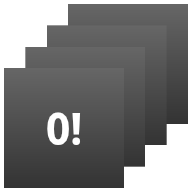
StackWidget。此示例由一堆视图组成,这些视图显示 0 到 9 的值。示例 widget 具有以下主要行为:
用户可以垂直快速滑动微件中的顶部视图,以显示下一个或上一个视图。这是内置的
StackView行为。无需任何用户互动,该微件就会自动按顺序浏览其视图,就像幻灯片一样。这是因为
res/xml/stackwidgetinfo.xml文件中的android:autoAdvanceViewId="@id/stack_view"设置。此设置适用于视图 ID,在本例中,该 ID 是堆叠视图的视图 ID。如果用户轻触顶部视图,该 widget 会显示
Toast消息“轻触了视图 n”,其中 n 是轻触的视图的索引(位置)。如需详细了解如何实现行为,请参阅向各个项添加行为部分。
实现包含集合的 widget
如需实现包含集合的小组件,请按照实现任何小组件的过程操作,然后执行以下几个额外步骤:修改清单,向小组件布局添加集合视图,并修改 AppWidgetProvider 子类。
包含集合的 widget 的清单
除了在清单中声明 widget 中列出的要求之外,您还需要使包含集合的 widget 能够绑定到您的 RemoteViewsService。为此,请在清单文件中声明该服务具有 BIND_REMOTEVIEWS 权限。这可防止其他应用随意访问您微件的数据。
例如,在创建使用 RemoteViewsService 填充集合视图的 widget 时,清单条目可能如下所示:
<service android:name="MyWidgetService"
    android:permission="android.permission.BIND_REMOTEVIEWS" />
在此示例中,android:name="MyWidgetService" 是指 RemoteViewsService 的子类。
包含集合的 widget 的布局
微件布局 XML 文件的主要要求是包含以下集合视图之一:ListView、GridView、StackView 或 AdapterViewFlipper。以下是 StackWidget 示例的 widget_layout.xml 文件:
<FrameLayout xmlns:android="http://schemas.android.com/apk/res/android" android:layout_width="match_parent" android:layout_height="match_parent"> <StackView android:id="@+id/stack_view" android:layout_width="match_parent" android:layout_height="match_parent" android:gravity="center" android:loopViews="true" /> <TextView android:id="@+id/empty_view" android:layout_width="match_parent" android:layout_height="match_parent" android:gravity="center" android:background="@drawable/widget_item_background" android:textColor="#ffffff" android:textStyle="bold" android:text="@string/empty_view_text" android:textSize="20sp" /> </FrameLayout>
请注意,空视图必须是集合视图的同级视图,空视图表示集合视图的空状态。
除了整个 widget 的布局文件之外,还要创建另一个布局文件,用于定义集合中每个项的布局,例如,图书集合中每本书的布局。StackWidget 示例只有一个项布局文件 widget_item.xml,因为所有项都使用相同的布局。
适用于包含集合的微件的 AppWidgetProvider 类
与常规 widget 一样,AppWidgetProvider 子类中的大部分代码通常都位于 onUpdate() 中。在创建包含集合的 widget 时,onUpdate() 实现的主要区别在于,您必须调用 setRemoteAdapter()。这会告知集合视图从何处获取其数据。
然后,RemoteViewsService 可以返回您的 RemoteViewsFactory 实现,并且 widget 可以提供适当的数据。调用此方法时,请传递一个指向 RemoteViewsService 实现的 intent,以及一个指定要更新的 widget 的 widget ID。
例如,以下是 StackWidget 示例如何实现 onUpdate() 回调方法,以将 RemoteViewsService 设置为 widget 集合的远程适配器:
override fun onUpdate( context: Context, appWidgetManager: AppWidgetManager, appWidgetIds: IntArray ) { // Update each of the widgets with the remote adapter. appWidgetIds.forEach { appWidgetId -> // Set up the intent that starts the StackViewService, which // provides the views for this collection. val intent = Intent(context, StackWidgetService::class.java).apply { // Add the widget ID to the intent extras. putExtra(AppWidgetManager.EXTRA_APPWIDGET_ID, appWidgetId) data = Uri.parse(toUri(Intent.URI_INTENT_SCHEME)) } // Instantiate the RemoteViews object for the widget layout. val views = RemoteViews(context.packageName, R.layout.widget_layout).apply { // Set up the RemoteViews object to use a RemoteViews adapter. // This adapter connects to a RemoteViewsService through the // specified intent. // This is how you populate the data. setRemoteAdapter(R.id.stack_view, intent) // The empty view is displayed when the collection has no items. // It must be in the same layout used to instantiate the // RemoteViews object. setEmptyView(R.id.stack_view, R.id.empty_view) } // Do additional processing specific to this widget. appWidgetManager.updateAppWidget(appWidgetId, views) } super.onUpdate(context, appWidgetManager, appWidgetIds) }
保留数据
如本页所述,RemoteViewsService 子类提供用于填充远程集合视图的 RemoteViewsFactory。
具体而言,请执行以下步骤:
RemoteViewsService子类。RemoteViewsService是远程适配器可通过其请求RemoteViews的服务。在
RemoteViewsService子类中,添加一个实现RemoteViewsFactory接口的类。RemoteViewsFactory是一个接口,用于在远程集合视图(例如ListView、GridView、StackView)与该视图的基础数据之间建立适配器。您的实现负责为数据集中的每个项创建一个RemoteViews对象。此接口是Adapter的精简封装容器。
您无法依赖服务的单个实例或其包含的任何数据来持久保存。除非数据是静态的,否则请勿将其存储在 RemoteViewsService 中。如果您希望微件的数据保持不变,最好的方法是使用 ContentProvider,其数据在进程生命周期结束后仍会保留。例如,杂货店 widget 可以将每个杂货清单项的状态存储在永久性位置(例如 SQL 数据库)中。
RemoteViewsService 实现的主要内容是其 RemoteViewsFactory,如下一部分所述。
RemoteViewsFactory 接口
实现 RemoteViewsFactory 接口的自定义类会为 widget 提供其集合中各项的数据。为此,它会将 widget 项 XML 布局文件与数据源结合使用。此数据源可以是任何内容,从数据库到数组。在 StackWidget 示例中,数据源是 WidgetItems 数组。RemoteViewsFactory 充当适配器,用于将数据粘合到远程集合视图。
您需要为 RemoteViewsFactory 子类实现的两个最重要的方法是 onCreate() 和 getViewAt()。
系统会在首次创建工厂时调用 onCreate()。
您可以在此处设置与数据源的任何连接或游标。例如,StackWidget 示例使用 onCreate() 初始化 WidgetItem 对象数组。当微件处于活跃状态时,系统会使用这些对象在数组中的索引位置访问它们,并显示它们包含的文本。
以下是 StackWidget 示例的 RemoteViewsFactory 实现中的一段摘录,其中显示了 onCreate() 方法的部分内容:
private const val REMOTE_VIEW_COUNT: Int = 10 class StackRemoteViewsFactory( private val context: Context ) : RemoteViewsService.RemoteViewsFactory { private lateinit var widgetItems: List<WidgetItem> override fun onCreate() { // In onCreate(), set up any connections or cursors to your data // source. Heavy lifting, such as downloading or creating content, // must be deferred to onDataSetChanged() or getViewAt(). Taking // more than 20 seconds on this call results in an ANR. widgetItems = List(REMOTE_VIEW_COUNT) { index -> WidgetItem("$index!") } } }
RemoteViewsFactory 方法 getViewAt() 会返回一个 RemoteViews 对象,该对象对应于数据集中指定 position 处的数据。以下是 StackWidget 示例的 RemoteViewsFactory 实现中的一段摘录:
override fun getViewAt(position: Int): RemoteViews { // Construct a remote views item based on the widget item XML file // and set the text based on the position. return RemoteViews(context.packageName, R.layout.widget_item).apply { setTextViewText(R.id.widget_item, widgetItems[position].text) } }
为单个商品添加行为
前面的部分介绍了如何将数据绑定到 widget 集合。但如果您想为集合视图中的各个项添加动态行为,该怎么办?
如使用 onUpdate() 类处理事件中所述,您通常使用 setOnClickPendingIntent() 设置对象的点击行为,例如让按钮启动 Activity。但对于单个集合项中的子视图,不允许采用这种方法。
例如,您可以使用 setOnClickPendingIntent() 在 Gmail widget 中设置一个用于启动应用的全局按钮,但不能在各个列表项上设置。
若要为集合中的各个项添加点击行为,请改用 setOnClickFillInIntent()。为集合视图设置待处理 intent 模板,并使用 RemoteViewsFactory 为集合中的每个项设置填充 intent。
本部分使用 StackWidget 示例来介绍如何向各个项添加行为。在 StackWidget 示例中,如果用户轻触顶部视图,微件会显示 Toast 消息“Touched view n”,其中 n 是轻触视图的索引(位置)。其工作原理如下:
StackWidgetProvider(AppWidgetProvider子类)会创建一个待处理 intent,其中包含名为TOAST_ACTION的自定义操作。当用户轻触视图时,该 intent 会触发并广播
TOAST_ACTION。此广播会被
StackWidgetProvider类的onReceive()方法拦截,并且 widget 会针对轻触的视图显示Toast消息。集合项的数据由RemoteViewsFactory通过RemoteViewsService提供。
设置待处理 intent 模板
StackWidgetProvider(AppWidgetProvider 子类)会设置待处理 intent。集合中的各个项无法设置自己的待处理 intent。而是由整个集合设置待处理 intent 模板,并由各个项设置填充 intent,以便逐项创建独特的行为。
此类还会接收用户轻触视图时发送的广播。它在自己的 onReceive() 方法中处理此事件。如果 intent 的操作为 TOAST_ACTION,则 widget 会针对当前视图显示 Toast 消息。
const val TOAST_ACTION = "com.example.android.stackwidget.TOAST_ACTION" const val EXTRA_ITEM = "com.example.android.stackwidget.EXTRA_ITEM" class StackWidgetProvider : AppWidgetProvider() { // ... // Called when the BroadcastReceiver receives an Intent broadcast. // Checks whether the intent's action is TOAST_ACTION. If it is, the // widget displays a Toast message for the current item. override fun onReceive(context: Context, intent: Intent) { val mgr: AppWidgetManager = AppWidgetManager.getInstance(context) if (intent.action == TOAST_ACTION) { val appWidgetId: Int = intent.getIntExtra( AppWidgetManager.EXTRA_APPWIDGET_ID, AppWidgetManager.INVALID_APPWIDGET_ID ) // EXTRA_ITEM represents a custom value provided by the Intent // passed to the setOnClickFillInIntent() method to indicate the // position of the clicked item. See StackRemoteViewsFactory in // Set the fill-in Intent for details. val viewIndex: Int = intent.getIntExtra(EXTRA_ITEM, 0) Toast.makeText(context, "Touched view $viewIndex", Toast.LENGTH_SHORT).show() } super.onReceive(context, intent) } override fun onUpdate( context: Context, appWidgetManager: AppWidgetManager, appWidgetIds: IntArray ) { // Update each of the widgets with the remote adapter. appWidgetIds.forEach { appWidgetId -> // Sets up the intent that points to the StackViewService that // provides the views for this collection. val intent = Intent(context, StackWidgetService::class.java).apply { putExtra(AppWidgetManager.EXTRA_APPWIDGET_ID, appWidgetId) // When intents are compared, the extras are ignored, so embed // the extra sinto the data so that the extras are not ignored. data = Uri.parse(toUri(Intent.URI_INTENT_SCHEME)) } val rv = RemoteViews(context.packageName, R.layout.widget_layout).apply { setRemoteAdapter(R.id.stack_view, intent) // The empty view is displayed when the collection has no items. // It must be a sibling of the collection view. setEmptyView(R.id.stack_view, R.id.empty_view) } // This section makes it possible for items to have individualized // behavior. It does this by setting up a pending intent template. // Individuals items of a collection can't set up their own pending // intents. Instead, the collection as a whole sets up a pending // intent template, and the individual items set a fillInIntent // to create unique behavior on an item-by-item basis. val toastPendingIntent: PendingIntent = Intent( context, StackWidgetProvider::class.java ).run { // Set the action for the intent. // When the user touches a particular view, it has the effect of // broadcasting TOAST_ACTION. action = TOAST_ACTION putExtra(AppWidgetManager.EXTRA_APPWIDGET_ID, appWidgetId) data = Uri.parse(toUri(Intent.URI_INTENT_SCHEME)) // The template must be mutable, because each item fills in its // own extras through setOnClickFillInIntent(). PendingIntent.getBroadcast( context, 0, this, PendingIntent.FLAG_UPDATE_CURRENT or PendingIntent.FLAG_MUTABLE ) } rv.setPendingIntentTemplate(R.id.stack_view, toastPendingIntent) appWidgetManager.updateAppWidget(appWidgetId, rv) } super.onUpdate(context, appWidgetManager, appWidgetIds) } }
设置填充 intent
您的 RemoteViewsFactory 必须为集合中的每个项设置填充 intent。这样就可以区分给定项的各个点击操作。然后,填充 intent 会与 PendingIntent 模板组合,以确定点按该项时执行的最终 intent。
private const val REMOTE_VIEW_COUNT: Int = 10 class StackRemoteViewsFactory( private val context: Context, intent: Intent ) : RemoteViewsService.RemoteViewsFactory { private lateinit var widgetItems: List<WidgetItem> private val appWidgetId: Int = intent.getIntExtra( AppWidgetManager.EXTRA_APPWIDGET_ID, AppWidgetManager.INVALID_APPWIDGET_ID ) override fun onCreate() { // In onCreate(), set up any connections or cursors to your data source. // Heavy lifting, such as downloading or creating content, must be // deferred to onDataSetChanged() or getViewAt(). Taking more than 20 // seconds on this call results in an ANR. widgetItems = List(REMOTE_VIEW_COUNT) { index -> WidgetItem("$index!") } // ... } // ... override fun getViewAt(position: Int): RemoteViews { // Construct a remote views item based on the widget item XML file // and set the text based on the position. return RemoteViews(context.packageName, R.layout.widget_item).apply { setTextViewText(R.id.widget_item, widgetItems[position].text) // Set a fill-intent to fill in the pending intent template. // that is set on the collection view in StackWidgetProvider. val fillInIntent = Intent().apply { Bundle().also { extras -> extras.putInt(EXTRA_ITEM, position) putExtras(extras) } } // Make it possible to distinguish the individual on-click // action of a given item. setOnClickFillInIntent(R.id.widget_item, fillInIntent) // ... } } // ... }
确保集合数据始终是最新的
图 2 展示了使用集合的 widget 中的更新流程。它展示了 widget 代码如何与 RemoteViewsFactory 交互,以及如何触发更新:

RemoteViewsFactory 的交互。使用集合的小组件可以为用户提供最新内容。例如,Gmail 微件可让用户一目了然地查看收件箱。为此,请触发 RemoteViewsFactory 和集合视图以提取并显示新数据。
为此,请使用 AppWidgetManager 调用 notifyAppWidgetViewDataChanged()。此调用会触发对 RemoteViewsFactory 对象的 onDataSetChanged() 方法的回调,以便您提取任何新数据。
您可以在 onDataSetChanged() 回调中同步执行处理密集型操作。此调用会在从 RemoteViewsFactory 提取元数据或视图数据之前完成。您还可以在 getViewAt() 方法中执行处理密集型操作。如果此调用耗时较长,则在返回之前,系统会在集合视图的相应位置显示加载视图(由 RemoteViewsFactory 对象的 getLoadingView() 方法指定)。
使用 RemoteCollectionItems 直接传递集合
Android 12(API 级别 31)添加了 setRemoteAdapter(int viewId,
RemoteViews.RemoteCollectionItems
items) 方法,该方法可让您的应用在填充集合视图时直接传递集合。如果您使用此方法设置适配器,则无需实现 RemoteViewsFactory,也无需调用 notifyAppWidgetViewDataChanged()。
除了可以更轻松地填充适配器之外,此方法还消除了在用户滚动浏览列表以显示新项时填充新项的延迟。只要您的集合项集相对较小,就首选这种设置适配器的方法。不过,举例来说,如果您的集合包含大量要传递给 setImageViewBitmap 的 Bitmaps,则此方法的效果不佳。
如果集合不使用一组固定的布局(即,如果某些项只是有时存在),请使用 setViewTypeCount 指定集合可以包含的唯一布局的最大数量。这样,在应用 widget 的更新过程中,适配器就可以重复使用。
以下示例展示了如何实现简化的 RemoteViews 集合。
val itemLayouts = listOf( R.layout.item_type_1, R.layout.item_type_2, // ... ) remoteView.setRemoteAdapter( R.id.list_view, RemoteViews.RemoteCollectionItems.Builder() .addItem(/* id= */ ID_1, RemoteViews(context.packageName, R.layout.item_type_1)) .addItem(/* id= */ ID_2, RemoteViews(context.packageName, R.layout.item_type_2)) // ... .setViewTypeCount(itemLayouts.count()) .build() )