

如果 Android 应用的界面线程处于阻塞状态的时间过长,系统会发送“应用无响应”(ANR) 错误。本页介绍了不同类型的 ANR、如何进行诊断并给出建议的解决方法。列出的所有默认超时时间范围均适用于 AOSP 和 Pixel 设备;这些时间可能因原始设备制造商 (OEM) 而异。
请注意,在确定 ANR 的原因时,区分系统问题和应用问题会很有帮助。
当系统处于不良状态时,以下问题可能会导致 ANR:
- 系统服务器出现的暂时性问题通常会导致快速 binder 调用速度变慢。
- 系统服务器问题和设备负载过高会导致系统无法调度应用线程。
如果可以,不妨使用 Perfetto 轨迹文件来区分系统问题和应用问题:
- 如需了解应用的主线程是否已调度,请查看 Perfetto 中的线程状态跟踪信息,以了解应用是正在运行还是可运行。
- 查看
system_server线程中是否存在锁争用等问题。 - 如果 binder 调用速度缓慢,请查看回复线程(如果存在),以了解速度缓慢的原因。
输入调度超时
当应用的主线程未及时响应输入事件(例如滑动或按键操作)时,会发生输入调度 ANR。由于在发生输入调度超时应用在前台运行,因此用户几乎总是可以看到这类超时,实施缓解措施就非常重要。
默认超时期限:5 秒。
输入调度 ANR 通常是由主线程上的问题导致的。如果主线程处于阻塞状态,正在等待获取锁,则也可能会涉及持有锁的线程。
为避免出现输入调度 ANR,请遵循以下最佳实践:
- 请勿在主线程上执行阻塞操作或长时间运行的操作。考虑使用
StrictMode捕获主线程上的意外 activity。 - 尽量减少在主线程和其他线程之间发生任何锁争用。
- 尽量减少在主线程中执行非界面工作;例如,在处理广播或运行服务时执行的工作。
常见原因
以下是导致输入调度 ANR 的一些常见原因和建议的解决方法。
| 原因 | 出现的情况 | 建议的解决方法 |
|---|---|---|
| binder 调用速度缓慢 | 主线程进行同步 binder 长调用。 | 将该调用移出主线程或尝试优化该调用(如果您拥有该 API)。 |
| 连续多次进行 binder 调用 | 主线程连续多次进行同步 binder 调用。 | 请勿在紧密循环中执行 binder 调用。 |
| 阻塞 I/O | 主线程进行阻塞 I/O 调用,例如数据库或网络访问。 | 将所有阻塞 IO 移出主线程。 |
| 锁争用 | 主线程处于阻塞状态,正在等待获取锁。 | 减少主线程和其他线程之间的锁争用。 优化其他线程中运行缓慢的代码。 |
| 耗用大量资源的帧 | 单个帧中的渲染工作量太大,导致严重卡顿。 | 减少帧渲染工作。请勿使用 n2 算法。使用高效的组件实现滚动或分页等操作,例如使用 Jetpack Paging 库。 |
| 被其他组件阻塞 | 另一个组件(如广播接收器)正在运行并阻塞主线程。 | 尽可能将非界面工作移出主线程。在其他线程上运行广播接收器。 |
| GPU 挂起 | GPU 挂起是系统或硬件问题,会导致渲染被阻塞,进而导致输入调度 ANR。 | 遗憾的是,通常无法在应用端解决这些问题。如有可能,请与硬件团队联系来排查问题。 |
如何调试
若要开始调试,请先查看 Google Play 管理中心或 Firebase Crashlytics 中的 ANR 集群签名。此集群通常包含最可能导致 ANR 的帧。
以下流程图展示了如何确定输入超时调度 ANR 的原因。

Play Vitals 可以检测并帮助调试其中部分常见的 ANR 原因。例如,如果 Vitals 检测到由于锁争用而发生了 ANR,则可以在 ANR 数据分析部分汇总问题和建议的解决方法。

无聚焦窗口
虽然轻触等事件会基于点击测试直接发送到相关窗口,但按键等事件需要目标。此目标称为“聚焦窗口”。每个屏幕只有一个聚焦窗口,通常是用户当前正在与之互动的窗口。如果找不到聚焦窗口,输入事件会引发“无聚焦窗口 ANR”。无聚焦窗口 ANR 是一种输入调度 ANR。
默认超时期限:5 秒。
常见原因
无焦点窗口 ANR 通常是由以下任一问题导致的:
- 应用执行的工作太多,速度太慢,无法绘制第一帧。
- 主窗口不可聚焦。如果某个窗口带有
FLAG_NOT_FOCUSABLE标志,用户便无法向其发送按键或按钮事件。
Kotlin
override fun onCreate(savedInstanceState: Bundle) {
  super.onCreate(savedInstanceState)
  setContentView(R.layout.activity_main)
  window.addFlags(WindowManager.LayoutParams.FLAG_FLAG_NOT_FOCUSABLE)
}
Java
@Override
protected void onCreate(Bundle savedInstanceState) {
  super.onCreate(savedInstanceState);
  setContentView(R.layout.activity_main);
  getWindow().addFlags(WindowManager.LayoutParams.FLAG_NOT_FOCUSABLE);
}
广播接收器超时
如果广播接收器未能及时处理广播,就会发生广播接收器 ANR。对于同步接收器或不调用 goAsync() 的接收器,超时意味着 onReceive() 没有及时完成。对于异步接收器或调用 goAsync() 的接收器,超时意味着没有及时调用 PendingResult.finish()。
广播接收器 ANR 通常发生在以下线程中:
- 主线程(如果问题是应用启动缓慢)。
- 运行广播接收器的线程(如果问题是
onReceive()代码运行缓慢)。 - 广播工作器线程(如果问题是
goAsync()广播代码运行缓慢)。
为避免出现广播接收器 ANR,请遵循以下最佳实践:
- 确保应用能够快速启动,因为如果应用开始处理广播,应用启动时间就会被计入 ANR 超时。
- 如果使用了
goAsync(),请确保快速调用PendingResult.finish()。这受与同步广播接收器相同的 ANR 超时约束。 - 如果使用
goAsync(),请确保不与其他长时间运行的操作或阻塞操作共享工作器线程。 - 请考虑使用
registerReceiver()在非主线程中运行广播接收器,以避免阻塞在主线程中运行的界面代码。
超时期限
广播接收超时期限取决于平台版本和是否设置了前台 intent 标志。
| intent 类型 | Android 13 及更低版本 | Android 14 及更高版本 |
|---|---|---|
前台优先级 intent (已设置 |
10 秒 |
10-20 秒,具体取决于进程是否已耗尽 CPU |
后台优先级 intent (未设置 |
60 秒 |
60-120 秒,具体取决于进程是否已耗尽 CPU |
如需判断是否设置了 FLAG_RECEIVER_FOREGROUND 标志,请在 ANR 主体中查找“flg=”,并检查是否存在 0x10000000。如果已设置该位,则 intent 会设置 FLAG_RECEIVER_FOREGROUND,因此超时时间较短。
广播超时时间较短(10-20 秒)的 ANR 主体示例:
Broadcast of Intent { act=android.inent.action.SCREEN_ON flg=0x50200010 }
广播超时时间较长(60-120 秒)的 ANR 主体示例:
Broadcast of Intent { act=android.intent.action.TIME_SET flg=0x25200010 }
如何测算广播时间
广播时长测算从 system_server 调度到应用后开始,到应用处理完广播后结束。如果应用进程尚未运行,则还需要在 ANR 超时期限内执行冷启动。因此,应用启动缓慢可能会导致广播接收器 ANR。
下图说明了广播接收器 ANR 时间轴与某些应用进程的对应关系。
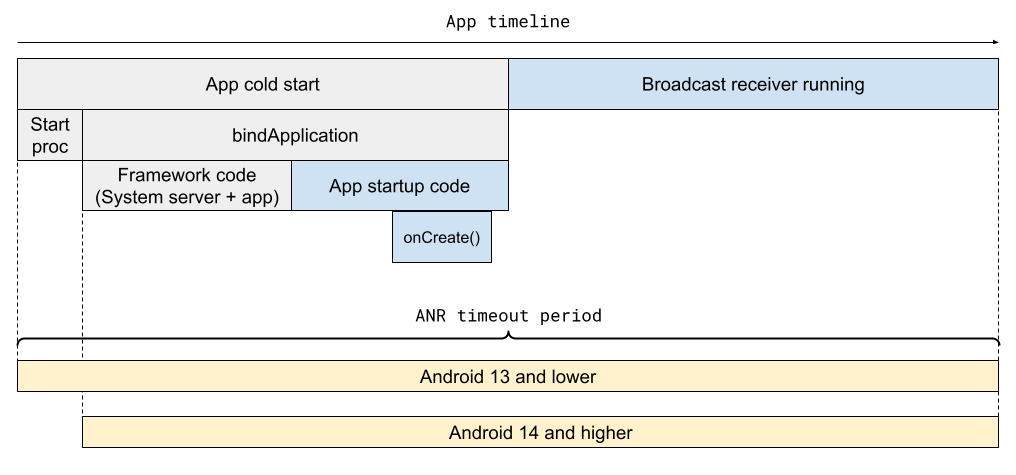
ANR 超时测算在接收器处理完广播后结束:具体发生时间取决于接收器是同步接收器还是异步接收器。
- 对于同步接收器,测算在返回
onReceive()时停止。 - 对于异步接收器,测算会在调用
PendingResult.finish()时停止。

常见原因
以下是导致广播接收器 ANR 的一些常见原因和建议的解决方法。
| 原因 | 应用对象 | 发生的情况 | 建议的解决方法 |
|---|---|---|---|
| 应用启动缓慢 | 所有接收器 | 应用冷启动用时过长。 | 针对应用启动缓慢进行优化。 |
onReceive() 未调度 | 所有接收器 | 广播接收器线程正忙于执行其他工作,因此无法启动 onReceive() 方法。 | 请勿在接收器线程上执行长时间运行的任务(也不要将接收器移至专用线程)。 |
onReceive() 运行缓慢 | 所有接收器,但主要是同步接收器 | onReceive() 方法已启动,但被阻塞或运行缓慢,因此未能及时完成。 | 优化运行缓慢的接收器代码。 |
| 异步接收器任务未调度 | goAsync() 接收器 | onReceive() 方法尝试在已阻塞的工作器线程池中执行工作,因此工作从未启动。 |
优化阻塞调用或运行缓慢的调用,或者为广播工作器与其他长时间运行的任务使用不同的线程。 |
| 工作器运行缓慢或阻塞 | goAsync() 接收器 |
处理广播时,工作器线程池中的某个位置发生了阻塞操作或运行缓慢的操作。因此,没有及时调用 PendingResult.finish。 | 优化运行缓慢的 async 接收器代码。 |
忘记调用 PendingResult.finish |
goAsync() 接收器 |
代码路径中缺少对 finish() 的调用。 |
确保始终调用 finish()。 |
如何调试
根据集群签名和 ANR 报告,您可以找到运行接收器的线程,以及缺失或运行缓慢的具体代码。
以下流程图显示了如何确定广播接收器 ANR 的原因。

查找接收器代码
Google Play 管理中心会在 ANR 签名中显示接收器类和广播 intent。查找以下项:
cmp=<receiver class>act=<broadcast_intent>
下面是一个广播接收器 ANR 签名示例:
com.example.app.MyClass.myMethod
Broadcast of Intent { act=android.accounts.LOGIN_ACCOUNTS_CHANGED
cmp=com.example.app/com.example.app.MyAccountReceiver }
查找运行 onReceive() 方法的线程
如果您使用 Context.registerReceiver 指定自定义处理程序,要找的线程就是运行此处理程序的线程。否则,就是主线程。
示例:异步接收器任务未调度
本部分详细介绍了如何调试广播接收器 ANR 问题的示例。
假设 ANR 签名如下所示:
com.example.app.MyClass.myMethod
Broadcast of Intent {
act=android.accounts.LOG_ACCOUNTS_CHANGED cmp=com.example.app/com.example.app.MyReceiver }
从签名来看,广播 intent 似乎是 android.accounts.LOG_ACCOUNTS_CHANGED,接收器类是 com.example.app.MyReceiver。
根据接收器代码,您可以确定线程池“BG Thread [0,1,2,3]”执行处理此广播的主要工作。查看堆栈转储,您会发现所有四个后台 (BG) 线程都具有相同的情况:都在运行阻塞调用 getDataSync。由于所有 BG 线程都处于忙碌状态,因此无法及时处理广播,从而导致 ANR。
BG Thread #0 (tid=26) Waiting

at jdk.internal.misc.Unsafe.park(Native method:0)
at java.util.concurrent.locks.LockSupport.park(LockSupport.java:211)
at com.google.common.util.concurrent.AbstractFuture.get(AbstractFuture:563)
at com.google.common.util.concurrent.ForwardingFuture.get(ForwardingFuture:68)
at com.example.app.getDataSync(<MyClass>:152)

...

at java.util.concurrent.ThreadPoolExecutor.runWorker(ThreadPoolExecutor.java:1145)
at java.util.concurrent.ThreadPoolExecutor$Worker.run(ThreadPoolExecutor.java:644)
at com.google.android.libraries.concurrent.AndroidExecutorsModule.lambda$withStrictMode$5(AndroidExecutorsModule:451)
at com.google.android.libraries.concurrent.AndroidExecutorsModule$$ExternalSyntheticLambda8.run(AndroidExecutorsModule:1)
at java.lang.Thread.run(Thread.java:1012)
at com.google.android.libraries.concurrent.ManagedPriorityThread.run(ManagedPriorityThread:34)
There are several approaches to fix the issue:
- Find out why
getDataSyncis slow and optimize. - Don't run
getDataSyncon all four BG threads. - More generally, ensure that the BG thread pool isn't saturated with long-running operations.
- Use a dedicated thread pool for
goAsyncworker tasks. - Use an unbounded thread pool instead of the bounded BG thread pool
Example: slow app startup
A slow app startup can cause several types of ANRs, especially broadcast
receiver and execute service ANRs. The cause of an
ANR is likely slow app startup if you see ActivityThread.handleBindApplication
in the main thread stacks.
Execute service timeout
An execute service ANR happens when the app's main thread doesn't start a
service in time. Specifically, a service doesn't finish executing
onCreate() and onStartCommand() or onBind() within the
timeout period.
Default timeout period: 20 seconds for foreground service; 200 seconds for
background service. The ANR timeout period includes the app cold start, if
necessary, and calls to onCreate(), onBind(), or onStartCommand().
To avoid execute service ANRs, follow these general best practices:
- Make sure that app startup is fast, since it's counted in the ANR timeout if the app is started to run the service component.
- Make sure that the service's
onCreate(),onStartCommand(), andonBind()methods are fast. - Avoid running any slow or blocking operations on the main thread from other components; these operations can prevent a service from starting quickly.
Common causes
The following table lists common causes of execute service ANRs and suggested fixes.
| Cause | What | Suggested fix |
|---|---|---|
| Slow app startup | The app takes too long to perform a cold start. | Optimize slow app start. |
Slow onCreate(), onStartCommand(), or
onBind() |
The service component's onCreate(),
onStartCommand(), or onBind() method takes too long to
execute on the main thread. |
Optimize slow code. Move slow operations off the critical path where possible. |
Not scheduled (main thread blocked before onStart()) |
The app's main thread is blocked by another component before the service can be started. | Move other component's work off the main thread. Optimize other component's blocking code. |
How to debug
From the cluster signature and ANR report in Google Play Console or Firebase Crashlytics, you can often determine the cause of the ANR based on what the main thread is doing.
The following flow chart describes how to debug an execute service ANR.
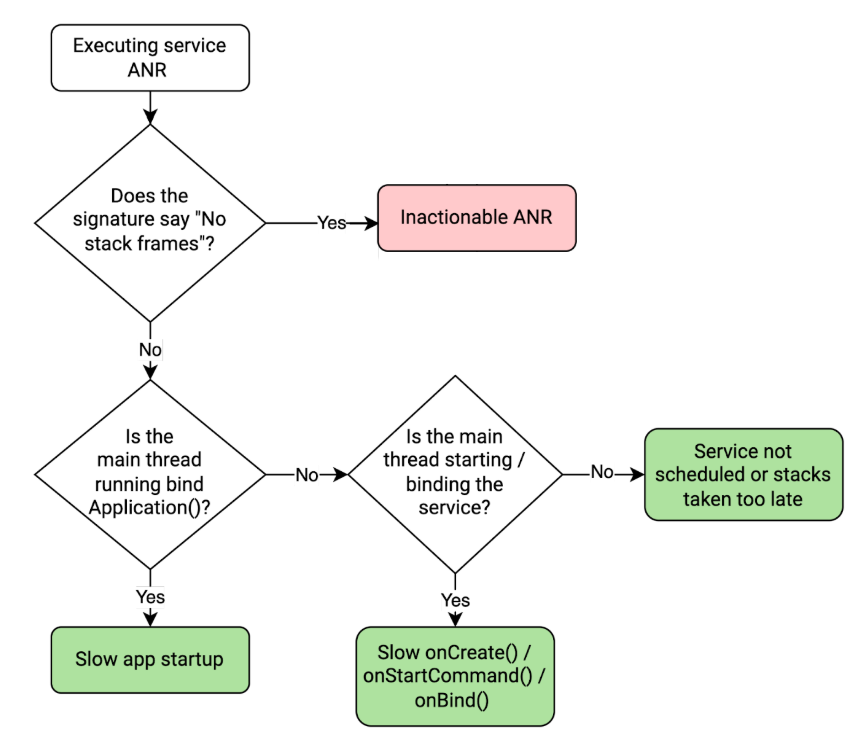
If you've determined that the execute service ANR is actionable, follow these steps to help resolve the issue:
Find the service component class in the ANR signature. In Google Play Console, the service component class is shown in the ANR signature. In the following example ANR details, it's
com.example.app/MyService.com.google.common.util.concurrent.Uninterruptibles.awaitUninterruptibly Executing service com.example.app/com.example.app.MyServiceDetermine whether the slow or block operation is part of app startup, the service component, or elsewhere by checking for the following important function call(s) in the main threads.
Function call(s) in main thread stacks What it means android.app.ActivityThread.handleBindApplicationApp was starting up, so the ANR was caused by slow app start. <ServiceClass>.onCreate()
[...]
android.app.ActivityThread.handleCreateService
Service was being created, so the ANR was likely caused by slow onCreate()code.<ServiceClass>.onBind()
[...]
android.app.ActivityThread.handleBindService
Service was being bound, so the ANR was likely caused by slow onBind()code.<ServiceClass>.onStartCommand()
[...]
android.app.ActivityThread.handleServiceArgs
Service was being started, so the ANR was likely caused by slow onStartCommand()code.For example, if the
onStartCommand()method in theMyServiceclass is slow, the main threads will look like this:at com.example.app.MyService.onStartCommand(FooService.java:25) at android.app.ActivityThread.handleServiceArgs(ActivityThread.java:4820) at android.app.ActivityThread.-$$Nest$mhandleServiceArgs(unavailable:0) at android.app.ActivityThread$H.handleMessage(ActivityThread.java:2289) at android.os.Handler.dispatchMessage(Handler.java:106) at android.os.Looper.loopOnce(Looper.java:205) at android.os.Looper.loop(Looper.java:294) at android.app.ActivityThread.main(ActivityThread.java:8176) at java.lang.reflect.Method.invoke(Native method:0)如果您找不到任何重要的函数调用,还可能存在几种情况:
- 服务正在运行或正在关停,这意味着获取堆栈的时间太晚。在这种情况下,您可以忽略 ANR,将其当做假正例。
- 另一个应用组件正在运行,例如广播接收器。在这种情况下,主线程可能在此组件中处于阻塞状态,使服务无法启动。
如果您确实找到一个关键函数调用并且可以确定 ANR 通常发生的位置,请检查其余的主线程堆栈,找出运行缓慢的操作并对其进行优化或将其从关键路径中移除。
- 确保应用快速启动,因为如果应用开始运行 content provider,则应用启动时间会被计入 ANR 超时。
- 确保 content provider 查询可以快速执行。
- 不要执行大量并发阻塞 binder 调用,这些调用可能会阻塞应用的所有 binder 线程。
- 无声界面冻结:应用界面停止响应用户输入。
- 崩溃:应用可能会崩溃并显示
illegalStateException。 - ANR:系统可能会触发 ANR 超时。
- 安排遍历:
ViewRootImpl通过向界面线程的MessageQueue发布同步屏障来安排遍历(布局和绘制过程)。此屏障会暂停正常消息处理,以便界面布局可以优先处理。 - 竞态条件:当多个线程尝试同时使视图失效时,它们会争相安排此遍历。两个线程可能都会成功插入同步屏障,但框架只会存储其中一个线程的令牌。
- 界面冻结:当遍历执行时,它只会移除单个已保存的屏障。次要的“泄露”屏障会无限期地保留在队列中,永久阻止界面线程处理任何同步消息。
- 只能在创建视图层次结构的线程上与
View对象进行交互,包括读取width或height等属性或设置TextView's text等属性。这几乎总是主线程或界面线程。 - 如果您无法保证在访问视图时正在界面线程上运行,请假设这样做是不安全的。例如,如果您使用
Coroutines进行后台工作,则必须先切换到主调度器,然后才能操作View对象。 ContextCompat#getMainExecutor(android.content.Context)View.post(Runnable)Activity.runOnUiThread(Runnable)- 在搭载 Android 17 或更高版本的设备上安装可调试的应用版本。
- 打开设备的“设置”应用,然后依次导航到系统 > 高级 > 开发者选项 > 应用兼容性变更。
- 从列表中选择您的应用。
- 在变更列表中,找到并开启
ENFORCE_THREAD_CHECKS_ON_VIEW_ROOT_IMPL_APIS开关。 - 遥测和跟踪:此监听器允许您的应用在从错误的线程调用 View API 时接收回调,从而更轻松地记录遥测数据和跟踪 bug。
- 内联执行:系统会内联调用监听器,以便您在违规发生时捕获并检查确切的堆栈轨迹。
- 系统级问题。由于系统负载高或系统服务器存在问题,未能调度该进程。
- 堆栈转储延迟。线程在触发 ANR 和转储堆栈期间的短暂时间内恢复。在 Android 13 上,Pixel 的延迟时间约为 100 毫秒,但可能会超过 1 秒。在 Android 14 上,Pixel 的延迟时间通常低于 10 毫秒。
- 线程归因错误。用于构建 ANR 签名的线程并不是导致 ANR 的实际无响应线程。
- 查看线程违规。如果应用在后台线程上修改视图,可能会在视图的内部触发竞态条件,从而阻止界面线程任务运行
- 系统负载过重:评估整体设备资源压力(例如系统范围内的 CPU、内存或 I/O 饥饿)是否是不响应的主要原因。
- 线程错误归因:审核工作线程和 binder 线程是否存在死锁、影响主线程的锁争用或挂起的处理异步组件(例如
goAsync())的后台线程。 - 查看线程违规情况:扫描后台线程,查找非法界面视图层次结构修改,此类修改可能会使 MessageQueue 中的同步屏障成为孤立屏障,并永久性地阻止所有同步消息。
- 获取堆栈耗时过长并超时。
- 进程在获取堆栈之前就已终止或被终止。
如需详细了解服务,请参阅以下页面:
content provider 没有响应
如果远程 content provider 响应查询的时间超出超时期限,并被终止,就会发生 content provider ANR。
默认超时期限:由 content provider 使用 ContentProviderClient.setDetectNotResponding 指定。ANR 超时期限包含远程 content provider 查询运行的总时间,其中包括对尚未运行的远程应用进行冷启动的时间。
为避免出现 content provider ANR,请遵循以下最佳实践:
常见原因
下表列出了导致 content provider ANR 的常见原因,以及建议的解决方法。
| 原因 | 出现的情况 | 信号 | 建议的解决方法 |
|---|---|---|---|
| content provider 查询速度缓慢 | content provider 的执行时间太长或被阻塞。 | android.content.ContentProvider$Transport.query 帧位于 binder 线程中。 |
优化 content provider 查询。找出阻塞 binder 线程的因素。 |
| 应用启动缓慢 | content provider 的应用启动时间过长。 | ActivityThread.handleBindApplication 帧位于主线程中。 |
优化应用启动。 |
| binder 线程耗尽 - 所有 binder 线程都处于忙碌状态 | 所有 binder 线程都忙于处理其他同步请求,因此 content provider binder 调用无法运行。 | 应用无法启动,所有 binder 线程都处于忙碌状态,并且 content provider 未运行。 | 减少 binder 线程的负载。也就是说,减少同步传出 binder 调用的数量,或减少处理传入调用时的工作量。 |
如何调试
如需使用 Google Play 管理中心或 Firebase Crashlytics 中的集群签名和 ANR 报告调试 content provider ANR,请查看主线程和 binder 线程正在执行的操作。
以下流程图介绍了如何调试 content provider ANR:
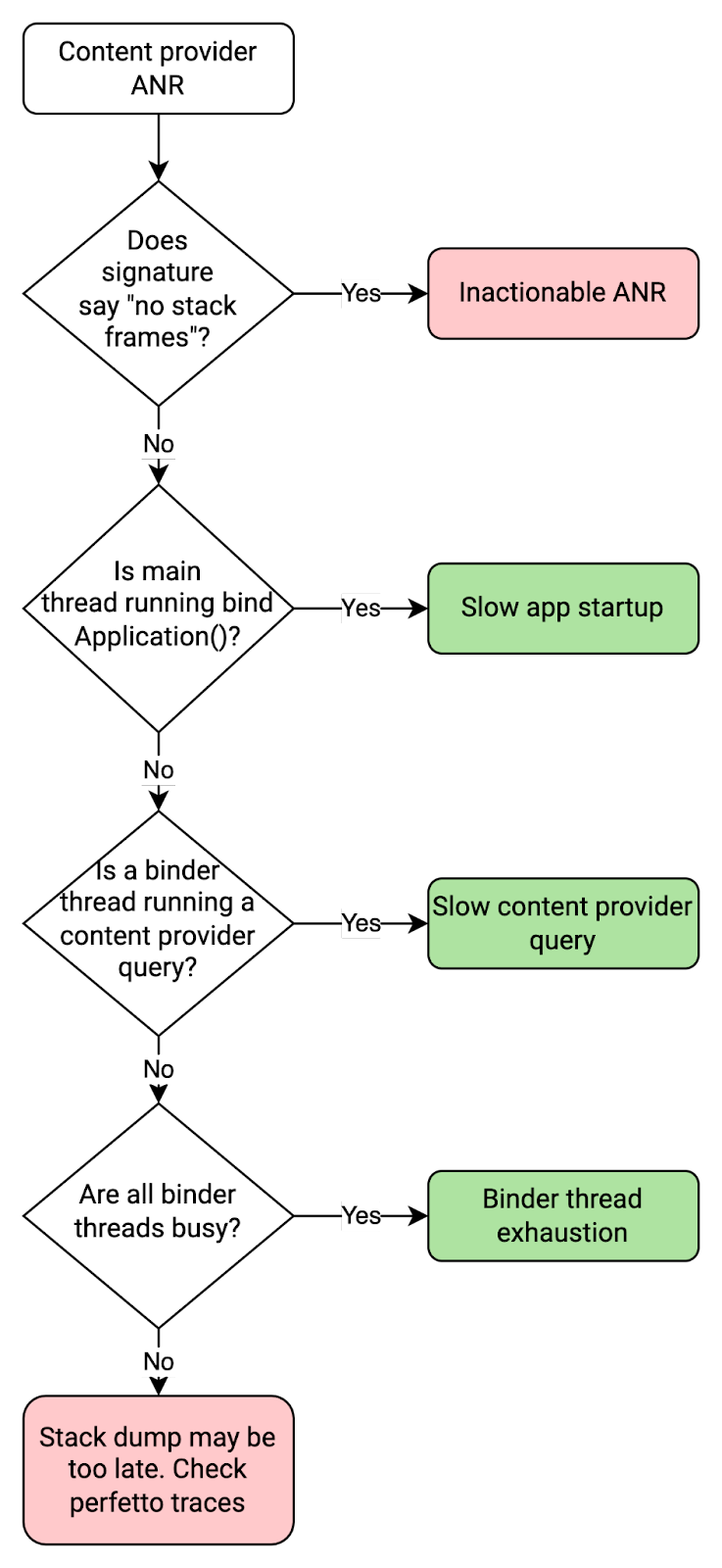
以下代码段展示了 binder 线程因 content provider 查询速度缓慢而被阻塞时的情况。在这种情况下,打开数据库时,content provider 查询正在等待锁。
binder:11300_2 (tid=13) Blocked

Waiting for osm (0x01ab5df9) held by at com.google.common.base.Suppliers$NonSerializableMemoizingSupplier.get(Suppliers:182)
at com.example.app.MyClass.blockingGetOpenDatabase(FooClass:171)
[...]
at com.example.app.MyContentProvider.query(MyContentProvider.java:915)
at android.content.ContentProvider$Transport.query(ContentProvider.java:292)
at android.content.ContentProviderNative.onTransact(ContentProviderNative.java:107)
at android.os.Binder.execTransactInternal(Binder.java:1339)
at android.os.Binder.execTransact(Binder.java:1275)
以下代码段展示了主线程因应用启动缓慢而被阻塞时的情况。在这种情况下,由于在 dagger 初始化期间发生锁争用,因此应用启动缓慢。
main (tid=1) Blocked

[...]
at dagger.internal.DoubleCheck.get(DoubleCheck:51)
- locked 0x0e33cd2c (a qsn)at dagger.internal.SetFactory.get(SetFactory:126)
at com.myapp.Bar_Factory.get(Bar_Factory:38)
[...]
at com.example.app.MyApplication.onCreate(DocsApplication:203)
at android.app.Instrumentation.callApplicationOnCreate(Instrumentation.java:1316)
at android.app.ActivityThread.handleBindApplication(ActivityThread.java:6991)
at android.app.ActivityThread.-$$Nest$mhandleBindApplication(unavailable:0)
at android.app.ActivityThread$H.handleMessage(ActivityThread.java:2235)
at android.os.Handler.dispatchMessage(Handler.java:106)
at android.os.Looper.loopOnce(Looper.java:205)
at android.os.Looper.loop(Looper.java:294)
at android.app.ActivityThread.main(ActivityThread.java:8170)
at java.lang.reflect.Method.invoke(Native method:0)
at com.android.internal.os.RuntimeInit$MethodAndArgsCaller.run(RuntimeInit.java:552)
at com.android.internal.os.ZygoteInit.main(ZygoteInit.java:971)
作业响应缓慢
如果应用响应 JobService.onStartJob() 或 JobService.onStopJob() 的用时过长,或使用 JobService.setNotification() 提供通知的用时过长,就会发生作业响应缓慢 ANR。这表明应用的主线程处于阻塞状态,无法执行其他操作。
如果 JobService.onStartJob() 或 JobService.onStopJob() 存在问题,请检查主线程中发生的情况。如果 JobService.setNotification() 存在问题,请务必尽快调用它。在提供通知之前不要执行太多工作。
查看线程违规

如果您的应用在后台线程上修改视图,则可能会在视图层次结构的内部状态中触发竞态条件。此违规行为可能会阻止主 (UI) 线程执行任何同步消息,从而导致严重的稳定性问题:
这种线程违规行为是 ANR 堆栈轨迹(其中主线程显示为空闲状态,例如在“nativePollOnce”或“主线程空闲”中捕获)背后的根本原因之一。
同步屏障泄漏
可以通过改变视图的状态(例如,调用 TextView.setText、View.setVisibility)间接使视图失效,也可以通过调用 View.invalidate 或 View.requestLayout 直接使视图失效。当视图失效时,ViewRootImpl 会安排一次遍历来执行测量、布局和绘制,以更新界面状态。
因此,界面会冻结。由于 MessageQueue 无法处理泄漏屏障之后的任何同步消息,因此主线程进入空闲状态。此问题通常表现为堆栈轨迹中包含 nativePollOnce 的 ANR。
为避免出现视图线程违规问题,请遵循以下最佳实践:
lifecycleOwner.lifecycleScope.launch(Dispatchers.IO) { val data = myRepository.getData() withContext(Dispatchers.Main) { // Switch context to Main myTextView.text = data.title } }
为了帮助您遵循最佳实践,Android 提供了多种从其他线程访问界面线程的方法:
热门图片加载器、响应式扩展框架、事件总线库和其他线程处理解决方案通常提供在主线程上观察特定事件的方法。对于需要获取和设置视图状态的观察者和事件监听器,此属性非常有用。
如何调试
Android 17 引入了新工具,可帮助您在开发期间识别、跟踪和解决视图线程违规问题。
1. 兼容性框架工具
借助兼容性框架工具,应用开发者可以使用开发者选项或 adb 单独启用或停用各项行为变更。您可以按照以下步骤切换查看线程违规行为变更:
您还可以使用 ADB 切换标志的开启或关闭状态:
$ adb shell am compat enable ENFORCE_THREAD_CHECKS_ON_VIEW_ROOT_IMPL_APIS <your.package.name>
$ adb shell am compat disable ENFORCE_THREAD_CHECKS_ON_VIEW_ROOT_IMPL_APIS <your.package.name>
启用此标志后,每当从错误的线程调用 View API 时,应用都会强制抛出异常并崩溃,从而帮助您捕获并修复视图线程违规问题。
2. CalledFromWrongThreadListener API
您还可以实现全局 View#registerCalledFromWrongThreadListener API,以通过编程方式检测不当的线程访问。
android {
   //...
   compileSdk = 37
}
val listener = object : View.CalledFromWrongThreadListener { override fun onCalledFromWrongThread() { // Handle the issue, e.g. crash if this is a dev build, or log an event // e.g. Log.d(TAG, "CalledFromWrongThread: ${Exception().stackTraceToString()}") // Unregister the listener to avoid redundant notifications for the same issue View.unregisterCalledFromWrongThreadListener(this) } } View.registerCalledFromWrongThreadListener(listener)
nativePollOnce
如果您在 ANR 堆栈中看到“nativePollOnce”或“message queue idle”帧,这通常表示疑似无响应的线程实际上处于空闲状态,正在等待 Looper 消息。在 Google Play 管理中心内,ANR 详细信息如下所示:
Native method - android.os.MessageQueue.nativePollOnce
Executing service com.example.app/com.example.app.MyService
例如,如果主线程处于空闲状态,则堆栈如下所示:
"main" tid=1 NativeMain threadIdle

#00  pc 0x00000000000d8b38  /apex/com.android.runtime/lib64/bionic/libc.so (__epoll_pwait+8)
#01  pc 0x0000000000019d88  /system/lib64/libutils.so (android::Looper::pollInner(int)+184)
#02  pc 0x0000000000019c68  /system/lib64/libutils.so (android::Looper::pollOnce(int, int*, int*, void**)+112)
#03  pc 0x000000000011409c  /system/lib64/libandroid_runtime.so (android::android_os_MessageQueue_nativePollOnce(_JNIEnv*, _jobject*, long, int)+44)
at android.os.MessageQueue.nativePollOnce (Native method)
at android.os.MessageQueue.next (MessageQueue.java:339)  at android.os.Looper.loop (Looper.java:208)
at android.app.ActivityThread.main (ActivityThread.java:8192)
at java.lang.reflect.Method.invoke (Native method)
at com.android.internal.os.RuntimeInit$MethodAndArgsCaller.run (RuntimeInit.java:626)
at com.android.internal.os.ZygoteInit.main (ZygoteInit.java:1015)
有几种原因可能会导致疑似无响应的线程处于空闲状态:
由于“nativePollOnce”ANR 的底层触发因素因 ANR 类型而异,因此诊断具体的 ANR 类别有助于确定可行的步骤来解决应用中的问题。
| 类别 | 原因 | 建议的解决方法 |
|---|---|---|
| 输入调度超时 | 系统级问题 堆栈转储延迟 |
您无需执行任何操作。 |
| 无聚焦窗口 | 系统级问题 延迟堆栈转储 查看线程违规 |
检查代码库是否存在视图线程违规情况。 |
| 广播接收器超时 | 延迟堆栈转储 系统级问题 线程错误归因 查看线程违规 |
检查堆栈转储中的相关线程。 检查代码库是否存在视图线程违规问题。 |
| 执行服务超时 | 后期堆栈转储 系统级问题 查看线程违规 |
检查代码库是否存在视图线程违规情况。 |
| content provider 没有响应 | 后期堆栈转储 系统级问题 线程错误归因 |
检查堆栈转储中的相关线程。 |
以下是分析 nativePollOnce ANR 的建议步骤。
无堆栈帧
某些 ANR 报告不包含存在 ANR 的堆栈,这意味着在生成 ANR 报告时堆栈转储失败。缺少堆栈帧有以下几种可能的原因:
[...]

--- CriticalEventLog ---
capacity: 20
timestamp_ms: 1666030897753
window_ms: 300000

libdebuggerd_client: failed to read status response from tombstoned: timeout reached?

----- Waiting Channels: pid 7068 at 2022-10-18 02:21:37.<US_SOCIAL_SECURITY_NUMBER>+0800 -----

[...]
没有堆栈帧的 ANR 无法通过集群签名或 ANR 报告进行处理。如需进行调试,请查看应用的其他集群,因为如果问题足够大,通常有自己的集群(其中包含堆栈帧)。另一种方法是查看 Perfetto 轨迹文件。
已知问题
由于系统监控 ANR 的异步方式,因此为在 ANR 触发之前完成广播处理而在应用进程中保留计时器可能无法正常工作。