

عند دمج ميزة "عرض المواد في Play"، يمكن لألعاب Unity الوصول إلى حِزم مواد العرض باستخدام Addressables أو AssetBundles. تُعدّ Addressables أحدث حلول عرض مواد العرض وأكثرها فعالية للألعاب التي تم إنشاؤها باستخدام Unity 2019.4 أو إصدار أحدث، بينما توفّر AssetBundles إمكانية استخدام حِزم مواد العرض في Unity 2017.4 و2018.4.
Unity Addressables
يجب أن تستخدم الألعاب التي تم إنشاؤها باستخدام Unity 2019.4 أو إصدار أحدث Addressables لعرض مواد العرض على أجهزة Android. توفّر Unity واجهة برمجة تطبيقات "عرض المواد في Play" (PAD) للتعامل مع حِزم مواد عرض Android باستخدام Addressables. للحصول على معلومات حول استخدام Addressables، يُرجى الاطّلاع على ما يلي:
- حزمة Addressables لنظام التشغيل Android
- دليل PAD لـ Unity
- مستندات مرجعية لواجهة برمجة التطبيقات PAD لـ Unity reference documentation
استخدام ملفات AssetBundle
يمكن للألعاب التي تم إنشاؤها باستخدام Unity 2017.4 و2018.4 استخدام ملفات AssetBundle لعرض مواد العرض على أجهزة Android. تحتوي ملفات Unity AssetBundle على مواد عرض متسلسلة يمكن لمحرك Unity تحميلها أثناء تشغيل التطبيق. هذه الملفات خاصة بمنصّة معيّنة (على سبيل المثال، تم إنشاؤها لنظام التشغيل Android) ويمكن استخدامها مع حِزم مواد العرض. في معظم الحالات، يتم تجميع ملف AssetBundle واحد في حزمة مواد عرض واحدة، وتستخدم الحزمة الاسم نفسه الذي يحمله ملف AssetBundle. إذا أردت المزيد من المرونة في إنشاء حزمة مواد عرض، يمكنك ضبط حزمة مواد العرض باستخدام واجهة برمجة التطبيقات.
أثناء وقت التشغيل، استخدِم فئة عرض المواد في Play for Unity لاسترداد ملف AssetBundle مجمّع في حزمة مواد عرض.
المتطلبات الأساسية
- إعداد بيئة التطوير:
OpenUPM-CLI
إذا كان لديك OpenUPM CLI مثبّتًا، يمكنك تثبيت سجلّ OpenUPM باستخدام الأمر التالي:
openupm add com.google.play.assetdeliveryOpenUPM
افتح إعدادات مدير الحِزم من خلال النقر على خيار قائمة Unity تعديل (Edit) > إعدادات المشروع (Project Settings) > مدير الحِزم (Package Manager).
أضِف OpenUPM كسجلّ ذي نطاق إلى نافذة "مدير الحِزم":
Name: package.openupm.com
URL: https://package.openupm.com
Scopes: com.google.external-dependency-manager
  com.google.play.common
  com.google.play.core
  com.google.play.assetdelivery
  com.google.android.appbundle
افتح قائمة مدير الحِزم من خلال النقر على خيار قائمة Unity نافذة (Window) > مدير الحِزم (Package Manager).
اضبط القائمة المنسدلة لنطاق المدير على سجلّاتي (My Registries).
اختَر حزمة مكوّن Google Play Integrity الإضافي لـ Unity من قائمة الحِزم وانقر على تثبيت (Install).
الاستيراد من GitHub
نزِّل أحدث
.unitypackageإصدار من GitHub.استورِد ملف
.unitypackageمن خلال النقر على خيار قائمة Unity مواد العرض (Assets) > استيراد حزمة (Import package) > حزمة مخصّصة (Custom Package) واستيراد جميع العناصر.
ضبط ملفات AssetBundle باستخدام واجهة المستخدم
اضبط كل ملف AssetBundle في حزمة مواد عرض:
- انقر على Google > مجموعة حزمات تطبيق Android > إعدادات عرض المواد.
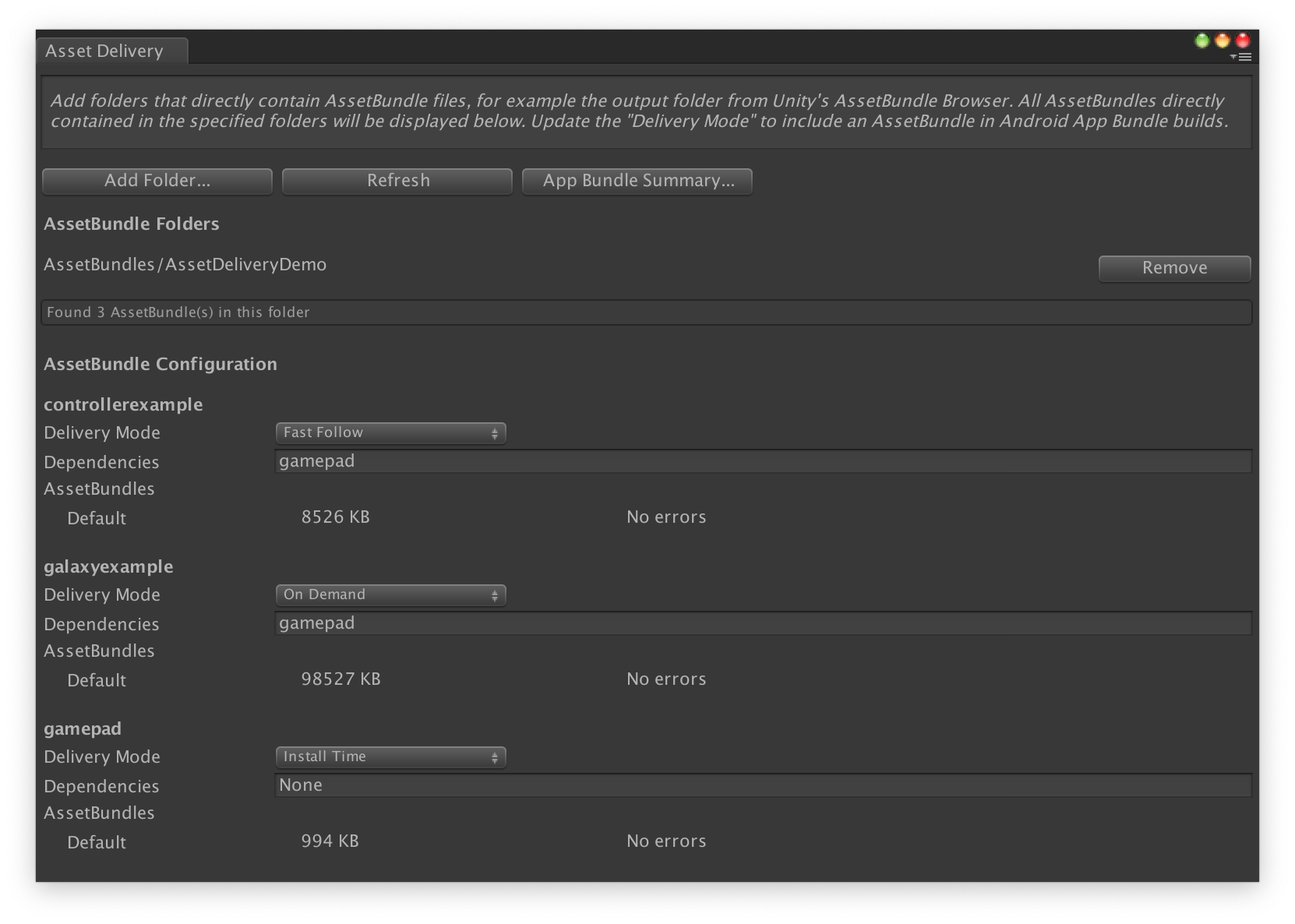
- لاختيار المجلدات التي تحتوي مباشرةً على ملفات AssetBundle، انقر على إضافة مجلد (Add Folder).
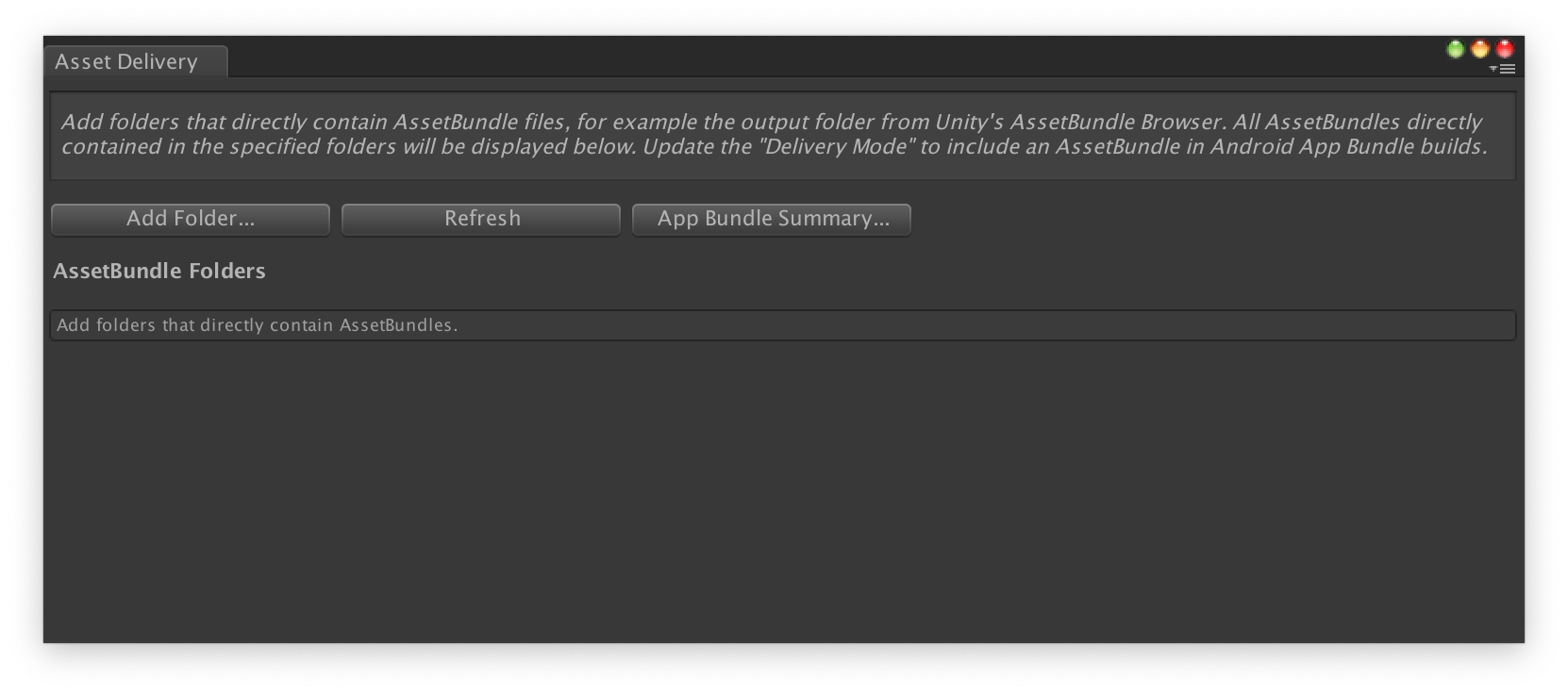
لكل حزمة، غيِّر وضع العرض (Delivery Mode) إلى وقت التثبيت (Install Time) أو التنزيل السريع (Fast Follow) أو عند الطلب (On Demand). أصلِح أي أخطاء أو التبعيات وأغلِق النافذة.
انقر على Google > إنشاء مجموعة حزمات تطبيق Android لإنشاء حزمة التطبيق.
(اختياري) اضبط حزمة التطبيق لتتوافق مع تنسيقات ضغط مواد العرض المختلفة.
ضبط حِزم مواد العرض باستخدام واجهة برمجة التطبيقات
يمكنك ضبط عرض مواد العرض من خلال نصوص المحرّر البرمجية التي يمكن تشغيلها كجزء من نظام إنشاء آلي.
استخدِم فئة
AssetPackConfig
لتحديد مواد العرض التي سيتم تضمينها في إنشاء مجموعة حزمات تطبيق Android، بالإضافة
إلى وضع عرض مواد العرض. لا تحتاج حِزم مواد العرض هذه إلى احتواء ملف AssetBundle.
public void ConfigureAssetPacks {
   // Creates an AssetPackConfig with a single asset pack, named
   // examplePackName, containing all the files in path/to/exampleFolder.
   var assetPackConfig = new AssetPackConfig();
   assetPackConfig.AddAssetsFolder("examplePackName",
                                   "path/to/exampleFolder",
                                   AssetPackDeliveryMode.OnDemand);

   // Configures the build system to use the newly created assetPackConfig when
   // calling Google > Build and Run or Google > Build Android App Bundle.
   AssetPackConfigSerializer.SaveConfig(assetPackConfig);

   // Alternatively, use BundleTool.BuildBundle to build an App Bundle from script.
   BuildBundle(new buildPlayerOptions(), assetPackConfig);
}
يمكنك أيضًا استخدام طريقة
BuildBundle
الثابتة في فئة Bundletool لإنشاء مجموعة حزمات تطبيق Android باستخدام حِزم مواد
العرض، مع توفير
BuildPlayerOptions
و
AssetPackConfig.
للحصول على برنامج تعليمي إرشادي، يُرجى الاطّلاع على الـ درس تطبيقي حول استخدام ميزة "عرض المواد في Play" في ألعاب Unity.
التكامل مع واجهة برمجة التطبيقات Play Asset Delivery Unity API
توفر واجهة برمجة التطبيقات Play Asset Delivery Unity API وظيفة طلب حِزم مواد العرض وإدارة عمليات التنزيل و الوصول إلى مواد العرض. احرِص على إضافة مكوّن Unity الإضافي إلى مشروعك أولاً.
تعتمد الدوال التي تستخدمها في واجهة برمجة التطبيقات على طريقة إنشاء حِزم مواد العرض.
عليك تنفيذ واجهة برمجة التطبيقات وفقًا لنوع عرض حزمة مواد العرض التي تريد الوصول إليها. يتم عرض هذه الخطوات في مخطط التدفق التالي.
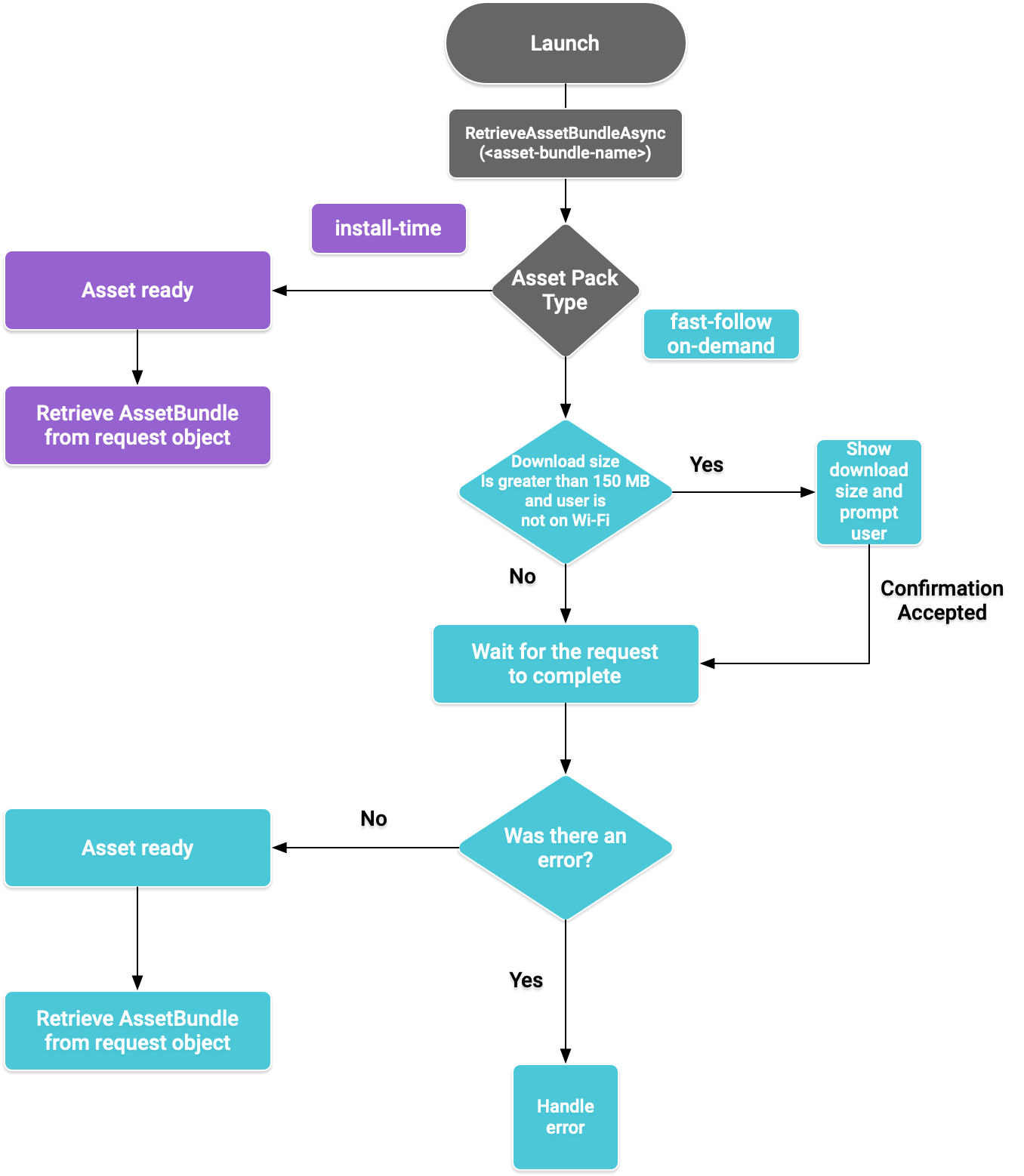
الشكل 1: مخطط تدفق للوصول إلى حِزم مواد العرض
استرداد ملفات AssetBundle
استورِد مكتبة
"عرض المواد في Play"
واستخدِم طريقة
RetrieveAssetBundleAsync()
لاسترداد ملف AssetBundle.
using Google.Play.AssetDelivery;

// Loads the AssetBundle from disk, downloading the asset pack containing it if necessary.
PlayAssetBundleRequest bundleRequest = PlayAssetDelivery.RetrieveAssetBundleAsync(asset-bundle-name);
العرض في وقت التثبيت
تتوفّر حِزم مواد العرض التي تم ضبطها على install-time على الفور عند تشغيل التطبيق. يمكنك استخدام ما يلي لتحميل مشهد من ملف AssetBundle:
AssetBundle assetBundle = bundleRequest.AssetBundle;

// You may choose to load scenes from the AssetBundle. For example:
string[] scenePaths = assetBundle.GetAllScenePaths();
SceneManager.LoadScene(scenePaths[path-index]);
التنزيل فور اكتمال التثبيت والعرض عند الطلب
تنطبق هذه الأقسام على حِزم مواد العرض fast-follow وon-demand.
التحقّق من الحالة
يتم تخزين كل حزمة مواد عرض في مجلد منفصل في وحدة التخزين الداخلية للتطبيق.
استخدِم طريقة
isDownloaded()
لتحديد ما إذا تم تنزيل حزمة مواد عرض من قبل.
مراقبة عملية التنزيل
استخدِم عنصر
PlayAssetBundleRequest
للاطّلاع على حالة الطلب:
// Download progress of request, between 0.0f and 1.0f. The value will always be
// 1.0 for assets delivered as install-time.
// NOTE: A value of 1.0 will only signify the download is complete. It will still need to be loaded.
float progress = bundleRequest.DownloadProgress;

// Returns true if:
//   * it had either completed the download, installing, and loading of the AssetBundle,
//   * OR if it has encountered an error.
bool done = bundleRequest.IsDone;

// Returns status of retrieval request.
AssetDeliveryStatus status = bundleRequest.Status;
switch(status) {
    case AssetDeliveryStatus.Pending:
        // Asset pack download is pending - N/A for install-time assets.
    case AssetDeliveryStatus.Retrieving:
        // Asset pack is being downloaded and transferred to app storage.
        // N/A for install-time assets.
    case AssetDeliveryStatus.Available:
        // Asset pack is downloaded on disk but NOT loaded into memory.
        // For PlayAssetPackRequest(), this indicates that the request is complete.
    case AssetDeliveryStatus.Loading:
        // Asset pack is being loaded.
    case AssetDeliveryStatus.Loaded:
        // Asset pack has finished loading, assets can now be loaded.
        // For PlayAssetBundleRequest(), this indicates that the request is complete.
    case AssetDeliveryStatus.Failed:
        // Asset pack retrieval has failed.
    case AssetDeliveryStatus.WaitingForWifi:
        // Asset pack retrieval paused until either the device connects via Wi-Fi,
        // or the user accepts the PlayAssetDelivery.ShowConfirmationDialog dialog.
    case AssetDeliveryStatus.RequiresUserConfirmation:
        // Asset pack retrieval paused until the user accepts the
        // PlayAssetDelivery.ShowConfirmationDialog dialog.
    default:
        break;
}
عمليات التنزيل الكبيرة
يمكن تنزيل حِزم مواد العرض التي يزيد حجمها عن 200 ميغابايت تلقائيًا، ولكن فقط على شبكة Wi-Fi. إذا لم يكن المستخدم متصلاً بشبكة Wi-Fi، يتم ضبط حالة PlayAssetBundleRequest على
AssetDeliveryStatus.WaitingForWifi
ويتم إيقاف عملية التنزيل مؤقتًا. في هذه الحالة، يمكنك إما الانتظار إلى أن يتصل الجهاز بشبكة Wi-Fi، ما يؤدي إلى استئناف عملية التنزيل، أو مطالبة المستخدم بالموافقة على تنزيل الحزمة عبر اتصال شبكة الجوّال.
موافقة المستخدم مطلوبة
إذا كانت حالة الحزمة هي AssetDeliveryStatus.RequiresUserConfirmation، لن تكتمل عملية التنزيل إلى أن يقبل المستخدم مربّع الحوار الذي يظهر باستخدام PlayAssetDelivery.ShowConfirmationDialog(). يمكن أن تحدث هذه الحالة إذا لم يتعرّف Play على التطبيق. يُرجى العِلم أنّ استدعاء PlayAssetDelivery.ShowConfirmationDialog() في هذه الحالة يؤدي إلى تعديل التطبيق. بعد التعديل، اطلب مواد العرض مرة أخرى.
if(request.Status == AssetDeliveryStatus.RequiresUserConfirmation
   || request.Status == AssetDeliveryStatus.WaitingForWifi) {
    var userConfirmationOperation = PlayAssetDelivery.ShowConfirmationDialog();
    yield return userConfirmationOperation;

    switch(userConfirmationOperation.GetResult()) {
        case ConfirmationDialogResult.Unknown:
            // userConfirmationOperation finished with an error. Something went
            // wrong when displaying the prompt to the user, and they weren't
            // able to interact with the dialog.
        case ConfirmationDialogResult.Accepted:
            // User accepted the confirmation dialog--an update will start.
        case ConfirmationDialogResult.Declined:
            // User canceled or declined the dialog. It can be shown again.
        default:
            break;
    }
}
إلغاء طلب (عند الطلب فقط)
إذا كنت بحاجة إلى إلغاء الطلب قبل تحميل ملفات AssetBundle في
الذاكرة، استخدِم
AttemptCancel()
طريقة في
PlayAssetBundleRequest
عنصر:
// Will only attempt if the status is Pending, Retrieving, or Available - otherwise
// it will be a no-op.
bundleRequest.AttemptCancel();

// Check to see if the request was successful by checking if the error code is Canceled.
if(bundleRequest.Error == AssetDeliveryErrorCode.Canceled) {
    // Request was successfully canceled.
}
طلب حِزم مواد العرض بشكل غير متزامن
في معظم الحالات، عليك استخدام Coroutines لـ طلب حِزم مواد العرض بشكل غير متزامن ومراقبة التقدّم، كما هو موضّح في ما يلي:
private IEnumerator LoadAssetBundleCoroutine(string assetBundleName) {

    PlayAssetBundleRequest bundleRequest =
        PlayAssetDelivery.RetrieveAssetBundleAsync(assetBundleName);

    while (!bundleRequest.IsDone) {
        if(bundleRequest.Status == AssetDeliveryStatus.WaitingForWifi) {
            var userConfirmationOperation = PlayAssetDelivery.ShowCellularDataConfirmation();

            // Wait for confirmation dialog action.
            yield return userConfirmationOperation;

            if((userConfirmationOperation.Error != AssetDeliveryErrorCode.NoError) ||
               (userConfirmationOperation.GetResult() != ConfirmationDialogResult.Accepted)) {
                // The user did not accept the confirmation. Handle as needed.
            }

            // Wait for Wi-Fi connection OR confirmation dialog acceptance before moving on.
            yield return new WaitUntil(() => bundleRequest.Status != AssetDeliveryStatus.WaitingForWifi);
        }

        // Use bundleRequest.DownloadProgress to track download progress.
        // Use bundleRequest.Status to track the status of request.

        yield return null;
    }

    if (bundleRequest.Error != AssetDeliveryErrorCode.NoError) {
        // There was an error retrieving the bundle. For error codes NetworkError
        // and InsufficientStorage, you may prompt the user to check their
        // connection settings or check their storage space, respectively, then
        // try again.
        yield return null;
    }

    // Request was successful. Retrieve AssetBundle from request.AssetBundle.
    AssetBundle assetBundle = bundleRequest.AssetBundle;
لمزيد من المعلومات حول معالجة الأخطاء، اطّلِع على قائمة
AssetDeliveryErrorCodes.
طُرق واجهة برمجة التطبيقات Play Core API الأخرى
في ما يلي بعض طُرق واجهة برمجة التطبيقات الإضافية التي قد ترغب في استخدامها في تطبيقك.
الاطّلاع على حجم التنزيل
يمكنك الاطّلاع على حجم ملف AssetBundle من خلال إجراء طلب غير متزامن إلى Google Play وضبط طريقة رد الاتصال عند اكتمال العملية:
public IEnumerator GetDownloadSize() {
   PlayAsyncOperation<long> getSizeOperation =
   PlayAssetDelivery.GetDownloadSize(assetPackName);

   yield return getSizeOperation;
   if(operation.Error != AssetDeliveryErrorCode.NoError) {
       // Error while retrieving download size.
    } else {
        // Download size is given in bytes.
        long downloadSize = operation.GetResult();
    }
}
إزالة ملفات AssetBundle
يمكنك إزالة ملفات AssetBundle التي يتم تنزيلها فور اكتمال التثبيت وعند الطلب والتي لم يتم تحميلها حاليًا في الذاكرة. أجرِ الطلب غير المتزامن التالي واضبط طريقة معاودة الاتصال عند اكتماله:
PlayAsyncOperation<string> removeOperation = PlayAssetDelivery.RemoveAssetPack(assetBundleName);

removeOperation.Completed += (operation) =>
            {
                if(operation.Error != AssetDeliveryErrorCode.NoError) {
                    // Error while attempting to remove AssetBundles.
                } else {
                    // Files were deleted OR files did not exist to begin with.
                }
            };
الخطوات التالية
اختبِر عرض مواد العرض محليًا ومن Google Play.