

分頁程式庫提供強大的功能,可載入並顯示大型資料集內的分頁資料。本指南說明如何使用分頁程式庫,設定來自網路資料來源的分頁資料串流,並顯示在延遲清單中。
定義資料來源
首先,您必須定義 PagingSource 實作來識別資料來源。PagingSource API 類別包含 load 方法,您必須覆寫該方法,指出如何從對應的資料來源擷取分頁資料。
請直接透過 PagingSource 類別,使用 Kotlin 協同程式執行非同步載入。
選取鍵和值類型
PagingSource<Key, Value> 有兩個類型參數:Key 和 Value。鍵會定義用於載入資料的 ID,值則是資料本身的類型。舉例來說,假設您將 Int 頁碼傳遞至 Retrofit,從網路載入 User 物件的網頁,就可選取 Int 做為 Key 的類型,並將 User 設為 Value 的類型。
定義 PagingSource
以下範例會實作 PagingSource,依據頁碼載入項目頁面。Key 類型為 Int,Value 類型為 User。
class ExamplePagingSource(
    val backend: ExampleBackendService,
    val query: String
) : PagingSource<Int, User>() {
  override suspend fun load(
    params: LoadParams<Int>
  ): LoadResult<Int, User> {

    init {
        // the data source is expected to be immutable
        // invalidate PagingSource if data source
        // has updated
        backEnd.addDatabaseOnChangedListener {
            invalidate()
        }
    }

    try {
      // Start refresh at page 1 if undefined.
      val nextPageNumber = params.key ?: 1
      val response = backend.searchUsers(query, nextPageNumber)
      return LoadResult.Page(
        data = response.users,
        prevKey = null, // Only paging forward.
        nextKey = nextPageNumber + 1
      )
    } catch (e: Exception) {
      // Handle errors in this block and return LoadResult.Error for
      // expected errors (such as a network failure).
    }
  }

  override fun getRefreshKey(state: PagingState<Int, User>): Int? {
    // Try to find the page key of the closest page to anchorPosition from
    // either the prevKey or the nextKey; you need to handle nullability
    // here.
    //  * prevKey == null -> anchorPage is the first page.
    //  * nextKey == null -> anchorPage is the last page.
    //  * both prevKey and nextKey are null -> anchorPage is the
    //    initial page, so return null.
    return state.anchorPosition?.let { anchorPosition ->
      val anchorPage = state.closestPageToPosition(anchorPosition)
      anchorPage?.prevKey?.plus(1) ?: anchorPage?.nextKey?.minus(1)
    }
  }
}
一般 PagingSource 實作會將建構函式中的參數傳遞至 load 方法,為查詢載入適合的資料。在上述範例中,相關的參數如下:
backend:提供資料的後端服務例項query:要傳送到backend指定服務的搜尋查詢
LoadParams 物件包含要執行的載入作業相關資訊。其中包括要載入的鍵和要載入的項目數量。
LoadResult 物件包含載入作業的結果。LoadResult 是密封類別;視 load 呼叫是否成功而定,可採用下列其中一個形式:
- 如果載入成功,就傳回
LoadResult.Page物件。 - 如果載入失敗,則傳回
LoadResult.Error物件。 - 如果
PagingSource不再有效,且應由新執行個體取代 (例如,由於基礎資料變更),請傳回LoadResult.Invalid物件。
下圖說明這個範例中的 load 函式如何接收每個載入作業的鍵,並提供後續載入作業的鍵。
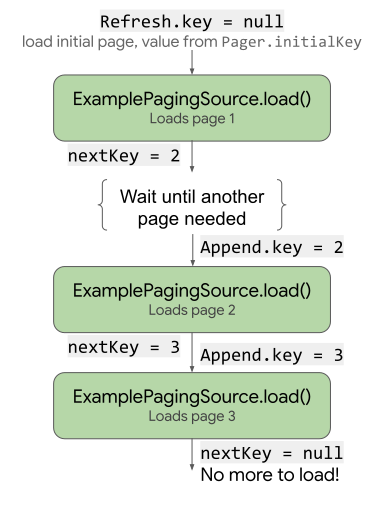
load 如何使用及更新鍵。PagingSource 實作項目也必須實作 getRefreshKey 方法,後者採用 PagingState 物件做為參數。當資料重新整理或在初始載入作業完成後失效時,這個方法會傳回要傳入 load 方法的鍵。在後續重新整理資料時,分頁程式庫會自動呼叫這個方法。
處理錯誤
有很多原因會造成資料載入要求失敗,尤其是透過網路載入時。從 load 方法傳回 LoadResult.Error 物件,即可回報載入期間發生的錯誤。
舉例來說,只要將下方程式碼加入 load 方法,你就能擷取及回報前一個範例 ExamplePagingSource 中的載入錯誤:
catch (e: IOException) {
  // IOException for network failures.
  return LoadResult.Error(e)
} catch (e: HttpException) {
  // HttpException for any non-2xx HTTP status codes.
  return LoadResult.Error(e)
}
如要進一步瞭解如何處理 Retrofit 錯誤,請參閱 PagingSource API 參考資料中的範例。
PagingSource 會收集 LoadResult.Error 物件並傳送至 UI,方便您執行操作。如要進一步瞭解如何在 UI 中顯示載入狀態,請參閱「管理及顯示載入狀態」一文。
設定 PagingData 串流
接下來,您需要用到來自 PagingSource 實作的串流分頁資料。請在 ViewModel 中設定資料串流。Pager 類別提供的方法,可對來自 PagingSource 的 PagingData 物件顯示回應式串流。分頁程式庫會將資料串流公開為 Flow。
建立 Pager 執行個體以設定回應式串流時,你必須為執行個體提供 PagingConfig 設定物件和一個用於通知 Pager 如何取得 PagingSource 實作執行個體的函式,如下列範例所示。
class UserViewModel(
    private val backend: ExampleBackendService,
    private val query: String
) : ViewModel() {

    val userPagingFlow: Flow<PagingData<User>> = Pager(
        // Configure how data is loaded by passing additional properties to
        // PagingConfig, such as pageSize and enabling or disabling placeholders.
        config = PagingConfig(
            pageSize = 20,
            enablePlaceholders = true
        ),
        pagingSourceFactory = {
            ExamplePagingSource(backend, query)
        }
    )
    .flow
    .cachedIn(viewModelScope)
}
cachedIn 運算子將使資料串流變得可共用,並透過提供的 CoroutineScope 快取已載入的資料。如果沒有 cachedIn,PagingData 就無法重新收集。這個範例會用到生命週期 lifecycle-viewmodel-ktx 構件提供的 viewModelScope。
Pager 物件會呼叫來自 PagingSource 物件的 load 方法,為其提供 LoadParams 物件,並接收傳回的 LoadResult 物件。
收集資料並顯示在 UI 中
如要將分頁串流連結至 UI,請從 ViewModel 取得流程,並傳遞至清單可組合函式。
@Composable
fun UserScreen(viewModel: UserViewModel = viewModel()) {
    val userFlow = viewModel.userPagingFlow
    UserList(flow = userFlow)
}
使用 collectAsLazyPagingItems 將 PagingData 流程轉換為 LazyPagingItems。接著,在 LazyColumn 中使用 items API,配置每個項目。
請務必使用 itemKey 為每項商品提供固定的專屬 ID。
以下範例使用 it.id (參照 User.id 屬性),因為在資料更新期間,User 執行個體會保持穩定。
@Composable
fun UserList(flow: Flow<PagingData<User>>) {
    val lazyPagingItems = flow.collectAsLazyPagingItems()
    LazyColumn {
        items(
            lazyPagingItems.itemCount,
            key = lazyPagingItems.itemKey { it.id }
        ) { index ->
            val user = lazyPagingItems[index]
            if (user != null) {
                UserRow(user)
            } else {
                UserPlaceholder()
            }
        }
    }
}
分頁程式庫會在載入頁面時使用 null 做為預留位置,因此如果您已啟用預留位置,就必須在內容區塊中處理 null 值。
現在清單會顯示分頁資料,而 Paging 程式庫會在使用者捲動畫面時載入其他頁面。
其他資源
如要進一步瞭解 Paging 程式庫,請參閱以下資源:
說明文件
Views content
為您推薦
- 注意:系統會在 JavaScript 關閉時顯示連結文字
- 從網路和資料庫進行分頁
- 遷移至 Paging 3
- Paging 程式庫總覽