

ExoPlayer는 오프라인 재생을 위해 미디어를 다운로드하는 기능을 제공합니다. 대부분의 사용 사례에서 앱이 백그라운드에 있는 경우에도 다운로드가 계속되는 것이 바람직합니다. 이러한 사용 사례의 경우 앱은 DownloadService를 서브클래싱하고 서비스에 명령어를 전송하여 다운로드를 추가, 삭제, 제어해야 합니다. 다음 다이어그램은 관련 주요 클래스를 보여줍니다.
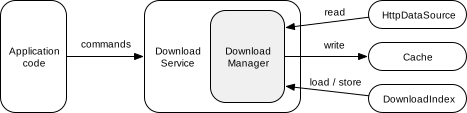
DownloadService:DownloadManager을 래핑하고 명령어를 전달합니다. 이 서비스를 사용하면 앱이 백그라운드에 있어도DownloadManager가 계속 실행될 수 있습니다.DownloadManager: 여러 다운로드를 관리하고,DownloadIndex에서 (및 으로) 상태 를 로드 (및 저장)하며, 네트워크 연결과 같은 요구사항에 따라 다운로드를 시작하고 중지합니다. 콘텐츠를 다운로드하기 위해 관리자는 일반적으로HttpDataSource에서 다운로드되는 데이터를 읽고Cache에 씁니다.DownloadIndex: 다운로드 상태를 유지합니다.
DownloadService 만들기
DownloadService를 만들려면 서브클래스를 만들고 추상 메서드를 구현하세요.
getDownloadManager(): 사용할DownloadManager를 반환합니다.getScheduler(): 대기 중인 다운로드가 진행되는 데 필요한 요구사항이 충족되면 서비스를 다시 시작할 수 있는 선택적Scheduler를 반환합니다. ExoPlayer는 다음 구현을 제공합니다.PlatformScheduler,JobScheduler(최소 API는 21)를 사용합니다. 앱 권한 요구사항은PlatformSchedulerJavadoc을 참고하세요.WorkManagerScheduler(WorkManager 사용)
getForegroundNotification(): 서비스가 포그라운드에서 실행될 때 표시되는 알림을 반환합니다.DownloadNotificationHelper.buildProgressNotification를 사용하여 기본 스타일로 알림을 만들 수 있습니다.
마지막으로 AndroidManifest.xml 파일에서 서비스를 정의합니다.
<uses-permission android:name="android.permission.FOREGROUND_SERVICE"/>
<uses-permission android:name="android.permission.FOREGROUND_SERVICE_DATA_SYNC"/>
<application>
  <service android:name="com.myapp.MyDownloadService"
      android:exported="false"
      android:foregroundServiceType="dataSync">
    <!-- This is needed for Scheduler -->
    <intent-filter>
      <action android:name="androidx.media3.exoplayer.downloadService.action.RESTART"/>
      <category android:name="android.intent.category.DEFAULT"/>
    </intent-filter>
  </service>
</application>
구체적인 예는 ExoPlayer 데모 앱의 DemoDownloadService 및 AndroidManifest.xml을 참고하세요.
DownloadManager 생성
다음 코드 스니펫은 DownloadManager를 인스턴스화하는 방법을 보여줍니다.
는 DownloadService에서 getDownloadManager()에 의해 반환될 수 있습니다.
Kotlin
// Note: This should be a singleton in your app. val databaseProvider = StandaloneDatabaseProvider(context) // A download cache should not evict media, so should use a NoopCacheEvictor. val downloadCache = SimpleCache(downloadDirectory, NoOpCacheEvictor(), databaseProvider) // Create a factory for reading the data from the network. val dataSourceFactory = DefaultHttpDataSource.Factory() // Choose an executor for downloading data. Using Runnable::run will cause each download task to // download data on its own thread. Passing an executor that uses multiple threads will speed up // download tasks that can be split into smaller parts for parallel execution. Applications that // already have an executor for background downloads may wish to reuse their existing executor. val downloadExecutor = Executor(Runnable::run) // Create the download manager. val downloadManager = DownloadManager(context, databaseProvider, downloadCache, dataSourceFactory, downloadExecutor) // Optionally, properties can be assigned to configure the download manager. downloadManager.requirements = requirements downloadManager.maxParallelDownloads = 3
자바
// Note: This should be a singleton in your app. databaseProvider = new StandaloneDatabaseProvider(context); // A download cache should not evict media, so should use a NoopCacheEvictor. downloadCache = new SimpleCache(downloadDirectory, new NoOpCacheEvictor(), databaseProvider); // Create a factory for reading the data from the network. dataSourceFactory = new DefaultHttpDataSource.Factory(); // Choose an executor for downloading data. Using Runnable::run will cause each download task to // download data on its own thread. Passing an executor that uses multiple threads will speed up // download tasks that can be split into smaller parts for parallel execution. Applications that // already have an executor for background downloads may wish to reuse their existing executor. Executor downloadExecutor = Runnable::run; // Create the download manager. downloadManager = new DownloadManager( context, databaseProvider, downloadCache, dataSourceFactory, downloadExecutor); // Optionally, setters can be called to configure the download manager. downloadManager.setRequirements(requirements); downloadManager.setMaxParallelDownloads(3);
구체적인 예는 데모 앱의 DemoUtil을 참고하세요.
다운로드 추가
다운로드를 추가하려면 DownloadRequest를 만들고 DownloadService에 전송합니다. 적응형 스트림의 경우 DownloadHelper를 사용하여 DownloadRequest를 빌드합니다. 다음 예에서는 다운로드 요청을 만드는 방법을 보여줍니다.
Kotlin
val downloadRequest = DownloadRequest.Builder(contentId, contentUri).build()
자바
DownloadRequest downloadRequest = new DownloadRequest.Builder(contentId, contentUri).build();
이 예에서 contentId은 콘텐츠의 고유 식별자입니다. contentUri는 contentId로 사용할 수 있는 경우가 많지만 앱은 사용 사례에 가장 적합한 ID 체계를 자유롭게 사용할 수 있습니다. DownloadRequest.Builder에는 선택적 설정자도 있습니다. 예를 들어 setKeySetId 및 setData는 앱이 다운로드와 연결하려는 DRM 및 맞춤 데이터를 각각 설정하는 데 사용할 수 있습니다. 콘텐츠의 MIME 유형은 setMimeType를 사용하여 지정할 수도 있습니다. 이는 MIME 유형을 contentUri에서 추론할 수 없는 경우에 대한 힌트입니다.
생성된 요청은 DownloadService에 전송되어 다운로드를 추가할 수 있습니다.
Kotlin
DownloadService.sendAddDownload( context, MyDownloadService::class.java, downloadRequest, /* foreground= */ false, )
자바
DownloadService.sendAddDownload( context, MyDownloadService.class, downloadRequest, /* foreground= */ false);
이 예에서 MyDownloadService는 앱의 DownloadService 하위 클래스이며 foreground 매개변수는 서비스가 포그라운드에서 시작되는지 여부를 제어합니다. 앱이 이미 포그라운드에 있는 경우 DownloadService가 해야 할 작업이 있다고 판단하면 포그라운드로 전환되므로 foreground 매개변수는 일반적으로 false로 설정해야 합니다.
다운로드 항목 삭제 중
DownloadService에 삭제 명령어를 전송하여 다운로드를 삭제할 수 있습니다. 여기서 contentId은 삭제할 다운로드를 식별합니다.
Kotlin
DownloadService.sendRemoveDownload( context, MyDownloadService::class.java, contentId, /* foreground= */ false, )
자바
DownloadService.sendRemoveDownload( context, MyDownloadService.class, contentId, /* foreground= */ false);
DownloadService.sendRemoveAllDownloads를 사용하여 다운로드한 모든 데이터를 삭제할 수도 있습니다.
다운로드 시작 및 중지
다운로드는 다음 네 가지 조건을 충족하는 경우에만 진행됩니다.
- 다운로드에 중지 이유가 없습니다.
- 다운로드가 일시중지되지 않습니다.
- 다운로드가 진행되기 위한 요구사항이 충족됩니다. 요구사항은 허용된 네트워크 유형에 관한 제약 조건과 기기가 유휴 상태여야 하는지 또는 충전기에 연결되어야 하는지를 지정할 수 있습니다.
- 최대 동시 다운로드 수를 초과하지 않습니다.
이러한 모든 조건은 DownloadService에 명령어를 전송하여 제어할 수 있습니다.
다운로드 중지 이유 설정 및 삭제
하나 또는 모든 다운로드가 중지되는 이유를 설정할 수 있습니다.
Kotlin
// Set the stop reason for a single download. DownloadService.sendSetStopReason( context, MyDownloadService::class.java, contentId, stopReason, /* foreground= */ false, ) // Clear the stop reason for a single download. DownloadService.sendSetStopReason( context, MyDownloadService::class.java, contentId, Download.STOP_REASON_NONE, /* foreground= */ false, )
자바
// Set the stop reason for a single download. DownloadService.sendSetStopReason( context, MyDownloadService.class, contentId, stopReason, /* foreground= */ false); // Clear the stop reason for a single download. DownloadService.sendSetStopReason( context, MyDownloadService.class, contentId, Download.STOP_REASON_NONE, /* foreground= */ false);
stopReason는 0이 아닌 값일 수 있습니다 (Download.STOP_REASON_NONE = 0은 다운로드가 중지되지 않음을 의미하는 특수 값임). 다운로드를 중지해야 하는 이유가 여러 개인 앱은 서로 다른 값을 사용하여 각 다운로드가 중지된 이유를 추적할 수 있습니다. 모든 다운로드의 중지 이유를 설정하고 지우는 것은 단일 다운로드의 중지 이유를 설정하고 지우는 것과 동일한 방식으로 작동합니다. 단, contentId는 null로 설정해야 합니다.
다운로드에 0이 아닌 중지 이유가 있으면 Download.STATE_STOPPED 상태가 됩니다. 중지 이유는 DownloadIndex에 유지되므로 애플리케이션 프로세스가 종료되었다가 나중에 다시 시작되더라도 유지됩니다.
모든 다운로드 일시중지 및 재개
모든 다운로드는 다음과 같이 일시중지하고 다시 시작할 수 있습니다.
Kotlin
// Pause all downloads. DownloadService.sendPauseDownloads( context, MyDownloadService::class.java, /* foreground= */ false, ) // Resume all downloads. DownloadService.sendResumeDownloads( context, MyDownloadService::class.java, /* foreground= */ false, )
자바
// Pause all downloads. DownloadService.sendPauseDownloads(context, MyDownloadService.class, /* foreground= */ false); // Resume all downloads. DownloadService.sendResumeDownloads(context, MyDownloadService.class, /* foreground= */ false);
다운로드가 일시중지되면 Download.STATE_QUEUED 상태가 됩니다.
중지 이유를 설정하는 것과 달리 이 접근 방식은 상태 변경사항을 유지하지 않습니다. DownloadManager의 런타임 상태에만 영향을 미칩니다.
다운로드가 진행되기 위한 요구사항 설정
Requirements은 다운로드를 진행하기 위해 충족해야 하는 제약 조건을 지정하는 데 사용할 수 있습니다. 요구사항은 위 예와 같이 DownloadManager를 만들 때 DownloadManager.setRequirements()를 호출하여 설정할 수 있습니다. DownloadService에 명령어를 전송하여 동적으로 변경할 수도 있습니다.
Kotlin
// Set the download requirements. DownloadService.sendSetRequirements( context, MyDownloadService::class.java, requirements, /* foreground= */ false, )
자바
// Set the download requirements. DownloadService.sendSetRequirements( context, MyDownloadService.class, requirements, /* foreground= */ false);
요구사항이 충족되지 않아 다운로드를 진행할 수 없는 경우 Download.STATE_QUEUED 상태가 됩니다. DownloadManager.getNotMetRequirements()를 사용하여 충족되지 않은 요구사항을 쿼리할 수 있습니다.
최대 동시 다운로드 수 설정
최대 병렬 다운로드 수는 DownloadManager.setMaxParallelDownloads()를 호출하여 설정할 수 있습니다. 이는 일반적으로 위 예와 같이 DownloadManager를 만들 때 실행됩니다.
최대 동시 다운로드 수가 이미 진행 중이어서 다운로드를 진행할 수 없는 경우 Download.STATE_QUEUED 상태가 됩니다.
다운로드 쿼리
DownloadManager의 DownloadIndex는 완료되거나 실패한 다운로드를 포함한 모든 다운로드의 상태를 쿼리할 수 있습니다. DownloadManager.getDownloadIndex()를 호출하여 DownloadIndex를 가져올 수 있습니다. 그런 다음 DownloadIndex.getDownloads()를 호출하여 모든 다운로드를 반복하는 커서를 가져올 수 있습니다. 또는 DownloadIndex.getDownload()를 호출하여 단일 다운로드의 상태를 쿼리할 수 있습니다.
DownloadManager는 현재 (즉, 완료되지 않았거나 실패하지 않음) 다운로드의 상태만 반환하는 DownloadManager.getCurrentDownloads()도 제공합니다. 이 메서드는 현재 다운로드의 진행률과 상태를 표시하는 알림 및 기타 UI 구성요소를 업데이트하는 데 유용합니다.
오프라인 저장 콘텐츠 듣기
DownloadManager에 리스너를 추가하여 현재 다운로드의 상태가 변경될 때 알림을 받을 수 있습니다.
Kotlin
downloadManager.addListener( object : DownloadManager.Listener { // Override methods of interest here. } )
자바
downloadManager.addListener( new DownloadManager.Listener() { // Override methods of interest here. });
구체적인 예는 데모 앱의 DownloadTracker 클래스에 있는 DownloadManagerListener를 참고하세요.
다운로드한 콘텐츠 재생
오프라인 저장된 콘텐츠를 재생하는 것은 온라인 콘텐츠를 재생하는 것과 비슷하지만, 네트워크를 통해 데이터를 읽는 대신 오프라인 저장 Cache에서 데이터를 읽는다는 점이 다릅니다.
다운로드한 콘텐츠를 재생하려면 다운로드에 사용된 동일한 Cache 인스턴스를 사용하여 CacheDataSource.Factory을 만들고 플레이어를 빌드할 때 DefaultMediaSourceFactory에 삽입합니다.
Kotlin
// Create a read-only cache data source factory using the download cache. val cacheDataSourceFactory: DataSource.Factory = CacheDataSource.Factory() .setCache(downloadCache) .setUpstreamDataSourceFactory(httpDataSourceFactory) .setCacheWriteDataSinkFactory(null) // Disable writing. val player = ExoPlayer.Builder(context) .setMediaSourceFactory( DefaultMediaSourceFactory(context).setDataSourceFactory(cacheDataSourceFactory) ) .build()
자바
// Create a read-only cache data source factory using the download cache. DataSource.Factory cacheDataSourceFactory = new CacheDataSource.Factory() .setCache(downloadCache) .setUpstreamDataSourceFactory(httpDataSourceFactory) .setCacheWriteDataSinkFactory(null); // Disable writing. ExoPlayer player = new ExoPlayer.Builder(context) .setMediaSourceFactory( new DefaultMediaSourceFactory(context).setDataSourceFactory(cacheDataSourceFactory)) .build();
동일한 플레이어 인스턴스를 다운로드되지 않은 콘텐츠를 재생하는 데도 사용하는 경우 재생 중에 해당 콘텐츠도 다운로드되지 않도록 CacheDataSource.Factory를 읽기 전용으로 구성해야 합니다.
플레이어가 CacheDataSource.Factory로 구성되면 재생을 위해 다운로드된 콘텐츠에 액세스할 수 있습니다. 다운로드를 재생하려면 해당 MediaItem를 플레이어에 전달합니다. MediaItem은 Download.request.toMediaItem를 사용하여 Download에서 가져오거나 DownloadRequest.toMediaItem를 사용하여 DownloadRequest에서 직접 가져올 수 있습니다.
MediaSource 구성
위의 예시에서는 모든 MediaItem의 재생에 다운로드 캐시를 사용할 수 있도록 합니다. 다운로드 캐시를 개별 MediaSource 인스턴스에서 사용할 수 있도록 할 수도 있습니다. 이 인스턴스는 플레이어에 직접 전달할 수 있습니다.
Kotlin
val mediaSource = ProgressiveMediaSource.Factory(cacheDataSourceFactory) .createMediaSource(MediaItem.fromUri(contentUri)) player.setMediaSource(mediaSource) player.prepare()
자바
ProgressiveMediaSource mediaSource = new ProgressiveMediaSource.Factory(cacheDataSourceFactory) .createMediaSource(MediaItem.fromUri(contentUri)); player.setMediaSource(mediaSource); player.prepare();
적응형 스트림 다운로드 및 재생
적응형 스트림 (예: DASH, SmoothStreaming, HLS)에는 일반적으로 여러 미디어 트랙이 포함됩니다. 다양한 품질 (예: SD, HD, 4K 동영상 트랙)로 동일한 콘텐츠를 포함하는 트랙이 여러 개 있는 경우가 많습니다. 콘텐츠가 다른 동일한 유형의 트랙이 여러 개 있을 수도 있습니다 (예: 언어가 다른 오디오 트랙이 여러 개).
스트리밍 재생의 경우 트랙 선택기를 사용하여 재생할 트랙을 선택할 수 있습니다. 마찬가지로 다운로드의 경우 DownloadHelper을 사용하여 다운로드할 트랙을 선택할 수 있습니다. DownloadHelper의 일반적인 사용법은 다음 단계를 따릅니다.
DownloadHelper.Factory인스턴스를 사용하여DownloadHelper를 빌드합니다. 도우미를 준비하고 콜백을 기다립니다.- 원하는 경우
getMappedTrackInfo및getTrackSelections를 사용하여 기본적으로 선택된 트랙을 검사하고clearTrackSelections,replaceTrackSelections,addTrackSelection를 사용하여 조정합니다. getDownloadRequest를 호출하여 선택한 트랙의DownloadRequest를 만듭니다. 앞서 설명한 대로 다운로드를 추가하기 위해 요청을DownloadService에 전달할 수 있습니다.release()를 사용하여 도우미를 해제합니다.
Kotlin
val downloadHelper = DownloadHelper.Factory() .setRenderersFactory(DefaultRenderersFactory(context)) .setDataSourceFactory(dataSourceFactory) .create(MediaItem.fromUri(contentUri)) downloadHelper.prepare(callback)
자바
DownloadHelper downloadHelper = new DownloadHelper.Factory() .setRenderersFactory(new DefaultRenderersFactory(context)) .setDataSourceFactory(dataSourceFactory) .create(MediaItem.fromUri(contentUri)); downloadHelper.prepare(callback);
다운로드한 적응형 콘텐츠를 재생하려면 앞에서 설명한 대로 플레이어를 구성하고 해당 MediaItem를 전달해야 합니다.
MediaItem를 빌드할 때 플레이어가 다운로드된 트랙의 하위 집합만 재생하려고 시도하도록 MediaItem.localConfiguration.streamKeys이 DownloadRequest의 트랙과 일치하도록 설정해야 합니다. Download.request.toMediaItem 및 DownloadRequest.toMediaItem를 사용하여 MediaItem를 빌드하면 이 문제가 해결됩니다.