
An offline-first app is an app that is able to perform all, or a critical subset of its core functionality without access to the internet. That is, it can perform some or all of its business logic offline.
Considerations for building an offline-first app start in the data layer, which offers access to application data and business logic. From time to time, the app might need to refresh this data from sources external to the device. In doing so, it might need to call on network resources to stay up to date.
Network availability is not always guaranteed. Devices commonly have periods of spotty or slow network connection. Users may experience the following:
- Limited internet bandwidth
- Transitory connection interruptions, such as when in an elevator or a tunnel
- Occasional data access—for example, Wi-Fi–only tablets
Regardless of the reason, it is often possible for an app to function adequately in these circumstances. To ensure that your app functions correctly offline, it must be able to do the following:
- Remain usable without a reliable network connection
- Present users with local data immediately instead of waiting for the first network call to complete or fail
- Fetch data in a manner that is conscious of battery and data status—for example, by requesting data fetches only under optimal conditions, such as when charging or on Wi-Fi
An app that satisfies these criteria is often called an offline-first app.
Design an offline-first app
When designing an offline-first app, start in the data layer and the two main operations that you can perform on app data:
- Reads: Retrieving data for use by other parts of the app like displaying information to the user. In Compose, you usually accomplish this by observing state. When your UI observes the local data source as state, the screen reflects the latest local data automatically.
- Writes: Persisting user input for later retrieval. In Compose, you usually achieve this using events and actions sent from the UI to the ViewModel.
Repositories in the data layer are responsible for combining data sources to provide app data. In an offline-first app, there must be at least one data source that does not need network access to perform its most critical tasks. One of these critical tasks is reading data.
Model data in an offline-first app
An offline-first app has a minimum of 2 data sources for every repository that utilizes network resources:
- The local data source
- The network data source
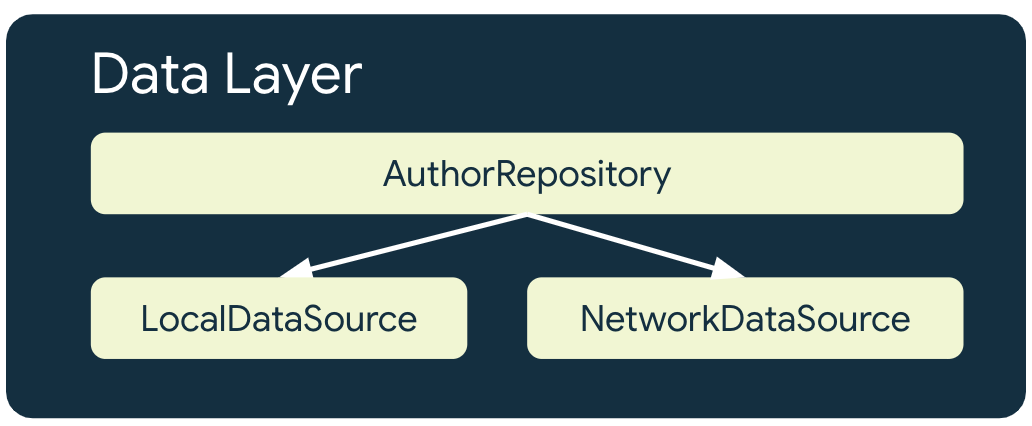
The local data source
The local data source is the canonical source of truth for the app. It should be the exclusive source of any data that higher layers of the app read. This ensures data consistency between connection states. The local data source is often backed by storage that is persisted to disk. Some common means of persisting data to disk are the following:
- Structured data sources, such as relational databases like Room
- Unstructured data sources—for example, protocol buffers with DataStore
- Simple files
The network data source
The network data source is the actual state of the application. At best, the
local data source is synchronized with the network data source. The local data
source can also lag behind the network data source, in which case the app needs
to be updated when back online. Inversely, the network data source might lag
behind the local data source until the app can update it when connectivity
returns. The domain and UI layers of the app must never communicate directly
with the network layer. It is the responsibility of the hosting repository to
communicate with it, and use it to update the local data source.
Custom versus managed synchronization
Building an offline-first data layer can be approached in two primary ways:
- Custom synchronization stack: You maintain local databases with Room or files in local storage, build custom network clients, and schedule reconciliation workers with WorkManager. This approach provides maximum control over schemas and custom conflict resolution algorithms.
- Managed cloud services: Solutions like Cloud Firestore can provide an all-in-one local cache and real-time cloud stream. The SDK handles disk caching, offline write queuing, and bidirectional sync automatically, delivering real-time data streams directly to your repository. For relational PostgreSQL backends, Firebase SQL Connect generates type-safe Kotlin client SDKs that integrate seamlessly with your repositories. For unstructured data (such as media, large files, or backups), Cloud Storage for Firebase provides cloud-hosted object storage with upload and download operations that automatically pause and resume across network interruptions.
Exposing resources
The local and network data sources can differ fundamentally in how your app can read and write to them. Querying a local data source can be fast and flexible, such as when using SQL queries. In contrast, network data sources can be slow and constrained, such as when incrementally accessing RESTful resources by ID. As a result, each data source often needs its own representation of the data it provides. The local data source and network data source might therefore have their own models.
The following directory structure helps visualize this concept. The
AuthorEntity represents an author read from the app's local database, and the
NetworkAuthor represents an author serialized over the network:
data/
├─ local/
│ ├─ entities/
│ │ ├─ AuthorEntity
│ ├─ dao/
│ ├─ NiADatabase
├─ network/
│ ├─ NiANetwork
│ ├─ models/
│ │ ├─ NetworkAuthor
├─ model/
│ ├─ Author
├─ repository/
The details of the AuthorEntity and NetworkAuthor follow:
/**
 * Network representation of [Author]
 */
@Serializable
data class NetworkAuthor(
    val id: String,
    val name: String,
    val imageUrl: String,
    val twitter: String,
    val mediumPage: String,
    val bio: String,
)

/**
 * Defines an author for either an [EpisodeEntity] or [NewsResourceEntity].
 * It has a many-to-many relationship with both entities
 */
@Entity(tableName = "authors")
data class AuthorEntity(
    @PrimaryKey
    val id: String,
    val name: String,
    @ColumnInfo(name = "image_url")
    val imageUrl: String,
    @ColumnInfo(defaultValue = "")
    val twitter: String,
    @ColumnInfo(name = "medium_page", defaultValue = "")
    val mediumPage: String,
    @ColumnInfo(defaultValue = "")
    val bio: String,
)
It is good practice to keep both the AuthorEntity and the NetworkAuthor
internal to the data layer and expose a third type for external layers to
consume. This protects external layers from minor changes in the local and
network data sources that don't fundamentally change the behavior of the app.
This is demonstrated in the following snippet:
/**
 * External data layer representation of a "Now in Android" Author
 */
data class Author(
    val id: String,
    val name: String,
    val imageUrl: String,
    val twitter: String,
    val mediumPage: String,
    val bio: String,
)
The network model can then define an extension method to convert it to the local model, and the local model similarly has one to convert it to the external representation as shown in the following snippet:
/**
 * Converts the network model to the local model for persisting
 * by the local data source
 */
fun NetworkAuthor.asEntity() = AuthorEntity(
    id = id,
    name = name,
    imageUrl = imageUrl,
    twitter = twitter,
    mediumPage = mediumPage,
    bio = bio,
)

/**
 * Converts the local model to the external model for use
 * by layers external to the data layer
 */
fun AuthorEntity.asExternalModel() = Author(
    id = id,
    name = name,
    imageUrl = imageUrl,
    twitter = twitter,
    mediumPage = mediumPage,
    bio = bio,
)
Reads
Reads are the fundamental operation on app data in an offline-first app. You must therefore ensure that your app can read the data, and that as soon as new data is available the app can display it. An app that can do this is a reactive app because it exposes read APIs with observable types.
In the following snippet, the OfflineFirstTopicRepository returns Flows for
all its read APIs. This lets it update its readers when it receives updates
from the network data source. In other words, it lets the
OfflineFirstTopicRepository push changes when its local data source is
invalidated. Therefore, each reader of the OfflineFirstTopicRepository must be
prepared to handle data changes that can be triggered when network connectivity
is restored to the app. Furthermore, OfflineFirstTopicRepository reads data
directly from the local data source. It can only notify its readers of data
changes by updating its local data source first.
class TopicsViewModel(
    offlineFirstTopicsRepository: OfflineFirstTopicsRepository
) : ViewModel() {

    val topics: StateFlow<List<Topic>> = offlineFirstTopicsRepository.getTopicsStream()
        .stateIn(
            scope = viewModelScope,
            started = SharingStarted.WhileSubscribed(5_000),
            initialValue = emptyList()
        )
}
In a Jetpack Compose app, use a ViewModel to bridge the data layer and the UI.
In the ViewModel, convert the Flow into a StateFlow using the stateIn
operator. Composables then collect those states using
collectAsStateWithLifecycle() and automatically manage subscriptions in a
lifecycle-aware manner.
For more information on collectAsStateWithLifecycle(), see
State and Jetpack Compose.
Error handling strategies
There are unique ways of handling errors in offline-first apps, depending on the data sources where they might occur. The following subsections outline these strategies.
Local data source
Try to minimize errors when reading from the local data source. To protect
readers from errors, use the catch operator on the Flows from which the
reader is collecting data.
You can use the catch operator in a ViewModel as follows:
class AuthorViewModel(
    authorsRepository: AuthorsRepository,
    ...
) : ViewModel() {
   private val authorId: String = ...

   // Observe author information
    private val authorStream: Flow<Author> =
        authorsRepository.getAuthorStream(
            id = authorId
        )
        .catch { emit(Author.empty()) }
}
For a more resilient approach, consider an LCE (Loading Content Error) solution. In LCE, when there is a failure while reading, you show an error state. Usually, you achieve LCE by modeling the UI states as Kotlin sealed classes.
// Define the LCE UI state
sealed interface AuthorUiState {
    data object Loading : AuthorUiState
    data class Success(val author: Author) : AuthorUiState
    data object Error : AuthorUiState
}

class AuthorViewModel(
    authorsRepository: AuthorsRepository,
    ...
) : ViewModel() {
    private val authorId: String = ...

    // Observe author information and map to LCE state
    val authorUiState: StateFlow<AuthorUiState> =
        authorsRepository.getAuthorStream(id = authorId)
            .map<Author, AuthorUiState> { author ->
                AuthorUiState.Success(author)
            }
            .catch { emit(AuthorUiState.Error) }
            .stateIn(
                scope = viewModelScope,
                started = SharingStarted.WhileSubscribed(5_000),
                initialValue = AuthorUiState.Loading
            )
}
Network data source
If errors occur when reading data from a network data source, the app needs to employ a heuristic to retry fetching data. Common heuristics include the following:
Exponential backoff
In exponential backoff, the app keeps attempting to read from the network data source with increasing time intervals until it succeeds, or other conditions dictate that it should stop.
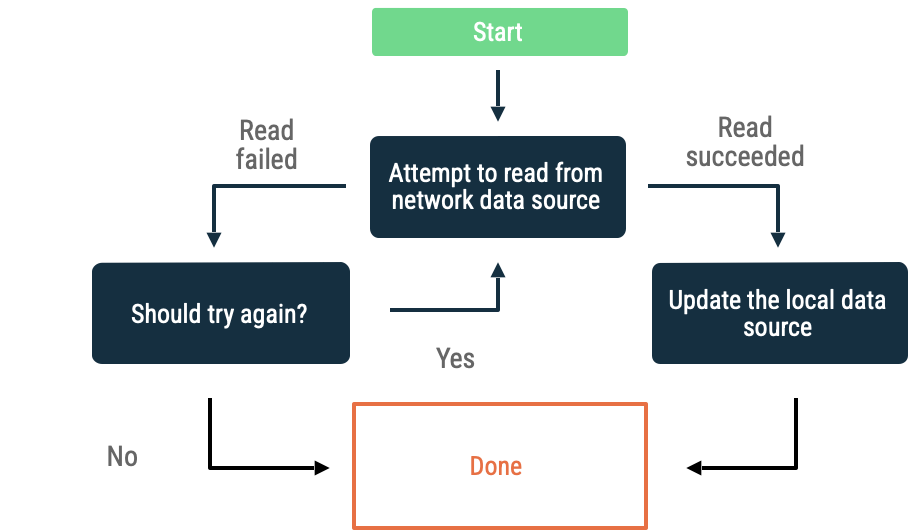
Criteria to evaluate if the app keeps backing off include the following:
- The kind of error that the network data source indicated. For example, do retry network calls that return an error that indicate a lack of connectivity. Don't retry HTTP requests that are not authorized until proper credentials are available.
- Maximum allowable retries.
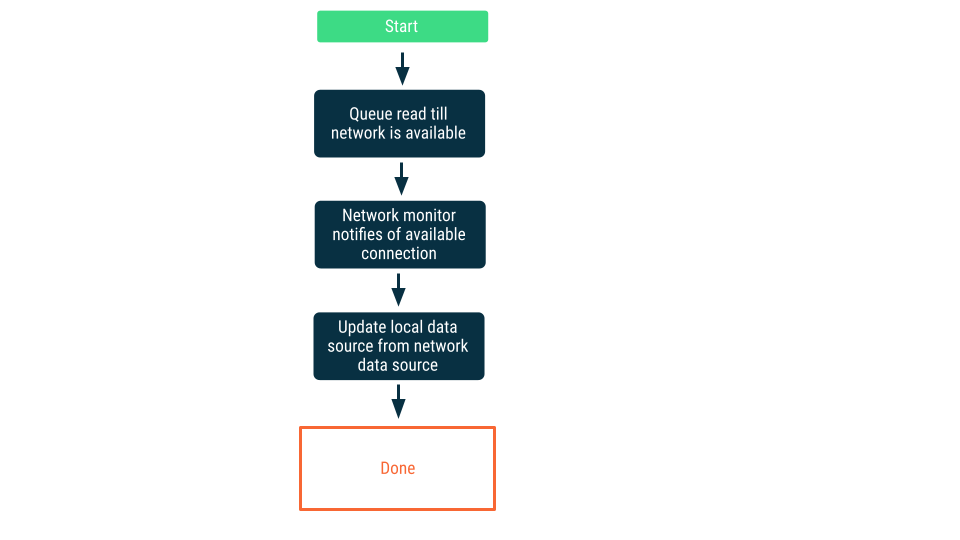
Network connectivity monitoring
In this approach, read requests are queued until the app is certain it can connect to the network data source. Once a connection is established, then the read request is dequeued, the data read, and the local data source updated. On Android this queue might be maintained with a Room database, and drained as persistent work using WorkManager.
Writes
While the recommended way to read data in an offline-first app is using observable types, the equivalent for write APIs are asynchronous APIs such as suspend functions. This avoids blocking the UI thread, and helps with error handling because writes in offline-first apps can fail when crossing a network boundary.
interface UserDataRepository {
    /**
     * Updates the bookmarked status for a news resource
     */
    suspend fun updateNewsResourceBookmark(newsResourceId: String, bookmarked: Boolean)
}
In the preceding snippet, the asynchronous API of choice is Coroutines as the method suspends.
Write strategies
When writing data in offline-first apps, there are three strategies to consider. Which you choose depends on the type of data being written and the requirements of the app:
Online-only writes
Attempt to write the data across the network boundary. If successful, update the local data source; otherwise, throw an exception and leave it to the caller to respond appropriately.
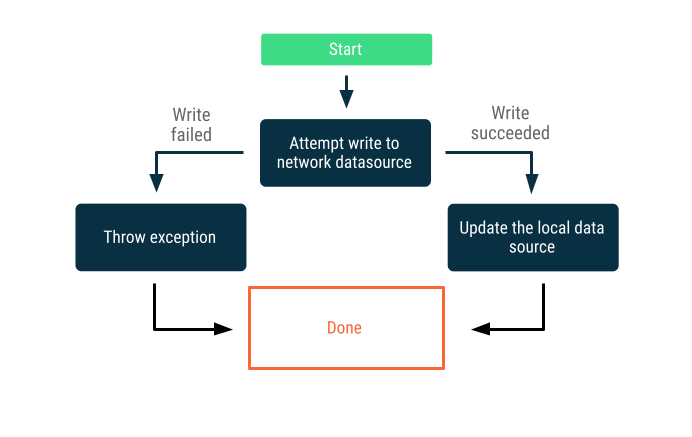
This strategy is often used for write transactions that must happen online in near real time—for example, a bank transfer. Since writes can fail, it is often necessary to communicate to the user that the write failed, or prevent the user from attempting to write data in the first place. Here are some strategies you can employ in these scenarios:
- If an app requires internet access to write data, you can opt not to present a UI to the user that lets them write data, or at the very least you can disable it.
- You can use an
AlertDialogthat the user can't dismiss, or aSnackbar, to notify the user that they are offline.
Queued writes
When you have an object you want to write, insert it into a queue. When the app gets back online, drain the queue with exponential backoff. On Android, draining an offline queue is persistent work that is often delegated to WorkManager.
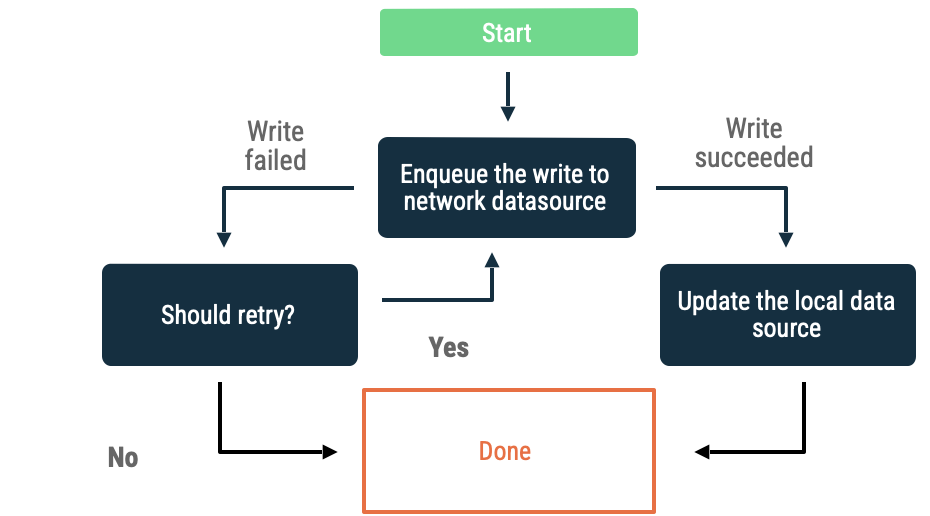
This approach is a good choice in the following scenarios:
- It's not essential that the data ever be written to the network.
- The transaction is not time sensitive.
- It's not essential that the user be informed if the operation fails.
Use cases for this approach include analytics events and logging.
Lazy writes
Write to the local data source first, then queue the write to notify the network at the earliest opportunity. This is nontrivial because there can be conflicts between the network and local data sources when the app comes back online. The next section on conflict resolution provides more detail.
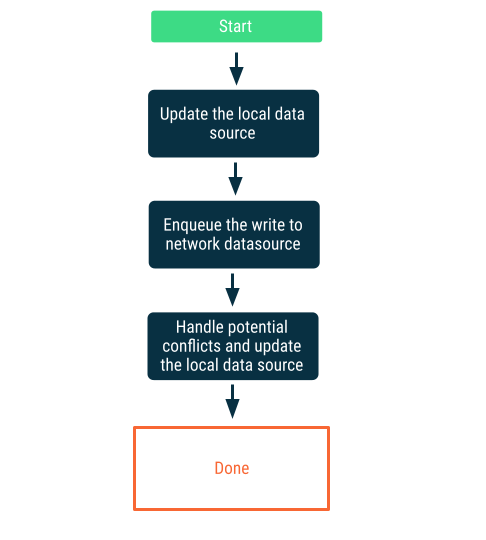
This approach is the correct choice when the data is critical to the app. For example, in an offline-first to-do list app, it's essential that any tasks the user adds offline are stored locally to avoid the risk of data loss.
Synchronization and conflict resolution
When an offline-first app restores its connectivity, it needs to reconcile the data in its local data source with that in the network data source. This process is called synchronization. There are two main ways an app can synchronize with its network data source:
- Pull-based synchronization
- Push-based synchronization
Pull-based synchronization
In pull-based synchronization, the app reaches out to the network to read the latest application data on demand. A common heuristic for this approach is navigation based, where the app only fetches data just before it presents it to the user.
This approach works best when the app expects brief to intermediate periods of no network connectivity. This is because data refresh is opportunistic, and long periods of no connectivity increase the chance that the user attempts to visit app destinations with a cache that is either stale or empty.
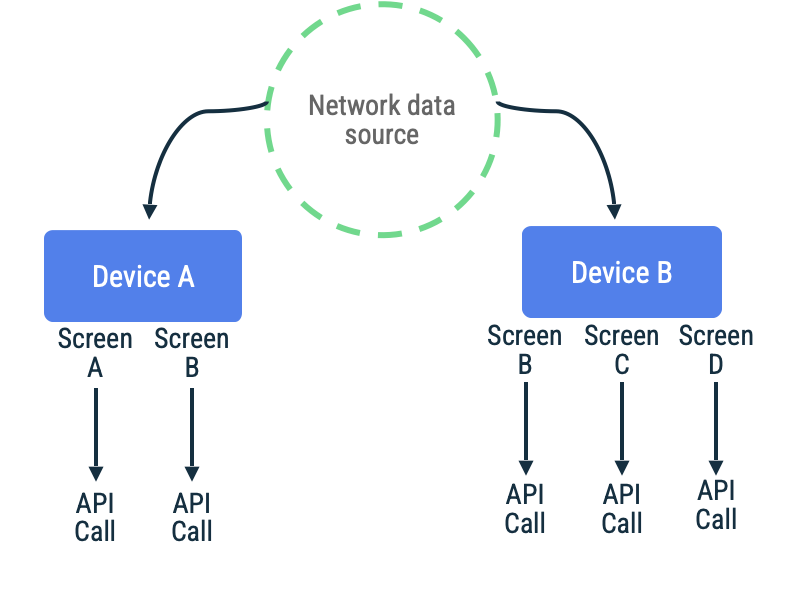
Consider an app where page tokens are used to fetch items in an endless
scrolling list for a particular screen. The implementation might lazily reach
out to the network, persist the data to the local data source, and then read
from the local data source to present information back to the user. In the case
where there is no network connectivity, the repository might request data from
the local data source alone. This is the pattern used by the
Jetpack Paging Library with its RemoteMediator API.
class FeedRepository(...) {

    fun feedPagingSource(): PagingSource<FeedItem> { ... }
}

class FeedViewModel(
    private val repository: FeedRepository
) : ViewModel() {
    private val pager = Pager(
        config = PagingConfig(
            pageSize = NETWORK_PAGE_SIZE,
            enablePlaceholders = false
        ),
        remoteMediator = FeedRemoteMediator(...),
        pagingSourceFactory = feedRepository::feedPagingSource
    )

    val feedPagingData = pager.flow
}
The advantages and disadvantages of pull-based synchronization are summarized in the following table:
| Advantages | Disadvantages |
|---|---|
| Relatively easy to implement. | Prone to heavy data use. This is because repeated visits to a navigation destination trigger unnecessary refetching of unchanged information. You can mitigate this through proper caching. This can be done in the UI layer with the cachedIn operator, or in the network layer with an HTTP cache. |
| Data that is not needed is never fetched. | Does not scale well with relational data because the model pulled needs to be self-sufficient. If the model being synchronized depends on other models to be fetched to populate itself, the heavy data use problem mentioned earlier becomes even more significant. Furthermore, it can cause dependencies between repositories of the parent model and repositories of the nested model. |
Push-based synchronization
In push-based synchronization, the local data source tries to mimic a replica set of the network data source to the best of its ability. It proactively fetches an appropriate amount of data on first startup to set a baseline. After that, it relies on notifications from the server to alert it when that data is stale.
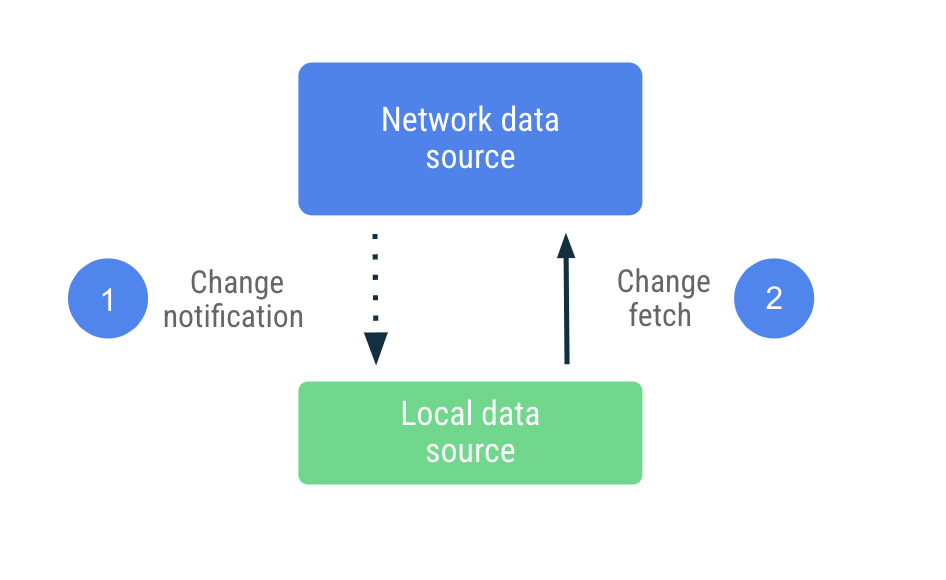
Upon receipt of the stale notification, the app reaches out to the network to
update only the data that was marked as stale. This work is delegated to the
Repository, which reaches out to the network data source and persists the data
fetched to the local data source. Since the repository exposes its data with
observable types, readers are notified of any changes.
class UserDataRepository(...) {

    suspend fun synchronize() {
        val userData = networkDataSource.fetchUserData()
        localDataSource.saveUserData(userData)
    }
}
In this approach, the app is far less dependent on the network data source and can work without it for extended periods. It offers both read and write access when offline because it assumes that it has the latest information from the network data source locally.
The advantages and disadvantages of push-based synchronization are summarized in the following table:
| Advantages | Disadvantages |
|---|---|
| The app can remain offline indefinitely. | Versioning data for conflict resolution is nontrivial. |
| Minimum data use. The app fetches only data that has changed. | You need to take into consideration write concerns during synchronization. |
| Works well for relational data. Each repository is responsible for fetching data for only the model it supports. | The network data source needs to support synchronization. |
Hybrid synchronization
Some apps use a hybrid approach that is pull- or push-based depending on the data. For example, a social media app might use pull-based synchronization to fetch the user's following feed on demand due to the high frequency of feed updates. The same app might opt to use push-based synchronization for data about the signed-in user, including their username, profile picture, and so on.
Ultimately, offline-first synchronization choice depends on product requirements and available technical infrastructure.
Conflict resolution
If, when offline, the app writes data locally that is misaligned with the network data source, you must resolve the conflict before synchronization can happen.
Conflict resolution often requires versioning. The app needs to do some bookkeeping to keep track of when changes occurred, so it can pass the metadata to the network data source. The network data source then has the responsibility of providing the absolute source of truth. There are many strategies to consider for conflict resolution, depending on the needs of the application. For mobile apps, a common approach is "last write wins."
Last write wins
In this approach, devices attach timestamp metadata to the data they write to the network. When the network data source receives them, it discards any data older than its current state while accepting those newer than its current state.
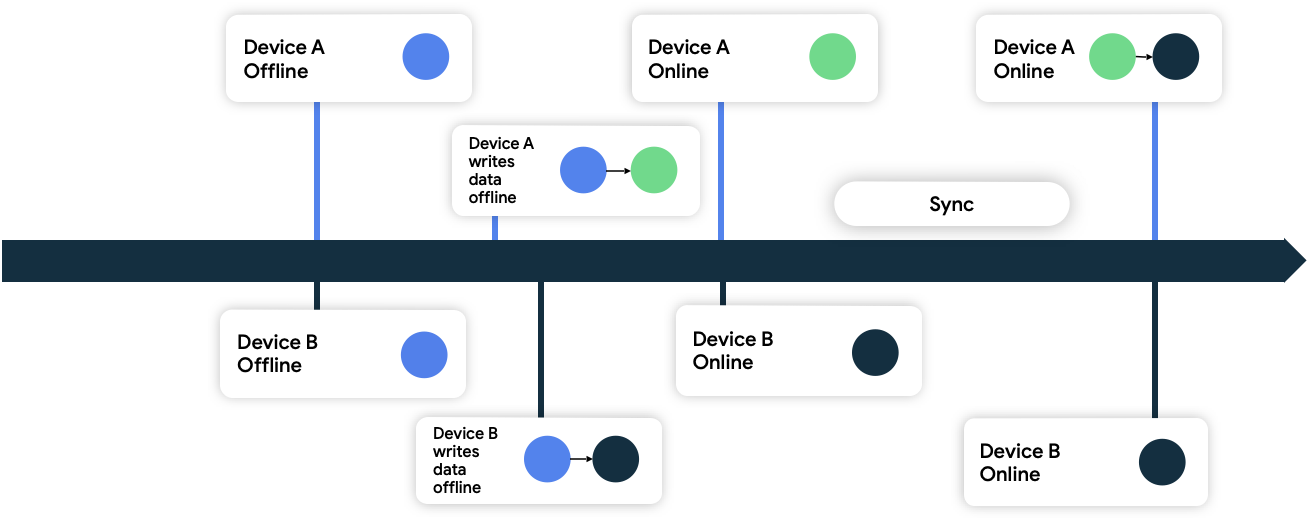
In figure 9, both devices are offline and are initially in sync with the network data source. While offline, they both write data locally and keep track of the time they wrote their data. When they both come back online and synchronize with the network data source, the network resolves the conflict by persisting data from device B because it wrote its data later.
WorkManager in offline-first apps
In both read and write strategies covered earlier, there are two common utilities:
- Queues
- Reads: Used to defer reads until network connectivity is available.
- Writes: Used to defer writes until network connectivity is available, and to requeue writes for retries.
- Network connectivity monitors
- Reads: Used as a signal to drain the read queue when the app is connected, and for synchronization.
- Writes: Used as a signal to drain the write queue when the app is connected, and for synchronization.
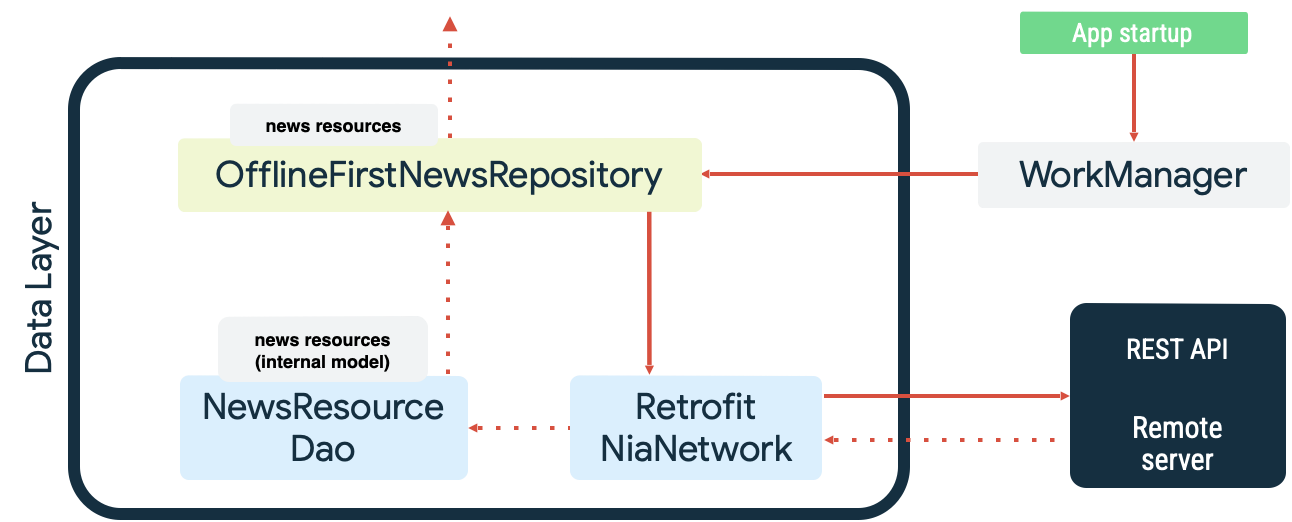
Both cases are examples of the persistent work that WorkManager excels at. For example, in the Now in Android sample app, WorkManager is used as both a read queue and network monitor when synchronizing the local data source. On startup, the app does the following:
- Enqueues read synchronization work to make sure there is parity between the local data source and the network data source.
- Drains the read synchronization queue and starts synchronizing when the app is online.
- Performs a read from the network data source using exponential backoff.
- Persists the results of the read into the local data source and resolves any conflicts that occur.
- Exposes the data from the local data source for other layers of the app to consume.
These actions are illustrated in the following diagram:
The enqueueing of the synchronization work with WorkManager follows by
specifying it as unique work with the KEEP ExistingWorkPolicy:
class SyncInitializer : Initializer<Sync> {
   override fun create(context: Context): Sync {
       WorkManager.getInstance(context).apply {
           // Queue sync on app startup and ensure only one
           // sync worker runs at any time
           enqueueUniqueWork(
               SyncWorkName,
               ExistingWorkPolicy.KEEP,
               SyncWorker.startUpSyncWork()
           )
       }
       return Sync
   }
}
SyncWorker.startupSyncWork() is defined as the following:
/**
 Create a WorkRequest to call the SyncWorker using a DelegatingWorker.
 This allows for dependency injection into the SyncWorker in a different
 module than the app module without having to create a custom WorkManager
 configuration.
*/
fun startUpSyncWork() = OneTimeWorkRequestBuilder<DelegatingWorker>()
    // Run sync as expedited work if the app is able to.
    // If not, it runs as regular work.
   .setExpedited(OutOfQuotaPolicy.RUN_AS_NON_EXPEDITED_WORK_REQUEST)
   .setConstraints(SyncConstraints)
    // Delegate to the SyncWorker.
   .setInputData(SyncWorker::class.delegatedData())
   .build()

val SyncConstraints
   get() = Constraints.Builder()
       .setRequiredNetworkType(NetworkType.CONNECTED)
       .build()
Specifically, the Constraints defined by SyncConstraints require that
the NetworkType be NetworkType.CONNECTED. That is, it waits until the
network is available before it runs.
Once the network is available, the Worker drains the unique work queue
specified by the SyncWorkName by delegating to the appropriate Repository
instances. If the synchronization fails, the doWork() method returns with
Result.retry(). WorkManager will automatically retry synchronization with
exponential backoff. Otherwise, it returns Result.success(), completing
synchronization.
class SyncWorker(...) : CoroutineWorker(appContext, workerParams), Synchronizer {

    override suspend fun doWork(): Result = withContext(ioDispatcher) {
        // First sync the repositories in parallel
        val syncedSuccessfully = awaitAll(
            async { topicRepository.sync() },
            async { authorsRepository.sync() },
            async { newsRepository.sync() },
        ).all { it }

        if (syncedSuccessfully) Result.success()
        else Result.retry()
    }
}
Samples
The following Google samples demonstrate offline-first apps. Go explore them to see this guidance in practice:
Recommended for you
- Note: link text is displayed when JavaScript is off
- UI State production
- UI layer
- Data layer