

Hilt — это библиотека внедрения зависимостей для Android, которая уменьшает объем рутинной работы по ручному внедрению зависимостей в вашем проекте. Ручное внедрение зависимостей требует от вас создания каждого класса и его зависимостей вручную, а также использования контейнеров для повторного использования и управления зависимостями.
Hilt предоставляет стандартный способ использования внедрения зависимостей (DI) в вашем приложении, предоставляя контейнеры для каждого класса Android в вашем проекте и автоматически управляя их жизненным циклом. Hilt построен на основе популярной библиотеки DI Dagger, что позволяет использовать преимущества корректности на этапе компиляции, производительности во время выполнения, масштабируемости и поддержки Android Studio , которые предоставляет Dagger. Для получения дополнительной информации см. Hilt и Dagger .
В этом руководстве объясняются основные концепции Hilt и создаваемых им контейнеров. Также приводится демонстрация того, как инициализировать существующее приложение для использования Hilt.
Добавление зависимостей
Сначала добавьте плагин hilt-android-gradle-plugin в корневой файл build.gradle вашего проекта:
Котлин
plugins {
  ...
  id("com.google.dagger.hilt.android") version "2.57.1" apply false
}
Классный
plugins {
  ...
  id 'com.google.dagger.hilt.android' version '2.57.1' apply false
}
Затем примените плагин Gradle и добавьте следующие зависимости в файл app/build.gradle :
Котлин
plugins {
  id("com.google.devtools.ksp")
  id("com.google.dagger.hilt.android")
}

android {
  ...
}

dependencies {
  implementation("com.google.dagger:hilt-android:2.57.1")
  ksp("com.google.dagger:hilt-android-compiler:2.57.1")
}
Классный
...
plugins {
  id 'com.google.devtools.ksp'
  id 'com.google.dagger.hilt.android'
}

android {
  ...
}

dependencies {
  implementation "com.google.dagger:hilt-android:2.57.1"
  ksp "com.google.dagger:hilt-compiler:2.57.1"
}
Чтобы убедиться, что ваш проект настроен для Java 17, которая требуется для Jetpack Compose и версий Hilt, добавьте следующее в файл app/build.gradle :
Котлин
android {
  ...
  compileOptions {
    sourceCompatibility = JavaVersion.VERSION_17
    targetCompatibility = JavaVersion.VERSION_17
  }
}
Классный
android {
  ...
  compileOptions {
    sourceCompatibility JavaVersion.VERSION_17
    targetCompatibility JavaVersion.VERSION_17
  }
}
класс приложений Hilt
Все приложения, использующие Hilt, должны содержать класс Application , аннотированный с помощью @HiltAndroidApp .
Аннотация @HiltAndroidApp запускает генерацию кода Hilt, включая базовый класс для вашего приложения, который служит контейнером зависимостей на уровне приложения.
@HiltAndroidApp
class ExampleApplication : Application() { ... }
This generated Hilt component is attached to the Application object's lifecycle and provides dependencies to it. Additionally, it is the parent component of the app, which means that other components can access the dependencies that it provides.
Внедрение зависимостей в классы Android
Once Hilt is set up in your Application class and an application-level component is available, Hilt can provide dependencies to other Android classes that have the @AndroidEntryPoint annotation:
@AndroidEntryPoint
class ExampleActivity : ComponentActivity() { ... }
В настоящее время Hilt поддерживает следующие классы Android:
-
Application(с использованием@HiltAndroidApp) -
ViewModel(с использованием@HiltViewModel) -
Activity -
Service -
BroadcastReceiver
In Compose, you don't need to annotate individual composables. Instead, annotate your root ComponentActivity with @AndroidEntryPoint . This serves as the single DI entry point for your entire UI hierarchy, so you can access Hilt-injected ViewModels directly within your composable functions.
@AndroidEntryPoint generates an individual Hilt component for each Android class in your project. These components can receive dependencies from their respective parent classes as described in Component hierarchy .
Для получения зависимостей от компонента используйте аннотацию @Inject для внедрения полей:
@AndroidEntryPoint
class ExampleActivity : ComponentActivity() {

  @Inject lateinit var analytics: AnalyticsAdapter
  ...
}
Классы, которые внедряют зависимости с помощью Hilt, могут иметь другие базовые классы, которые также используют внедрение зависимостей. Таким классам не требуется аннотация @AndroidEntryPoint если они являются абстрактными.
Чтобы узнать больше о том, в какой обработчик жизненного цикла внедряется класс Android, см. раздел «Жизненный цикл компонентов» .
Определение привязок Hilt
Для внедрения полей Hilt необходимо знать, как предоставить экземпляры необходимых зависимостей из соответствующего компонента. Привязка содержит информацию, необходимую для предоставления экземпляров типа в качестве зависимости.
Один из способов передачи информации о привязке в Hilt — это внедрение зависимостей через конструктор . Используйте аннотацию @Inject в конструкторе класса, чтобы указать Hilt, как предоставлять экземпляры этого класса:
class AnalyticsAdapter @Inject constructor(
  private val service: AnalyticsService
) { ... }
The parameters of an annotated constructor of a class are the dependencies of that class. In the example, AnalyticsAdapter has AnalyticsService as a dependency. Therefore, Hilt must also know how to provide instances of AnalyticsService .
модули Hilt
Иногда внедрение зависимостей в тип через конструктор невозможно. Это может происходить по разным причинам. Например, невозможно внедрить интерфейс через конструктор. Также невозможно внедрить тип, которым вы не владеете, например, класс из внешней библиотеки. В таких случаях вы можете предоставить Hilt информацию о привязке, используя модули Hilt .
A Hilt module is a class that is annotated with @Module . It provides Hilt with instructions on how to create instances of types that can't be provided through constructor injection, such as interfaces or third-party classes. You must also annotate every module with @InstallIn to tell Hilt which Android class each module will be used or installed in.
Зависимости, которые вы указываете в модулях Hilt, доступны во всех сгенерированных компонентах, связанных с классом Android, в который вы устанавливаете модуль Hilt.
Внедряйте экземпляры интерфейса с помощью аннотации @Binds
Consider the AnalyticsService example. If AnalyticsService is an interface, then you cannot constructor-inject it. Instead, provide Hilt with the binding information by creating an abstract function annotated with @Binds inside a Hilt module.
Аннотация @Binds указывает Hilt, какую реализацию использовать, когда необходимо предоставить экземпляр интерфейса.
Аннотированная функция предоставляет Hilt следующую информацию:
- Тип возвращаемого значения функции указывает Hilt, экземпляры какого интерфейса предоставляет эта функция.
- Параметр функции указывает Hilt, какую реализацию следует предоставить.
interface AnalyticsService {
  fun analyticsMethods()
}

// Constructor-injected, because Hilt needs to know how to
// provide instances of AnalyticsServiceImpl, too.
class AnalyticsServiceImpl @Inject constructor(
  ...
) : AnalyticsService { ... }

@Module
@InstallIn(ActivityComponent::class)
abstract class AnalyticsModule {

  @Binds
  abstract fun bindAnalyticsService(
    analyticsServiceImpl: AnalyticsServiceImpl
  ): AnalyticsService
}
The Hilt module AnalyticsModule is annotated with @InstallIn(ActivityComponent.class) because you want Hilt to inject that dependency into ExampleActivity . This annotation means that all of the dependencies in AnalyticsModule are available in all of the app's activities.
Внедряйте экземпляры с помощью аннотации `@Provides`.
Interfaces are not the only case where you cannot constructor-inject a type. Constructor injection is also not possible if you don't own the class because it comes from an external library (classes like Retrofit , OkHttpClient , or Room databases ), or if instances must be created with the builder pattern .
Consider the previous example. If you don't directly own the AnalyticsService class, you can tell Hilt how to provide instances of this type by creating a function inside a Hilt module and annotating that function with @Provides .
Аннотированная функция предоставляет Hilt следующую информацию:
- Тип возвращаемого значения функции указывает Hilt, экземпляры какого типа предоставляет функция.
- Параметры функции указывают Hilt на зависимости соответствующего типа.
- Тело функции указывает Hilt, как предоставить экземпляр соответствующего типа. Hilt выполняет тело функции каждый раз, когда ему необходимо предоставить экземпляр этого типа.
@Module
@InstallIn(ActivityComponent::class)
object AnalyticsModule {

  @Provides
  fun provideAnalyticsService(
    // Potential dependencies of this type
  ): AnalyticsService {
      return Retrofit.Builder()
               .baseUrl("https://example.com")
               .build()
               .create(AnalyticsService::class.java)
  }
}
Предоставьте несколько привязок для одного и того же типа.
В тех случаях, когда Hilt необходимо предоставлять различные реализации одного и того же типа в качестве зависимостей, необходимо указать Hilt несколько привязок. Вы можете определить несколько привязок для одного и того же типа с помощью квалификаторов .
Квалификатор — это аннотация, используемая для идентификации конкретной привязки для типа, если для этого типа определено несколько привязок.
Consider the example. If you need to intercept calls to AnalyticsService , you could use an OkHttpClient object with an interceptor . For other services, you might need to intercept calls in a different way. In that case, you need to tell Hilt how to provide two different implementations of OkHttpClient .
Сначала определите квалификаторы, которые вы будете использовать для аннотирования методов @Binds или @Provides :
@Qualifier
@Retention(AnnotationRetention.BINARY)
annotation class AuthInterceptorOkHttpClient

@Qualifier
@Retention(AnnotationRetention.BINARY)
annotation class OtherInterceptorOkHttpClient
Then, Hilt needs to know how to provide an instance of the type that corresponds with each qualifier. In this case, you could use a Hilt module with @Provides . Both methods have the same return type, but the qualifiers label them as two different bindings:
@Module
@InstallIn(SingletonComponent::class)
object NetworkModule {

  @AuthInterceptorOkHttpClient
  @Provides
  fun provideAuthInterceptorOkHttpClient(
    authInterceptor: AuthInterceptor
  ): OkHttpClient {
      return OkHttpClient.Builder()
               .addInterceptor(authInterceptor)
               .build()
  }

  @OtherInterceptorOkHttpClient
  @Provides
  fun provideOtherInterceptorOkHttpClient(
    otherInterceptor: OtherInterceptor
  ): OkHttpClient {
      return OkHttpClient.Builder()
               .addInterceptor(otherInterceptor)
               .build()
  }
}
Вы можете указать необходимый тип, добавив к полю или параметру соответствующий квалификатор:
// As a dependency of another class.
@Module
@InstallIn(ActivityComponent::class)
object AnalyticsModule {

  @Provides
  fun provideAnalyticsService(
    @AuthInterceptorOkHttpClient okHttpClient: OkHttpClient
  ): AnalyticsService {
      return Retrofit.Builder()
               .baseUrl("https://example.com")
               .client(okHttpClient)
               .build()
               .create(AnalyticsService::class.java)
  }
}

// As a dependency of a constructor-injected class.
class ExampleServiceImpl @Inject constructor(
  @AuthInterceptorOkHttpClient private val okHttpClient: OkHttpClient
) : ...

// At field injection.
@AndroidEntryPoint
class ExampleActivity: ComponentActivity() {

  @AuthInterceptorOkHttpClient
  @Inject lateinit var okHttpClient: OkHttpClient
}
В качестве лучшей практики, если вы добавляете квалификатор к типу, добавьте квалификаторы ко всем возможным способам предоставления этой зависимости. Оставление базовой или общей реализации без квалификатора чревато ошибками и может привести к тому, что Hilt внедрит неправильную зависимость.
Предопределенные квалификаторы в Hilt
Hilt provides some predefined qualifiers. For example, as you might need the Context class from either the application or the activity, Hilt provides the @ApplicationContext and @ActivityContext qualifiers.
Предположим, что классу AnalyticsAdapter из примера необходим контекст активности. Следующий код демонстрирует, как передать контекст активности классу AnalyticsAdapter :
class AnalyticsAdapter @Inject constructor(
    @ActivityContext private val context: Context,
    private val service: AnalyticsService
) { ... }
Другие предопределенные привязки, доступные в Hilt, см. в разделе «Привязки компонентов по умолчанию» .
Сгенерированные компоненты для классов Android
For each Android class in which you can perform field injection, there's an associated Hilt component that you can refer to in the @InstallIn annotation. Each Hilt component is responsible for injecting its bindings into the corresponding Android class.
В предыдущих примерах было продемонстрировано использование ActivityComponent в модулях Hilt.
Компания Hilt предоставляет следующие компоненты:
| Компонент Hilt | Форсунка для |
|---|---|
SingletonComponent | Application |
ActivityRetainedComponent | Н/Д |
ViewModelComponent | ViewModel |
ActivityComponent | Activity |
ServiceComponent | Service |
Срок службы компонентов
Hilt автоматически создает и уничтожает экземпляры сгенерированных классов компонентов в соответствии с жизненным циклом соответствующих классов Android.
| Сгенерированный компонент | Создано в | Уничтожен в |
|---|---|---|
SingletonComponent | Application#onCreate() | Application уничтожено |
ActivityRetainedComponent | Activity#onCreate() | Activity#onDestroy() |
ViewModelComponent | ViewModel создана | ViewModel уничтожен |
ActivityComponent | Activity#onCreate() | Activity#onDestroy() |
ServiceComponent | Service#onCreate() | Service#onDestroy() |
Области компонентов
По умолчанию все привязки в Hilt не имеют области видимости . Это означает, что каждый раз, когда ваше приложение запрашивает привязку, Hilt создает новый экземпляр необходимого типа.
In the example, every time Hilt provides AnalyticsAdapter as a dependency to another type or through field injection (as in ExampleActivity ), Hilt provides a new instance of AnalyticsAdapter .
Однако Hilt также позволяет привязывать данные к конкретному компоненту. Hilt создает привязку с определенной областью видимости только один раз для каждого экземпляра компонента, к которому привязана привязка, и все запросы к этой привязке используют один и тот же экземпляр.
В таблице ниже перечислены аннотации области видимости для каждого сгенерированного компонента:
| класс Android | Сгенерированный компонент | Объем |
|---|---|---|
Application | SingletonComponent | @Singleton |
Activity | ActivityRetainedComponent | @ActivityRetainedScoped |
ViewModel | ViewModelComponent | @ViewModelScoped |
Activity | ActivityComponent | @ActivityScoped |
Service | ServiceComponent | @ServiceScoped |
In the example, if you scope AnalyticsAdapter to the ActivityComponent using @ActivityScoped , Hilt provides the same instance of AnalyticsAdapter throughout the life of the corresponding activity:
@ActivityScoped
class AnalyticsAdapter @Inject constructor(
  private val service: AnalyticsService
) { ... }
Suppose that AnalyticsService has an internal state that requires the same instance to be used every time—not only in ExampleActivity , but anywhere in the app. In this case, it is appropriate to scope AnalyticsService to the SingletonComponent . The result is that whenever the component needs to provide an instance of AnalyticsService , it provides the same instance every time.
The following example demonstrates how to scope a binding to a component in a Hilt module. A binding's scope must match the scope of the component where it is installed, so in this example you must install AnalyticsService in SingletonComponent instead of ActivityComponent :
// If AnalyticsService is an interface.
@Module
@InstallIn(SingletonComponent::class)
abstract class AnalyticsModule {

  @Singleton
  @Binds
  abstract fun bindAnalyticsService(
    analyticsServiceImpl: AnalyticsServiceImpl
  ): AnalyticsService
}

// If you don't own AnalyticsService.
@Module
@InstallIn(SingletonComponent::class)
object AnalyticsModule {

  @Singleton
  @Provides
  fun provideAnalyticsService(): AnalyticsService {
      return Retrofit.Builder()
               .baseUrl("https://example.com")
               .build()
               .create(AnalyticsService::class.java)
  }
}
Чтобы узнать больше об областях видимости компонентов Hilt, см. раздел «Области видимости в Android и Hilt» .
Иерархия компонентов
Установка модуля в компонент позволяет использовать его привязки в качестве зависимости для других привязок в этом компоненте или в любом дочернем компоненте, расположенном ниже в иерархии компонентов.
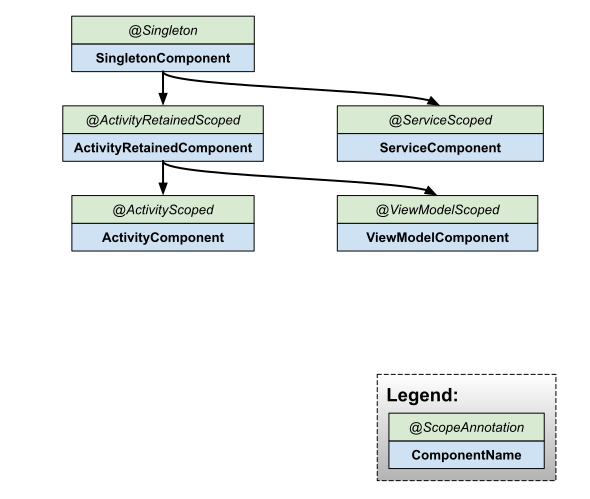
Привязки компонентов по умолчанию
Each Hilt component comes with a set of default bindings that Hilt can inject as dependencies into your own custom bindings. Note that these bindings correspond to the general activity type and not to any specific subclass. This is because Hilt uses a single activity component definition to inject all activities. Each activity has a different instance of this component.
| компонент Android | Привязки по умолчанию |
|---|---|
SingletonComponent | Application |
ActivityRetainedComponent | Application |
ViewModelComponent | SavedStateHandle |
ActivityComponent | Application , Activity |
ServiceComponent | Application , Service |
Привязка контекста приложения также доступна с помощью @ApplicationContext . Например:
class AnalyticsServiceImpl @Inject constructor(
  @ApplicationContext context: Context
) : AnalyticsService { ... }

// The Application binding is available without qualifiers.
class AnalyticsServiceImpl @Inject constructor(
  application: Application
) : AnalyticsService { ... }
Привязка контекста активности также доступна с помощью @ActivityContext . Например:
class AnalyticsAdapter @Inject constructor(
  @ActivityContext context: Context
) { ... }

// The Activity binding is available without qualifiers.
class AnalyticsAdapter @Inject constructor(
  activity: ComponentActivity
) { ... }
Внедрение зависимостей в классы, не поддерживаемые Hilt.
In Compose, the standard pattern is to inject dependencies into a @HiltViewModel using constructor injection, and then to use hiltViewModel() inside your composable to access the ViewModel. While Hilt supports the most common Android classes, you might still encounter unsupported classes where you need to perform field injection.
In those cases, you can create an entry point using the @EntryPoint annotation. An entry point is the boundary between code that is managed by Hilt and code that is not. It is the point where code first enters into the graph of objects that Hilt manages. Entry points allow Hilt to use code that Hilt does not manage to provide dependencies within the dependency graph.
For example, Hilt doesn't directly support content providers . If you want a content provider to use Hilt to get some dependencies, you need to define an interface that is annotated with @EntryPoint for each binding type that you want and include qualifiers. Then add @InstallIn to specify the component in which to install the entry point as follows:
class ExampleContentProvider : ContentProvider() {

  @EntryPoint
  @InstallIn(SingletonComponent::class)
  interface ExampleContentProviderEntryPoint {
    fun analyticsService(): AnalyticsService
  }

  ...
}
Для доступа к точке входа используйте соответствующий статический метод из EntryPointAccessors . Параметром должен быть либо экземпляр компонента, либо объект @AndroidEntryPoint , выступающий в качестве держателя компонента. Убедитесь, что компонент, передаваемый в качестве параметра, и статический метод EntryPointAccessors соответствуют классу Android в аннотации @InstallIn интерфейса @EntryPoint :
class ExampleContentProvider: ContentProvider() {
    ...

  override fun query(...): Cursor {
    val appContext = context?.applicationContext ?: throw IllegalStateException()
    val hiltEntryPoint =
      EntryPointAccessors.fromApplication(appContext, ExampleContentProviderEntryPoint::class.java)

    val analyticsService = hiltEntryPoint.analyticsService()
    ...
  }
}
In this example, you must use the ApplicationContext to retrieve the entry point because the entry point is installed in SingletonComponent . If the binding that you wanted to retrieve were in the ActivityComponent , you would instead use the ActivityContext .
Рукоять и кинжал
Hilt is the officially recommended library for dependency injection in Android. It provides a standardized, opinionated, and efficient way to implement dependency injection in your application, specifically optimized for Jetpack Compose and single-activity architectures.
Цели организации Hilt следующие:
- Цель – создать стандартный набор компонентов и областей видимости для упрощения настройки, повышения читаемости и совместного использования кода между приложениями.
- Предоставить простой способ настройки различных привязок для разных типов сборки, таких как тестирование, отладка или релиз.
Поскольку операционная система Android создает экземпляры многих собственных классов фреймворка, использование Dagger в приложении Android требует написания значительного количества шаблонного кода. Hilt сокращает количество шаблонного кода, необходимого для использования Dagger в приложении Android. Hilt автоматически генерирует и предоставляет следующее:
- Компоненты для интеграции классов фреймворка Android с Dagger, которые в противном случае пришлось бы создавать вручную.
- Аннотации области видимости , используемые с компонентами, которые Hilt генерирует автоматически.
- Предопределенные привязки для представления классов Android, таких как
ApplicationилиActivity. - Предопределенные квалификаторы для представления
@ApplicationContextи@ActivityContext.
Dagger and Hilt code can coexist in the same codebase. However, in most cases it is best to use Hilt to manage all of your usage of Dagger on Android. To migrate a project that uses Dagger to Hilt, see the migration guide .
Дополнительные ресурсы
Чтобы узнать больше о компании Hilt, ознакомьтесь со следующими дополнительными материалами.
Образцы
Блоги
- Внедрение зависимостей в Android с помощью Hilt
- Определение области видимости в Android и Hilt
- Добавление компонентов в иерархию Hilt
- Перенос приложения Google I/O на платформу Hilt.