
Remote Compose is a Jetpack library that lets you build UI with Compose-style APIs in your app and display it in system processes, such as App Widgets or Wear OS Widgets. Your app records the UI as a compact document, and a player in the host process renders it and handles interactions, state changes, and animations locally, without calling back into your app.
This guide explains the Remote Compose architecture and how it differs from standard Jetpack Compose. This guide focuses on building UI with components.
Remote Compose use cases
Remote Compose can be used on any surface with a supporting player. On Android, it powers App widgets and Wear OS widgets.
How it works: Three-block architecture
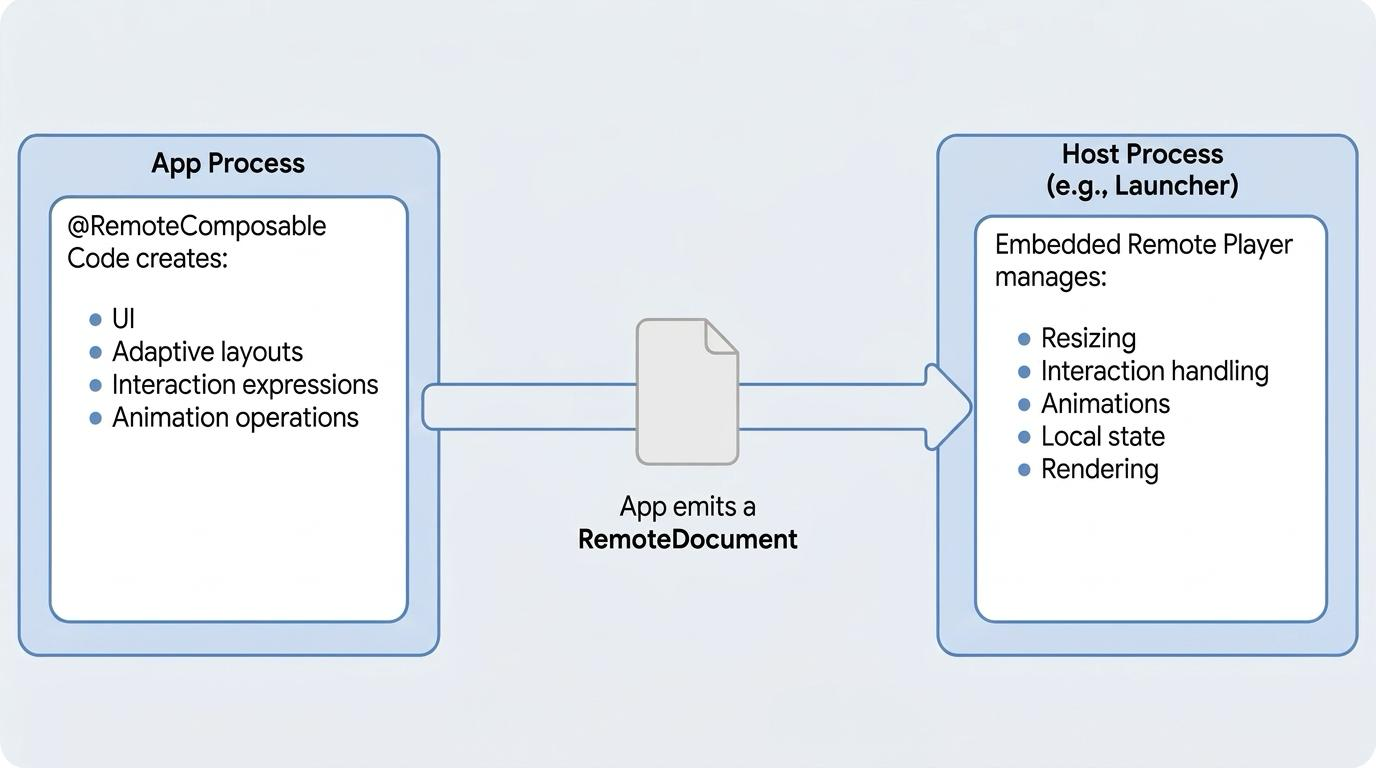
The fundamental architectural distinction between Remote Compose and standard Jetpack Compose lies in decoupling UI definition from execution across three high-level blocks:
- Create the document: Your app runs your
@RemoteComposablefunctions to record a document: a compact, serialized description of the UI, including its layout, remote state, and actions. When your data changes, your app can record and send a new document. - Transport the document to the remote host: Your app passes the document to the host, the process that displays it, such as a launcher or Wear OS.
- Play the document: A Remote Compose player in the host renders the document and handles layout, input, UX state changes, and animations locally, without calling back into your app.
This architecture provides primary benefits that directly reduce latency:
- Small document size: Serialized document snapshots remain compact and lightweight.
- Reduced round trips: Because the remote host player handles interaction and state changes locally, round-trip communications back to the application or server are minimized.
Webpage / HTML analogy: Remote Compose functions similarly to serving a webpage. The app server generates and sends an HTML/document structure once, and the browser host renders it and handles interactions locally without constantly querying the backend.
Components
Remote Compose provides high-level UI components to structure layouts. Use
Remote Compose components and RemoteModifier instead of their standard Compose
equivalents. These include basic layout containers as well as adaptive
components specifically designed to handle dynamic screen sizes:
- Basic layout components: Common Compose-like layout elements such as
RemoteBox,RemoteRow, andRemoteColumn. - Adaptive layout components: Specialized components such as
RemoteFitBox,RemoteCollapsibleRow, andRemoteCollapsibleColumndesigned to adapt cleanly across remote surfaces. - Material design theming: Theming works the same way for Wear OS widgets,
with a hierarchy of color and typography provided by
RemoteMaterialTheme. This allows for consistent branding and design system implementation across your app and widgets.
Custom drawing with RemoteCanvas
For custom graphics and time-based animations, use RemoteCanvas, which
records drawing commands that the player runs on the host. This guide focuses on
building UI with components.
Key differences
Review the following core concepts to understand how Remote Compose manages state, logic, and actions.
Symbolic state references
In standard Compose, state containers hold active, readable values in local app memory mutated by app code (lambdas) when things happen. In Remote Compose, state declarations act as symbolic references. Rather than holding active values in local app memory, they declare bindings that the remote player manages and updates locally at runtime. Keep the following considerations in mind when declaring state in Remote Compose:
- Use Remote Compose factory functions to declare state such as
rememberMutableRemoteInt,rememberMutableRemoteFloat, orrememberMutableRemoteString. - Your app code cannot inspect or read the value of a remote state variable directly during composition.
- The player stores and updates these values locally as the user interacts with the document.
Remote state versus Kotlin control flow
Your Kotlin code runs only when your app creates the document. Kotlin statements like if, when, and for can shape the document based on values known at that time, such as repeating a row for each item in a list, but they can't react to a remote state that changes later on. Keep the following in mind when working in Remote Compose:
- Branching logic: Dynamic UI switching is done using
RemoteStateLayoutby mapping state to differentRemoteComposableslots. - Text evaluation: Avoid standard Kotlin string interpolation
("
$remoteValue"), which evaluates only when the document is created. Instead, passRemoteStringtoRemoteText.
Dynamic styling using RemoteModifier
Dynamic styling on the host does not rerun composition; instead, remote state
variables are passed directly into modifiers, such as
RemoteModifier.background(remoteColor).
Remote system context
CompositionLocal providers such as LocalConfiguration or LocalDensity only
reflect the local app environment at the moment the document is recorded. They
don't update dynamically on the remote host as the surface resizes, changes
display state, or advances through time. Instead, use values that the player
resolves on the host at runtime, such as the component's current size,
RemoteConfiguration orRemoteDensity.
Declarative actions
In standard Compose, click handlers are lambdas that run in your app. The host
can't run your app's code, so in Remote Compose you attach actions instead, for
example with RemoteModifier.clickable(action). An action can update remote
state directly on the host with valueChange, or hand off to your app or the
host with pendingIntentAction or hostAction. To run several actions from one
click, use combinedAction.
High-level paradigm comparison
Feature domain |
Standard Jetpack Compose |
Remote Compose |
|---|---|---|
Click and touch events |
In-process synchronous lambdas |
Declarative serialized Action objects |
Conditional logic |
Kotlin if and when control flow |
Standard Kotlin Dynamic branching uses |
Control flow loops |
Standard Kotlin for and while loops |
Standard Kotlin loops (repeat, for, forEach) run only when the document is created. They can't loop over remote state on the host |
Execution host |
App process |
Launcher (AppWidget), Wear OS widgets or any form factor with a supporting player |
Process lifecycle |
Process must remain active to recompose & render |
Process records UI snapshot document; the Remote Player engine parses the component tree, tracks state mutations, and redraws locally without calling back into the app. |
Side effects |
Coroutine lifecycles (LaunchedEffect) |
Not available on the host. Composition runs in your app to create the document, so coroutine effects can't drive the remote UI, unless the integration keeps a composition open. |
State paradigm |
Local memory state values |
Factory functions (rememberMutableRemoteInt(), rememberNamedRemoteColor()) that return symbolic state references rather than raw values. |